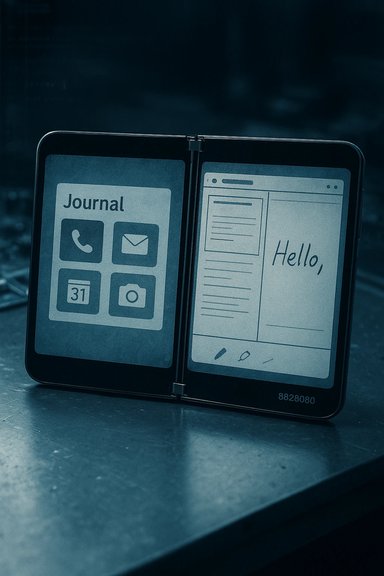
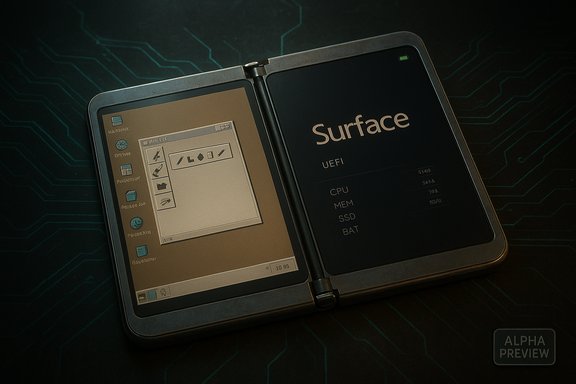
The long‑lost Windows 10 “Andromeda” firmware for the first‑generation Surface Duo has finally been published by the community‑run DuoWOA effort, opening a rare window into Microsoft’s aborted Windows‑based dual‑screen vision and giving enthusiasts the ability to boot a near‑original Andromeda build on the Duo hardware for the first time in the wild. The release includes UEFI images, platform support files and a guided installation flow, but it is emphatically a work‑in‑progress: critical hardware subsystems remain offline, cellular and sensor stacks are not yet integrated, sleep and brightness controls are broken, and devices run hot under load — conditions the maintainers and early testers both flag as expected and potentially hazardous if attempted without careful preparation.
Source: Dataconomy Long-lost Windows 10 Andromeda firmware surfaces for first-gen Duo
 Background
What was Andromeda?
Andromeda was Microsoft’s experimental Windows variant tailored for a pocketable, dual‑screen device — the idea that later morphed into the Surface Duo hardware. Built as a modular, Windows Core OS‑based environment with strong pen and ink integration, Andromeda represented a long‑standing internal attempt to bridge phone and PC experiences. The project was shelved before commercial launch, and Microsoft pivoted to Android for the Duo’s retail release. Decades of leaks, prototype images and video captures have fed a persistent narrative: Andromeda existed as runnable builds inside Microsoft, but the company ultimately chose the lower‑risk path of shipping Android for app parity and time‑to‑market.Why this release matters
For collectors, historians, and device hackers, a public Andromeda firmware package is more than nostalgia: it’s an opportunity to study a canceled OS at scale on the hardware it was designed for. The DuoWOA release—hosted under the WOA‑Project umbrella and surfaced through the project’s SurfaceDuo release channels—provides UEFI images and driver bundles intended to boot Andromeda‑era Windows on the Surface Duo (1st gen). That means the community can test, iterate and potentially resurrect missing drivers, but it also places the responsibility squarely on users and modders: this is alpha‑grade firmware that may brick devices, disable official OTA updates, and expose modem/firmware incompatibilities.Overview of the DuoWOA release
What the package contains
According to the WOA‑Project release notes, the published artifacts include:- UEFI images and backup flash packages for the Surface Duo 1st Gen, including options for dual‑boot and fast‑boot testing.
- Driver bundles and ACPI table updates designed to work with the Project Mu UEFI build tailored for the Duo.
- “FD” files (flash descriptors) intended for advanced users who want to craft their own dual‑boot images.
- Clear warnings that these images target specific Microsoft OTA firmware/bootloader versions (notably the 2022.902.48 Microsoft OTA for Duo 1) and that flashing to other firmware versions may render touch or boot behavior unusable.
What works today
The release is presented as a preview build. On functioning installs users report:- The device can successfully boot the Andromeda‑era Windows image and reach a usable desktop UI.
- Basic input and display rendering operate — the unique dual‑screen layout and many UI elements appear as intended.
- Community members have been able to run many userland apps and experiment with the shell and inking flows that were central to Andromeda’s design.
What does not work (and why it matters)
Both the DuoWOA notes and independent reporting flag key limitations:- Sensors and cellular data: Accelerometer, gyroscope, magnetometer and the integrated modem stacks are not yet adapted to the Windows drivers included in the package, meaning many modern phone capabilities — location, motion gestures, and mobile connectivity — are offline.
- Sleep mode and brightness control: Power management paths and panel backlight control are incomplete, so the device cannot reliably suspend or adjust display brightness. This impacts battery safety and usability.
- Elevated temperatures: Running an OS that lacks optimized power profiles and driver‑level thermal controls results in higher operating temperatures under load — a normal but dangerous behavior for extended use.
Verifying the facts: cross‑checks and technical validation
To meet a high bar of verification, the most important claims were cross‑referenced across public channels:- The DuoWOA/WOA‑Project publishes the Andromeda platform assets and UEFI images in its SurfaceDuo repositories and release pages — those artifacts and release notes are visible on GitHub. The release index clearly lists UEFI and dual‑boot packages and warns about firmware compatibility.
- Independent reporting from multiple outlets (Dataconomy, IT之家 / IT Home, and mainstream coverage recalling Andromeda’s history) corroborates the release and echoes the project’s caveats about missing sensors, cellular, and power management features. These outlets reproduce or summarize the DuoWOA notes and provide additional context about what enthusiasts should expect.
- The Surface Duo hardware specifications — dual 5.6‑inch 1800×1350 AMOLED panels, Snapdragon 855 SoC, 6GB RAM, 128/256GB storage and a 3,577 mAh battery — were confirmed using Microsoft’s product documentation and major hardware outlets, which establishes the platform constraints developers face when adapting drivers and thermal policies.
Technical analysis: why running Andromeda on Duo 1 is hard
Boot chain and UEFI
The DuoWOA effort is built on Project Mu — Microsoft’s open‑sourced platform for UEFI development. Replacing or augmenting the Duo’s firmware to support Windows requires a UEFI implementation that correctly exposes ACPI tables, TPM/secure boot flows (when applicable), and platform‑specific memory maps. The WOA release includes Project Mu‑based UEFI images, but pairing them with the correct Android OTA bootloader and firmware revision is mandatory; mismatches are frequent causes of bricked devices or broken touch.Drivers, ACPI and power management
Windows on ARM requires drivers (kernel and user mode) for every major SoC block — from the GPU and display controllers to modem, audio, and battery. The Duo’s Snapdragon 855 platform was engineered with Android driver stacks and firmware blobs; porting involves either creating Windows drivers from scratch or adapting Linux/Android drivers through translation layers. Even when display rendering works, panel backlight control and system sleep require working ACPI methods and battery drivers, which are often proprietary. That is why brightness and suspend are among the first features to fail in an early port.Modem and cellular
Cellular modems on phones often run separate baseband firmware with tightly coupled HALs exposed to the OS through vendor‑specific interfaces. Those interfaces are rarely publicly documented. Without a compatible Windows modem driver and an accompanying firmware handshake, the device cannot present a cellular network interface to the OS — leaving the Duo effectively Wi‑Fi only under Andromeda. Carrier certification (for voice, SMS, and data) would be required to restore full cellular functionality.Thermal and battery implications
OS‑level power policies determine CPU core scheduling, per‑cluster power gating, GPU frequency scaling and display energy states. Android vendor stacks include aggressive power‑management optimizations tailored for the Duo’s dual‑panel, thin chassis. A Windows port lacking this tuning sustains higher clock frequencies and reduced idle behavior, resulting in elevated temperatures and faster battery discharge. Users should assume battery drain and heat levels will be worse than Android until driver teams deliver platform‑specific power profiles.Practical considerations and risks for would‑be experimenters
- Backups are mandatory. The GitHub release repeatedly warns that flashing custom boot images will prevent OTAs and may require using official recovery packages to return to stock Android. Back up boot partitions and firmware before experimenting.
- Firmware and bootloader versions must match. The dual‑boot images target specific Microsoft OTA firmware (for Duo 1, notably 2022.902.48). Flashing to a different firmware or a device variant can brick hardware or leave touch input unusable. Verify your device’s OTA version before attempting any install.
- Expect missing features and regressions. Sensors, cellular, brightness and sleep were called out by the project as currently non‑functional. Elevated device temperatures are typical while the port lacks optimized power management. Use caution: thermal stress can exacerbate hardware failures.
- Warranty and carrier support: Modifying firmware voids support and warranty terms in many regions and may violate carrier terms for devices that are locked or registered on networks. Proceed with the assumption that manufacturer support is no longer available.
- Security implications: Community builds do not receive the same security vetting, sandboxing or attestation as official firmware. Sensitive functions like mobile network authentication and secure enclave access may be compromised or unusable. Treat installs as experimental lab work rather than daily drivers.
High‑level walkthrough: what the installation process looks like (summary)
The DuoWOA release supplies guides and staged files; the public instructions are aimed at experienced tinkerers and require command‑line tooling. The following is a high‑level, non‑exhaustive sequence of actions described by the project — it is not a step‑by‑step tutorial and bypasses low‑level commands on purpose to avoid mistakes:- Confirm your Surface Duo variant and the current Microsoft OTA firmware version. If it does not match the release’s compatibility table (e.g., 2022.902.48 for Duo 1st Gen), update or follow the project’s FD guide to craft a custom image.
- Back up device partitions (boot, vbmeta, EFS, etc. and obtain a full stock recovery image. This is the safety net if you need to return to Android.
- Use the provided “fastboot” images to test‑boot the UEFI without permanently flashing. The DuoWOA package includes a fast‑boot image intended for temporary boot testing.
- If the test boot works, follow the Dual‑Boot guide to flash the dual‑boot image, understanding this will break future Android OTAs unless you reflash the original boot image.
- Install the driver bundle indicated for the release version and test core functionality. Expect to iterate: missing drivers must be replaced or patched, and ACPI/thermal tweaks will be ongoing work.
What this means for the community and the future of Windows on phones
The DuoWOA release is a reminder that the intersection of ambitious OS design and mobile realities remains a difficult engineering problem. Andromeda’s resurrection on Duo hardware is symbolic: it proves parts of Microsoft’s shelved vision were functional and that the company likely abandoned it for pragmatic reasons — fragmentation, app ecosystem risk and the enormous integration work for modem/carrier support. Community ports like DuoWOA are valuable for preservation, experimentation and technical archaeology, but they do not automatically translate into a commercially viable or carrier‑certified platform. From a practical standpoint, the release could catalyze:- Continued driver work from volunteers to bring sensors, power management and modem integration into a usable state.
- Academic and historical analysis of Andromeda’s UX concepts — particularly its pen‑forward journal ideas — which could influence future Microsoft or third‑party designs.
- New risk models for small‑scale device projects: community ports can demonstrate proof‑of‑concepts for vendors, but they also highlight the long tail of firmware, certification and silicon support required to ship mass‑market devices.
Critical assessment: strengths, limitations, and unverified claims
Strengths
- Preservation and transparency: Making the firmware publicly available provides engineers and historians with a concrete artifact for study. The project’s inclusion of UEFI, drivers and guides reflects a methodical approach to platform porting.
- Community coordination: Hosting under the WOA‑Project and providing detailed release notes, compatibility matrices and recovery guidance reduces accidental bricking and centralizes efforts.
Limitations and risks
- Incomplete hardware support: Missing modem, sensor and power drivers make the builds unsuitable for everyday use. Those gaps involve proprietary components that are difficult to reimplement.
- Safety and reliability: Elevated thermal output and the possibility of bricking devices are immediate concerns. Without vendor cooperation, some problems may be intractable.
- Legal and licensing ambiguity: The release includes no carrier certifications or manufacturer warranty, and may surface proprietary blobs whose redistribution could carry legal implications. This is an area where the public documentation is either silent or ambiguous; it should be treated as unverified until the maintainers publish precise licensing details.
Unverified claims to watch
- Specific Andromeda build numbers and their provenance (exact Microsoft internal build IDs) were not fully reproducible in public logs and may require additional disclosure from maintainers or Microsoft to be independently verified. Treat detailed build provenance as tentative until the project provides cryptographic hashes and explicit provenance notes.
Conclusion
The DuoWOA publication of Andromeda firmware for the first‑generation Surface Duo is a rare and meaningful milestone in device preservation and community engineering. It brings a discontinued Microsoft vision back to life on the hardware that inspired it, but it is emphatically an alpha‑grade achievement: useful for research and tinkering, but not for daily use. The path from a bootable Andromeda thumbnail to a secure, carrier‑certified phone is long, requiring modem integration, driver rewrites, thermal and power optimization and, perhaps, vendor cooperation. For now, the release gives enthusiasts and engineers a starting point — a living artifact to study and improve — while underscoring the hard realities that forced Microsoft to pivot to Android in the first place.Source: Dataconomy Long-lost Windows 10 Andromeda firmware surfaces for first-gen Duo