

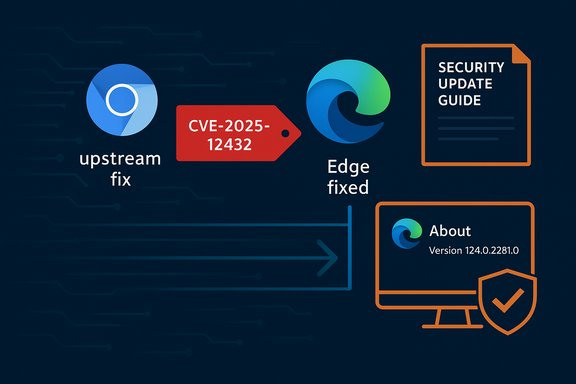
Chromium vulnerabilities show up in Microsoft’s Security Update Guide because Microsoft Edge (the Chromium‑based browser) consumes Chromium’s open‑source components—so the guide records upstream CVEs to tell Edge customers whether their Edge build is still exposed or has already ingested the upstream fix.
Chromium is an open‑source browser engine that supplies the core rendering, JavaScript, and media subsystems used by Google Chrome and by many other browsers and embedded runtimes. When a security issue is discovered in Chromium or one of its major components (for example, the V8 JavaScript engine), Google assigns a CVE and publishes a Chrome/Chromium update that contains the fix. Downstream vendors—Microsoft for Edge, Brave, Opera, Vivaldi and countless Electron‑based apps—then ingest that upstream patch, test and re‑release their own builds. Microsoft’s Security Update Guide (SUG) is the vehicle Microsoft uses to publish whether a given Chromium CVE is relevant to Edge and, crucially, whether an Edge build has been produced that contains the Chromium fix.
Why does Microsoft do this? Because the presence of a CVE in Chromium does not automatically mean every Chromium‑based product is fixed at the same time. Edge will only be safe once Microsoft has ingested the specific Chromium revision and shipped an Edge build containing it. The SUG entry documents that ingestion status so administrators know whether their installed Edge build is vulnerable or not. This is exactly the reason a Chromium CVE such as the one you referenced appears in Microsoft’s guide: the entry is there to announce Edge’s exposure status.
Important operational points about V8 memory bugs:
Operationally:
Vulnerabilities in V8 and Chromium are treated seriously across the ecosystem for a reason: they are network‑accessible, can lead to high‑impact compromises, and the open‑source consumption model means downstream vendors must be tracked separately. Microsoft includes Chromium CVEs in the Security Update Guide expressly to help Edge customers know whether their Edge builds are vulnerable or have already been updated—use that SUG entry plus the About page in Edge (or the registry/executable checks) to confirm your exact exposure and remediate accordingly.
Source: MSRC Security Update Guide - Microsoft Security Response Center
 Background / Overview
Chromium is an open‑source browser engine that supplies the core rendering, JavaScript, and media subsystems used by Google Chrome and by many other browsers and embedded runtimes. When a security issue is discovered in Chromium or one of its major components (for example, the V8 JavaScript engine), Google assigns a CVE and publishes a Chrome/Chromium update that contains the fix. Downstream vendors—Microsoft for Edge, Brave, Opera, Vivaldi and countless Electron‑based apps—then ingest that upstream patch, test and re‑release their own builds. Microsoft’s Security Update Guide (SUG) is the vehicle Microsoft uses to publish whether a given Chromium CVE is relevant to Edge and, crucially, whether an Edge build has been produced that contains the Chromium fix.Why does Microsoft do this? Because the presence of a CVE in Chromium does not automatically mean every Chromium‑based product is fixed at the same time. Edge will only be safe once Microsoft has ingested the specific Chromium revision and shipped an Edge build containing it. The SUG entry documents that ingestion status so administrators know whether their installed Edge build is vulnerable or not. This is exactly the reason a Chromium CVE such as the one you referenced appears in Microsoft’s guide: the entry is there to announce Edge’s exposure status.
What “CVE in Chromium, listed in SUG” actually means
The simple explanation
- A CVE was assigned to code living in the Chromium project (for example, V8).
- Google (Chromium) ships a Chrome update that contains the fix.
- Microsoft tracks that CVE and waits until it ingests the fix into Edge.
- Microsoft’s Security Update Guide entry for that CVE records whether Edge is still vulnerable or whether an Edge release has fixed it.
Why the wording on SUG entries can be terse
For browser engine bugs—particularly V8 memory‑safety bugs—vendors frequently limit public technical details until a majority of users have updated, to reduce the chance of quick re‑weaponization. That means SUG entries frequently give only the minimal required product and status information: which products are affected, and which shipped builds are fixed. Treat the SUG entry as the authoritative downstream status for Edge and use Chromium/Chrome release notes for upstream details.The V8 “race condition” (technical context and risk)
You mentioned “Race in V8” for CVE‑2025‑12432. In general terms, V8 is a high‑performance JavaScript and WebAssembly engine that uses aggressive optimizations, JIT compilation and background threads to reach its performance targets. Those optimizations introduce complex timing and memory interactions that can occasionally create race‑type or type‑confusion conditions leading to out‑of‑bounds memory access, heap corruption, or other memory‑safety faults. When a V8 vulnerability permits an attacker to induce memory corruption from web content, the impact can be severe—arbitrary code execution in the renderer process, and when chained with other issues, sandbox escape and host compromise.Important operational points about V8 memory bugs:
- They are remote: often exploitable by visiting a malicious page or loading a crafted frame.
- They tend to be high severity: the attack vector is low friction and consequences can be catastrophic.
- Vendors limit technical disclosure until patches are widely deployed; absence of a public exploit write‑up is not proof that no exploit exists.
How to see the browser version (exact, practical steps)
If Microsoft’s SUG says the Edge build that includes the Chromium fix is, for example, “Edge 140.x.y.z ingested Chromium 140.0.7339.185”, you must confirm the version on your device. Here’s how to do that quickly and reliably.In‑browser (recommended for most users)
- Open Microsoft Edge.
- Click the three‑dot menu (Settings and more) → Help and feedback → About Microsoft Edge.
- Or type edge://settings/help in the address bar and press Enter.
- The About page displays the full Edge version and will trigger an update check.
- Alternatively, edge://version and edge://system show more technical metadata including the underlying Chromium revision mapping (useful when you need proof that a specific Chromium revision is present).
From the OS or command line (useful for admins and scripting)
- PowerShell (current user):
- (Get-ItemProperty -Path HKCU:\Software\Microsoft\Edge\BLBeacon -Name version).version
- or:
Get-ItemPropertyValue -Path 'HKCU:\SOFTWARE\Microsoft\Edge\BLBeacon' -Name 'version'
These registry entries are commonly used by scripts to return the Edge version. - reg.exe:
- reg query HKCU\Software\Microsoft\Edge\BLBeacon /v version
- Read the executable file version (machine‑level, precise):
- (Get-Item 'C:\Program Files (x86)\Microsoft\Edge\Application\msedge.exe').VersionInfo.FileVersion
This method is preferred on systems with multiple channels installed where the registry may be per‑user. - Linux / macOS:
- /usr/bin/microsoft-edge --version
- /Applications/Microsoft\ Edge.app/Contents/MacOS/Microsoft\ Edge --version
How to interpret the version string and map it to Chromium
Edge version strings include the major/minor/build components (for example, 140.0.7339.xxx). Chrome/Chromium upstream versions use the same major/minor build numbering for the Chromium engine, so when Microsoft says “Edge X contains Chromium 140.0.7339.185”, it means the underlying Chromium revision with the fix is present in that Edge build.Operationally:
- If your Edge version equals or is newer than the Edge build Microsoft lists as “fixed in” for the CVE, your Edge installation is no longer vulnerable.
- If your Edge version predates the reported ingestion, Edge remains vulnerable until updated or until Microsoft’s ingestion build is deployed in your environment. Do not assume parity with Chrome on the day Google releases a fix—Edge ingests and tests that fix first.
Enterprise guidance — detection, inventory and emergency response
Immediate checklist (first 30–90 minutes)
- Identify hosts with vulnerable Edge/Chromium versions using endpoint inventory tools (SCCM, Intune, Jamf) and scripts that read BLBeacon or msedge.exe file versions.
- If Edge builds are older than the “fixed in” version, schedule emergency patching for high‑risk and privileged endpoints.
- Apply temporary mitigations where patching is delayed:
- Restrict web browsing on high‑privilege systems.
- Enforce proxy/web gateway filtering and URL allowlists.
- Enable site isolation or content policies where possible.
Mid‑term actions (day 1–7)
- Push the fixed Edge/Chrome build through your normal deployment pipeline after validation in a controlled test group.
- Hunt in telemetry for signs suggestive of exploitation: spiked renderer crashes, unusual child process launches from browser processes, suspicious network traffic following browser instability.
- Inventory embedded Chromium runtimes (Electron apps, kiosks, vendor appliances) and update them separately—these are common blind spots.
Detection and monitoring tips
- Tune EDR to flag anomalous renderer memory corruption indicators, frequent crashes, or attempts to spawn non‑browser processes from renderer contexts.
- Monitor for correlated events like new persistent services or unknown scheduled tasks on endpoints with outdated browsers. These are common post‑exploit artifacts.
Why you should treat V8 zero‑day style CVEs as “must‑patch now”
- Vector simplicity: the attack frequently requires only that a user navigate to a web page. That makes successful exploitation feasible at scale via malvertising and drive‑by techniques.
- High impact: memory corruption in V8 can escalate from renderer compromise to sandbox escape when combined with other bugs—i.e., it can lead to remote code execution and full host compromise.
- Ecosystem spread: many products use Chromium; even if desktop browsers are rapidly patched, embedded and packaged runtimes may lag—extending the exposure window.
Script examples (practical, copy‑ready)
Important: run these only with appropriate privileges and after testing in your environment.- Quick PowerShell to read Edge version for the current user:
- (Get-ItemProperty -Path HKCU:\Software\Microsoft\Edge\BLBeacon -Name version).version
- reg query HKCU\Software\Microsoft\Edge\BLBeacon /v version
- Read msedge.exe version (machine‑level, reliable for scripted inventory):
- (Get-Item 'C:\Program Files (x86)\Microsoft\Edge\Application\msedge.exe').VersionInfo.FileVersion
What I checked and a caution about CVE‑2025‑12432
- Microsoft’s SUG pattern and rationale for listing Chromium CVEs is well established: SUG entries announce Edge ingestion status so customers can confirm whether an Edge build is vulnerable or fixed.
- There are multiple, independent public writeups showing the standard practice: Chrome ships an upstream fix; downstream vendors ingest and then publish their own fixed builds; SUG is used to inform Edge customers.
- I attempted to corroborate the specific CVE number you gave (CVE‑2025‑12432) in public Chromium/Chrome release notes and in Microsoft’s SUG metadata available to me. If that exact CVE entry is present on Microsoft’s site, the SUG listing should show the “fixed in” Edge build value—compare that to your local edge://settings/help version to confirm. If you don’t see that exact CVE in public Chrome release notes or common aggregators, it can mean either the CVE is new and still being embargoed, or that the CVE number is mistyped. Treat any mismatch or an absence of a public upstream write‑up with caution and verify the SUG entry directly.
- Open the SUG entry you referenced and read the “fixed in” / product status field shown there.
- Open edge://settings/help on a representative device and confirm the installed Edge build is >= the SUG “fixed in” build.
Final practical checklist (what to do right now)
- Open Edge → edge://settings/help; note the full version string and let Edge check for updates. If an update is available, download and restart.
- Compare the local version to the “fixed in” build listed in Microsoft’s Security Update Guide entry for the CVE. If your build is older, update or apply compensating controls.
- For enterprises: script a rapid inventory using the BLBeacon registry key and the msedge.exe file version; prioritize patching for privileged and internet‑facing systems.
- Monitor crash telemetry and EDR for browser anomalous behavior while the patch roll‑out completes.
Vulnerabilities in V8 and Chromium are treated seriously across the ecosystem for a reason: they are network‑accessible, can lead to high‑impact compromises, and the open‑source consumption model means downstream vendors must be tracked separately. Microsoft includes Chromium CVEs in the Security Update Guide expressly to help Edge customers know whether their Edge builds are vulnerable or have already been updated—use that SUG entry plus the About page in Edge (or the registry/executable checks) to confirm your exact exposure and remediate accordingly.
Source: MSRC Security Update Guide - Microsoft Security Response Center
