

Microsoft is once again testing the limits of how far it can push Edge on Windows 11 users before the backlash becomes the story. A new preview behavior in the browser can make Edge launch automatically at sign-in, and the reaction has been predictably fierce, including from people who already use the browser. That matters because this is not just a minor interface tweak; it is another example of a long-running strategy that many Windows users now read as pressure, not product improvement.
Microsoft Edge has spent years trying to escape the shadow of Internet Explorer, then Chromium, then its own reputation. The browser is technically solid, often fast, and increasingly competitive on performance and security, but Microsoft has repeatedly undercut those gains with aggressive promotion inside Windows. That tension is what makes the current auto-start experiment so combustible.
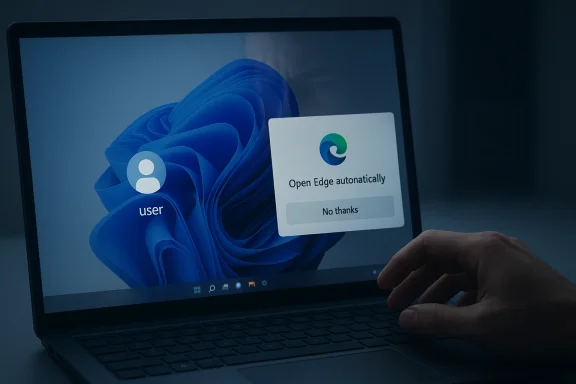
The newest controversy comes from a test in the Edge Beta channel that appears to enable browser launch at Windows sign-in. Windows Central reported that some users saw a banner telling them Edge would open automatically unless they chose “No thanks,” which strongly suggests the behavior is opt-out rather than opt-in. That distinction is the entire argument in miniature, because users tend to accept a feature they consciously enable and resent one that is effectively presumed on by default.
It also lands at a time when Microsoft is trying to sell a broader story about a cleaner, more user-respectful Windows 11. The company has been under pressure for dark patterns, default-setting confusion, and a steady stream of nudges that make the OS feel less like a platform and more like a marketing surface. A browser that launches itself as soon as you sign in fits uncomfortably into that history.
What makes this round of criticism especially awkward is that Edge already has legitimate startup-related technology in the form of Startup boost. Microsoft’s own documentation says that startup boost allows Edge processes to start at OS sign-in and restart in the background after the last browser window closes, with the goal of making the browser open faster later. In other words, Microsoft already has a performance argument; what it is now testing goes one step further by surfacing the full browser window itself.
The public mood is predictable because the company has trained it. Windows users have spent years seeing browser prompts, default-browser nudges, and feature banners that feel less like helpful suggestions and more like persistence campaigns. When a company keeps asking the same question in slightly different ways, users eventually stop hearing the product pitch and start hearing the power move. That is the real context for this backlash.
That distinction matters to both consumers and enterprises. Consumers experience it as friction and a mild privacy or autonomy violation, while IT admins see it as another startup behavior to audit, document, or disable at scale. Microsoft may consider that a small price to pay for faster browser access, but users increasingly interpret it as evidence that the company still believes default momentum is easier than consent.
The backlash is also amplified by the fact that this test is happening inside a browser that already ships with several background and startup-related behaviors. Edge can keep processes around for faster relaunches, and Microsoft documents those behaviors as performance optimizations. When users already feel they are fighting background activity, adding an automatic full-window launch can feel like crossing a line from optimization into intrusion.
There is also a competitive layer here. Microsoft is trying to keep Edge relevant against Chrome and other browsers by leaning on Windows integration, but the same integration can become a liability if it annoys the very people it is meant to convert. In browser wars, trust is a product feature, and Windows users are signaling that they do not trust Microsoft’s instincts to remain neutral. That is a harder problem than adding or removing a toggle.
That expectation is what creates the visceral reaction. A browser is not just another app in the dock; it is a decision point for attention. When Edge appears before the user has chosen to open anything, the company is effectively claiming the first interaction of the session.
That detail matters because previews often reveal the shape of a future default long before final release. Microsoft could still reverse course, change the enrollment logic, or restrict the behavior to specific conditions, such as when Edge is the default browser. Indeed, the reporting noted that it was unclear whether the behavior only activates under certain account or browser settings.
The company may be trying to use the familiar language of convenience to normalize a more assertive launch experience. “Ready when you want to browse” sounds friendly enough, but readiness is not the same as permission. In a product ecosystem as large as Windows, those words can obscure how much control has shifted from user to vendor.
Microsoft may argue that many people do want their browser ready instantly, especially because so much of modern computing begins in the web. That is not a crazy argument. But when the company controls the operating system, the browser, and many of the preference surfaces, it bears a heavier burden to avoid looking like it is exploiting its own platform to tilt user behavior.
It also helps explain why the backlash includes Edge users. The Windows Central poll cited in the reporting showed that a meaningful slice of respondents who already use Edge daily still did not want auto-start behavior, while very few supported it outright. That is a telling sign: the issue is not browser loyalty, but respect for agency.
Social reaction has been especially hostile because the feature is easy to frame as emblematic of something larger: a company that still confuses promotion with improvement. When users think the browser itself is fine but the company’s tactics are not, every new tactic becomes proof that the real product problem is Microsoft’s posture.
For many users, Edge’s problem is not technical quality but emotional residue. Even when the browser performs well, the memory of past nags, defaults, and banners colors how new features are interpreted. Trust once lost is expensive to rebuild, and every aggressive prompt spends a little more of that trust.
But technical merit does not automatically make a design choice good. Users rarely object to performance if it is invisible or clearly bounded; they object when performance work becomes a visible behavior that changes their workflow. Auto-starting the whole browser is a much more tangible interruption than maintaining a light background footprint.
There is also the matter of resource use. Microsoft says startup boost has limited impact, but a browser window that appears on login is not the same thing as a few processes waiting in the background. One is an optimization; the other is a foreground event that competes for attention, screen space, and possibly even battery life on laptops. That difference is not cosmetic.
That is why the discussion has moved beyond performance and into legitimacy. The more visible the behavior, the more it feels like a policy choice rather than a technical one. And policy choices, unlike performance features, are judged against values such as consent and fairness.
For enterprises, the issue becomes one of standardization and predictability. IT departments are often willing to tolerate defaults if they can be centrally managed, but they dislike surprises in preview channels that may later become mainstream behaviors. Any change that alters login behavior can create help-desk tickets, user confusion, and policy work.
There is a subtle enterprise-versus-consumer split here. Consumers mostly ask, “Why is this happening to me?” Enterprises ask, “Can I prevent this from happening to everyone?” Microsoft’s documentation around startup boost and related controls suggests it understands that question, but the current backlash shows that documentation alone does not repair perception.
This is why Microsoft should be careful about treating enterprise controls as a public-relations shield. Power users and IT admins may be able to fix the setting, but they are often the loudest critics when the vendor assumes they should have to.
The irony is that Edge itself has improved enough that it probably needs less help than Microsoft thinks. Chromium compatibility, performance gains, sleeping tabs, and security features have made it a legitimate daily driver for many users. Yet Microsoft keeps behaving as if the product must be smuggled into favor, which implies a lack of confidence that the browser can win on merit alone.
That pattern creates a long-term brand problem. Each new nudge may add a few more users in the short run, but it also tells everyone else that Microsoft does not fully trust its own product appeal. That is not how you build affection.
The more Microsoft uses Windows to amplify Edge, the more it invites criticism that the operating system is not neutral. Even if the company never says that explicitly, users can feel the hierarchy in the interface. And once that feeling takes hold, every new feature is judged through it.
That matters because browser switching costs are emotional as much as technical. Users invest bookmarks, extensions, sync data, saved passwords, and habits. If Microsoft wants to win them over, the pitch should be speed, security, and convenience, not a surprise window after sign-in. The latter can actually harden preference for a competitor.
There is also a broader market signal. If Windows users repeatedly punish Edge promotion tactics, third-party browsers can position themselves as the respectful alternative. That gives rivals an easy narrative: we do not need to commandeer your login screen to earn your attention.
In a crowded browser market, trust can matter more than a few percentage points of startup speed. That is especially true when users are already skeptical of operating-system-level nudges. Microsoft risks giving competitors a free emotional advantage by insisting on one more push.
There is a plausible product logic here. If the browser is going to be opened anyway, pre-opening it can shave seconds off perceived startup time. That is a real advantage in a world where users expect instant readiness and increasingly measure software by how quickly it disappears into the background.
But product logic is only half the equation. The other half is whether the implementation respects the user’s explicit preference architecture. Windows is not a kiosk. It is a personal and enterprise environment with layered defaults, and the more Microsoft overrides those layers in the name of convenience, the more it risks appearing presumptuous.
That is the fork in the road. One path says, “Here is a choice that may help you.” The other says, “We have already decided this is probably best for you.” Windows users have made clear which one they prefer.
What Microsoft does next will matter because the company is not just testing a browser behavior; it is testing tolerance. Users will judge whether the company is genuinely listening to feedback or merely waiting for the outrage to settle before pushing ahead. In a platform as politically charged as Windows, that distinction is never lost for long.
Source: Windows Central Microsoft's new Edge auto-start feature is alienating even daily users
 Background
Microsoft Edge has spent years trying to escape the shadow of Internet Explorer, then Chromium, then its own reputation. The browser is technically solid, often fast, and increasingly competitive on performance and security, but Microsoft has repeatedly undercut those gains with aggressive promotion inside Windows. That tension is what makes the current auto-start experiment so combustible.The newest controversy comes from a test in the Edge Beta channel that appears to enable browser launch at Windows sign-in. Windows Central reported that some users saw a banner telling them Edge would open automatically unless they chose “No thanks,” which strongly suggests the behavior is opt-out rather than opt-in. That distinction is the entire argument in miniature, because users tend to accept a feature they consciously enable and resent one that is effectively presumed on by default.
It also lands at a time when Microsoft is trying to sell a broader story about a cleaner, more user-respectful Windows 11. The company has been under pressure for dark patterns, default-setting confusion, and a steady stream of nudges that make the OS feel less like a platform and more like a marketing surface. A browser that launches itself as soon as you sign in fits uncomfortably into that history.
What makes this round of criticism especially awkward is that Edge already has legitimate startup-related technology in the form of Startup boost. Microsoft’s own documentation says that startup boost allows Edge processes to start at OS sign-in and restart in the background after the last browser window closes, with the goal of making the browser open faster later. In other words, Microsoft already has a performance argument; what it is now testing goes one step further by surfacing the full browser window itself.
The public mood is predictable because the company has trained it. Windows users have spent years seeing browser prompts, default-browser nudges, and feature banners that feel less like helpful suggestions and more like persistence campaigns. When a company keeps asking the same question in slightly different ways, users eventually stop hearing the product pitch and start hearing the power move. That is the real context for this backlash.
Overview
The key detail in this story is not merely that Edge can start automatically, but that Microsoft appears to be exploring whether this should happen by default. If a feature is buried behind manual settings, it is a convenience feature. If it is presented as a presumption that the user must reject, it becomes a behavioral nudge.That distinction matters to both consumers and enterprises. Consumers experience it as friction and a mild privacy or autonomy violation, while IT admins see it as another startup behavior to audit, document, or disable at scale. Microsoft may consider that a small price to pay for faster browser access, but users increasingly interpret it as evidence that the company still believes default momentum is easier than consent.
The backlash is also amplified by the fact that this test is happening inside a browser that already ships with several background and startup-related behaviors. Edge can keep processes around for faster relaunches, and Microsoft documents those behaviors as performance optimizations. When users already feel they are fighting background activity, adding an automatic full-window launch can feel like crossing a line from optimization into intrusion.
There is also a competitive layer here. Microsoft is trying to keep Edge relevant against Chrome and other browsers by leaning on Windows integration, but the same integration can become a liability if it annoys the very people it is meant to convert. In browser wars, trust is a product feature, and Windows users are signaling that they do not trust Microsoft’s instincts to remain neutral. That is a harder problem than adding or removing a toggle.
Why this feels different from ordinary startup software
Many apps run on login, and most users tolerate that when the software is clearly theirs to manage. A chat client, cloud sync agent, or security tool can justify early startup because the purpose is obvious and the control surface is well understood. A browser is different because it is both a utility and a gateway to the web, which makes any automatic opening feel like a statement about what Microsoft expects the user to do first.That expectation is what creates the visceral reaction. A browser is not just another app in the dock; it is a decision point for attention. When Edge appears before the user has chosen to open anything, the company is effectively claiming the first interaction of the session.
What Microsoft Is Testing
The reported behavior is straightforward: after signing into Windows, Edge may open automatically, and the user would need to decline the setting in order to stop it. Windows Central said the banner appears in the latest Edge Beta build and that the default path seems to be automatic launch unless “No thanks” is chosen.That detail matters because previews often reveal the shape of a future default long before final release. Microsoft could still reverse course, change the enrollment logic, or restrict the behavior to specific conditions, such as when Edge is the default browser. Indeed, the reporting noted that it was unclear whether the behavior only activates under certain account or browser settings.
The company may be trying to use the familiar language of convenience to normalize a more assertive launch experience. “Ready when you want to browse” sounds friendly enough, but readiness is not the same as permission. In a product ecosystem as large as Windows, those words can obscure how much control has shifted from user to vendor.
Opt-in versus opt-out
This entire debate turns on a simple product choice: do you ask first, or do you assume yes and provide a way out? Opt-in features tend to be viewed as respectful, while opt-out features are seen as manipulative when they are not tightly justified. In the browser context, the latter category is especially unpopular because the user already has a default browser and usually already understands how to open it.Microsoft may argue that many people do want their browser ready instantly, especially because so much of modern computing begins in the web. That is not a crazy argument. But when the company controls the operating system, the browser, and many of the preference surfaces, it bears a heavier burden to avoid looking like it is exploiting its own platform to tilt user behavior.
Why Users React So Strongly
The intensity of the reaction comes from accumulated history, not just the new banner. Windows users have seen repeated default-browser promotions, Edge prompts, and messaging that frames Microsoft’s browser as the better or safer choice whether they asked for it or not. Each new nudge lands on top of that memory, which makes even a modest experiment feel like another escalation.It also helps explain why the backlash includes Edge users. The Windows Central poll cited in the reporting showed that a meaningful slice of respondents who already use Edge daily still did not want auto-start behavior, while very few supported it outright. That is a telling sign: the issue is not browser loyalty, but respect for agency.
Social reaction has been especially hostile because the feature is easy to frame as emblematic of something larger: a company that still confuses promotion with improvement. When users think the browser itself is fine but the company’s tactics are not, every new tactic becomes proof that the real product problem is Microsoft’s posture.
The psychology of “just one more prompt”
A single prompt can be helpful. Multiple prompts, especially at login or startup, start to feel coercive. That difference is subtle on paper and dramatic in practice, because login is when people are least interested in negotiation and most interested in getting to work.For many users, Edge’s problem is not technical quality but emotional residue. Even when the browser performs well, the memory of past nags, defaults, and banners colors how new features are interpreted. Trust once lost is expensive to rebuild, and every aggressive prompt spends a little more of that trust.
The Technical Trade-Off
From a technical standpoint, Microsoft can make a plausible case for startup-related behavior. Browsers are among the first applications people open, and preloading or auto-launching can improve perceived responsiveness. Microsoft’s own startup boost materials describe the feature as a way to start Edge more quickly when it is launched after device startup or after the browser has been closed.But technical merit does not automatically make a design choice good. Users rarely object to performance if it is invisible or clearly bounded; they object when performance work becomes a visible behavior that changes their workflow. Auto-starting the whole browser is a much more tangible interruption than maintaining a light background footprint.
There is also the matter of resource use. Microsoft says startup boost has limited impact, but a browser window that appears on login is not the same thing as a few processes waiting in the background. One is an optimization; the other is a foreground event that competes for attention, screen space, and possibly even battery life on laptops. That difference is not cosmetic.
Why background loading is easier to defend
Background preloading is easier to justify because it stays out of the way. Users can keep their preferred browser, log into Windows, and only interact with Edge when they choose to. An automatic browser window, by contrast, has an agenda you can see.That is why the discussion has moved beyond performance and into legitimacy. The more visible the behavior, the more it feels like a policy choice rather than a technical one. And policy choices, unlike performance features, are judged against values such as consent and fairness.
Enterprise and Consumer Impact
For consumers, the reaction is mostly about annoyance and control. People do not like feeling that their desktop is being used to steer them toward a vendor’s product, especially when they have already chosen another browser. The emotional response is stronger among power users because they are acutely aware that the setting exists precisely so it can be resisted.For enterprises, the issue becomes one of standardization and predictability. IT departments are often willing to tolerate defaults if they can be centrally managed, but they dislike surprises in preview channels that may later become mainstream behaviors. Any change that alters login behavior can create help-desk tickets, user confusion, and policy work.
There is a subtle enterprise-versus-consumer split here. Consumers mostly ask, “Why is this happening to me?” Enterprises ask, “Can I prevent this from happening to everyone?” Microsoft’s documentation around startup boost and related controls suggests it understands that question, but the current backlash shows that documentation alone does not repair perception.
Manageability is not the same as goodwill
A feature can be manageable and still unpopular. That is especially true in Windows, where administrators often know how to disable behavior even when ordinary users do not. The existence of a policy or support article does not eliminate the sense that the default posture is overreaching.This is why Microsoft should be careful about treating enterprise controls as a public-relations shield. Power users and IT admins may be able to fix the setting, but they are often the loudest critics when the vendor assumes they should have to.
A Familiar Pattern of Edge Promotion
Microsoft’s browser promotion strategy is hardly new. Over the years, the company has used banners, suggestions, default prompts, and system integrations to keep Edge visible in ways that rival browsers cannot match on Windows. That visibility has helped Edge remain relevant, but it has also made the browser feel like a recurring campaign rather than a neutral application.The irony is that Edge itself has improved enough that it probably needs less help than Microsoft thinks. Chromium compatibility, performance gains, sleeping tabs, and security features have made it a legitimate daily driver for many users. Yet Microsoft keeps behaving as if the product must be smuggled into favor, which implies a lack of confidence that the browser can win on merit alone.
That pattern creates a long-term brand problem. Each new nudge may add a few more users in the short run, but it also tells everyone else that Microsoft does not fully trust its own product appeal. That is not how you build affection.
The cost of over-optimization
One of the enduring lessons of software UX is that over-optimizing for engagement can damage satisfaction. If a company keeps reducing friction for its own product while increasing friction for every alternative, users eventually notice the imbalance. In Microsoft’s case, the problem is especially acute because Windows is the platform of choice, not a narrowly controlled product environment.The more Microsoft uses Windows to amplify Edge, the more it invites criticism that the operating system is not neutral. Even if the company never says that explicitly, users can feel the hierarchy in the interface. And once that feeling takes hold, every new feature is judged through it.
The Competitive Landscape
Against Chrome, Edge needs differentiation, but forced visibility is a weak differentiator. Chrome’s advantage is inertia and cross-platform familiarity; Edge’s advantage is integration and a growing feature set. What Microsoft should be doing is making Edge compelling enough that users voluntarily choose it, not relying on launch behavior to put the browser in front of them first.That matters because browser switching costs are emotional as much as technical. Users invest bookmarks, extensions, sync data, saved passwords, and habits. If Microsoft wants to win them over, the pitch should be speed, security, and convenience, not a surprise window after sign-in. The latter can actually harden preference for a competitor.
There is also a broader market signal. If Windows users repeatedly punish Edge promotion tactics, third-party browsers can position themselves as the respectful alternative. That gives rivals an easy narrative: we do not need to commandeer your login screen to earn your attention.
What rivals gain from Microsoft’s missteps
Every aggressive Edge experiment hands rivals a marketing line. It tells consumers that alternative browsers are less intrusive and better aligned with user preference. It also lets browser makers frame their products as tools, not vehicles for platform self-preference.In a crowded browser market, trust can matter more than a few percentage points of startup speed. That is especially true when users are already skeptical of operating-system-level nudges. Microsoft risks giving competitors a free emotional advantage by insisting on one more push.
What Microsoft May Be Trying to Solve
To be fair, Microsoft may be reacting to a genuine usage pattern. Many people open a browser first thing after signing in, and Edge is already deeply integrated with Windows services, links, and account flows. If the company believes a default launch matches common behavior, it may see auto-start as a convenience feature rather than a coercive one.There is a plausible product logic here. If the browser is going to be opened anyway, pre-opening it can shave seconds off perceived startup time. That is a real advantage in a world where users expect instant readiness and increasingly measure software by how quickly it disappears into the background.
But product logic is only half the equation. The other half is whether the implementation respects the user’s explicit preference architecture. Windows is not a kiosk. It is a personal and enterprise environment with layered defaults, and the more Microsoft overrides those layers in the name of convenience, the more it risks appearing presumptuous.
The narrow case for the feature
If Microsoft can prove that the feature is strictly limited, easily reversible, and tied to an obvious user choice, it might survive the backlash. If, however, it becomes another silent default that appears because it can, users will treat it as part of a pattern rather than a standalone feature.That is the fork in the road. One path says, “Here is a choice that may help you.” The other says, “We have already decided this is probably best for you.” Windows users have made clear which one they prefer.
Strengths and Opportunities
Microsoft still has a chance to turn this into a more constructive conversation if it treats the backlash as signal rather than noise. The company can use the criticism to refine how it communicates startup-related features and to make Edge feel less like a platform instrument and more like a product people choose on merit. It can also align the feature more clearly with user intent, which would reduce the sense that it is using Windows to smuggle Edge into the foreground.- Edge is already technically strong, so Microsoft does not need to rely on coercive tactics to make it competitive.
- Startup boost gives Microsoft a legitimate performance narrative if it wants to emphasize speed instead of automatic opening.
- Clearer consent flows could convert resistance into acceptance, especially if the feature is truly optional.
- Enterprise policy controls can help administrators standardize behavior across fleets.
- User choice messaging would likely reduce accusations of dark patterns and improve brand trust.
- Telemetry and feedback from the beta can help Microsoft judge whether the feature creates more friction than value.
- Competitive differentiation is still possible if Microsoft shifts from promotion to usefulness.
Risks and Concerns
The biggest risk is that Microsoft reinforces the very distrust it should be trying to undo. A feature that feels like a default-first push can turn a manageable annoyance into a symbolic grievance, especially among users already sensitive to Windows advertising and browser nudges. If the company misreads the backlash, it may damage Edge’s reputation even among people who otherwise like the browser.- User resentment may increase, not decrease, if the behavior is rolled out broadly without stronger opt-in controls.
- Trust erosion can spill beyond Edge and affect how users feel about Windows 11 more generally.
- Enterprise support overhead may rise if admins need to disable or explain the behavior across devices.
- Competitive backlash could strengthen Chrome and other browsers as “less intrusive” alternatives.
- Accessibility and workflow disruption may affect users who do not want any foreground app appearing before they act.
- Brand fatigue is a real danger when one company keeps promoting the same product through repeated prompts.
- Preview features can become public liabilities if they are perceived as a trial balloon for a more invasive default.
Looking Ahead
The next few weeks will likely determine whether this remains a noisy beta test or becomes a larger story about Microsoft’s product judgment. If feedback continues to skew negative, Microsoft may soften the rollout, change the default, or narrow the circumstances under which Edge launches automatically. If the company does neither, it should expect the criticism to harden into another chapter in the long history of Windows users feeling steered rather than served.What Microsoft does next will matter because the company is not just testing a browser behavior; it is testing tolerance. Users will judge whether the company is genuinely listening to feedback or merely waiting for the outrage to settle before pushing ahead. In a platform as politically charged as Windows, that distinction is never lost for long.
- Whether Microsoft keeps the feature opt-out or shifts it to opt-in
- Whether the behavior remains limited to Edge Beta or spreads wider
- Whether Microsoft updates its messaging to emphasize choice
- Whether enterprise policies are documented clearly and quickly
- Whether the backlash affects Edge adoption among Windows 11 users
Source: Windows Central Microsoft's new Edge auto-start feature is alienating even daily users
