

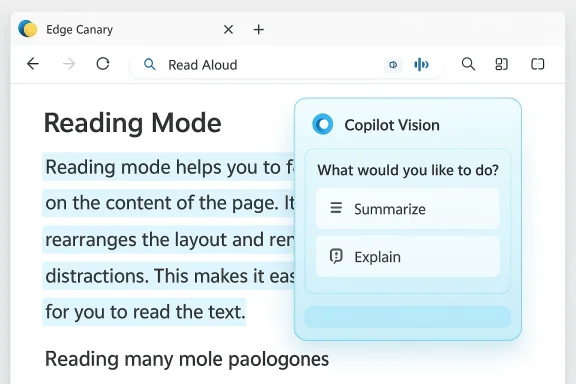
Microsoft Edge’s long‑running, accessibility‑focused reading surface is being reworked in Canary builds so that the classic one‑click “Read aloud” action can launch Microsoft’s Copilot Vision assistant instead of immediately starting text‑to‑speech — a subtle UI change with outsized implications for accessibility, privacy, and how people actually consume longform content. Early reports and teardown footage show the Immersive Reader label being relabeled to Reading Mode, a redesigned reader toolbar that surfaces Copilot actions, and evidence that clicking Read aloud in that new toolbar opens a Copilot Vision overlay rather than beginning an immediate, customizable narration. These changes are currently experimental in Edge Canary and appear to be part of Microsoft’s broader Copilot‑first strategy for the browser. fe])
Immersive Reader (now being shown in some Canary builds as Reading Mode) has been a staple accessibility and distraction‑free tool inside Microsoft Edge since the Chromium‑based browser launched in 2020. Its core value was simple: strip away page chrome, normalize typography, offer line focus and grammar tools, and — crucially — provide a Read Aloud function that begins spoken narration immediately with selectable natural voices and word‑by‑word highlighting. For many users — students, people with dyslexia, multitaskers, and those who prefer listening to text — Read Aloud is not a gimmick but a utility. Microsoft documents Immersive Reader as an accessibility feature within Edge, and the F9 shortcut and address‑bar icon have long been standard ways to enter that mode.
What’s changed recently is twofold: a naming and UI update that replaces the “Immersive Reader” text with Reading Mode, and a Copilot‑centric redesign that places AI actions (Summarize, Explain, Chat with Copilot, and, in Canary, Vision activation) directly in the reader toolbar. That redesign nudges — and sometimes forces — the assistant into the reading workflow rather than keeping readi space. Early Canary testers and community reporters have documented flags and UX experiments that promote this Copilot‑first layout.
There are practical reasons for this shift:
Key user‑facing issues to watch:
Edge’s Canary channel is doing what it should: testing bold UX shifts. The question for Microsoft now is not whether Copilot belongs in the reader, but how it should be introduced so that the reader remains predictable, accessible, and respectful of user privacy. Preserve the old Read Aloud as a direct path; make Copilot an optional, clearly labeled augmentation. That balance would let Microsoft deliver a genuine improvement without breaking the millions of everyday listening sessions that relied on a simple, reliable feature.
Microsoft’s experiments in Edge Canary are a useful preview of the company’s AI‑first direction for browsing, but they also underline a fundamental design lesson: when you change the default path for people with disabilities or well‑established habits, you must replace the lost affordance with an equally simple and reliable alternative. Until the Canary experiments land in public channels and Microsoft publishes definitive guidance on data handling and fallback behavior, treat the Copilot‑first reader as an interesting preview — not yet an unqualified improvement.
Source: Windows Central Copilot Vision replaces Read Aloud in Edge Canary, and I don't know why
 Background: why Immersive Reader mattered
Immersive Reader (now being shown in some Canary builds as Reading Mode) has been a staple accessibility and distraction‑free tool inside Microsoft Edge since the Chromium‑based browser launched in 2020. Its core value was simple: strip away page chrome, normalize typography, offer line focus and grammar tools, and — crucially — provide a Read Aloud function that begins spoken narration immediately with selectable natural voices and word‑by‑word highlighting. For many users — students, people with dyslexia, multitaskers, and those who prefer listening to text — Read Aloud is not a gimmick but a utility. Microsoft documents Immersive Reader as an accessibility feature within Edge, and the F9 shortcut and address‑bar icon have long been standard ways to enter that mode. What’s changed recently is twofold: a naming and UI update that replaces the “Immersive Reader” text with Reading Mode, and a Copilot‑centric redesign that places AI actions (Summarize, Explain, Chat with Copilot, and, in Canary, Vision activation) directly in the reader toolbar. That redesign nudges — and sometimes forces — the assistant into the reading workflow rather than keeping readi space. Early Canary testers and community reporters have documented flags and UX experiments that promote this Copilot‑first layout.
What the Canary experiment looks like right now
The visual and interaction changes
- The reader toolbar has been redesiactions prominently; that toolbar may hide traditional reading controls behind a gear or menu.
- In address bars and context menus, Immersive Reader labels are being replaced by Reading Mode, aligning Edge’s wording with Chrome’s terminology.
- In at least one Canary build, the Read aloud button in the redesigned toolbar doesn’t trigger the old inline TTS flow. Instead it opeverlay or a Copilot composer area that greets the user and appears to expect a spoken or typed instruction to start reading. This behavior was captured in tester footage and community reports.
How Copilot Vision enters the loop
Copilot Vision is Microsoft’s multimodal assistant that can “see” a region of the screen, run OCR on images and page content, and then answer follow‑up questions conversationally. Microsoft has been integrating Vision into the Copilot sidebar and broader Copilot surface across Windows and Edge; the Canary experiments suggest Vision may be launched from within the reader toolbar so Copilot can parse page content and respond in a chat‑style overlay rather than simply narrate it line‑by‑line. The overall approach converts reading from a passive, linear activity into an interactive AI session.Why Microsoft might be doing this (product logic)
At a product level, the logic is consistent: Microsoft is unifying the Copilot experience across its ecosystem and wants the assistant to be the primary entry point for higher‑level tasks like summarization, Q&A, and visually grounded help. Making Copilot the default path in Reading Mode increases discoverability and — from the company’s perspective — delivers additional value beyond basic text narration: on‑demand summaries, definitions, l context for images or embedded PDFs.There are practical reasons for this shift:
- Single‑surface assistance. Folding summarization, highlighting, and image analysis into the reader reduces the steps to get a researched, synthesized answer wicle.
- Feature cadence. Hosting Copilot Vision functionality on a centralized Copilot surface (web or service‑side) allows Microsoft to iterate faster than shipping frequent browser updates. That makes rapid feature rollouts and experiments easier.
- Monetization and entitlements. Microsoft differentiates between classic Read Aloud and enhanced Copilot‑powered audio experiences; surfacing Copilot could funnel users toward richer Copilot experiences that are entitlements for paid tiers or gated by tenant/region rollouts. Community troubleshooting guidance and internal documentation note a split between “classic” TTS and enhanced Copilot audio features, which rely on cloud entitlements and server‑side rollouts.
Accessibility impact: benefits and immediate risks
Potential benefits
- Multimodal accessibility: Pairing Read Aloud with Copilot Vision can, in theory, accessible. Copilot could read text, explain difficult vocabulary, and describe images or charts in context. That is a powerful augmentation for users with low vision or cognitive disabilities.
- **On‑demand clarificausing narration to look things up, readers could ask Copilot to clarify a passage and return to listening — a genuine productivity gain for research and learning workflows.
Risks and regressions
- More clicks and friction for basic use: The classic Read Aloud was a one‑tap experience; switching to a Copilot overlay introduces extra sompt or voice command) and may break muscle memory. Early testers report frustration when a beloved accessibility shortcut suddenly behaves differently.
- Unreliable verbatim narration: Early experiments show Copilot Vision favors summaries and Q&A over literal, line‑by‑line reading. Getting Copilot to read text verbatim can be difficult or inconsistent, which undermines the original use case for users who depend on exact narration. Community testing and reporting indicate Copilot often returns a synopsis instead of a word‑for‑word readout.
- Compatibility and security gating: Reports indicate Copilot Vision may not always have the “security clearance”mmersive Reader or on certain pages (especially PDFs and paywalled content), resulting in errors or refusals. That means users could be shifted from an always‑available Read Aloud to a gated, sometimes‑blocked Copilot step.
Privacy, telemetry, and enterprise concerns
Embedding Copilot into a reading surface invites reasonable questions about what data is processed, where it’s stored, and how long any derived artifacts live. Microsoft has repeatedly framed Copilot features as opt‑in and session‑bound, but the experimental integrations raise hard questions that are not yet fully answered in public documentation:- Where are page summaries and vectors stored? Microsoft’s public descriptions promise limited rete auditing details and exact retention policies for text derived from web pages are still not widely published. That leaves a data‑handling gap for organizations that must comply with strict governance.
- Telemetry and training: High‑level statements about not using user contot a substitute for technical proofs or third‑party audits. Until Microsoft provides detailed, auditable logs or opt‑out controls, IT teams should treat those claims with caution.
- Corporate entitlements and blocking: For managed environments, Copilot features can be blocked or staged via policy. But the experimental UI could confuse end users on managed devices: a button labeled “Read aloud” that launches a blocked or partially available Copilot may produce opaque errors or repeated permission prompts. Admins must audit group policies and Intune controls before deploying these features broadly.
The user experience: what's being lost — and what could be improved
Many users who rely on Read Aloud value its reliability: predictable start point, consistent voice options, and tight highlight tracking. Replacing the immediate narration with a conversational AI that prefers summaries changes the mental model from “turn this text into speech” to “start an AI session about this content.”Key user‑facing issues to watch:
- Discoverability vs. control: Copilot actions become more discoverable, but the classic reading controls may become hidden behind menus. Accessibilled for a “reader‑first” toggle that restores a pure, AI‑free reading canvas. Early Canary recommendations echo this need.
- Predictability: Voice navigation and TTS expectations are different from chat interactions. Users expect the Read Aloud control to start continuous narration the’s sequence; Copilot sessions that focus on summaries or selective highlights break that expectation.
- Error handling: When Copilot Vision can’t read a page (e.g., due to paywalls, security headers, or site blocking), the user must receive clear fallbacks rather than opaque “page unsupported” messages. Current experies return generic errors when trying to apply Vision to Immersive Reader content.
How to test, and how to preserve the old behavior (practical steps)
If you want to experiment with the new layout — or revert to the classic Read Aloud behavior while Microsoft tests these changes — here are practical steps and tips for testers and admins.- Try Canary only on a secondary profile or machine. Canary is d experimental behavior will differ from the public release.
- Check edge://flags for reader‑related flags. Testers have found flags named along the lines of “Updated UX for Edge Immersive Reader” and other Copilot‑surface toggles that gate the new toolbar and e them off to return to the classic UI.
- If Read Aloud launches Copilot in your Canary build and you prefer the old behavior, look for an “Open selection in Immersive Reader” context option or use F9 to enter the reader directly; some combinations still preserve the classic flow. If that fails, switch to a stable channel (Beta or Stable) where the old Read Aloud remains unchanged.
- For administrators: audit Edge policies and Intune controls that gate Copilot, Page Context, and conneou must prevent Copilot from accessing corporate pages, use the documented administrative templates rather than trusting ad hoc UI behavior.
Developer and product critique: where Microsoft should tighten the design
Microsoft’s desire to make Copilot omnipresent is understandable, but design choices in the reader deserve sharper guardrails:- Preserve an always‑available, one‑tap **classic Rebility users. Do not hide that control behind Copilot flows or rewire the button into a different modality by default.
- Offer a clear “reader‑first” toggle in settings that disables AI actions in the reader UI, returning the c‑agentive experience. That respects different user goals: pure reading vs. interactive analysis.
- Improve error messages when Copilot Vision can’t read a page. Tell useraywall, security headers) and provide a direct fallback to the classic TTS.
- Publish granular, auditable privacy docs for page content used by Copilot Vision in the reader. Give enterptry/retention rules they need to evaluate compliance.
Cross‑referenced verification: what public reporting actually shows
To keep claims verifiable: community testers including Leopeva64 and Canary observers first documented the UI changes and the rename from Immersive Reader to Reading Mode; independent tech outlets and hands‑on reporting have since described Copilot Vision and Copilot Mode experiments in Edge. The core observations — the rename, Copilot surfacing inside the reader, and Canaries that route Read Aloud to Copilot Vision — are supported by multiple hands‑on reports and internal Canary flag descriptions. However, the specific behavior of “click Read Aloud and Copilot Vision opens instead of immediate TTS” is currently visible in Canary experiments and community videos rather than in the stable Edge release, so it remains an experimental behavior rather than a confirmed, wide release change. Treat Canary reporting as a reliable preview of intent but not final product behavior.Recommendations for users, accessibility advocates, and IT admins
- Users who rely on Read Aloud: test your workflows in Stable/Beta rather than Canary and report regressions if the one‑tap narration is hidden or replaced. Ask Microsoft to preserve an explicit, simple Read Aloud control in the reader.
- Accessibility advocates: push for a “reader‑first” default and ensure the new UX does not bury font, spabehind menus. Beta testers can help by filing targeted feedback with reproduction steps.
- IT and enterprise admins: evaluate Copilot entitlements and Edge policies, pilot any Copilot changes in a controlled ring, and validate that Copilot’s data handling fits your compliance posture before rolling it out widely. Use the outlined remediation and testing steps if users report read‑aloud regressions.
The verdict: promising idea, sloppy execution so far
The idea of pairing a modern, multimodal assistant with a reading surface makes compelling sense — richer descriptions of images, inline definitions, and context‑aware summaries could be game changers for learning and accessibility. But the execution so far risks undermining the very people who depend on the old feature’s reliability. Converting a label and wiring a single button to a different interaction model without a clear fallback or a simple opt‑out introduces friction, confusion, and potential accessibility regressions.Edge’s Canary channel is doing what it should: testing bold UX shifts. The question for Microsoft now is not whether Copilot belongs in the reader, but how it should be introduced so that the reader remains predictable, accessible, and respectful of user privacy. Preserve the old Read Aloud as a direct path; make Copilot an optional, clearly labeled augmentation. That balance would let Microsoft deliver a genuine improvement without breaking the millions of everyday listening sessions that relied on a simple, reliable feature.
Microsoft’s experiments in Edge Canary are a useful preview of the company’s AI‑first direction for browsing, but they also underline a fundamental design lesson: when you change the default path for people with disabilities or well‑established habits, you must replace the lost affordance with an equally simple and reliable alternative. Until the Canary experiments land in public channels and Microsoft publishes definitive guidance on data handling and fallback behavior, treat the Copilot‑first reader as an interesting preview — not yet an unqualified improvement.
Source: Windows Central Copilot Vision replaces Read Aloud in Edge Canary, and I don't know why
