

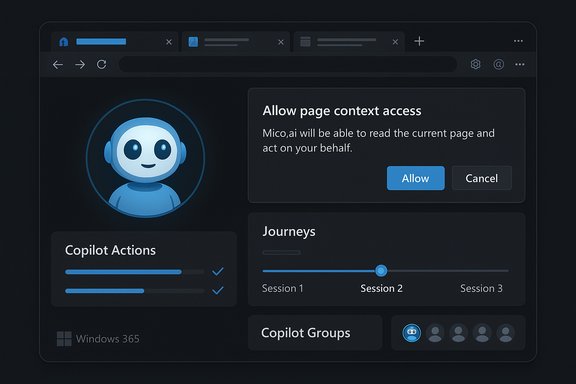
Microsoft’s Edge has quietly crossed a threshold: the browser is no longer merely a window to the web but now presents itself as a permissioned, agentic assistant that can read pages, remember sessions, and perform multi‑step tasks — all under the banner of the newly expanded Copilot Mode. The update, rolled out as part of Microsoft’s Copilot Fall release, introduces two headline capabilities — Copilot Actions and Journeys — while adding a visible avatar (Mico), group collaboration, and deeper links into Microsoft 365. The move landed almost immediately after OpenAI’s launch of its ChatGPT Atlas browser, sharpening the competition to define what an “AI browser” actually is.
Background / Overview
The last several months have pushed browsers into uncharted territory. Generative AI models and multimodal agents have made it practical — and commercially attractive — to embed conversational assistants directly into the browsing surface. Companies now see the browser as the natural runtime for assistants that can synthesize content across tabs, act on behalf of users, and maintain memory across sessions. Microsoft’s Copilot Mode in Edge and OpenAI’s ChatGPT Atlas are emblematic of two competing design philosophies: integrate an assistant into an existing browser ecosystem versus ship a standalone browser built around an assistant. Both approaches share the same user-facing ambitions, but differ sharply in ecosystem strategy and model control. Microsoft’s official announcement positions Copilot Mode as a user‑controlled, opt‑in transformation of the Edge experience. Copilot Mode replaces the traditional new‑tab surface with a unified Search & Chat entry point, supplies a persistent assistant panel, and — with explicit permission — can read open tabs to summarize, compare and act on information. The company emphasized consent, visible UI cues when Copilot is “listening” or “doing,” and staged, limited previews to manage rollout risk. OpenAI’s Atlas, introduced days earlier, takes the opposite route: a Chromium‑based browser that centers ChatGPT as a persistent sidecar with an Agent Mode for paid users that can browse and act across pages. Atlas debuted on macOS with broader platform releases planned later, and it includes optional browser memories and careful privacy toggles. The timing of the two launches — within 48 hours of one another — crystallized the industry’s view that the browser is once again a strategic frontline.What Microsoft shipped: Copilot Mode’s core features
Microsoft folded multiple prior experiments into a single coherent mode and added new agentic capabilities. The most consequential elements are:- Copilot Actions — an automation engine that can execute multi‑step tasks inside the browser after receiving user approval. Examples shown in previews include filling reservation forms, unsubscribing from newsletters, and orchestrating multi‑tab comparisons. Actions can be triggered by text or voice and show progress and confirmation dialogs so users stay in control.
- Journeys — a session memory layer that groups related browsing activity into resumable “journeys” so you can pick up a project without reconstructing dozens of tabs. Journeys surface summaries and suggested next steps, and they are opt‑in.
- Page Context / Multi‑tab reasoning — with explicit opt‑in permissions, Copilot can read and synthesize content from multiple open tabs, enabling consolidated answers (e.g., price comparisons or research roundups). Microsoft frames this as “permissioned”: users must enable Page Context in settings.
- Mico (optional avatar) — a non‑photoreal visual presence that animates during voice interactions and acts as a clear cue that Copilot is active. Mico is toggleable and intentionally playful; an easter‑egg will even let it briefly transform into Clippy if users prod it enough.
- Copilot Groups — shared AI sessions for up to 32 participants to collaborate with Copilot in real time, useful for brainstorming, co‑writing, or teaching.
- Platform coverage and rollout — Copilot Mode updates are being staged as limited previews (initially U.S.‑first for Actions and Journeys) and are available on Edge for Windows and macOS, with mobile support coming later. Microsoft emphasizes enterprise controls and admin policies for managed devices.
How Copilot Mode compares to OpenAI’s Atlas
At a glance, Copilot Mode and Atlas look and feel similar: minimalist layouts, a persistent AI sidecar or full‑tab assistant, and the ability to summarize and act. But beneath that similarity lie strategic and technical differences:- Product strategy
- Microsoft: integrates the assistant into Edge as a mode, leveraging Windows distribution and Microsoft 365 connectors to extend Copilot’s utility across apps and identity. This reduces friction for enterprise deployment because Edge is already managed in many organizations.
- OpenAI: ships Atlas as a dedicated browser that places ChatGPT at the structural core; its agent features initially target paid tiers and come with ChatGPT’s existing memory and account model. This approach is designed to make ChatGPT the primary interface for browsing for users who opt in.
- Model and ecosystem
- Microsoft routes tasks through a mix of in‑house MAI models and selected external models depending on task needs, while integrating tightly with Windows and Microsoft 365. That can yield deeper cross‑app workflows (e.g., Outlook, OneDrive) for enterprise users.
- OpenAI builds Atlas on its GPT stack and centers the ChatGPT user account; Atlas’s agent features rely on OpenAI’s model and account controls.
- UX choices
- Edge’s Copilot Mode tends to convert the new tab into a full‑tab “ride‑along” assistant with a darker UI that adheres to Windows design, while Atlas uses a persistent sidebar sidecar on top of Chromium. The differences are subtle but matter for discoverability and workflow integration.
- Rollout and gating
- Microsoft emphasizes staged, opt‑in previews and enterprise policies; some Actions are initially limited to curated or partner flows. OpenAI has gated Agent Mode behind paid tiers for some users at launch and prioritized macOS in the initial release.
Why this matters: product and market implications
- Browsers as AI platforms. By embedding agentic assistants, vendors are reframing browsers as execution environments where intent is not only interpreted but acted upon. That shifts power away from search engines and towards assistant platforms that can mediate browsing, transactions, and content summarization.
- Publisher economics and discovery. If assistants summarize or act on content without sending traffic to a publisher, downstream ad and subscription economics could change. Assistants that synthesize content may inadvertently reduce pageviews, raising questions about licensing and revenue sharing.
- Enterprise adoption calculus. For organizations, Copilot Mode’s deep Microsoft 365 integrations and admin controls lower the barrier to pilot internal use cases. But risk, governance and compliance requirements will substantially affect adoption pace.
- Competition and antitrust context. Google’s dominance of the browser market remains a structural reality; however, the AI layer introduces new competitive vectors that incumbents and challengers alike will pursue aggressively. Atlas’s launch prompted immediate market attention and signaled a possible challenge to Chrome’s centrality.
Security, privacy, and safety: the hard trade-offs
Turning browsers into agents multiplies both capability and risk. These are the key vectors to scrutinize:- Prompt injection and content-based attacks. An agent that executes actions based on page content is vulnerable to indirect prompt injection: adversarial content can attempt to influence the agent’s reasoning or action plan. This class of exploit is not theoretical — security experts have flagged it in early agentic browsers. Mitigations must include strict action confirmation flows, sandboxing of sensitive domains, and heuristics to detect malicious instruction patterns.
- Credential and session exposure. Agents that act inside the browser may be confronted with authenticated sessions, cookies, and tokens. If not carefully scoped, agent actions could expose credentials or perform unintended operations on logged‑in services. Microsoft’s permission model and explicit consent UIs are necessary but not sufficient; enterprises should isolate sensitive workflows to a non‑agentBrowser or enforce elevated confirmation policies.
- Privacy of browsing history and memory. Both Copilot Mode and Atlas offer optional memory features that can improve personalization. Memory stored under a user account can be valuable but also increases the attack surface. Microsoft insists on opt‑in toggles and provides controls for clearing Journey data, but defaults, telemetry, and backend retention policies must be audited by privacy teams. Any claim about “never used for training” or limited data collection should be verified in product privacy statements and telemetry dashboards.
- Overtrust and hallucination. Agents that can act create a special kind of harm: if users overtrust an assistant’s output or let it transact without rigorous checks, financial, legal or reputational damage can follow from AI hallucinations or poor judgment. UI affordances should make uncertainty explicit and require human confirmation for financial or irreversible actions.
- Supply chain and model provenance. Microsoft’s mixed‑model routing and OpenAI’s GPT pipeline raise questions about where inference runs (on device or cloud), which models are used for what tasks, and how vulnerabilities in model implementations are disclosed and patched. Enterprises should demand clear model provenance and SLAs if they plan to integrate agentic browsing into regulated workflows.
Practical guidance: how to try Copilot Mode safely (for users and IT)
For Windows enthusiasts and administrators who want to experiment without undue risk, a cautious, staged approach is recommended.- For individual users:
1. Enable Copilot Mode only in a secondary profile or a non‑critical browser profile.
2. Keep Page Context and memory features off until you’ve tested behavior on harmless sites.
3. Require explicit confirmations for any agent actions that interact with accounts or payments.
4. Use a separate browser (or an incognito profile) for banking and admin tasks. - For IT administrators:
1. Pilot Copilot Mode with a small user cohort and instrument outcomes (errors, false positives, support tickets).
2. Configure group policies to disable agent actions on sensitive sites and enforce consent dialogs.
3. Build playbooks for incidents where an agent acted incorrectly (audit logs, rollbacks).
4. Evaluate model routing, data residency, and contractual obligations before enabling connectors to corporate email or storage. - For security teams:
1. Run red‑team tests focused on prompt injection and page‑based manipulation.
2. Verify that action execution is atomic and auditable (with clear progress and rollback).
3. Ensure that credentials and tokens are not exposed to the agent’s cloud inference service.
UX and design: getting personality right (and avoiding Clippy‑2.0)
Microsoft is acutely aware of Clippy’s cultural legacy and has tried to design Mico as optional, expressive, and clearly visible — a “friendly” cue for voice interactions rather than a persistent, interruptive presence. That design choice matters: a persona that nudges and pushes can boost adoption, but it can also create attention capture and misaligned incentives if engagement becomes the product metric. Microsoft’s toggleable approach and emphasis on consent are the right starts, but whether the company resists using persona and memory to maximize engagement will be key to public perception.Business strategy and the future of browsing
- Distribution matters. Edge’s installed base on Windows is Microsoft’s strategic advantage. Converting a portion of those users to Copilot Mode — especially among Microsoft 365 customers — can create meaningful product‑led adoption that standalone browsers struggle to match.
- Monetization and content relationships. If assistants can synthesize content and present consolidated answers, traditional page‑based ad models may be disrupted. Publishers and news organizations will watch how agents attribute and link to original sources; licensing and revenue sharing models may evolve as a result.
- A race of ecosystems. The competition will be decided less by initial layout and more by model quality, integration depth, and trust. Microsoft’s enterprise ties and OpenAI’s conversational model incumbency give each a distinct play to win certain user segments. Third parties — Perplexity, Brave, Opera and others — will continue to innovate in niche approaches to agentic browsing.
What remains uncertain (and what to verify)
- Rollout timelines outside the U.S. and platform parity for Actions/Journeys are subject to change; Microsoft’s blog clearly says preview availability is staged and regionally limited. Enterprises should confirm current availability in their markets and exact feature gating before broad enablement.
- Backend data handling and training claims. Vendor claims about what data is used for model training or telemetry are sometimes phrased aspirationally; these require careful verification in privacy statements, contractual terms, and telemetry dashboards before trusting them for regulated data. Treat vendor claims as starting points for due diligence, not definitive protections.
- Security hardening against novel attacks. Prompt injection and content‑based manipulation are an active research area; the mitigations announced at launch are helpful but not a final fix. Expect iterative patches and additional guardrails over the coming months.
Final assessment — strengths and risks
Strengths- Practical productivity gains. Copilot Actions and Journeys directly target time‑consuming, repetitive tasks — price comparisons, bookings, form filling — that have real user value when automation is reliable.
- Ecosystem leverage. Microsoft’s ability to link Copilot with Windows, Outlook, OneDrive and Microsoft 365 is a differentiator for enterprise scenarios where cross‑app workflows matter.
- Opt‑in and staged rollout. Microsoft’s emphasis on permissioned access and limited previews reduces some risks associated with mass releases.
- New attack surfaces. Agentic automation opens avenues for prompt injection and unintended actions if page content is malicious or ambiguous. Security practices must evolve accordingly.
- Privacy and data governance concerns. Memory, Journeys and multi‑tab synthesis increase the sensitivity of what the browser can collect and reason over. Defaults and telemetry policies will matter enormously.
- Reliability and overtrust. Agents can make mistakes; misplaced trust in an assistant that “does things for you” can lead to significant downstream cost or error. Clear UI signaling and confirmation steps are essential.
Microsoft’s Copilot Mode in Edge represents a clear step toward the era of agentic browsers: a permissioned, integrated assistant that can summarize, remember and act across web sessions. It is a pragmatic approach — retrofit a familiar browser with deep assistant features — that trades the disruption of shipping a new browser for the distribution and enterprise advantages of Edge. OpenAI’s Atlas offers the converse play: a clean slate built around ChatGPT that centers model continuity and standalone identity.
Both moves accelerate the commercial and design debate over what web browsing should be in an AI era. For users and IT teams, the sensible posture is cautious experimentation: pilot, measure, instrument, and harden controls. The potential for productivity is real; the potential for novel harms is also real. Expect intense iteration from all players, and demand clarity — in defaults, in privacy controls, and in auditability — before giving any agent unsupervised permission to act on your behalf.
Source: Moneycontrol https://www.moneycontrol.com/techno...er-copilot-mode-in-edge-article-13630479.html
