

Microsoft’s latest update turns Edge from a passive tab manager into a permissioned, context‑aware assistant that can read open pages, reason across tabs, and — with explicit user consent — perform multi‑step actions on your behalf, a move timed so closely with OpenAI’s ChatGPT Atlas that it effectively formalizes the emerging “AI browser” category.
Source: Analytics Insight AI Face-Off: Microsoft Edge Gets Copilot Mode to Outshine ChatGPT Atlas
 Background
What just happened
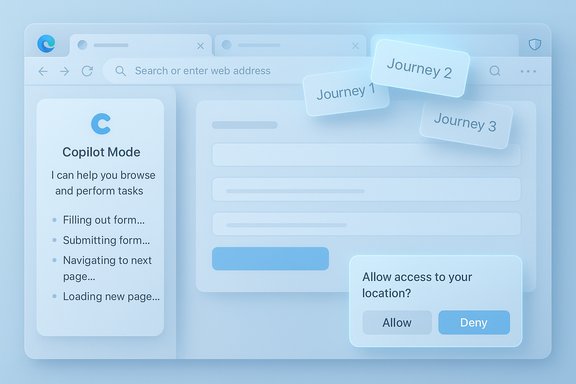
In late October 2025 Microsoft expanded Copilot Mode inside Microsoft Edge, promoting an experience first previewed in July into a fuller “AI browser” offering and adding two headline capabilities: Copilot Actions (agentic automation) and Journeys (session/project memory). The company frames Copilot Mode as opt‑in and permissioned, placing visible cues on the UI when the assistant is reading, listening, or taking action. Two days earlier OpenAI launched ChatGPT Atlas, a Chromium‑based, ChatGPT‑centric browser that embeds ChatGPT as a persistent sidecar with an optional Agent Mode that can open tabs, click links, and carry out tasks for the user in preview. The near‑simultaneous rollouts crystallized a broader industry pivot: the browser is increasingly being reimagined as the runtime for persistent, agentive assistants.Why this matters
Browsers have historically been the pass‑through for content: you open tabs, copy URLs, and manually stitch information together. The new generation of AI browsers promises to collapse those steps into conversational workflows. That is consequential for productivity, for privacy, and for the economics of the web — because assistants can change who gets traffic, how transactions are routed, and how publishers monetize content. Early previews show real convenience but also expose reliability and security trade‑offs that will shape adoption.What Copilot Mode actually does
Core UX changes
- A unified Search & Chat entry on the New Tab page that blends navigation, search, and conversational queries.
- A persistent Copilot pane that can be invoked on any page to summarize content or synthesize information across open tabs.
- Voice input and wake‑word style activation (optional) for hands‑free interaction.
These changes reposition the browser surface into a conversational workspace: the same input can open a URL, answer a question about the current page, or launch a multi‑step action.
Copilot Actions — agentic automation
Copilot Actions is the agent layer that can execute sequences of steps inside the browser after you approve them. Representative examples Microsoft demonstrated and that early previews confirm include:- Unsubscribing from newsletters (when permitted).
- Filling reservation forms and initiating booking flows.
- Extracting prices from multiple product pages and building a comparison table.
- Executing browser-level commands via conversation (close tabs, open pages, etc..
Actions shows the promise of real time saved, but hands‑on reporting highlights that automation is still brittle on complex, non‑standard pages. Failures can be silent or misreported, so early users should treat agent results as suggestive until confirmation arrives.
Journeys — resumable sessions and memory
Journeys automatically groups your past browsing activity by topic (for example: “vacation planning” or “buying a new TV”) and surfaces resumable cards so you can pick up the thread without a graveyard of tabs. Journeys is opt‑in, and when enabled it can use short, on‑device summaries of pages and searches to build those clusters. Microsoft positions Journeys as a tab‑management antidote and a productivity tool for longer projects.Safety, signals, and controls
Microsoft emphasizes visible consent flows and clear visual cues when Copilot is active. Copilot Mode requires explicit permission to use page context, stored credentials, or browsing history. Additional on‑device protections include a local‑AI Scareware blocker intended to stop full‑screen scam takeovers, and built‑in password management and breach monitoring features. These protections are part of Microsoft’s argument that Copilot Mode is permissioned and privacy‑aware by design.Verifying the claims — cross‑checking the record
To ensure accuracy, the major claims and numbers were cross‑referenced with independent sources:- Microsoft’s product and quote from Sean Lyndersay are documented in the official Microsoft Edge Blog post introducing Copilot Mode.
- OpenAI’s ChatGPT Atlas launch and Agent Mode details are confirmed on OpenAI’s product page and subsequent coverage.
- Industry hands‑on coverage and analysis of brittleness in agentic automation come from outlets that tested early previews (e.g., The Verge and TechCrunch).
- Browser market share statistics cited in contemporary coverage (Chrome ~71.8% globally; Edge ~4.67% globally) are reflected in StatCounter’s September 2025 snapshot. Because platform definitions differ (desktop vs. all platforms), readers should treat these as global aggregate estimates with platform‑specific variation.
Where vendor messaging and independent reporting diverge — particularly around how reliably agentic workflows complete transactions — the public testing record shows inconsistency; that gap is flagged and treated as an outstanding risk in this analysis.
Copilot Mode vs. ChatGPT Atlas — design and strategic differences
Two architectural choices
- Microsoft: Add an agentic Copilot mode inside an existing mainstream browser (Edge). That leverages distribution (Windows installs, enterprise IT policies) and integration with Microsoft 365 and Windows identity. Copilot Mode is toggleable and staged as a permissioned layer rather than a distinct browser product.
- OpenAI: Ship a new, AI‑first browser (ChatGPT Atlas) with ChatGPT as the structural sidecar and Agent Mode as a native capability. Atlas debuted on macOS with Windows and mobile coming later. The standalone approach allows UI re‑design without legacy constraints but requires convincing users to switch.
Experience differences
- Persistence and memory: Both products offer optional memory and session recovery, but Microsoft’s Journeys leans into grouping browser history into resumable projects, while Atlas centers “browser memories” tied to your ChatGPT account.
- Agentic behavior: Both have agent modes that can perform tasks. Microsoft integrates agentic features into Edge via Actions; OpenAI exposes similar capabilities through Atlas’ Agent Mode. Early reviews suggest both teams built similar primitives — the user‑visible differences will depend on model accuracy, site compatibility, and permission UX.
Strategic implications
Microsoft’s integration strategy reduces friction for adoption (Edge is preinstalled on many Windows systems), and the company can tie Copilot to enterprise policies and Microsoft 365 connectors. OpenAI’s Atlas bets on ChatGPT’s brand and model capabilities to pull users into a new browser experience. The two approaches create a natural deterrence: Microsoft can reach Windows users quickly; OpenAI can iterate on an AI‑native UI unchecked by legacy ergonomics.Privacy, security, and reliability — risk analysis
Privacy: opt‑in promises but consent complexity
Microsoft stresses that browsing history and Page Context are only used when the user opts in, and that visual cues indicate when an assistant is active. That model should reduce surprise access, but the UX burden remains: many users consent to prompts without fully appreciating what is shared. Organizations should treat Copilot Mode’s access to page content and history as a policy‑controlled capability that requires governance. Cautionary note: vendor statements that data “isn’t used for model training by default” require careful auditing. The space between telemetry for product improvement and data used to update models often creates regulatory and contractual complexity; enterprises should insist on explicit assurances and contractual controls if they enable agentic features on managed devices.Security: a new attack surface
Agentic automations that can fill forms and click through pages expand the attack surface. Threat vectors to watch include:- Prompt injection on web pages designed to trick agents.
- Malicious pages that attempt to escalate permissions or coerce actions.
- Automated flows that misreport success or capture credentials if permissions are misconfigured.
Reliability: brittle automation and the "last mile" problem
Independent hands‑on reporting shows that Copilot Actions and similar agentic features can succeed in straightforward flows but often fail on dynamic or heavily script‑driven sites. Common failure modes:- Picking the wrong date or form field (misaligned selectors).
- Reporting an action as completed when it was not.
- Breaking on sites that require CAPTCHAs or multi‑factor flows.
Practical guidance for Windows users and IT teams
For consumers
- Treat Copilot’s agentic results as recommendations until you see explicit confirmations (reservation emails, transaction receipts, unsubscribe confirmations).
- Keep Copilot Mode toggled off for sensitive browsing (banking, medical portals) unless you explicitly need it and trust the environment.
- Use the visible cues and privacy toggles to limit Page Context access; enable Journeys and history only when you value resumability over absolute privacy.
For IT administrators
- Pilot in a controlled group: start with non‑critical workflows and measure error rates for agentic tasks.
- Enforce admin policies: use device management to control whether Copilot can access Page Context, connectors, or stored credentials.
- Require logging and rollback: insist on audit trails for any assistant‑initiated action in corporate contexts.
- Train users: educate employees that assistant outputs may be approximate and that confirmations are required for any transaction.
Market context — where browsers stand today
The competitive landscape still favors Google Chrome by a wide margin. StatCounter’s global snapshot for September 2025 shows Chrome at roughly 71.8% global share, with Edge around 4.7% in the aggregated view — though platform splits (desktop vs. mobile) show different numbers. The reality: Chrome’s default presence on Android and its cross‑platform continuity remain powerful distribution advantages. For Microsoft, integrating Copilot into Edge is a strategy to make the browser more indispensable, not necessarily to win immediate share. Historically, Microsoft’s Internet Explorer once dominated browser usage, but that era ended as ecosystems evolved. Today’s AI browser race is less about reviving old share numbers and more about capturing attention and transactional flows inside the browser — which could, over time, shift web economics.Strengths, weaknesses, and what to watch
Strengths
- Seamless distribution: Copilot Mode rolled into Edge lowers friction for adoption on Windows machines.
- Integration potential: Microsoft can surface context from Outlook, OneDrive, and Microsoft 365 in permissioned scenarios.
- Permissioned design: Clear opt‑in toggles and visible cues reduce surprise access if implemented and communicated well.
Weaknesses and risks
- Automation brittleness: Agentic flows still fail on complex pages and can misreport outcomes.
- Privacy nuance: Opt‑in controls are not a panacea — user comprehension and admin governance are the weak links.
- Publisher economics: Assistants changing navigational flows could reduce ad revenue or require new commercial arrangements with publishers.
Short‑term signals to monitor
- Error rates for Copilot Actions on real booking and checkout flows.
- Adoption metrics: do users enable Copilot Mode, or merely try it once?
- Policy responses from regulators and publishers as assistants change traffic patterns.
- OpenAI and Google’s responses — particularly whether Chrome’s Gemini integration or Atlas’ Windows rollout materially alter the user choice calculus.
Conclusion
Microsoft’s expanded Copilot Mode is a pragmatic, high‑leverage push to make Edge more than a portal — it’s an attempt to make the browser into a permissioned assistant that helps users resume work, synthesize information, and do things on the web. The approach is coherent: fold agentic features into an existing, widely distributed product and apply enterprise controls and consent flows where possible. That confers adoption advantages and an avenue into managed deployments. But capability is not the only metric that matters. The early record exposes meaningful limits: agentic automations are brittle, privacy and telemetry subtleties remain unresolved, and the economics of how assistants route commerce and traffic could prompt regulatory and publisher pushback. In short: the productivity upside is real, but so are the new governance demands. For readers and IT leaders, the sensible posture is one of cautious experimentation: test the features in targeted scenarios where reliability and auditability can be measured, insist on clear consent and logging for any assistant action tied to identity or transactions, and treat automated actions as provisional until you verify outcomes. The browser is no longer just a neutral window to the web — it’s becoming a delegation surface where convenience and risk must be balanced deliberately.Source: Analytics Insight AI Face-Off: Microsoft Edge Gets Copilot Mode to Outshine ChatGPT Atlas
Last edited:
