

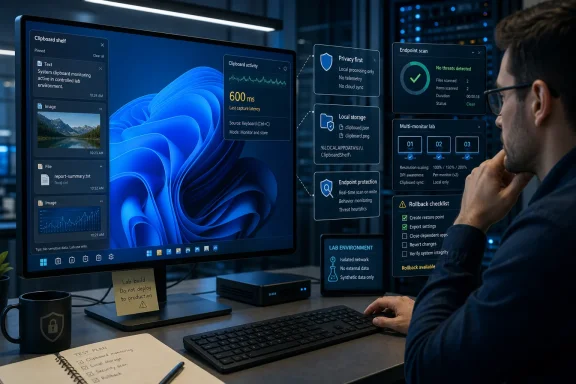
Edge Drop v0.1.0 should be tested only in a controlled Windows 11 profile or disposable lab device, not installed immediately on a production workstation. The utility polls the clipboard every 600 milliseconds, retains captured material in local application storage, and has had just one public release—dated July 9, 2026—so privacy validation, endpoint review, and a documented rollback plan should come before convenience.
The mouse-driven clipboard shelf is an appealing alternative to repeatedly opening Windows 11 clipboard history with Win+V. As Windows Central has reported, Edge Drop hides along the left side of the display and exposes copied text, images, and files through an interface designed for dragging content back into applications.
That workflow also gives the app continuing visibility into one of Windows’ most sensitive transient data channels. Before trying it, enthusiasts and IT administrators should complete these seven checks.
Edge Drop’s documentation says its
The project claims to honor four Windows clipboard privacy-related formats:
Build a test matrix around the applications that matter in your environment. Copy disposable sample values—not real credentials—from password managers, remote administration tools, privileged browser sessions, developer consoles, document-management systems, and any line-of-business software that handles regulated data.
After every copy operation, open Edge Drop and check whether the sample appears. Repeat the test after restarting the source application and Edge Drop, because a single successful exclusion does not establish dependable behavior across sessions.
Do not test exclusion handling with an actual password, API token, recovery code, customer record, or private key. A synthetic marker such as
Use a dedicated Windows test account and identify the application’s local storage before introducing any meaningful content. Take a directory listing or snapshot, copy one unique text marker, and then capture a uniquely colored test image. Compare the storage afterward to determine which files were created or modified.
Next, remove those items through Edge Drop and inspect the storage again. The essential questions are practical:
This check is especially important on shared PCs, nonpersistent virtual desktops, and systems where user-profile data is redirected or synchronized. A clipboard database can quietly become a second repository for text and images that users assumed were temporary.
Then press Win+V and compare Windows clipboard history with Edge Drop after copying controlled text, images, and files. The goal is not merely to see whether both interfaces display an item. You need to establish whether exclusions, deletion, and retention behave consistently—or whether content omitted from one history appears in the other.
This distinction matters because Edge Drop documents support for both
WindowsForum’s guides to Windows 11 clipboard management and cross-device synchronization remain useful preparation because they establish the Microsoft-managed baseline. Edge Drop should be evaluated as an additional clipboard repository, not as a cosmetic replacement for Win+V.
Clear both histories after the test. If Edge Drop’s local files remain after its visible history is cleared, document that result before deciding whether the application is suitable for wider use.
After installation, open Task Manager > Startup apps and look for Edge Drop or a related entry. Also check the user’s Startup folder, scheduled tasks, and any endpoint-management inventory that records auto-start applications. Sign out and back in, then confirm whether Edge Drop launches without user action.
If it does start automatically, copy a synthetic marker immediately after sign-in and determine whether it is captured before the user opens the Edge Drop interface. Also test whether closing the visible shelf exits the application or merely hides its window while the clipboard watcher continues running.
For an initial pilot, disable automatic startup if that option is available through Windows or the application. Requiring deliberate launch narrows the testing window and makes it easier to correlate clipboard activity with stored artifacts.
The test report should distinguish among three states: the interface is visible, the application is running in the background, and the clipboard watcher is active. Those states may overlap, but administrators should not assume they are identical.
Those are meaningful security design choices, but they do not turn a new application into a preapproved enterprise component. The deployment still adds an Electron runtime, application code, local storage, and a continuously active clipboard-monitoring function to the endpoint.
Before installation, submit the package through the same checks used for other unsigned or newly introduced utilities. Record its file hashes, inspect the publisher information available to Windows, scan it with the organization’s endpoint security stack, and retain the exact v0.1.0 installer or package used in the pilot.
Application-control teams should decide whether the software is allowed by policy before users discover and deploy it independently. A temporary allow rule should be scoped to the pilot devices and the reviewed artifact rather than granting broad permission to arbitrary executables from the same download location.
Security reviewers should also compare the published architecture with observed processes. If the process tree, network behavior, or files written to disk differ materially from the documentation, pause the trial and investigate rather than dismissing the difference as normal Electron overhead.
Run usability tests with every display arrangement common in the target group. At minimum, test a single monitor, a secondary monitor positioned to the left of the primary display, mixed scaling, full-screen applications, and an auto-hidden taskbar if users rely on one.
Watch for accidental activation when moving between displays, difficulty reaching controls positioned against the left boundary, and situations where the transparent window intercepts mouse actions intended for another application. Test dragging files both into and out of the shelf, because successful activation does not guarantee that cross-application drop targets behave correctly.
Applications used for remote administration, design, development, gaming, and media playback deserve special attention. A tool that works smoothly in a normal desktop window may become disruptive when another program expects uninterrupted access to an edge or pointer movement.
This is where Edge Drop’s early release status is most visible. A novel interaction can be genuinely productive while still needing tuning for uncommon display geometries and established Windows workflows.
Before users build a workflow around it, document how to exit the application, prevent it from launching, uninstall it, and remove residual local storage. Export any diagnostic information required for the pilot before deleting data, but do not retain captured clipboard contents unless there is a clear operational need.
After uninstalling, restart Windows and verify that no Edge Drop processes, startup entries, scheduled tasks, always-on-top edge windows, or application data remain. Recheck Win+V and ordinary copy-and-paste operations to confirm that the native clipboard experience has returned to its previous state.
A sound pilot should also define stop conditions in advance. Unexpected capture of excluded test data, unexplained persistence after deletion, interference with full-screen applications, unapproved network activity, or inability to remove the watcher cleanly should end the trial until the behavior is understood.
Edge Drop has a clear productivity proposition: turn clipboard history into a shelf that can be operated with the mouse and used for text, images, and files. WindowsForum readers exploring the broader clipboard-manager market may find its drag-oriented approach more immediate than conventional history menus, particularly when moving mixed content between applications.
The tradeoff is that convenience depends on persistent observation and retention. Edge Drop says it polls every 600 milliseconds, applies Windows privacy-related formats, and stores its index and images locally; administrators still need observed evidence that those controls behave correctly with their software, profiles, displays, and retention requirements.
For now, v0.1.0 belongs in a measured pilot, not a default workstation image. The next meaningful milestones will be additional releases, clearer operational controls, and enough field testing to show that exclusion handling, storage cleanup, startup behavior, multi-monitor activation, and uninstall rollback remain dependable outside the developer’s own environment.
The mouse-driven clipboard shelf is an appealing alternative to repeatedly opening Windows 11 clipboard history with Win+V. As Windows Central has reported, Edge Drop hides along the left side of the display and exposes copied text, images, and files through an interface designed for dragging content back into applications.
That workflow also gives the app continuing visibility into one of Windows’ most sensitive transient data channels. Before trying it, enthusiasts and IT administrators should complete these seven checks.
 1. Prove That Clipboard Exclusions Work in Your Applications
Edge Drop’s documentation says its ClipboardWatcher polls the operating system clipboard every 600 milliseconds. It deduplicates captured text, images, and files, but polling still means the application repeatedly checks whether clipboard content has changed.The project claims to honor four Windows clipboard privacy-related formats:
ExcludeClipboardContentFromMonitorProcessingClipboardViewerIgnoreCanIncludeInClipboardHistoryCanUploadToCloudClipboard
Build a test matrix around the applications that matter in your environment. Copy disposable sample values—not real credentials—from password managers, remote administration tools, privileged browser sessions, developer consoles, document-management systems, and any line-of-business software that handles regulated data.
After every copy operation, open Edge Drop and check whether the sample appears. Repeat the test after restarting the source application and Edge Drop, because a single successful exclusion does not establish dependable behavior across sessions.
Do not test exclusion handling with an actual password, API token, recovery code, customer record, or private key. A synthetic marker such as
EDGEDROP-EXCLUSION-TEST-01 makes an unexpected capture obvious without creating a real exposure.2. Locate the Local Store and Watch It Change
Edge Drop’s documented storage architecture uses an atomic JSON index alongside individual PNG files for captured images. This is a local-first design, but local does not mean ephemeral, encrypted, access-controlled to enterprise standards, or automatically covered by an organization’s retention policy.Use a dedicated Windows test account and identify the application’s local storage before introducing any meaningful content. Take a directory listing or snapshot, copy one unique text marker, and then capture a uniquely colored test image. Compare the storage afterward to determine which files were created or modified.
Next, remove those items through Edge Drop and inspect the storage again. The essential questions are practical:
- Does deleting an item remove its index entry?
- Does the corresponding PNG disappear when an image is deleted?
- Does clearing the interface remove every test artifact from local storage?
- Do removed items remain recoverable through backups, profile containers, snapshots, or endpoint tooling?
- Does uninstalling the application leave its data directory behind?
This check is especially important on shared PCs, nonpersistent virtual desktops, and systems where user-profile data is redirected or synchronized. A clipboard database can quietly become a second repository for text and images that users assumed were temporary.
3. Compare Edge Drop With Windows 11 Clipboard Settings
Before adding another clipboard layer, record the Windows configuration already in effect. Open Settings > System > Clipboard and note whether clipboard history and cross-device clipboard features are enabled.Then press Win+V and compare Windows clipboard history with Edge Drop after copying controlled text, images, and files. The goal is not merely to see whether both interfaces display an item. You need to establish whether exclusions, deletion, and retention behave consistently—or whether content omitted from one history appears in the other.
This distinction matters because Edge Drop documents support for both
CanIncludeInClipboardHistory and CanUploadToCloudClipboard. Those formats express different intentions: content may be unsuitable for history, cloud upload, or both. An IT pilot should verify each relevant behavior independently rather than assuming that “not synchronized” also means “not stored locally.”WindowsForum’s guides to Windows 11 clipboard management and cross-device synchronization remain useful preparation because they establish the Microsoft-managed baseline. Edge Drop should be evaluated as an additional clipboard repository, not as a cosmetic replacement for Win+V.
Clear both histories after the test. If Edge Drop’s local files remain after its visible history is cleared, document that result before deciding whether the application is suitable for wider use.
4. Determine Exactly When the Watcher Starts
A clipboard manager has a very different privacy footprint when launched manually for a short task than when it begins monitoring automatically at every sign-in. Edge Drop is young enough that administrators should verify startup behavior directly rather than infer it from the interface.After installation, open Task Manager > Startup apps and look for Edge Drop or a related entry. Also check the user’s Startup folder, scheduled tasks, and any endpoint-management inventory that records auto-start applications. Sign out and back in, then confirm whether Edge Drop launches without user action.
If it does start automatically, copy a synthetic marker immediately after sign-in and determine whether it is captured before the user opens the Edge Drop interface. Also test whether closing the visible shelf exits the application or merely hides its window while the clipboard watcher continues running.
For an initial pilot, disable automatic startup if that option is available through Windows or the application. Requiring deliberate launch narrows the testing window and makes it easier to correlate clipboard activity with stored artifacts.
The test report should distinguish among three states: the interface is visible, the application is running in the background, and the clipboard watcher is active. Those states may overlap, but administrators should not assume they are identical.
5. Treat Electron as an Endpoint Review Item
Edge Drop is an Electron 30+ application. Its documentation describes a three-process architecture consisting of a main process, preload process, and renderer process, with context isolation enabled, Node integration disabled, and sandboxing enabled.Those are meaningful security design choices, but they do not turn a new application into a preapproved enterprise component. The deployment still adds an Electron runtime, application code, local storage, and a continuously active clipboard-monitoring function to the endpoint.
Before installation, submit the package through the same checks used for other unsigned or newly introduced utilities. Record its file hashes, inspect the publisher information available to Windows, scan it with the organization’s endpoint security stack, and retain the exact v0.1.0 installer or package used in the pilot.
Application-control teams should decide whether the software is allowed by policy before users discover and deploy it independently. A temporary allow rule should be scoped to the pilot devices and the reviewed artifact rather than granting broad permission to arbitrary executables from the same download location.
Security reviewers should also compare the published architecture with observed processes. If the process tree, network behavior, or files written to disk differ materially from the documentation, pause the trial and investigate rather than dismissing the difference as normal Electron overhead.
6. Test the Left Edge as a Shared Resource
Edge Drop’s activation model depends on the left edge of the screen and a transparent, always-on-top window. That design is central to its convenience, but it also places the application in a part of the desktop already used by full-screen software, hidden controls, remote sessions, and multi-monitor transitions.Run usability tests with every display arrangement common in the target group. At minimum, test a single monitor, a secondary monitor positioned to the left of the primary display, mixed scaling, full-screen applications, and an auto-hidden taskbar if users rely on one.
Watch for accidental activation when moving between displays, difficulty reaching controls positioned against the left boundary, and situations where the transparent window intercepts mouse actions intended for another application. Test dragging files both into and out of the shelf, because successful activation does not guarantee that cross-application drop targets behave correctly.
Applications used for remote administration, design, development, gaming, and media playback deserve special attention. A tool that works smoothly in a normal desktop window may become disruptive when another program expects uninterrupted access to an edge or pointer movement.
This is where Edge Drop’s early release status is most visible. A novel interaction can be genuinely productive while still needing tuning for uncommon display geometries and established Windows workflows.
7. Rehearse Removal Before Approving the Pilot
Edge Drop’s public repository had one release—v0.1.0, published July 9, 2026. That does not make the software unsafe, but it does make rollback readiness more important than it would be for a mature, centrally supported product with a long servicing history.Before users build a workflow around it, document how to exit the application, prevent it from launching, uninstall it, and remove residual local storage. Export any diagnostic information required for the pilot before deleting data, but do not retain captured clipboard contents unless there is a clear operational need.
After uninstalling, restart Windows and verify that no Edge Drop processes, startup entries, scheduled tasks, always-on-top edge windows, or application data remain. Recheck Win+V and ordinary copy-and-paste operations to confirm that the native clipboard experience has returned to its previous state.
A sound pilot should also define stop conditions in advance. Unexpected capture of excluded test data, unexplained persistence after deletion, interference with full-screen applications, unapproved network activity, or inability to remove the watcher cleanly should end the trial until the behavior is understood.
Edge Drop has a clear productivity proposition: turn clipboard history into a shelf that can be operated with the mouse and used for text, images, and files. WindowsForum readers exploring the broader clipboard-manager market may find its drag-oriented approach more immediate than conventional history menus, particularly when moving mixed content between applications.
The tradeoff is that convenience depends on persistent observation and retention. Edge Drop says it polls every 600 milliseconds, applies Windows privacy-related formats, and stores its index and images locally; administrators still need observed evidence that those controls behave correctly with their software, profiles, displays, and retention requirements.
For now, v0.1.0 belongs in a measured pilot, not a default workstation image. The next meaningful milestones will be additional releases, clearer operational controls, and enough field testing to show that exclusion handling, storage cleanup, startup behavior, multi-monitor activation, and uninstall rollback remain dependable outside the developer’s own environment.
References
- Primary source: microsoft.com

Drop: Simple File Sharing Feature | Microsoft Edge
Use the new Drop feature from Microsoft Edge for easy file sharing across devices. Share files or send notes from mobile to desktop with an intuitive drag and drop.
www.microsoft.com
- Independent coverage: reddit.com

Reddit - Please wait for verification
www.reddit.com
- Independent coverage: tech.yahoo.com
I'm using a brilliant new Windows 11 clipboard app, but its name has to go
"Edge Drop" is a fantastic sidebar tool that lets you drag, drop, and stack files on your desktop. It is a perfect companion to Windows 11's built-in clipboard, but Microsoft's legal team may want a word about that title.tech.yahoo.com - Independent coverage: github.com
GitHub - sabrogden/Ditto: Ditto is an extension to the Windows Clipboard. You copy something to the Clipboard and Ditto takes what you copied and stores it in a database to retrieve at a later time. · GitHub
Ditto is an extension to the Windows Clipboard. You copy something to the Clipboard and Ditto takes what you copied and stores it in a database to retrieve at a later time. - sabrogden/Ditto github.com
- Independent coverage: infinith4.github.io
Clipor - Smart Clipboard Manager for Windows
Clipor is a lightweight, fast clipboard manager for Windows built with Rust and Tauri. Manage clipboard history, templates, and more.infinith4.github.io
- Independent coverage: github.github.com
<clipboard-copy> element | clipboard-copy-element
Copy element text content or input values to the clipboard.github.github.com