

Microsoft’s Copilot Mode is now being positioned as an enterprise-ready, agentic layer for Edge for Business — a change that converts the browser from a passive rendering surface into a permissioned, action-taking assistant capable of reasoning across tabs, accessing enterprise data stores, and executing multi-step workflows when authorized.
Copilot Mode first surfaced as an experimental, consumer-facing feature that replaced the classic new‑tab experience with a chat-first interface and the ability to “reason” across open pages. Microsoft’s October updates expanded that concept by adding two headline capabilities — Copilot Actions (agentic automations that can perform multi‑step tasks in the browser) and Journeys (session memory that groups past browsing into resumable, topic-focused cards) — and packaged them as Copilot Mode inside Edge. That consumer rollout and its preview limitations are documented in Microsoft’s developer blog and in coverage across the tech press. What’s new in November is the explicit enterprise focus: Microsoft announced Copilot Mode for Edge for Business in a private preview, with features and policy controls intended to make agentic browsing plausible for managed corporate environments. That announcement frames Edge not only as an interface for web apps, but as an enterprise-aware agent that can combine public web data with organizational knowledge stored in Microsoft 365 and the Microsoft Graph. This article explains what Copilot Mode brings to the enterprise, verifies the main technical claims against Microsoft’s documentation and independent reporting, evaluates benefits and practical risks for IT and security teams, and offers a pragmatic rollout checklist for administrators preparing to pilot the new mode.
Enterprises should treat Copilot Mode as a controlled capability: pilot it with clear policy gating, verify licensing and telemetry, and require human confirmation for sensitive actions. Expect ongoing iteration: the feature set, availability windows, and admin controls will change as Microsoft scales previews and responds to customer feedback. Until your tenant’s policies and licensing are validated, avoid applying agentic actions to high‑value or regulated transactions.
Copilot Mode’s arrival inside Edge for Business marks a significant inflection point: the browser is no longer only a renderer but a potential automation platform that sits at the intersection of user intent, enterprise data, and web transactions. For enterprises that invest in governance, pilot discipline, and licensing clarity, the feature promises measurable productivity improvements. For those that skip the fundamentals — policy gating, audits, and legal review — it risks producing costly compliance and security surprises. The right approach is pragmatic: test, constrain, monitor, and then scale.
Source: SiliconANGLE Copilot Mode makes Edge for Business into an enterprise-ready agentic browser - SiliconANGLE
 Background / Overview
Copilot Mode first surfaced as an experimental, consumer-facing feature that replaced the classic new‑tab experience with a chat-first interface and the ability to “reason” across open pages. Microsoft’s October updates expanded that concept by adding two headline capabilities — Copilot Actions (agentic automations that can perform multi‑step tasks in the browser) and Journeys (session memory that groups past browsing into resumable, topic-focused cards) — and packaged them as Copilot Mode inside Edge. That consumer rollout and its preview limitations are documented in Microsoft’s developer blog and in coverage across the tech press. What’s new in November is the explicit enterprise focus: Microsoft announced Copilot Mode for Edge for Business in a private preview, with features and policy controls intended to make agentic browsing plausible for managed corporate environments. That announcement frames Edge not only as an interface for web apps, but as an enterprise-aware agent that can combine public web data with organizational knowledge stored in Microsoft 365 and the Microsoft Graph. This article explains what Copilot Mode brings to the enterprise, verifies the main technical claims against Microsoft’s documentation and independent reporting, evaluates benefits and practical risks for IT and security teams, and offers a pragmatic rollout checklist for administrators preparing to pilot the new mode.What Copilot Mode for Edge for Business actually does
Core capabilities (what Microsoft is shipping and previewing)
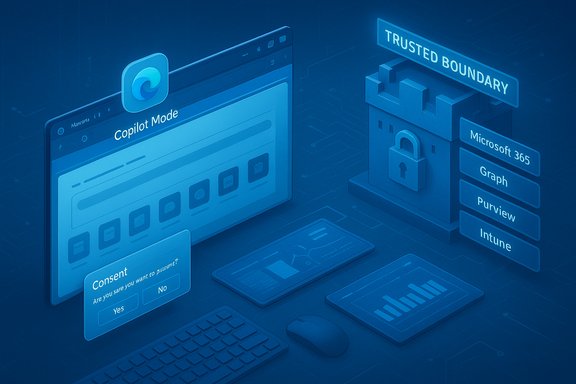
- Copilot Actions (agentic automations): With explicit user consent, Copilot can perform multi‑step browser tasks — open pages, click UI elements, fill forms, follow booking flows, unsubscribe from mailing lists, and assemble comparative summaries from multiple sites. These Actions can be triggered via text or voice and are surfaced with visible consent dialogs and action plans before any sensitive steps are taken.
- Journeys (session memory): Edge will group related browsing sessions into topic cards so users can resume research or multi‑step work without hunting through tabs or history. Journeys can draw on recent history if the user opts into Page Context.
- Multi‑tab reasoning and Page Context: When allowed, Copilot can read and synthesize the contents of multiple open tabs to produce consolidated answers (e.g., product comparisons, combined research summaries). Page Context and history access are explicit opt‑ins controlled by users and admins.
- Enterprise grounding and connectors: Edge for Business copies Microsoft’s broader Copilot strategy: agent responses and actions can be grounded in Microsoft 365 data (mail, documents, calendar) and tenant policies so results and automations can incorporate private, organizational content while respecting DLP and sensitivity labels.
- On‑device protections and safety features: Microsoft bundles protections such as a local‑AI “scareware blocker” for full‑screen scams and expanded password and breach monitoring. Administrators get additional policy options to control what Copilot can access and do inside managed environments.
- Administrative controls for data boundaries: Edge for Business introduces policy tooling intended to let admins define trusted boundaries for web apps, enforce copy/paste restrictions, direct downloads to OneDrive for Business, and apply Intune Mobile Application Management profiles to BYOD or externally managed devices. These controls aim to keep sensitive data from leaving the designated organizational perimeter.
The business specifics announced by Microsoft and reported by press
Microsoft describes Edge for Business as a “secure enterprise browser” that integrates Copilot and enterprise controls to reduce training friction and centralize management. The Edge for Business product page and Microsoft Learn docs confirm that Copilot Chat and Copilot-related features will execute under enterprise DLP and sensitivity label enforcement, and that admin controls extend across platforms (Windows, macOS, iOS, Android) via the Edge management service and Intune. SiliconANGLE’s reporting adds detail on how Copilot Mode will operate inside Edge for Business — noting a new daily briefing driven by Microsoft Graph, a watermark overlay to prompt caution around sharing sensitive files, and policy‑driven “trusted boundaries” that block data leave‑flows — all positioned as controls to keep agent activity compliant with corporate governance. Those items appear in the public coverage of the private preview but some elements (for example, timing and precise UX wording) require confirmation in official docs and admin portals.How this differs from the consumer Copilot and from the old Copilot sidebar
- Mode vs sidebar: The consumer Copilot experience began as a sidebar and chat box. Copilot Mode replaces the new‑tab surface with a conversational, persistent entry point and an assistant that follows the browsing session. This mode model changes expectations: the assistant is a primary interaction surface rather than an on‑demand sidebar.
- Agentic DOM control vs suggestion only: Consumer Copilot and earlier chat helpers could summarize pages and give instructions. Copilot Actions introduces DOM‑level, agentic behavior — the ability to interact with page elements programmatically on the user’s behalf. That is a qualitative jump and introduces both productivity upside and new security vectors.
- Enterprise grounding and governance: Edge for Business adds tenant-level controls, DLP enforcement, Intune MAM, and Microsoft Purview integration so administrators can decide what the browser—and its agent—may or may not access. That enterprise integration is the main differentiator that makes agentic browsing viable for regulated environments.
Verification: What’s confirmed, what’s inferred, and what remains unverified
Because features that change data flows and automation boundaries are high‑risk for enterprises, it’s important to map claims back to official documentation.- Confirmed by Microsoft: Copilot Actions, Journeys, multi‑tab context, and the opt‑in Page Context settings are part of the Copilot Mode rollout and are currently available as limited previews in some markets (U.S. first for many features). Microsoft’s Edge team documents the feature set and the opt‑in consent model.
- Confirmed by Microsoft docs: Enterprise-grade controls, DLP/Purview integration, and Intune management for Edge for Business are in the official product materials and Learn documentation. These sources describe how DLP policies can restrict Copilot processing of content with sensitivity labels and how admin policies can govern Copilot capabilities inside Edge for Business.
- Confirmed by pricing / entitlement docs: Microsoft sells Copilot as a paid add‑on (Microsoft 365 Copilot) for many enterprise scenarios, and some advanced features across Microsoft’s Copilot ecosystem require appropriate licensing or metered billing. Public pricing pages and product descriptions make clear that some Copilot capabilities are tied to subscriptions or add‑ons. That suggests some Edge Copilot features will require corresponding Copilot licensing at the tenant level. However, exact entitlement rules for Edge for Business agentic actions were not fully enumerated in product pages at the time of reporting; licensing and quota detail should be validated via your Microsoft account representative before wide deployment.
- Reported by press but needing admin console verification: The SiliconANGLE claim that the full Copilot Mode enterprise rollout will happen in February (or that specific calendar date applies to all features) is not mirrored in Microsoft’s public blog post or the Edge for Business product page available at press time. Treat stated calendar expectations in press pieces as provisional until confirmed in Microsoft’s commercial or admin announcements. Flag dates that are mentioned in third‑party articles as not-yet-official unless backed by Microsoft’s roadmap or message center.
- Potentially true but not yet documented in an admin KB: SiliconANGLE’s description of a watermark overlay triggered in‑browser to warn users before copying sensitive content aligns conceptually with Microsoft Purview’s dynamic watermarking for Office content, but public Microsoft roadmaps primarily reference watermarking for Office files rather than a browser overlay that intercepts copy/paste. Until a documented admin policy or product changelog shows a browser-level watermark overlay tied to sensitivity labels, treat this as plausible but unverified and validate against your tenant’s Edge for Business policy options.
Strengths — what enterprises stand to gain
- Real productivity gains for repetitive web processes. Agentic automations can collapse multi‑step workflows into single commands (search across catalogs, assemble comparisons, unsubscribe flows), saving time across procurement, research, HR onboarding, and vendor interactions. Early previews show tangible convenience for repetitive, structurally similar tasks.
- Enterprise grounding and governance. By integrating Copilot with Microsoft 365 connectors, Purview DLP, and Intune, organizations can make agent outputs auditable and enforce policy boundaries — a necessary prerequisite for real enterprise adoption. Microsoft’s documentation indicates DLP can now gate Copilot processing of labeled content.
- Administrative control and cross‑platform management. Edge for Business is designed to be manageable across Windows, macOS and mobile, reducing the friction of pilot programs and enabling admins to apply consistent policies and telemetry.
- Local protections reduce telemetry exposure. Features such as the on‑device scareware blocker are implemented locally, which lowers the need to send page content to cloud services for certain security checks. This is a practical win for privacy‑sensitive deployments.
Risks and blind spots — what should worry IT and legal teams
- Agent errors and brittle automations. Agentic actions operate on unpredictable web pages. Forms change, CAPTCHAs appear, and transaction flows vary by region and partner. Early previews have shown that Actions can be brittle and sometimes fail to complete complex transactions reliably. Agents should not be trusted with high‑value financial or regulatory actions without supervised review.
- Data exfiltration via browser automation. Agents that can read multiple tabs and interact with page elements introduce new vectors for data leakage. Even with DLP controls, complex flows (copy/paste, attachments, or clipboard actions) can create edge cases. Admins must test policy-enforced boundaries thoroughly and configure logging and alerts for unexpected agent activity.
- Licensing and cost surprises. Some Copilot features are tied to paid Microsoft 365 Copilot or metered billing for agent consumption. Pilots that scale without license planning can create unanticipated costs — verify licensing entitlements for Edge Copilot Actions that access organizational data or consume agent compute.
- Regulatory and compliance exposure. Healthcare, finance, and public sector tenants must scrutinize whether Copilot’s grounding and memory features comply with sectoral rules. Microsoft has added DLP hooks and label detection, but organizations must still enforce policy at the tenant level and perform legal review before using agentic features with regulated data.
- User experience and change management. Replacing the new‑tab surface with an assistant mode alters workflow and may degrade personalization. Microsoft Q&A and community feedback indicate friction where consumers or managed users find Copilot Mode different from past Copilot functions; corporations should expect support loads and require user training.
Practical rollout checklist for IT and security teams
- Inventory: Identify which Copilot/Edge features you plan to allow (Actions, Journeys, Page Context, voice). Map these to data categories and sensitivity labels in Purview.
- Entitlement: Confirm licensing with your Microsoft account team — decide whether your tenants need Microsoft 365 Copilot add‑ons for the features you’ll enable. Budget for metered agent usage where applicable.
- Policy baseline: Create DLP and sensitivity label rules to block Copilot processing on content that must not be used by agents. Set policies to block clipboard exports, downloads, or external sharing where required.
- Pilot scope: Start with a small business unit on non‑production devices. Use scenarios with clearly structured web flows (catalog searches, internal knowledge base aggregation) to measure reliability and false positives.
- Logging and audit: Ensure telemetry and action logs are retained and reviewed. Agents must provide visible cues for when they read or act — test that those cues appear and are logged.
- Fail‑safe gating: Configure actions to require explicit confirmation for any payment, credential reuse, or transfer of sensitive fields. Enforce “human in the loop” for high‑value operations.
- Training and change management: Prepare user guidance that explains opt‑in settings, how Journeys work, and when to disable Page Context. Include a quick escalation path for agent misbehavior.
Security deep dive: DLP, sensitivity labels and the “trusted boundary” model
Microsoft has extended Purview and DLP to control Copilot processing of labeled content. Specifically, admins can configure policies that detect sensitivity labels and restrict Copilot from processing protected content — an essential control for preventing tenant data from being used in agent responses or offloaded to external systems. Microsoft Learn documents this capability and explains policy configuration for Copilot Chat in Edge for managed Entra ID users. Separately, Microsoft’s broader roadmap shows dynamic watermarking and sensitivity‑label integrations for Office files — a complementary protection layer that helps deter casual data sharing. However, the exact UX described in some press accounts (a browser-level watermark overlay that intercepts copy/paste) is not yet visible in Microsoft’s admin documentation in the same explicit form; validate a tenant’s policy options in the Edge management console before assuming parity with Office watermark features. Treat press descriptions of new UI affordances as likely accurate conceptually but verify against your tenant’s policy templates and message center updates.Governance and legal considerations
- Contract and liability: Ensure your Microsoft contract and order forms clearly define how Copilot agent logs and outputs will be handled, whether tenant data may be used for model training, and any indemnities related to agent behavior. Microsoft provides tenant-level controls that can exclude enterprise data from training pipelines, but administrative settings and contractual terms must be reviewed.
- Records retention and audit trails: Agentic actions may initiate or complete web transactions. Create a retention policy for agent logs and tie auditing to your incident response playbook. If an agent performs an unauthorized data transfer, logs must be traceable to user consent and the action plan the agent presented.
- Regulatory review: In regulated sectors, insist on a legal and compliance review prior to pilot expansion. Demonstrate how DLP, sensitivity labels, and policy gating prevent Copilot from processing regulated PII, PHI, or financial data.
The bottom line — enterprise productivity vs governance trade‑off
Copilot Mode for Edge for Business is a practical, measured attempt to make agentic browsing viable inside organizations: Microsoft bundled agentic automation, session memory, and policy controls in a managed browser that integrates with Microsoft 365 governance tooling. The potential productivity gains are real, especially for repetitive, multi‑site workflows and research organization, but the approach raises new security and compliance responsibilities that are not optional.Enterprises should treat Copilot Mode as a controlled capability: pilot it with clear policy gating, verify licensing and telemetry, and require human confirmation for sensitive actions. Expect ongoing iteration: the feature set, availability windows, and admin controls will change as Microsoft scales previews and responds to customer feedback. Until your tenant’s policies and licensing are validated, avoid applying agentic actions to high‑value or regulated transactions.
Final recommendations
- Run an internal pilot focused on low‑risk, high‑repetition workflows to measure reliability and failure modes before expanding.
- Confirm licensing needs for Microsoft 365 Copilot or agent consumption to avoid unplanned costs.
- Lock down DLP and sensitivity-label policies for early pilots; enforce human approvals for any automated payments or credential re‑use.
- Validate any UI claims in press coverage (watermark overlays, February rollout dates) against the tenant’s Edge management console and Microsoft Message Center; treat press dates and UI descriptions as provisional until matched to official Microsoft admin documentation.
Copilot Mode’s arrival inside Edge for Business marks a significant inflection point: the browser is no longer only a renderer but a potential automation platform that sits at the intersection of user intent, enterprise data, and web transactions. For enterprises that invest in governance, pilot discipline, and licensing clarity, the feature promises measurable productivity improvements. For those that skip the fundamentals — policy gating, audits, and legal review — it risks producing costly compliance and security surprises. The right approach is pragmatic: test, constrain, monitor, and then scale.
Source: SiliconANGLE Copilot Mode makes Edge for Business into an enterprise-ready agentic browser - SiliconANGLE
