

Microsoft announced on May 13, 2026, that it is retiring Copilot Mode in Microsoft Edge and moving its core AI browsing features directly into the standard Edge experience across desktop, iOS, and Android. That is the official story of simplification: one less named mode, fewer visible seams, more features where users already work. The practical story is sharper. Microsoft is not pulling AI back from Edge; it is making AI harder to route around.
Copilot Mode always had the feel of a transitional object. It was introduced as an experimental way to make Edge feel less like a Chromium browser with a chatbot bolted to the side and more like a browser whose interface could be piloted through natural language. But the word mode did a lot of work. It implied a boundary, a choice, and a state you entered deliberately.
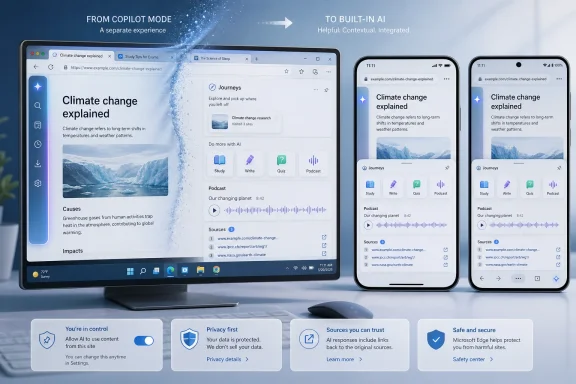
That boundary is now being erased. Microsoft says the Copilot Mode experience is being retired, while its marquee features are being folded into Edge itself. Copilot can reason across open tabs, use browsing context with permission, organize browsing history into topic-based Journeys, help with writing, generate quizzes, guide study sessions, and even turn open tabs into a podcast.
This is a familiar Microsoft maneuver. When a feature is controversial as a destination, it becomes infrastructure. The company did not need Copilot Mode to win as a separate Edge identity if the same capabilities could be redistributed into the new tab page, the sidebar, the writing surface, the mobile browser, and the history experience.
The result is a browser that looks less cluttered in marketing copy and more saturated in practice. Edge may have one fewer switch, but Copilot has more places to appear.
But the company is also simplifying the decision tree in its own favor. A separate Copilot Mode required users to opt into a conceptual frame: “I am now using the AI browser.” Folding those capabilities into default surfaces changes the psychology. Users are no longer deciding whether to enter Copilot Mode; they are deciding, feature by feature, how much of Edge they are willing to let Copilot interpret.
That distinction matters because browsers are not just apps. They are memory systems, identity systems, authentication surfaces, research notebooks, shopping assistants, work portals, and private diaries that pretend to be address bars. The more AI sits inside the browser, the more it sits near the richest behavioral data most people generate on a computer.
Microsoft knows this. Edge has never beaten Chrome by being merely compatible. It has competed through adjacent value: vertical tabs, Collections, sleeping tabs, PDF tools, shopping features, enterprise controls, sidebar apps, Bing integration, and now Copilot. The retirement of Copilot Mode is not a retreat from that strategy. It is the moment Microsoft stops treating AI browsing as a special exhibit and starts treating it as the floor plan.
That is important because mobile browsing is where the browser has the least space and the highest friction. On a phone, comparing tabs is annoying, reading long pages is tiring, and copying information between apps is still more cumbersome than it should be. If Copilot can actually summarize several pages, compare options, and speak through the process while looking at what is on screen, the feature has a much better claim to utility than another desktop button competing for toolbar space.
It also raises the stakes for trust. On mobile, the browser is often closer to personal life than work life: banking, travel, health searches, shopping, maps, family logistics, and private messaging links all pass through the same small window. The promise of Voice and Vision is that Copilot can see what you are seeing and help in real time. The concern is exactly the same sentence with a different tone.
Microsoft says these experiences depend on user permission, and that distinction should not be waved away. Permission models matter. But IT professionals have learned to ask the next question: whether the permission is understandable, durable, revocable, auditable, and separated cleanly enough that a user can accept one helpful feature without accidentally enabling a wider behavioral profile.
That is where “AI in more places” becomes an administrative problem. The more distributed the feature set becomes, the harder it is for users and help desks to know which setting controls which behavior.
An AI-organized history changes the premise. Instead of a list, Microsoft wants to group browsing activity by topic and suggest next steps. That could be genuinely useful for research-heavy tasks: planning a trip, comparing laptops, troubleshooting a driver issue, choosing a college course, investigating a medical bill, or assembling a parts list for a home server.
But it also moves the browser from record keeper to narrator. Once Edge summarizes what you were doing, clusters it into themes, and proposes what to do next, it is making judgments about intent. That is useful when the inference is correct and disorienting when it is not.
For WindowsForum readers, the practical question is not whether AI history is clever. It is whether it preserves the affordances that made old history dependable. Can users still get back to the exact page? Can they distinguish visited pages from generated summaries? Can administrators disable or constrain the feature in managed environments? Can a user clear the underlying data and the inferred layer together?
AI products often fail not because they produce no value, but because they blur the line between source and synthesis. In a browser, that line is sacred. A bad summary is annoying; a bad summary that replaces the path back to the original page is a workflow tax.
Microsoft has been moving away from some sidebar app experiences while continuing to preserve and promote Copilot. That asymmetry is why the “simplification” pitch has met skepticism. The company appears willing to simplify Edge by removing or reducing features that require maintenance, while keeping the AI layer that advances its broader platform strategy.
That does not mean every removed sidebar feature deserved to survive. Browsers accrete cruft quickly, and Edge has sometimes felt like a product where every team at Microsoft got a square inch. There is a legitimate case for reducing surface area. The problem is that Copilot increasingly occupies the surface area being cleared.
This is why user frustration often sounds less like anti-AI sentiment and more like a complaint about product governance. People can accept a browser changing. They are less forgiving when useful, user-directed features disappear while vendor-directed features become harder to ignore.
A browser earns loyalty through muscle memory. When Microsoft rearranges that memory around Copilot, it is betting that AI convenience will outweigh the irritation of displacement.
This is not merely search assistance. It is content transformation. Edge is being positioned as a browser that does not just retrieve the web but reshapes it into formats Microsoft believes are more useful: quiz, summary, draft, lesson, conversation, podcast.
For students and knowledge workers, some of this will land. A browser that can quiz you on a technical article or summarize a pile of documentation while you commute has obvious appeal. Sysadmins reading release notes, developers scanning framework changes, and power users comparing hardware specs can all imagine situations where the browser doing first-pass synthesis saves time.
The risk is that synthesis becomes a substitute for reading before it becomes reliable enough to deserve that role. A podcast generated from tabs sounds convenient, but the moment it misstates a caveat in a security advisory or flattens a nuanced vendor document into confident mush, convenience becomes liability. The web is already full of derivative summaries. Turning the browser itself into a derivative engine will require unusually clear source grounding.
Microsoft’s strongest case is that the browser is the right place for this because it has the surrounding context. Its weakest case is the same fact. Context makes the assistant useful, but it also makes failures more consequential.
Enterprise IT will be less romantic. Admins will ask what data is processed, where it is processed, which tenant policies apply, whether consumer Microsoft accounts behave differently from work accounts, how mobile and desktop settings diverge, and whether Copilot features can be disabled without breaking standard browsing. They will also ask whether Edge for Business exposes controls granular enough to separate acceptable AI assistance from unacceptable context sharing.
That last point is critical. Many organizations are not opposed to AI in principle. They are opposed to uncontrolled AI operating over confidential tabs, internal dashboards, customer records, legal documents, or regulated workflows. A feature that can compare public product pages is one thing. A feature that can reason across open tabs in a browser session containing HR systems and privileged admin consoles is another.
Microsoft’s enterprise advantage has always been manageability. Edge can make a stronger AI argument in business settings than a startup browser can if the controls are real, documented, and enforceable. But that advantage disappears quickly if features arrive faster than policy clarity.
The burden is on Microsoft to prove that “built into Edge” does not mean “enabled beyond comprehension.” In 2026, the default enterprise posture toward AI is not awe. It is conditional permission.
A user comparing debt consolidation pages, searching symptoms, reading layoff laws, checking competitor job postings, or reviewing immigration forms may not think of each page as a secret. Together, they tell a story. Journeys, tab reasoning, and long-term personalization are valuable precisely because they can detect that story.
That is why the interface language around permissions needs to be unusually plain. “Use my browsing history to improve answers” is a very different mental model from “create an inferred map of my interests, projects, and possible next actions.” Both may describe aspects of the same system, but only one gives the user a visceral sense of what is being exchanged.
Microsoft is hardly alone here. Every major browser vendor is looking at AI as a way to make the web feel less laborious, and every AI company wants the browser because the browser is where intent becomes visible. But Microsoft faces a particular credibility problem because Windows users have spent years watching promotional surfaces, account nudges, Edge prompts, Bing defaults, and Copilot entry points appear in places they did not expect.
Even when a specific Copilot feature is opt-in, it arrives in a climate of accumulated suspicion. Microsoft cannot solve that with a blog post. It has to solve it with restraint.
AI gives Microsoft a new wedge. If Copilot is already in Windows, Microsoft 365, Teams, Outlook, and the broader productivity stack, then Edge becomes the place where those threads meet the open web. The browser is no longer just a rendering engine; it is the connective tissue between enterprise knowledge, web content, and personal task management.
That strategy is coherent. It may even be the only plausible way for Edge to gain relevance without winning a pure browser-war rematch. Microsoft is trying to define the next browser competition around assistance rather than page loading.
But coherence is not the same as inevitability. Users can smell when a product’s roadmap serves the vendor’s ecosystem ambitions more than their immediate needs. If Copilot makes Edge feel faster, calmer, and more capable, the strategy works. If it makes Edge feel like the front end for Microsoft’s AI adoption metrics, users will flee to browsers that promise less intelligence and more silence.
The irony is that Edge’s best traditional features were often the quiet ones. Sleeping tabs, vertical tabs, PDF handling, Collections, efficiency mode, and enterprise policy support did not need to announce a platform revolution. They simply made browsing better. Copilot now has to meet that standard, not just Microsoft’s strategic one.
The key phrase is accountable to the page. The browser’s authority comes from showing users where information lives. AI features should enhance that relationship, not obscure it. Every summary should make it easy to return to the source. Every inferred Journey should preserve the underlying visited pages. Every podcast or quiz should be understood as a generated derivative, not a substitute for the material.
This is where Edge can differentiate if Microsoft chooses discipline. The company has the browser, the operating system, the enterprise controls, the identity layer, and the productivity suite. It could build AI browsing that is transparent, manageable, and source-faithful.
Or it could chase engagement. It could turn every blank surface into a prompt, every history item into a recommendation, every writing box into a Copilot invitation, and every act of reading into another chance to summarize. That path may increase usage. It will not necessarily increase trust.
Source: Windows Central Microsoft is "simplifying" Edge by putting AI in more places
 Microsoft Kills the Mode and Keeps the Machine
Copilot Mode always had the feel of a transitional object. It was introduced as an experimental way to make Edge feel less like a Chromium browser with a chatbot bolted to the side and more like a browser whose interface could be piloted through natural language. But the word mode did a lot of work. It implied a boundary, a choice, and a state you entered deliberately.That boundary is now being erased. Microsoft says the Copilot Mode experience is being retired, while its marquee features are being folded into Edge itself. Copilot can reason across open tabs, use browsing context with permission, organize browsing history into topic-based Journeys, help with writing, generate quizzes, guide study sessions, and even turn open tabs into a podcast.
This is a familiar Microsoft maneuver. When a feature is controversial as a destination, it becomes infrastructure. The company did not need Copilot Mode to win as a separate Edge identity if the same capabilities could be redistributed into the new tab page, the sidebar, the writing surface, the mobile browser, and the history experience.
The result is a browser that looks less cluttered in marketing copy and more saturated in practice. Edge may have one fewer switch, but Copilot has more places to appear.
The Simplification Pitch Hides a Platform Bet
Microsoft’s chosen word, “simplify,” is not wrong in the narrow interface-design sense. Removing a named mode can reduce confusion for users who do not want to understand whether they are in normal Edge, AI Edge, Copilot Edge, or some preview variant of all three. If AI search, page summarization, tab comparison, and writing help are now treated as ordinary browser features, the product story becomes cleaner.But the company is also simplifying the decision tree in its own favor. A separate Copilot Mode required users to opt into a conceptual frame: “I am now using the AI browser.” Folding those capabilities into default surfaces changes the psychology. Users are no longer deciding whether to enter Copilot Mode; they are deciding, feature by feature, how much of Edge they are willing to let Copilot interpret.
That distinction matters because browsers are not just apps. They are memory systems, identity systems, authentication surfaces, research notebooks, shopping assistants, work portals, and private diaries that pretend to be address bars. The more AI sits inside the browser, the more it sits near the richest behavioral data most people generate on a computer.
Microsoft knows this. Edge has never beaten Chrome by being merely compatible. It has competed through adjacent value: vertical tabs, Collections, sleeping tabs, PDF tools, shopping features, enterprise controls, sidebar apps, Bing integration, and now Copilot. The retirement of Copilot Mode is not a retreat from that strategy. It is the moment Microsoft stops treating AI browsing as a special exhibit and starts treating it as the floor plan.
Mobile Edge Becomes the Real Test Bed
The most consequential part of the announcement may not be on Windows at all. Microsoft is bringing more Copilot features to Edge on iOS and Android, including the ability to reason across open tabs and interact through Voice and Vision. The company’s AI browser strategy no longer depends on desktop users accepting a sidebar.That is important because mobile browsing is where the browser has the least space and the highest friction. On a phone, comparing tabs is annoying, reading long pages is tiring, and copying information between apps is still more cumbersome than it should be. If Copilot can actually summarize several pages, compare options, and speak through the process while looking at what is on screen, the feature has a much better claim to utility than another desktop button competing for toolbar space.
It also raises the stakes for trust. On mobile, the browser is often closer to personal life than work life: banking, travel, health searches, shopping, maps, family logistics, and private messaging links all pass through the same small window. The promise of Voice and Vision is that Copilot can see what you are seeing and help in real time. The concern is exactly the same sentence with a different tone.
Microsoft says these experiences depend on user permission, and that distinction should not be waved away. Permission models matter. But IT professionals have learned to ask the next question: whether the permission is understandable, durable, revocable, auditable, and separated cleanly enough that a user can accept one helpful feature without accidentally enabling a wider behavioral profile.
That is where “AI in more places” becomes an administrative problem. The more distributed the feature set becomes, the harder it is for users and help desks to know which setting controls which behavior.
Journeys Turns Browser History Into an Interpretation Layer
Journeys may be the feature that best captures the shift. Traditional browser history is crude but honest: a chronological list of places visited, usually searchable by title or URL. It is not elegant, but it preserves a certain literalness. You went there, at roughly that time, and the browser recorded it.An AI-organized history changes the premise. Instead of a list, Microsoft wants to group browsing activity by topic and suggest next steps. That could be genuinely useful for research-heavy tasks: planning a trip, comparing laptops, troubleshooting a driver issue, choosing a college course, investigating a medical bill, or assembling a parts list for a home server.
But it also moves the browser from record keeper to narrator. Once Edge summarizes what you were doing, clusters it into themes, and proposes what to do next, it is making judgments about intent. That is useful when the inference is correct and disorienting when it is not.
For WindowsForum readers, the practical question is not whether AI history is clever. It is whether it preserves the affordances that made old history dependable. Can users still get back to the exact page? Can they distinguish visited pages from generated summaries? Can administrators disable or constrain the feature in managed environments? Can a user clear the underlying data and the inferred layer together?
AI products often fail not because they produce no value, but because they blur the line between source and synthesis. In a browser, that line is sacred. A bad summary is annoying; a bad summary that replaces the path back to the original page is a workflow tax.
The Sidebar Fight Was a Preview of the Bigger Battle
The Edge sidebar has become a symbol of Microsoft’s browser dilemma. To some users, it was one of Edge’s best differentiators: a place to pin tools, apps, search, messaging, productivity sites, and quick utilities. To others, it was yet another strip of Microsoft-controlled real estate used to promote services they did not ask for.Microsoft has been moving away from some sidebar app experiences while continuing to preserve and promote Copilot. That asymmetry is why the “simplification” pitch has met skepticism. The company appears willing to simplify Edge by removing or reducing features that require maintenance, while keeping the AI layer that advances its broader platform strategy.
That does not mean every removed sidebar feature deserved to survive. Browsers accrete cruft quickly, and Edge has sometimes felt like a product where every team at Microsoft got a square inch. There is a legitimate case for reducing surface area. The problem is that Copilot increasingly occupies the surface area being cleared.
This is why user frustration often sounds less like anti-AI sentiment and more like a complaint about product governance. People can accept a browser changing. They are less forgiving when useful, user-directed features disappear while vendor-directed features become harder to ignore.
A browser earns loyalty through muscle memory. When Microsoft rearranges that memory around Copilot, it is betting that AI convenience will outweigh the irritation of displacement.
Study, Learn, Write, Quiz, Podcast: Edge Becomes a Content Machine
The new desktop features are a useful map of Microsoft’s assumptions about where AI browsing is headed. Study and Learn mode can turn web material into guided learning sessions. Copilot quizzes can test users on a page or topic. Writing assistant can draft, rewrite, and adjust tone in places where users already type. The podcast generator can convert open tabs into audio.This is not merely search assistance. It is content transformation. Edge is being positioned as a browser that does not just retrieve the web but reshapes it into formats Microsoft believes are more useful: quiz, summary, draft, lesson, conversation, podcast.
For students and knowledge workers, some of this will land. A browser that can quiz you on a technical article or summarize a pile of documentation while you commute has obvious appeal. Sysadmins reading release notes, developers scanning framework changes, and power users comparing hardware specs can all imagine situations where the browser doing first-pass synthesis saves time.
The risk is that synthesis becomes a substitute for reading before it becomes reliable enough to deserve that role. A podcast generated from tabs sounds convenient, but the moment it misstates a caveat in a security advisory or flattens a nuanced vendor document into confident mush, convenience becomes liability. The web is already full of derivative summaries. Turning the browser itself into a derivative engine will require unusually clear source grounding.
Microsoft’s strongest case is that the browser is the right place for this because it has the surrounding context. Its weakest case is the same fact. Context makes the assistant useful, but it also makes failures more consequential.
Enterprise IT Will Ask the Boring Questions First
For consumers, the Edge Copilot push will mostly be judged by feel. Does it get in the way? Does it help? Can it be turned off? Does it make the browser feel heavier? Does it respect obvious boundaries?Enterprise IT will be less romantic. Admins will ask what data is processed, where it is processed, which tenant policies apply, whether consumer Microsoft accounts behave differently from work accounts, how mobile and desktop settings diverge, and whether Copilot features can be disabled without breaking standard browsing. They will also ask whether Edge for Business exposes controls granular enough to separate acceptable AI assistance from unacceptable context sharing.
That last point is critical. Many organizations are not opposed to AI in principle. They are opposed to uncontrolled AI operating over confidential tabs, internal dashboards, customer records, legal documents, or regulated workflows. A feature that can compare public product pages is one thing. A feature that can reason across open tabs in a browser session containing HR systems and privileged admin consoles is another.
Microsoft’s enterprise advantage has always been manageability. Edge can make a stronger AI argument in business settings than a startup browser can if the controls are real, documented, and enforceable. But that advantage disappears quickly if features arrive faster than policy clarity.
The burden is on Microsoft to prove that “built into Edge” does not mean “enabled beyond comprehension.” In 2026, the default enterprise posture toward AI is not awe. It is conditional permission.
The Privacy Debate Is Really About Inference
The obvious privacy question is whether Copilot can access tabs, history, screen contents, or typed text. The deeper question is what can be inferred when those signals are combined. Browsing data is not sensitive only when a page contains a password, diagnosis, invoice, or private message. It is sensitive because patterns reveal intent.A user comparing debt consolidation pages, searching symptoms, reading layoff laws, checking competitor job postings, or reviewing immigration forms may not think of each page as a secret. Together, they tell a story. Journeys, tab reasoning, and long-term personalization are valuable precisely because they can detect that story.
That is why the interface language around permissions needs to be unusually plain. “Use my browsing history to improve answers” is a very different mental model from “create an inferred map of my interests, projects, and possible next actions.” Both may describe aspects of the same system, but only one gives the user a visceral sense of what is being exchanged.
Microsoft is hardly alone here. Every major browser vendor is looking at AI as a way to make the web feel less laborious, and every AI company wants the browser because the browser is where intent becomes visible. But Microsoft faces a particular credibility problem because Windows users have spent years watching promotional surfaces, account nudges, Edge prompts, Bing defaults, and Copilot entry points appear in places they did not expect.
Even when a specific Copilot feature is opt-in, it arrives in a climate of accumulated suspicion. Microsoft cannot solve that with a blog post. It has to solve it with restraint.
Chrome Is the Target, but Windows Is the Leverage
Edge’s market problem has always been that being good is not enough. Modern Edge is fast, compatible, and often technically excellent, but Chrome benefits from habit, Google account gravity, Android defaults, and web developer assumptions. Microsoft needed Edge to be more than a Chrome alternative. It needed Edge to be the Microsoft browser for a Microsoft-shaped workflow.AI gives Microsoft a new wedge. If Copilot is already in Windows, Microsoft 365, Teams, Outlook, and the broader productivity stack, then Edge becomes the place where those threads meet the open web. The browser is no longer just a rendering engine; it is the connective tissue between enterprise knowledge, web content, and personal task management.
That strategy is coherent. It may even be the only plausible way for Edge to gain relevance without winning a pure browser-war rematch. Microsoft is trying to define the next browser competition around assistance rather than page loading.
But coherence is not the same as inevitability. Users can smell when a product’s roadmap serves the vendor’s ecosystem ambitions more than their immediate needs. If Copilot makes Edge feel faster, calmer, and more capable, the strategy works. If it makes Edge feel like the front end for Microsoft’s AI adoption metrics, users will flee to browsers that promise less intelligence and more silence.
The irony is that Edge’s best traditional features were often the quiet ones. Sleeping tabs, vertical tabs, PDF handling, Collections, efficiency mode, and enterprise policy support did not need to announce a platform revolution. They simply made browsing better. Copilot now has to meet that standard, not just Microsoft’s strategic one.
AI Browsing Is Useful Only When It Stays Accountable to the Page
There is a version of this future that is genuinely better. A browser that can compare six open tabs without losing the source trail would save time. A writing assistant that appears only when requested and keeps data boundaries clear would be welcome. A study mode that helps students interrogate a source instead of replacing it could be valuable. A mobile assistant that lets users talk through a complex page while walking or cooking could be the rare AI feature that feels native to the device.The key phrase is accountable to the page. The browser’s authority comes from showing users where information lives. AI features should enhance that relationship, not obscure it. Every summary should make it easy to return to the source. Every inferred Journey should preserve the underlying visited pages. Every podcast or quiz should be understood as a generated derivative, not a substitute for the material.
This is where Edge can differentiate if Microsoft chooses discipline. The company has the browser, the operating system, the enterprise controls, the identity layer, and the productivity suite. It could build AI browsing that is transparent, manageable, and source-faithful.
Or it could chase engagement. It could turn every blank surface into a prompt, every history item into a recommendation, every writing box into a Copilot invitation, and every act of reading into another chance to summarize. That path may increase usage. It will not necessarily increase trust.
Microsoft’s Browser Is Now a Consent Surface
The retirement of Copilot Mode makes one thing clear: Edge’s future will not be divided neatly between AI and non-AI browsing. The question is how much agency users and administrators retain as the features spread across the product.- Microsoft is retiring Copilot Mode, but the underlying AI capabilities are moving into standard Edge experiences rather than disappearing.
- Edge on mobile is becoming a major Copilot surface, with tab reasoning, Voice, Vision, Journeys, and a redesigned new tab page narrowing the gap with desktop.
- Journeys changes browser history from a chronological record into an interpreted layer that can be useful only if it preserves clear access to original pages.
- Writing, study, quiz, and podcast features push Edge beyond browsing and into content transformation, which makes source transparency more important.
- Enterprise acceptance will depend less on novelty than on policy controls, data boundaries, account separation, and auditability.
- The central user choice is shifting from whether to enter an AI mode to whether to grant contextual access across tabs, history, pages, and input fields.
Source: Windows Central Microsoft is "simplifying" Edge by putting AI in more places
