

Microsoft announced on May 13, 2026, that it is retiring Copilot Mode in Microsoft Edge, the experimental AI browsing mode it introduced in July 2025, while moving many of its capabilities directly into Edge across desktop and mobile. The headline sounds like a retreat, but the product move is closer to absorption than surrender. Microsoft is not pulling AI out of the browser; it is removing the label that made AI feel like a separate browser-within-a-browser. For users and administrators, that distinction matters more than the branding.
Copilot Mode was always a strange halfway house. Microsoft presented it as an experimental opt-in experience that could rethink browsing around AI, but it lived inside a browser that already had a sidebar, a new tab page, Bing integrations, profile sync, enterprise controls, and years of accumulated Edge-specific features. In practice, Copilot Mode was less a new browser than a test chamber for deciding which AI interactions deserved to become ordinary Edge behavior.
That is what Microsoft now says has happened. The company’s latest Edge update says the features that made Copilot Mode useful are being integrated directly into the browser, making the dedicated mode unnecessary. Existing Copilot Mode users are not being tossed out of the test program entirely; Microsoft says they will continue to receive priority access to upcoming AI features through Edge Preview.
This is a familiar Microsoft maneuver. A feature begins life as a branded experience, gathers telemetry and user feedback, and then either disappears or becomes infrastructure. Copilot Mode is taking the second path: the sign on the door is coming down, but the machinery behind it is spreading through the building.
That should temper any celebration from users who disliked the idea of an AI-first browser. Retiring Copilot Mode does not mean Edge is returning to a pre-Copilot state. It means Microsoft believes Copilot has graduated from novelty to plumbing.
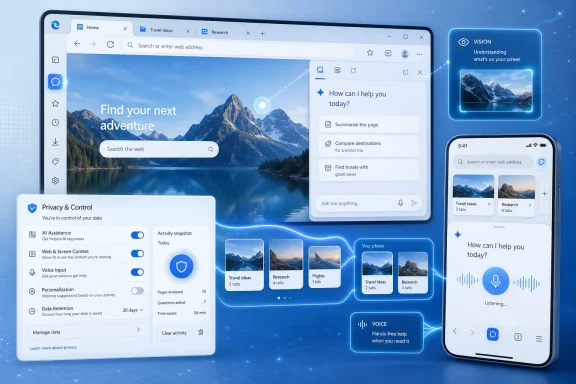
On Edge mobile, Copilot can now reason across multiple open tabs, reducing the need to copy text between pages or manually explain what the user is comparing. That was one of Copilot Mode’s central pitches on desktop: the browser should know enough about the user’s active browsing session to help make sense of it. Bringing that model to mobile matters because mobile browsing is where tab sprawl becomes least manageable and most invisible.
Microsoft is also extending Journeys to mobile after previously offering the feature on desktop. Journeys uses AI to group browsing history into meaningful topics, which sounds mundane until you consider what browser history has traditionally been: a chronological junk drawer. If Microsoft can turn that into coherent research threads, Edge becomes more than a rendering engine with bookmarks. It becomes a memory system for the web.
That is the strategic bet underneath all of this. Search engines organize the public web. Browsers organize a user’s interaction with it. Microsoft wants Copilot in Edge to sit at the second layer, where the context is more personal, more recent, and more commercially valuable.
The risk is equally obvious. The more useful the browser becomes as an AI assistant, the more sensitive the underlying context becomes. Tabs, history, searches, drafts, shopping comparisons, work portals, health research, and private reading habits are not just “signals.” They are a behavioral map.
That move follows the broader direction of the AI industry. The frontier is no longer simply asking a bot a question. It is asking a system that can see your app, understand your intent, and perform a task across software boundaries. Edge is a natural place for Microsoft to push that vision because the browser is already where many users live during work, shopping, research, entertainment, and administration.
But screen-aware AI also creates an uneasy new trust bargain. A browser that can “see” what is on screen can help summarize, compare, and explain. It can also feel like an observer sitting inside the most revealing app on the PC. Microsoft emphasizes user controls and privacy settings, but the user experience will need to make those boundaries obvious in the moment, not buried behind policy language.
This is where Microsoft’s history works against it. Windows users have long memories of browser defaults, promotional prompts, and features that seemed optional until they became persistent. Edge is a better browser than its reputation suggests, but Microsoft’s habit of pushing its ecosystem through Windows has made many users suspicious of anything framed as helpful.
Multi-tab Copilot reasoning on mobile is particularly telling. Phone browsers are often worse at context switching than desktop browsers because users cannot see several pages at once. If Copilot can compare, summarize, and track intent across mobile tabs, it may solve a real usability problem rather than merely attach AI to a product for marketing purposes.
The redesigned new tab page rolling out to Edge mobile also fits the same pattern. Microsoft wants the start surface of the browser to feel less like a blank utility and more like an AI-guided dashboard. That will appeal to users who already treat the browser as their main productivity surface, but it may irritate those who want mobile Edge to stay fast, quiet, and predictable.
Journeys on mobile is the sleeper feature. A phone browser history organized around topics could be useful for students, shoppers, travelers, and anyone doing fragmented research across spare minutes. It could also become another place where Microsoft’s taste for personalization collides with the user’s desire for a simple list of pages visited.
The old distinction between “desktop power features” and “mobile convenience features” is fading. Microsoft is betting that AI makes the smaller screen more capable, not merely more assisted.
Other features show how wide Microsoft now wants the browser’s job description to be. The company says users can create a podcast by prompting Copilot with a topic, and Edge can turn tabs into an audio experience in supported markets. That is less “browser feature” than “media generation service embedded in the browser.”
There is a logic here. If a user is researching a topic across several pages, turning that material into a portable listening session could be genuinely useful. It also turns Edge into another front end for Microsoft’s AI subscription and usage-limit strategy, especially where extended usage is attached to Microsoft 365 plans.
The writing assistant, quizzes, memory, podcasts, tab reasoning, and voice controls all point in the same direction. Microsoft is trying to make the browser not only a place where information appears, but a place where information is transformed into work product. That is a much larger ambition than adding a chatbot button.
The question is whether Edge users want one browser to do all of this. Enthusiasts often prize configurability, and administrators prize predictability. A browser that becomes a writing coach, study tutor, tab analyst, memory engine, and podcast generator may be powerful, but it also becomes harder to explain, manage, and trust.
Copilot in the sidebar, contextual grounding, long-term memory, writing help, multi-tab reasoning, and screen-aware capabilities all raise different questions. Which features are available to managed users? Which are consumer-only? Which require Microsoft 365 subscriptions? Which send data to cloud services? Which can see work content? Which are governed by enterprise data protection rather than consumer Copilot terms?
Microsoft has been moving toward more granular controls for AI experiences, and Edge for Business already sits in a privileged position because so much corporate work happens in browser tabs. But granularity has a cost. Every new toggle is another setting to audit, another help desk article to write, another compliance meeting to survive.
The “Browse with Copilot” detail is especially worth watching. As part of retiring Copilot Mode, Microsoft says Copilot Actions, previously in limited preview, becomes Browse with Copilot on Edge desktop for Microsoft 365 Premium subscribers in the United States only, with usage limits. That suggests the most agentic browsing capabilities may increasingly be treated as premium, region-limited features rather than default browser behavior.
That may be sensible from a cost and compliance perspective. It also means admins should not assume that “Copilot in Edge” is one thing. It is becoming a bundle of experiences with different eligibility, licensing, geography, and data-handling implications.
That is the right language, but the hard part is not the statement. The hard part is making the product behave in a way that matches ordinary users’ expectations. Browsing data occupies a special category of sensitivity because it often includes the parts of life people have not yet spoken aloud: medical worries, job searches, financial stress, political reading, relationship problems, and work-in-progress ideas.
Long-term memory makes that tension sharper. A Copilot that remembers browsing history can provide better context and more personalized help. It can also make users wonder what exactly is being remembered, where it is stored, how long it persists, and whether deleting browser history is enough to remove the AI’s context.
Microsoft’s broader Copilot documentation already distinguishes between chat history, personalization, model training, and Edge-specific personalization and advertising settings. That distinction may be clear to privacy lawyers and product managers, but it is not intuitive to normal users. If Copilot can personalize based on some Microsoft activity while Edge has its own personalization toggle, the interface needs to communicate that without sending users into a maze.
The company’s strongest privacy argument is user control. Its weakest is user patience. People may accept AI features that are clearly useful and clearly optional. They are less forgiving when they feel settings are fragmented, defaults are ambiguous, or promotional surfaces keep returning after being dismissed.
That happened with cloud identity, OneDrive integration, Windows Search web results, Teams hooks, and now Copilot. The company’s long-term instinct is integration. If Microsoft believes AI is a foundational computing layer, it will not leave it confined to a mode.
This is why the retirement of Copilot Mode may actually make Copilot harder to avoid. A mode has a boundary. A mode can be turned off and mentally filed away. A distributed set of AI affordances across new tabs, sidebars, text boxes, mobile history, voice controls, and screen analysis is harder to ignore and harder to evaluate as one thing.
For enthusiasts, that can feel like the browser is being colonized. For Microsoft, it is simply the browser becoming competitive in an AI-first market. Both readings can be true.
Edge has often struggled with perception more than capability. It is fast, compatible, and rich with features, but many users see it through the lens of Windows prompts and Microsoft account nudges. Adding more Copilot may make Edge more distinctive, but it also risks reinforcing the idea that Edge is less a neutral browser than the front door to Microsoft’s services strategy.
That is why companies are experimenting with AI browsers, agentic browsing, summarized tabs, and assistants that can act across pages. The prize is not merely a nicer tab manager. It is the ability to mediate the user’s relationship with the web.
Microsoft has advantages here. It owns Windows, ships Edge by default, operates Bing, sells Microsoft 365, and has made Copilot the brand umbrella for its AI push. It can connect browser AI to productivity subscriptions, enterprise identity, and Windows experiences in a way smaller browser makers cannot.
It also has disadvantages. Users are wary of bundling. Regulators scrutinize platform leverage. Enterprises move slowly when data boundaries are unclear. And Chrome remains the default habit for much of the desktop web, even when Edge is technically competent.
The AI browser race may therefore be decided less by model quality than by trust and restraint. A browser assistant that saves users time will be welcomed. A browser assistant that feels like another layer of Microsoft persuasion will be disabled, blocked, or avoided.
Source: Neowin Microsoft is killing Copilot Mode in Edge, but AI features aren't going away
 Microsoft Retires the Mode, Not the Mission
Copilot Mode was always a strange halfway house. Microsoft presented it as an experimental opt-in experience that could rethink browsing around AI, but it lived inside a browser that already had a sidebar, a new tab page, Bing integrations, profile sync, enterprise controls, and years of accumulated Edge-specific features. In practice, Copilot Mode was less a new browser than a test chamber for deciding which AI interactions deserved to become ordinary Edge behavior.That is what Microsoft now says has happened. The company’s latest Edge update says the features that made Copilot Mode useful are being integrated directly into the browser, making the dedicated mode unnecessary. Existing Copilot Mode users are not being tossed out of the test program entirely; Microsoft says they will continue to receive priority access to upcoming AI features through Edge Preview.
This is a familiar Microsoft maneuver. A feature begins life as a branded experience, gathers telemetry and user feedback, and then either disappears or becomes infrastructure. Copilot Mode is taking the second path: the sign on the door is coming down, but the machinery behind it is spreading through the building.
That should temper any celebration from users who disliked the idea of an AI-first browser. Retiring Copilot Mode does not mean Edge is returning to a pre-Copilot state. It means Microsoft believes Copilot has graduated from novelty to plumbing.
The Browser Is Becoming the Context Window
The most consequential change is not the loss of the Copilot Mode name. It is the expansion of what Copilot can see, remember, and act upon inside Edge.On Edge mobile, Copilot can now reason across multiple open tabs, reducing the need to copy text between pages or manually explain what the user is comparing. That was one of Copilot Mode’s central pitches on desktop: the browser should know enough about the user’s active browsing session to help make sense of it. Bringing that model to mobile matters because mobile browsing is where tab sprawl becomes least manageable and most invisible.
Microsoft is also extending Journeys to mobile after previously offering the feature on desktop. Journeys uses AI to group browsing history into meaningful topics, which sounds mundane until you consider what browser history has traditionally been: a chronological junk drawer. If Microsoft can turn that into coherent research threads, Edge becomes more than a rendering engine with bookmarks. It becomes a memory system for the web.
That is the strategic bet underneath all of this. Search engines organize the public web. Browsers organize a user’s interaction with it. Microsoft wants Copilot in Edge to sit at the second layer, where the context is more personal, more recent, and more commercially valuable.
The risk is equally obvious. The more useful the browser becomes as an AI assistant, the more sensitive the underlying context becomes. Tabs, history, searches, drafts, shopping comparisons, work portals, health research, and private reading habits are not just “signals.” They are a behavioral map.
Microsoft Is Trying to Normalize Screen-Aware AI
Vision and Voice are now available to more Edge users on desktop and mobile, and their importance goes beyond convenience. Voice turns Copilot into something closer to an ambient assistant, while Vision lets it interpret what is visible on the screen. Together, they shift AI from a chat box into a layer over the browsing session.That move follows the broader direction of the AI industry. The frontier is no longer simply asking a bot a question. It is asking a system that can see your app, understand your intent, and perform a task across software boundaries. Edge is a natural place for Microsoft to push that vision because the browser is already where many users live during work, shopping, research, entertainment, and administration.
But screen-aware AI also creates an uneasy new trust bargain. A browser that can “see” what is on screen can help summarize, compare, and explain. It can also feel like an observer sitting inside the most revealing app on the PC. Microsoft emphasizes user controls and privacy settings, but the user experience will need to make those boundaries obvious in the moment, not buried behind policy language.
This is where Microsoft’s history works against it. Windows users have long memories of browser defaults, promotional prompts, and features that seemed optional until they became persistent. Edge is a better browser than its reputation suggests, but Microsoft’s habit of pushing its ecosystem through Windows has made many users suspicious of anything framed as helpful.
Edge Mobile Is No Longer the Junior Version
For years, mobile versions of desktop browsers have been treated as companions rather than equals. They sync tabs, passwords, and bookmarks, but the serious work is assumed to happen on a laptop or desktop. Microsoft’s latest Edge update pushes against that assumption.Multi-tab Copilot reasoning on mobile is particularly telling. Phone browsers are often worse at context switching than desktop browsers because users cannot see several pages at once. If Copilot can compare, summarize, and track intent across mobile tabs, it may solve a real usability problem rather than merely attach AI to a product for marketing purposes.
The redesigned new tab page rolling out to Edge mobile also fits the same pattern. Microsoft wants the start surface of the browser to feel less like a blank utility and more like an AI-guided dashboard. That will appeal to users who already treat the browser as their main productivity surface, but it may irritate those who want mobile Edge to stay fast, quiet, and predictable.
Journeys on mobile is the sleeper feature. A phone browser history organized around topics could be useful for students, shoppers, travelers, and anyone doing fragmented research across spare minutes. It could also become another place where Microsoft’s taste for personalization collides with the user’s desire for a simple list of pages visited.
The old distinction between “desktop power features” and “mobile convenience features” is fading. Microsoft is betting that AI makes the smaller screen more capable, not merely more assisted.
The Productivity Pitch Is Getting Broader and Stranger
Some of the new or continuing Edge AI features are straightforward. Writing assistant can draft, rewrite, or adjust tone in text fields. Study and Learn mode breaks topics into quizzes and guided sessions. Copilot quizzes and flashcards make sense for students and workers trying to absorb dense material.Other features show how wide Microsoft now wants the browser’s job description to be. The company says users can create a podcast by prompting Copilot with a topic, and Edge can turn tabs into an audio experience in supported markets. That is less “browser feature” than “media generation service embedded in the browser.”
There is a logic here. If a user is researching a topic across several pages, turning that material into a portable listening session could be genuinely useful. It also turns Edge into another front end for Microsoft’s AI subscription and usage-limit strategy, especially where extended usage is attached to Microsoft 365 plans.
The writing assistant, quizzes, memory, podcasts, tab reasoning, and voice controls all point in the same direction. Microsoft is trying to make the browser not only a place where information appears, but a place where information is transformed into work product. That is a much larger ambition than adding a chatbot button.
The question is whether Edge users want one browser to do all of this. Enthusiasts often prize configurability, and administrators prize predictability. A browser that becomes a writing coach, study tutor, tab analyst, memory engine, and podcast generator may be powerful, but it also becomes harder to explain, manage, and trust.
The Enterprise Story Is Control, Until It Is Cost
For IT departments, the retirement of Copilot Mode may simplify one surface while complicating the larger policy picture. A single experimental mode is easy to document: it is on or off, enabled or blocked, available or unavailable. A set of AI features distributed throughout Edge is a different administrative problem.Copilot in the sidebar, contextual grounding, long-term memory, writing help, multi-tab reasoning, and screen-aware capabilities all raise different questions. Which features are available to managed users? Which are consumer-only? Which require Microsoft 365 subscriptions? Which send data to cloud services? Which can see work content? Which are governed by enterprise data protection rather than consumer Copilot terms?
Microsoft has been moving toward more granular controls for AI experiences, and Edge for Business already sits in a privileged position because so much corporate work happens in browser tabs. But granularity has a cost. Every new toggle is another setting to audit, another help desk article to write, another compliance meeting to survive.
The “Browse with Copilot” detail is especially worth watching. As part of retiring Copilot Mode, Microsoft says Copilot Actions, previously in limited preview, becomes Browse with Copilot on Edge desktop for Microsoft 365 Premium subscribers in the United States only, with usage limits. That suggests the most agentic browsing capabilities may increasingly be treated as premium, region-limited features rather than default browser behavior.
That may be sensible from a cost and compliance perspective. It also means admins should not assume that “Copilot in Edge” is one thing. It is becoming a bundle of experiences with different eligibility, licensing, geography, and data-handling implications.
Privacy Is the Product Boundary Microsoft Has to Earn
Microsoft’s privacy message around the Edge update is familiar: users can customize the experience, turn off features they do not need, and rely on Microsoft’s privacy standards. The company says it collects only what is necessary to improve the browsing experience or what users consent to share through personalization settings.That is the right language, but the hard part is not the statement. The hard part is making the product behave in a way that matches ordinary users’ expectations. Browsing data occupies a special category of sensitivity because it often includes the parts of life people have not yet spoken aloud: medical worries, job searches, financial stress, political reading, relationship problems, and work-in-progress ideas.
Long-term memory makes that tension sharper. A Copilot that remembers browsing history can provide better context and more personalized help. It can also make users wonder what exactly is being remembered, where it is stored, how long it persists, and whether deleting browser history is enough to remove the AI’s context.
Microsoft’s broader Copilot documentation already distinguishes between chat history, personalization, model training, and Edge-specific personalization and advertising settings. That distinction may be clear to privacy lawyers and product managers, but it is not intuitive to normal users. If Copilot can personalize based on some Microsoft activity while Edge has its own personalization toggle, the interface needs to communicate that without sending users into a maze.
The company’s strongest privacy argument is user control. Its weakest is user patience. People may accept AI features that are clearly useful and clearly optional. They are less forgiving when they feel settings are fragmented, defaults are ambiguous, or promotional surfaces keep returning after being dismissed.
Killing Copilot Mode Makes Edge More Like Windows
There is a Windows pattern hiding inside this Edge story. Microsoft often introduces a new capability as a distinct experience, waits for the market to understand it, and then folds it into the operating environment. Over time, the feature becomes less visible as a product and more visible as a default assumption.That happened with cloud identity, OneDrive integration, Windows Search web results, Teams hooks, and now Copilot. The company’s long-term instinct is integration. If Microsoft believes AI is a foundational computing layer, it will not leave it confined to a mode.
This is why the retirement of Copilot Mode may actually make Copilot harder to avoid. A mode has a boundary. A mode can be turned off and mentally filed away. A distributed set of AI affordances across new tabs, sidebars, text boxes, mobile history, voice controls, and screen analysis is harder to ignore and harder to evaluate as one thing.
For enthusiasts, that can feel like the browser is being colonized. For Microsoft, it is simply the browser becoming competitive in an AI-first market. Both readings can be true.
Edge has often struggled with perception more than capability. It is fast, compatible, and rich with features, but many users see it through the lens of Windows prompts and Microsoft account nudges. Adding more Copilot may make Edge more distinctive, but it also risks reinforcing the idea that Edge is less a neutral browser than the front door to Microsoft’s services strategy.
The AI Browser Race Is For the Default Habit
Microsoft is not making these changes in a vacuum. The browser is suddenly strategic again because AI threatens to change the economics of search, discovery, and web navigation. If users ask an assistant to compare products, summarize pages, fill forms, and plan purchases, the browser becomes a place where intent is captured before it reaches a traditional search results page.That is why companies are experimenting with AI browsers, agentic browsing, summarized tabs, and assistants that can act across pages. The prize is not merely a nicer tab manager. It is the ability to mediate the user’s relationship with the web.
Microsoft has advantages here. It owns Windows, ships Edge by default, operates Bing, sells Microsoft 365, and has made Copilot the brand umbrella for its AI push. It can connect browser AI to productivity subscriptions, enterprise identity, and Windows experiences in a way smaller browser makers cannot.
It also has disadvantages. Users are wary of bundling. Regulators scrutinize platform leverage. Enterprises move slowly when data boundaries are unclear. And Chrome remains the default habit for much of the desktop web, even when Edge is technically competent.
The AI browser race may therefore be decided less by model quality than by trust and restraint. A browser assistant that saves users time will be welcomed. A browser assistant that feels like another layer of Microsoft persuasion will be disabled, blocked, or avoided.
The Disappearing Mode Leaves a Very Concrete Checklist
The practical lesson is not that Copilot Mode failed. It is that Microsoft used it to discover which AI behaviors should become native Edge features, then retired the wrapper once the browser itself could carry the load. Users and administrators should judge the new Edge not by whether a mode exists, but by what the browser can now observe, remember, and generate.- Copilot Mode is being retired, but Copilot remains deeply embedded in Edge across desktop and mobile.
- Existing Copilot Mode users are expected to receive priority access to upcoming AI features through Edge Preview.
- Edge mobile is gaining more serious AI capabilities, including multi-tab reasoning, Journeys, Vision, Voice, and a redesigned new tab page.
- Long-term memory and browsing-history context may make Copilot more useful, but they also raise sharper privacy and governance questions.
- Some advanced actions are being positioned as region-limited or subscription-linked features, which matters for Microsoft 365 customers and IT planning.
- The most important Edge setting for many users may no longer be the default browser prompt, but the set of controls governing Copilot visibility, personalization, memory, and data use.
Source: Neowin Microsoft is killing Copilot Mode in Edge, but AI features aren't going away
