
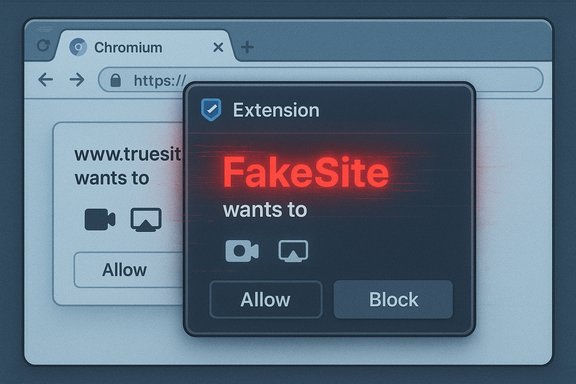
Microsoft has confirmed a Chromium‑based Microsoft Edge spoofing flaw, tracked as CVE‑2025‑65046, that allows a malicious page or a content script injected into a page to display a browser extension’s popup over a permission prompt or screen‑share dialog, enabling the extension UI to impersonate parts of the prompt (including the text that reports origin). This is a user‑interface integrity issue: the vulnerability carries CVSS impact metrics of Confidentiality: None (C:N), Integrity: Low (I:L), and Availability: None (A:N) — in plain terms, the bug does not grant direct data exfiltration or denial‑of‑service, but it does permit deceptive UI behavior that can mislead users into granting permissions or disclosing secrets.
User interface (UI) integrity is one of the browser’s last, and most important, lines of defense against social engineering. Modern Chromium‑based browsers expose permission prompts (camera, microphone, screen sharing, geolocation, clipboard access) that include clear provenance signals — the site origin, a padlock or security indicator, and trusted wording — so users can verify who is asking for access. When those trust signals can be spoofed, an attacker can make a malicious page look and behave like a legitimate prompt, vastly increasing the success rate of phishing and consent‑prompt attacks.
This particular vulnerability enables an attacker to overlay an extension popup over a genuine permission prompt or screen‑share dialog so that the popup visually replaces or augments the prompt’s origin text. The result: users can be shown an on‑screen UI that says the permission is being requested by a benign domain while the actual page and request come from a malicious origin. Multiple independent trackers and vendor advisories describe this class of UI spoofing as a low‑to‑medium technical severity but high‑impact social engineering enabler because it affects integrity of displayed information even when confidentiality and availability remain intact.
Mitigation is straightforward but time‑sensitive: update Edge to the patched build when Microsoft publishes it, audit and tighten extension policies, and deploy compensating network and authentication controls while patching proceeds. Organizations should treat UI spoofing vulnerabilities as phishing accelerants and prioritize protective measures for high‑value users and embedded Chromium runtimes. The real defense against this class of attack is the combination of vendor patches, disciplined extension governance, and continuous user vigilance.
Source: MSRC Security Update Guide - Microsoft Security Response Center
 Background / Overview
User interface (UI) integrity is one of the browser’s last, and most important, lines of defense against social engineering. Modern Chromium‑based browsers expose permission prompts (camera, microphone, screen sharing, geolocation, clipboard access) that include clear provenance signals — the site origin, a padlock or security indicator, and trusted wording — so users can verify who is asking for access. When those trust signals can be spoofed, an attacker can make a malicious page look and behave like a legitimate prompt, vastly increasing the success rate of phishing and consent‑prompt attacks.This particular vulnerability enables an attacker to overlay an extension popup over a genuine permission prompt or screen‑share dialog so that the popup visually replaces or augments the prompt’s origin text. The result: users can be shown an on‑screen UI that says the permission is being requested by a benign domain while the actual page and request come from a malicious origin. Multiple independent trackers and vendor advisories describe this class of UI spoofing as a low‑to‑medium technical severity but high‑impact social engineering enabler because it affects integrity of displayed information even when confidentiality and availability remain intact.
How the flaw works: technical anatomy
Attack surface and prerequisites
- Attack vector: a malicious web page or content script (injected by an extension) that can control layering and timing of DOM elements and popups.
- Required user interaction: Yes — the victim must visit the crafted page or interact with the extension’s UI or content.
- Privileges required: None beyond normal page access; the attack leverages UI compositing/timing rather than memory corruption.
- Scope: UI integrity only — the browser process and sandbox boundaries are not directly bypassed.
Exploit mechanics (high level)
- A webpage (or an extension content script) triggers a permission prompt (for camera/mic/screen share).
- By manipulating z‑index, CSS, frames, or invoking an extension popup, the attacker places an extension UI overlay over the real prompt.
- The extension popup is crafted to mimic or replace the portion of the dialog that displays origin information (for example, the site URL or the textual origin indicator).
- The user sees the spoofed origin text and a familiar dialog layout, and may grant permissions or follow instructions that they otherwise would not.
Why the CVSS vector says C:N / I:L / A:N
- Confidentiality (C:N): The exploit does not, by itself, leak stored secrets or arbitrarily read protected data from the browser; it only misrepresents UI.
- Integrity (I:L): The attacker can modify the integrity of user decisions by falsifying what the UI displays — a limited but meaningful integrity impact (e.g., persuading a user to share camera or screen).
- Availability (A:N): The vulnerability does not affect the browser’s ability to function or access resources.
Real‑world attack scenarios and risk amplification
Common abuse patterns
- Permission phishing: A crafted page displays a fake permission prompt (via extension popup) claiming to be a trusted site; the user approves camera/microphone access and the attacker harvests audio/video or uses it for extortion.
- Screen‑share capture: By spoofing the origin in the screen‑share dialog, attackers can trick users into sharing the wrong screen or app window (for example, a credentials entry screen or internal admin dashboard).
- Credential harvesting via staged dialogs: Attackers use the overlay to display a faux “re‑authenticate” prompt, capturing passwords or session tokens when users try to proceed.
- Targeted spearphishing: High‑value targets (executives, finance staff) are more likely to be successfully tricked with tailored messages that reference internal systems.
Why this is especially dangerous in certain contexts
- Enterprise environments with high‑value targets: Even a low‑integrity UI spoof can yield access to privileged accounts or internal tooling if the victim is convinced the prompt is legitimate.
- Remote work and video conferencing: Screen sharing is ubiquitous in meetings; spoofed screen‑share prompts in the context of a meeting create powerful social‑engineering vectors to expose sensitive displays.
- Extension ecosystem abuse: A malicious or compromised extension with popup capabilities magnifies the attack surface because extension UIs are often trusted by users and can appear chrome‑native.
Who’s most at risk
- Individual users with lax extension hygiene (many extensions installed, especially from third‑party stores).
- Employees who frequently accept permission prompts (e.g., remote workers, conferencing hosts).
- Organizations that permit side‑loading or non‑store extension installations.
- Kiosk and shared devices where a malicious page might be opened in a public session.
Detection, mitigation, and operational guidance
Immediate actions for end users
- Update Microsoft Edge to the latest stable build as soon as Microsoft publishes the patched release. Vendor ingestion of Chromium fixes is the authoritative remediation path.
- Audit installed extensions and remove any you don’t recognize or that request unnecessary UI or content script permissions.
- Disable or block extensions from untrusted sources; install extensions only from the official store and read reviews and permissions carefully.
Enterprise/IT controls (practical checklist)
- Inventory and enforce allowed extensions via group policy or MDM (Intune, SCCM, Jamf).
- Configure Edge policies to block side‑loading of unpacked extensions and to only allow store‑verified extensions.
- Enforce browser update policies and confirm version compliance across the fleet (use edge://version and group reporting to map to Microsoft’s Security Update Guide ingestion entry).
- Use web content filtering (secure web gateways, DNS filtering) to block known phishing/malicious pages as a compensating control until patches are applied.
- Apply phishing‑resistant authentication (FIDO2/hardware security keys) for privileged accounts to reduce the value of credential capture attacks.
Detection and response signals
- SIEM / EDR: monitor for unusual permission grants — sudden spikes in camera/screenshare approvals from endpoints.
- Authentication anomalies: unusual successful logins immediately after an employee reported a suspicious prompt.
- User reports: channels for users to report suspicious prompts or unexpected permission requests should be emphasized and triaged rapidly.
Short‑term mitigations where patching is slow
- Restrict screen sharing and camera/microphone usage to trusted applications via policy (for example, allowlist approved domains for conferencing).
- Temporarily tighten extension policies on high‑risk groups (executives, finance).
- Increase phishing awareness reminders and simulate consent‑phishing drills for staff.
Patching and vendor responsibilities
Because Microsoft Edge is built on Chromium, many UI bugs are discovered and fixed upstream by the Chromium project and then ingested by downstream vendors. The ingestion and release cadence means that a Chrome stable update may contain the upstream fix before Edge ships its integrated build; Microsoft uses the Security Update Guide to communicate when an Edge build contains the upstream remediation. Enterprises must rely on Microsoft’s published ingestion mapping (Security Update Guide / Edge release notes) to confirm mitigation status rather than assuming parity with Chrome immediately after an upstream fix is announced. Several analyses highlight the ingestion lag and recommend verifying the exact Edge build that Microsoft marks as patched.Critical analysis — strengths, limitations, and residual risk
Notable strengths of the fix model
- Rapidly addressing UI spoofing prevents effective phishing campaigns that would otherwise rely on visual deception.
- Chromium’s upstream patching model allows a single fix to cover many downstream browsers once those vendors ingest changes.
- Microsoft’s Security Update Guide gives enterprises an authoritative, auditable way to confirm whether Edge builds contain the fix.
Important limitations and residual risks
- Patch lag: The time between upstream Chrome fixes and Edge ingestion creates an operational window where unpatched Edge installations remain vulnerable. Organizations that delay updates for change control extend their exposure.
- Human factor: UI spoofing by definition targets human trust. Even with patches, attackers can adapt with other social‑engineering lures; fixes reduce but do not eliminate the risk.
- Embedded Chromium: Applications embedding Chromium (Electron apps, custom kiosks, WebView instances) will remain vulnerable until their maintainers rebuild with the fixed Chromium revision. These instances are often overlooked in inventories.
- Extension ecosystem: A malicious or compromised extension with privileged UIs can accelerate exploitation; supply‑chain compromises of extensions remain a high‑impact path.
When the CVSS rating understates real harm
The CVSS impact vector (C:N I:L A:N) accurately frames direct technical effects, but it does not account for downstream consequences of successful social engineering: stolen credentials, unauthorized consents, lateral movement after account takeover, or financial fraud. In operational risk assessments, treat these UI integrity issues as enablers for much higher‑impact events even when the immediate CVSS numbers are low.Recommended timelines and priorities
- Patch: Deploy the Microsoft Edge build that Microsoft marks as containing the ingestion of the Chromium fix — prioritize executives and internet‑facing hosts first.
- Block risky extensions: Immediately remove or quarantine extensions that request content script access and popup UIs.
- Hardening: Enforce extension allowlists, enable SmartScreen and strict site isolation, and require re‑authentication for sensitive operations.
- Awareness: Run consent‑phishing simulations and communicate the specific risk (spoofed permission prompts) to users.
- Inventory: Identify embedded Chromium runtimes and coordinate with application owners to get updates applied.
Conclusion
CVE‑2025‑65046 is a classic reminder that browser security is more than memory‑safety and sandboxing: it is also about trusted UI surfaces. The technical impact — no direct confidentiality loss, low integrity impact, and no availability effect — understates the practical danger: an attacker who can make a permission prompt appear to come from a trusted origin can coax users into actions with severe consequences.Mitigation is straightforward but time‑sensitive: update Edge to the patched build when Microsoft publishes it, audit and tighten extension policies, and deploy compensating network and authentication controls while patching proceeds. Organizations should treat UI spoofing vulnerabilities as phishing accelerants and prioritize protective measures for high‑value users and embedded Chromium runtimes. The real defense against this class of attack is the combination of vendor patches, disciplined extension governance, and continuous user vigilance.
Source: MSRC Security Update Guide - Microsoft Security Response Center
