

EDR-Redir V2 is the latest proof‑of‑concept tool to exploit Windows’ new bind link facility and the cloud filter stack to create parent‑level filesystem redirections that can blind Endpoint Detection and Response (EDR) products — including a demonstrated bypass of Windows Defender on Windows 11 — by making EDR processes operate against attacker‑controlled folders while leaving benign applications unaffected.
Windows 11 version 24H2 introduced a new Bind Link API and a Bind Filter mini‑driver (bindflt.sys) that allow administrators to create transparent, kernel‑assisted filesystem namespace redirections: a virtual path can be bound to a backing path so that applications see files and folders at the virtual location while the actual data is read from the backing location. The feature is explicitly exposed to admin users via the Bindlink API (CreateBindLink / RemoveBindLink). Security researchers have rapidly turned that capability into a new attack surface. A public researcher operating under the handle TwoSevenOneT released tools and demonstrations under the name EDR‑Redir (and an upgraded variant, EDR‑Redir V2) showing how bind links and cloud filter APIs can be used — from user mode with administrative privileges — to redirect or isolate EDR working folders to attacker‑controlled paths, enabling DLL hijacking, file drops, or simple denial of the EDR’s access to its own files. Multiple independent news outlets and community threads have reported and discussed the tool and the demonstrations. This article explains the technical mechanics, evaluates the risk to enterprises, highlights defensive controls built into Windows that can mitigate or detect this class of abuse, and offers practical guidance for EDR vendors and administrators.
Defenders occupy a difficult balance: preventing administrative abuse of namespace features without hampering legitimate system management and enterprise deployment. The immediate defensive priorities are clear:
Source: RS Web Solutions EDR-Redir V2 Evades Windows Defender on Windows 11
 Background / Overview
Windows 11 version 24H2 introduced a new Bind Link API and a Bind Filter mini‑driver (bindflt.sys) that allow administrators to create transparent, kernel‑assisted filesystem namespace redirections: a virtual path can be bound to a backing path so that applications see files and folders at the virtual location while the actual data is read from the backing location. The feature is explicitly exposed to admin users via the Bindlink API (CreateBindLink / RemoveBindLink). Security researchers have rapidly turned that capability into a new attack surface. A public researcher operating under the handle TwoSevenOneT released tools and demonstrations under the name EDR‑Redir (and an upgraded variant, EDR‑Redir V2) showing how bind links and cloud filter APIs can be used — from user mode with administrative privileges — to redirect or isolate EDR working folders to attacker‑controlled paths, enabling DLL hijacking, file drops, or simple denial of the EDR’s access to its own files. Multiple independent news outlets and community threads have reported and discussed the tool and the demonstrations. This article explains the technical mechanics, evaluates the risk to enterprises, highlights defensive controls built into Windows that can mitigate or detect this class of abuse, and offers practical guidance for EDR vendors and administrators.How EDR‑Redir V2 works — technical anatomy
Bind links and the bindflt driver
- The Bind Link API allows an admin to create a transparent mapping from a virtual path to a backing path. Once created, all standard file APIs are unaffected — processes accessing the virtual path are served from the backing path without noticing the redirection. This is handled by the Bind Filter mini‑driver (bindflt.sys).
- The CreateBindLink API is explicitly for administrators; creating bind links from user space does not require a kernel exploit, but it does require appropriate privileges (administrator) and permission to open the involved paths.
- Minifilter drivers (EDR kernel components or other filters) can veto a bind link in certain situations (for example, on the system boot partition), but that veto mechanism has constraints — a filter must sit below bindflt in the stack to intercept the CreateBindLink request and can only veto links on the boot partition. That technical detail limits blanket vetoing of bind links across all volumes.
Cloud filter (CFAPI / cldflt.sys) behavior
- The Cloud Files API (CFAPI) and the Cloud Filter driver (cldflt.sys) are designed for on‑demand sync scenarios (OneDrive, similar). They permit registration of sync roots and can change how directories and placeholder files behave to consumers of the filesystem.
- Researchers demonstrated alternate techniques that use CFAPI registration tricks to make an EDR’s folder appear corrupt/unavailable to the EDR process or to divert its file operations, producing behavior similar to a targeted denial of access. This attack path can persist differently than bind links and has distinct detection and remediation profiles.
The V2 innovation: parent‑level loops and selective exclusion
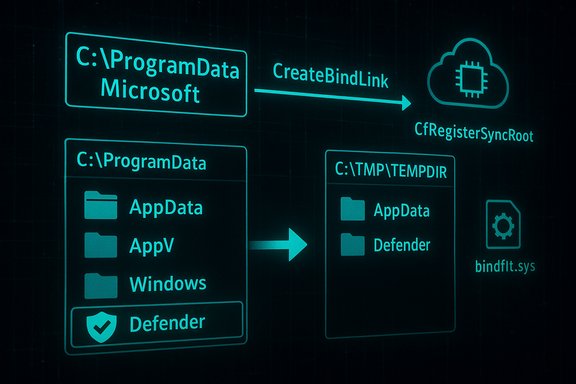
- Earlier PoCs attempted to redirect EDR subfolders directly, but modern EDRs add protections to specific subfolders and monitor symlinks. EDR‑Redir V2 advances the technique by manipulating the parent directory rather than only individual subfolders: it enumerates all subfolders under a parent (for example, C:\Program Files or C:\ProgramData\Microsoft), creates mirrored copies in an attacker‑controlled location (e.g., C:\TMP\TEMPDIR), and then establishes bind links so each mirror maps back to its original. The trick is to create a loop where every normal subfolder resolves as before, except the EDR’s specific subfolder (for example, C:\ProgramData\Microsoft\Windows Defender) — that subfolder is excluded from the loop and instead pointed solely at the attacker’s TEMPDIR copy. The EDR process thus sees its folder contents coming from the attacker’s storage without affecting other applications. Reported demonstrations show Defender operations being redirected to the TEMPDIR backing store.
Consequences for EDRs
- Once the EDR reads its files from attacker‑controlled backing storage, classic attacks become feasible:
- DLL hijacking or sideloading by placing a malicious DLL that the EDR will load.
- Dropping or swapping binaries used at startup to disable or corrupt the EDR.
- Emptying the backing path or corrupting key files so the EDR fails to start or operate.
- In‑place tampering of definition files or configuration to neutralize detection.
- The attack surface is especially sensitive because many EDRs harden and lock their own installation subfolders but cannot safely prevent writes or operations to the parent directory without breaking legitimate installers or system updates. That tension creates the window that EDR‑Redir exploits.
Demonstration against Windows Defender — what was shown and what can be verified
- Reported demonstrations show EDR‑Redir V2 executed with parameters that target the parent folder (C:\ProgramData\Microsoft), a redirection endpoint (c:\TMP\TEMPDIR), and an explicit exception path (the Defender subfolder), e.g.:
EDR-Redir.exe C:\ProgramData\Microsoft c:\TMP\TEMPDIR "C:\ProgramData\Microsoft\Windows Defender". Console logs in the demonstration indicated successful creation of bind links and subsequent Defender file accesses resolving through TEMPDIR. - Independent reporting corroborates the technique and the demonstration; multiple outlets reproduced the researcher’s findings and community threads echoed the technical summary and screenshots. That supports the claim that the technique works in controlled tests.
- Caveat / verification boundary: multiple articles mention a GitHub repository and a YouTube demo that accompany the researcher’s release, but direct, authoritative links to an official repository or a canonical video were not found in indexed search results at the time of reporting. The public reporting reliably documents the PoC behavior, but the precise repository URL and the full artifact list were not independently verified here. Treat downloads and binaries with extreme caution and avoid running proof‑of‑concept code on production systems.
Why existing EDR protections are insufficient against this technique
Parent‑level trust assumptions and operational constraints
- EDR vendors typically harden known subfolders (for example, their own binary locations) and monitor for symbolic links or suspicious manipulations at that micro‑level. Those protections are logical and effective against standard tampering.
- However, hardening every parent directory (Program Files, ProgramData) to the level required to block privileged administrative changes would break legitimate system operations: installers, Windows updates, and enterprise deployment tooling all rely on changes to these parent paths. That operational constraint creates a practical blind spot. The PoC exploits just that gap: redirect the parent namespace while preserving normal behavior for non‑EDR processes.
Kernel filter constraints
- Bind links are established by bindflt.sys, and the Windows platform offers a veto mechanism for minifilters, but the veto ability is limited (boot partition only) and requires the defensive filter to be below bindflt in the mini‑filter stack. In many real deployments an EDR’s filter may not be positioned to veto every bind link creation request on all volumes, limiting protective coverage.
Privilege model — why this is not a remote worm
- Creating bind links requires administrative privileges. This means the technique is not a remote unauthenticated worm; it is a local privilege or escalation‑dependent claim. Nevertheless, many real incidents start with phishing or malicious installers that yield local code execution with elevated rights — in those cases EDR‑Redir becomes a powerful local evasion primitive. News coverage and the PoC emphasise the user‑mode (non‑kernel‑exploit) nature of the technique, but administrators should not underestimate the risk when an adversary already has admin capability on a host.
Detection, monitoring, and short‑term mitigations
EDR‑Redir and similar tools leave multiple huntable artifacts and telemetry gaps that defenders can prioritize.- Monitor bind link creation and removal activity.
- The Bindlink API and the Bind Filter driver generate specific events and IRP flows; centralized telemetry that captures calls to CreateBindLink and related file system control activity is a high‑value hunt signal. Administrators should add detections for unexpected CreateBindLink calls against high‑value paths like C:\Program Files and C:\ProgramData.
- Monitor CFAPI / Cloud Filter registrations.
- Unexpected CfRegisterSyncRoot calls or atypical sync root registrations for system or EDR folders are suspicious. Correlate these events with changes in service start behavior and file I/O errors from EDR processes.
- Harden administrative and operational controls:
- Enforce the principle of least privilege: limit who can obtain interactive administrative sessions or local admin accounts.
- Use centralized delegation and privileged access management (PAM) to reduce the number of admins who can create bind links. News reporting stresses that the technique relies on admin‑level operations; reducing admin exposure reduces risk.
- Use application control and boot‑time protections:
- Windows Defender Application Control (WDAC), Smart App Control, AppLocker, and Memory Integrity/HVCI increase the cost of tampering and make persistence and driver abuse harder. These are compensations, not complete mitigations.
- Integrity monitoring for EDR paths:
- Add file system integrity checks and allow‑listing for EDR binaries and critical config files. Alert on any unrecognized changes, temporary files in those folders, or unusual folder re‑pointing. Implement narrow, process‑specific exclusions rather than broad folder exclusions in AV policies.
What EDR vendors should do next — product hardening roadmap
- Reassess folder protection policies
- Move from subfolder hardening to path provenance and open path verification that validates not only the file’s contents and signatures but also the namespace provenance — i.e., confirm that the file’s presented path is the same physical path and not a bind link mapping. Where possible, detect that a target path resolves through a bindlink/backing path and treat that as a policy evaluation factor.
- Minifilter placement and veto planning
- Consider redesigning minifilter stack placement so the security vendor’s filter can detect and, where appropriate, veto bind link creations affecting EDR‑owned paths during boot or at runtime. Understand the platform limitations (veto on boot partition only) and coordinate with Microsoft on possible platform improvements.
- Kernel‑mode visibility for namespace mapping
- Add kernel‑level checks that verify that the process attempting to open EDR files is using direct backing paths and not virtualized namespace views, and record those mismatches to telemetry. This increases visibility and allows behavioral analytics to spot suspicious access patterns.
- Harden against CFAPI misuse
- Explicitly monitor and validate Sync Root registrations for system and EDR folders. Refuse or alert on unexpected registration metadata or registrations originating from untrusted processes.
- Improve vendor‑to‑vendor cooperation
- Share indicators, detection rules, and recommended kernel/filter placement patterns across vendors, and coordinate with Microsoft on recommended practices for minifilter design and testing against bindlink/CFAPI abuse. Public reporting urged vendors to harden quickly; coordinated disclosure and rapid mitigation guidance will reduce operational risk.
Enterprise playbook — prioritized actions for IT teams
- Inventory and reduce admin blast radius
- Immediately enumerate accounts and systems that have local admin privileges. Apply PAM and just‑in‑time elevation. Reduce the number of endpoints where an adversary can obtain the local admin token required to run CreateBindLink.
- Hunt for bind link and CFAPI activity
- Update SIEM and EDR rules to surface CreateBindLink calls, unusual CfRegisterSyncRoot calls, and changes to the minifilter stack. Hunt for these events against hosts with recent local admin operations or unexpected reboots.
- Verify EDR integrity and behavior
- Run proactive integrity checks of EDR processes and their disk locations. Ensure tamper protection is enabled where available. If an EDR cannot be trusted on suspect machines, isolate and reimage rather than attempting live cleanup after probable namespace/kernel manipulation. Public incident response guidance repeatedly recommends conservative reimage decisions when kernel‑level artifacts may have been abused.
- Apply platform updates and baseline policies
- Keep Windows and driver/component updates current. Use WDAC / HVCI where hardware permits. While the platform contains defensive hooks, many recommended mitigations depend on applying the latest platform guidance and hardening guidance from vendors.
Risks, limitations, and what remains uncertain
- Privilege requirement: the technique requires administrative privileges on the host to create bind links and to register sync roots. This materially limits remote exploitation potential but does not remove real‑world risk because many incidents begin with local elevated contexts (malicious installers, compromised admin accounts). Public reporting acknowledges this constraint while also stressing the potency of the primitive when admins are compromised.
- Persistence and reboot behavior: bind links do not necessarily persist across reboots unless the attacker automates recreation (scheduled tasks, services) or co‑opts mechanisms that survive restarts. The cloud filter trick reported in some demonstrations can yield differing persistence characteristics — defenders should treat both paths seriously but recognize different persistence models.
- Public artifact verification: several news reports reference a GitHub repository and a demonstration video. At the time of this article, multiple reputable outlets reproduce the PoC results, but direct, canonical access to the researcher’s repository and the full artifact set could not be reliably verified in indexed search results. Therefore, any concrete claims about the exact codebase, compilation artifacts, or ready‑to‑run binaries should be treated as potentially volatile and unverified until the repository can be validated. Running untrusted PoC code is inherently dangerous and should only be done in isolated lab environments.
- No large‑scale exploitation reported — yet: available reporting and community discussion show proof‑of‑concepts and vendor tests, but there is no confirmed widespread incident campaign abusing EDR‑Redir at the time of writing. The simplicity of the technique and the availability of PoC artifacts, however, raise the probability of opportunistic misuse against any environment where an attacker can obtain local admin. Treat the posture as elevated and act accordingly.
Conclusion — tradeoffs and the defensive path forward
EDR‑Redir V2 demonstrates a pragmatic and effective escalation of red‑team and research tradecraft: leverage legitimate OS features that were designed for compatibility and cloud‑file scenarios, then adapt them into stealthy namespace manipulations that ordinary file‑level protections and legacy anti‑tamper checks do not anticipate. The Bind Link API and Cloud Filter stack were added to modernize and extend filesystem capabilities in Windows 11, but those same capabilities create new abuse channels that must be acknowledged and mitigated.Defenders occupy a difficult balance: preventing administrative abuse of namespace features without hampering legitimate system management and enterprise deployment. The immediate defensive priorities are clear:
- Reduce the administrative blast radius and treat CreateBindLink/CfRegisterSyncRoot events as high‑value telemetry.
- Add namespace provenance checks and integrity verification for EDR services and files.
- Use application control and kernel hardening to reduce the chance of post‑compromise actions persisting.
- EDR vendors must redesign protections to consider virtualized namespace provenance — not just file paths and signatures — and coordinate with platform teams to enable robust veto/visibility semantics across all volumes.
Source: RS Web Solutions EDR-Redir V2 Evades Windows Defender on Windows 11
