

A public proof‑of‑concept called EDR‑Redir V2 can redirect Windows EDR product folders to attacker‑controlled locations by abusing Windows’ new bind link and cloud filter APIs, allowing DLL hijacking and other local evasion techniques — a demonstration that reportedly blinded Windows Defender on Windows 11 and that security teams must treat as a high‑priority detection and hardening problem.
Windows 11 introduced a new Bind Link API and the Bind Filter driver (bindflt.sys) that let administrators create transparent filesystem namespace redirections: a local virtual path can be bound to a backing path, and processes that access the virtual path are served from the backing path without knowing a redirection exists. This API is exposed to administrators via CreateBindLink / RemoveBindLink. The same Windows platform also exposes the Cloud Files API (CFAPI, cldflt.sys) used by sync providers (OneDrive and others), which can change how directories and placeholders behave and — when misused — can make folders appear corrupt or unavailable to certain consumers. Both subsystems are legitimate platform features designed for compatibility and sync scenarios, but they extend the kernel‑level surface that a local attacker with administrative privileges can influence. Security researchers released EDR‑Redir and an upgraded variant, EDR‑Redir V2, which leverages bind links (and in some demonstrations the Cloud Filter APIs) to redirect or isolate the working folders of Endpoint Detection & Response (EDR) products so those EDR processes operate against attacker‑controlled backing storage. Multiple independent tech outlets and community threads reported the PoC and provided demonstration details.
Organizations that act now — closing admin windows, improving host telemetry, and coordinating with vendors — will dramatically reduce the operational effectiveness of this class of attack.
Source: Cyber Press EDR-Redir V2 Evades Windows Defender Using Fake Program Files
 Background / Overview
Windows 11 introduced a new Bind Link API and the Bind Filter driver (bindflt.sys) that let administrators create transparent filesystem namespace redirections: a local virtual path can be bound to a backing path, and processes that access the virtual path are served from the backing path without knowing a redirection exists. This API is exposed to administrators via CreateBindLink / RemoveBindLink. The same Windows platform also exposes the Cloud Files API (CFAPI, cldflt.sys) used by sync providers (OneDrive and others), which can change how directories and placeholders behave and — when misused — can make folders appear corrupt or unavailable to certain consumers. Both subsystems are legitimate platform features designed for compatibility and sync scenarios, but they extend the kernel‑level surface that a local attacker with administrative privileges can influence. Security researchers released EDR‑Redir and an upgraded variant, EDR‑Redir V2, which leverages bind links (and in some demonstrations the Cloud Filter APIs) to redirect or isolate the working folders of Endpoint Detection & Response (EDR) products so those EDR processes operate against attacker‑controlled backing storage. Multiple independent tech outlets and community threads reported the PoC and provided demonstration details. How EDR‑Redir V2 works — technical anatomy
The platform primitives: bind links and cloud filter registration
- Bind Links (bindflt.sys) — Bind links map a local virtual path to a backing path. They are transparent to applications and inherit the backing path’s security descriptors. Bind link creation requires Administrator privileges and persists until removed or the system shuts down. The CreateBindLink API takes an optional list of exception paths to exclude from the binding.
- Cloud Filter API (CFAPI / cldflt.sys) — CFAPI exposes functions such as CfRegisterSyncRoot to register a sync root and manage placeholder semantics. Misusing registration can alter how consumers see a directory (for example, making it appear as a placeholder or corrupt), which can disrupt software that expects regular filesystem behavior.
The V2 innovation: parent‑level loops with selective exclusion
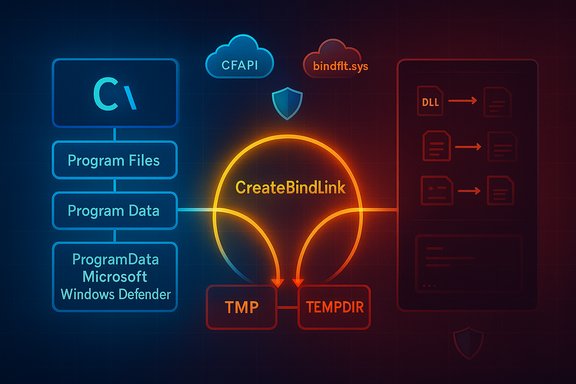
EDR‑Redir V2 modifies the earlier approach of redirecting a single EDR folder and instead targets parent directories (for example, C:\Program Files, C:\Program Files (x86), or C:\ProgramData\Microsoft). The tool:- Enumerates all subfolders under the chosen parent directory.
- Mirrors those subfolders in an attacker‑controlled backing directory (e.g., C:\TMP\TEMPDIR).
- Creates bind links that map each original subfolder to the corresponding backing mirror, forming a loop so that most applications continue to access the same logical tree and behave normally.
- Crucially, the EDR’s specific subfolder (for example, C:\ProgramData\Microsoft\Windows Defender) is excluded from the loop and instead pointed only to the attacker’s backing copy.
Practical effects and exploitation primitives
Once the EDR process is operating against an attacker‑controlled backing path, several practical attack primitives become available to an adversary with local admin rights:- DLL hijacking / sideloading — Place a malicious DLL under a name or location the EDR process will load, leveraging the target’s DLL search order. Syscalls that EDR performs to load helper libraries can then be satisfied from hostile files.
- Dropping or swapping binaries — Replace or remove executable bits the EDR requires, causing service failure or disabling protections at boot.
- Tampering of data/config — Modify definition files, configuration, or telemetry stores so the EDR behaves incorrectly.
- Deny‑service by corruption — Use CFAPI registration or backing path manipulation to make the folder appear corrupt or inaccessible to the EDR, preventing it from starting or updating while other apps remain unaffected.
The Windows Defender demonstration — what was shown (and what is verifiable)
The public reporting describes a demonstration in which the researcher executed EDR‑Redir V2 to target Defender’s folder under C:\ProgramData\Microsoft, redirecting it to C:\TMP\TEMPDIR while excluding C:\ProgramData\Microsoft\Windows Defender so that Defender’s process saw TEMPDIR as its parent. Console output in the demo listed bind links created and Defender’s filesystem accesses resolved through the backing store. Multiple outlets reproduced the demonstration narrative and community posts circulated screenshots and short clips showing the effect. Verification caveat: public reporting consistently documents the PoC behavior, but not every report published a canonical repository URL or a single authoritative video link. Some write‑ups referenced a GitHub repository and demo assets, while at least one internal review explicitly cautioned that a direct, authoritative repository URL wasn’t found in indexed results at the time of analysis; treat unverified downloads and binaries with extreme caution and avoid running PoC code on production machines.Why this matters: attack surface, prerequisites, and realistic scope
- Prerequisite: administrative privileges. CreateBindLink and the bind link APIs require Administrator rights. This is not a remote unauthenticated worm; it’s a local evasion primitive that becomes serious when adversaries gain elevated access (e.g., via phishing, credential theft, misconfigured RDP, or post‑exploitation escalation).
- Why EDRs are exposed. EDR vendors typically harden known installation subfolders (their own binary directories) and monitor for symbolic links in those micro‑locations. However, hardening every parent directory like Program Files or ProgramData to block administrative writes would break legitimate installers, system updates, and enterprise deployment tools. That operational trade‑off leaves a practical blind spot that bind link abuse targets.
- Kernel vs user mode observation. Bind links are implemented by a minifilter (bindflt.sys) and operate at a driver level that is transparent to user mode. Many user‑mode monitoring tools generate limited events for these operations; vendors must add kernel‑level filter visibility to detect these redirections reliably. Microsoft provides a veto capability for minifilters, but it has deployment limitations (boot partition only) that reduce its blanket effectiveness.
- Real‑world feasibility. The technique requires local privilege and planning (mirroring directories, creating bind links correctly, setting exceptions). In real incidents where adversaries already have admin rights, EDR‑Redir becomes a powerful evasion primitive; in the wild it’s most likely to appear as a post‑exploit tool used by sophisticated intruders, red teams, or opportunistic attackers who obtain admin access.
Defenses, detection, and mitigation — concrete recommendations
There’s no single silver bullet. Defenders must combine platform hardening, telemetry, privilege governance, and vendor cooperation.1) Immediate operational mitigations (high priority)
- Treat admin rights as an attack vector. Reduce the number of administrators and require Just‑In‑Time (JIT) elevation workflows. Remove local admin rights from endpoints that don’t need them. These steps reduce the chance an adversary can call CreateBindLink in the first place.
- Detect bind link and cloud filter activity. Because Windows does not emit a simple, widely used high‑level event specifically for CreateBindLink by default, defenders should:
- Audit and alert on administrative command prompts, scheduled tasks, or processes that attempt to call native Bindlink APIs (for example, monitor processes that load bindlink.dll or call the CreateBindLink entry points).
- Instrument EDR agents and kernel telemetry to surface filter attach/IRP patterns and suspicious CFAPI registrations (CfRegisterSyncRoot).
- Enable comprehensive logging and hunt rules. Deploy Sysmon (or similar host telemetry) with rules that emphasize:
- ImageLoad events where standard, signed processes load DLLs from non‑standard backing paths (Temp, Downloads, attacker‑controlled folders).
- Parent/child process anomalies and administrative command executions that coincide with filesystem namespace changes. Sysmon ImageLoad (event ID 7) and process create logs are high‑value telemetry for catching DLL sideloading after a redirection.
- Integrity checks for parent folders. Implement scheduled integrity scans that verify expected directory trees under Program Files, ProgramData, and other EDR‑relevant parents. Alert on unexpected reparse points, missing subfolders, or changes to parent directory metadata. Such checks detect backing path changes even when individual EDR subfolders remain protected.
2) Medium‑term platform and vendor controls
- EDR vendors should monitor minifilter interactions. Vendors must extend kernel sensors to detect CreateBindLink IRPs, bindflt notifications, and suspicious cloud filter registrations that affect EDR‑owned paths. Vendors can also consider positioning their minifilters to be able to veto bind links for critical directories when feasible, while balancing compatibility constraints. Microsoft’s veto design is limited to boot partitions and stack ordering, so vendors and Microsoft must collaborate on practical, cross‑vendor protections.
- Windows telemetry improvements. Platform telemetry could be extended to emit auditable events when CreateBindLink or CfRegisterSyncRoot are called, and to include caller identity details (process, user), enabling enterprise SIEM rules that flag administrative calls that affect critical parents. Encourage Windows platform teams to expose such telemetry in a secure, admin‑auditable way.
3) Hunting and incident response playbook
- Triage hosts with any administrative session activity in the prior 24–72 hours.
- Search for bindlink usage (processes invoking bindlink.* or new reparse points) and CfRegisterSyncRoot calls in endpoint and kernel telemetry.
- Use ImageLoad and file integrity events to detect post‑redirection DLL loads from unexpected backing paths.
- If a redirection is confirmed, quarantine the host immediately, collect volatile memory, and restore legitimate folder contents from known good backups. Rebuild may be the safest step for hosts fully compromised at the admin level.
What vendors and platform owners must do
- Microsoft should evaluate adding an auditable event for CreateBindLink and make veto semantics more broadly useful to defensive minifilters. The existing veto is useful but constrained; platform telemetry that records caller identity and bind link parameters would materially help defenders.
- EDR vendors need to add kernel‑level detection for bindflt activity and CFAPI misuse, extend file handle integrity checks across parent directories, and apply reputation checks on backing paths that suddenly appear under EDR‑owned virtual locations. Several public reports note that EDR‑Redir worked against multiple commercial products in lab testing, which signals vendors must prioritize mitigations.
Limits, caveats, and unverifiable claims
- Admin privileges are required. The PoC is a local admin evasion vector, not a remote worm. Defenders should not conflate the existence of the technique with a platform compromise vector that requires no privilege escalation.
- Persistence characteristics vary. Bind links do not persist across reboots by default; attackers can, however, re‑create links at startup via scheduled tasks or services. Some reports detail using CFAPI registration to create persistent corruption that survives reboot in different ways. The exact persistence model depends on which API and parameters are used; defenders should not assume a single persistence signature.
- Public repository and assets: treat binaries cautiously. Multiple news posts referenced a GitHub repository and demo videos accompanying the researcher’s release, but independent reviews caution that a canonical repository URL or authoritative asset list was not consistently available in indexed results. Do not download or run PoC binaries on production systems; prefer static analysis in controlled lab sandboxes.
- Not every EDR will be affected the same way. Vendor implementations vary: some EDRs may already place kernel components under protected locations, use signed‑only loading restrictions, or maintain minifilters positioned to intercept bindlink IRPs. Public reporting shows successful lab tests against multiple products, but detection and resilience will differ across vendors and configurations.
Practical checklist for Windows administrators (actionable steps)
- Reduce local admin counts and institute JIT elevation and strong MFA for privileged accounts.
- Deploy Sysmon with ImageLoad and detailed process creation logging; centralize logs in a SIEM and create hunts for unusual ImageLoad events and admin commands.
- Add file system integrity checks for Program Files, ProgramData, and other EDR‑relevant parents; alert on reparse points and unexpected directory masks.
- Monitor for creation of reparse points, new bind link patterns, and CFAPI registrations in kernel telemetry — escalate any admin‑context calls that affect EDR directories.
- Coordinate with EDR vendor support to verify whether your deployment is susceptible, and to obtain vendor‑specific detection or mitigation guidance.
- Never run PoC tools on production; use isolated lab sandboxes with full network and forensic capture if testing is required.
Conclusion
EDR‑Redir V2 highlights a critical lesson: platform features intended for compatibility and cloud sync can become powerful evasion primitives when they interact with security‑sensitive paths and when attackers have administrative access. The bind link API and CFAPI are legitimate and useful capabilities in Windows 11, but they expand the kernel‑level attack surface and expose a parent‑directory trust assumption that many EDRs relied on implicitly. Microsoft’s Bind Link and Cloud Filter APIs include defensive hooks and design constraints, but those controls are not a full substitute for vendor‑grade detection and organizational privilege hygiene. Immediate action for defenders is clear: tighten administrative controls, add targeted telemetry (ImageLoad, process create, kernel filter events), implement integrity checks on parent directories, and work with EDR vendors and Microsoft to ensure bind link and CFAPI activity affecting security‑owned paths is visible and actionable. Treat this PoC as a red‑team grade evasion primitive that should inform patching, hardening, and detection strategies across all Windows fleets rather than as an isolated academic curiosity.Organizations that act now — closing admin windows, improving host telemetry, and coordinating with vendors — will dramatically reduce the operational effectiveness of this class of attack.
Source: Cyber Press EDR-Redir V2 Evades Windows Defender Using Fake Program Files
