

Microsoft's recent update that makes it easier to embed Copilot Studio agents directly into Power Pages sites is a practical step toward bringing conversational AI into low‑code web experiences — but it also raises important design, authentication, and governance decisions that every Power Platform practitioner should consider before rolling agents out to customers or employees. (microsoft.com)
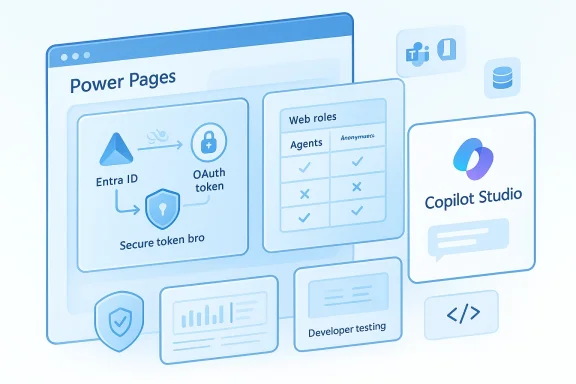
Power Pages is Microsoft’s low‑code web platform for building external- and internal‑facing sites that connect to Dataverse and other Microsoft Power Platform services. Copilot Studio is the centralized authoring environment for creating, publishing, and managing AI agents (topics, connectors, skills, and channels) that can run across Teams, Microsoft 365, and web channels. The new Power Pages integration lets makers bring those Copilot Studio agents into their sites with more flexible authentication choices, in‑studio testing, and visibility control driven by Power Pages web roles. (learn.microsoft.com)
These changes are incremental rather than revolutionary: they remove a number of practical friction points that previously forced teams to choose between simple embedding and enterprise‑grade identity. But those conveniences also put a premium on planning — both technical and governance — because agents that can access internal resources or invoke connectors are, by definition, an extension of your identity and data plane.
But there are important tradeoffs and incomplete areas you should weigh:
Start small, secure aggressively, and instrument everything. If you do, agents will become a reliable extension of your site experience rather than a hidden risk vector.
Source: Microsoft Seamlessly embed Copilot Studio agents into Power Pages - Microsoft Power Platform Blog
 Background
Power Pages is Microsoft’s low‑code web platform for building external- and internal‑facing sites that connect to Dataverse and other Microsoft Power Platform services. Copilot Studio is the centralized authoring environment for creating, publishing, and managing AI agents (topics, connectors, skills, and channels) that can run across Teams, Microsoft 365, and web channels. The new Power Pages integration lets makers bring those Copilot Studio agents into their sites with more flexible authentication choices, in‑studio testing, and visibility control driven by Power Pages web roles. (learn.microsoft.com)These changes are incremental rather than revolutionary: they remove a number of practical friction points that previously forced teams to choose between simple embedding and enterprise‑grade identity. But those conveniences also put a premium on planning — both technical and governance — because agents that can access internal resources or invoke connectors are, by definition, an extension of your identity and data plane.
What changed — the headline features
- Support for all authentication types available in Copilot Studio when an agent is hosted inside Power Pages, including Microsoft Entra ID (formerly Azure AD), manual OAuth2 configurations, and no‑auth options. This alignment means Power Pages site makers can keep the same authentication model they already use for other site components. (microsoft.com)
- The ability to test Power Pages–hosted agents directly from Copilot Studio, which shortens the developer feedback loop and reduces context‑switching during authoring and validation. This lets makers validate both conversation flows and authentication logic without repeatedly deploying changes to a live site. (microsoft.com)
- A straightforward path to “bring your own Copilot Studio agent” into Power Pages, and assign visibility using the platform’s existing web roles. That means agents can be scoped to anonymous visitors, authenticated users, or finely‑scoped user groups using the same web role model that governs page and table visibility in Power Pages. (microsoft.com)
How the pieces fit together technically
Authentication models you can choose
Copilot Studio exposes three primary authentication modes:- No authentication — the agent accepts anonymous users and can only access public resources. This is the least secure and should be used only for truly public, read‑only experiences. (learn.microsoft.com)
- Authenticate with Microsoft — a Teams/Microsoft 365 native flow that leverages Microsoft Entra ID for single sign‑on and is optimized for Teams and Microsoft 365 channels. It provides identity metadata (User.ID, User.DisplayName) to topics but does not surface an OAuth access token to the topic canvas. Use this when you need frictionless SSO in M365 channels and do not need the raw access token inside your agent logic. (learn.microsoft.com)
- Authenticate manually — a configurable OAuth2 option that supports Microsoft Entra ID (multiple variants: client secret, certificates, federated credentials) and generic OAuth2 providers (Google, Facebook, custom IdPs). This option makes a user token available to agent topics (User.AccessToken), which is necessary if your topics must act on behalf of the user against downstream APIs. (learn.microsoft.com)
Embedding options and runtime plumbing
Power Pages embeds Copilot Studio agents in two practical ways:- Create an agent from Power Pages: Power Pages can generate a Copilot Studio agent pre‑aware of the site context (web roles and site data), then publish it as a site agent. This flow streamlines site context grounding. (learn.microsoft.com)
- Add an existing Copilot Studio agent: pick any published Copilot Studio agent in the environment and assign it to a site, then use web roles to control visibility. This is the recommended path when you maintain agents centrally in Copilot Studio and share them across multiple sites. (learn.microsoft.com)
- Direct Line / Web Chat embedding — a classic approach that uses a connection token exchanged at page load. It’s useful when you need tight control over authentication flows (for example, proxying tokens or implementing custom session lifetime).
- M365 Agents SDK / Copilot client — Microsoft maintains SDKs and client libraries that wrap the platform’s agent APIs for easier consumption in web apps. The SDK can simplify Microsoft‑auth flows (Authenticate with Microsoft) and handle details like token renewal and channel selection. Use the SDK when you want a supported integration with less custom plumbing.
Testing and development: what “test from Copilot Studio” actually gives you
Being able to test a Power Pages–hosted agent directly from Copilot Studio is more than a convenience — it alters the iterative cycle for makers. Instead of repeatedly publishing a change and reloading a staging site, you can:- Validate conversation flows and tooling interactions in an environment that simulates the Power Pages site context, including authentication triggers and site‑scoped topics. (microsoft.com)
- Exercise authentication flows in the same designer, which helps find token exchange and consent issues earlier, reducing surprises when the agent runs on a live site. (microsoft.com)
Security, privacy, and governance — where the real operational work happens
These integrations introduce both opportunities and surface area for risk. Below are the most important threat vectors and controls to consider.Major risks
- Phishing and OAuth consent abuse (CoPhish‑style attacks). Security researchers have documented campaigns where malicious agents or topics can present consent prompts that steal OAuth grants. Because Copilot Studio agents use legitimate Microsoft domains for hosting, attackers can weaponize social engineering to obtain scoped tokens. This is a real threat you must plan for.
- Token leakage and privilege escalation. If your agent exposes a User.AccessToken to downstream systems (or stores tokens insecurely), an attacker who controls content or middleboxes could re‑use tokens to access mail, files, or other sensitive resources.
- Overexposed public agents. Choosing No authentication for convenience can inadvertently publish an agent capable of providing information about your site, or of triggering actions, to anyone who finds it. Power Pages and Copilot Studio both warn about making agents public when they access internal resources. (learn.microsoft.com)
- Governance complexity across channels. An agent published to multiple channels (Teams, Power Pages, M365) will behave differently depending on the authentication model for each channel — variables such as the presence of User.AccessToken change between modes. Misaligned expectations here lead to failures and potential data exposure. (learn.microsoft.com)
Recommended controls and hardening
- Default to authenticated agents when your agent uses connectors or reaches into internal data. If you must offer an unauthenticated public agent, make sure it is strictly limited to public, non‑sensitive content and that site‑level rate‑limiting and DLP rules are in place. (learn.microsoft.com)
- Use web roles to gate functionality. Assign agents to web roles in Power Pages and map sensitive topics to roles. Treat agents as you would any other data surface — assign least privilege and document role‑based behaviors. (learn.microsoft.com)
- Prefer the built‑in “Authenticate with Microsoft” flow where appropriate. For M365/Teams‑centric scenarios that do not require an OAuth access token inside the topic, Authenticate with Microsoft reduces configuration complexity and yields SSO behavior. Where you need the token for downstream calls, use Authenticate manually — but recognize it increases configuration and operational overhead. (learn.microsoft.com)
- Lock down agent sharing and publishing in the tenant. Use Power Platform admin controls to control whether developers can enable manual auth, publish agents publicly, or provision site agents during site creation. These admin controls reduce the risk of accidental data exposure. (learn.microsoft.com)
- Monitor consent flows and token exchange patterns. Logging and telemetry should capture when a topic triggers an OAuth consent card, which users approve, and where a token is exchanged. Correlate that telemetry with Power Platform and Azure AD logs for a complete audit trail.
Operational guidance: rollouts, roles, and the deployment checklist
Below is a pragmatic checklist for teams preparing to embed Copilot Studio agents into Power Pages sites.- Governance and planning
- Decide which agents are central (corporate) vs. site‑specific (local) and where they will be authored.
- Define a role map: which web roles, Dataverse table permissions, and site pages should be permitted to invoke which agents.
- Security configuration
- Choose authentication: Authenticate with Microsoft for SSO‑only, Authenticate manually for token needs, or No authentication for purely public agents. Validate the choice against downstream connectors and data access requirements. (learn.microsoft.com)
- Implement DLP policies in Power Platform to stop connectors or actions that violate data policy when agents are used.
- Implementation and testing
- Author the agent in Copilot Studio and test conversation flows in‑studio, exercising authentication flows during testing. (microsoft.com)
- Add the agent to the Power Pages site from the setup workspace, assign web roles, and retest in the site context.
- For manual OAuth: configure app registrations in Entra ID (or your IdP), test token exchange and refresh, and validate session persistence from the embedded site.
- Monitoring and lifecycle
- Enable audit logs for agent usage and admin publishes.
- Periodically review role assignments and agent topic changes.
- Have a rollback plan for agent updates that produce unexpected actions (for example, a topic that discovers internal data and responds inappropriately).
Troubleshooting and common friction points
- Users repeatedly prompted to log in: this can happen when the site and the agent use different authentication flows (for example, site SSO vs. manual OAuth inside Copilot). Verify your token exchange configuration and whether you can rely on the site’s existing session by using token pass‑through or a backend proxy. Anecdotal community reports confirm these session‑persistence issues are common during initial configuration. Treat those reports as diagnostic leads and validate token lifetime, cookie policies, and cross‑site frame permissions. (learn.microsoft.com)
- Topics that reference User.AccessToken become “Unknown” after switching to Authenticate with Microsoft: Copilot Studio intentionally hides tokens in that mode; if your topics need tokens, you must use Authenticate manually. Always publish and retest after changing auth modes. (learn.microsoft.com)
- Embedded agent not rendering in Power Pages preview: some design‑time previews block script or frame content. Publish to a staging site (or view in a live preview) to validate the embedded web chat. The embed is an iframe‑style web app channel and requires JavaScript at runtime.
Integration patterns and architecture decisions
Two common architectures
1.) Simple embed with Entra ID SSO (low engineering cost)- Use Authenticate with Microsoft where the agent does not need an access token.
- Embed agent via the SDK or web chat client.
- Rely on web roles for visibility.
- Best for read‑only site help and general Q&A.
- Use Authenticate manually with Microsoft Entra ID (client credentials/authorization code + refresh).
- Implement token pass‑through or SAS URL exchange to securely inject user tokens into the agent topic flow.
- Securely proxy tokens in backend if you need to mediate scopes or rotation.
- Best for agents that must query SharePoint, Dataverse, or other tenant resources on the user’s behalf. (learn.microsoft.com)
When to use a backend proxy
If you must normalize sessions, enforce additional authorization logic, or prevent tokens from being exposed to the client, implement a backend proxy or token broker. The proxy:- Accepts site SSO tokens,
- Exchanges them for the scopes the agent needs,
- Injects or exchanges the token using the secure SAS mechanism, and
- Applies auditing and rate limiting.
Governance and lifecycle: people and processes
Embedding agents is as much a people problem as a technical one. Successful programs create clear ownership for:- Agent authoring (Copilot Studio owners)
- Site integration (Power Pages makers)
- Identity and access (Azure/Entra administrators)
- Security and DLP ownership (security team)
- Support and incident response (helpdesk and engineers)
Practical recommendations (quick wins)
- Start with a limited pilot: pick one public or low‑risk site and one internal site, embed the same agent, and compare the SSO and manual auth behaviors. Use that pilot to capture operational runbooks.
- Use web roles aggressively: they are the simplest, lowest‑risk way to control who sees which agent and which site context is exposed. (learn.microsoft.com)
- Instrument telemetry from day one: log topic triggers, token consent events, and connector calls. Correlate with Azure AD sign‑in logs for suspicious consent patterns.
- Train support teams on how the agent uses identity so they can diagnose missing permissions, expired client secrets, or misconfigured redirect URLs quickly.
Final analysis — strengths, unknowns, and the practical tradeoffs
The Power Pages + Copilot Studio integration is a pragmatic stride toward consistent, identity‑aware agents on low‑code web properties. By supporting Copilot Studio’s full authentication surface and adding in‑studio testing and web‑role visibility, Microsoft reduces many of the previous blockers that forced custom engineering or duct‑taped SSO solutions. For organizations that already use Power Pages and Copilot Studio, this feature shortens time‑to‑value and centralizes agent governance. (microsoft.com)But there are important tradeoffs and incomplete areas you should weigh:
- Operational complexity increases when agents need user tokens. Authenticate manually unlocks powerful scenarios, but it also requires careful app registration, token management, and security review. (learn.microsoft.com)
- The attack surface is non‑trivial. Social engineering against consent flows is a known risk vector for Copilot Studio agents; you must add monitoring and consent governance to your rollout plan.
- Documentation and edge cases still matter. Community reports and blog posts show teams encountering session persistence and connector onboarding friction during real deployments; expect a short period of operational tuning. Treat those community reports as practical signals, not gospel.
Conclusion
Embedding Copilot Studio agents into Power Pages is now a supported, more seamless experience: makers can reuse centrally authored agents, choose the authentication model that matches their security context, test agents from the studio, and control access with Power Pages web roles. These capabilities close the gap between low‑code websites and enterprise‑grade conversational automation — but they also demand a disciplined approach to authentication, token handling, and governance.Start small, secure aggressively, and instrument everything. If you do, agents will become a reliable extension of your site experience rather than a hidden risk vector.
Source: Microsoft Seamlessly embed Copilot Studio agents into Power Pages - Microsoft Power Platform Blog
