

Endex arrives in Excel as an assertive, analyst‑style co‑pilot — able to pull tables out of multi‑page PDFs, clean and standardize messy workbooks, and assemble a full three‑statement DCF model from a single prompt — and it does so at a moment when Microsoft has already begun baking agentic AI into Excel itself.
The last 18 months have seen spreadsheet work change from manual drudgery into a battleground for AI agents. Microsoft’s Copilot work for Excel introduced conversational formula generation, document ingestion, and a new Agent Mode that plans, acts and validates multi‑step workflows inside workbooks — a capability that shifts much of the “grunt” work away from users while exposing the steps it took for auditability.
Into that evolving landscape steps Endex, a specialist add‑in that positions itself not as a generic assistant but as an Excel‑native analyst specifically tuned to financial modeling, auditability and complex data ingestion. Early hands‑on writeups and company materials claim Endex can: automate PDF and image extraction into dynamic tables, detect broken formulas and risky assumptions, standardize formatting according to industry conventions, and build complete discounted cash‑flow (DCF) models with linked historical imports and auditable outputs — all without leaving Excel. Independent press coverage also reports that Endex completed a $14 million round led by the OpenAI Startup Fund, underscoring the strategic interest in spreadsheet agents. This feature‑level focus — specialization over generalization — is the defining difference Endex emphasizes when compared to broader automation platforms. The question for practitioners and IT teams is not simply “can this save time?” but “can it save time while preserving precision, auditability, and data governance?” The rest of this article examines those claims, verifies what’s independently confirmable, and lays out practical strengths, limitations and deployment advice.
Source: Geeky Gadgets Excel on Autopilot : Endex Cleans Sheets, Pulls from PDFs, Builds Complete DCF Models
 Background / Overview
The last 18 months have seen spreadsheet work change from manual drudgery into a battleground for AI agents. Microsoft’s Copilot work for Excel introduced conversational formula generation, document ingestion, and a new Agent Mode that plans, acts and validates multi‑step workflows inside workbooks — a capability that shifts much of the “grunt” work away from users while exposing the steps it took for auditability.Into that evolving landscape steps Endex, a specialist add‑in that positions itself not as a generic assistant but as an Excel‑native analyst specifically tuned to financial modeling, auditability and complex data ingestion. Early hands‑on writeups and company materials claim Endex can: automate PDF and image extraction into dynamic tables, detect broken formulas and risky assumptions, standardize formatting according to industry conventions, and build complete discounted cash‑flow (DCF) models with linked historical imports and auditable outputs — all without leaving Excel. Independent press coverage also reports that Endex completed a $14 million round led by the OpenAI Startup Fund, underscoring the strategic interest in spreadsheet agents. This feature‑level focus — specialization over generalization — is the defining difference Endex emphasizes when compared to broader automation platforms. The question for practitioners and IT teams is not simply “can this save time?” but “can it save time while preserving precision, auditability, and data governance?” The rest of this article examines those claims, verifies what’s independently confirmable, and lays out practical strengths, limitations and deployment advice.
How Endex integrates with Excel: a technical snapshot
Native add‑in, sidebar UX, and model routing
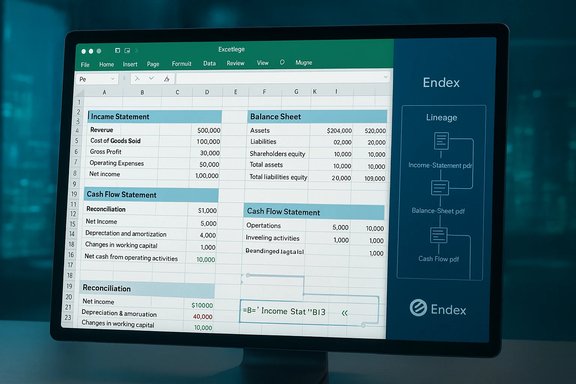
Endex installs as an Excel add‑in and runs as a persistent task pane inside the workbook, allowing users to interact with the agent without switching apps. According to company materials and user previews, processing typically flows like this:- Attach or point the agent at source documents (PDFs, images, slides, other workbooks).
- Select a high‑level prompt (e.g., “Extract the revenue tables and build a three‑statement model for META”).
- Endex performs OCR/structure extraction, maps columns to financial concepts, inserts native Excel tables and formulas, and generates reconciliation/validation sheets to explain its actions.
- Outputs are left as native Excel artifacts (tables, formulas, PivotTables), not black‑box blobs.
Data sources and refresh
Public descriptions show Endex connecting to market and financial data sources (Capital IQ, FactSet, SEC filings) and creating refreshable links when the source supports it. That mirrors the trends we’ve seen with Copilot’s import flows but packaged inside a product focused on finance. Look for these attributes during evaluation:- Ability to create Power Query or linked connections from imported tables for refreshability.
- Preservation of cell‑level lineage or citations so auditors can trace numbers back to source documents.
- Enterprise connectors and single‑sign‑on support for controlled access.
Feature breakdown: What Endex promises, and what’s independently verifiable
1) PDF → Table → Model: automated extraction that tries to understand structure
- Vendor claim: Endex converts multi‑page PDFs, scanned statements and slide decks into structured Excel tables; it recognizes header rows, grouping, and accounting line items and can map those into a model.
- Independent corroboration: Multiple demo writeups and listing pages describe PDF‑to‑table conversion as a headline capability. The press coverage around the company’s funding and product demos repeatedly highlights PDF ingestion as a core differentiator.
- Practical verification note: Several independent reviews show Endex inserting native formulas and building three‑sheet models after extraction, but the fidelity of extraction will depend heavily on the PDF's formatting and OCR quality. Users should test with representative statements (scanned bank statements, non‑tabular footnotes, inconsistent column layouts) to measure error rates before relying on fully automated ingestion.
2) Workbook understanding, error detection and risk analysis
- Vendor claim: Endex inspects workbooks for broken formulas, hidden links, hardcoded totals, and risky assumptions, and it surfaces actionable remediation steps.
- Independent corroboration: Hands‑on previews report that Endex produces “reconciliation” or “risk” sheets that count mismatches, flag indirect references and replace hardcoded totals with dynamic formulas. This aligns with the general trend in Excel agents that favor visible, editable artifact creation rather than opaque outputs.
- Practical verification note: Error detection routines are not perfect and will not replace domain review. The agent can produce indirect formula chains that require human inspection; organizations should maintain peer review and sign‑off processes for any financial or regulatory reporting.
3) Spreadsheet cleanup and standardization
- Vendor claim: Endex can apply industry‑standard color coding (inputs vs formulas), replace brittle totals with formulas, and reformat for stakeholder readability in seconds.
- Independent corroboration: Product demos and third‑party writeups show the tool standardizing headers, removing duplicate rows, applying consistent number formats, and recommending structural improvements.
- Practical verification note: This is a high‑value, low‑risk area. Formatting and replacing hardcoded totals are straightforward transformations, but teams should keep version snapshots (or use OneDrive version history) before committing changes.
4) Financial modeling and DCF automation
- Vendor claim: From a simple prompt, Endex can build a three‑statement DCF model — historicals, projections, free cash flow, discounting, terminal value and implied share price — with auditable links to source data.
- Independent corroboration: Demonstrations in the wild replicate these steps; press pieces describe the model generation workflow as Endex’s marquee capability. Funding coverage highlights the product’s ambition to “think like a financial analyst.”
- Practical verification note: Automatically generated valuation models are powerful for rapid prototyping and due‑diligence triage, but they are not substitutes for an analyst’s judgement. Model logic, assumptions and terminal value choices must be reviewed; automated outputs should be treated as starting points not final deliverables.
Endex vs. Microsoft Copilot: specialization vs. platform generalization
How they differ — the short version
- Endex: A specialist, Excel‑native agent focused on financial modeling, audit trails, PDF ingestion and professional formatting. Marketed as “an analyst in the workbook.”
- Microsoft Copilot (Excel): A platform‑level assistant integrated across Microsoft 365 that supports wide‑ranging tasks — formula generation, cross‑document ingestion, agentic plans — but with broader scope rather than finance‑first depth. Copilot’s Agent Mode emphasizes plan→act→validate loops and is delivered as part of Microsoft’s Copilot stack, with licensing and tenant governance tied to Microsoft 365 offerings.
Practical implications for teams
- If your primary need is finance and auditability — recurring valuation builds, reconciliations, regulatory templates, cell‑level lineage — a specialist like Endex can deliver deeper, out‑of‑the‑box modeling workflows and templates.
- If your environment values broad integration with Teams, SharePoint, and the wider Microsoft 365 ecosystem and you want an assistant that can jump across Word, PowerPoint, Outlook and Excel, Copilot’s platform integration is compelling. Copilot’s Agent Mode also aims to preserve auditable steps, but its generalist nature means some finance‑specific flows might require additional templating or configuration.
Security, compliance and governance: what to verify before deployment
Enterprise buyers must treat AI agents as a new integration class. Endex advertises enterprise-grade compliance (SOC 2, ISO, GDPR/CCPA) and a no‑training‑on‑customer‑data posture in marketing materials; press coverage confirms OpenAI funding but not third‑party attestation documents. Always verify the following directly with the vendor and in contract:- Certification evidence: Obtain SOC 2 Type II reports, ISO certification documents, and data processing addenda that reflect your regional requirements.
- Model routing and data flow: Confirm where inference occurs (vendor cloud, OpenAI endpoints, customer VPC) and whether PII or sensitive financial data can be excluded from model calls.
- Retention, logging and audit trails: Ensure Endex provides cell‑level lineage, exportable audit logs and version snapshots to support regulatory audits.
- DLP and tenant controls: For Microsoft‑hosted environments, validate how Endex cooperates with existing tenant DLP policies and whether admin consent and conditional access can be enforced.
- SLAs and rollback: Confirm SLAs for availability and recovery steps for failed automations; require a clear rollback path when agent runs make large structural edits.
Strengths: where Endex delivers material value
- Specialized financial workflows: The ability to generate auditable DCFs, reconcile disparate sources, and convert PDFs into models can save hours to days in deal cycles.
- Native Excel artifacts: Outputs are Excel tables and formulas — not opaque black boxes — which preserves editability and learning by inspection.
- Time to insight: For analysts building prototypes or triaging large legacy models, Endex’s automation can compress lengthy cleanup and reconciliation tasks into minutes.
- Auditability focus: Endex emphasizes lineage and validation sheets, addressing a key pain point for finance teams that must trace numbers for internal controls and external audits.
Risks and limitations: what can go wrong
- Overreliance and skill erosion: Heavy automation can reduce domain familiarity. Organizations should enforce human sign‑offs and maintain training programs so analysts retain model literacy.
- Hallucinations and subtle numeric errors: LLM‑driven agents can misinterpret ambiguous inputs or misalign columns; numeric edge cases (currency formatting, historical restatements) require human checks. Treat automated models as drafts.
- Vendor claims vs. verifiable performance: Marketing numbers (accuracy scores, % reduction in hallucination) are useful indicators but frequently stem from vendor benchmarks. These should be validated in your environment with representative datasets.
- Governance friction: Many agentic features require cloud storage (OneDrive/SharePoint) or tenant opt‑ins; regulated environments with local‑only storage may face deployment barriers.
Due‑diligence checklist: pilot plan for finance teams
- Select representative workbooks and PDFs: include messy, scanned and well‑structured samples.
- Pilot Endex on a sandbox tenant with a DLP policy in place.
- Measure: time saved on ingestion, number of post‑automation corrections, and frequency of numeric mismatches.
- Validate lineage: verify that every imported figure can be traced back to a source and that the agent’s validation sheets reconcile totals.
- Compare outputs to a Copilot pilot (or a Power Query baseline) on the same files and track auditability and error rates.
- Require human approvals for any outputs used in reports or investor materials; integrate agent runs into change‑control processes.
What’s independently verified — and what remains vendor‑claimed
- Independently verified: Endex exists as an Excel add‑in and has been demoed doing PDF extraction and model generation in public writeups and previews; OpenAI‑led funding coverage in industry press corroborates strong investor interest.
- Vendor‑claimed and requiring validation: specific accuracy percentages, latency improvements, and benchmark scores cited in marketing collateral should be treated as vendor claims until validated by a neutral third‑party audit or by a customer pilot. The presence of SOC 2 or ISO certifications needs document proof as part of procurement.
Final assessment: who should adopt Endex — and when
Endex is not a replacement for Excel — it’s a targeted accelerator. For teams whose core workflows are financial modeling, deal due diligence, consolidation and audit‑heavy reporting, Endex offers a compelling, specialist toolset that both speeds work and improves traceability. For broader task automation across Microsoft 365, or for organizations that need a single vendor footprint spanning mail, documents and spreadsheets, Microsoft Copilot remains the natural first stop. Adopt Endex when:- You build or maintain large, multi‑sheet financial models regularly.
- PDF ingestion and rapid model prototyping are recurring bottlenecks.
- Auditability and cell‑level lineage are procurement requirements.
- Your organization cannot permit cloud model calls for sensitive data.
- You lack the governance or version‑control processes to inspect agent outputs.
- You need broad Microsoft 365 integration across apps rather than finance‑first depth.
Conclusion
Endex marks an important inflection point in spreadsheet tooling: a specialist agent that brings finance‑grade automation directly into Excel. It demonstrates how focused agents can complement platform copilots by doing domain‑specific work with higher fidelity and more deliberate audit trails. Early coverage and demos confirm the core capabilities (PDF extraction, cleanup, DCF model generation), and venture funding and press attention validate investor confidence in the market opportunity. The productivity gains are real, but so are the governance and verification requirements. The most responsible path for teams is pragmatic: pilot with representative files, insist on auditable lineage and human sign‑offs, and treat automated models as powerful accelerants — not replacements — for financial expertise. When those guardrails are in place, Endex can transform Excel from a tool you fight into a partner that helps you get to better decisions faster.Source: Geeky Gadgets Excel on Autopilot : Endex Cleans Sheets, Pulls from PDFs, Builds Complete DCF Models
