

Microsoft completed the Enterprise State Roaming management handoff on July 1, 2026, removing the Microsoft Entra portal as the supported control plane while leaving ESR’s settings scope intact. Organizations planning PC refreshes should now treat roaming as an endpoint-policy responsibility: document the former Entra intent, assign a new policy owner, and validate backup and restore separately before deployment.
Microsoft’s documentation introduces a naming complication during this transition. Windows Backup for Organizations is becoming Windows settings backup and restore, so administrators may encounter both names in documentation, management tools, and policy reporting.
Microsoft’s May 2026 transition reference and the July 1 completion date describe stages of the same management change. For operational purposes, July 1, 2026 is the date on which policy-based management became the supported control approach and the Entra portal stopped serving as the management experience.
The transition does not remove ESR’s supported settings or replace them with a broader catalog. It changes where administrators express the organization’s intent: through Intune, another MDM platform, or Group Policy rather than through the Entra portal.
That makes this an ownership handoff more than a feature retirement. The principal risk is an accountability gap. Identity administrators may assume endpoint engineering has rebuilt the former Entra intent, while endpoint teams may assume the old configuration remains authoritative.
WindowsForum’s reports on the rollout consistently frame Windows Backup for Organizations as a cloud-oriented tool for device replacement and Windows migration. Those reports also emphasize its deliberately limited scope: preserving supported Windows settings and Microsoft Store app lists is not the same as creating a full device image, backing up every application, or reproducing all user data.
The table should contain names or accountable teams, not generic queue assignments. Identity can explain the former ESR scope; endpoint management can own policy deployment; desktop engineering can define the required replacement-PC experience; and security can review whether the approved settings fit organizational requirements.
WindowsForum’s report on the Intune-integrated enterprise feature describes the service as preserving supported Windows settings and Microsoft Store app lists in the cloud. Its reports on Entra-joined PCs and managed out-of-box setup focus on the other half of the workflow: making restoration useful during device replacement and mass migration.
Microsoft says backup will be enabled starting with Windows 11 version 26H2. Administrators should consult current Microsoft documentation before deployment for the exact applicability and management behavior rather than assuming additional eligibility or override conditions not stated in the transition excerpt.
For restore, verify the currently documented controls available in the organization’s chosen management platform. Exact menu paths, policy labels, and configuration values can change and should come from the accessible Microsoft documentation for the deployed Windows and management-tool versions.
This produces two explicit approvals:
Microsoft has not supplied a more precise cutoff date in the transition material summarized here, so administrators should not turn “one year” into an invented servicing deadline. The safer approach is to complete the ownership audit and production pilot well before the compatibility period becomes relevant.
Precedence also affects troubleshooting. If the observed result differs from the former Entra intent, first check whether an existing GPO or MDM control is governing the device. Do not respond by adding another policy source until the effective configuration has been established.
Escalate the migration when:
The pilot record should include:
The pilot should also respect the product’s scope. Success means the documented Windows settings and Store app information behave as expected. It should not be scored as though Windows Backup for Organizations were a full imaging, application deployment, or user-file backup system.
The immediate task is therefore not to find a replacement Entra checkbox. It is to transfer the former identity-side intent into an owned endpoint policy, approve backup and restore independently, and prove the complete refresh experience before the next deployment wave.
Microsoft’s documentation introduces a naming complication during this transition. Windows Backup for Organizations is becoming Windows settings backup and restore, so administrators may encounter both names in documentation, management tools, and policy reporting.
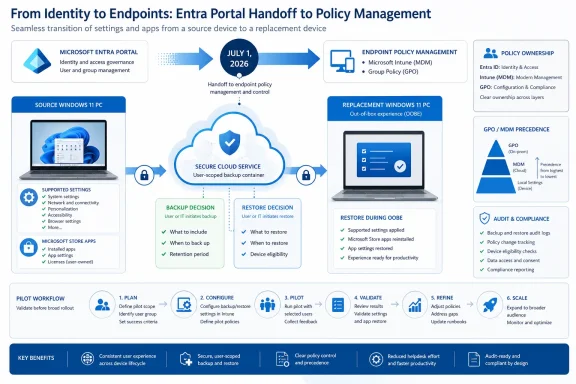 The July 1 Date Marks the Completed Handoff
Microsoft’s May 2026 transition reference and the July 1 completion date describe stages of the same management change. For operational purposes, July 1, 2026 is the date on which policy-based management became the supported control approach and the Entra portal stopped serving as the management experience.The transition does not remove ESR’s supported settings or replace them with a broader catalog. It changes where administrators express the organization’s intent: through Intune, another MDM platform, or Group Policy rather than through the Entra portal.
That makes this an ownership handoff more than a feature retirement. The principal risk is an accountability gap. Identity administrators may assume endpoint engineering has rebuilt the former Entra intent, while endpoint teams may assume the old configuration remains authoritative.
WindowsForum’s reports on the rollout consistently frame Windows Backup for Organizations as a cloud-oriented tool for device replacement and Windows migration. Those reports also emphasize its deliberately limited scope: preserving supported Windows settings and Microsoft Store app lists is not the same as creating a full device image, backing up every application, or reproducing all user data.
Audit Ownership Before the Next Refresh Ring
The transition audit should begin with the former Entra configuration and end with named owners for policy, restore, conflict investigation, and pilot approval.- Record whether ESR was previously enabled or restricted through Microsoft Entra and which users or groups were intended to receive roaming.
- Inventory existing GPO and MDM controls related to settings synchronization. Microsoft’s transition guidance says Windows will honor existing ESR and GPO or MDM roaming controls for one year, with GPO or MDM controls taking precedence.
- Decide which supported management system will express the future backup policy: Intune, another MDM platform, or Group Policy.
- Make a separate decision about restoration. Do not treat evidence that settings were backed up as proof that the replacement-device restore experience is configured or working.
- Assign a person or team to investigate precedence and assignment problems. This owner should have access to identity scope, endpoint policy, device state, and the refresh workflow.
- Run an end-to-end pilot using the same enrollment and provisioning process planned for production devices.
Handoff action table
| Decision or evidence | Required owner or outcome | Source basis |
|---|---|---|
| Former Entra owner | Records the previous ESR intent, target population, and restrictions | Microsoft’s July 1 management handoff |
| New policy owner | Maintains the supported Intune, third-party MDM, or Group Policy configuration | Microsoft’s policy-based management guidance |
| Backup decision | States whether supported Windows settings should be backed up and for whom | Microsoft transition documentation |
| Restore decision | States where restoration is expected in the replacement-device workflow | Microsoft documentation and WindowsForum’s Intune/OOBE restore reports |
| Conflict owner | Investigates cases where GPO or MDM precedence changes the expected result | Microsoft’s one-year compatibility guidance |
| Pilot evidence | Shows source-device state, replacement-device experience, restored results, and policy records | WindowsForum’s refresh and mass-migration coverage |
Backup and Restore Are Separate Decisions
Backup and restoration solve different parts of the refresh process. A successful backup policy does not by itself demonstrate that users will encounter the intended restore experience on a replacement PC.WindowsForum’s report on the Intune-integrated enterprise feature describes the service as preserving supported Windows settings and Microsoft Store app lists in the cloud. Its reports on Entra-joined PCs and managed out-of-box setup focus on the other half of the workflow: making restoration useful during device replacement and mass migration.
Microsoft says backup will be enabled starting with Windows 11 version 26H2. Administrators should consult current Microsoft documentation before deployment for the exact applicability and management behavior rather than assuming additional eligibility or override conditions not stated in the transition excerpt.
For restore, verify the currently documented controls available in the organization’s chosen management platform. Exact menu paths, policy labels, and configuration values can change and should come from the accessible Microsoft documentation for the deployed Windows and management-tool versions.
This produces two explicit approvals:
- Backup approval: The organization has decided which supported settings should participate and which users or devices are in scope.
- Restore approval: The refresh owner has decided when and how the replacement device should offer or apply restoration.
The Compatibility Period Is a Migration Window
Microsoft says Windows will honor existing ESR and GPO or MDM roaming controls for one year, with GPO and MDM controls taking precedence. That is a compatibility bridge, not a permanent operating model.Microsoft has not supplied a more precise cutoff date in the transition material summarized here, so administrators should not turn “one year” into an invented servicing deadline. The safer approach is to complete the ownership audit and production pilot well before the compatibility period becomes relevant.
Precedence also affects troubleshooting. If the observed result differs from the former Entra intent, first check whether an existing GPO or MDM control is governing the device. Do not respond by adding another policy source until the effective configuration has been established.
Escalate the migration when:
- The former Entra target population cannot be reconstructed.
- GPO and MDM records indicate different intended outcomes.
- A device reports policy assignment but the expected backup evidence cannot be demonstrated.
- Restore is absent from the planned refresh workflow.
- A setting appears on the source device but not on the replacement.
- Results differ between otherwise equivalent pilot users or devices.
- Documentation uses the old and new product names in ways that prevent reliable policy identification.
Use a Source-to-Replacement Pilot
A meaningful pilot starts on the source PC and ends after the replacement PC has completed the organization’s real setup process. A policy assignment report alone does not prove that supported settings were captured and restored as intended.The pilot record should include:
- The test user and source device.
- The former ESR scope applicable to that user.
- The management authority responsible for backup.
- The separately approved restore design.
- The supported settings selected as test evidence.
- Relevant GPO or MDM policy records.
- Screenshots or logs showing the source state.
- The replacement device’s provisioning method.
- The restore experience actually presented.
- The resulting Windows profile and any missing or unexpected settings.
- The names shown in management surfaces, including both “Windows Backup for Organizations” and “Windows settings backup and restore” where applicable.
- A signed decision to proceed, remediate, or escalate.
The pilot should also respect the product’s scope. Success means the documented Windows settings and Store app information behave as expected. It should not be scored as though Windows Backup for Organizations were a full imaging, application deployment, or user-file backup system.
A Practical Division of Responsibility
A workable responsibility model is:- Identity team: Preserve the historical Entra intent and explain previous user or group targeting.
- Endpoint management: Implement and monitor the supported policy configuration.
- Desktop engineering: Define the source-to-replacement experience and test acceptance criteria.
- Security: Review the approved scope and investigate policy concerns.
- Service desk: Receive a diagnostic checklist that distinguishes backup failure, restore failure, policy precedence, and unsupported expectations.
- Change owner: Approve expansion only after the pilot produces repeatable evidence.
Frequently Asked Questions
Was Enterprise State Roaming retired on July 1, 2026?
No. Microsoft completed the management handoff on July 1, removing the Entra portal as the supported control plane. ESR’s settings scope remains, but management moves to policy-based controls.What happened in May 2026?
Microsoft referenced the transition beginning in May. The supplied facts establish July 1 as the completed handoff date but do not support a more detailed day-by-day coexistence chronology.Must every organization use Intune?
No. Microsoft identifies Intune, other MDM platforms, and Group Policy as policy-based management options. Organizations should select the authority appropriate to their environment and document how responsibility and precedence will be handled.Does enabling backup automatically configure restore?
No. Backup and restore must be treated as separate operational decisions and tested separately in the real device-replacement workflow.Is one policy authority a Microsoft requirement?
Not on the basis of the material summarized here. It is WindowsForum’s recommendation for reducing ambiguity. Organizations using multiple authorities should document the intended division and troubleshooting process.What should block a production rollout?
Missing ownership, unreconciled GPO or MDM intent, absent restore behavior, inconsistent pilot results, or an inability to prove the expected source-to-replacement outcome should all stop expansion until resolved.The immediate task is therefore not to find a replacement Entra checkbox. It is to transfer the former identity-side intent into an owned endpoint policy, approve backup and restore independently, and prove the complete refresh experience before the next deployment wave.
References
- Primary source: learn.microsoft.com
Windows Backup for Organizations Overview | Microsoft Learn
Learn how to configure devices to use Windows Backup for Organizations.learn.microsoft.com - Primary source: WindowsForum
Windows Backup for Organizations: Cloud-Native Restore for Entra + Intune | Windows Forum
Microsoft’s new Windows Backup for Organizations arrives as a focused, cloud‑native lifeline for IT teams wrestling with mass device refreshes and the...windowsforum.com