

Microsoft’s July 2026 Entra Connect Sync-to-Cloud Sync notices are not a universal cutover deadline. Hybrid-identity teams should prepare an early pilot only if their current synchronization requirements are already fully covered by Microsoft Entra Cloud Sync; teams with an unsupported dependency should remain on Connect Sync, document the blocker, and watch Microsoft’s feature comparison until they become eligible.
That distinction matters because the first notices are targeted, phased transition windows—not a blanket retirement notice. Microsoft says it began contacting eligible organizations in July through the Microsoft 365 Message Center, Entra Connect Health, and targeted email, with each tenant receiving its own assigned window and migration guidance.
Microsoft’s Entra announcements make the initial selection criteria unusually clear: the first waves focus on straightforward tenants whose needs are fully supported by Cloud Sync. Organizations relying on advanced capabilities, or operating large directories, are not expected to be in those first targeted groups. For most administrators, the correct response is neither panic nor passive waiting. It is a readiness exercise that produces a defensible go/no-go decision before a transition window arrives.
The key operational change is Microsoft’s direction of travel. Cloud Sync is becoming the preferred platform for hybrid identity synchronization, while Connect Sync remains in service for organizations whose required scenarios are not yet supported. That makes July’s transition messaging a planning trigger: IT needs to know which side of the capability line it occupies.
Microsoft’s migration FAQ says tenants that depend on features not yet available in Cloud Sync are not required to migrate yet. They can continue using Connect Sync while monitoring the feature comparison. That is the strongest reason not to force an early move simply because a migration program exists.
The inverse is equally important. A tenant that appears simple should not assume migration is frictionless merely because it is selected in an early wave. “Fully supported” is a capability judgment, not a substitute for testing the organization’s actual synchronization scope, customizations, operational ownership, and rollback expectations.
Windows administrators have seen this pattern elsewhere in Microsoft’s cloud transition programs: a product direction can be unambiguous while each environment’s timing remains conditional. The practical task is to separate Microsoft’s long-term platform preference from the configuration your tenant must preserve today.
That makes OU design more than an administrative detail. It is the guardrail that prevents duplicate ownership during a phased migration. A pilot is valid only when the chosen OU is unambiguously owned by one tool and excluded from the other.
For a team preparing an early pilot, the sequence should be deliberate:
This is also where smaller identity teams can gain an advantage. A simple directory with clean OU boundaries may be a strong candidate for an early transition, but only if the team has documented those boundaries well enough to prove that objects will not be managed twice.
That means “hold” is a valid, supportable decision when it is based on a concrete dependency. It is not a permanent answer, and it should not be an undocumented instinct. The team should capture the dependency, identify the affected objects or workflows, assign an owner, and review Microsoft’s feature comparison as Cloud Sync develops.
A vague statement that the environment is “too complex” will become difficult to defend. A specific statement is far stronger: this configuration depends on a capability that Cloud Sync does not currently support, so Connect Sync remains the production synchronization tool until feature parity arrives.
The distinction also protects teams from unnecessary redesign. There may be good reasons to simplify identity architecture, but a forced migration window is not automatically a good reason to remove a working dependency before Microsoft supports its replacement.
WindowsForum readers tracking Microsoft’s identity changes may recognize the larger pattern from the recent discussion around Entra Connect Sync updates: better auditing, management, and cloud alignment do not eliminate the need to understand what a local identity deployment is actually doing. The migration decision belongs to the environment’s requirements, not to a marketing label.
An exception is appropriate when the organization is eligible but cannot complete a safe migration in the allotted period—for example, when the required pilot, validation, and production change process cannot responsibly be compressed into the window. It is also the mechanism for continuing the existing setup while working with Microsoft support or an account team on an appropriate timeline.
But an exception request should not be the first artifact created after a notice. The stronger approach is to prepare the readiness record in advance: current requirements, Cloud Sync support status, pilot OU, test owner, change authority, and expected blockers. If an exception becomes necessary, the organization can explain why with evidence rather than a generic request for more time.
This is especially relevant for teams already managing overlapping Microsoft transition calendars. The practical risk is not that Cloud Sync arrives unexpectedly; it is that identity migration is treated as a single task when it actually requires coordination across Active Directory ownership, Entra administration, service desks, and application teams.
The teams that fare best will not be those that migrate first or resist longest. They will be the ones that can show, object by object and OU by OU, which synchronization tool owns the environment and why.
That distinction matters because the first notices are targeted, phased transition windows—not a blanket retirement notice. Microsoft says it began contacting eligible organizations in July through the Microsoft 365 Message Center, Entra Connect Health, and targeted email, with each tenant receiving its own assigned window and migration guidance.
Microsoft’s Entra announcements make the initial selection criteria unusually clear: the first waves focus on straightforward tenants whose needs are fully supported by Cloud Sync. Organizations relying on advanced capabilities, or operating large directories, are not expected to be in those first targeted groups. For most administrators, the correct response is neither panic nor passive waiting. It is a readiness exercise that produces a defensible go/no-go decision before a transition window arrives.
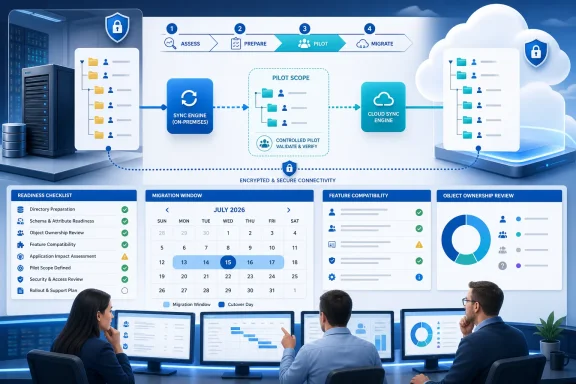 Treat the notice as an eligibility signal, not an order to switch overnight
The key operational change is Microsoft’s direction of travel. Cloud Sync is becoming the preferred platform for hybrid identity synchronization, while Connect Sync remains in service for organizations whose required scenarios are not yet supported. That makes July’s transition messaging a planning trigger: IT needs to know which side of the capability line it occupies.Microsoft’s migration FAQ says tenants that depend on features not yet available in Cloud Sync are not required to migrate yet. They can continue using Connect Sync while monitoring the feature comparison. That is the strongest reason not to force an early move simply because a migration program exists.
The inverse is equally important. A tenant that appears simple should not assume migration is frictionless merely because it is selected in an early wave. “Fully supported” is a capability judgment, not a substitute for testing the organization’s actual synchronization scope, customizations, operational ownership, and rollback expectations.
Windows administrators have seen this pattern elsewhere in Microsoft’s cloud transition programs: a product direction can be unambiguous while each environment’s timing remains conditional. The practical task is to separate Microsoft’s long-term platform preference from the configuration your tenant must preserve today.
The readiness decision can be made in four steps
Hybrid-identity teams do not need to wait for a notice to start the assessment. The most useful preparation is a short decision record that names the current Connect Sync dependencies, maps which organizational units are in scope, and states whether Cloud Sync supports every required scenario.- Inventory what Connect Sync manages today, including the parts nobody wants to rediscover during a migration. Review the current synchronization configuration, custom sync rules, organizational-unit scope, and the users, groups, and contacts that depend on it. Microsoft specifically notes that migration duration and complexity are affected by the number of users and groups, custom sync rules, and the number of OUs being moved.
- Compare those requirements against Microsoft’s current Cloud Sync feature comparison. Do not reduce this to a generic “supported or unsupported” label. The outcome should be a written list of required capabilities, a decision for each one, and an owner who can confirm the result. If even one production dependency is unavailable, the proper conclusion is to remain on Connect Sync for now.
- Design an OU-based pilot boundary before changing production ownership. Microsoft does not support Connect Sync and Cloud Sync managing the same objects simultaneously. Its recommended migration model is OU-based scoping, with each OU managed by one synchronization tool at a time. Identify a subset that can be exclusively assigned to Cloud Sync, validate it, and expand only after the pilot behaves as expected.
- Define the response path for a transition window. If the tenant is ready, use the assigned window to pilot and validate. If it is not ready because of an unsupported feature, preserve the evidence and continue on Connect Sync. If the tenant otherwise could migrate but cannot meet Microsoft’s recommended timeframe, plan to request an exception rather than silently missing the window.
Early-pilot tenants should focus on object ownership first
The highest-risk misunderstanding in this transition is the idea that “side by side” means two tools can safely synchronize the same population while administrators compare results. Microsoft’s FAQ is explicit: Connect Sync and Cloud Sync cannot manage the same objects simultaneously.That makes OU design more than an administrative detail. It is the guardrail that prevents duplicate ownership during a phased migration. A pilot is valid only when the chosen OU is unambiguously owned by one tool and excluded from the other.
For a team preparing an early pilot, the sequence should be deliberate:
- Select an OU whose users and groups are well understood and whose impact is manageable.
- Confirm that Connect Sync will no longer manage the pilot objects before Cloud Sync assumes responsibility for them.
- Validate Cloud Sync on that isolated subset before expanding to additional OUs.
- Keep a record of which synchronization tool owns every production OU during the transition.
This is also where smaller identity teams can gain an advantage. A simple directory with clean OU boundaries may be a strong candidate for an early transition, but only if the team has documented those boundaries well enough to prove that objects will not be managed twice.
Unsupported dependencies are a reason to hold, not a reason to improvise
The migration conversation can become unnecessarily political when a cloud-first roadmap is interpreted as an immediate requirement to abandon the existing tool. Microsoft has left an important off-ramp: if a needed feature is not yet supported by Cloud Sync, the tenant can continue using Connect Sync.That means “hold” is a valid, supportable decision when it is based on a concrete dependency. It is not a permanent answer, and it should not be an undocumented instinct. The team should capture the dependency, identify the affected objects or workflows, assign an owner, and review Microsoft’s feature comparison as Cloud Sync develops.
A vague statement that the environment is “too complex” will become difficult to defend. A specific statement is far stronger: this configuration depends on a capability that Cloud Sync does not currently support, so Connect Sync remains the production synchronization tool until feature parity arrives.
The distinction also protects teams from unnecessary redesign. There may be good reasons to simplify identity architecture, but a forced migration window is not automatically a good reason to remove a working dependency before Microsoft supports its replacement.
WindowsForum readers tracking Microsoft’s identity changes may recognize the larger pattern from the recent discussion around Entra Connect Sync updates: better auditing, management, and cloud alignment do not eliminate the need to understand what a local identity deployment is actually doing. The migration decision belongs to the environment’s requirements, not to a marketing label.
An exception is a scheduling tool, not a substitute for readiness
Microsoft says tenants that cannot migrate within their recommended transition window must request an exception. That wording should change how teams plan once a notice arrives.An exception is appropriate when the organization is eligible but cannot complete a safe migration in the allotted period—for example, when the required pilot, validation, and production change process cannot responsibly be compressed into the window. It is also the mechanism for continuing the existing setup while working with Microsoft support or an account team on an appropriate timeline.
But an exception request should not be the first artifact created after a notice. The stronger approach is to prepare the readiness record in advance: current requirements, Cloud Sync support status, pilot OU, test owner, change authority, and expected blockers. If an exception becomes necessary, the organization can explain why with evidence rather than a generic request for more time.
This is especially relevant for teams already managing overlapping Microsoft transition calendars. The practical risk is not that Cloud Sync arrives unexpectedly; it is that identity migration is treated as a single task when it actually requires coordination across Active Directory ownership, Entra administration, service desks, and application teams.
The real dividing line is evidence
Microsoft’s phased approach gives most organizations a useful period to replace assumptions with proof. If your requirements are already fully supported and you can isolate a pilot OU, prepare for an early Cloud Sync test. If a required feature remains unsupported, continue operating Connect Sync and monitor the capability comparison. If a transition window arrives before the organization can safely complete the move, request an exception.The teams that fare best will not be those that migrate first or resist longest. They will be the ones that can show, object by object and OU by OU, which synchronization tool owns the environment and why.
References
- Primary source: learn.microsoft.com
Microsoft Entra releases and announcements - Microsoft Entra | Microsoft Learn
Learn what is new with Microsoft Entra, such as the latest release notes, known issues, bug fixes, deprecated functionality, and upcoming changes.learn.microsoft.com - Independent coverage: techcommunity.microsoft.com
- Independent coverage: microsoft.com
- Independent coverage: kloudvin.com
- Independent coverage: blog.sebastienmiro.fr
Migration de Entra Connect Sync vers Cloud Sync : ce que les admins doivent préparer dès maintenant
Microsoft a confirmé en avril 2026 le démarrage officiel de la transition entre Entra Connect Sync (l’outil serveur historique, ex-Azure AD Connect) et Entra Cloud Sync (le moteur de synchronisation cloud-natif basé sur des agents légers). Les notifications individuelles aux tenants commenceront...blog.sebastienmiro.fr - Independent coverage: directionsonmicrosoft.com
Entra Cloud Sync Replacing Connect Sync: What to Expect - Directions on Microsoft
Customers should begin transitioning now from Connect Sync to Cloud Sync, but larger customers won’t be required to move completely to cloud Sync for several years. While Cloud Sync offers certain benefits over Connect Sync, it’s not an exact replacement and will often require enhancements or...www.directionsonmicrosoft.com