

Microsoft Entra Connect Sync 2.6.84.0 should be treated as an urgent upgrade, but IT teams should audit every script and runbook that changes cloud-side synchronization settings before deploying it. Microsoft’s new interactive administrator authorization is a welcome security control; the operational catch is that unattended PowerShell automation can no longer assume it may silently alter Entra Connect cloud configuration.
Microsoft released Entra Connect Sync 2.6.84.0 through the Microsoft Entra admin center on July 7, 2026, with security fixes and a recommendation to upgrade as soon as possible. The change matters less for ordinary directory synchronization than for the smaller set of actions that enable, disable, repair, or remove cloud-connected synchronization features.
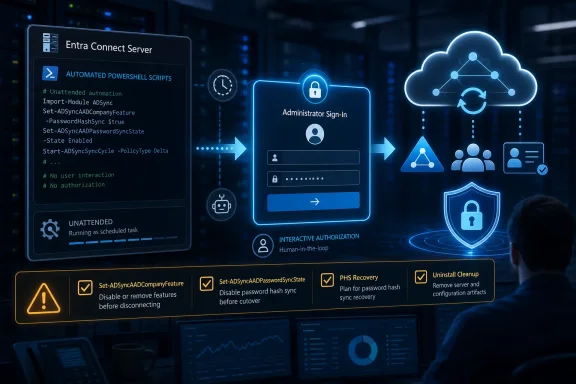
Microsoft’s documentation frames the adjustment as a move to interactive Microsoft Authentication Library, or MSAL, authentication for cloud writes. In practice, that changes the contract between a Connect server and the automation built around it: a cloud configuration change now expects a real administrator to sign in at the point of change.
Regular Microsoft Entra Connect synchronization continues as before. Users should not see a change in sign-in behavior, and the scheduled synchronization process itself is not suddenly interactive. Administrators do not need to interrupt normal sync merely because version 2.6.84.0 has been installed.
The affected surface is configuration. Microsoft specifically calls out
That sounds like a modest command-line adjustment. It is more consequential for environments where those cmdlets appear inside deployment tooling, scheduled tasks, incident scripts, desired-state remediation, upgrade automation, or break-glass procedures. A script can still start, perform local actions, and then stall or fail exactly where it reaches the cloud write that now requires human authentication.
The immediate recommendation is therefore two-part: install 2.6.84.0 promptly, then treat interactive authorization as a production change to automation rather than a cosmetic admin prompt.
Microsoft’s configuration guidance has long distinguished between local synchronization-rule work and changes that affect Microsoft Entra ID. The difference in 2.6.84.0 is that the cloud boundary is now enforced during the workflow rather than left to stored service credentials or inherited execution context.
It also means upgrade and reconfiguration playbooks need to account for timing. A server-side maintenance window may be perfectly planned, the right installer may be present, and the local operator may have administrative access to the machine—yet the change can still pause until someone who can authenticate to the cloud is available.
Uninstall behavior deserves the same attention. Microsoft says uninstall now requests administrator authentication before performing cloud-side cleanup. If authentication is skipped, local cleanup can still continue, but cloud cleanup does not automatically follow. That creates a split outcome that should be documented clearly in retirement procedures: removal of the local Entra Connect installation is not necessarily proof that cloud-side configuration cleanup occurred.
For organizations retiring or replacing a Connect server, that distinction is not theoretical. The runbook should explicitly state whether the goal is local software removal, cloud configuration cleanup, or both—and it should identify the administrator who will complete the interactive authorization if cloud cleanup is required.
This is also a useful moment to revisit existing Entra Connect hardening work. WindowsForum’s earlier coverage of stronger on-premises mapping controls and SyncJacking defenses focused on reducing risky synchronization paths. Interactive authorization extends the same broad principle to administration: sensitive cloud-side changes should be tied to an accountable, authenticated administrator rather than an unattended background process.
That removes a convenience mechanism, but it makes the administrative state more predictable. A team that intentionally disabled PHS should not find the setting quietly restored; conversely, a team that expects PHS to be enabled can no longer assume the service will repair the cloud flag without intervention.
The operational consequence is simple: monitoring and recovery procedures need to distinguish between the synchronization engine running and PHS being enabled as a cloud feature. If an investigation finds the PHS flag disabled, the remedy is now an intentional administrative action with the newly required interactive sign-in.
This is exactly where stale remediation scripts are most dangerous. A script written around an assumption of background self-healing may report success because its local checks passed, while the feature remains disabled in the cloud. Recovery validation must check the actual intended state after the administrator completes the authorization flow.
WindowsForum’s coverage of Entra Connect Sync 2.4.129.0 emphasized the growing importance of auditing identity-management changes. Version 2.6.84.0 raises the bar from recording or reviewing those changes to ensuring that the actor making them is actively present during the cloud write.
The design change is that a workflow must no longer pretend the final cloud-side decision is entirely unattended. That is a reasonable security tradeoff, particularly for features that affect how identities and password hashes are synchronized into Microsoft Entra ID.
Teams should avoid an overcorrection, however. The answer is not to disable security controls or defer the update indefinitely because a scheduled script cannot handle a prompt. The better approach is to redesign the workflow around an approval and authentication handoff:
No. Microsoft says regular synchronization and end-user behavior are not changing. The interactive requirement applies to cloud-side configuration changes, including enabling or disabling synchronization features.
Which PowerShell commands need special attention?
Microsoft specifically identifies
Can Entra Connect still be uninstalled if an administrator does not sign in?
Yes, local cleanup can proceed if the authentication step is skipped. But cloud-side cleanup requires administrator authentication, so an uninstall runbook should verify which cleanup actions actually completed.
Will Password Hash Synchronization repair itself if its cloud flag is disabled?
No. In 2.6.84.0, Microsoft says PHS no longer self-heals that cloud feature flag in the background. An administrator must explicitly re-enable it.
The upgrade decision is clear because Microsoft is urging customers to take the security fixes in 2.6.84.0. The real readiness test is whether the next configuration change, password-sync recovery, or server retirement has a named administrator ready to complete the cloud authorization that automation can no longer quietly bypass.
Microsoft released Entra Connect Sync 2.6.84.0 through the Microsoft Entra admin center on July 7, 2026, with security fixes and a recommendation to upgrade as soon as possible. The change matters less for ordinary directory synchronization than for the smaller set of actions that enable, disable, repair, or remove cloud-connected synchronization features.
Microsoft’s documentation frames the adjustment as a move to interactive Microsoft Authentication Library, or MSAL, authentication for cloud writes. In practice, that changes the contract between a Connect server and the automation built around it: a cloud configuration change now expects a real administrator to sign in at the point of change.
 The Upgrade Is Straightforward; the Operational Review Is Not
Regular Microsoft Entra Connect synchronization continues as before. Users should not see a change in sign-in behavior, and the scheduled synchronization process itself is not suddenly interactive. Administrators do not need to interrupt normal sync merely because version 2.6.84.0 has been installed.The affected surface is configuration. Microsoft specifically calls out
Set-ADSyncAADCompanyFeature and Set-ADSyncAADPasswordSyncState: when these cmdlets modify cloud configuration, they now require an explicit -AADUsername parameter so an administrator can authenticate interactively.That sounds like a modest command-line adjustment. It is more consequential for environments where those cmdlets appear inside deployment tooling, scheduled tasks, incident scripts, desired-state remediation, upgrade automation, or break-glass procedures. A script can still start, perform local actions, and then stall or fail exactly where it reaches the cloud write that now requires human authentication.
The immediate recommendation is therefore two-part: install 2.6.84.0 promptly, then treat interactive authorization as a production change to automation rather than a cosmetic admin prompt.
Audit the Scripts Before the First Emergency Change
The most useful work can be completed before upgrading, while there is time to discover assumptions rather than recover from a failed overnight task. Start by finding all references to the affected cmdlets and every workflow that launches the Entra Connect wizard or uninstalls the product.- Search PowerShell repositories, deployment shares, scheduled tasks, orchestration platforms, and administrator workstations for
Set-ADSyncAADCompanyFeatureandSet-ADSyncAADPasswordSyncState. - Identify whether each use case actually changes cloud configuration, such as enabling or disabling a synchronization feature or changing Password Hash Synchronization state. Read-only checks and ordinary synchronization are not the focus of this change.
- For each script that performs a cloud write, add and test the required
-AADUsernamehandling. The test must include the interactive administrator sign-in, not merely a syntax check or a local dry run. - Review scheduled and unattended execution paths. If a workflow runs without an available administrator, it should not be relied upon to complete a cloud configuration change after the upgrade.
- Update incident and break-glass documentation so the responder knows that a valid administrator sign-in is part of the recovery path. Record who can perform it, where it can be performed, and how the team will confirm the cloud-side change completed.
- Test a representative change in a controlled maintenance window, then validate both the intended configuration and the normal synchronization service afterward.
Microsoft’s configuration guidance has long distinguished between local synchronization-rule work and changes that affect Microsoft Entra ID. The difference in 2.6.84.0 is that the cloud boundary is now enforced during the workflow rather than left to stored service credentials or inherited execution context.
The Wizard and Uninstall Path Now Have the Same Human Gate
The Connect wizard now uses interactive MSAL authentication for cloud writes instead of stored service credentials. That is an important security improvement because it reduces reliance on a persistent credential arrangement for operations that alter cloud synchronization configuration.It also means upgrade and reconfiguration playbooks need to account for timing. A server-side maintenance window may be perfectly planned, the right installer may be present, and the local operator may have administrative access to the machine—yet the change can still pause until someone who can authenticate to the cloud is available.
Uninstall behavior deserves the same attention. Microsoft says uninstall now requests administrator authentication before performing cloud-side cleanup. If authentication is skipped, local cleanup can still continue, but cloud cleanup does not automatically follow. That creates a split outcome that should be documented clearly in retirement procedures: removal of the local Entra Connect installation is not necessarily proof that cloud-side configuration cleanup occurred.
For organizations retiring or replacing a Connect server, that distinction is not theoretical. The runbook should explicitly state whether the goal is local software removal, cloud configuration cleanup, or both—and it should identify the administrator who will complete the interactive authorization if cloud cleanup is required.
This is also a useful moment to revisit existing Entra Connect hardening work. WindowsForum’s earlier coverage of stronger on-premises mapping controls and SyncJacking defenses focused on reducing risky synchronization paths. Interactive authorization extends the same broad principle to administration: sensitive cloud-side changes should be tied to an accountable, authenticated administrator rather than an unattended background process.
Password Hash Synchronization Loses a Quiet Recovery Mechanism
The other practical behavior change in 2.6.84.0 concerns Password Hash Synchronization, or PHS. Microsoft says PHS no longer self-heals its cloud feature flag in the background. If that flag is disabled, an administrator must explicitly re-enable it.That removes a convenience mechanism, but it makes the administrative state more predictable. A team that intentionally disabled PHS should not find the setting quietly restored; conversely, a team that expects PHS to be enabled can no longer assume the service will repair the cloud flag without intervention.
The operational consequence is simple: monitoring and recovery procedures need to distinguish between the synchronization engine running and PHS being enabled as a cloud feature. If an investigation finds the PHS flag disabled, the remedy is now an intentional administrative action with the newly required interactive sign-in.
This is exactly where stale remediation scripts are most dangerous. A script written around an assumption of background self-healing may report success because its local checks passed, while the feature remains disabled in the cloud. Recovery validation must check the actual intended state after the administrator completes the authorization flow.
WindowsForum’s coverage of Entra Connect Sync 2.4.129.0 emphasized the growing importance of auditing identity-management changes. Version 2.6.84.0 raises the bar from recording or reviewing those changes to ensuring that the actor making them is actively present during the cloud write.
Where Automation Can Still Help—and Where It Must Stop
Interactive authorization does not make PowerShell irrelevant. Automation can still inventory servers, collect current configuration, prepare change windows, launch approved workflows, capture logs, and test post-change outcomes. It can also tell an on-call engineer exactly when an administrator must take over.The design change is that a workflow must no longer pretend the final cloud-side decision is entirely unattended. That is a reasonable security tradeoff, particularly for features that affect how identities and password hashes are synchronized into Microsoft Entra ID.
Teams should avoid an overcorrection, however. The answer is not to disable security controls or defer the update indefinitely because a scheduled script cannot handle a prompt. The better approach is to redesign the workflow around an approval and authentication handoff:
- Automation can detect drift and open or route the remediation task.
- A designated administrator can authenticate interactively to authorize the cloud configuration change.
- Automation can then collect evidence that the requested change completed and that normal synchronization remains healthy.
Frequently Asked Questions
Does Entra Connect Sync 2.6.84.0 make every synchronization cycle interactive?No. Microsoft says regular synchronization and end-user behavior are not changing. The interactive requirement applies to cloud-side configuration changes, including enabling or disabling synchronization features.
Which PowerShell commands need special attention?
Microsoft specifically identifies
Set-ADSyncAADCompanyFeature and Set-ADSyncAADPasswordSyncState. When they modify cloud configuration, they require an explicit -AADUsername for interactive administrator authentication.Can Entra Connect still be uninstalled if an administrator does not sign in?
Yes, local cleanup can proceed if the authentication step is skipped. But cloud-side cleanup requires administrator authentication, so an uninstall runbook should verify which cleanup actions actually completed.
Will Password Hash Synchronization repair itself if its cloud flag is disabled?
No. In 2.6.84.0, Microsoft says PHS no longer self-heals that cloud feature flag in the background. An administrator must explicitly re-enable it.
The upgrade decision is clear because Microsoft is urging customers to take the security fixes in 2.6.84.0. The real readiness test is whether the next configuration change, password-sync recovery, or server retirement has a named administrator ready to complete the cloud authorization that automation can no longer quietly bypass.
References
- Primary source: learn.microsoft.com
Microsoft Entra Connect Sync: Make a change to the default configuration - Microsoft Entra ID | Microsoft Learn
Walks you through how to make a change to the configuration in Microsoft Entra Connect Sync.learn.microsoft.com - Primary source: WindowsForum
You are intermittently prompted for credentials or experience time-outs when you connect to Authenti | Windows Forum
Fixes an issue in which a time-out error occurs when many NTLM authentication requests are sent on a high latency network from a computer that is running...windowsforum.com