

Tenants that still rely on directory-sourced phone numbers or alternate email addresses for Microsoft Entra self-service password reset should begin remediation now, because Microsoft says SSPR will accept only explicitly registered authentication methods starting September 7, 2026. Treat the July 6, 2026 registration campaign as the start of the migration window, not as a courtesy reminder.
The direct admin answer is:
Microsoft’s change is simple on paper and messy in real tenants. According to Microsoft’s Entra guidance and its June 2026 Entra update, SSPR will stop accepting unregistered directory-sourced values for verification on September 7, 2026. That means a mobile number synced from HR, a business phone stamped by Entra Connect, or an alternate email sitting in
The first admin move is not to debate whether this is a good security decision. It is to compare the tenant’s SSPR requirements with actual registered authentication methods.
That distinction is the whole issue. A user can have contact information in the directory and still be unprepared for the new SSPR behavior. The question Microsoft is forcing is not whether Entra ID knows a phone number or email address. It is whether the method was registered and is available to satisfy the SSPR policy that applies to the user.
For privileged accounts, do not wait for a sign-in prompt. Verify each admin account deliberately and make sure its registered methods satisfy the tenant’s SSPR policy before September 7. A normal user locked out of SSPR is a support ticket. A privileged operator locked out during an incident is a recovery problem.
This is also the latest step in a broader hardening pattern WindowsForum readers have already been following. In WindowsForum discussion of Microsoft Entra ID retiring service-principal-less authentication by 2026, the practical concern was the same: organizations were being pushed away from older implicit trust paths and toward explicit, auditable identity configuration. WindowsForum’s coverage of Windows-first SSO in 2025, including Entra ID and passkeys, similarly framed authentication as something that now reaches from cloud policy into the everyday endpoint experience. Reader discussion around Microsoft 365 disabling legacy authentication protocols in 2025 made the application-side lesson clear: shortcuts that once reduced friction can become security debt when the platform changes its defaults. WindowsForum’s report on Conditional Access enforcement for All resources in 2026 added the same migration lesson from another angle: identity teams should expect Microsoft to keep reducing exception paths and should inventory assumptions before deadlines arrive.
SSPR is now getting the same treatment. Recovery is no longer just a profile-data problem. It is an authentication-methods problem.
The mistake would be reading “campaign” as “Microsoft will handle it.” Registration campaigns are useful because they put the prompt in front of users, but they do not guarantee completion, policy fit, or help-desk readiness. They also arrive inside the normal sign-in flow, where users are trying to get to work and may be primed to dismiss anything that looks optional.
Admins should use the campaign as a forcing function for measurement. The useful questions are concrete: who was prompted, who completed registration, who still lacks enough registered methods, and which populations require assisted registration? If the answer is “we’ll know when password resets start failing,” the tenant has turned a planned security change into an avoidable outage.
Do not build the migration plan around a hoped-for delay. Plan around the two dates Microsoft has published: July 6, 2026, for the automatic registration campaign and September 7, 2026, for enforcement.
That convenience had a security cost. Directory-sourced contact values are administratively populated data, not necessarily user-verified authentication methods. They can be stale, mistyped, reassigned, over-shared, imported from questionable upstream systems, or maintained by teams that do not think of themselves as part of the authentication boundary.
Microsoft’s move narrows the gap between “we have contact data” and “we have recovery factors.” In the older behavior, an organization could mistake inventory for assurance. In the new behavior, SSPR needs a method that has gone through the registration path, not merely a value that exists in a user object.
That is why this cutoff is more than housekeeping. WindowsForum’s older discussion of Extended Protection for Authentication, including the long-running concern around NTLMv1 and LM network authentication, is useful context only because it shows a recurring migration pattern: authentication systems age badly when convenience paths outlive their risk assumptions. What looked like a deployment accelerator years ago can become an identity boundary problem later.
That means the right first question is not “does the user have a phone number?” It is “does the user have enough registered methods to satisfy the SSPR policy that applies to them?” Those are different questions, and September 7 will punish tenants that confuse them.
Use Microsoft Learn’s current SSPR configuration guidance and your tenant’s Microsoft Entra admin center experience as the source of truth for portal navigation and settings. Avoid copying old blade names into runbooks unless your own tenant documentation has verified them. The portal changes often enough that the durable runbook should describe the policy decisions, the evidence needed, and the owner of each step.
Do not overstate deployment details you have not verified in your tenant. The important remediation point is not the exact grouping model. It is whether every in-scope user has registered authentication methods that satisfy the applicable SSPR policy.
Admins may also need assisted processes for users who cannot complete registration unaided. The important distinction is that simply writing a phone number to a user’s profile is not the same thing as registering an authentication method for SSPR. If your onboarding workflow still says “populate alternate email and mobile phone, then SSPR is ready,” that workflow is about to become wrong.
New joiners are the edge case most likely to expose lazy assumptions. Many organizations bootstrap a user by feeding personal contact data from HR into directory attributes. After September 7, that data may still be useful for communication, but it should not be treated as a finished password-reset credential. The onboarding process needs a registration step the user completes, or an assisted process that results in a method Entra recognizes as registered.
There is also a communications problem hiding inside the technical one. Users have been trained to mistrust unexpected prompts, and rightly so. If Microsoft’s campaign starts interrupting sign-ins on July 6, help desks should already have screenshots, approved language, and escalation paths. Otherwise, the security team’s good-faith migration will look to users like another suspicious authentication prompt.
That creates a particularly nasty class of false positives. An admin checking a user profile may conclude the account has recovery data. A help-desk analyst may see a phone number and assume SSPR should work. A user may not understand why a number they have used before no longer appears as an eligible reset path. All three are looking at data that used to matter more than it will after enforcement.
The fix is procedural discipline. Reports and runbooks should distinguish between directory contact attributes and registered authentication methods. If the field came from HR, Active Directory, Entra Connect, or manual profile editing, do not count it as SSPR-ready unless the authentication-methods registration state confirms it.
This is also where overlapping policy design can confuse remediation. A user may be in an SSPR-enabled population, an authentication-methods policy target, and a Conditional Access regime that changes the registration experience. That does not change Microsoft’s September rule, but it can change whether the user successfully registers before the deadline. The migration owner needs visibility across those layers, not just the user profile.
That distinction matters because a prompt is not the same as a completed migration. Users may ignore it. Users may fail registration. Users may register a method that does not satisfy local policy. Privileged users may be handled outside ordinary user flows for operational reasons. Frontline workers may not have the device or time needed to complete registration in the moment. Some users may only discover the problem when they need password reset most.
The better approach is staged readiness before the campaign lands. Pilot the current registration flow with a representative group. Confirm what users see. Confirm how the help desk verifies completion. Confirm that privileged accounts are not relying on contact fields. Then let the July campaign mop up the long tail rather than carry the whole migration.
WindowsForum’s recommendation is deliberately conservative: plan as if July 6, 2026, is real and September 7, 2026, is nonnegotiable. If your tenant receives additional Microsoft guidance, fold it into the runbook. Do not use uncertainty as a reason to wait.
The September cutoff should trigger an admin-account review that is separate from the general user campaign. Inventory the accounts that can administer identity, change authentication policy, reset passwords, or support emergency recovery. Then verify registered methods account by account. This is WindowsForum’s operational advice for reducing blast radius; it is not being presented as a Microsoft-documented role list for this SSPR change.
Emergency access accounts require special care. They exist precisely because normal controls can fail, so they should not depend on a method that will be invalidated by a platform change. At the same time, they should not be casually enrolled into every convenience feature in the tenant. The right answer is not generic; it is documented, tested, and known by the small number of people responsible for emergency access.
This is where Windows-first shops should also remember the user experience at the Windows sign-in screen. WindowsForum’s coverage of Windows-first SSO in 2025 emphasized that Entra ID, passkeys, and licensing choices are now part of the everyday endpoint experience, not just cloud-console decisions. SSPR can reduce help-desk calls only when the account has usable reset methods and the device experience is configured appropriately. A user locked out at the Windows sign-in screen is not helped by a beautifully populated directory profile if SSPR refuses the unregistered phone number behind it.
That group often includes long-tenured employees, acquired-company users, hybrid identities, and people whose profiles were bulk-populated years ago. It can include executives whose assistants or IT staff maintained contact fields. It can include users who changed phone numbers but never updated security info because password reset “still worked.”
The operational question is whether you can identify that population before Microsoft identifies it for you through failed resets. If you cannot, the July 6 campaign should be treated as a data-gathering event as much as a user prompt. Track completion, track exceptions, and track accounts that need assisted registration.
Do not let the phrase “registered method” lull the organization into minimum viable security. Microsoft’s registration threshold depends on the number of methods required by the tenant’s SSPR policy. If your policy requires more than one method, or if the account’s role deserves stronger recovery assurance, the local standard should be higher.
Start with tenant policy. Use Microsoft Learn’s SSPR documentation and the current Microsoft Entra admin center experience to confirm the SSPR scope, the number of methods required, and the methods allowed for reset. Avoid documenting brittle UI paths unless they are currently supported in Microsoft Learn or verified in your own tenant runbook.
Then move to evidence. Identify users whose registered authentication methods do not satisfy the SSPR policy. Do not substitute profile contact fields for this report. If your tenant has a large or complex population, reconcile registration readiness against privileged accounts, VIP groups, frontline populations, and hybrid-synced users.
Finally, remediate in waves. Have users register approved methods through the security information experience, assist users who cannot complete registration unaided, and manually review administrative accounts. Update onboarding documentation so HR-fed phone numbers and alternate emails are treated as contact data, not completed SSPR registration.
The support script should be blunt: “We are not checking whether your phone number is in the company directory. We are checking whether your password reset method is registered.” That one sentence will prevent a lot of false reassurance.
WindowsForum’s report on Entra ID retiring service-principal-less authentication by 2026 is relevant because it showed how identity teams must inventory dependencies before a platform cutoff. WindowsForum’s 2025 SSO coverage is relevant because passwordless, passkeys, and Entra-centered sign-in strategies depend on the same discipline: the endpoint experience only works when identity configuration is explicit and current. The Microsoft 365 legacy authentication discussion is relevant because application compatibility often hides until defaults change. The Conditional Access enforcement discussion is relevant because policy scope and evaluation assumptions can become migration risks when enforcement tightens.
The SSPR deadline is smaller than all of those topics in scope, but it carries the same operational pattern. The organization that wins is not the one with the most populated directory. It is the one that can prove which users have registered recovery methods that satisfy policy before enforcement begins.
The direct admin answer is:
- What changed: SSPR verification can no longer be treated as satisfied by contact data that merely exists in the directory. A reset method needs to be explicitly registered and allowed by the tenant’s SSPR configuration.
- By when: Microsoft’s automatic registration campaign begins July 6, 2026, and enforcement begins September 7, 2026.
- Who is affected: Any user whose reset path depends on directory-populated values such as
mobilePhone,businessPhone,otherMails, or similar contact attributes rather than registered authentication methods. - First three steps: Document the SSPR policy, identify users who lack enough registered methods to satisfy that policy, and remediate privileged and high-risk users before relying on the campaign to catch the rest.
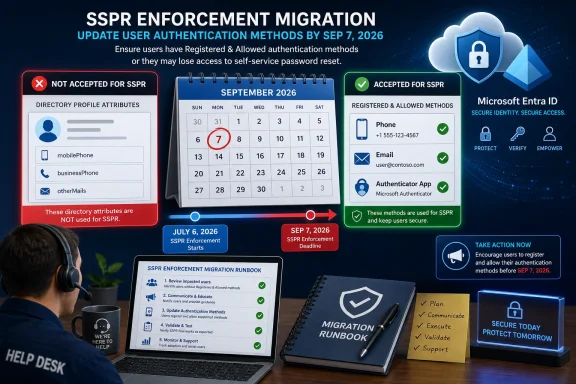 The September Cutoff Turns Contact Data Into Dead Weight
Microsoft’s change is simple on paper and messy in real tenants. According to Microsoft’s Entra guidance and its June 2026 Entra update, SSPR will stop accepting unregistered directory-sourced values for verification on September 7, 2026. That means a mobile number synced from HR, a business phone stamped by Entra Connect, or an alternate email sitting in otherMails should not be treated as ready unless it is also registered as an authentication method that can satisfy the applicable SSPR policy.The first admin move is not to debate whether this is a good security decision. It is to compare the tenant’s SSPR requirements with actual registered authentication methods.
That distinction is the whole issue. A user can have contact information in the directory and still be unprepared for the new SSPR behavior. The question Microsoft is forcing is not whether Entra ID knows a phone number or email address. It is whether the method was registered and is available to satisfy the SSPR policy that applies to the user.
For privileged accounts, do not wait for a sign-in prompt. Verify each admin account deliberately and make sure its registered methods satisfy the tenant’s SSPR policy before September 7. A normal user locked out of SSPR is a support ticket. A privileged operator locked out during an incident is a recovery problem.
What Microsoft Has Said Versus What WindowsForum Is Advising
Microsoft’s sourced guidance is the hard boundary:- SSPR depends on the authentication methods available to the user and the number of methods required by the tenant’s password reset policy.
- Microsoft Learn describes SSPR scoping as None, Selected, or All users.
- Microsoft’s June 2026 Entra update says an automatic registration campaign begins July 6, 2026, for affected users, with enforcement on September 7, 2026.
- Microsoft Learn’s authentication-methods documentation explains that authentication-methods policy affects sign-in and password reset scenarios.
This is also the latest step in a broader hardening pattern WindowsForum readers have already been following. In WindowsForum discussion of Microsoft Entra ID retiring service-principal-less authentication by 2026, the practical concern was the same: organizations were being pushed away from older implicit trust paths and toward explicit, auditable identity configuration. WindowsForum’s coverage of Windows-first SSO in 2025, including Entra ID and passkeys, similarly framed authentication as something that now reaches from cloud policy into the everyday endpoint experience. Reader discussion around Microsoft 365 disabling legacy authentication protocols in 2025 made the application-side lesson clear: shortcuts that once reduced friction can become security debt when the platform changes its defaults. WindowsForum’s report on Conditional Access enforcement for All resources in 2026 added the same migration lesson from another angle: identity teams should expect Microsoft to keep reducing exception paths and should inventory assumptions before deadlines arrive.
SSPR is now getting the same treatment. Recovery is no longer just a profile-data problem. It is an authentication-methods problem.
July 6 Is the First Day of Remediation, Not the First Day of Awareness
Microsoft says it will begin an automatic registration campaign on July 6, 2026, prompting affected users to register methods ahead of enforcement. According to Microsoft’s June 2026 Entra update, the campaign applies across Public cloud, GCC, GCC High, and DoD. The broad cloud coverage is a signal that this is not a commercial-cloud experiment or a soft retirement notice; Microsoft is aligning the SSPR behavior across the estate.The mistake would be reading “campaign” as “Microsoft will handle it.” Registration campaigns are useful because they put the prompt in front of users, but they do not guarantee completion, policy fit, or help-desk readiness. They also arrive inside the normal sign-in flow, where users are trying to get to work and may be primed to dismiss anything that looks optional.
Admins should use the campaign as a forcing function for measurement. The useful questions are concrete: who was prompted, who completed registration, who still lacks enough registered methods, and which populations require assisted registration? If the answer is “we’ll know when password resets start failing,” the tenant has turned a planned security change into an avoidable outage.
Do not build the migration plan around a hoped-for delay. Plan around the two dates Microsoft has published: July 6, 2026, for the automatic registration campaign and September 7, 2026, for enforcement.
The Directory Attribute Shortcut Was Always a Trust Compromise
The retiring behavior existed because enterprises are full of identity data that originates outside Entra ID. HR systems know personal mobile numbers. Directories know office phone numbers. Entra Connect can synchronize fields that make password reset look ready before the user has touched security registration.That convenience had a security cost. Directory-sourced contact values are administratively populated data, not necessarily user-verified authentication methods. They can be stale, mistyped, reassigned, over-shared, imported from questionable upstream systems, or maintained by teams that do not think of themselves as part of the authentication boundary.
Microsoft’s move narrows the gap between “we have contact data” and “we have recovery factors.” In the older behavior, an organization could mistake inventory for assurance. In the new behavior, SSPR needs a method that has gone through the registration path, not merely a value that exists in a user object.
That is why this cutoff is more than housekeeping. WindowsForum’s older discussion of Extended Protection for Authentication, including the long-running concern around NTLMv1 and LM network authentication, is useful context only because it shows a recurring migration pattern: authentication systems age badly when convenience paths outlive their risk assumptions. What looked like a deployment accelerator years ago can become an identity boundary problem later.
The Admin Checklist Starts With Policy, Not Users
Before chasing individual users, admins should freeze the current SSPR design in writing. Which users are in scope? How many methods are required to reset? Which methods are allowed? Are administrative accounts handled through a separate operational review? Are hybrid password writeback expectations documented? Microsoft’s guidance says users must have enough registered methods to satisfy the password reset policy; if your policy requires two methods, one registered method is not enough.That means the right first question is not “does the user have a phone number?” It is “does the user have enough registered methods to satisfy the SSPR policy that applies to them?” Those are different questions, and September 7 will punish tenants that confuse them.
Use Microsoft Learn’s current SSPR configuration guidance and your tenant’s Microsoft Entra admin center experience as the source of truth for portal navigation and settings. Avoid copying old blade names into runbooks unless your own tenant documentation has verified them. The portal changes often enough that the durable runbook should describe the policy decisions, the evidence needed, and the owner of each step.
Do not overstate deployment details you have not verified in your tenant. The important remediation point is not the exact grouping model. It is whether every in-scope user has registered authentication methods that satisfy the applicable SSPR policy.
Concrete Remediation Checklist for Admins
Use this as the working checklist for the migration. Microsoft supplies the policy and registration concepts; WindowsForum is translating them into an executable runbook.- Document the SSPR policy. Record whether SSPR is enabled for None, Selected, or All users; the number of methods required to reset; and the methods allowed for reset. Use Microsoft Learn’s current SSPR configuration guidance and your tenant UI as the source of truth.
- Measure registered authentication methods. Identify users who do not have enough registered methods to satisfy SSPR. Do not count
mobilePhone,businessPhone,otherMails, or other profile contact fields unless the method is also registered as an authentication method. - Create an operational priority list. Include accounts and populations where a failed reset would create outsized impact: highly privileged administrators, help-desk and password-reset operators, emergency access accounts, executives, frontline users, hybrid-synced users, and users in constrained device environments. This is operational risk management, not a claim that Microsoft requires those exact categories.
- Verify privileged accounts one by one. For each privileged account, confirm that the account has the required number of registered methods that are valid for SSPR. Record the verification date, verifier, and remediation action.
- Remediate ordinary users in waves. Direct users to the approved security information registration experience for your tenant, communicate which methods are approved, and track completion. For users who cannot self-register, use an assisted process that results in registered authentication methods, not merely updated profile fields.
- Update onboarding and joiner-mover-leaver workflows. HR-fed phone numbers and alternate emails may remain useful contact data, but they should not be treated as completed SSPR registration. Add a registration checkpoint to onboarding.
- Prepare the help desk before July 6. Give support staff approved wording, screenshots from your tenant, escalation criteria, and a script that distinguishes “profile phone number exists” from “SSPR authentication method is registered.”
- Recheck after the campaign starts. After July 6, measure who completed registration and who remains noncompliant. Treat the campaign as telemetry, not as proof the tenant is ready.
Pre-Registration Is the Difference Between Migration and Triage
The clean migration path is to pre-register users before they need recovery. For ordinary users, that usually means driving them through the tenant’s approved security information registration experience and requiring approved methods that satisfy the configured SSPR rules. For administrators, it means a controlled review: inspect the registered methods through the admin tools available in your tenant and confirm the account can survive the September behavior change.Admins may also need assisted processes for users who cannot complete registration unaided. The important distinction is that simply writing a phone number to a user’s profile is not the same thing as registering an authentication method for SSPR. If your onboarding workflow still says “populate alternate email and mobile phone, then SSPR is ready,” that workflow is about to become wrong.
New joiners are the edge case most likely to expose lazy assumptions. Many organizations bootstrap a user by feeding personal contact data from HR into directory attributes. After September 7, that data may still be useful for communication, but it should not be treated as a finished password-reset credential. The onboarding process needs a registration step the user completes, or an assisted process that results in a method Entra recognizes as registered.
There is also a communications problem hiding inside the technical one. Users have been trained to mistrust unexpected prompts, and rightly so. If Microsoft’s campaign starts interrupting sign-ins on July 6, help desks should already have screenshots, approved language, and escalation paths. Otherwise, the security team’s good-faith migration will look to users like another suspicious authentication prompt.
Synced Phone Fields Are the Trap Door Under Hybrid Identity
Hybrid tenants should pay special attention to phone fields synchronized from on-premises directories. The fields may remain populated after September 7, and administrators may still see values that look reassuring. The problem is that visibility is not validity. A number inmobilePhone or businessPhone can still exist while no longer working as an unregistered SSPR verification method.That creates a particularly nasty class of false positives. An admin checking a user profile may conclude the account has recovery data. A help-desk analyst may see a phone number and assume SSPR should work. A user may not understand why a number they have used before no longer appears as an eligible reset path. All three are looking at data that used to matter more than it will after enforcement.
The fix is procedural discipline. Reports and runbooks should distinguish between directory contact attributes and registered authentication methods. If the field came from HR, Active Directory, Entra Connect, or manual profile editing, do not count it as SSPR-ready unless the authentication-methods registration state confirms it.
This is also where overlapping policy design can confuse remediation. A user may be in an SSPR-enabled population, an authentication-methods policy target, and a Conditional Access regime that changes the registration experience. That does not change Microsoft’s September rule, but it can change whether the user successfully registers before the deadline. The migration owner needs visibility across those layers, not just the user profile.
The Campaign May Be Automatic, but Accountability Is Still Local
The July 6 campaign is Microsoft’s prompt. Readiness is still the tenant’s responsibility.That distinction matters because a prompt is not the same as a completed migration. Users may ignore it. Users may fail registration. Users may register a method that does not satisfy local policy. Privileged users may be handled outside ordinary user flows for operational reasons. Frontline workers may not have the device or time needed to complete registration in the moment. Some users may only discover the problem when they need password reset most.
The better approach is staged readiness before the campaign lands. Pilot the current registration flow with a representative group. Confirm what users see. Confirm how the help desk verifies completion. Confirm that privileged accounts are not relying on contact fields. Then let the July campaign mop up the long tail rather than carry the whole migration.
WindowsForum’s recommendation is deliberately conservative: plan as if July 6, 2026, is real and September 7, 2026, is nonnegotiable. If your tenant receives additional Microsoft guidance, fold it into the runbook. Do not use uncertainty as a reason to wait.
Privileged Accounts Deserve Their Own Cutover Plan
Privileged accounts should not be treated as ordinary users with better titles. They often have different Conditional Access requirements, different device constraints, different authentication strengths, and different operational expectations. They are also the accounts most likely to be involved when normal support paths are unavailable.The September cutoff should trigger an admin-account review that is separate from the general user campaign. Inventory the accounts that can administer identity, change authentication policy, reset passwords, or support emergency recovery. Then verify registered methods account by account. This is WindowsForum’s operational advice for reducing blast radius; it is not being presented as a Microsoft-documented role list for this SSPR change.
Emergency access accounts require special care. They exist precisely because normal controls can fail, so they should not depend on a method that will be invalidated by a platform change. At the same time, they should not be casually enrolled into every convenience feature in the tenant. The right answer is not generic; it is documented, tested, and known by the small number of people responsible for emergency access.
This is where Windows-first shops should also remember the user experience at the Windows sign-in screen. WindowsForum’s coverage of Windows-first SSO in 2025 emphasized that Entra ID, passkeys, and licensing choices are now part of the everyday endpoint experience, not just cloud-console decisions. SSPR can reduce help-desk calls only when the account has usable reset methods and the device experience is configured appropriately. A user locked out at the Windows sign-in screen is not helped by a beautifully populated directory profile if SSPR refuses the unregistered phone number behind it.
The Real Risk Is a Silent Inventory of Almost-Ready Users
Most identity migrations fail in the gray zone, not the red zone. Users with no methods are easy to spot. Users with modern MFA and current security info are probably fine. The dangerous population is the “almost ready” group: users who appear to have contact information, may even have used SSPR in the past, but do not have methods registered in the way September enforcement will require.That group often includes long-tenured employees, acquired-company users, hybrid identities, and people whose profiles were bulk-populated years ago. It can include executives whose assistants or IT staff maintained contact fields. It can include users who changed phone numbers but never updated security info because password reset “still worked.”
The operational question is whether you can identify that population before Microsoft identifies it for you through failed resets. If you cannot, the July 6 campaign should be treated as a data-gathering event as much as a user prompt. Track completion, track exceptions, and track accounts that need assisted registration.
Do not let the phrase “registered method” lull the organization into minimum viable security. Microsoft’s registration threshold depends on the number of methods required by the tenant’s SSPR policy. If your policy requires more than one method, or if the account’s role deserves stronger recovery assurance, the local standard should be higher.
The Practical Runbook for the Migration Window
The winning plan is boring, which is usually a compliment in identity operations: confirm policy, report actual registration state, remediate users, validate privileged accounts, and prepare support. The only novel piece is the deadline.Start with tenant policy. Use Microsoft Learn’s SSPR documentation and the current Microsoft Entra admin center experience to confirm the SSPR scope, the number of methods required, and the methods allowed for reset. Avoid documenting brittle UI paths unless they are currently supported in Microsoft Learn or verified in your own tenant runbook.
Then move to evidence. Identify users whose registered authentication methods do not satisfy the SSPR policy. Do not substitute profile contact fields for this report. If your tenant has a large or complex population, reconcile registration readiness against privileged accounts, VIP groups, frontline populations, and hybrid-synced users.
Finally, remediate in waves. Have users register approved methods through the security information experience, assist users who cannot complete registration unaided, and manually review administrative accounts. Update onboarding documentation so HR-fed phone numbers and alternate emails are treated as contact data, not completed SSPR registration.
The support script should be blunt: “We are not checking whether your phone number is in the company directory. We are checking whether your password reset method is registered.” That one sentence will prevent a lot of false reassurance.
Migration Lessons From Related WindowsForum Coverage
The useful comparison across recent WindowsForum identity coverage is not nostalgia for old protocols or broad historical analogy. It is the migration lesson: when Microsoft removes an implicit trust path, the pain lands on tenants that cannot distinguish configured intent from operational evidence.WindowsForum’s report on Entra ID retiring service-principal-less authentication by 2026 is relevant because it showed how identity teams must inventory dependencies before a platform cutoff. WindowsForum’s 2025 SSO coverage is relevant because passwordless, passkeys, and Entra-centered sign-in strategies depend on the same discipline: the endpoint experience only works when identity configuration is explicit and current. The Microsoft 365 legacy authentication discussion is relevant because application compatibility often hides until defaults change. The Conditional Access enforcement discussion is relevant because policy scope and evaluation assumptions can become migration risks when enforcement tightens.
The SSPR deadline is smaller than all of those topics in scope, but it carries the same operational pattern. The organization that wins is not the one with the most populated directory. It is the one that can prove which users have registered recovery methods that satisfy policy before enforcement begins.