

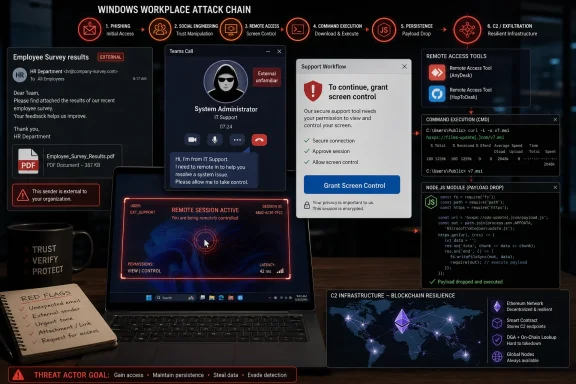
A new EtherRAT campaign reported July 6, 2026 uses phishing email, a fake Microsoft Teams call from an external “system administrator,” legitimate remote-access tools, and a malicious Windows Installer to compromise employees and establish blockchain-backed command-and-control on Windows systems. The campaign, detailed by Unit 42 researchers and reported by BleepingComputer and Cyberpress, is not just another malware delivery story. It is a warning that the modern Windows workplace has turned collaboration software into an attack surface where trust, urgency, and remote help can be weaponized faster than a mail filter can react.
The most important detail in this campaign is not EtherRAT’s Ethereum-based command-and-control, clever as that is. It is the moment when the victim receives a Microsoft Teams call from someone pretending to be an internal system administrator.
That call changes the psychology of the attack. Email phishing asks the user to believe a message; Teams vishing asks the user to believe a person. Once the attacker is speaking in the idiom of IT support — “I’m here to fix this,” “please share your screen,” “grant control so I can help” — the target is no longer judging a suspicious attachment in isolation. They are participating in a staged support interaction.
According to the reporting, the sequence starts with an email titled “Employee Survey results” and a PDF attachment. That lure primes the victim for what follows: a Teams call from an external Microsoft 365 tenant using the address [email protected][.]com. Teams audit logs reportedly flagged the contact as “External unfamiliar,” a small but vital clue that the caller had no trusted organizational relationship with the victim’s company.
That warning, however, is only useful if the employee has been trained to treat it as a stop sign rather than visual noise. In many companies, external Teams chats and calls are a normal part of working with vendors, consultants, auditors, partners, and outsourced support. The attacker’s trick is not to defeat Teams outright. It is to exploit the ambiguity that enterprises themselves have created.
Teams is designed to make collaboration frictionless. It allows cross-tenant communication, screen sharing, voice calls, and in some configurations remote control during a shared session. Those are useful capabilities in real organizations, especially those with distributed workforces and outsourced support models. The same features that make a remote help desk efficient also make a fake remote help desk convincing.
Microsoft’s own documentation says the default Teams external access posture can allow users to find, chat, call, and meet with people outside the organization unless administrators restrict it. Microsoft has also warned this year that attackers are increasingly abusing external Teams collaboration to impersonate IT or help desk personnel and convince users to grant remote assistance access. In other words, this EtherRAT case is not an isolated oddity; it is a concrete example of a broader shift Microsoft has already acknowledged.
The “External unfamiliar” label is a useful defensive cue, but it is not a control by itself. A label does not stop a conversation. A label does not prevent a stressed employee from believing that the person on the call is the only thing standing between them and a broken account, a missed deadline, or a security incident.
This is where enterprise UX collides with security reality. Collaboration platforms are optimized to reduce hesitation. Security depends on introducing hesitation at exactly the right moment.
This is not a semantic distinction for incident response. If the threat actor controlled the cursor, typed commands, opened sites, and installed tools, the timeline of compromise becomes much clearer. The endpoint was not simply “infected”; it was operated.
From there, the attacker reportedly guides the victim to download legitimate remote desktop tools, including HopToDesk and AnyDesk, using Microsoft Edge. These applications are not inherently malicious. That is precisely why attackers like them. Remote monitoring and management software gives intruders durable access while blending into a category of tools that many IT departments already use.
The use of legitimate software also complicates security triage. A suspicious executable named malware.exe is easy to dislike. AnyDesk installed by a user during a Teams “support” session is harder, especially in companies where sanctioned and unsanctioned remote access tools coexist.
This is the heart of the campaign’s efficiency. By the time the malicious MSI appears, the attacker has already crossed the trust boundary. The malware is not the spear tip. The impersonated support workflow is.
The loader chain is a familiar modern pattern: drop scripts into the user’s local application data directory, use legitimate runtime components, decrypt embedded blobs, and keep suspicious behavior split across stages. In this case, the batch script downloads Node.js version 18.20.5, which is then used to execute later JavaScript stages. The JavaScript loader reportedly uses a 24-byte subtraction cipher to decrypt an encrypted binary blob before ultimately delivering EtherRAT.
That architecture is not exotic for its own sake. It is designed to make the malicious activity look less like a single obvious malware launch and more like a messy sequence of scripts, installers, runtimes, and user-context activity. On a Windows endpoint, especially one used by developers, analysts, or power users, Node.js is not automatically suspicious. Attackers understand that “living off the land” increasingly includes living off the developer stack.
EtherRAT itself is a Node.js-based remote access trojan. Malwarebytes reported in June that EtherRAT gives attackers full control of a compromised machine and can execute arbitrary code supplied by its command-and-control infrastructure. In this campaign, the RAT’s role is to turn a successful help desk impersonation into a foothold that can survive beyond the call.
The persistence mechanism is tellingly mundane: the malware reportedly adds itself to the Windows registry under a OneDriveSetup run key. That is the other side of modern malware tradecraft. The command-and-control may lean on Ethereum smart contracts, but persistence still often lives in the same old Windows startup locations defenders have watched for decades.
This is sometimes described in breathless terms, as if blockchain instantly makes malware unstoppable. It does not. But it does change the defender’s job.
Traditional takedowns often depend on seizing, blocking, or sinkholing domains and servers. A smart contract used as a dead drop is harder to erase, and public blockchain infrastructure is not something a single victim company can realistically “take down.” The attacker can store or update pointers while the malware checks a decentralized source for where to call next.
The point is not that Ethereum is uniquely villainous. The point is that attackers keep finding ways to move fragile parts of their infrastructure onto services that defenders are reluctant or unable to block wholesale. We have seen similar logic with cloud storage, developer platforms, content delivery networks, SaaS file-sharing sites, and messaging platforms. EtherRAT’s blockchain trick is part of that continuum: hide the critical instruction in a place defenders cannot casually burn down.
For Windows administrators, the practical implication is sobering. Blocking one malicious domain may not be enough if the malware’s next domain is resolved elsewhere. Detection has to focus on the chain: the Teams contact, the remote-control grant, the RMM installation, the curl download, the MSI execution, the Node.js runtime drop, the registry persistence, and the outbound beaconing pattern.
A noisy commodity intruder might be content to install a RAT and move on. This operator apparently understood that internal workflow can be used as camouflage and privilege escalation. A ticket filed from a real employee’s session can look like ordinary business process, especially if the request matches the victim’s department, role, or recent activity.
This is where social engineering becomes operational tradecraft. The attacker is not only fooling the employee; they are trying to fool the organization’s bureaucracy. Identity, ticketing, access approval, and help desk processes are often treated as internal trust machinery. Once an attacker sits inside an authenticated user session, that machinery can be turned against the company.
For defenders, this means incident response cannot stop at removing the malware. Any tickets, access requests, password resets, MFA changes, application grants, mailbox rules, file shares, OAuth consents, and remote-access approvals created during the suspicious window need review. The endpoint is only one record of the intrusion. The business systems may tell the rest of the story.
It also means that help desk teams need a protocol for suspiciously well-timed support activity. If an employee gets a phishing email, then a Teams call, then a remote access session, then a ServiceNow request, those events should not live in separate silos. They are one story.
This campaign uses email as a stage prop. The real persuasion happens in Teams. The durable access comes through legitimate remote tools. The malware arrives only after the user has been convinced that the attacker belongs there.
That multi-channel structure is what makes these attacks dangerous. Each component, viewed separately, can seem explainable. An employee opens a survey PDF. An external contact calls on Teams. The user shares a screen. AnyDesk appears. A command prompt runs curl. Node.js is downloaded. A registry key changes. None of these events must be benign, but many enterprises lack the correlation needed to see them as a single intrusion in real time.
Microsoft has been warning about cross-tenant help desk impersonation for months, and security vendors including Blumira, Cloud Security Alliance researchers, and others have tracked similar patterns involving Teams, Quick Assist, RMM software, spam floods, and fake support narratives. The EtherRAT case simply gives the technique a more sophisticated payload.
The lesson is not “ban Teams.” The lesson is that collaboration tools now require the same defensive seriousness as email gateways. External messaging policies, tenant allowlists, remote control settings, audit log retention, user reporting workflows, and conditional access rules are no longer administrative niceties. They are frontline controls.
The challenge is prioritization. Many organizations drown in endpoint telemetry but still miss the sequence because their detections are tuned to malware families rather than behaviors. If the alert only fires after EtherRAT is unpacked, the attacker has already enjoyed a successful support-session takeover.
A stronger approach would treat unsolicited external Teams contact plus remote-control activity as a high-risk event, especially when followed by remote-access software installation. The identity of the external tenant matters. So does the display name. So does whether the contact is from a domain the organization has ever trusted before. The “onmicrosoft.com” tenant pattern is especially important because disposable or lookalike tenants can appear plausibly corporate to a busy user.
Endpoint teams should also revisit assumptions around Windows Installer execution. MSI files remain a convenient malware delivery format because they look administrative and fit naturally into software installation workflows. When an MSI is fetched via curl from an unusual host during or immediately after a remote support session, that should be treated as a red flare, not a curiosity.
Node.js is another useful pivot. The runtime is legitimate, common, and necessary in many environments, but it should not be silently downloaded into user-local directories on a finance employee’s machine moments after an external Teams call. Context is the difference between normal and alarming.
Those controls matter, but they are not enough by themselves. The cultural problem is that many organizations have conditioned employees to obey urgent IT requests. Security training tells users to be suspicious; daily workplace reality tells them to keep moving, accept interruptions, and let support fix the problem.
A real fix requires making refusal normal. Employees need permission to say, “I will call the help desk back through the official number,” even when the person on Teams sounds authoritative. They need a clean reporting path for suspicious Teams calls, not just suspicious emails. They need to know that an external label is not decorative.
Help desk teams also need to stop behaving in ways that train users to accept attacker-like conduct. If legitimate support routinely asks users to install remote tools from public websites during unsolicited calls, attackers will copy that pattern. If legitimate support uses inconsistent accounts, external tenants, or vague display names, attackers will exploit that ambiguity. Secure support must be boring, standardized, and verifiable.
The uncomfortable truth is that a lot of organizations have built support workflows around convenience and then asked security awareness training to compensate. EtherRAT is what happens when an attacker studies that gap.
The EtherRAT campaign is a reminder that Windows compromise increasingly begins in the gray space between sanctioned collaboration and misplaced trust. Attackers no longer need to smash the front door if they can call through Teams, sound helpful, and persuade an employee to open it from the inside. The next phase of enterprise defense will depend less on finding one perfect malware signature and more on making the ordinary rituals of remote work harder to impersonate.
 The Help Desk Is Now Part of the Kill Chain
The most important detail in this campaign is not EtherRAT’s Ethereum-based command-and-control, clever as that is. It is the moment when the victim receives a Microsoft Teams call from someone pretending to be an internal system administrator.That call changes the psychology of the attack. Email phishing asks the user to believe a message; Teams vishing asks the user to believe a person. Once the attacker is speaking in the idiom of IT support — “I’m here to fix this,” “please share your screen,” “grant control so I can help” — the target is no longer judging a suspicious attachment in isolation. They are participating in a staged support interaction.
According to the reporting, the sequence starts with an email titled “Employee Survey results” and a PDF attachment. That lure primes the victim for what follows: a Teams call from an external Microsoft 365 tenant using the address [email protected][.]com. Teams audit logs reportedly flagged the contact as “External unfamiliar,” a small but vital clue that the caller had no trusted organizational relationship with the victim’s company.
That warning, however, is only useful if the employee has been trained to treat it as a stop sign rather than visual noise. In many companies, external Teams chats and calls are a normal part of working with vendors, consultants, auditors, partners, and outsourced support. The attacker’s trick is not to defeat Teams outright. It is to exploit the ambiguity that enterprises themselves have created.
Microsoft Teams Did What It Was Built to Do
There is a temptation to describe this as a Microsoft Teams failure. That is too simple, and it lets defenders off too easily.Teams is designed to make collaboration frictionless. It allows cross-tenant communication, screen sharing, voice calls, and in some configurations remote control during a shared session. Those are useful capabilities in real organizations, especially those with distributed workforces and outsourced support models. The same features that make a remote help desk efficient also make a fake remote help desk convincing.
Microsoft’s own documentation says the default Teams external access posture can allow users to find, chat, call, and meet with people outside the organization unless administrators restrict it. Microsoft has also warned this year that attackers are increasingly abusing external Teams collaboration to impersonate IT or help desk personnel and convince users to grant remote assistance access. In other words, this EtherRAT case is not an isolated oddity; it is a concrete example of a broader shift Microsoft has already acknowledged.
The “External unfamiliar” label is a useful defensive cue, but it is not a control by itself. A label does not stop a conversation. A label does not prevent a stressed employee from believing that the person on the call is the only thing standing between them and a broken account, a missed deadline, or a security incident.
This is where enterprise UX collides with security reality. Collaboration platforms are optimized to reduce hesitation. Security depends on introducing hesitation at exactly the right moment.
The Attack Succeeds Before the Malware Runs
The most revealing forensic artifact in the campaign may be “CtrlVirtualCursorWin,” reportedly seen in user session logs after the victim grants Teams screen control. That artifact matters because it helps distinguish between a user merely following instructions and an attacker actively driving the machine.This is not a semantic distinction for incident response. If the threat actor controlled the cursor, typed commands, opened sites, and installed tools, the timeline of compromise becomes much clearer. The endpoint was not simply “infected”; it was operated.
From there, the attacker reportedly guides the victim to download legitimate remote desktop tools, including HopToDesk and AnyDesk, using Microsoft Edge. These applications are not inherently malicious. That is precisely why attackers like them. Remote monitoring and management software gives intruders durable access while blending into a category of tools that many IT departments already use.
The use of legitimate software also complicates security triage. A suspicious executable named malware.exe is easy to dislike. AnyDesk installed by a user during a Teams “support” session is harder, especially in companies where sanctioned and unsanctioned remote access tools coexist.
This is the heart of the campaign’s efficiency. By the time the malicious MSI appears, the attacker has already crossed the trust boundary. The malware is not the spear tip. The impersonated support workflow is.
EtherRAT Turns a Social Engineering Win Into Persistent Access
Once remote access is established, the attacker reportedly opens a command prompt and uses curl to retrieve a malicious Windows Installer named v7.msi from camorreado[.]click. That installer launches a multi-stage loader written in JavaScript, according to Unit 42 research summarized by BleepingComputer and Cyberpress.The loader chain is a familiar modern pattern: drop scripts into the user’s local application data directory, use legitimate runtime components, decrypt embedded blobs, and keep suspicious behavior split across stages. In this case, the batch script downloads Node.js version 18.20.5, which is then used to execute later JavaScript stages. The JavaScript loader reportedly uses a 24-byte subtraction cipher to decrypt an encrypted binary blob before ultimately delivering EtherRAT.
That architecture is not exotic for its own sake. It is designed to make the malicious activity look less like a single obvious malware launch and more like a messy sequence of scripts, installers, runtimes, and user-context activity. On a Windows endpoint, especially one used by developers, analysts, or power users, Node.js is not automatically suspicious. Attackers understand that “living off the land” increasingly includes living off the developer stack.
EtherRAT itself is a Node.js-based remote access trojan. Malwarebytes reported in June that EtherRAT gives attackers full control of a compromised machine and can execute arbitrary code supplied by its command-and-control infrastructure. In this campaign, the RAT’s role is to turn a successful help desk impersonation into a foothold that can survive beyond the call.
The persistence mechanism is tellingly mundane: the malware reportedly adds itself to the Windows registry under a OneDriveSetup run key. That is the other side of modern malware tradecraft. The command-and-control may lean on Ethereum smart contracts, but persistence still often lives in the same old Windows startup locations defenders have watched for decades.
Blockchain C2 Is Resilience, Not Magic
EtherRAT’s headline feature is its blockchain-anchored command-and-control. The malware retrieves its primary C2 URLs from an Ethereum smart contract and falls back to a hardcoded domain if blockchain resolution fails. That design gives the operator a resilient way to rotate infrastructure without baking every change into a new binary.This is sometimes described in breathless terms, as if blockchain instantly makes malware unstoppable. It does not. But it does change the defender’s job.
Traditional takedowns often depend on seizing, blocking, or sinkholing domains and servers. A smart contract used as a dead drop is harder to erase, and public blockchain infrastructure is not something a single victim company can realistically “take down.” The attacker can store or update pointers while the malware checks a decentralized source for where to call next.
The point is not that Ethereum is uniquely villainous. The point is that attackers keep finding ways to move fragile parts of their infrastructure onto services that defenders are reluctant or unable to block wholesale. We have seen similar logic with cloud storage, developer platforms, content delivery networks, SaaS file-sharing sites, and messaging platforms. EtherRAT’s blockchain trick is part of that continuum: hide the critical instruction in a place defenders cannot casually burn down.
For Windows administrators, the practical implication is sobering. Blocking one malicious domain may not be enough if the malware’s next domain is resolved elsewhere. Detection has to focus on the chain: the Teams contact, the remote-control grant, the RMM installation, the curl download, the MSI execution, the Node.js runtime drop, the registry persistence, and the outbound beaconing pattern.
The ServiceNow Detail Shows the Operator Was Thinking Like an Insider
One of the stranger details in the reported campaign is that the attacker, while controlling the compromised machine, accessed the company’s internal ServiceNow portal and created a legitimate support ticket requesting access to specific enterprise applications. That move deserves more attention than the malware name.A noisy commodity intruder might be content to install a RAT and move on. This operator apparently understood that internal workflow can be used as camouflage and privilege escalation. A ticket filed from a real employee’s session can look like ordinary business process, especially if the request matches the victim’s department, role, or recent activity.
This is where social engineering becomes operational tradecraft. The attacker is not only fooling the employee; they are trying to fool the organization’s bureaucracy. Identity, ticketing, access approval, and help desk processes are often treated as internal trust machinery. Once an attacker sits inside an authenticated user session, that machinery can be turned against the company.
For defenders, this means incident response cannot stop at removing the malware. Any tickets, access requests, password resets, MFA changes, application grants, mailbox rules, file shares, OAuth consents, and remote-access approvals created during the suspicious window need review. The endpoint is only one record of the intrusion. The business systems may tell the rest of the story.
It also means that help desk teams need a protocol for suspiciously well-timed support activity. If an employee gets a phishing email, then a Teams call, then a remote access session, then a ServiceNow request, those events should not live in separate silos. They are one story.
The Old Perimeter Is Losing to the Live Conversation
Security teams have spent years hardening email. Sandboxing, URL rewriting, attachment detonation, DMARC, user reporting buttons, phishing simulations, and mailbox intelligence have all made classic phishing harder. The attackers’ response has been to stop relying on email alone.This campaign uses email as a stage prop. The real persuasion happens in Teams. The durable access comes through legitimate remote tools. The malware arrives only after the user has been convinced that the attacker belongs there.
That multi-channel structure is what makes these attacks dangerous. Each component, viewed separately, can seem explainable. An employee opens a survey PDF. An external contact calls on Teams. The user shares a screen. AnyDesk appears. A command prompt runs curl. Node.js is downloaded. A registry key changes. None of these events must be benign, but many enterprises lack the correlation needed to see them as a single intrusion in real time.
Microsoft has been warning about cross-tenant help desk impersonation for months, and security vendors including Blumira, Cloud Security Alliance researchers, and others have tracked similar patterns involving Teams, Quick Assist, RMM software, spam floods, and fake support narratives. The EtherRAT case simply gives the technique a more sophisticated payload.
The lesson is not “ban Teams.” The lesson is that collaboration tools now require the same defensive seriousness as email gateways. External messaging policies, tenant allowlists, remote control settings, audit log retention, user reporting workflows, and conditional access rules are no longer administrative niceties. They are frontline controls.
Windows Defenders Need to Watch the Boring Parts
EtherRAT’s blockchain C2 will understandably draw attention, but the most actionable detection points are less glamorous. A fake Teams support call leaves traces. Remote control leaves traces. RMM installation leaves traces. Curl downloading an MSI from a newly observed domain leaves traces. Node.js appearing under unusual user paths leaves traces.The challenge is prioritization. Many organizations drown in endpoint telemetry but still miss the sequence because their detections are tuned to malware families rather than behaviors. If the alert only fires after EtherRAT is unpacked, the attacker has already enjoyed a successful support-session takeover.
A stronger approach would treat unsolicited external Teams contact plus remote-control activity as a high-risk event, especially when followed by remote-access software installation. The identity of the external tenant matters. So does the display name. So does whether the contact is from a domain the organization has ever trusted before. The “onmicrosoft.com” tenant pattern is especially important because disposable or lookalike tenants can appear plausibly corporate to a busy user.
Endpoint teams should also revisit assumptions around Windows Installer execution. MSI files remain a convenient malware delivery format because they look administrative and fit naturally into software installation workflows. When an MSI is fetched via curl from an unusual host during or immediately after a remote support session, that should be treated as a red flare, not a curiosity.
Node.js is another useful pivot. The runtime is legitimate, common, and necessary in many environments, but it should not be silently downloaded into user-local directories on a finance employee’s machine moments after an external Teams call. Context is the difference between normal and alarming.
The Policy Fix Is Smaller Than the Cultural Fix
There are straightforward controls that reduce exposure. Administrators can restrict external Teams access to trusted domains, disable or limit remote control during meetings, govern RMM tools through application control, use Defender or comparable telemetry to hunt for suspicious Teams-to-RMM chains, and train employees to verify IT support through a known channel before granting access.Those controls matter, but they are not enough by themselves. The cultural problem is that many organizations have conditioned employees to obey urgent IT requests. Security training tells users to be suspicious; daily workplace reality tells them to keep moving, accept interruptions, and let support fix the problem.
A real fix requires making refusal normal. Employees need permission to say, “I will call the help desk back through the official number,” even when the person on Teams sounds authoritative. They need a clean reporting path for suspicious Teams calls, not just suspicious emails. They need to know that an external label is not decorative.
Help desk teams also need to stop behaving in ways that train users to accept attacker-like conduct. If legitimate support routinely asks users to install remote tools from public websites during unsolicited calls, attackers will copy that pattern. If legitimate support uses inconsistent accounts, external tenants, or vague display names, attackers will exploit that ambiguity. Secure support must be boring, standardized, and verifiable.
The uncomfortable truth is that a lot of organizations have built support workflows around convenience and then asked security awareness training to compensate. EtherRAT is what happens when an attacker studies that gap.
The EtherRAT Call Leaves a Short List of Non-Negotiables
The practical response to this campaign is not panic. It is disciplined reduction of ambiguity in the places where attackers are now operating. The campaign’s mechanics point to a few concrete moves that Windows shops can make quickly, even before broader identity and collaboration reforms land.- Organizations should restrict Microsoft Teams external access to known and trusted domains wherever business requirements allow it.
- Employees should be trained to treat unsolicited Teams calls from external accounts claiming to be IT support as reportable security events.
- Remote control in Teams meetings should be limited, monitored, or disabled for users who do not have a clear business need for it.
- Remote monitoring and management tools such as AnyDesk and HopToDesk should be governed by allowlists, not discovered for the first time during an incident.
- Security teams should correlate Teams audit logs, RMM installation events, MSI execution, curl downloads, Node.js runtime drops, and registry run-key changes into a single detection story.
- Help desk procedures should require identity verification through an internal channel before any remote session begins.
The EtherRAT campaign is a reminder that Windows compromise increasingly begins in the gray space between sanctioned collaboration and misplaced trust. Attackers no longer need to smash the front door if they can call through Teams, sound helpful, and persuade an employee to open it from the inside. The next phase of enterprise defense will depend less on finding one perfect malware signature and more on making the ordinary rituals of remote work harder to impersonate.
References
- Primary source: cyberpress.org
Published: Tue, 07 Jul 2026 07:05:38 GMT
Loading…
cyberpress.org - Related coverage: bleepingcomputer.com
Loading…
www.bleepingcomputer.com - Related coverage: malwarebytes.com
Loading…
www.malwarebytes.com - Related coverage: blumira.com
Microsoft Teams Helpdesk Impersonation Attack Explained
Attackers pose as IT helpdesk in Microsoft Teams to hijack Quick Assist and reach domain admin in 21 minutes. See the kill chain, IOCs, and how to stop it. www.blumira.com
- Related coverage: techrepublic.com
Hackers Impersonate IT Help Desk on Microsoft Teams to Gain Access, Steal Data
Hackers are abusing Microsoft Teams chats to impersonate IT support, gain remote access, move laterally, and steal company data, Microsoft warns.www.techrepublic.com
- Related coverage: ucl.ac.uk
Loading…
www.ucl.ac.uk
- Related coverage: cibersecurity.io
Loading…
www.cibersecurity.io - Related coverage: ntgit.com
Microsoft Teams “IT Support” Impersonation Scam | Northern Technologies Group
An active, fast-moving scam is targeting organizations that use Microsoft Teams — and the threat actors running it are sophisticated, persistent, and effective. Microsoft published a detailed security advisory on this campaign on April 18, 2026, and what they describe matches what is being seen... ntgit.com
- Related coverage: lyrie.ai
Loading…
lyrie.ai - Related coverage: techradar.com
Loading…
www.techradar.com - Related coverage: cyberproof.com
Loading…
www.cyberproof.com - Related coverage: labs.cloudsecurityalliance.org
Microsoft Teams as Phishing Infrastructure: The A0Backdoor Campaign and the Industrialization of Collaboration-Platform Attacks
PDF documentlabs.cloudsecurityalliance.org
- Official source: microsoft.com
Inside an AI‑enabled device code phishing campaign | Microsoft Security Blog
A new wave of device code phishing shows how threat actors are scaling account compromise using AI and end‑to‑end automation. This campaign goes beyond traditional phishing by generating live authentication codes on demand, enabling higher success rates and sustained post‑compromise access.www.microsoft.com - Related coverage: helpnetsecurity.com
Attackers use MS Teams, fake mailbox repair utility to breach organizations - Help Net Security
A threat group is impersonating IT helpdesk staff on Microsoft Teams, tricking employees with a fake "Mailbox Repair Utility".www.helpnetsecurity.com
- Related coverage: myabt.com
Loading…
www.myabt.com - Related coverage: scworld.com
Loading…
www.scworld.com - Official source: learn.microsoft.com
Loading…
learn.microsoft.com - Related coverage: csoonline.com
Attackers abuse Microsoft Teams to impersonate the IT helpdesk in a new enterprise intrusion playbook | CSO Online
Microsoft details a cross-tenant social engineering technique that tricks employees into granting remote access and enables stealthy data exfiltration.www.csoonline.com
- Related coverage: securityonline.info
Loading…
securityonline.info - Related coverage: windowscentral.com
Microsoft warns Teams users about new scammers | Windows Central
Microsoft Teams adds real‑time brand impersonation alerts to protect users from scam calls.www.windowscentral.com - Related coverage: itpro.com
Loading…
www.itpro.com