

Evernote 11 lands as the most consequential update to the note-taking app in half a decade, folding two years of behind-the-scenes engineering into a release that layers three AI-driven capabilities — AI Assistant, Semantic Search, and AI Meeting Notes — on top of a modernized interface and refreshed brand identity.
Evernote’s v11 is the product of sustained work dating back roughly two years, during which the company rolled out hundreds of incremental improvements aimed at stability, sync, and core experience enhancements. The new release packages those incremental changes together and adds a prominent AI thrust: a chat-style AI Assistant integrated with users’ notes, a meaning-aware Semantic Search engine, and an AI Meeting Notes tool that transcribes, attributes speakers, and produces summaries with action items. The company describes the effort as a functional evolution rather than a wholesale redesign: notes, tasks, notebooks, and the editor remain familiar, but AI is now embedded as an optional — though enabled by default — productivity layer.
This article synthesizes Evernote’s official disclosures and coverage from multiple independent technology outlets to give WindowsForum readers a deep, practical look at what v11 delivers, how it works, and what to watch for when enabling AI features in a personal or professional workflow.
AI is positioned as an assistant that sits above the core building blocks — notes, tasks, notebooks, tags — rather than as a separate silo. That design choice keeps Evernote’s long-established organizational metaphors intact while making retrieval, summarization, and content generation faster.
Behavior to be aware of:
Caveats and things to verify before enabling:
However, success will hinge on two variables: trust and accuracy. Users will adopt AI features only if they trust how their data is handled and if the AI demonstrably saves time without introducing errors.
Evernote 11 promises to speed the everyday tasks that make knowledge work grind: searching for forgotten details, turning meeting audio into actions, and distilling long notes into useful summaries. The release is a significant inflection point for Evernote — one that modernizes the app for hybrid work while forcing users and organizations to explicitly decide how much of their workflow they want to hand over to AI.
Source: gHacks Technology News Evernote 11 Introduces AI Assistant, Semantic Search, And Meeting Notes - gHacks Tech News
 Background
Evernote’s v11 is the product of sustained work dating back roughly two years, during which the company rolled out hundreds of incremental improvements aimed at stability, sync, and core experience enhancements. The new release packages those incremental changes together and adds a prominent AI thrust: a chat-style AI Assistant integrated with users’ notes, a meaning-aware Semantic Search engine, and an AI Meeting Notes tool that transcribes, attributes speakers, and produces summaries with action items. The company describes the effort as a functional evolution rather than a wholesale redesign: notes, tasks, notebooks, and the editor remain familiar, but AI is now embedded as an optional — though enabled by default — productivity layer.This article synthesizes Evernote’s official disclosures and coverage from multiple independent technology outlets to give WindowsForum readers a deep, practical look at what v11 delivers, how it works, and what to watch for when enabling AI features in a personal or professional workflow.
What’s new in Evernote 11 — the essentials
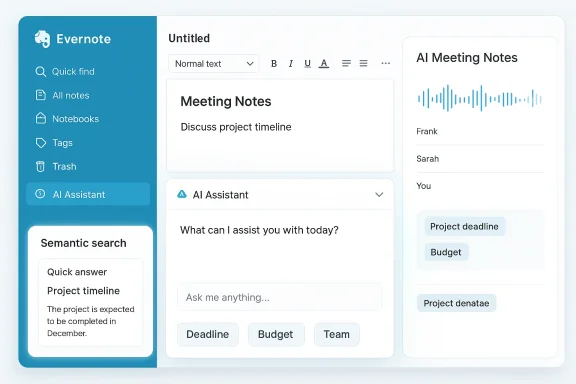
- AI Assistant — a chat drawer inside Evernote (desktop and web for now) that can answer questions about your notes, summarize long content, surface related notes, and run lightweight web searches. Designed to prioritize context from the note you have open and expand across your account when necessary. Evernote says the assistant was developed in collaboration with OpenAI and includes tools like @-mentions to focus the assistant on particular notebooks, notes, or tags.
- Semantic Search — replaces or supplements literal keyword matching with meaning-based retrieval. Describe what you’re searching for in natural language and Evernote will return matched notes even when the phrasing differs. Results can include a “Quick answer” at the top and “Smart notes” mixed into standard results.
- AI Meeting Notes — capture in-person or online meetings, transcribe audio, detect and separate multiple speakers, and generate action-oriented summaries saved directly into Evernote as notes. The feature supports transcription options, language selection, replay, and basic translation.
- UI refresh and new logo — visual modernizations across the app that keep the layout familiar while updating typography, icons, and brand elements.
- Settings to control AI — every AI feature can be toggled on or off independently in preferences; AI features are enabled by default but require explicit triggers (e.g., start a chat, run a semantic search, or begin a transcription).
Overview: how the AI features integrate with existing workflows
Evernote 11 is not trying to replace the note-taking mental model; it augments it.AI is positioned as an assistant that sits above the core building blocks — notes, tasks, notebooks, tags — rather than as a separate silo. That design choice keeps Evernote’s long-established organizational metaphors intact while making retrieval, summarization, and content generation faster.
- The AI Assistant opens in a drawer inside the app. It’s context-aware: it prioritizes the open note or selected text, and can expand to search the rest of your account. It supports operations that are common to knowledge-work: summarizing long meeting notes into bulleted highlights, extracting deadlines or decisions, and rewriting or translating text. It can also reference specific notebooks or tags via @-mentions to narrow its scope.
- Semantic Search is integrated into the standard search workflow. Results continue to show direct text matches, but smart notes and quick AI-generated answers appear when Evernote deems them useful. This blends the speed of keyword search with the flexibility of natural language.
- AI Meeting Notes turn recorded conversations into usable artifacts without extra copy-paste. Transcriptions, speaker separation, and summary generation all happen inside Evernote, and the final output is saved directly as a note, ready for tagging, sharing, or turning into tasks.
How the key features work in practice
AI Assistant: chat that actually knows your notes
The assistant behaves like a chat-based knowledge worker with access to the content in your Evernote account and a limited ability to search the open web when required. Typical uses include:- Summarize the current note into a short executive summary.
- Find the due date or owner of an action item across your notebooks.
- Produce a consolidated view of related notes (e.g., all research on a project).
- Reformat or rewrite text for different tones and purposes.
- Use @-mentions to tell the assistant which notebook, tag, or note to focus on.
- Select text before opening the assistant to ensure it uses the most relevant context.
- Use the “regenerate reply” option if the first answer is incomplete or unclear.
Semantic Search: meaning over keywords
Semantic Search indexes notes in a way that lets Evernote match intent, not only words. That means a natural-language query like “notes about budget planning for Q3” can return meeting notes, spreadsheets, and other artifacts that discuss budget planning — even if they don’t use the exact phrase.Behavior to be aware of:
- Quick answer may show at the top for clearly phrased questions.
- Smart notes — results flagged by the semantic engine — are interleaveed with literal text matches.
- The indexing process can take time; depending on account size, full semantic indexing may take days.
AI Meeting Notes: from recording to action items
AI Meeting Notes combines recording, transcription, speaker attribution, and summarization in a single flow:- Record an in-person meeting with a laptop or mobile microphone, or connect to an online meeting source.
- Evernote transcribes the audio and identifies multiple speakers. You can assign or edit speaker names for clarity.
- The tool generates a summary with key points and action items. The summary is saved as a note, and the transcript is searchable.
- Evernote says transcription processing is handled by its internal models, while some summarization steps may use third-party AI providers.
- The feature supports language selection and can produce translations for transcriptions.
- Entire recordings are processed only when you explicitly choose to transcribe or summarize.
Privacy, data handling, and trust: what Evernote says — and what to watch for
Evernote frames v11’s AI as privacy-first: the company states that user content is not used to train AI models and that Evernote does not permit third-party use of that content for model training. The official documentation explains that:- AI Assistant may send user prompts to a third-party provider (Evernote cites OpenAI collaboration) to process conversation-style requests; Evernote claims data is deleted immediately after response generation and not retained for training by the third party.
- Semantic Search and AI Meeting Notes (transcription) primarily use Evernote’s internal models and infrastructure; content does not leave Evernote for these operations.
- AI Meeting Notes may use a third-party provider for some summarization steps (Evernote notes that transcription uses internal models; summarization could be handled externally for specific workloads).
Caveats and things to verify before enabling:
- Claims like “data is not used to train models” and “third-party retention is zero” are important but difficult for end users to verify independently. Organizations with regulatory obligations (HIPAA, certain finance or government contracts, strict corporate data policies) should treat these claims as vendor assertions and push for contractual assurances, audits, or an enterprise data processing addendum where necessary.
- Even when Evernote processes data internally, risk remains around misclassification, retention of logs, or metadata usage. Companies should ask for specifics: where data is hosted, how logs are handled, and what the deletion timeline and auditability look like.
- The split between in-house processing and third-party calls (e.g., for web search or summarization) introduces decision points: turning off particular features might reduce exposure but also remove functionality.
Cross-platform availability and plans
Evernote’s v11 rollout is staggered across platforms:- AI Assistant: Desktop and web initially; mobile support is planned later.
- Semantic Search: Desktop, web, and mobile.
- AI Meeting Notes: Desktop, web, and mobile.
Technical and operational considerations
Indexing and scale
Evernote has indicated that a large-scale indexing effort underpins v11’s semantic features — the company indexed billions of notes to prepare the back-end. That preparatory work is necessary for reliable semantic retrieval at scale, but it also means the initial rollout may require a propagation period while accounts are indexed and tuned.Performance and local resources
- Semantic indexing happens server-side; users should not expect heavy local CPU usage for searches.
- Recording and live transcription will use local I/O for capture but rely on remote processing; audio quality, network connectivity, and microphone configuration will affect transcription accuracy.
Accuracy, hallucination risk, and citation behavior
Generative AI can produce concise answers, but it can also hallucinate or over-generalize. Evernote’s assistant includes mechanisms to cite notes used as sources in replies, which helps trace the origin of generated answers. Users should cross-check AI-generated summaries and action items before treating them as authoritative, especially for tasks like legal summaries, compliance notes, or financial decisions.Strengths: why Evernote 11 matters
- Practical AI, not gimmicks: The features are focused on core productivity problems — finding the right notes, summarizing long content, and turning meeting audio into usable artifacts. That increases the probability the AI will be genuinely useful to day-to-day workflows.
- Tight integration: AI is embedded into existing flows (search bar, note editor, meeting recording) rather than being an external add-on. That reduces friction and preserves the mental model long-time users rely on.
- Granular controls: Being able to turn each AI feature on or off independently is a pragmatic design that respects different user risk tolerances.
- Cross-device reach: Offering semantic search and meeting notes across desktop, web, and mobile makes the tools broadly useful for hybrid work patterns.
- Preparation at scale: The backend indexing and incremental improvements suggest Evernote invested in infrastructure and reliability before launching headline AI features — a positive sign for stability.
Risks and limitations: what to be cautious about
- Data handling opacity: While Evernote publishes assurances about not using user data to train models, that posture depends on clear contractual and technical controls. For high-security contexts, vendor assertions are not a substitute for contractual safeguards and auditability.
- Third-party dependencies: When AI Assistant delegates to external providers for generation or web search, that introduces another layer of data flow and potential exposure.
- Accuracy and legal risk: AI-created summaries or action items may omit context or misattribute responsibility. Using them as the single source of truth without manual verification could be risky in legal, financial, or clinical contexts.
- Adoption friction: Long-time Evernote users with large archives may face a delay while semantic indexing completes; the initial period of tuning could produce inconsistent results.
- Feature availability gating: Rolling AI Assistant to paid users first (and mobile lag for the assistant) may frustrate some users and complicate team rollouts.
Practical guidance — configuring Evernote 11 safely and effectively
- Review organizational policy: If you manage a team, consult legal or compliance before enabling AI features for shared notebooks or sensitive content.
- Start in audit mode:
- 1. Enable Semantic Search for a subset of notebooks that contain non-sensitive data.
- 2. Test search and quick-answer results for accuracy and relevancy over a 2–4 week period.
- 3. Evaluate transcription quality on several meeting recordings with different acoustics and speaker counts.
- Use toggles to limit exposure: disable AI Assistant at the account level until policies are in place, or restrict it to individual users who consent.
- Train teams on verification: require manual review of AI-generated summaries and action items before assigning tasks or forwarding to external stakeholders.
- Keep sensitive data out of shared or team notebooks where possible, and use Evernote’s permission controls to limit access to notebooks used for AI testing.
- If you rely on audit trails for compliance, ask Evernote for explicit documentation on data deletion timelines, logging practices, and the option to disable third-party calls.
Step-by-step quick start (recommended first steps)
- Update to Evernote v11 on desktop or web.
- Open Settings > Preferences > AI features and confirm which AI tools are enabled for your account.
- Try Semantic Search with a descriptive query like “notes about Q3 budget approvals” and inspect both smart notes and quick answers.
- Open a long meeting note, highlight a section, and ask the AI Assistant to “summarize this selection.”
- Record a short meeting and transcribe it with AI Meeting Notes. Check speaker attribution, then generate a summary and compare it against manual notes.
- Review the AI Assistant’s sources in any generated reply to understand provenance.
Competitive context and market impact
Evernote’s move mirrors a broader trend: productivity apps are embedding generative AI to help users manage information overload. Competitors have pursued similar features — natural-language search, in-app assistants, and meeting transcription — but Evernote’s advantage is its long history as a knowledge repository and a large installed base of notes and notebooks. The combination of in-place summarization, search by meaning, and a meeting transcription workflow gives v11 a strong proposition for users who treat Evernote as a single source for both creation and recall.However, success will hinge on two variables: trust and accuracy. Users will adopt AI features only if they trust how their data is handled and if the AI demonstrably saves time without introducing errors.
Final appraisal: who should upgrade and when
- Upgrade now if:
- You want smarter search and faster access to corner cases where you “remember the idea, not the words.”
- You frequently transcribe meetings and prefer having transcripts and summaries saved directly in your note archive.
- You are comfortable with the privacy assurances and want to use AI as a productivity multiplier.
- Wait or proceed cautiously if:
- Your notes contain regulated or highly sensitive data requiring contractual security and auditability.
- You need AI Assistant on mobile today (it’s desktop/web first).
- You require absolute guarantees that third parties will never see any content; in those cases, consult Evernote’s enterprise terms or explore on-premises options (if available).
Evernote 11 promises to speed the everyday tasks that make knowledge work grind: searching for forgotten details, turning meeting audio into actions, and distilling long notes into useful summaries. The release is a significant inflection point for Evernote — one that modernizes the app for hybrid work while forcing users and organizations to explicitly decide how much of their workflow they want to hand over to AI.
Source: gHacks Technology News Evernote 11 Introduces AI Assistant, Semantic Search, And Meeting Notes - gHacks Tech News
