

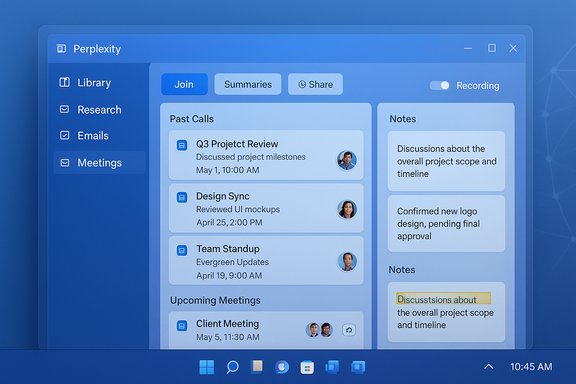
Perplexity’s Email Assistant is reportedly gaining a dedicated “Meetings” view inside its Library — a built-in hub that groups past calls with their notes, lists scheduled meetings, and exposes scheduling and summary controls — a move that would fold meeting capture and playback directly into the same workspace users already rely on for saved research and email triage.
Perplexity began as a citation-first research assistant and has expanded rapidly into agentic productivity features: search and summarization evolved into inbox triage, and more recently into an Email Assistant that can read mail, draft replies, and help schedule meetings when authorized. That Email Assistant is available to Perplexity’s premium tiers and has been surfaced in official help documentation and early reporting. The onboarding flow requires users to connect Gmail or Outlook and to grant scoped permissions; once enabled the assistant can draft replies, label incoming mail, and participate in threads when CC’d. The new Meetings view — visible in internal builds and reported through a TestingCatalog leak — appears to be the next logical step: rather than scattering meeting artifacts across calendars, chats, or third‑party recorders, Perplexity would index calls and their notes in the Library and give users a single place to review recordings, recaps, and scheduled sessions. That consolidation aligns with Perplexity’s stated ambition to combine research, email, and task‑centric workflows into a single workspace.
Perplexity’s ambition is clear: tie research, communication, and meeting outcomes into a single assistant‑anchored workspace. If the company executes with strong governance, transparency, and admin controls, the result could be a powerful productivity play for teams that need traceable, evidence‑backed meeting artifacts. If those controls lag or the Library remains unreliable, the same features could amplify compliance headaches and information risk. The practical choice for IT leaders and Windows power users is a cautious trial: validate the feature set in a controlled pilot, demand clear controls, and only then expand usage more broadly.
Source: TestingCatalog Perplexity Assistant will make meeting notes library for you
 Background
Perplexity began as a citation-first research assistant and has expanded rapidly into agentic productivity features: search and summarization evolved into inbox triage, and more recently into an Email Assistant that can read mail, draft replies, and help schedule meetings when authorized. That Email Assistant is available to Perplexity’s premium tiers and has been surfaced in official help documentation and early reporting. The onboarding flow requires users to connect Gmail or Outlook and to grant scoped permissions; once enabled the assistant can draft replies, label incoming mail, and participate in threads when CC’d. The new Meetings view — visible in internal builds and reported through a TestingCatalog leak — appears to be the next logical step: rather than scattering meeting artifacts across calendars, chats, or third‑party recorders, Perplexity would index calls and their notes in the Library and give users a single place to review recordings, recaps, and scheduled sessions. That consolidation aligns with Perplexity’s stated ambition to combine research, email, and task‑centric workflows into a single workspace. What the leaked Meetings view shows
The TestingCatalog preview of the build highlights several concrete elements and configuration controls that define how Perplexity thinks about meetings inside the Library:- A Meetings tab inside the Library that groups past calls with attached notes and shows upcoming, scheduled meetings in one list.
- Controls to define which calendar events the Email Assistant should join automatically and options to set who receives post‑call summaries.
- Switches for auto recording on or off for specific sources, although the UI elements for manual recording controls are not available to users yet.
- Stored call entries that serve as discrete Library artifacts — each can carry notes, recaps, and routing rules for summaries.
Why this matters: productivity and friction reduction
For users who run frequent calls — founders, ops leads, product managers, and customer‑facing teams — a meeting hub tied to an assistant that already triages email could shorten the lifecycle from conversation to action.- Fewer app switches. Instead of juggling separate recording services, calendar entries, and note repositories, a Library meetings hub creates a single namespace for meeting artefacts.
- Actionable recordings. When recordings are indexed and paired with summaries and timestamped snippets, long calls become navigable, making it easier to extract decisions and responsibilities.
- Automated routing. The ability to choose who receives summaries and to set which meetings the assistant joins reduces manual distribution steps and keeps stakeholders aligned faster.
Cross-referencing the claims: what’s confirmed and what’s tentative
Multiple reporting threads corroborate Perplexity’s broader agent roadmap and the Email Assistant’s capabilities. Perplexity’s help center documents the Email Assistant setup (connect Gmail/Outlook, set availability, enable smart labels and drafts), and independent news reports describe the assistant’s alpha/alpha‑to‑beta rollout to premium users. Those sources confirm that Perplexity is actively shipping inbox agent functionality and that scheduling and draft generation are part of that feature set. The specific Meetings view and the leaked Library UI come from a TestingCatalog reveal and, as far as public reporting goes at the time of writing, were surfaced through internal builds rather than a public announcement. That means the Meetings tab should be treated as an early leak subject to change; it is corroborated by the context of Perplexity’s existing Email Assistant work but not yet confirmed as a public, released feature. The claim that manual record controls are not present in the UI and that recording capability remains under development is consistent with the leak framing but is not independently verifiable via Perplexity’s public docs or official changelogs. Flag this as unverified / in development until Perplexity publishes release notes. Key cross‑checks performed:- Perplexity’s official help documentation confirms Email Assistant onboarding and scheduling features.
- Independent coverage of the Email Assistant rollout corroborates the assistant’s high‑level capabilities and that it’s a premium feature in Perplexity Max.
- The Meetings view itself is reported by TestingCatalog as visible in internal builds; there is no official product page or changelog entry released publicly at the time that explicitly references a Meetings tab. Treat the leak as plausible but not definitive.
How the Meetings hub would fit Perplexity’s product strategy
Perplexity has been repositioning from “search engine with citations” to a more expansive productivity platform. The Email Assistant already ties research and inbox workflows together; adding a meetings hub completes the triad — research, email, and meetings — allowing Perplexity to own more of the knowledge lifecycle:- From research (answers and sources),
- to communication (email drafting and triage),
- to execution (meetings, notes, and action items).
Comparison: how this stacks up against alternatives
Perplexity would not be inventing a new capability — Microsoft, Google, and specialized meeting tools already offer meeting capture and AI summaries — but the combination of features and the user experience matter.- Microsoft Copilot / Teams: Copilot’s roadmap includes calendar search, ingestion of meeting recordings, timestamped snippets, and exports into Office formats. Those capabilities are natively tied to Microsoft Graph and tenant admin controls, which gives Copilot an advantage for organizations heavily invested in Microsoft 365. The tradeoff: Copilot’s reach and governance are bound to Microsoft’s ecosystem and tenant‑level admin gating.
- Google / Gemini + Recorder integrations: Google’s workspace tools can automate meeting workflows inside Google Calendar and Meet; recorded meetings and transcripts can be surfaced in-drive. The advantage is deep integration with Google Workspace but the same limits apply — it’s best in Google environments.
- Specialized tools (Otter.ai, Fireflies.ai): These tools focus on live transcription, note extraction, and integrations to route summaries into Slack, Notion, or CRMs. They are platform‑agnostic but may lack the broader assistant capabilities (email triage, research grounding) Perplexity pursues.
Governance, privacy, and compliance: critical operational concerns
Adding a meeting hub raises immediate governance questions that IT teams and compliance officers must weigh carefully:- Recording and retention. Automated recording, transcription, and storage change eDiscovery footprints and retention obligations. Admins need clarity on where transcripts are stored, how long they persist, and what export or deletion controls exist. TestingCatalog’s note that manual record controls are not yet present amplifies the governance risk if recordings are captured without clear user controls.
- Permissions and OAuth scopes. The Email Assistant operates via connectors that request OAuth permissions to read/write mail and calendar events. Admins must audit scopes and ensure least‑privilege: a calendar‑only policy is safer for scheduling automations than granting full mailbox access. Perplexity’s onboarding explicitly shows those connector flows in the help center.
- Data residency and training guarantees. Enterprise buyers should insist on contractual terms that prevent their content from being used to train public models and should require SOC‑2 / ISO assurances and DPA language suitable for regulated data. Independent reporting and Perplexity’s documentation highlight these governance needs for agentic assistants.
- Human‑in‑the‑loop for sensitive actions. For scheduling and sending meeting summaries, conservative defaults should require human approval for distribution outside the immediate participant list; admins should enable audit logs to track which summaries were generated and routed where. Community reporting emphasizes that users should keep manual approval barriers until the assistant proves reliable.
Potential benefits — who stands to gain most
Perplexity’s Meetings hub could offer immediate productivity gains for specific user classes:- Founders and operators who run dozens of external calls each week and need consistent, shareable recaps.
- Customer success and sales teams that must capture commitments and action items in a standard, archival format tied to client records.
- Small teams and startups that lack dedicated ops support and want a lightweight, automated way to produce minutes and assign follow‑ups.
- Researchers and legal teams that value citation and traceability — if Perplexity attaches evidence to meeting conclusions, they can more easily audit decision rationales.
Limitations and risks to call out
No product is risk‑free. The Meetings view leak highlights several immediate limitations and hazards:- Unverified feature state. The Meetings tab is reported from internal builds; there is no public release note or admin guide at the moment — treat details as subject to change.
- Recording control gaps. If UI recording toggles are absent or incomplete, users may lack clear on/off controls and could inadvertently capture sensitive audio or conversations. TestingCatalog flagged this specifically; IT teams must insist on robust manual and policy controls before wide adoption.
- Accuracy and hallucination risk. Automated summaries can omit nuance or misattribute decisions; organizations must preserve a human review step for mission‑critical or legally sensitive outcomes. Independent analyst guidance across the assistant space repeatedly warns about hallucinations and the need for verification.
- Searchability and library reliability. Perplexity users have reported issues with library discoverability and missing entries; if the Library is the single place for meeting artifacts, those reliability issues must be resolved to avoid information loss. Community complaints about the Library’s search and persistence were prominent in forums and must be considered.
Practical recommendations for Windows users and IT admins
If your organization or team is evaluating Perplexity’s Email Assistant and the potential Meetings hub, apply these pragmatic steps:- Start with a pilot: enroll a small cohort of power users who run frequent external calls. Track reliability, accuracy of summaries, and user satisfaction over 4–8 weeks.
- Apply least‑privilege access: connect the assistant with the minimum OAuth scopes required. Prefer calendar‑only scopes for scheduling pilots and folder‑limited mailbox access for draft generation.
- Enforce human approval for distribution: keep auto‑send disabled for summaries and drafts until confidence is proven.
- Audit and retention mapping: map Perplexity artifacts into your records management and eDiscovery plans. Require contractual clarity on retention, deletion, and training usage.
- Test Library search and exports: validate that saved meeting artifacts are discoverable and exportable to your preferred DMS; don’t rely solely on a single vendor‑hosted archive until you confirm redundancy.
What to watch next
- Official release notes from Perplexity outlining the Meetings view, recording controls, and admin governance features. Until Perplexity publishes these, features shown in internal builds remain tentative.
- Admin and compliance controls for recordings and transcript storage: organization‑level retention policies and admin consent flows will determine whether enterprises can enable meeting capture safely.
- Library reliability improvements: Perplexity’s own community reports suggest users have struggled with library search and persistence, so fixes there are prerequisites for trusting the Library as a single source of truth.
Conclusion
The leaked Meetings view for Perplexity’s Email Assistant, as reported by TestingCatalog, paints a coherent picture of where Perplexity aims to take its product: integrate meetings, notes, and email under one searchable Library and let an assistant automate the repetitive work of capturing decisions, drafting recaps, and routing outcomes. That strategy aligns with Perplexity’s broader move from citation‑first search into agentic productivity, and it could deliver real time savings for power users who juggle heavy meeting loads. However, the leak is an early snapshot. Critical governance elements — recording controls, retention policies, and reliable library search — must be explicit, auditable, and controllable before organizations adopt meeting capture at scale. Until Perplexity publishes concrete release notes and admin documentation, the Meetings hub should be treated as promising but provisional: plan pilots, insist on least‑privilege and manual approval defaults, and require contractual protections for sensitive content.Perplexity’s ambition is clear: tie research, communication, and meeting outcomes into a single assistant‑anchored workspace. If the company executes with strong governance, transparency, and admin controls, the result could be a powerful productivity play for teams that need traceable, evidence‑backed meeting artifacts. If those controls lag or the Library remains unreliable, the same features could amplify compliance headaches and information risk. The practical choice for IT leaders and Windows power users is a cautious trial: validate the feature set in a controlled pilot, demand clear controls, and only then expand usage more broadly.
Source: TestingCatalog Perplexity Assistant will make meeting notes library for you
