

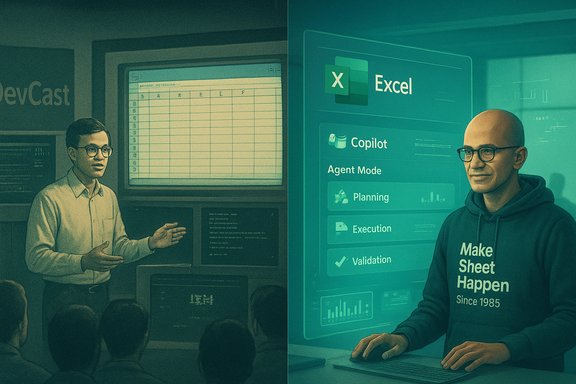
A grainy clip of a young Satya Nadella walking an audience through Microsoft Excel has resurfaced and gone viral — and the CEO’s cheeky response, “Less hair. Same love for Excel!”, paired with a hoodie reading Make Sheet Happen Since 1985, felt less like nostalgia and more like a deliberate reminder: Excel’s four-decade arc from a simple spreadsheet to an AI-enabled workspace is not only intact, it’s accelerating into an agent-driven future.
The video resurfaced on social platforms this month and prompted an affectionate reply from Nadella: a modern photo of himself with Excel on screen and a hoodie celebrating Excel’s birth year. The moment is culturally resonant — a visible throughline between hands‑on product evangelism in the 1990s and executive stewardship in a company whose productivity stack is now a primary battleground for AI.
Cautionary note: benchmark claims about Agent Mode’s raw accuracy (Microsoft referenced internal SpreadsheetBench evaluations) should be treated carefully — publicly available independent validation remains limited and model performance will vary by dataset and task complexity.
More importantly, it frames Excel as a durable substrate for incremental reinvention. This is not about abandoning spreadsheets because “there’s a better tool”; it’s about making a familiar canvas smarter and more accessible. That messaging matters: when a product has entrenched usage across finance, operations and analytics, the company’s approach to AI must be evolutionary, pragmatic and controllable.
That potential is real and promising: everyday users can do far more, far faster. But the risks are real too — hallucinations, data leakage, auditability gaps and governance challenges must be actively managed. The sensible posture for IT leaders is not reflexive resistance or blind trust. It’s a careful program of pilots, DLP and auditability updates, user training, and measurable validation routines.
In the end, the image of a young product demonstrator and a modern CEO in the same frame is a useful metaphor. The tools have matured; the environment has changed; the purpose — turning raw data into human decisions — remains the same. The next chapter of Excel’s long life will be about how well organizations marry the speed of AI with the controls of enterprise IT.
Source: livemint.com ‘Less hair, same love’: Satya Nadella reacts to his 32-year-old Microsoft Excel demo going viral | Company Business News
 Background
A short history of Microsoft Excel and the 1993 clip
Microsoft Excel began life as a graphical spreadsheet for the Macintosh in 1985 and later arrived on Windows in the late 1980s. Its tabular model — rows, columns, formulas and tables — became a universal way for people and businesses to model, analyse and present data. The viral footage shows a 26‑year‑old Nadella during a 1993 DevCast segment demonstrating how data could flow from an IBM AS/400 mainframe into Excel running on Windows NT. At that time he was a technical marketing manager, demonstrating Excel’s role as a bridge between enterprise systems and end‑user analysis.The video resurfaced on social platforms this month and prompted an affectionate reply from Nadella: a modern photo of himself with Excel on screen and a hoodie celebrating Excel’s birth year. The moment is culturally resonant — a visible throughline between hands‑on product evangelism in the 1990s and executive stewardship in a company whose productivity stack is now a primary battleground for AI.
Why this matters now
The clip would be interesting as nostalgia alone, but it’s more consequential because it lands precisely as Microsoft is transforming Excel from a manual tool into a cognitive partner. New features like Copilot in Excel and an Agent Mode designed to plan and execute multi‑step spreadsheet tasks signal a shift: spreadsheets will increasingly be co-authored by humans and AI. That raises big productivity opportunities and equally large governance, security and accuracy questions for IT teams and power users.The evolution: from manual spreadsheet work to AI‑assisted modeling
Excel’s enduring design primitives
Excel’s longevity isn’t accidental. Its success rests on a few durable design principles:- Universal representation: Tables are a simple, human‑readable abstraction for structured data.
- Composability: Formulas, named ranges and PivotTables let non‑programmers compose complex logic.
- Interoperability: Excel long acted as the last‑mile connector between legacy systems, CSV exports and business workflows.
From formula autocomplete to full‑blown agents
The path to agentic spreadsheets started with incremental automation:- Formula suggestions and “Formula by Example” patterns helped users discover functions.
- Copilot integrations added conversational prompts to create formulas, generate charts, and summarize insights.
- Agent Mode elevates this by accepting a higher‑level brief — “Build a monthly close report with YoY comparisons and charts” — then planning, executing, validating and iterating until the user is satisfied.
Microsoft’s current AI offerings in Excel: what they do and how they’re delivered
Microsoft Copilot in Excel — capabilities at a glance
- Create and explain formulas from plain English prompts.
- Analyse datasets for trends, outliers and correlations.
- Generate charts and suggested visualizations.
- Create filters, highlight critical rows and add columns or summary sheets.
- Integrate with Python in Excel to run more advanced analytics.
Agent Mode — a higher level of automation
Agent Mode is designed to be “agentic”: it accepts a task, devises a plan, executes a sequence of spreadsheet steps, validates the output, and iterates based on clarifying questions. Typical Agent Mode workflows include:- Plain‑language prompt describing the desired deliverable.
- Agent plan that outlines sheets, formulas, pivots and charts.
- Execution phase that creates worksheets, formulas and visuals.
- Validation checks and user prompts to address uncertainty.
- Iteration until the output meets the user’s brief.
Availability and licensing considerations
Agent Mode and Copilot features deploy via Microsoft’s staged preview and licensing model:- Preview / Frontier programs: early access to agentic features is typically gated behind Frontier/preview opt‑ins or admin enablement.
- Subscription tiers: some Copilot capabilities require Microsoft 365 Copilot licensing or specific Microsoft 365 Personal, Family or Premium subscription entitlements.
- Regional and language limits: initial releases may be limited to English and web clients, with broader platform/language support coming later.
Practical strengths: why enterprises and users should care
Democratizing complex spreadsheet work
AI dramatically lowers the barrier to tasks that once required advanced skills. Non‑expert users can:- Generate correct‑looking formulas from natural language.
- Produce charts and dashboards without manual formatting.
- Create multi‑sheet reports and automations without VBA scripting.
Time savings and consistency
Agent‑assisted workflows reduce repetitive work: standard formatting, pivot setup, formula replication and basic validation can be automated consistently across teams. Organizations can scale best practices — standard reporting templates, naming conventions, and validation routines — more quickly.Integrations and modern analytics
Copilot’s integration with features like Python in Excel and external connectors brings richer analytics into the spreadsheet canvas. The result is a hybrid environment where quick spreadsheet exploration can graduate into repeatable code and data engineering workflows.Material risks and limitations: what IT must not overlook
Accuracy and hallucination risks
AI agents can produce plausible but incorrect formulas or calculations. Unlike deterministic code, generative models can hallucinate — inventing functions or logic that appear right but are wrong. This creates a high‑impact risk when spreadsheets feed financial reports, regulatory filings, or operational decisions.Cautionary note: benchmark claims about Agent Mode’s raw accuracy (Microsoft referenced internal SpreadsheetBench evaluations) should be treated carefully — publicly available independent validation remains limited and model performance will vary by dataset and task complexity.
Data leakage and privacy concerns
When AI features access organizational data, there is risk of sensitive information being sent to external model endpoints or surfaced in shared outputs. Organizations must ensure:- Data Loss Prevention (DLP) policies are updated to account for Copilot/Agent interactions.
- Admin controls limit which users can enable Frontier features or connect third‑party services.
- Sensitive datasets are sanitized before allowing agentic processing.
Auditability and reproducibility
Agent Mode’s ability to generate or modify spreadsheets raises governance questions: How do you audit what the agent changed? Can you reproduce a result months later? Enterprises require:- Persistent action logs (step‑by‑step traces of what the agent did).
- Versioned snapshots of generated workbooks.
- Human‑review checkpoints and sign‑offs for critical outputs.
Overdependence and skill erosion
If users rely on AI to build formulas and models without understanding the underlying logic, organizational spreadsheet literacy can atrophy. That increases risk when the AI is unavailable or when a generated model needs human debugging.Operational and lifecycle management
AI‑generated work might lock businesses into brittle patterns: undocumented formulas, hidden assumptions, and fragile links to external data. Managing these artifacts requires new lifecycle and change‑management practices.Governance checklist: practical steps for IT leaders
To balance productivity with risk control, IT teams should consider a staged, policy‑first approach.- Policy and access control
- Define which users can access Copilot and Agent Mode features.
- Use centralized admin controls to opt in/out of Frontier previews.
- Data protection
- Extend DLP to guard AI interactions and restrict transfers of sensitive fields.
- Enforce use of sanitized test datasets for pilot programs.
- Audit and traceability
- Require agents to produce an exportable action log for every run.
- Store snapshots of AI‑generated workbooks and record validation results.
- Validation and testing
- Create test suites for critical spreadsheets that assert formula outputs on known inputs.
- Require human review on high‑impact outputs before deployment.
- Training and awareness
- Provide short courses that pair AI‑assisted workflows with core spreadsheet literacy.
- Teach users to treat AI outputs as draft artifacts — not unquestionable truth.
- Lifecycle management
- Treat AI‑generated models as living artifacts; schedule periodic audits for drift and hidden assumptions.
- Document the provenance of business logic added by agents.
For power users: getting the most out of Agent Mode and Copilot
- Start small: pilot Agent Mode on non‑sensitive, low‑risk spreadsheets to understand behaviors.
- Use sandbox copies: work on copies, never the live workbook, during initial experiments.
- Validate outputs: always cross‑check AI‑created formulas against known calculations.
- Keep provenance: copy the agent’s plan and step log into a dedicated worksheet for later review.
- Harden templates: once an agent builds a reliable workflow, convert the output into a vetted template with locked cells and documented assumptions.
- Add manual checks: build "sanity check" rows and cells with independent calculations to detect agent errors.
The cultural subtext: why Nadella’s tweet is meaningful
Nadella’s light‑hearted response — a CEO wearing a tongue‑in‑cheek hoodie and joking about hair — performs multiple corporate functions at once. It humanizes leadership, ties product lineage to contemporary strategy, and sends a marketing signal: Microsoft’s investment in AI enhances, rather than replaces, its bedrock productivity tools.More importantly, it frames Excel as a durable substrate for incremental reinvention. This is not about abandoning spreadsheets because “there’s a better tool”; it’s about making a familiar canvas smarter and more accessible. That messaging matters: when a product has entrenched usage across finance, operations and analytics, the company’s approach to AI must be evolutionary, pragmatic and controllable.
Measuring success: how organizations should evaluate agentic spreadsheets
- Accuracy: percentage of agent outputs that pass independent validation checks on holdout test cases.
- Explainability: ability to produce a human‑readable step log for each agent run.
- Reproducibility: whether a result can be re‑generated using the action log and the same dataset.
- Security posture: evidence that DLP and admin controls limited sensitive data exposure during AI interactions.
- Productivity delta: time saved on routine tasks vs. time spent auditing and remediating agent errors.
- User competence retention: measures of user proficiency in core spreadsheet skills over time.
Where the technology still needs work
- Better, standardized audit trails that are machine‑readable and human‑verifiable.
- Transparent provenance metadata that links every formula and transformation to a specific agent action or human edit.
- Domain‑aware validation models for high‑stakes verticals (finance, healthcare, regulated industries).
- Stronger on‑device or enterprise‑hosted model options to avoid sending sensitive content to third‑party endpoints.
- Clearer legal frameworks for responsibility when agent errors cause material harm.
Conclusion
A short, grainy demo of Satya Nadella from 1993 became a social media moment, but it also spotlighted a deeper continuity: Excel’s core design — lists and tables — remains a powerful interface for human thinking, and AI is being positioned as a way to amplify that thinking rather than replace it. Microsoft’s Copilot features and the new Agent Mode mark an important pivot: spreadsheets will increasingly be co‑created with AI agents that plan, execute and validate multi‑step tasks.That potential is real and promising: everyday users can do far more, far faster. But the risks are real too — hallucinations, data leakage, auditability gaps and governance challenges must be actively managed. The sensible posture for IT leaders is not reflexive resistance or blind trust. It’s a careful program of pilots, DLP and auditability updates, user training, and measurable validation routines.
In the end, the image of a young product demonstrator and a modern CEO in the same frame is a useful metaphor. The tools have matured; the environment has changed; the purpose — turning raw data into human decisions — remains the same. The next chapter of Excel’s long life will be about how well organizations marry the speed of AI with the controls of enterprise IT.
Source: livemint.com ‘Less hair, same love’: Satya Nadella reacts to his 32-year-old Microsoft Excel demo going viral | Company Business News
