

Today Microsoft opened the Public Preview for the Exchange Online Admin API — a REST-based, cmdlet-style administrative surface intended to help organizations move specific Exchange admin scenarios off Exchange Web Services (EWS) and modernize automation over HTTP.
EWS has been on a long deprecation path for Exchange Online; Microsoft set a hard disablement window targeting October 2026 and has repeatedly urged customers and ISVs to migrate to Microsoft Graph or other supported management surfaces. This deprecation is a major cloud-era policy decision: while EWS will receive limited security fixes until shutdown, Microsoft will block EWS usage in Exchange Online beginning in October 2026. The Admin API announcement responds to a very specific gap: many administrative scenarios that historically used EWS do not yet have tidy replacements in Graph or other REST APIs. The new Admin API is explicitly scoped — it is not a universal REST replacement for Exchange Online management, and Microsoft continues to recommend Exchange Online PowerShell for full administrative coverage. This matters because the EWS retirement is both a technical and programmatic deadline. Organizations that still rely on EWS for automation or third‑party integrations must identify which EWS scenarios remain and whether the Admin API (Public Preview now) or other Graph endpoints will cover them ahead of October 1, 2026. Community and operational guidance repeatedly emphasize rapid inventory, testing, and migration planning to meet those timelines.
POST <BaseUrl>/adminapi/v2.0/<TenantID>/<EndpointName>
The request body contains a CmdletInput object:
{
"CmdletInput": {
"CmdletName": "<Cmdlet Name>",
"Parameters": {
...
}
}
}
Strengths and practical wins:
Notable strengths:
Source: Microsoft Exchange Team Blog Announcing Public Preview: Exchange Online Admin API | Microsoft Community Hub
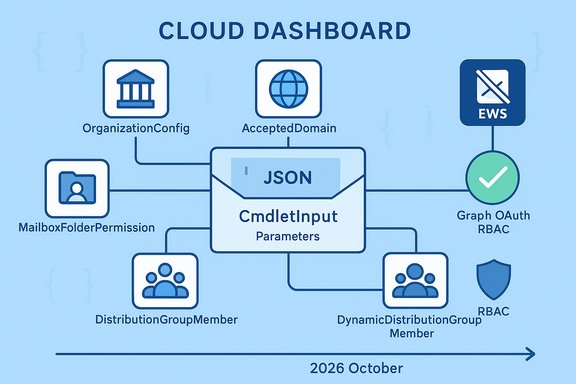 Background
EWS has been on a long deprecation path for Exchange Online; Microsoft set a hard disablement window targeting October 2026 and has repeatedly urged customers and ISVs to migrate to Microsoft Graph or other supported management surfaces. This deprecation is a major cloud-era policy decision: while EWS will receive limited security fixes until shutdown, Microsoft will block EWS usage in Exchange Online beginning in October 2026. The Admin API announcement responds to a very specific gap: many administrative scenarios that historically used EWS do not yet have tidy replacements in Graph or other REST APIs. The new Admin API is explicitly scoped — it is not a universal REST replacement for Exchange Online management, and Microsoft continues to recommend Exchange Online PowerShell for full administrative coverage. This matters because the EWS retirement is both a technical and programmatic deadline. Organizations that still rely on EWS for automation or third‑party integrations must identify which EWS scenarios remain and whether the Admin API (Public Preview now) or other Graph endpoints will cover them ahead of October 1, 2026. Community and operational guidance repeatedly emphasize rapid inventory, testing, and migration planning to meet those timelines.Overview: what the Exchange Online Admin API delivers in Public Preview
Microsoft defines the Admin API as a cmdlet-style REST surface: each endpoint accepts a POST with a JSON body that specifies a cmdlet name and parameters, and the API executes the equivalent administrative operation and returns structured JSON rather than the EWS XML payloads admins historically consumed. The Public Preview is intended for evaluation, planning, and feedback collection prior to GA. Key Public Preview facts:- Public Preview availability: Worldwide from November 17, 2025.
- Scope: A limited set of administrative endpoints (six endpoints at preview). It is not a full replacement for Exchange Online PowerShell.
- Request model: All calls use POST and include a CmdletInput envelope that names a cmdlet and supplies parameters. The X-AnchorMailbox header is required for routing in v2.0 calls. Responses are JSON and support $select and pagination where applicable.
- Permissions: New scopes exist — Delegated: Exchange.ManageV2; App-only: Exchange.ManageAsAppV2 — and RBAC roles must be granted to the caller.
Capabilities in Public Preview — endpoint-by-endpoint
The Public Preview exposes six endpoints focused on administrative read and permission workflows. This is the initial, pragmatic set of scenarios Microsoft targeted to cover EWS admin dependencies.OrganizationConfig
- Primary use: Read tenant-wide MailTips-related configuration (for example, whether MailTips are enabled for external recipients, or which tips are globally configured).
- Typical cmdlet mapping: Get-OrganizationConfig.
- When to use: Automation that validates tenant MailTips settings or reports differences between tenants.
AcceptedDomain
- Primary use: List accepted domains and core domain settings for the tenant.
- Typical cmdlet mapping: Get-AcceptedDomain.
- When to use: Scripts that enumerate or validate domains for routing/transport automation.
Mailbox
- Primary use: Read mailbox properties and manage “Send on behalf” delegates (view and update).
- Typical cmdlet mappings: Get-Mailbox, Set‑Mailbox (for the supported parameters).
- When to use: Inventory workflows, mailbox-reporting automation, and mailbox-level delegation tasks.
MailboxFolderPermission
- Primary use: List, grant, modify, and remove folder-level permissions (Inbox, Calendar, subfolders).
- Typical cmdlet mapping: Get-MailboxFolderPermission, Add/Set/Remove-MailboxFolderPermission.
- When to use: Automations that provision calendar sharing, manage shared mailbox folder permissions for staff onboarding/offboarding, or audit folder-level grants.
DistributionGroupMember
- Primary use: Retrieve membership for distribution groups (static groups).
- Typical cmdlet mapping: Get-DistributionGroupMember.
- When to use: Enumeration of group membership, reconciliation of on‑premises directories with cloud groups, and provisioning checks.
DynamicDistributionGroupMember
- Primary use: Retrieve membership for dynamic distribution groups (evaluation results).
- Typical cmdlet mapping: Get-DynamicDistributionGroupMember (or the dynamic group evaluation equivalents).
- When to use: Validate dynamic group expansion rules and produce membership lists for policy or migration tasks.
How the API works in practice: request model and best practices
Every Admin API call is a POST to an endpoint URL patterned like:POST <BaseUrl>/adminapi/v2.0/<TenantID>/<EndpointName>
The request body contains a CmdletInput object:
{
"CmdletInput": {
"CmdletName": "<Cmdlet Name>",
"Parameters": {
...
}
}
}
- Use X-AnchorMailbox in headers (UPN or SMTP) to ensure correct routing.
- Use $select to limit returned properties and reduce payload size.
- Pagination: many endpoints support ResultSize and return @odata.nextLink for continuation; the nextLink expiry window is short (5–10 minutes), so implement prompt paging handling.
- Authentication: app-only is supported and recommended for automation (Exchange.ManageAsAppV2), but administrators must assign RBAC roles to the app/service principal to scope operations.
What this means for EWS migration: where Admin API helps — and where it doesn’t
The Admin API is an important but narrow tool in the larger EWS migration story.Strengths and practical wins:
- Targeted parity for admin scenarios: The Public Preview covers real admin pain points: folder permissions, mailbox delegation, domain enumeration, MailTips, and group membership. For teams relying on EWS for these tasks, the Admin API can eliminate several blockers to EWS retirement.
- Cmdlet-style familiarity: The CmdletInput model lets admins reuse operational patterns and mapping logic from PowerShell scripts, simplifying retooling of automation.
- Modern authentication and auditing: OAuth-based app-only tokens and explicit RBAC assignments improve security posture over legacy service accounts that often drove problematic EWS usage.
- Not a full EWS replacement: Microsoft explicitly states this is a subset of admin capabilities. If your automation depends on other EWS functionality — message synchronization, fine-grained mailbox operations outside the six preview endpoints, or historical EWS behavior — you will need other Graph endpoints, Exchange Online PowerShell, or a re-architecture.
- Preview → GA property changes: API responses in Public Preview include extra properties; only the properties documented per endpoint will be guaranteed at GA. Automation that relies on undocumented/preview-only properties is brittle and may break at GA. Flagging these properties and coding defensively is critical.
- Sovereign clouds and timing: GA dates and availability in GCC/GCC High/DoD are not announced; these environments often lag global rollout. If you operate in a sovereign scenario, plan additional testing and gating.
Recommended migration path and checklist for administrators
A clear, sequenced approach reduces risk and delivers measurable migration progress. Use the following as a practical playbook:- Inventory and prioritize
- Run tenant EWS usage reports and third‑party inventory tools. Identify which scripts and applications call EWS and for what cmdlets/actions. Prioritize admin scenarios first (MailTips, folder permissions, delegation, group membership).
- Map each usage pattern to one of: Exchange Online PowerShell, Microsoft Graph, or the Exchange Online Admin API.
- Pilot the Admin API for covered scenarios
- Select a non-production tenant or a small pilot group. Convert a subset of folder-permission and delegation scripts to Admin API calls. Verify behavior, property sets, and error handling.
- Ensure service principals, scopes (Exchange.ManageV2/Exchange.ManageAsAppV2), and RBAC roles are configured correctly.
- Harden authentication and RBAC
- For production automation, prefer app-only authentication with certificates or managed identities. Assign least-privilege RBAC roles to the service principal. Log and rotate keys regularly.
- Avoid preview-only dependencies
- Inspect Preview responses for undocumented properties and avoid relying on them. Use $select to request only documented properties and write defensive code that tolerates property removal.
- Implement robust error handling and paging
- Handle 429 throttles (Retry-After), 400 for parameter mismatches, and short-lived @odata.nextLink tokens. Log request IDs for Microsoft support escalation.
- Plan fallbacks and rollback
- During initial production rollout, keep a tested fallback plan that can revert to Exchange Online PowerShell or other pre-migration workflows if unexpected behavior appears. Monitor mailflow, delegation behavior, and delegated send/send-as semantics closely.
- Communicate with vendors and third parties
- If third-party apps use EWS for admin tasks, confirm their migration plans. Where gaps exist, coordinate timelines or use temporary compensating controls. Market and community signals show vendors are moving to Graph but timelines vary.
Security, governance, and compliance implications
Moving admin automation to OAuth-protected REST APIs changes the security model in important ways.- Stronger token governance: Use tenant-level admin consent for app permissions, short token lifetimes, certificate-based app-only authentication, and regular audits of granted permissions. Delegated user consent must be controlled or disabled where policy requires.
- RBAC enforcement: The Admin API honors RBAC; ensure service principals or delegated accounts are assigned only the roles they need. Treat RBAC as your primary mechanism to reduce blast radius.
- Audit trails: Enable and centralize audit logs so you can trace Admin API calls back to service principals and actors; integrate these logs with SIEM and retention policies for compliance.
- Sovereignty and data flow: For high‑sovereignty tenants (GCC/GCC‑High/DoD), confirm when GA will be available in those clouds and review any compliance differences before shifting automation.
Roadmap, GA expectations, and what to watch next
Microsoft published the Admin API Public Preview announcement on November 17, 2025 and linked to Learn documentation and endpoint references for developers. GA timing is not yet announced; Microsoft will communicate the final list of exposed properties and GA availability separately — and the properties available at GA may be narrower than what appears in the preview. Administrators should watch for:- Official GA announcement and the guaranteed list of response properties.
- Extension of endpoints or new endpoints that broaden admin coverage beyond the six preview endpoints.
- Sovereign cloud availability dates (GCC, GCC High, DoD).
- Updated API throttling, rate limits, and recommended production usage patterns.
Strengths, risks, and critical analysis
The Admin API Public Preview is a pragmatic bridge: it keeps admin semantics while moving to modern HTTP mechanics. That design reduces the friction for many real-world automation porting tasks and helps organizations avoid the most painful EWS admin dependencies.Notable strengths:
- Cmdlet-like model reduces rewrite cost for PowerShell-driven automation.
- OAuth + RBAC improves credential hygiene and centralized governance compared to entrenched long-lived service credentials.
- Focused scope means Microsoft can accelerate delivery for the most critical admin use cases rather than chasing full parity at once.
- Scope gap risk: If your org’s EWS usage extends beyond the six preview endpoints, you will need other Graph endpoints or PowerShell solutions; failing to inventory could leave you unprepared.
- Preview instability: Preview responses include extra properties; depending on them may cause production breakage at GA when Microsoft narrows output. Code defensively.
- Sovereign cloud lag: Government and sovereign clouds often receive features later — do not assume parity if you operate in GCC/GCC‑High/DoD.
- Operational maturity: New APIs require mature retry/backoff, observability, and throttling strategies; naive ports from EWS may underperform or hit limits in large estates.
Practical next steps for Windows administrators and automation teams
- Export a precise inventory of EWS calls across scripts, apps, and third‑party tools. Prioritize by business impact and identify which calls map to Admin API endpoints.
- Pilot Admin API calls in a test tenant, convert a small set of folder-permission and delegation scripts, and harden auth (app-only + certificates).
- Remove reliance on undocumented preview properties; use $select and documented properties only.
- Coordinate with vendors: confirm third-party migration timelines to Graph or Admin API and document any interim mitigations.
- Prepare compliance and audit processes for the new OAuth/RBAC model, and ensure your SIEM ingests Admin API logs for traceability.
Conclusion
The Exchange Online Admin API Public Preview is a welcome, pragmatic release: it delivers a familiar, cmdlet-style REST surface that directly addresses several concrete EWS-based admin pain points while raising the bar for secure automation through OAuth and RBAC. Admins should treat the preview as an urgent opportunity to test, retool, and harden automation workflows before the EWS disablement window in October 2026. The API is not a total replacement for every Exchange management scenario, however — careful inventory, staged migration, and defensive coding are essential to a low-risk transition. Your migration roadmap should now include a pilot of Admin API conversions for folder permission and delegation scripts, an immediate inventory of EWS usage, and coordination with third-party vendors that still rely on EWS. Time is finite; start the testing and remediation work now to avoid last‑minute disruption as EWS is removed from Exchange Online.Source: Microsoft Exchange Team Blog Announcing Public Preview: Exchange Online Admin API | Microsoft Community Hub
