

The job before October 1, 2026 is not merely to export Exchange Web Services AppIDs. Exchange Online administrators should turn Microsoft’s tenant-specific EWS usage reports into an owned, evidence-backed application register, validate every retained dependency, and prepare migrations before Microsoft begins tenant-by-tenant blocking. These instructions apply to Exchange Online and Microsoft 365, not EWS running on Exchange Server.
WindowsForum users tracking the retirement consistently report the same operational problem: discovering an AppID is relatively easy, but determining who owns it, what transaction it performs, and whether it can be retired is much harder. Other WindowsForum reports emphasize that the retirement is phased rather than a single shutdown event, so administrators need both a short-term exception process and a dated migration plan.
Microsoft says it will begin blocking EWS access on October 1, 2026, as part of the retirement that concludes in April 2027 (Microsoft’s EWS retirement announcement).
Microsoft also says that it plans to populate
That automation is a fallback, not an approval decision. An observed AppID might belong to an abandoned integration, an unapproved vendor product, or an application whose original owner has left.
The inverse is an administrator risk hypothesis that must also be tested: a dependency might not appear in the reports your team has retained. Unless Microsoft documents the applicable observation window and coverage, do not assume that one usage snapshot represents every scheduled or exceptional workflow. Preserve successive reports and test known business transactions.
Run the lookup in the correct tenant. An empty result is an investigation trigger, not permission to discard the AppID. Confirm the tenant context, search retained records, and ask the application or vendor team how its identity is provisioned.
For a vendor-controlled multi-tenant application:
Adjust the path to a controlled repository or application directory. Do not indiscriminately scan user profiles or expose secrets in exported results.
Record the tenant, operator, timestamp, Exchange Online PowerShell module version, change ticket, and file hashes.
Exchange Online documentation currently describes
Likewise, do not copy a comma-separated
In particular, administrators should not infer that:
The exact rollback for that specific setting is:
Then verify it:
This restores only the captured
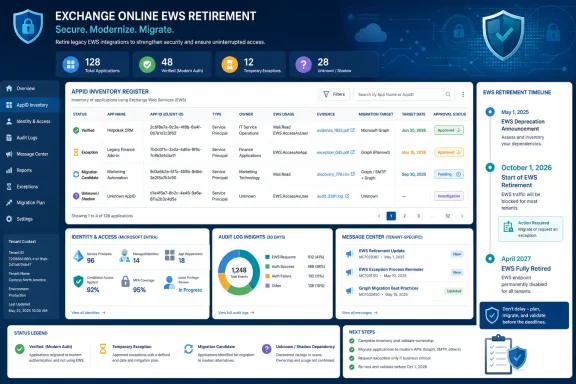 Why the October deadline matters
WindowsForum users tracking the retirement consistently report the same operational problem: discovering an AppID is relatively easy, but determining who owns it, what transaction it performs, and whether it can be retired is much harder. Other WindowsForum reports emphasize that the retirement is phased rather than a single shutdown event, so administrators need both a short-term exception process and a dated migration plan.Microsoft says it will begin blocking EWS access on October 1, 2026, as part of the retirement that concludes in April 2027 (Microsoft’s EWS retirement announcement).
Microsoft also says that it plans to populate
EWSAllowedAppIDs in September 2026 for tenants where customers have not created a list, using EWS applications observed in the tenant. A customer-created list will not be changed by that automated process (Microsoft’s Exchange Online EWS retirement guidance).That automation is a fallback, not an approval decision. An observed AppID might belong to an abandoned integration, an unapproved vendor product, or an application whose original owner has left.
The inverse is an administrator risk hypothesis that must also be tested: a dependency might not appear in the reports your team has retained. Unless Microsoft documents the applicable observation window and coverage, do not assume that one usage snapshot represents every scheduled or exceptional workflow. Preserve successive reports and test known business transactions.
Build the EWS inventory
Use the following procedure for every production tenant.- Sign in to the Microsoft 365 admin center with an account permitted to read service communications.
- Open Health > Message center.
- Find the latest tenant-specific message concerning active Exchange Web Services applications.
- Export or record every reported application name and AppID.
- Retain the original message or export with its publication date. Do not replace an older report with the newest one.
- Compare the reports and create one register row per AppID, not per display name.
- Mark every new row Unverified until an owner and business purpose are established.
- Store the register in a controlled location with change history.
- AppID
- Reported application name
- First and last report dates
- Tenant
- Service principal object ID
- Publisher or vendor
- Authentication pattern, if confirmed
- Business service
- Technical owner
- Business owner
- Affected mailboxes or users
- Required EWS workflow
- Replacement technology
- Exception decision
- Exception expiration date
- Test transaction and result
- Migration or retirement date
- Evidence links
- Last review date
Correlate each AppID with Microsoft Entra
Use Microsoft Entra to investigate the identity behind each reported AppID. Portal navigation and available log fields can vary with licensing, permissions, portal updates, and the type of sign-in, so treat the following as an investigation workflow rather than proof of EWS use.- In the Microsoft Entra admin center, locate the tenant’s sign-in logs.
- Search the available user and workload-identity sign-in records for the AppID.
- Locate the corresponding enterprise application or service principal.
- Record the service principal object ID, display name, publisher information, assigned owners, and relevant permissions that are visible to your account.
- If your organization owns the application registration, inspect that registration as well.
- Save the relevant event IDs, screenshots, or exported records in the register.
- Treat Microsoft’s tenant-specific EWS report as the protocol-usage evidence. Entra records are supporting identity and authentication evidence, not standalone confirmation that a particular transaction used EWS.
Code:
Connect-MgGraph -Scopes "Application.Read.All"

Get-MgServicePrincipal -Filter "appId eq '<application-id>'" |
Select-Object DisplayName, AppId, Id, SignInAudience, AppOwnerOrganizationIdApply an evidence standard
WindowsForum administrators preparing for the retirement have repeatedly stressed inventory and migration rather than blind preservation. Convert that principle into a decision gate: an AppID should become a temporary exception only when its register row answers these questions.- What is it? Identify the product, workload, AppID, service principal, publisher, and tenant.
- Who owns it? Name an accountable business owner and a technical contact or vendor escalation route.
- Why does it need EWS? Document the actual transaction, not merely the product name.
- What breaks if it is blocked? Identify the affected service, mailboxes, schedule, and user-visible failure.
- How was it tested? Record a real end-to-end transaction and its expected result.
- When will the exception end? Enter a migration, replacement, upgrade, or retirement date.
- Approved temporary exception: Dependency verified, owners assigned, transaction tested, and exit date approved.
- Migration candidate: Dependency confirmed, but EWS access is scheduled for removal.
- Unknown shadow dependency: Activity reported, but no accountable owner or defensible purpose has been found.
- Retired or unauthorized: Application must not be preserved.
Resolve orphaned and vendor applications
For an orphaned application, assign interim responsibility to the team that owns the affected business service. Do not make the messaging team the permanent owner merely because the application accesses Exchange.For a vendor-controlled multi-tenant application:
- Match the reported AppID to the enterprise application in your tenant.
- Record its publisher and service principal information.
- Obtain written vendor confirmation that the AppID belongs to the affected product.
- Ask which supported product release removes EWS use.
- Obtain the vendor’s migration procedure and delivery date.
- Assign an internal business and technical owner.
- Treat any replacement AppID as a new identity requiring validation.
Code:
Get-ChildItem -Path C:\Automation -Recurse -File -ErrorAction SilentlyContinue |
Select-String -Pattern '<application-id>','outlook.office365.com/EWS','Exchange.asmx'Preserve the current Exchange configuration
Before any approved Exchange Online change, capture the complete organization configuration rather than relying on an unverified hand-selected property list.
Code:
Import-Module ExchangeOnlineManagement
Connect-ExchangeOnline

Get-OrganizationConfig | Export-Clixml ".\ExchangeOrganizationConfig-before.xml"
Get-OrganizationConfig | Format-List * |
Out-File ".\ExchangeOrganizationConfig-before.txt"Exchange Online documentation currently describes
EwsApplicationAccessPolicy, EwsAllowList, and EwsBlockList as organization configuration parameters used by existing EWS application-access policy behavior. Do not assume that those controls are equivalent to the retirement-related EWSAllowedAppIDs mechanism. The supplied retirement information does not establish that the controls can safely be combined, how precedence would work, or that one can validate the other.Likewise, do not copy a comma-separated
Set-OrganizationConfig -EwsAllowedAppIDs example into production unless Microsoft’s current cmdlet documentation for your rollout explicitly documents that parameter, accepted data type, enforcement behavior, and rollback procedure. The feature is associated with a planned 2026 rollout, and pre-release syntax should not be treated as a supported production runbook.Run a controlled transaction pilot
A safe pilot does not begin by assuming that settingEWSEnabled=True will enforce a customer-created AppID list. The supplied Microsoft statements establish the planned allow-list population and retirement timeline, but they do not establish enough command semantics to prescribe that tenant-wide enforcement procedure here.In particular, administrators should not infer that:
EWSEnabled=TrueplusEWSAllowedAppIDspermits only listed callers;- Microsoft and non-Microsoft callers will be treated differently during a customer pilot;
- an empty or absent customer-created list has a safe, predictable result; or
- undocumented list syntax can be rolled back reliably.
- Freeze the proposed exception register for the test window.
- Obtain approval from messaging, identity, security, and affected service owners.
- Confirm every tested application has a named contact available during the window.
- Capture the Exchange organization configuration and application configuration.
- Run a normal end-to-end transaction for every proposed exception.
- Record the start time, completion time, mailbox or test object, expected result, actual result, and supporting application log.
- Repeat the transaction after any vendor upgrade or Graph migration change.
- Investigate every failure before approving the AppID.
- Request Microsoft support confirmation of the tenant’s
EWSAllowedAppIDsavailability, supported syntax, prerequisites, caller behavior, and rollback process before attempting enforcement. - Attach Microsoft’s response and the exact approved commands to the change record.
EwsEnabled, capture its original value in the same session:
Code:
$Before = Get-OrganizationConfig
$Before.EwsEnabledSet-OrganizationConfig -EwsEnabled $Before.EwsEnabledThen verify it:
Get-OrganizationConfig | Format-List EwsEnabledThis restores only the captured
EwsEnabled value. It does not restore an AppID list or any separate EWS access policy. Do not perform an EWSAllowedAppIDs enforcement pilot until the current Microsoft documentation or Microsoft support provides the supported list-setting and list-restoration commands for the tenant.Verify and troubleshoot
After each application test:- Confirm the business transaction completed, not merely that authentication succeeded.
- Check the application’s own job history and error log.
- Record the tested mailbox, account, or resource without placing secrets in the register.
- Correlate the test time with available Entra records.
- Confirm the AppID matches the register.
- If the transaction fails, restore only settings changed under the approved change record.
- Re-run
Get-OrganizationConfigand compare it with the saved baseline. - Repeat the application transaction after rollback.
- Escalate unexplained EWS results to Microsoft or the vendor with timestamps, AppID, tenant ID, and sanitized error details.
Frequently Asked Questions
Pre-October deliverables
Before October 1, 2026, each production tenant should have:- Retained tenant-specific Message Center reports and their dates
- One controlled register row for every reported AppID
- Named business and technical owners for every approved exception
- An approved temporary exception list
- A recorded end-to-end transaction test for every retained application
- A configuration baseline and tested rollback artifact
- Microsoft-supported commands attached to any enforcement change
- A migration or retirement date for every temporary exception
- An investigation decision for every unknown caller
- A post-change verification and escalation plan
References
- Primary source: techcommunity.microsoft.com
- Independent coverage: devblogs.microsoft.com
Retirement of Exchange Web Services in Exchange Online
On October 1, 2026, we will start blocking Exchange Web Service requests from non-Microsoft apps to Exchange Online.devblogs.microsoft.com - Primary source: WindowsForum
EWSAllowedAppIDs: Exchange Online EWS Allow List Before Oct 2026 Disablement | Windows Forum
Microsoft is rolling out EWSAllowedAppIDs in Exchange Online in June 2026 so tenant administrators can restrict remaining Exchange Web Services access to...windowsforum.com