

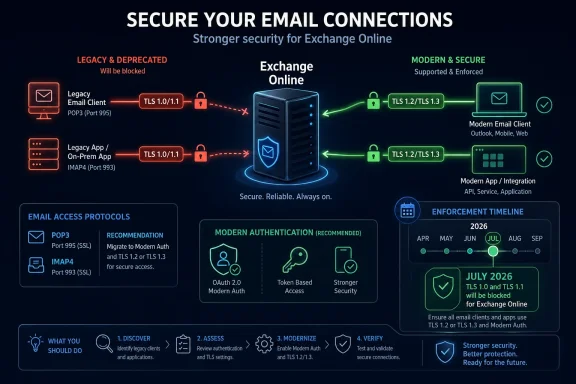
Microsoft’s latest Exchange Online security announcement is a reminder that “legacy” does not always mean unused. POP3 and IMAP4 may no longer be the preferred way most Microsoft 365 users access their mailboxes, but they remain embedded in help desk tools, monitoring systems, ticketing platforms, scanners, line-of-business applications, archiving scripts, migration utilities, and older desktop clients. That is why the next deprecation matters: Microsoft is preparing to fully remove support for TLS 1.0 and TLS 1.1 for POP and IMAP connections to Exchange Online, including the special legacy endpoints that some customers previously opted into.
The change was announced by the Exchange Team on April 27, 2026. Microsoft says it will start blocking legacy-version connections beginning in July 2026. In practical terms, organizations that still rely on POP3 or IMAP4 clients connecting with TLS 1.0 or TLS 1.1 need to move those clients to TLS 1.2 or later before enforcement begins. The impact should be narrow, because modern mail clients, development libraries, operating systems, and security frameworks already support TLS 1.2 or newer. The customers most likely to be affected are those that deliberately opted into Microsoft’s legacy POP and IMAP endpoints after Exchange Online began moving away from TLS 1.0 and TLS 1.1 several years ago.
This is not a retirement of POP and IMAP themselves. It is not, by itself, a new retirement of OAuth or Modern Authentication support. It is specifically about the transport security layer used when POP3 and IMAP4 clients connect to Exchange Online. If an application uses POP or IMAP with TLS 1.2 or TLS 1.3 and supported authentication, it is aligned with the direction of the service. If it depends on TLS 1.0 or TLS 1.1, or if its configuration points to the old legacy endpoints created for outdated clients, it needs attention.
The distinction is important because POP, IMAP, TLS, and authentication are often mixed together in operational discussions. POP3 and IMAP4 are mail access protocols. TLS is the encrypted channel that protects the connection. Authentication is the way the user or application proves its identity. A client can support POP but fail modern TLS. A client can support TLS 1.2 but still use an outdated authentication method. A script can use IMAP with OAuth but be pinned to an old TLS library. Each layer needs to be checked separately.
For many organizations, the right response is simple: verify that no production workload points to the legacy POP or IMAP endpoints and confirm that remaining POP or IMAP clients negotiate TLS 1.2 or later. For others, especially those with embedded systems or older third-party products, the change may require vendor engagement, application updates, library upgrades, or a redesign of how mail is retrieved.
TLS is the protocol family used to encrypt traffic between a client and a server. When an email client connects to Exchange Online over POP3 or IMAP4, TLS helps protect credentials, tokens, message content, and session metadata from interception or tampering while the connection is in transit. Older TLS versions were designed for a different era of computing. TLS 1.0 dates back to the late 1990s, and TLS 1.1 followed in the mid-2000s. The industry has spent years moving away from both because they do not provide the same level of protection expected from modern cryptographic protocols.
The security issue is not simply that TLS 1.0 and TLS 1.1 are old. The deeper problem is that they bring older cryptographic assumptions, older cipher suite dependencies, weaker negotiation behavior, and broader opportunities for downgrade and compatibility-related misconfiguration. Modern security baselines generally expect TLS 1.2 or TLS 1.3. Those versions support stronger algorithms, improved protocol design, and better operational defaults. They also reduce the need for services such as Exchange Online to maintain special compatibility paths for clients that should already have been upgraded.
Microsoft’s decision follows a long-running industry pattern. Major cloud providers, browsers, payment platforms, compliance frameworks, and standards bodies have been moving away from TLS 1.0 and TLS 1.1 for years. In the Microsoft 365 world, Exchange Online had already stopped supporting TLS 1.0 and TLS 1.1 as mainstream protocols in the service. However, because some customers still had POP and IMAP clients that could not immediately move to TLS 1.2, Microsoft introduced opt-in legacy endpoints as a temporary bridge.
Those legacy endpoints gave administrators time to update older clients while still keeping critical business processes running. The worldwide endpoints were commonly associated with names such as
pop-legacy.office365.com and imap-legacy.office365.com, with separate equivalents for certain Microsoft 365 operated-by-partner environments. Administrators could also enable a tenant-level setting to permit legacy TLS clients. That arrangement was never the destination. It was a transition mechanism.The April 2026 announcement closes that chapter. Microsoft is no longer just discouraging use of those endpoints. It is preparing to remove support entirely. Organizations that treated the legacy endpoint configuration as a permanent exception now have a short window to unwind it.
The most likely affected systems are not necessarily obvious user-facing email clients. In fact, the biggest risk may be hidden service accounts and background processes. An old monitoring platform might sign in to a mailbox over IMAP to check whether automated reports arrived. A ticketing platform might poll a support mailbox. A copier or multifunction printer might retrieve mailbox data in an unusual workflow. A custom application might use a bundled Java runtime, Python interpreter, OpenSSL build, .NET Framework version, or vendor SDK that has not been updated in years. A migration utility might still be configured according to instructions written before modern TLS became the baseline.
These systems often remain invisible because they keep working until the day a cloud service enforces a stricter minimum. The accounts may not belong to real users. The applications may not be documented in the same place as normal endpoint management. The configuration may be owned by a business team rather than central IT. The vendor may not even describe the dependency as “TLS 1.0” or “TLS 1.1”; it may simply say that a particular version of the product supports “Office 365 IMAP” or “Exchange Online POP.”
That is why organizations should not wait until July 2026 to test. The enforcement start month gives administrators a planning target, not a recommended start date. The discovery and remediation work should begin immediately, especially in environments with custom integrations, regulated workflows, older devices, or decentralized application ownership.
A useful first step is to inventory all known POP and IMAP use in Exchange Online. Administrators should identify which mailboxes have POP3 or IMAP4 enabled, which applications use those protocols, who owns those applications, what hostnames they connect to, what runtime or library they use, and whether they support TLS 1.2 or newer. This inventory should include both interactive users and service accounts. It should also include products that ingest mail into another system, because those are common sources of forgotten IMAP dependencies.
Configuration review is critical. Any client still pointing to a legacy endpoint should be considered in scope for remediation. A modernized client should use the standard Exchange Online endpoint and negotiate TLS 1.2 or later. If a vendor tells you their product requires a legacy endpoint, that product needs an update, a configuration change, or replacement before enforcement begins.
Administrators should also check tenant configuration where legacy TLS was explicitly allowed. In many environments, the presence of an old allow setting is a signal that someone previously discovered a dependency and worked around it. That dependency may still exist. The setting itself should not be treated as proof that traffic is still flowing, but it is an important clue. If the organization once enabled legacy TLS clients, it should investigate why, who requested it, and whether the related application has been upgraded.
The next layer is client capability. For commercial software, ask the vendor direct questions: Does the current product version support TLS 1.2 or TLS 1.3 for POP3 and IMAP4 connections to Exchange Online? Does it require legacy Office 365 POP or IMAP endpoints? Does it support OAuth 2.0 for Exchange Online if the application authenticates as a mailbox? Which runtime, framework, or cryptographic library is used? Is there a minimum version needed for Microsoft 365 compatibility after July 2026?
For custom software, developers should inspect the code and the runtime environment. It is not enough for the source code to say “use TLS.” Older libraries may default to older protocol versions, and older operating systems may not enable TLS 1.2 by default for all client libraries. Some applications pin protocol versions explicitly. Others inherit behavior from the platform. A script that works on a developer’s modern workstation may fail on an older server because the system OpenSSL or .NET configuration is different.
In .NET-based applications, teams should review framework version, operating system support, and whether the application allows the platform to choose secure defaults. In Java applications, teams should check the JDK or JRE version and enabled TLS protocols. In Python, Node.js, Go, PHP, Ruby, and other ecosystems, teams should check the language runtime and linked TLS library. Containerized workloads should not be overlooked; a container image built years ago may contain old libraries even when the host is current.
Network appliances can complicate discovery. If traffic flows through a proxy, firewall, mail gateway, TLS inspection device, or load balancer, the observed TLS version may reflect the appliance rather than the original client. In some architectures, the internal client uses one TLS session to the proxy, while the proxy uses another TLS session to Exchange Online. Administrators need to understand where TLS terminates and where it is re-established. A device that silently bridges or rewrites connections can hide weak internal clients while still creating operational risk.
Testing should be realistic. A basic “does the application start” check is not enough. The application should be tested in the same mode it uses in production, against Exchange Online, with the same mailbox type, authentication flow, runtime, and network path. If the application retrieves mail on a schedule, test that scheduled path. If it only fails when reading a large mailbox or processing a specific folder, include that scenario. If it runs as a service under a particular account, test under that service context, not only from an administrator’s shell.
Administrators should create a remediation plan for every identified dependency. The preferred resolution is to upgrade the client, library, device firmware, or application so it supports TLS 1.2 or later and uses the standard Exchange Online endpoints. In some cases, a configuration change is enough. In others, the product version must be upgraded. For older hardware or abandoned software, replacement may be the only sustainable answer.
There is also a strategic question: should the organization still be using POP or IMAP for this workflow at all? POP and IMAP provide basic mailbox access, but they are not the richest or most manageable ways to integrate with Microsoft 365. Where possible, organizations should evaluate Microsoft Graph-based mail access, application permissions, managed identities where applicable, service principals, and more modern integration patterns. A short-term TLS fix may keep the workflow alive, but a longer-term redesign may reduce future risk.
This is especially relevant because Exchange Online has already gone through major security transitions around Basic Authentication. Basic Authentication has been disabled across Exchange Online for protocols such as POP and IMAP, pushing customers toward Modern Authentication and OAuth-based flows. While the current TLS announcement is separate from Basic Authentication, both changes are part of the same broader direction: Microsoft is reducing support for older, weaker, and harder-to-protect connectivity models.
Organizations should therefore avoid solving the July 2026 TLS issue in a way that preserves another legacy dependency. If an application must be touched anyway, it is a good time to confirm both transport security and authentication posture. Does it support TLS 1.2 or later? Does it use OAuth where required? Does it avoid storing reusable passwords? Is the account protected by appropriate access controls? Is the mailbox access still necessary? Is the protocol limited to the accounts that actually need it?
For user mail clients, the answer is usually to move to supported modern clients and connection methods. Outlook users should normally connect to Exchange Online using the native Exchange account experience rather than POP or IMAP. Mobile users should use supported mobile clients. Thunderbird and other clients may support OAuth for certain Exchange Online POP, IMAP, and SMTP scenarios, but configuration and client version matter. Older desktop clients that can only speak TLS 1.0 or TLS 1.1 should be retired.
For service workloads, the answer depends on the business process. A ticketing platform that reads a shared mailbox may have a newer version with OAuth and TLS 1.2 support. A custom reporting workflow might be rewritten to use Graph. An old scanner workflow might be redesigned around SMTP relay or another supported send path if it does not actually need to retrieve mail. An archiving process might need vendor guidance. The key is to avoid assuming that “email integration” means “IMAP forever.”
Governance matters as much as technical remediation. Many POP and IMAP dependencies exist because business teams can create mail-enabled workflows faster than central IT can document them. Before July 2026, organizations should assign owners to each remaining POP or IMAP integration. Each owner should know the application purpose, mailbox, authentication method, protocol, endpoint, vendor, support status, and remediation deadline. Unowned integrations should be disabled or migrated with urgency.
Security teams should treat this as an opportunity to reduce attack surface. If POP3 or IMAP4 is enabled for mailboxes that do not need it, disable it. If service accounts are overprivileged, reduce permissions. If credentials are stored in scripts, move to a safer authentication model. If legacy protocols are allowed broadly, narrow them. If a mailbox is used as an application queue, consider whether a more explicit integration mechanism would provide better auditing and control.
The operational risk of ignoring the change is straightforward: affected clients will stop connecting once enforcement reaches them. Depending on the workload, that could mean missed support tickets, failed automated processing, delayed alerts, broken data ingestion, or user complaints that a legacy mail client no longer works. The failure mode may appear as a generic connection error, TLS negotiation failure, authentication failure, or “server unavailable” message. Help desk teams should be briefed before enforcement begins so they recognize the likely cause.
Because Microsoft says blocking will start in July 2026, organizations should plan backward from that date. A reasonable timeline would include immediate discovery, owner assignment within weeks, vendor confirmation shortly after, testing and remediation before the end of June 2026, and a freeze period before Microsoft begins enforcement. Waiting until July leaves little room for vendor delays, procurement, firmware testing, or business acceptance.
Documentation should be updated as changes are made. Replace old setup guides that mention legacy endpoints. Remove outdated screenshots from internal knowledge bases. Update onboarding instructions for service integrations. Record which clients were tested and what TLS version they support. Where an application is upgraded, document the new minimum version. Where POP or IMAP is disabled, document the business approval. This prevents future administrators from reintroducing the same risk.
Change management should include communication to application owners and business units. A short internal advisory can explain that Microsoft is removing legacy TLS support for Exchange Online POP and IMAP beginning in July 2026, that only TLS 1.2 or later is acceptable, and that any legacy endpoint configuration must be removed. The advisory should ask teams to report applications, devices, or scripts that read mail from Microsoft 365 mailboxes using POP or IMAP. This type of outreach often uncovers systems that central IT did not know existed.
For managed service providers, the announcement is also a client management issue. MSPs should check every tenant where they manage Exchange Online, especially older small-business tenants that may have long-lived scanners, accounting systems, ticketing tools, or archival products. If a customer previously opted into legacy TLS endpoints, that should be escalated as a time-sensitive remediation item. MSPs should not assume that low-volume usage means low business impact; a single mailbox polling process can be critical.
For software vendors, the message is equally clear. Any product that integrates with Exchange Online using POP3 or IMAP4 must support TLS 1.2 or later, must avoid legacy endpoints, and should support modern authentication expectations. Vendors should publish clear guidance for customers before enforcement begins. They should specify supported versions, required configuration, and migration steps from older releases. If customers need to update embedded runtimes or appliance firmware, that guidance should be explicit.
One challenge is that many administrators will not have direct visibility into the TLS version used by POP and IMAP clients from a simple Exchange admin screen. That makes configuration review, client-side testing, network telemetry, and vendor validation more important. Where possible, administrators can test from the client host using diagnostic tools that show negotiated TLS versions. Network teams may be able to observe outbound connections and identify traffic to legacy endpoint names. Endpoint management tools can help find old runtime versions or unsupported operating systems.
It is also worth considering conditional access and sign-in telemetry, but with realistic expectations. Sign-in logs can help identify legacy authentication patterns and some client behavior, but TLS version visibility for POP and IMAP may not always be available in the same way administrators expect for other services. The absence of an obvious report should not be interpreted as proof that no legacy TLS dependency exists.
The safest posture is to eliminate the old configuration entirely. If a tenant has no business need for POP or IMAP, disable those protocols. If it has a narrow need, enable them only for the necessary mailboxes and ensure the clients are current. If a client cannot be upgraded, move the workload. If a vendor cannot provide a supported path, treat that as a product risk. Legacy TLS exceptions were a temporary bridge; the bridge is being removed.
This deprecation also reflects a broader truth about cloud services: compatibility exceptions have expiration dates. Cloud providers can temporarily accommodate old clients, but indefinite support for weak protocols creates risk for everyone. Maintaining TLS 1.0 and TLS 1.1 paths increases complexity, expands the attack surface, and undermines consistent security baselines. Removing those paths lets Exchange Online enforce a cleaner and more predictable security posture.
For most organizations, the change should be manageable. TLS 1.2 has been widely supported for years. Modern operating systems, current mail clients, and maintained development libraries should already be ready. The work is mainly about finding the exceptions: the old appliance in a branch office, the forgotten script on a utility server, the vendor product that has not been patched, the mailbox integration built by a department years ago, or the tenant setting enabled during an earlier migration and never revisited.
The immediate checklist is simple:
- Identify all POP3 and IMAP4 usage in Exchange Online.
- Find any configuration that points to legacy POP or IMAP endpoints.
- Check whether
AllowLegacyTLSClientsor similar legacy TLS accommodation was previously enabled. - Confirm that every remaining client supports TLS 1.2 or later.
- Upgrade or replace old clients, libraries, runtimes, and devices.
- Validate authentication method, not just TLS version.
- Disable POP and IMAP wherever they are not required.
- Test production-like workflows before July 2026.
- Update documentation and notify support teams.
- Get vendor confirmation for third-party applications.
The best outcome is not merely surviving the deprecation. It is using the event to remove unnecessary POP and IMAP exposure, retire obsolete clients, modernize mail integrations, and strengthen the overall Microsoft 365 security baseline. TLS 1.0 and TLS 1.1 have had a long retirement runway. For Exchange Online POP and IMAP legacy endpoints, that runway now has an end date.
Source: Microsoft Exchange Team Blog Deprecating Legacy TLS and Endpoints for POP and IMAP in Exchange Online | Microsoft Community Hub
