

Explore Learning, a UK tutoring provider with about 95 centres, has used Raspberry Pi-based thin clients since around 2014 to connect thousands of student workstations to centrally managed Windows virtual machines running its browser-based Compass learning software. The story is not that a hobby board replaced the PC. It is that a narrowly defined workload let an IT team stop pretending every desk needed a full computer. In an industry that often buys flexibility first and asks about management later, Explore Learning’s Raspberry Pi fleet is a reminder that the most boring endpoint can be the most strategic one.
The modern workplace has spent years moving in two directions at once. Software has gone to the browser and the cloud, while endpoint hardware has often become more expensive, more powerful, and more complicated than the work actually requires. Explore Learning’s setup cuts through that contradiction with unusual clarity: if the application lives elsewhere, the endpoint does not need to be a general-purpose PC.
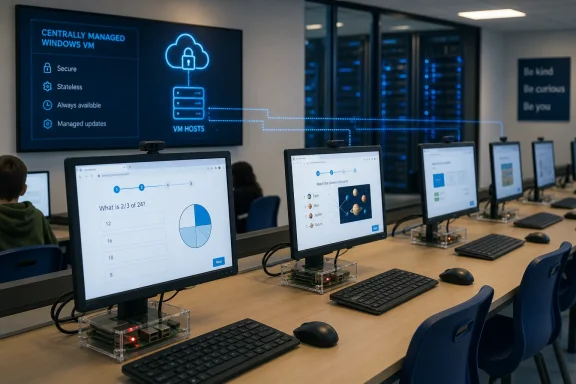
At one of the company’s tutoring centres, the visible experience is conventional. A child sits at a monitor with a keyboard and mouse, works through maths or English lessons, and interacts with a tutor in person. The less visible part is that the “computer” is a Raspberry Pi mounted behind the display, acting as a conduit to a server-hosted Windows environment.
That distinction matters. A Raspberry Pi in this role is not being asked to behave like a cheap desktop replacement. It is being asked to display a remote session, accept keyboard and mouse input, and stay out of the way. The sophistication is not in the endpoint; it is in the architecture.
This is where many thin-client conversations go wrong. The interesting comparison is not Raspberry Pi versus a Core i5 desktop. It is Raspberry Pi plus a controlled virtual desktop environment versus dozens of independent PCs that must each be patched, secured, repaired, and eventually replaced.
That makes the endpoint predictable. Students are not supposed to be compiling code, editing 4K video, running local CAD models, or installing their own tools. They are meant to sit down, authenticate into a learning environment, and work through structured content under staff supervision.
Daniel Hyatt, Explore Learning’s head of IT infrastructure, has described the company’s deployment as reaching close to 3,000 Raspberry Pi-based machines by 2016. The scale is the point. A clever Raspberry Pi experiment in a back room is one thing; a multi-thousand-device estate across a distributed tutoring business is another.
Each centre can have dozens of workstations, with the Pi devices connecting back to a local server-hosted Windows virtual machine. NComputing firmware supplies the thin-client layer, allowing the devices to connect over Remote Desktop Protocol. That turns the Pi into a managed access terminal rather than a little Linux box waiting to be tinkered with.
A traditional PC lab model creates a maintenance surface for every seat. Each desktop has storage, operating system state, applications, drivers, user leftovers, local failures, and the inevitable mystery problem that only appears when a lesson is about to begin. Multiply that across nearly 100 centres and the support model becomes a tax on the whole business.
Explore Learning’s model collapses much of that complexity into the server. Hyatt’s team can update the virtual machine serving a site instead of touching every endpoint individually. If the workstations are mainly portals into the same managed environment, the IT team gets leverage.
That leverage is why thin clients keep reappearing in schools, call centres, healthcare, retail, libraries, and training rooms. The promise is not glamour. The promise is that the endpoint becomes replaceable, stateless, and less interesting to support.
In Explore Learning’s case, that apparently allowed a relatively lean IT team to manage a large device count. That is the quiet win administrators recognize immediately. The capital saving is welcome; the operational saving is what keeps the model alive.
Hyatt’s argument is that this flexibility is often overbought. If a desk does not need mobility, a laptop may be the wrong default. If an application is browser-based and centrally managed, a full desktop may be excessive. If users can roam by signing into profiles at any available station, the office can be flexible without making every endpoint a portable personal computer.
This is especially relevant after years of cloud migration. Businesses moved email, line-of-business apps, collaboration tools, and storage into remote services, then continued buying endpoints as if local compute were still the centre of gravity. Explore Learning’s centres show the alternative: put the compute where it is easier to manage, and make the desk device as thin as the job allows.
That does not mean Raspberry Pis are suddenly ideal business PCs. They are not. They lack the standard corporate endpoint ecosystem many IT departments expect, and they require configuration knowledge that a mainstream Windows laptop does not. But in a constrained environment, those objections lose some force.
A tutoring centre is not a general office. It is a controlled classroom-like space with a known workload and repeatable sessions. That kind of environment rewards standardization more than versatility.
Hyatt has emphasized that Explore Learning’s thin clients do not store user data locally and can be configured with a freeze-state model that restores the environment after reboot. For a student-facing device, that is not a cosmetic feature. Children click things, experiment, break workflows, and sometimes intentionally test boundaries. A reboot that returns the station to a known-good state is an administrator’s best friend.
There is also a physical security dimension. The server can live in a restricted area, while the visible endpoint has limited standalone utility. A Pi-based thin client removed from the network is not a treasure chest of cached work and user files. It is mostly an inert access device.
That model does not remove the need for patching, authentication, monitoring, network segmentation, or server hardening. It shifts the defensive emphasis. The crown jewels move away from the desk and into infrastructure that can be locked down more deliberately.
For schools and child-focused environments, that shift has practical value. The endpoint should be as uninteresting as possible. The learning environment should be consistent, recoverable, and centrally governed.
Hyatt’s examples are familiar to anyone who has run a shared desktop environment. One user can consume disproportionate resources. A legacy application opened repeatedly can sap capacity. Bandwidth-heavy behavior can disrupt the experience for everyone else.
That does not make the architecture wrong. It means the management problem changes shape. Instead of maintaining dozens of bloated endpoints, administrators need quotas, session controls, application limits, network quality, monitoring, and capacity headroom. The endpoint gets simpler, but the backend must be treated seriously.
This is where Raspberry Pi thin-client stories can become misleading. The Pi is not magic. It does not make remote desktop performance problems disappear. If video decoding, latency, printing, peripherals, or authentication are poorly handled, users will not care that the endpoint is cheap and efficient.
Explore Learning appears to have succeeded because the workload is aligned with the architecture. Browser-based education software, predictable session lengths, and controlled centres are a much better fit than a creative agency, engineering firm, or video production classroom. Thin clients reward boring workloads. They punish messy ones.
But Explore Learning’s deployment is not just “Raspberry Pis in business.” It is Raspberry Pis packaged into a thin-client design with NComputing firmware, Remote Desktop Protocol, server-side Windows sessions, and a support model built around repeatability. That stack is what makes it viable.
This distinction matters because businesses do not buy anecdotes; they buy risk profiles. A bare Raspberry Pi arriving without the expected enterprise operating system and management tooling is not automatically a good corporate endpoint. It may be cheap, but cheap hardware plus improvised management can become expensive very quickly.
NComputing’s role helps explain why the setup is more than a DIY fleet. The firmware and management layer give the Pi a defined job. That reduces the burden on local staff and makes the device behave more like a conventional thin client.
In other words, the Pi is the silicon and board-level bargain. The product is the managed endpoint. Confusing those two is how organizations turn a clever idea into a support nightmare.
Hyatt’s comment about rising RAM prices captures a broader anxiety. If memory becomes more expensive, sharing resources becomes more attractive. A server-side pool can be sized, monitored, and upgraded in ways that are often more efficient than distributing surplus RAM across hundreds or thousands of endpoints.
The same logic applies to energy. A Raspberry Pi-class endpoint consumes far less power than a traditional desktop tower. Across one desk, that may look trivial. Across thousands of always-ready education stations, it becomes a line item, a heat-management consideration, and a sustainability argument.
The environmental case should not be overstated. Servers still consume power, devices still need manufacturing, and centralized infrastructure has its own footprint. But replacing large numbers of overpowered endpoints with low-energy access devices is one of the more concrete ways IT can reduce waste without asking users to accept a worse application model.
This is why the story resonates beyond education. It speaks to a post-cloud contradiction that many organizations have not fully resolved: if work has moved off the local machine, why is the local machine still treated as the main event?
This hybrid reality is common in modern IT. Organizations may want the manageability of nontraditional endpoints without abandoning Windows applications, identity systems, policies, or administrative habits. Remote Desktop Protocol remains the bridge.
That makes the deployment less radical than it first appears. Explore Learning did not replace Windows with Raspberry Pi OS as the centre of its computing model. It moved Windows into a place where it could be managed once and consumed many times.
This is the subtle strategic play. Microsoft’s ecosystem remains relevant, but its physical location changes. The endpoint no longer has to be a Windows PC to deliver a Windows-based experience.
That arrangement also hints at why virtual desktop infrastructure, Azure Virtual Desktop, Windows 365, and traditional Remote Desktop Services remain important. The future of Windows in some environments may be less about every user owning a full Windows device and more about Windows being streamed, brokered, or session-hosted to whatever endpoint makes operational sense.
Explore Learning’s use case sits between a school computer lab and a commercial branch network. It has many locations, predictable tasks, and a need for consistency. Those are precisely the conditions under which centralized computing can shine.
There is also a pedagogical angle. In a tutoring environment, the computer is not the star. The learning session, the tutor, and the software are the experience. The endpoint should disappear into the furniture.
That is a healthy corrective to a lot of edtech thinking. Devices often dominate the conversation, partly because hardware is visible and easy to count. But the better question is whether the device supports the instructional model without creating avoidable management debt.
By that measure, a Pi hidden behind a monitor is almost elegant. It is not trying to impress anyone. It is trying to be available, consistent, and cheap enough to deploy wherever the model requires.
Knowledge workers often need local video conferencing, multiple displays, USB peripherals, offline access, security agents, device compliance checks, and occasionally demanding local applications. Some of those can be solved in a thin-client architecture. Some can be solved only with cost, compromise, or complexity.
The better lesson is segmentation. Not every worker needs the same endpoint, and not every room needs the same computing model. A reception desk, training room, call-centre station, library terminal, warehouse kiosk, or hot-desk pod may be a much better thin-client candidate than a developer laptop or designer workstation.
This is where IT strategy should become more granular. The question is not whether Raspberry Pi thin clients can replace PCs. The question is where a full PC is merely habit.
Hyatt’s critique of companies buying mobility for occasional room changes is especially sharp. If the job is stationary most of the time, roaming profiles and shared desks may be a better answer than issuing a laptop to every person. Mobility is valuable, but it is not free. It carries cost in hardware, support, security, loss risk, and lifecycle management.
Raspberry Pi thin clients are not good enough for everything. They are excellent for some things precisely because they are limited. Their constraints force a cleaner design.
The PC industry has long benefited from ambiguity. If an organization is unsure what users may need, it buys more capability. That approach feels safe, but it creates waste. It also masks poor application planning by throwing endpoint power at every problem.
Explore Learning’s model goes the other way. It defines the workload first, then chooses the smallest endpoint that can support it. That is how infrastructure decisions should be made, but often are not.
This is not nostalgia for dumb terminals. It is a modern version of an old idea: centralize what benefits from central control, distribute only what must be local, and do not pay for unused autonomy at every desk.
Raspberry Pi thin clients will remain a niche for many businesses, and rightly so. But niches are where useful ideas prove themselves before the market finds a more polished name for them. As PC costs, energy pressure, and management sprawl keep testing IT budgets, the Explore Learning model points toward a more deliberate endpoint future: fewer assumptions, more shared infrastructure, and devices chosen not for what they could do, but for what the job actually requires.
 The Best PC in the Room Is the One That Barely Exists
The modern workplace has spent years moving in two directions at once. Software has gone to the browser and the cloud, while endpoint hardware has often become more expensive, more powerful, and more complicated than the work actually requires. Explore Learning’s setup cuts through that contradiction with unusual clarity: if the application lives elsewhere, the endpoint does not need to be a general-purpose PC.At one of the company’s tutoring centres, the visible experience is conventional. A child sits at a monitor with a keyboard and mouse, works through maths or English lessons, and interacts with a tutor in person. The less visible part is that the “computer” is a Raspberry Pi mounted behind the display, acting as a conduit to a server-hosted Windows environment.
That distinction matters. A Raspberry Pi in this role is not being asked to behave like a cheap desktop replacement. It is being asked to display a remote session, accept keyboard and mouse input, and stay out of the way. The sophistication is not in the endpoint; it is in the architecture.
This is where many thin-client conversations go wrong. The interesting comparison is not Raspberry Pi versus a Core i5 desktop. It is Raspberry Pi plus a controlled virtual desktop environment versus dozens of independent PCs that must each be patched, secured, repaired, and eventually replaced.
Explore Learning Found the Workload Thin Clients Were Built For
Explore Learning’s use case is almost comically well suited to thin clients. The company teaches children aged roughly 4 to 16, using its Compass software in physical tutoring centres and online. In-centre machines are primarily there to run a controlled education workflow, not to support arbitrary employee computing.That makes the endpoint predictable. Students are not supposed to be compiling code, editing 4K video, running local CAD models, or installing their own tools. They are meant to sit down, authenticate into a learning environment, and work through structured content under staff supervision.
Daniel Hyatt, Explore Learning’s head of IT infrastructure, has described the company’s deployment as reaching close to 3,000 Raspberry Pi-based machines by 2016. The scale is the point. A clever Raspberry Pi experiment in a back room is one thing; a multi-thousand-device estate across a distributed tutoring business is another.
Each centre can have dozens of workstations, with the Pi devices connecting back to a local server-hosted Windows virtual machine. NComputing firmware supplies the thin-client layer, allowing the devices to connect over Remote Desktop Protocol. That turns the Pi into a managed access terminal rather than a little Linux box waiting to be tinkered with.
Central Management Is the Real Cost Cutter
The seductive number in any Raspberry Pi story is the hardware cost, but that is rarely where the biggest saving lives. Endpoint fleets do not become expensive simply because the machines cost money. They become expensive because they sprawl.A traditional PC lab model creates a maintenance surface for every seat. Each desktop has storage, operating system state, applications, drivers, user leftovers, local failures, and the inevitable mystery problem that only appears when a lesson is about to begin. Multiply that across nearly 100 centres and the support model becomes a tax on the whole business.
Explore Learning’s model collapses much of that complexity into the server. Hyatt’s team can update the virtual machine serving a site instead of touching every endpoint individually. If the workstations are mainly portals into the same managed environment, the IT team gets leverage.
That leverage is why thin clients keep reappearing in schools, call centres, healthcare, retail, libraries, and training rooms. The promise is not glamour. The promise is that the endpoint becomes replaceable, stateless, and less interesting to support.
In Explore Learning’s case, that apparently allowed a relatively lean IT team to manage a large device count. That is the quiet win administrators recognize immediately. The capital saving is welcome; the operational saving is what keeps the model alive.
Raspberry Pi Works Here Because the PC Was Overqualified
There is a lesson in restraint here that enterprise buyers often resist. Many organizations buy endpoints for edge cases, not for the median day. A laptop fleet gets justified because someone might need to move rooms, connect to a projector, or work from home, even when many machines spend their lives docked, stationary, and running browser apps.Hyatt’s argument is that this flexibility is often overbought. If a desk does not need mobility, a laptop may be the wrong default. If an application is browser-based and centrally managed, a full desktop may be excessive. If users can roam by signing into profiles at any available station, the office can be flexible without making every endpoint a portable personal computer.
This is especially relevant after years of cloud migration. Businesses moved email, line-of-business apps, collaboration tools, and storage into remote services, then continued buying endpoints as if local compute were still the centre of gravity. Explore Learning’s centres show the alternative: put the compute where it is easier to manage, and make the desk device as thin as the job allows.
That does not mean Raspberry Pis are suddenly ideal business PCs. They are not. They lack the standard corporate endpoint ecosystem many IT departments expect, and they require configuration knowledge that a mainstream Windows laptop does not. But in a constrained environment, those objections lose some force.
A tutoring centre is not a general office. It is a controlled classroom-like space with a known workload and repeatable sessions. That kind of environment rewards standardization more than versatility.
The Security Argument Is Boring, Which Is Why It Matters
Thin clients have always had a security pitch, and it remains persuasive when the deployment is disciplined. A stateless endpoint has less to steal, less to corrupt, and less to preserve after misuse. If the local device stores little or nothing of value, losing control of the device is not the same as losing control of the data.Hyatt has emphasized that Explore Learning’s thin clients do not store user data locally and can be configured with a freeze-state model that restores the environment after reboot. For a student-facing device, that is not a cosmetic feature. Children click things, experiment, break workflows, and sometimes intentionally test boundaries. A reboot that returns the station to a known-good state is an administrator’s best friend.
There is also a physical security dimension. The server can live in a restricted area, while the visible endpoint has limited standalone utility. A Pi-based thin client removed from the network is not a treasure chest of cached work and user files. It is mostly an inert access device.
That model does not remove the need for patching, authentication, monitoring, network segmentation, or server hardening. It shifts the defensive emphasis. The crown jewels move away from the desk and into infrastructure that can be locked down more deliberately.
For schools and child-focused environments, that shift has practical value. The endpoint should be as uninteresting as possible. The learning environment should be consistent, recoverable, and centrally governed.
The Catch Is That Thin Clients Do Not Forgive Bad Capacity Planning
The weakness of thin clients is also the source of their efficiency: shared resources. If every endpoint depends on a server-side session, the server and network become the system. A problem that might once have affected one PC can become a site-wide problem if the shared infrastructure is undersized or misconfigured.Hyatt’s examples are familiar to anyone who has run a shared desktop environment. One user can consume disproportionate resources. A legacy application opened repeatedly can sap capacity. Bandwidth-heavy behavior can disrupt the experience for everyone else.
That does not make the architecture wrong. It means the management problem changes shape. Instead of maintaining dozens of bloated endpoints, administrators need quotas, session controls, application limits, network quality, monitoring, and capacity headroom. The endpoint gets simpler, but the backend must be treated seriously.
This is where Raspberry Pi thin-client stories can become misleading. The Pi is not magic. It does not make remote desktop performance problems disappear. If video decoding, latency, printing, peripherals, or authentication are poorly handled, users will not care that the endpoint is cheap and efficient.
Explore Learning appears to have succeeded because the workload is aligned with the architecture. Browser-based education software, predictable session lengths, and controlled centres are a much better fit than a creative agency, engineering firm, or video production classroom. Thin clients reward boring workloads. They punish messy ones.
The Raspberry Pi Is Not the Product; the System Is
The Raspberry Pi brand brings cultural baggage. For enthusiasts, it suggests experimentation, retro gaming, home servers, robotics, and weekend projects. For IT departments, that same image can trigger skepticism. Nobody wants to run a mission-critical branch estate on something that feels like it came from a maker bench.But Explore Learning’s deployment is not just “Raspberry Pis in business.” It is Raspberry Pis packaged into a thin-client design with NComputing firmware, Remote Desktop Protocol, server-side Windows sessions, and a support model built around repeatability. That stack is what makes it viable.
This distinction matters because businesses do not buy anecdotes; they buy risk profiles. A bare Raspberry Pi arriving without the expected enterprise operating system and management tooling is not automatically a good corporate endpoint. It may be cheap, but cheap hardware plus improvised management can become expensive very quickly.
NComputing’s role helps explain why the setup is more than a DIY fleet. The firmware and management layer give the Pi a defined job. That reduces the burden on local staff and makes the device behave more like a conventional thin client.
In other words, the Pi is the silicon and board-level bargain. The product is the managed endpoint. Confusing those two is how organizations turn a clever idea into a support nightmare.
The Return of Thin Clients Is Really a Reaction to PC Inflation
The timing of renewed interest in thin clients is not accidental. PC prices, component supply shocks, and memory-market volatility have pushed organizations to re-examine what they actually need at the endpoint. Even when supply chains stabilize, the lesson tends to linger: fleets are expensive when every seat is provisioned for the worst case.Hyatt’s comment about rising RAM prices captures a broader anxiety. If memory becomes more expensive, sharing resources becomes more attractive. A server-side pool can be sized, monitored, and upgraded in ways that are often more efficient than distributing surplus RAM across hundreds or thousands of endpoints.
The same logic applies to energy. A Raspberry Pi-class endpoint consumes far less power than a traditional desktop tower. Across one desk, that may look trivial. Across thousands of always-ready education stations, it becomes a line item, a heat-management consideration, and a sustainability argument.
The environmental case should not be overstated. Servers still consume power, devices still need manufacturing, and centralized infrastructure has its own footprint. But replacing large numbers of overpowered endpoints with low-energy access devices is one of the more concrete ways IT can reduce waste without asking users to accept a worse application model.
This is why the story resonates beyond education. It speaks to a post-cloud contradiction that many organizations have not fully resolved: if work has moved off the local machine, why is the local machine still treated as the main event?
Windows Still Sits at the Centre of the Story
For Windows administrators, the most interesting part may be that the endpoint is not Windows, but the user environment still is. The Raspberry Pi is an access layer into a Windows server-hosted session. That preserves compatibility with the organization’s chosen software environment while reducing the desk-side Windows footprint.This hybrid reality is common in modern IT. Organizations may want the manageability of nontraditional endpoints without abandoning Windows applications, identity systems, policies, or administrative habits. Remote Desktop Protocol remains the bridge.
That makes the deployment less radical than it first appears. Explore Learning did not replace Windows with Raspberry Pi OS as the centre of its computing model. It moved Windows into a place where it could be managed once and consumed many times.
This is the subtle strategic play. Microsoft’s ecosystem remains relevant, but its physical location changes. The endpoint no longer has to be a Windows PC to deliver a Windows-based experience.
That arrangement also hints at why virtual desktop infrastructure, Azure Virtual Desktop, Windows 365, and traditional Remote Desktop Services remain important. The future of Windows in some environments may be less about every user owning a full Windows device and more about Windows being streamed, brokered, or session-hosted to whatever endpoint makes operational sense.
Education Makes the Trade-Offs Easier to See
Education is a ruthless test of endpoint strategy because budgets are constrained, users are varied, and the devices are often treated harshly. A machine in a tutoring centre has to survive frequent logins, short sessions, curious children, staff turnover, and the occasional act of chaos. Overengineering the endpoint is expensive; underengineering the environment is disruptive.Explore Learning’s use case sits between a school computer lab and a commercial branch network. It has many locations, predictable tasks, and a need for consistency. Those are precisely the conditions under which centralized computing can shine.
There is also a pedagogical angle. In a tutoring environment, the computer is not the star. The learning session, the tutor, and the software are the experience. The endpoint should disappear into the furniture.
That is a healthy corrective to a lot of edtech thinking. Devices often dominate the conversation, partly because hardware is visible and easy to count. But the better question is whether the device supports the instructional model without creating avoidable management debt.
By that measure, a Pi hidden behind a monitor is almost elegant. It is not trying to impress anyone. It is trying to be available, consistent, and cheap enough to deploy wherever the model requires.
The Office Lesson Is Narrower Than the Hype
It would be tempting to turn Explore Learning’s story into a broad claim that businesses should ditch PCs for Raspberry Pis. That would be the wrong lesson. Most office environments contain more edge cases than a tutoring centre, and edge cases are where thin-client economics get complicated.Knowledge workers often need local video conferencing, multiple displays, USB peripherals, offline access, security agents, device compliance checks, and occasionally demanding local applications. Some of those can be solved in a thin-client architecture. Some can be solved only with cost, compromise, or complexity.
The better lesson is segmentation. Not every worker needs the same endpoint, and not every room needs the same computing model. A reception desk, training room, call-centre station, library terminal, warehouse kiosk, or hot-desk pod may be a much better thin-client candidate than a developer laptop or designer workstation.
This is where IT strategy should become more granular. The question is not whether Raspberry Pi thin clients can replace PCs. The question is where a full PC is merely habit.
Hyatt’s critique of companies buying mobility for occasional room changes is especially sharp. If the job is stationary most of the time, roaming profiles and shared desks may be a better answer than issuing a laptop to every person. Mobility is valuable, but it is not free. It carries cost in hardware, support, security, loss risk, and lifecycle management.
The Endpoint Market Should Be More Honest About “Good Enough”
The phrase good enough often sounds like surrender in technology circles. In fleet management, it can be a virtue. An endpoint is good enough when it delivers the required application experience reliably, securely, and maintainably at the lowest reasonable operational burden.Raspberry Pi thin clients are not good enough for everything. They are excellent for some things precisely because they are limited. Their constraints force a cleaner design.
The PC industry has long benefited from ambiguity. If an organization is unsure what users may need, it buys more capability. That approach feels safe, but it creates waste. It also masks poor application planning by throwing endpoint power at every problem.
Explore Learning’s model goes the other way. It defines the workload first, then chooses the smallest endpoint that can support it. That is how infrastructure decisions should be made, but often are not.
This is not nostalgia for dumb terminals. It is a modern version of an old idea: centralize what benefits from central control, distribute only what must be local, and do not pay for unused autonomy at every desk.
The Pi Fleet’s Real Message for Windows Shops
The concrete lesson from Explore Learning is not that every organization should order Raspberry Pis by the pallet. It is that endpoint strategy should start with workload shape, not device fashion.- Explore Learning’s deployment works because its in-centre student workload is controlled, browser-heavy, and well matched to remote Windows sessions.
- The Raspberry Pi endpoints reduce desk-side complexity, but the server, network, firmware, and management model carry the real responsibility.
- The economic case is strongest when many stations perform the same task and do not need local storage, mobility, or high-end processing.
- The security case improves when endpoints are stateless, recoverable, and useless outside the managed network.
- The model becomes fragile if shared resources are undersized, if users need demanding local apps, or if peripheral and multimedia requirements are underestimated.
- For Windows administrators, the architecture shows that Windows can remain central even when the physical endpoint is something much smaller and cheaper than a PC.
Raspberry Pi thin clients will remain a niche for many businesses, and rightly so. But niches are where useful ideas prove themselves before the market finds a more polished name for them. As PC costs, energy pressure, and management sprawl keep testing IT budgets, the Explore Learning model points toward a more deliberate endpoint future: fewer assumptions, more shared infrastructure, and devices chosen not for what they could do, but for what the job actually requires.
References
- Primary source: IT Brew
Published: None
How an edtech pro uses Raspberry Pis as thin clients
At first glance, a computer at one of Explore Learning’s almost 100 tutoring facilities in the UK might look pretty normal: monitor, keyboard, and mouse. But tucked behind each screen is a Raspberry Pi, a small single-board device often used by hobbyists for prototyping hardware projects.www.itbrew.com
- Related coverage: cnx-software.com
NComputing RX420(HDX) Raspberry Pi 4 Thin Client Works with Citrix HDX - CNX Software
NComputing RX420(HDX) is Raspberry Pi 4 thin client and/or IoT edge device supporting Citrix HDX virtualization technologywww.cnx-software.com - Related coverage: silicon.co.uk
VMworld 2014: Dell Launches Its First Intel-Based Thin Client
Dell Wyse 3000 is now available with a Bay Trail chip, while Wyse 5000 gets PCoIP support All IT news on Silicon.co.ukwww.silicon.co.uk
