

ExpressVPN has pushed a ground-up redesign to its desktop lineup by shipping a Qt-based Linux app today, while macOS users can opt into a beta and Windows 10/11 owners are told to expect the revamped client in a coming beta — a move that promises cross-platform consistency, faster feature delivery, and a clutch of new tools aimed at both casual users and administrators.
ExpressVPN’s desktop apps have historically been developed and maintained as platform-specific code paths, which created inevitable differences in features and release timing between Windows, macOS, and Linux clients. That fragmented approach is changing: the company announced a strategic migration to the Qt cross‑platform framework to unify the desktop experience and accelerate the rollout of advanced features across operating systems. The company’s announcement makes the Linux Qt client the first public release under this initiative; macOS is available as a website-only beta and Windows is slated for beta in the near term. This shift matters for two reasons. First, a unified codebase reduces duplicated engineering work and should shorten the lag between feature introduction on one platform and availability on the others. Second, the Qt migration restores parity for some features that were previously missing on certain platforms due to OS restrictions — for example, split tunnelling and deeper CLI control on macOS — by providing a single implementation path that can be adapted for each OS without rebuilding a feature from scratch. Industry coverage confirms ExpressVPN’s intent and details the staged rollout.
Source: GB News ExpressVPN releases redesigned app on Linux, but Windows 11 users face a longer wait
 Background
ExpressVPN’s desktop apps have historically been developed and maintained as platform-specific code paths, which created inevitable differences in features and release timing between Windows, macOS, and Linux clients. That fragmented approach is changing: the company announced a strategic migration to the Qt cross‑platform framework to unify the desktop experience and accelerate the rollout of advanced features across operating systems. The company’s announcement makes the Linux Qt client the first public release under this initiative; macOS is available as a website-only beta and Windows is slated for beta in the near term. This shift matters for two reasons. First, a unified codebase reduces duplicated engineering work and should shorten the lag between feature introduction on one platform and availability on the others. Second, the Qt migration restores parity for some features that were previously missing on certain platforms due to OS restrictions — for example, split tunnelling and deeper CLI control on macOS — by providing a single implementation path that can be adapted for each OS without rebuilding a feature from scratch. Industry coverage confirms ExpressVPN’s intent and details the staged rollout. What’s new on Linux: features, usability, and enterprise friendliness
A modern, card‑based UI and accessibility improvements
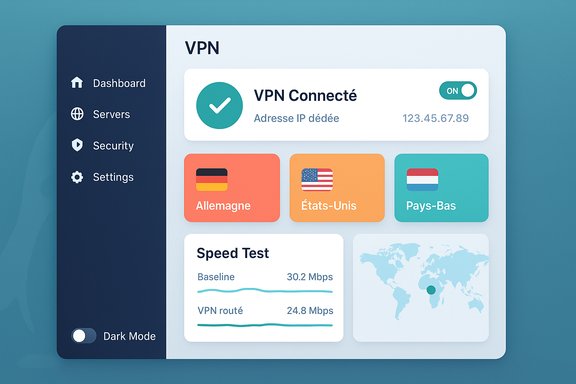
Linux users receive a fully graphical client with a modern card-based dashboard, light/dark themes, multi-language support, favourites, and an interactive map. The design is intended to be both approachable for newcomers and efficient for experienced users who switch servers frequently. These UI changes replace the previous CLI-centric experience and are now the default Linux experience.Built‑in speed test: measure ISP vs VPN performance
A notable addition is a native speed test that runs two measurements in a single session: a baseline test through the user’s ISP and a second test routed through the VPN. This side‑by‑side presentation is useful to quickly identify whether performance issues stem from the user’s local connection or from the VPN path. The feature returns metrics for download and upload and shows server/protocol details used during the test. Tech press coverage highlights this as a practical troubleshooting and comparison tool for everyday users.Dedicated IP management in‑app
Linux users can now unlock, manage, and monitor Dedicated IP addresses directly from the client, including a status indicator that shows when a dedicated connection is active. This removes a previously manual step of provisioning or configuring Dedicated IPs through the web dashboard or support channels. For users who rely on static egress IPs for remote services or allowlisting, this integration simplifies workflow significantly.New protocol lineup: Lightway, OpenVPN, and post‑quantum WireGuard
The Qt Linux client ships with three protocol options: Lightway (ExpressVPN’s proprietary, low-latency protocol), OpenVPN, and a new post‑quantum WireGuard variant. Lightway remains the default, and WireGuard is presented as an option engineered to be resistant to future cryptographic threats. The inclusion of WireGuard — and specifically a post‑quantum variant — reflects an industry trend toward both high-performance tunnelling and proactive cryptographic hardening; however, the specific mechanics of a “post‑quantum WireGuard” rollout should be examined closely (see the Security section below).Headless installation and lighter dependencies for servers and containers
For administrators, the new release tones down system dependencies required for headless installs, which simplifies deployment on minimal Linux servers, containers, and headless environments. This makes ExpressVPN easier to run in server-side scenarios, NAS devices, or orchestrated container setups where minimizing footprint and dependencies matters. ExpressVPN indicates reduced dependencies and a more straightforward CLI for these scenarios.Deprecation timeline: previous CLI‑only client to be retired
ExpressVPN states the Qt client replaces the older CLI-only Linux client and that the legacy version will be discontinued in January 2026. Organizations that have automated workflows or scripts relying on the old CLI should plan testing and migration before the deprecation date.What macOS and Windows users will (and won’t) get — timeline and caveats
macOS: Qt beta brings split tunnelling and CLI control
The Qt-based macOS beta introduces features that macOS users have long requested: split tunnelling, CLI control (expressvpnctl), and WireGuard alongside Lightway and OpenVPN. Importantly, this Qt macOS build is a separate, advanced version available only from ExpressVPN’s website — not the Mac App Store — because Apple’s App Store sandboxing and policy constraints can block functionality like split tunnelling and low-level network integration. ExpressVPN frames this as the “most comprehensive” macOS client and requires macOS 11 (Big Sur) or newer due to Qt 6.5 dependencies.Windows 10/11: the Qt beta is coming, not here yet
Windows 10 and Windows 11 users have not yet received the Qt client in stable form. ExpressVPN says a Windows beta will arrive in the coming weeks, bringing the unified design plus features such as the built‑in speed test, an Advanced Network Lock (the app’s kill switch variant), and network automation rules. Industry coverage reiterates the Windows beta timeline, and until that beta appears, Windows users remain on the prior native Windows client.App Store constraints: why the Mac beta is web‑only
Because the Qt macOS client includes features that the App Store’s sandboxing and network APIs either restrict or disallow (notably split tunnelling and potentially system-level kill switches), ExpressVPN will distribute the full‑feature Qt macOS build directly from its website through a beta channel. Users who install from the website must manually accept the installer and system permissions, and will not receive automatic App Store updates. This is a conscious tradeoff to deliver deeper functionality to advanced users.Technical deep dive: Qt, protocols, and what “post‑quantum WireGuard” likely means
Why Qt? Cross‑platform benefits and tradeoffs
Qt is a mature C++-based cross‑platform application framework used extensively for desktop apps that need consistent UI/UX across operating systems. By re-writing desktop clients in Qt, ExpressVPN can:- Consolidate feature development on one codebase
- Maintain consistent UI/UX and behaviour
- Ship features faster across platforms
Lightway vs OpenVPN vs WireGuard (and the “post‑quantum” qualifier)
- Lightway: ExpressVPN’s proprietary protocol, designed for quick reconnections and low latency. It remains the default for everyday use.
- OpenVPN: Time‑tested, highly configurable, broadly compatible, but relatively heavier in CPU cost compared with WireGuard.
- WireGuard: A modern, lightweight kernel‑friendly protocol with superior throughput and simpler key management.
- It’s a forward‑looking, defensive measure against potential future quantum adversaries rather than a requirement for current threat models.
- The security properties depend heavily on implementation details — which post‑quantum algorithms are used, whether the handshake is hybrid, and how keys are stored or rotated.
Security and privacy analysis: strengths, open questions, and operational advice
Strengths
- Feature parity and faster rollouts: A unified Qt codebase should reduce cross-platform lag and make it easier to ship requested features such as split tunnelling on macOS and CLI tooling for advanced users. This is a genuine operational advantage for users who work across OSes.
- Practical user tools: The built‑in speed test and in‑app Dedicated IP controls make common tasks easier and reduce the need for external troubleshooting tools or web‑based workarounds.
- Server and deployment improvements: Lowering headless installation dependencies simplifies deployment in server‑side or containerized contexts, a real benefit for enterprise and power users.
Open questions and risks
- What “post‑quantum WireGuard” actually protects: The phrase suggests improved future resistance, yet the security benefits hinge on specific algorithms, handshake design, and key lifecycle management. Those details are not fully public in the announcement; independent cryptographic review would clarify the strength of the claim. Treat the term as an evolving feature rather than a completed, fully‑audited guarantee. Caution is advised until audit details are published.
- App store vs website distribution tradeoffs: The Qt macOS build is not in the App Store, so users who install the website beta will manage updates outside of the App Store ecosystem. That raises practical questions about update delivery, notarization, and long‑term trust signals — users should validate installer signatures and prefer vendor-provided installers over mirror downloads.
- Transition for scripted and automated setups: Organizations using the legacy Linux CLI should inventory their automation and test the Qt release because some command names, output formats, or behavior might change. The stated deprecation (January 2026) gives a migration window, but enterprise testing is essential.
- Implementation history and QA: VPN clients are platform components with tight integration to networking subsystems. Past incidents (ExpressVPN patched a Windows bug earlier in 2025 that could expose IPs in rare conditions) remind operators that complex client changes benefit from robust QA and independent review. Users and administrators should continue to apply updates quickly and monitor vendor advisories.
Practical security advice for users and admins
- Verify installers by checking vendor signatures and hashes when downloading from the website.
- Use the built‑in speed test to compare performance before and after changes; save baseline results for troubleshooting.
- For macOS, prefer App Store versions for the easiest update flow if you do not need split tunnelling; install the website beta only if you require advanced features and are comfortable managing direct installs.
- If you rely on Dedicated IPs for allowlisting, validate the in‑app Dedicated IP workflow in a controlled test before migrating production systems.
- Keep an eye out for published audits or technical whitepapers that explain the post-quantum handshake design; do not treat the label as a substitute for concrete cryptographic transparency.
User impact: who benefits most, and who should be cautious
Beneficiaries
- Linux desktop users and administrators: A graphical client, built‑in speed test, Dedicated IP management, and improved headless installation are clear wins for both desktop and server administrators.
- macOS power users: The return of split tunnelling and the addition of CLI controls on macOS are long‑requested features for developers and users who need selective routing.
- Cross‑platform users and small teams: Those who use multiple desktop OSes will appreciate a consistent UI and faster parity of features when the Windows beta arrives.
Users who should be cautious
- Enterprises with scripted automation: Organizations should test the new Qt client for compatibility before adopting it in production, especially if scripts expect the older CLI’s behaviour or output.
- Users concerned about App Store-managed updates: macOS users who prefer automatic App Store updates for software supply‑chain assurances should weigh the convenience/value tradeoff before installing a website-only client.
- Those relying on absolute, immediate post‑quantum guarantees: Post‑quantum cryptography is a fast-moving research area; users seeking provable long-term quantum resistance should wait for technical details and third‑party validation rather than relying solely on marketing language.
Migration and practical steps (quick checklist)
- Linux desktop users: Download and test the new Qt client from your ExpressVPN account; confirm Dedicated IP and speed‑test behaviours on representative networks.
- Linux server admins: Test headless installation in a staging container; validate existing automation and cron jobs that call the legacy CLI.
- macOS users who need split tunnelling: Install the Qt beta from the ExpressVPN website, verify installer signature, and test split‑tunnel rules in a non‑critical environment.
- Windows users: Await the upcoming beta; continue using the current Windows client and prepare for a staged deployment once the Qt beta is publicly released.
- Security teams: Track ExpressVPN for technical whitepapers or audit reports on the post‑quantum WireGuard implementation; plan to revalidate compliance and risk assessments after public documentation or third‑party audits appear.
Final analysis: meaningful progress, but transparency and QA remain central
ExpressVPN’s move to a Qt-based desktop lineup is a substantive architectural decision with concrete user benefits: faster feature parity, a friendlier Linux client, macOS features that were previously hard to implement, and administrative improvements for headless deployments. The shipping of a Linux GUI with integrated speed testing and Dedicated IP management is a real usability win, and the promise of split tunnelling and CLI control on macOS will matter to many power users. Industry coverage and the vendor announcement line up on these core claims. At the same time, several important pieces remain to be fully validated in public: the precise design and cryptographic assurances behind the post‑quantum WireGuard option, the Windows beta's maturity and compatibility, and the degree of independent security review accompanying a major client rewrite. Past bugs in VPN clients underscore that subtle regressions can have privacy consequences, so continued transparency — in the form of implementation notes, audits, and robust QA reporting — will be key to building user confidence. ExpressVPN’s engineering direction is sound; success depends on execution, documentation, and independent verification. ExpressVPN Linux users can upgrade and test today; macOS early adopters can access the website beta for more advanced features; and Windows users should watch for the promised beta in the coming weeks if they want the same unified experience on their desktops. The rollout represents a strategic step toward a more consistent, feature‑rich VPN client family — but careful migration planning and a demand for technical transparency are essential for privacy‑conscious users and organizations.Source: GB News ExpressVPN releases redesigned app on Linux, but Windows 11 users face a longer wait
