

Facebook users looking for a human support line are still likely to come up empty in 2026. A newly updated Technobezz guide on contacting Facebook support points users back to Meta’s in-product tools, recovery forms and paid support tiers rather than phone numbers or generic email addresses — a distinction Meta’s own Help Center confirms.
Meta says Facebook does not offer a general public customer-service phone number. That makes old search results, social-media posts and sponsored listings advertising “Facebook support” particularly risky: users with a compromised account should not give passwords, one-time codes or remote PC access to anyone claiming to be Meta support.
For most routine issues — privacy settings, account features, safety questions and content reports — the Facebook Help Center remains the starting point. Logged-in users can also check the Support Inbox for the status of submitted reports and any decisions that Facebook has made.
Technical faults should be reported from inside Facebook using the “Report a problem” option, rather than submitted as an account or abuse report. The report can include screenshots and diagnostic details, which gives Meta substantially more context than a generic support request.
Abuse, spam, impersonation and harmful content should likewise be reported from the specific post, profile, Page, group or Messenger conversation involved. Reporting the exact object is important: it associates the complaint with the content Facebook needs to review.
Users should also check the email address previously attached to the account. Meta says it may send an alert when an email address is changed, and that message can include an option to reverse an unauthorized change. A password reset alone is not enough if an attacker has also replaced recovery details or enabled their own two-factor authentication method.
For locked accounts, Facebook normally presents recovery and identity-confirmation steps during login. There is no reliable shortcut around those prompts.
Marketplace orders paid through Facebook’s checkout and Meta Pay systems have their own order-support path, separate from ordinary account assistance. That channel is for transaction disputes and seller or payment issues, not login recovery.
For Windows users, the practical rule is simple: start from Facebook’s own Help Center or the app’s Help & support menu, and treat phone numbers, email addresses and unsolicited “account recovery” offers as suspect.
Meta says Facebook does not offer a general public customer-service phone number. That makes old search results, social-media posts and sponsored listings advertising “Facebook support” particularly risky: users with a compromised account should not give passwords, one-time codes or remote PC access to anyone claiming to be Meta support.
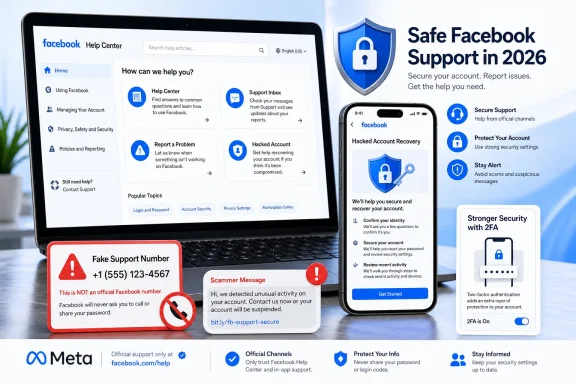 The right support route depends on the problem
For most routine issues — privacy settings, account features, safety questions and content reports — the Facebook Help Center remains the starting point. Logged-in users can also check the Support Inbox for the status of submitted reports and any decisions that Facebook has made.Technical faults should be reported from inside Facebook using the “Report a problem” option, rather than submitted as an account or abuse report. The report can include screenshots and diagnostic details, which gives Meta substantially more context than a generic support request.
Abuse, spam, impersonation and harmful content should likewise be reported from the specific post, profile, Page, group or Messenger conversation involved. Reporting the exact object is important: it associates the complaint with the content Facebook needs to review.
Hacked accounts are a separate case
Anyone who suspects their account has been taken over should use Facebook’s dedicated hacked-account recovery flow, preferably from a device and browser previously used to sign in. Meta explicitly recommends that route for compromised accounts and uses prior-device recognition as one signal during recovery.Users should also check the email address previously attached to the account. Meta says it may send an alert when an email address is changed, and that message can include an option to reverse an unauthorized change. A password reset alone is not enough if an attacker has also replaced recovery details or enabled their own two-factor authentication method.
For locked accounts, Facebook normally presents recovery and identity-confirmation steps during login. There is no reliable shortcut around those prompts.
Live help is limited and conditional
The guide notes that direct chat or email support is not generally available to ordinary Facebook users. Some account holders may see automated help options in the Help Center, while Meta Verified subscribers can receive enhanced support through the Facebook mobile app. Eligible creators, advertisers, commerce users and managed business accounts may also see direct support options in Meta’s business tools.Marketplace orders paid through Facebook’s checkout and Meta Pay systems have their own order-support path, separate from ordinary account assistance. That channel is for transaction disputes and seller or payment issues, not login recovery.
For Windows users, the practical rule is simple: start from Facebook’s own Help Center or the app’s Help & support menu, and treat phone numbers, email addresses and unsolicited “account recovery” offers as suspect.
References
- Primary source: Technobezz
Published: 2026-07-14T17:27:03.012000+00:00
How to Contact Facebook Customer Support in 2026 | Technobezz
Need Facebook customer support? Use the Help Center, Support Inbox, recovery tools, reports, and eligible chat options.www.technobezz.com
