

Blackmagic Design has released the final version of Fairlight Live, its free software-based audio mixer for broadcast and live events, following its NAB debut in April 2026. The application supports modern Apple Silicon Macs and Windows PCs, large channel counts, immersive formats, third-party plug-ins, broadcast-oriented routing, and integration with supported ATEM switchers. For Windows users, the practical next step is to verify an ASIO-based audio interface and, if using ATEM USB routing, update the switcher to ATEM Switchers 10.3.
The price is the immediate headline, but the larger significance is accessibility. Fairlight Live gives Windows-based studios, broadcasters, event teams, schools, houses of worship, and independent producers a no-cost route into a live mixer designed around production tasks such as snapshots, virtual sound check, mix-minus, talkback, cue playback, protected on-air operation, and remote control.
ProVideo Coalition’s Allan Tépper reports that the finished release is now available following its April NAB introduction. Blackmagic’s product information distinguishes between thousands of channels on modern Mac and Windows computers and hundreds of channels for wide-format or complex mixes. Those figures establish the intended scale of the software, but they should not be treated as guaranteed capacity for every computer or every project.
The practical question is therefore not merely whether Fairlight Live can display and route a large mix. It is whether a production team can validate a particular host, audio interface, switcher, controller, plug-in set, and recovery plan before relying on that configuration during a live event.
Calling Fairlight Live “free” is accurate, but it does not mean a complete live-audio system has no cost. The application can be used with compatible computer audio interfaces, supported ATEM switchers, control surfaces, remote controllers, and, in larger facilities, SMPTE 2110 infrastructure. Productions may also need additional computers, interfaces, networking equipment, monitoring, power protection, and backup signal paths.
That distinction is important because Fairlight Live is not presented as a narrowly limited demonstration application. Its published capabilities include snapshots, virtual sound check recording, internal routing, third-party plug-in support, talkback, mix-minus, cue playback, immersive panning, tablet control, and an On Air mode intended to protect critical controls during transmission.
A small production may begin with the software, a Windows computer, and a supported ASIO interface. An existing ATEM operation may use the USB digital-audio support added by ATEM Switchers 10.3. A larger broadcaster may evaluate dedicated control panels, multiple operators, redundant systems, or 2110-based I/O.
The free license lowers the cost of testing those possibilities. It does not remove the need to select, configure, and validate the rest of the production chain.
Verified product fact: Fairlight Live can operate as a software mixer and supports external control and audio-interface options, including ASIO on Windows.
WindowsForum operational advice: Budget for the system rather than the application alone. Interface drivers, monitoring, controllers, backup hosts, power protection, spare cables, and rehearsal time can matter more to reliability than the software’s purchase price.
The broad Windows compatibility statement does not establish that every computer capable of installing Fairlight Live is suitable for live production. Windows systems vary widely in processor, chipset, USB implementation, audio-interface driver quality, power configuration, and background software.
That variety is also an advantage. Facilities can evaluate Fairlight Live on existing Windows workstations rather than being required to purchase a specific computer platform simply to test the workflow. Windows 10 support may be especially relevant to production environments that retain validated systems longer than ordinary office fleets.
The Mac requirement is narrower. Intel Macs are excluded, and macOS 15 Sequoia is the stated minimum. Windows teams have more possible hardware combinations, but that flexibility increases the number of combinations that may need to be tested.
Verified product fact: Fairlight Live supports Windows 10 Creators Update and Windows 11, using ASIO-compatible audio interfaces.
WindowsForum operational advice: Do not approve a Windows host solely because it meets the operating-system requirement. Validate the actual computer with the intended ASIO driver, interface, USB connection, controller, routing, plug-ins, and expected workload.
The useful distinction is straightforward: the software is intended to scale into very large configurations, while wide or operationally complex projects may be described in the hundreds rather than the thousands. Neither statement should be converted into a universal performance guarantee for an arbitrary PC.
Fairlight Live supports mono, stereo, LCR, 5.1, immersive, and ASAF formats. It also supports third-party plug-ins, with four plug-in slots available on a channel and ChainFX expanding the possible chain to as many as 24 slots per channel. Native, AU, and VST plug-in formats are listed, with AU applying to the Apple platform.
Those capabilities allow productions to create projects that differ substantially in size and complexity. A numerical channel claim therefore does not tell an administrator how a specific show will behave on a specific workstation.
Verified product fact: Blackmagic describes thousands of channels on modern Mac and Windows computers, while also referring to hundreds of channels for wide-format and complex mixes.
WindowsForum operational advice: Establish a tested operating envelope for each approved host. Record the validated project scale, interface configuration, plug-in set, and software versions instead of treating the largest published channel figure as a planning target.
The strongest interpretation of the claim is not that every Windows PC can run the largest imaginable production. It is that Fairlight Live is not positioned around the small fixed channel limits normally associated with entry-level mixing software.
Mix-minus is a central example. Remote contributors commonly need to hear the program and other participants without receiving their own voice back through the return feed. Fairlight Live includes mix-minus support so that productions can build those individualized returns within the mixer.
Talkback provides communication paths for the production team. It is separate from the public program and must be configured carefully so that internal instructions reach the intended talent or crew without being sent to viewers.
AFL and PFL solo modes allow an engineer to inspect signals at different points relative to the channel fader. The distinction helps an operator evaluate a source independently of the level currently being sent into the active mix.
On Air mode addresses the risk of an accidental operational change. It protects critical controls during a live feed, giving a production team a defined way to move from setup and rehearsal into a more restricted transmission state. Primary mode remains available for ordinary mixer operation and configuration.
These are verified product capabilities. How they are applied remains a production decision.
WindowsForum operational advice: Document which controls are expected to remain accessible during a broadcast, when On Air mode is enabled, who is authorized to leave it, and how talkback and mix-minus paths are checked before transmission.
On Air protection should complement crew discipline rather than replace it. A protected interface cannot correct an incorrectly routed return, an untested snapshot, or a misunderstanding about which operator is responsible for a source.
A team might prepare separate snapshots for a presenter segment, a remote interview, and a performance. Recalling a prepared state can be faster and more consistent than manually rebuilding the required settings while the program is moving.
Virtual Sound Check ISO recording supports preparation by capturing isolated material that can be replayed after the original sources are no longer available. Engineers can use representative audio to continue working on the mix without requiring every presenter, performer, or remote participant to remain present.
This capability may be particularly useful for organizations with limited rehearsal windows. Schools, volunteer productions, houses of worship, corporate studios, and regional event teams can capture a sound check and continue technical preparation after participants have left.
The Cue Player provides a place for repeatable program elements such as effects and stingers. Keeping those assets within the mixer’s production workflow can reduce dependence on a separate playback application and its additional routing.
Verified product fact: Fairlight Live includes snapshots, virtual sound check ISO recording, and a Cue Player.
WindowsForum operational advice: Treat snapshots as controlled production assets. Name them clearly, test every transition, record who last changed them, and confirm that a recalled state is still appropriate when microphones, contributors, or physical routing change.
ProVideo Coalition identifies ATEM Mini Pro, ATEM Mini Extreme, ATEM SDI Extreme, ATEM Television Studio, and ATEM Constellation 4K models in connection with support. Administrators should verify the exact model rather than assuming that every product carrying a broadly similar family name is included.
For a supported ATEM installation, USB provides a direct way to connect switcher audio with Fairlight Live. That may make initial evaluation more approachable for smaller productions that are not beginning with a separate IP-audio infrastructure.
Audio Follow Video, or AFV, can associate audio behavior with video switching. In a suitable production, that allows planned audio changes to follow camera transitions.
AFV is not a substitute for editorial judgment. Some sources should remain active when a related camera leaves the program output. Examples can include room ambience, music, audience response, presenters heard over supporting footage, and remote guests participating across multiple shots.
Verified product fact: ATEM Switchers 10.3 adds USB digital-audio output for Fairlight Live, with support associated with specifically identified ATEM models and product groups.
WindowsForum operational advice: Confirm the exact switcher model, firmware version, USB connection, and routing before building a production around the integration. Test AFV with every intended transition and identify the sources that must remain under manual control.
Do not assume that a successful connection proves the whole workflow. The rehearsal should cover switcher restarts, mixer restarts, cable replacement, source changes, snapshot recalls, and recovery after the USB link is interrupted.
ATEM Television Studio HD8 ISO and ATEM Mini Extreme ISO G2 can receive remote sources from Cloud Stream Router. This gives supported systems a path for incorporating geographically remote feeds into a production as well as sending a stream outward.
Remote contribution increases the importance of carefully built audio returns. Each participant may need a different combination of program audio, other speakers, production communication, and local monitoring. Mix-minus and talkback become essential parts of making those sources usable in a live conversation.
The cloud connection supplies transport and remote-source support. It does not by itself define the required audio mix, monitoring plan, or contributor return.
Verified product fact: Supported ATEM systems can stream directly to Blackmagic Cloud Stream Router, and the named ISO switchers can receive remote sources from it.
WindowsForum operational advice: Test remote contributors under realistic conditions. Confirm what each participant hears, how production talkback is separated from the public program, and what the crew will do if the remote feed freezes, loses audio, or returns with an unexpected level.
Multiple operators may divide responsibility across a large production. A redundant system, by contrast, must be capable of preserving or restoring the required audio service when the primary system or another component fails.
A second computer is not automatically a complete backup. Two hosts may still depend on the same interface, USB hub, network switch, power circuit, switcher, or monitoring path. If that shared component fails, both computers can become unavailable at once.
Verified product fact: Fairlight Live supports multi-system operation for additional users or redundancy.
WindowsForum operational advice: Design redundancy around failure domains. Identify which components are shared, which are duplicated, how a failure is detected, who initiates the changeover, and what portion of the program can continue during recovery.
Version locking is also WindowsForum operational advice, not a Fairlight Live feature. Once a configuration has been validated, record the approved versions of Windows, Fairlight Live, ATEM software, switcher firmware, ASIO drivers, controller software, and third-party plug-ins. Apply changes first to a test system or during a maintenance window rather than immediately before an event.
Plug-in validation follows the same principle. Fairlight Live supports third-party plug-ins, but that support does not guarantee that every plug-in will be appropriate for a critical live path. Test installation, authorization, project loading, snapshot changes, long-duration operation, and behavior on any backup computer.
Physical controls remain useful because a live operator may need to adjust several sources while watching a stage, multiview, rundown, or presenter rather than navigating software windows. A control surface can provide faster access to common level and selection tasks.
Remote iOS and Android tablet controllers extend control beyond the primary desk. That can help during setup and sound check, particularly when an engineer needs to listen from a position outside the control room.
Remote access also requires policy. Teams should decide which devices are authorized, how controllers connect, whether wireless control will remain enabled during transmission, and what operators should expect if a tablet disconnects.
Verified product fact: Fairlight Live supports dedicated panels, MCU consoles, and remote tablet controllers.
WindowsForum operational advice: Choose controls according to the pace and staffing of the production. A mouse may be sufficient for evaluation or a small fixed program, while a fast, source-heavy live event may justify a tactile surface and clearly assigned operator roles.
The important shift is that processing and routing are not tied to one fixed desk. A production can choose the control method that fits its scale, but every chosen controller should be included in rehearsal and failover testing.
That breadth does not mean every production needs an immersive output. Most webcasts, meetings, podcasts, and local events will continue to prioritize clear speech, stable levels, and a dependable stereo program.
Native support is nevertheless significant for teams that need wider formats. It allows conventional and immersive projects to be approached within the same application rather than automatically moving to a separate mixer when a production grows beyond stereo.
Support for Core Audio, ASIO, and SMPTE 2110 interfaces reflects a similar range. Core Audio serves compatible Mac systems, ASIO provides the primary professional interface route on Windows, and 2110 support addresses larger IP-based media facilities.
Blackmagic describes Fairlight Live as low latency, but a Windows team should evaluate the experienced result using its actual hardware. The complete monitoring path includes the interface, its ASIO driver, the computer, the selected buffer configuration, the mixer project, and the output path.
Verified product fact: Fairlight Live supports the listed conventional and immersive formats along with Core Audio, ASIO, and 2110 interface paths.
WindowsForum operational advice: Measure and rehearse the real monitoring workflow rather than relying on a general latency description. Use the same interface, driver settings, routing, and monitoring arrangement that will be present during the event.
ATEM Switchers 10.3 strengthens that proposition by adding USB digital-audio output for supported switchers, direct streaming to Blackmagic Cloud Stream Router, and remote-source support on the named ISO models. Existing ATEM users may therefore have the clearest path to an initial trial.
The final decision should come from rehearsal rather than the feature list. A production-ready system is not defined by whether Fairlight Live launches or whether an ATEM appears as an available device. It is defined by whether the complete configuration survives realistic routing, snapshot, controller, remote-source, interruption, recovery, and failover tests.
Fairlight Live lowers the financial barrier to beginning that work. For Windows teams, the opportunity is substantial: a free mixer with professional ambitions, support for standard ASIO interfaces, and a direct connection to selected ATEM workflows. The next phase is not speculation about what software mixing might eventually become. It is disciplined evaluation of what this release can reliably do on the specific Windows systems that will be asked to carry a live program.
The price is the immediate headline, but the larger significance is accessibility. Fairlight Live gives Windows-based studios, broadcasters, event teams, schools, houses of worship, and independent producers a no-cost route into a live mixer designed around production tasks such as snapshots, virtual sound check, mix-minus, talkback, cue playback, protected on-air operation, and remote control.
ProVideo Coalition’s Allan Tépper reports that the finished release is now available following its April NAB introduction. Blackmagic’s product information distinguishes between thousands of channels on modern Mac and Windows computers and hundreds of channels for wide-format or complex mixes. Those figures establish the intended scale of the software, but they should not be treated as guaranteed capacity for every computer or every project.
The practical question is therefore not merely whether Fairlight Live can display and route a large mix. It is whether a production team can validate a particular host, audio interface, switcher, controller, plug-in set, and recovery plan before relying on that configuration during a live event.
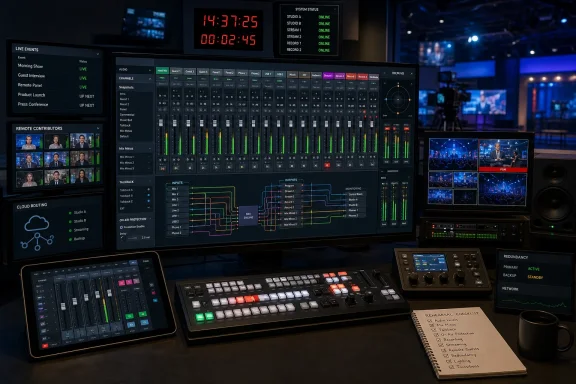 Free Software Is the Entry Point, Not the Entire Production System
Calling Fairlight Live “free” is accurate, but it does not mean a complete live-audio system has no cost. The application can be used with compatible computer audio interfaces, supported ATEM switchers, control surfaces, remote controllers, and, in larger facilities, SMPTE 2110 infrastructure. Productions may also need additional computers, interfaces, networking equipment, monitoring, power protection, and backup signal paths.That distinction is important because Fairlight Live is not presented as a narrowly limited demonstration application. Its published capabilities include snapshots, virtual sound check recording, internal routing, third-party plug-in support, talkback, mix-minus, cue playback, immersive panning, tablet control, and an On Air mode intended to protect critical controls during transmission.
A small production may begin with the software, a Windows computer, and a supported ASIO interface. An existing ATEM operation may use the USB digital-audio support added by ATEM Switchers 10.3. A larger broadcaster may evaluate dedicated control panels, multiple operators, redundant systems, or 2110-based I/O.
The free license lowers the cost of testing those possibilities. It does not remove the need to select, configure, and validate the rest of the production chain.
Verified product fact: Fairlight Live can operate as a software mixer and supports external control and audio-interface options, including ASIO on Windows.
WindowsForum operational advice: Budget for the system rather than the application alone. Interface drivers, monitoring, controllers, backup hosts, power protection, spare cables, and rehearsal time can matter more to reliability than the software’s purchase price.
Windows Gets a Serious Seat at the Live-Audio Console
Fairlight Live’s Windows support is strategically important. ProVideo Coalition lists Windows 10 Creators Update and Windows 11 as supported. The Mac edition requires macOS 15 Sequoia or later and an Apple Silicon M-series processor. No Linux version is currently listed.| Platform | Minimum stated software requirement | Hardware requirement | Audio-interface path | Availability |
|---|---|---|---|---|
| macOS | macOS 15 Sequoia or later | Apple Silicon M-series Mac | Core Audio and compatible interfaces | Available |
| Windows 10 | Windows 10 Creators Update | Modern Windows computer | ASIO and compatible interfaces | Available |
| Windows 11 | Windows 11 | Modern Windows computer | ASIO and compatible interfaces | Available |
| Linux | Not supported | Not applicable | Not applicable | No current version |
That variety is also an advantage. Facilities can evaluate Fairlight Live on existing Windows workstations rather than being required to purchase a specific computer platform simply to test the workflow. Windows 10 support may be especially relevant to production environments that retain validated systems longer than ordinary office fleets.
The Mac requirement is narrower. Intel Macs are excluded, and macOS 15 Sequoia is the stated minimum. Windows teams have more possible hardware combinations, but that flexibility increases the number of combinations that may need to be tested.
Verified product fact: Fairlight Live supports Windows 10 Creators Update and Windows 11, using ASIO-compatible audio interfaces.
WindowsForum operational advice: Do not approve a Windows host solely because it meets the operating-system requirement. Validate the actual computer with the intended ASIO driver, interface, USB connection, controller, routing, plug-ins, and expected workload.
What Windows teams should do now
- Verify that the proposed host runs Windows 10 Creators Update or Windows 11.
- Install the released version of Fairlight Live.
- If ATEM USB audio routing will be used, confirm that the exact switcher is supported and update it to ATEM Switchers 10.3.
- Connect the intended audio interface and select its ASIO driver in Fairlight Live.
- Build and test the required input, output, monitoring, talkback, and mix-minus routing.
- Test snapshots, On Air mode, and any required plug-ins or controllers.
- Rehearse the failover procedure and complete a sustained test before using the system for a live event.
“Thousands of Channels” Is a Scaling Claim, Not a Default Configuration
One of Fairlight Live’s most prominent claims is support for thousands of channels on modern Mac and Windows computers. Blackmagic also describes hundreds of channels in wide-format or complex mixes.The useful distinction is straightforward: the software is intended to scale into very large configurations, while wide or operationally complex projects may be described in the hundreds rather than the thousands. Neither statement should be converted into a universal performance guarantee for an arbitrary PC.
Fairlight Live supports mono, stereo, LCR, 5.1, immersive, and ASAF formats. It also supports third-party plug-ins, with four plug-in slots available on a channel and ChainFX expanding the possible chain to as many as 24 slots per channel. Native, AU, and VST plug-in formats are listed, with AU applying to the Apple platform.
Those capabilities allow productions to create projects that differ substantially in size and complexity. A numerical channel claim therefore does not tell an administrator how a specific show will behave on a specific workstation.
Verified product fact: Blackmagic describes thousands of channels on modern Mac and Windows computers, while also referring to hundreds of channels for wide-format and complex mixes.
WindowsForum operational advice: Establish a tested operating envelope for each approved host. Record the validated project scale, interface configuration, plug-in set, and software versions instead of treating the largest published channel figure as a planning target.
The strongest interpretation of the claim is not that every Windows PC can run the largest imaginable production. It is that Fairlight Live is not positioned around the small fixed channel limits normally associated with entry-level mixing software.
The Mixer Is Built Around Broadcast Problems
Many audio applications can be adapted for livestreaming. Fairlight Live instead includes capabilities aimed directly at recurring broadcast and live-production tasks.Mix-minus is a central example. Remote contributors commonly need to hear the program and other participants without receiving their own voice back through the return feed. Fairlight Live includes mix-minus support so that productions can build those individualized returns within the mixer.
Talkback provides communication paths for the production team. It is separate from the public program and must be configured carefully so that internal instructions reach the intended talent or crew without being sent to viewers.
AFL and PFL solo modes allow an engineer to inspect signals at different points relative to the channel fader. The distinction helps an operator evaluate a source independently of the level currently being sent into the active mix.
On Air mode addresses the risk of an accidental operational change. It protects critical controls during a live feed, giving a production team a defined way to move from setup and rehearsal into a more restricted transmission state. Primary mode remains available for ordinary mixer operation and configuration.
These are verified product capabilities. How they are applied remains a production decision.
WindowsForum operational advice: Document which controls are expected to remain accessible during a broadcast, when On Air mode is enabled, who is authorized to leave it, and how talkback and mix-minus paths are checked before transmission.
On Air protection should complement crew discipline rather than replace it. A protected interface cannot correct an incorrectly routed return, an untested snapshot, or a misunderstanding about which operator is responsible for a source.
Snapshots and Virtual Sound Check Turn Preparation Into Infrastructure
Fairlight Live snapshots save mixer states for later recall. That can be useful in recurring productions, programs with distinct segments, or events with multiple acts and source configurations.A team might prepare separate snapshots for a presenter segment, a remote interview, and a performance. Recalling a prepared state can be faster and more consistent than manually rebuilding the required settings while the program is moving.
Virtual Sound Check ISO recording supports preparation by capturing isolated material that can be replayed after the original sources are no longer available. Engineers can use representative audio to continue working on the mix without requiring every presenter, performer, or remote participant to remain present.
This capability may be particularly useful for organizations with limited rehearsal windows. Schools, volunteer productions, houses of worship, corporate studios, and regional event teams can capture a sound check and continue technical preparation after participants have left.
The Cue Player provides a place for repeatable program elements such as effects and stingers. Keeping those assets within the mixer’s production workflow can reduce dependence on a separate playback application and its additional routing.
Verified product fact: Fairlight Live includes snapshots, virtual sound check ISO recording, and a Cue Player.
WindowsForum operational advice: Treat snapshots as controlled production assets. Name them clearly, test every transition, record who last changed them, and confirm that a recalled state is still appropriate when microphones, contributors, or physical routing change.
ATEM Switchers 10.3 Adds the USB Audio Path
The final Fairlight Live release arrives alongside ATEM Switchers 10.3, which adds USB digital-audio output for use with the software.ProVideo Coalition identifies ATEM Mini Pro, ATEM Mini Extreme, ATEM SDI Extreme, ATEM Television Studio, and ATEM Constellation 4K models in connection with support. Administrators should verify the exact model rather than assuming that every product carrying a broadly similar family name is included.
For a supported ATEM installation, USB provides a direct way to connect switcher audio with Fairlight Live. That may make initial evaluation more approachable for smaller productions that are not beginning with a separate IP-audio infrastructure.
Audio Follow Video, or AFV, can associate audio behavior with video switching. In a suitable production, that allows planned audio changes to follow camera transitions.
AFV is not a substitute for editorial judgment. Some sources should remain active when a related camera leaves the program output. Examples can include room ambience, music, audience response, presenters heard over supporting footage, and remote guests participating across multiple shots.
Verified product fact: ATEM Switchers 10.3 adds USB digital-audio output for Fairlight Live, with support associated with specifically identified ATEM models and product groups.
WindowsForum operational advice: Confirm the exact switcher model, firmware version, USB connection, and routing before building a production around the integration. Test AFV with every intended transition and identify the sources that must remain under manual control.
Do not assume that a successful connection proves the whole workflow. The rehearsal should cover switcher restarts, mixer restarts, cable replacement, source changes, snapshot recalls, and recovery after the USB link is interrupted.
Cloud Routing Expands the Production Beyond the Control Room
ATEM Switchers 10.3 also adds direct streaming from an ATEM switcher to Blackmagic Cloud Stream Router.ATEM Television Studio HD8 ISO and ATEM Mini Extreme ISO G2 can receive remote sources from Cloud Stream Router. This gives supported systems a path for incorporating geographically remote feeds into a production as well as sending a stream outward.
Remote contribution increases the importance of carefully built audio returns. Each participant may need a different combination of program audio, other speakers, production communication, and local monitoring. Mix-minus and talkback become essential parts of making those sources usable in a live conversation.
The cloud connection supplies transport and remote-source support. It does not by itself define the required audio mix, monitoring plan, or contributor return.
Verified product fact: Supported ATEM systems can stream directly to Blackmagic Cloud Stream Router, and the named ISO switchers can receive remote sources from it.
WindowsForum operational advice: Test remote contributors under realistic conditions. Confirm what each participant hears, how production talkback is separated from the public program, and what the crew will do if the remote feed freezes, loses audio, or returns with an unexpected level.
Redundancy Depends on the Whole Signal Path
ProVideo Coalition reports that multiple Fairlight Live systems can be used for simultaneous operators or full redundancy. Those are related but distinct uses.Multiple operators may divide responsibility across a large production. A redundant system, by contrast, must be capable of preserving or restoring the required audio service when the primary system or another component fails.
A second computer is not automatically a complete backup. Two hosts may still depend on the same interface, USB hub, network switch, power circuit, switcher, or monitoring path. If that shared component fails, both computers can become unavailable at once.
Verified product fact: Fairlight Live supports multi-system operation for additional users or redundancy.
WindowsForum operational advice: Design redundancy around failure domains. Identify which components are shared, which are duplicated, how a failure is detected, who initiates the changeover, and what portion of the program can continue during recovery.
Version locking is also WindowsForum operational advice, not a Fairlight Live feature. Once a configuration has been validated, record the approved versions of Windows, Fairlight Live, ATEM software, switcher firmware, ASIO drivers, controller software, and third-party plug-ins. Apply changes first to a test system or during a maintenance window rather than immediately before an event.
Plug-in validation follows the same principle. Fairlight Live supports third-party plug-ins, but that support does not guarantee that every plug-in will be appropriate for a critical live path. Test installation, authorization, project loading, snapshot changes, long-duration operation, and behavior on any backup computer.
The Physical Console Has Not Disappeared
Fairlight Live can be controlled from its software interface, but it also supports dedicated Fairlight Live panels and MCU-compatible consoles.Physical controls remain useful because a live operator may need to adjust several sources while watching a stage, multiview, rundown, or presenter rather than navigating software windows. A control surface can provide faster access to common level and selection tasks.
Remote iOS and Android tablet controllers extend control beyond the primary desk. That can help during setup and sound check, particularly when an engineer needs to listen from a position outside the control room.
Remote access also requires policy. Teams should decide which devices are authorized, how controllers connect, whether wireless control will remain enabled during transmission, and what operators should expect if a tablet disconnects.
Verified product fact: Fairlight Live supports dedicated panels, MCU consoles, and remote tablet controllers.
WindowsForum operational advice: Choose controls according to the pace and staffing of the production. A mouse may be sufficient for evaluation or a small fixed program, while a fast, source-heavy live event may justify a tactile surface and clearly assigned operator roles.
The important shift is that processing and routing are not tied to one fixed desk. A production can choose the control method that fits its scale, but every chosen controller should be included in rehearsal and failover testing.
Immersive Audio Reaches the General-Purpose Computer
Fairlight Live supports mono, stereo, LCR, 5.1, immersive, and ASAF formats. Its integrated panning supports one-, two-, and three-dimensional placement.That breadth does not mean every production needs an immersive output. Most webcasts, meetings, podcasts, and local events will continue to prioritize clear speech, stable levels, and a dependable stereo program.
Native support is nevertheless significant for teams that need wider formats. It allows conventional and immersive projects to be approached within the same application rather than automatically moving to a separate mixer when a production grows beyond stereo.
Support for Core Audio, ASIO, and SMPTE 2110 interfaces reflects a similar range. Core Audio serves compatible Mac systems, ASIO provides the primary professional interface route on Windows, and 2110 support addresses larger IP-based media facilities.
Blackmagic describes Fairlight Live as low latency, but a Windows team should evaluate the experienced result using its actual hardware. The complete monitoring path includes the interface, its ASIO driver, the computer, the selected buffer configuration, the mixer project, and the output path.
Verified product fact: Fairlight Live supports the listed conventional and immersive formats along with Core Audio, ASIO, and 2110 interface paths.
WindowsForum operational advice: Measure and rehearse the real monitoring workflow rather than relying on a general latency description. Use the same interface, driver settings, routing, and monitoring arrangement that will be present during the event.
Action checklist for administrators
- Confirm that every host meets a stated platform requirement: Windows 10 Creators Update, Windows 11, or macOS 15 Sequoia or later on an Apple Silicon Mac.
- On Windows, install and select the intended interface’s ASIO driver.
- Confirm that the exact interface, switcher, control surface, and remote controller are recognized and operate as expected.
- If ATEM USB audio will be used, verify that the exact switcher model is supported and update it to ATEM Switchers 10.3.
- Build the required program, monitoring, talkback, mix-minus, cue, and remote-contributor paths.
- Test snapshots individually and rehearse every planned snapshot transition.
- Verify On Air mode and document when it will be enabled or disabled.
- Validate every required third-party plug-in, including its authorization and behavior after a restart.
- Test AFV only on the sources intended to follow video transitions.
- Verify what local and remote participants hear, including return feeds and production communication.
- Run a sustained rehearsal using the intended project rather than an empty mixer.
- Test loss and restoration of the audio interface, USB connection, controller, network connection, and remote source.
- Rehearse the failover sequence and assign responsibility for initiating it.
- Record the approved Windows, Fairlight Live, driver, plug-in, controller, ATEM software, and switcher firmware versions.
- Prevent unplanned operating-system, driver, firmware, and plug-in updates immediately before a production.
- Keep a written fallback plan that the crew can execute if Fairlight Live, the host computer, or the integrated ATEM audio path becomes unavailable.
Free Changes the Cost of Entry, Not the Standard of Care
Fairlight Live makes an unusually broad live-audio toolset available without a software purchase price. Its Windows support, ASIO compatibility, large-scale mixing claims, snapshots, virtual sound check, broadcast routing, immersive formats, control options, and supported ATEM connections give a wide range of production teams a credible reason to evaluate it.ATEM Switchers 10.3 strengthens that proposition by adding USB digital-audio output for supported switchers, direct streaming to Blackmagic Cloud Stream Router, and remote-source support on the named ISO models. Existing ATEM users may therefore have the clearest path to an initial trial.
The final decision should come from rehearsal rather than the feature list. A production-ready system is not defined by whether Fairlight Live launches or whether an ATEM appears as an available device. It is defined by whether the complete configuration survives realistic routing, snapshot, controller, remote-source, interruption, recovery, and failover tests.
Fairlight Live lowers the financial barrier to beginning that work. For Windows teams, the opportunity is substantial: a free mixer with professional ambitions, support for standard ASIO interfaces, and a direct connection to selected ATEM workflows. The next phase is not speculation about what software mixing might eventually become. It is disciplined evaluation of what this release can reliably do on the specific Windows systems that will be asked to carry a live program.
References
- Primary source: ProVideo Coalition
Published: 2026-07-10T18:20:08.786172
Loading…
www.provideocoalition.com - Related coverage: soundonsound.com
Loading…
www.soundonsound.com - Related coverage: businesswire.com
Loading…
www.businesswire.com - Related coverage: film-tv-video.de
Loading…
www.film-tv-video.de