

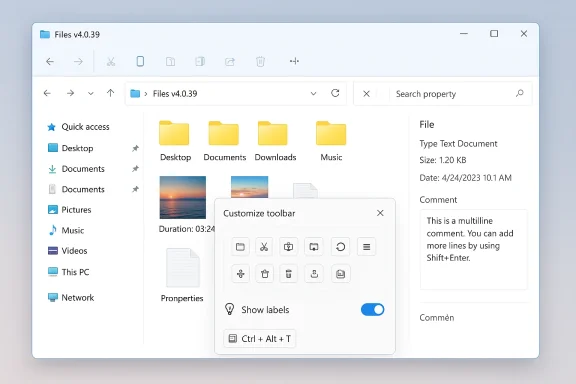
Microsoft’s File Explorer overhaul is still a work in progress, and that leaves room for third-party tools to keep stealing the spotlight. The latest example is Files, one of the most polished alternative file managers for Windows 11 and Windows 10, which has just shipped preview version 4.0.39 with a genuinely useful new toolbar customization feature. That sounds modest on paper, but for power users who live inside folders, tabs, and command bars all day, it is the kind of tweak that can materially improve speed, clarity, and muscle memory. The update also adds shortcut-based theme switching, richer media tooltips, multiline comments, and a pair of bug fixes, reinforcing the app’s reputation as a serious challenger to File Explorer rather than a cosmetic replacement. (files.community)
Windows file management has always been one of those everyday experiences that people notice most when it goes wrong. File Explorer remains the default choice for most users, but its pace of change has often lagged behind what enthusiasts want from a modern workspace tool. Microsoft has continued to ship improvements in recent Windows 11 builds, including responsiveness tweaks, context menu refinements, and archive-handling improvements, yet the stock experience still leaves plenty of room for customization gaps that third-party apps can exploit.
That is where Files has built its audience. The app has spent years turning the basic act of browsing directories into something closer to a productivity suite, with support for tabs, dual-pane workflows, cloud drives, Git integration, an omnibar, and tag-based organization. The project’s own documentation shows a broad feature set that extends well beyond simple browsing, which is part of why it keeps drawing users who want a file manager that feels more like a control center than a shell extension. (files.community)
The new v4.0.39 preview is interesting because it does not chase a headline-grabbing redesign. Instead, it focuses on small, high-frequency interactions. That approach matters because file managers are tools people use dozens or hundreds of times per day, and shaving seconds off repeated actions can have more value than a flashy one-time upgrade. This release is a reminder that utility software often wins by reducing friction, not by adding spectacle. (files.community)
The timing is also notable. Microsoft has repeatedly signaled that Windows 11’s built-in file handling will keep improving, but the company’s own updates arrive in waves and are not always enough for demanding workflows. Recent Windows Insider and preview releases have continued to refine File Explorer behavior, yet Files is taking a different path by letting users adapt the interface to their habits rather than forcing them to adapt to the interface. That distinction is important, because customization is often the feature that turns a good app into a daily default.
Files also added an Edit Tags button that can be placed directly on the toolbar. That is a small but telling decision, because tagging is one of the app’s more advanced organizational features and one that benefits from instant access. Putting it within reach suggests the developers are thinking about how people actually work, not just how the app looks in a screenshot. (files.community)
There is a larger design lesson here as well. If an app expects people to customize it, the customization itself should be easy to access. Shortcut-driven appearance control is the sort of thing that makes the software feel responsive and personal, which is precisely what many Windows users wish File Explorer would become. The irony is that Microsoft’s own interface still makes such tailoring feel more limited than it should.
The tooltip responsiveness improvement in Grid Layout is especially important for performance perception. Even when an app is technically fast, a sluggish hover response can make it feel clunky. By tightening that interaction, Files is smoothing one of the most common points of visual friction in a dense file browser. (files.community)
This also reinforces a broader theme in Files’ development: the app is trying to capture not only navigation but context. That matters because modern file management is increasingly about remembering what things are for, not just where they are stored. The more the app can preserve meaning alongside storage, the closer it gets to being a true information workspace. (files.community)
Preview Pane reliability also matters more than casual users may realize. Preview is often the first step in deciding whether to open, edit, or discard a file, so a failure there has a disproportionate effect on trust. For a file manager that aims to be the better alternative, polishing these fundamentals is as important as adding new features. (files.community)
This difference also explains why alternative file managers remain relevant even in 2026. Microsoft may eventually catch up on certain layout and responsiveness issues, but the market for file managers is no longer only about default functionality. It is about speed, agency, and whether the interface bends to the user’s habits instead of the other way around. (files.community)
For Windows 10 users in particular, alternative file managers still carry extra appeal because they can provide a more modern sense of continuity as the platform evolves. Even as Microsoft focuses on Windows 11 and its latest update cadence, a mature third-party app can smooth over some of the rough edges that have lingered for years. That is an especially strong proposition for users who do not want to wait for the next round of system updates.
The app’s optional paid Microsoft Store listing and support model also hint at a familiar modern software pattern: the core product remains broadly accessible, while distribution channels and sponsorships help sustain development. That structure is attractive for a niche utility that needs continuous iteration but cannot depend on massive enterprise licensing. (files.community)
There is also a branding advantage in being the app that listens. When users see preview releases adding practical customization in response to feedback, they tend to infer that the development roadmap is responsive rather than corporate. That perception can be a major moat in the Windows utility space, where trust and momentum matter almost as much as feature depth. (files.community)
The other thing to watch is how quickly these changes move from preview to stable release. The app’s developers have not given a timetable, and that uncertainty is typical for pre-release software. Still, the presence of practical features like toolbar customization, shortcut-based theme switching, and multiline comments suggests the roadmap is aimed squarely at everyday usability rather than novelty for its own sake. (files.community)
Source: Neowin One of the best file managers for Windows 11 and 10 gets a useful customization feature
 Background
Windows file management has always been one of those everyday experiences that people notice most when it goes wrong. File Explorer remains the default choice for most users, but its pace of change has often lagged behind what enthusiasts want from a modern workspace tool. Microsoft has continued to ship improvements in recent Windows 11 builds, including responsiveness tweaks, context menu refinements, and archive-handling improvements, yet the stock experience still leaves plenty of room for customization gaps that third-party apps can exploit.That is where Files has built its audience. The app has spent years turning the basic act of browsing directories into something closer to a productivity suite, with support for tabs, dual-pane workflows, cloud drives, Git integration, an omnibar, and tag-based organization. The project’s own documentation shows a broad feature set that extends well beyond simple browsing, which is part of why it keeps drawing users who want a file manager that feels more like a control center than a shell extension. (files.community)
The new v4.0.39 preview is interesting because it does not chase a headline-grabbing redesign. Instead, it focuses on small, high-frequency interactions. That approach matters because file managers are tools people use dozens or hundreds of times per day, and shaving seconds off repeated actions can have more value than a flashy one-time upgrade. This release is a reminder that utility software often wins by reducing friction, not by adding spectacle. (files.community)
The timing is also notable. Microsoft has repeatedly signaled that Windows 11’s built-in file handling will keep improving, but the company’s own updates arrive in waves and are not always enough for demanding workflows. Recent Windows Insider and preview releases have continued to refine File Explorer behavior, yet Files is taking a different path by letting users adapt the interface to their habits rather than forcing them to adapt to the interface. That distinction is important, because customization is often the feature that turns a good app into a daily default.
What Files v4.0.39 Changes
The standout feature in version 4.0.39 is toolbar customization. Users can now right-click the toolbar, open a customization window, and decide which actions appear there, how they are arranged, and whether labels are shown for each button. In practical terms, that gives the toolbar a much more personal, task-focused role, and it moves Files closer to the kind of adaptive interface people usually expect from professional desktop software. (files.community)Why Toolbar Control Matters
A toolbar is not just decoration. It is a memory aid, a speed layer, and a way to reduce repeated navigation through menus. If a user spends the day switching views, editing tags, opening preview tools, or launching common actions, then a customized toolbar can remove dozens of clicks over time. That is why this feature feels more important than it might sound at first glance; it is about workflow compression, not aesthetics. (files.community)Files also added an Edit Tags button that can be placed directly on the toolbar. That is a small but telling decision, because tagging is one of the app’s more advanced organizational features and one that benefits from instant access. Putting it within reach suggests the developers are thinking about how people actually work, not just how the app looks in a screenshot. (files.community)
- Users can choose which toolbar actions remain visible.
- Button labels can be shown or hidden.
- The toolbar can better match different work styles.
- Tag editing is now easier to reach.
- The feature should benefit keyboard-heavy and mouse-heavy users alike.
Theme Switching Gets Faster
The update also adds keyboard shortcuts for changing the app theme. Files now supports assigning custom shortcuts for theme switching, and it includes a default toggle of Ctrl + Alt + T for switching between light and dark modes. That matters because theme switching is one of those preferences users often adjust based on time of day, lighting, battery habits, or simply personal comfort. (files.community)A Small Shortcut With Daily Value
On its face, a theme shortcut is a modest feature. In daily use, though, it can become a kind of quality-of-life unlock, especially for users who bounce between a bright office setup and a darker home environment. It also signals that Files is thinking more like a productivity app and less like a static shell replacement. (files.community)There is a larger design lesson here as well. If an app expects people to customize it, the customization itself should be easy to access. Shortcut-driven appearance control is the sort of thing that makes the software feel responsive and personal, which is precisely what many Windows users wish File Explorer would become. The irony is that Microsoft’s own interface still makes such tailoring feel more limited than it should.
- Theme changes are now quicker to trigger.
- Users can create custom shortcuts for appearance changes.
- Light/dark switching becomes less disruptive.
- The shortcut complements the app’s broader customization push.
- It reinforces the idea that small friction points matter.
Media and Metadata Improvements
Files v4.0.39 also improves the way the app handles media files. Tooltips now show duration for audio and video, and tooltip responsiveness in the Grid Layout has been improved. That makes browsing large media libraries more informative at a glance, especially when users are comparing clips or trying to identify the right file without opening it first. (files.community)Better Previews for Faster Decisions
This kind of metadata surfacing is one of those enhancements that sounds minor until you use it every day. If you manage recordings, music libraries, exported clips, or creative assets, being able to see duration directly in a tooltip reduces guesswork and speeds up sorting. It also makes the app feel more modern, because richer in-context metadata is part of what users now expect from polished file managers. (files.community)The tooltip responsiveness improvement in Grid Layout is especially important for performance perception. Even when an app is technically fast, a sluggish hover response can make it feel clunky. By tightening that interaction, Files is smoothing one of the most common points of visual friction in a dense file browser. (files.community)
- Media file tooltips now expose duration.
- Grid Layout hover behavior is more responsive.
- Users can identify clips without opening them.
- Browsing large libraries becomes more efficient.
- The change improves the app’s “at a glance” value.
Multiline Comments and File Notes
Another useful addition is multiline support in the Comment field within the Properties window’s Details page. Users can now enter notes across multiple lines with Shift + Enter, and the full content is preserved when the window is reopened. That may sound like a niche enhancement, but for people who annotate project files, archive research, or maintain informal documentation, it is the difference between a note field that is barely useful and one that can carry real context. (files.community)Why Notes Become Workflow Infrastructure
Comments and metadata fields are often underrated because they do not feel as visible as tabs or panes. In practice, though, they become the memory layer for teams and solo users who need lightweight organization without a separate database or note-taking app. Multiline support turns the field into something closer to a useful annotation pad, which is exactly the kind of small functional gain that power users notice immediately. (files.community)This also reinforces a broader theme in Files’ development: the app is trying to capture not only navigation but context. That matters because modern file management is increasingly about remembering what things are for, not just where they are stored. The more the app can preserve meaning alongside storage, the closer it gets to being a true information workspace. (files.community)
Bug Fixes and Stability
The release closes with two fixes: PowerToys Peek is now detected correctly when installed in a custom path, and the Preview Pane issue has been resolved. These are not glamorous fixes, but they are the sort that often determine whether a power user trusts a tool enough to keep it installed permanently. Stability in a file manager is not optional; it is the baseline expectation. (files.community)Why Compatibility Matters
The PowerToys fix is especially relevant because it acknowledges the reality of Windows power-user ecosystems. Many enthusiasts use layered tools, alternate install paths, and custom layouts that deviate from the default assumptions in app design. If one app cannot reliably detect another, the result is not just a bug; it is a workflow break. (files.community)Preview Pane reliability also matters more than casual users may realize. Preview is often the first step in deciding whether to open, edit, or discard a file, so a failure there has a disproportionate effect on trust. For a file manager that aims to be the better alternative, polishing these fundamentals is as important as adding new features. (files.community)
- PowerToys interoperability is more dependable.
- Preview Pane behavior is more stable.
- The app is still refining its edge cases.
- Fixes matter because they protect user trust.
- Infrastructure work underpins feature growth.
Files Versus File Explorer
The deeper story here is not just that Files got an update. It is that third-party file managers continue to fill gaps left by Microsoft’s own pace of change. File Explorer has improved in recent Windows 11 builds, with Microsoft highlighting better responsiveness, archive handling, and interface tweaks, but those refinements still do not add up to the level of user-controlled flexibility that many enthusiasts want.Where Microsoft Moves Slowly
Microsoft tends to improve File Explorer incrementally and in carefully controlled phases. That makes sense for a system component, but it also means users waiting for specific ergonomics can wait a long time. Files, by contrast, can ship customization features directly to preview users and iterate quickly, which gives it a real advantage among people who care about tailoring their desktop tools. (files.community)This difference also explains why alternative file managers remain relevant even in 2026. Microsoft may eventually catch up on certain layout and responsiveness issues, but the market for file managers is no longer only about default functionality. It is about speed, agency, and whether the interface bends to the user’s habits instead of the other way around. (files.community)
- File Explorer still sets the baseline.
- Files is competing on flexibility and workflow fit.
- Microsoft’s changes arrive incrementally.
- Third-party apps can iterate faster.
- Customization remains a major differentiator.
Consumer Impact
For regular users, the biggest upside is that Files becomes easier to personalize without diving into hidden menus. A customizable toolbar can make the app less intimidating for newcomers while making it more efficient for experienced users, which is a rare combination in desktop software. The theme shortcut and media tooltip improvements also make day-to-day browsing feel more immediate and responsive. (files.community)The Everyday Benefit
Consumer value in software often comes from removing tiny irritations, and this update does exactly that. A user who wants dark mode after sunset, quick tag editing, or instant duration visibility on media files will feel the benefit repeatedly rather than once. That repetition matters because it turns a feature into a habit, and habits are what keep apps installed. (files.community)For Windows 10 users in particular, alternative file managers still carry extra appeal because they can provide a more modern sense of continuity as the platform evolves. Even as Microsoft focuses on Windows 11 and its latest update cadence, a mature third-party app can smooth over some of the rough edges that have lingered for years. That is an especially strong proposition for users who do not want to wait for the next round of system updates.
Enterprise and Power User Impact
Enterprise users may not adopt Files as broadly as consumers, but power users, IT staff, and technically inclined teams are often the ones who feel these improvements first. Toolbar customization can support repeatable workflows, while better metadata handling and multiline comments can help with lightweight documentation around shared assets. Those are small-scale capabilities, but they can be very effective when applied consistently across a team. (files.community)Why Admins Care About Small Tools
In enterprise environments, a tool does not need to replace the default operating system component to matter. It only needs to solve a sharp pain point for the subset of users who spend the most time in it. Files’ preview channel suggests the app is aiming to keep that group engaged by offering a level of control that the built-in file manager still does not match. (files.community)The app’s optional paid Microsoft Store listing and support model also hint at a familiar modern software pattern: the core product remains broadly accessible, while distribution channels and sponsorships help sustain development. That structure is attractive for a niche utility that needs continuous iteration but cannot depend on massive enterprise licensing. (files.community)
- Power users gain faster access to frequent actions.
- Documentation-minded users can store richer comments.
- Teams can standardize a more efficient toolbar layout.
- The app’s preview model encourages rapid iteration.
- Optional support channels help sustain development.
Competitive Implications
Feature-by-feature, this update does not dethrone File Explorer by itself. Strategically, though, it deepens the case for alternative file managers as a category. Every time Windows users see a polished customization feature arrive in a third-party app before the built-in shell reaches a comparable level of polish, the market argument for specialization becomes stronger. (files.community)The Race Is About Experience, Not Checklists
The competition here is less about who has the longer features list and more about who understands workflow design. Files is leaning into touchpoints like toolbar layout, keyboard shortcuts, media metadata, and comment handling because those are the kinds of features that accumulate into a better daily experience. That is a smart competitive position, especially when Microsoft’s own updates are still primarily framed as platform refinements rather than interface freedom. (files.community)There is also a branding advantage in being the app that listens. When users see preview releases adding practical customization in response to feedback, they tend to infer that the development roadmap is responsive rather than corporate. That perception can be a major moat in the Windows utility space, where trust and momentum matter almost as much as feature depth. (files.community)
Strengths and Opportunities
This update plays to Files’ core strengths: rapid iteration, visible user control, and a willingness to treat file management as a productivity problem rather than a static system utility. The opportunity is to keep turning small interface decisions into meaningful workflow wins.- Toolbar customization gives users immediate control over the interface.
- Custom shortcuts make theme switching faster and more personal.
- Media duration tooltips improve glanceable file identification.
- Multiline comments turn metadata into a better note-taking layer.
- Preview-channel agility lets the app ship useful refinements quickly.
- PowerToys compatibility improves the experience for advanced users.
- Optional support channels help sustain ongoing development.
Risks and Concerns
The main risk is expectation management. Users often hear about preview features and assume they will reach stable builds quickly, but that is not always how desktop software development works. If the rollout slows or if new interface controls prove inconsistent across setups, enthusiasm can cool fast.- Preview delays could frustrate users waiting for stable availability.
- Interface complexity may grow as more customization is added.
- Feature overlap could confuse users who also rely on Windows tools.
- Compatibility edge cases may appear with other utilities or shell extensions.
- Discovery problems could limit use if new options are not obvious enough.
- Maintenance burden rises as the app gains more configurable surfaces.
- Too much choice could make the toolbar harder to understand for casual users.
Looking Ahead
The most important question is whether toolbar customization becomes a foundation for broader personalization across the app. If Files can make other parts of the interface similarly adaptable, it will strengthen its identity as a user-first file manager rather than simply a better-looking alternative to File Explorer. That would be a meaningful next step in a market where incremental polish often matters more than dramatic reinvention. (files.community)The other thing to watch is how quickly these changes move from preview to stable release. The app’s developers have not given a timetable, and that uncertainty is typical for pre-release software. Still, the presence of practical features like toolbar customization, shortcut-based theme switching, and multiline comments suggests the roadmap is aimed squarely at everyday usability rather than novelty for its own sake. (files.community)
- Stable release timing for v4.0.39.
- Whether toolbar options expand beyond the current set.
- More granular shortcut customization in future builds.
- Additional metadata surfaces for files and folders.
- Continued fixes for preview-pane and compatibility issues.
Source: Neowin One of the best file managers for Windows 11 and 10 gets a useful customization feature
