

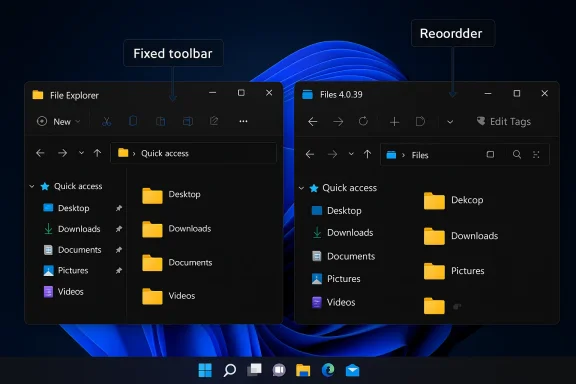
Microsoft’s latest Files update is more than a small quality-of-life tweak. It is a pointed reminder that Windows 11’s built-in File Explorer still leaves obvious usability gaps, even as Microsoft keeps polishing its core shell. Files 4.0.39 now lets users customize the toolbar, reorder actions, toggle labels, and surface an Edit Tags button directly in the command area, which makes the app feel more tailored to real workflows than File Explorer does today . That matters because Microsoft has spent months improving Explorer reliability, dark mode behavior, launch speed, and archive handling, yet the third-party app still manages to ship a feature that power users have wanted for years .
File management is one of those Windows experiences that only becomes visible when it fails. Most users do not think about the shell every day, but they notice immediately when Explorer opens slowly, flashes white in dark mode, or makes simple tasks feel harder than they should. Microsoft has been trying to modernize File Explorer across Windows 11, but the pace has often felt incremental rather than transformative .
The latest Files update lands in that context and exposes a familiar tension in Windows: the built-in tool is good enough for general use, but third-party developers keep proving that it could be much better. Files has already beaten Microsoft to several ideas, including tabs, a cleaner preview experience, a column view, and a more flexible interface . The new customizable toolbar is not revolutionary on its own, but it reinforces the broader pattern that Windows users keep seeing: the best file-manager ideas often appear outside Microsoft first.
That pattern is not unique to file explorers, of course. It is a recurring story in Windows history, where enthusiast apps surface a better way to do something, the community adopts it, and Microsoft eventually follows if enough people ask loudly enough. Sometimes that works well. Sometimes the platform spends years behind the curve while users rely on unofficial solutions.
The timing also matters because Microsoft is actively trying to reposition File Explorer as a more dependable part of Windows 11. Recent Insider and Release Preview builds have focused on responsiveness, dark mode polish, archive support, and explorer.exe stability . In other words, Microsoft is fixing the basics while Files is demonstrating how much further the basics could go.
That matters for both speed and confidence. If a button is always where your hand expects it, your workflow gets quieter. If the app lets you choose which labels appear, the interface becomes easier to scan without turning into a wall of icons .
That gap matters because file managers are not decorative software. They are operational software. Users open them to move work, inspect downloads, manage archives, and navigate the system itself. When the interface gets in the way, the frustration spreads beyond the app and into the perception of Windows as a whole .
That matters because software often becomes “professional” not when it adds complexity, but when it gives users control over complexity. A file manager that can adapt to different workflows is more useful than one that simply adds more features and hopes the defaults are good enough. Files seems to understand that distinction well.
That is why this update feels larger than the changelog suggests. It turns the toolbar into a workspace rather than a billboard. And by allowing some buttons to show labels, Files also addresses a common usability complaint: small icons can be efficient for experts, but opaque for everyone else .
That is especially useful for people who organize large media libraries, work with project assets, or manage files where tags matter more than folders alone. Microsoft’s File Explorer still tends to push users toward basic browse-and-open behavior, while Files is leaning into richer file management.
Microsoft has been busy improving Explorer in areas that matter, including dark mode flashes, startup responsiveness, folder-view persistence, and shell reliability . But those are mostly repair jobs. Toolbar customization would be a design upgrade.
Files, by contrast, is still pushing the shape of the experience. That is why enthusiasts keep paying attention. It is not that Files is perfect. It is that it is willing to challenge assumptions about how a Windows file manager should work.
Microsoft has already shown that it can modernize pieces of Explorer without breaking everything. The problem is that the modernizations often stop short of the most obvious productivity features. A fixed toolbar is a prime example. It is difficult to argue that users should not be trusted with that level of control in 2026.
This is especially true because many users will never install a third-party file manager. For those people, Microsoft owns the experience outright. If the built-in tool is slower, less flexible, or less intuitive than alternatives, that is not just a feature gap. It is a platform gap.
The issue is that these improvements are mostly about making Explorer less annoying. They do not yet make it feel especially modern, especially not compared with a third-party app that can ship user-controlled toolbar layouts and label toggles in a routine point release .
Right now, Files is still telling a better story about personalization than Microsoft is.
For those users, toolbar customization is not a cosmetic flourish. It is a productivity multiplier. Every small reduction in mouse travel, menu hunting, or icon ambiguity adds up over a workday.
A customizable toolbar does exactly that. It turns the app into an extension of the user’s pattern of work. In a world where Windows still asks people to learn some interactions by feel and some by memory, that kind of adaptation is valuable.
That is a better design philosophy than assuming one interface style fits all. In practice, many users want a cleaner UI without sacrificing clarity. Files is giving them exactly that.
That is why Files’ toolbar update feels practical rather than flashy. It makes routine work smoother in the exact places where users notice inefficiency most.
But foundations are not the whole building. Users also want the interface itself to evolve. That is where Microsoft still looks conservative compared with Files.
That is why Microsoft’s ongoing fixes matter so much. They are not just patching a utility. They are protecting trust in the Windows experience. Still, trust can only get you so far if the alternative is a more capable file manager sitting one download away.
But invisible improvements do not always convert into user excitement. A customizable toolbar would. That is the difference between maintenance and momentum.
For enterprises, the picture is more complicated. Most managed environments will stay with File Explorer because it is standard, supported, and already integrated with policy and support workflows. That means Microsoft’s own improvements still matter a great deal, even if they are less exciting than what Files offers .
It also benefits users who simply enjoy customizing software. There is a pleasure in making a familiar tool fit your habits, and that kind of satisfaction builds loyalty.
A customizable toolbar, while attractive, could also introduce standardization questions in managed environments. That makes the feature more complicated for enterprise adoption than it is for enthusiasts. Still, that is not an argument against it; it is an argument for giving admins policy-aware control.
In the end, this Files update is a small product release with an outsized message. It says that the modern Windows file manager does not have to be rigid, and it quietly reminds users that the built-in one still is. Until Microsoft changes that, every thoughtful third-party improvement will keep making File Explorer look older than it should.
Source: Windows Central This Files update makes File Explorer look old
 Background
File management is one of those Windows experiences that only becomes visible when it fails. Most users do not think about the shell every day, but they notice immediately when Explorer opens slowly, flashes white in dark mode, or makes simple tasks feel harder than they should. Microsoft has been trying to modernize File Explorer across Windows 11, but the pace has often felt incremental rather than transformative .The latest Files update lands in that context and exposes a familiar tension in Windows: the built-in tool is good enough for general use, but third-party developers keep proving that it could be much better. Files has already beaten Microsoft to several ideas, including tabs, a cleaner preview experience, a column view, and a more flexible interface . The new customizable toolbar is not revolutionary on its own, but it reinforces the broader pattern that Windows users keep seeing: the best file-manager ideas often appear outside Microsoft first.
That pattern is not unique to file explorers, of course. It is a recurring story in Windows history, where enthusiast apps surface a better way to do something, the community adopts it, and Microsoft eventually follows if enough people ask loudly enough. Sometimes that works well. Sometimes the platform spends years behind the curve while users rely on unofficial solutions.
The timing also matters because Microsoft is actively trying to reposition File Explorer as a more dependable part of Windows 11. Recent Insider and Release Preview builds have focused on responsiveness, dark mode polish, archive support, and explorer.exe stability . In other words, Microsoft is fixing the basics while Files is demonstrating how much further the basics could go.
Why toolbar customization resonates
A customizable toolbar sounds mundane until you use one every day. Then it becomes obvious that fixed controls are a compromise, not a feature. The ability to add, remove, and reorder actions means the interface can match the user’s habits instead of forcing the user to adapt to the app .That matters for both speed and confidence. If a button is always where your hand expects it, your workflow gets quieter. If the app lets you choose which labels appear, the interface becomes easier to scan without turning into a wall of icons .
- It reduces clutter.
- It shortens common tasks.
- It improves discoverability for less familiar actions.
- It gives power users a meaningful sense of control.
- It helps the app scale from casual use to heavy use.
Why this exposes File Explorer’s weaknesses
File Explorer has made real progress, but it still behaves like a product designed around compromise. Microsoft has worked on tabs, visuals, and reliability, yet the shell still lacks the kind of user-level customization that power users expect in a mature desktop utility .That gap matters because file managers are not decorative software. They are operational software. Users open them to move work, inspect downloads, manage archives, and navigate the system itself. When the interface gets in the way, the frustration spreads beyond the app and into the perception of Windows as a whole .
Files 4.0.39: A Small Update With Big Implications
The headline feature in Files 4.0.39 is the customizable toolbar, and it is exactly the kind of feature that makes a product feel mature. The new customization window lets users choose from available actions and shape the toolbar around the work they actually do .That matters because software often becomes “professional” not when it adds complexity, but when it gives users control over complexity. A file manager that can adapt to different workflows is more useful than one that simply adds more features and hopes the defaults are good enough. Files seems to understand that distinction well.
Toolbar design as workflow design
A toolbar is not just a visual strip. It is an opinion about what the app thinks is important. When the toolbar is fixed, the app’s priorities dominate. When it is customizable, the user’s priorities do.That is why this update feels larger than the changelog suggests. It turns the toolbar into a workspace rather than a billboard. And by allowing some buttons to show labels, Files also addresses a common usability complaint: small icons can be efficient for experts, but opaque for everyone else .
The Edit Tags button is more important than it sounds
The new Edit Tags button is another good example. On paper, it is a narrow convenience feature. In practice, it signals that Files is trying to support more metadata-driven file work directly from the main interface .That is especially useful for people who organize large media libraries, work with project assets, or manage files where tags matter more than folders alone. Microsoft’s File Explorer still tends to push users toward basic browse-and-open behavior, while Files is leaning into richer file management.
- Toolbar actions can be matched to routine tasks.
- Labels reduce icon ambiguity.
- Edit Tags brings metadata closer to the workflow.
- The app becomes faster to operate under pressure.
- The interface becomes easier to learn without being harder to master.
Why Microsoft Looks Behind
The real reason this update grabs attention is not because Files added something flashy. It is because it did something Microsoft has not yet done in File Explorer. Customizable toolbars are one of the simplest ways to improve usability, and their absence in a flagship OS component feels increasingly hard to justify .Microsoft has been busy improving Explorer in areas that matter, including dark mode flashes, startup responsiveness, folder-view persistence, and shell reliability . But those are mostly repair jobs. Toolbar customization would be a design upgrade.
Repair versus evolution
This is the key distinction. Fixing bugs makes a product less frustrating. Adding customization makes it more capable. Microsoft’s recent work suggests a platform in cleanup mode, not expansion mode .Files, by contrast, is still pushing the shape of the experience. That is why enthusiasts keep paying attention. It is not that Files is perfect. It is that it is willing to challenge assumptions about how a Windows file manager should work.
Why Explorer still feels old in places
File Explorer carries the weight of legacy expectations. It has to support decades of habits, broad compatibility, and millions of users who want the interface to stay familiar. That makes bold changes risky, but it also creates stagnation.Microsoft has already shown that it can modernize pieces of Explorer without breaking everything. The problem is that the modernizations often stop short of the most obvious productivity features. A fixed toolbar is a prime example. It is difficult to argue that users should not be trusted with that level of control in 2026.
- Microsoft is fixing reliability gaps.
- Files is addressing interface flexibility.
- One company is catching up.
- The other is setting the pace.
- That contrast is what makes the update feel embarrassing for Explorer.
The Case for Copying the Best Ideas
Microsoft should not be afraid to borrow good ideas from Files or any other third-party file manager. Windows has always been healthiest when it absorbs the best community innovations and turns them into stable, built-in features. File Explorer is too central to remain behind the curve on obvious workflow improvements .This is especially true because many users will never install a third-party file manager. For those people, Microsoft owns the experience outright. If the built-in tool is slower, less flexible, or less intuitive than alternatives, that is not just a feature gap. It is a platform gap.
What Microsoft has already improved
To be fair, Microsoft has not ignored File Explorer. Recent work has targeted dark mode flashes, folder-view consistency, download handling, archive support, and explorer.exe stability . That is real progress.The issue is that these improvements are mostly about making Explorer less annoying. They do not yet make it feel especially modern, especially not compared with a third-party app that can ship user-controlled toolbar layouts and label toggles in a routine point release .
What File Explorer still lacks
There is no mystery about the missing pieces. Users want better customization, more predictable layouts, and fewer hidden behaviors. They want the shell to feel like a tool they can shape, not a fixed environment they merely endure.- Customizable toolbars.
- Better command discoverability.
- More flexible view controls.
- More useful metadata actions.
- Faster access to frequent tools.
- Less visual clutter.
The broader competitive lesson
Microsoft does not need to turn File Explorer into a clone of Files. It needs to make sure the default experience is strong enough that users do not feel compelled to leave in the first place. Third-party competition is useful because it reveals the ceiling of user expectation.Right now, Files is still telling a better story about personalization than Microsoft is.
Files, Power Users, and the Desktop Workflow
Files has always appealed most strongly to power users, and this update reinforces why. The app is built around the idea that a file manager should fit the user’s habits rather than impose a rigid layout. That philosophy matters especially for people who spend all day inside the shell .For those users, toolbar customization is not a cosmetic flourish. It is a productivity multiplier. Every small reduction in mouse travel, menu hunting, or icon ambiguity adds up over a workday.
Why customization is a power-user feature
Power users care less about novelty than about friction. They want the tools they use most often to be immediately available. They want the interface to reward muscle memory, not fight it.A customizable toolbar does exactly that. It turns the app into an extension of the user’s pattern of work. In a world where Windows still asks people to learn some interactions by feel and some by memory, that kind of adaptation is valuable.
The role of labels and visual clarity
The ability to show labels for selected toolbar buttons is especially smart. Icons are efficient once learned, but learning them is not always intuitive. By letting the user choose where labels appear, Files gives people a spectrum rather than a binary choice between “busy” and “minimal” .That is a better design philosophy than assuming one interface style fits all. In practice, many users want a cleaner UI without sacrificing clarity. Files is giving them exactly that.
- Faster operation for frequent tasks.
- Better onboarding for new users.
- Less reliance on memory alone.
- More flexible visual density.
- A stronger fit for mixed-skill environments.
Why this matters for advanced workflows
Advanced workflows often involve repetition, not glamour. Renaming batches of files, inspecting media metadata, applying tags, sorting downloads, and moving project assets are all ordinary tasks that become painful when the UI is clumsy.That is why Files’ toolbar update feels practical rather than flashy. It makes routine work smoother in the exact places where users notice inefficiency most.
Microsoft’s File Explorer Strategy: Better, But Not Bold Enough
Microsoft’s current File Explorer direction is understandable, but it still feels cautious. The company is clearly investing in reliability and polish, with improvements to launch speed, shell stability, dark mode behavior, and archive support . Those are the right foundations.But foundations are not the whole building. Users also want the interface itself to evolve. That is where Microsoft still looks conservative compared with Files.
The shell is the product
File Explorer is not an isolated app. It is the face of file handling in Windows, and in many ways it is the face of the desktop itself. When it feels slow or visually inconsistent, users judge the whole OS more harshly .That is why Microsoft’s ongoing fixes matter so much. They are not just patching a utility. They are protecting trust in the Windows experience. Still, trust can only get you so far if the alternative is a more capable file manager sitting one download away.
The importance of mundane improvements
One reason these updates matter is that the best software changes are often invisible. A faster launch here, a cleaner dark-mode transition there, more reliable folder state persistence, broader archive handling, and fewer explorer.exe hiccups all make the system feel more solid .But invisible improvements do not always convert into user excitement. A customizable toolbar would. That is the difference between maintenance and momentum.
The gap Microsoft still needs to close
The stubborn issue is that Microsoft often treats Explorer like a place to stabilize, not a place to innovate. That approach is understandable, but it also creates space for third parties to define what a modern file manager should look like.- Files is more configurable.
- Files is more workflow-aware.
- Files is more willing to expose controls.
- Files is easier to tailor.
- Files sets a higher expectation.
Consumer Impact Versus Enterprise Impact
For consumers, the most visible takeaway is simple: Files continues to look like a better file-management experience for anyone willing to step outside the default Windows tool. Its customizable toolbar, label controls, and tag editing make everyday file work feel more intentional .For enterprises, the picture is more complicated. Most managed environments will stay with File Explorer because it is standard, supported, and already integrated with policy and support workflows. That means Microsoft’s own improvements still matter a great deal, even if they are less exciting than what Files offers .
Consumers want speed and comfort
Home users are more likely to judge the interface by feel. Does it open quickly? Does it make sense? Can I get to the thing I need without hunting through menus? Files scores well there because it reduces friction in obvious ways.It also benefits users who simply enjoy customizing software. There is a pleasure in making a familiar tool fit your habits, and that kind of satisfaction builds loyalty.
Enterprises want predictability and supportability
IT departments care about different things. They need stable behavior, consistent rollout timing, and low support overhead. Microsoft’s recent File Explorer focus on reliability and dark-mode polish is valuable because it directly targets the kinds of issues that generate tickets and complaints .A customizable toolbar, while attractive, could also introduce standardization questions in managed environments. That makes the feature more complicated for enterprise adoption than it is for enthusiasts. Still, that is not an argument against it; it is an argument for giving admins policy-aware control.
Different users, different definitions of “better”
This is where Microsoft sometimes gets trapped. It builds for the broad middle and ends up under-serving everyone else. Power users want customization. Casual users want simplicity. IT wants predictability. A strong shell has to balance all three.- Consumers value ease and personality.
- Enterprises value consistency and supportability.
- Power users value control and speed.
- Microsoft must serve all three.
- Files is showing what happens when power users get priority.
Strengths and Opportunities
The strongest thing about this update is that it demonstrates a philosophy, not just a feature list. Files is proving that file management can be both practical and customizable, and that matters because users keep asking Windows for a more flexible shell experience. Microsoft has a chance to learn from that signal before the gap gets wider.- It makes routine file work faster.
- It reduces interface clutter.
- It improves task-specific efficiency.
- It gives Microsoft a clear feature to copy.
- It raises the standard for shell customization.
- It reinforces the value of third-party experimentation.
- It shows that small UI changes can have big workflow impact.
Risks and Concerns
The biggest risk is that Microsoft may keep treating these gaps as secondary, even though users experience them as central. A file manager is not a niche app, and every visible limitation in Explorer reflects on Windows itself. If Microsoft continues to rely on slow, incremental refinement while rivals ship more flexible tools, it will keep losing the argument about what modern desktop software should feel like.- Users may keep drifting to third-party tools.
- Explorer may remain feature-conservative.
- Microsoft could miss easy wins in usability.
- Performance fixes may not satisfy customization demands.
- Enterprise rollout may lag behind consumer expectations.
- Changes in Files could outpace Microsoft’s response.
- Users may judge Windows by the weakest shell surface.
Looking Ahead
The next few months will tell us whether Microsoft is content to keep polishing File Explorer or whether it finally starts competing on usability in a more ambitious way. The current trajectory is encouraging, but it still feels incomplete. Files is not replacing Explorer for most people, yet it is becoming a persistent reminder of what Explorer could be if Microsoft embraced customization more aggressively.What to watch next
- Whether Microsoft adds toolbar customization to File Explorer.
- Whether the current Explorer reliability push continues into future builds.
- Whether Files keeps widening its lead in workflow personalization.
- Whether enterprise users pressure Microsoft for more shell flexibility.
- Whether Microsoft responds with more than bug fixes and visual cleanup.
In the end, this Files update is a small product release with an outsized message. It says that the modern Windows file manager does not have to be rigid, and it quietly reminds users that the built-in one still is. Until Microsoft changes that, every thoughtful third-party improvement will keep making File Explorer look older than it should.
Source: Windows Central This Files update makes File Explorer look old
