

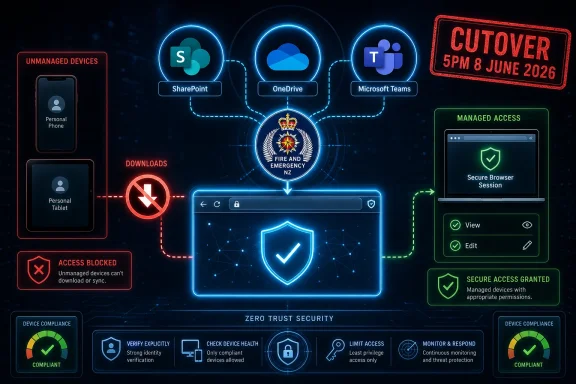
Fire and Emergency New Zealand will stop people downloading its documents to personal devices through SharePoint, OneDrive, and Microsoft Teams from 5pm on 8 June 2026, while preserving existing browser-based viewing and editing permissions for staff and external partners. The move is not a ban on access; it is a ban on local copies leaving the managed estate. That distinction matters, because it shows where modern Microsoft 365 security is heading: less trust in the endpoint, more control in the browser, and a colder view of bring-your-own-device convenience. For volunteers, contractors, and personnel with older phones or tablets, the change will feel operational before it feels theoretical.
The policy change is simple enough to summarize in one sentence: personal devices may still reach the work, but they may no longer take the work home as files. SharePoint, OneDrive, and Teams will remain the collaboration layer, but the browser becomes the approved boundary for unmanaged devices.
That is a very 2026 security posture. The old model assumed that if a user had permission to open a document, the user could probably download it, sync it, email it, cache it, print it, or leave it in a folder that would be forgotten until the next laptop sale. The newer model separates entitlement from exfiltration. You may be allowed to see the information, and even edit it, without being allowed to possess a portable copy of it.
For Fire and Emergency, the immediate rationale is cyber security and compliance with its ICT acceptable use policy, which says personnel must not download files to devices that are not issued by the organisation. That may sound like policy housekeeping, but in Microsoft 365 environments it is also a practical control against a familiar problem: cloud collaboration makes sharing easier than governance can often tolerate.
The interesting part is that Fire and Emergency is not framing this as a permissions change. Existing access rights remain in place. The organisation is instead changing the mode of access, which is exactly where many public-sector and emergency-service bodies now have to apply pressure.
Microsoft 365 complicates that picture because a browser can turn almost any device into a work terminal. That is the product’s strength and its administrative headache. If a volunteer can open a Teams file from a home computer at midnight, the organisation gains reach and responsiveness. If that same file lands in the Downloads folder of a shared family laptop, the organisation inherits a data-loss risk it cannot meaningfully inspect or clean up.
The modern answer is to treat the browser session as a containment zone. Users can authenticate, view documents, and collaborate through Office for the web, while the platform blocks actions such as downloading, syncing, and sometimes printing. In Microsoft’s language, this is the world of unmanaged-device controls, app-enforced restrictions, Conditional Access, and site-level download policies.
That jargon masks a straightforward bargain. The user keeps access, but the device does not gain custody. It is a compromise between full denial and full trust, and it is especially attractive to organisations that depend on people who are not sitting on standard corporate hardware all day.
Fire and Emergency’s notice lands squarely in that compromise zone. It acknowledges that some personnel use personal devices and that contractors, vendors, third parties, and other external entities may not have Fire and Emergency-issued hardware. Rather than severing those users from the documents they need, the organisation is narrowing what the device can do with those documents.
That matters because a “Teams download restriction” is often not really a Teams-only policy. It is a content policy applied where the files actually live. When users click the Files tab in a team, open a shared document, or follow a link to a OneDrive item, the same underlying governance model can determine whether the device is allowed to download, sync, preview, or edit.
This is why changes like Fire and Emergency’s can feel broader than the wording first suggests. A person may think of Teams as chat and meetings, SharePoint as the intranet, and OneDrive as personal work storage. But from a data-protection perspective, they are all routes to documents.
The notice also implies that Fire and Emergency is making a tenant-wide or broad policy move rather than a narrowly targeted document-library tweak. The language applies to “Fire and Emergency documents” accessed through the three major Microsoft collaboration surfaces. That does not tell us the exact technical switch being used, but it does tell us the organisation wants a consistent behavioural outcome: unmanaged devices should not become repositories.
For WindowsForum readers, the practical takeaway is that Teams is increasingly only the front door. The real governance questions sit behind it, in SharePoint, Entra ID, device compliance, sensitivity labels, session controls, and the sometimes awkward mapping between collaboration UX and administrative architecture.
Emergency-service organisations sit in an uncomfortable middle ground. They need distributed access, often across a mixture of paid staff, volunteers, contractors, partner agencies, and field personnel. They also hold information that should not drift casually into personal storage accounts, unmanaged devices, consumer backup services, or forgotten email attachments.
That tension is sharper for a national emergency organisation than it is for a conventional office. The workforce is not a neat rectangle of managed laptops on a corporate network. People move, respond, train, administer, and coordinate from many locations. Some will expect to use mobile devices. Some may have older organisation-issued hardware that no longer qualifies as managed because it has aged out of support or enrolment.
Fire and Emergency’s notice is candid on that last point. Some personnel with older Fire and Emergency mobile phones or tablets may be affected because the devices are not managed by the organisation due to age. That is a small sentence with large operational implications. A device can carry an organisation’s name, history, and habit of use while no longer satisfying the modern control plane.
That is the uncomfortable truth of endpoint governance: ownership is not enough. A device must be enrolled, compliant, supportable, and visible to the management stack. Otherwise, from a Conditional Access perspective, it may be treated much like any other personal device.
Contractors and vendors often live in the seams of enterprise security. They need enough access to deliver services, but they are rarely inside the organisation’s standard device-management regime. Their hardware belongs to another company. Their identity may be guest-based. Their security posture may be contractually promised but technically opaque.
Fire and Emergency is telling those external users that they, too, will retain web access but lose download rights through SharePoint, OneDrive, and Teams. That is consistent and defensible, but it will force process changes. A vendor who previously downloaded a specification, marked it up locally, and uploaded a revised version may now need to work in the browser. A contractor who kept a local folder of reference material may need to rely on links and online access. A third party that uses its own document-management system may find the handoff less convenient.
This is where policy purity meets business friction. Blocking downloads reduces one class of risk, but it can also expose every workflow that quietly depended on local copies. Some of those workflows will be bad habits. Others will be legitimate operational needs that now require a managed exception, a different sharing pattern, or a more formal supplier-access model.
The better organisations handle this by treating the rollout as a process redesign, not merely a switch flip. If external users still need to produce deliverables, collaborate on non-Office files, or work in specialist applications, the answer cannot simply be “use the browser” in every case. Browser-only access is powerful, but it is not a universal substitute for every document workflow.
Those controls are useful because they move the decision closer to the data. Instead of pretending every authenticated session is equivalent, Microsoft 365 can distinguish between a managed Windows device, an unmanaged personal laptop, a browser session, and an Office desktop app. That is the difference between identity being the only gate and identity being one signal among several.
But tools do not decide the risk appetite. Administrators still have to determine which users are included, which devices count as compliant, which sites need stricter treatment, and which legacy workflows will break. They also need to understand that browser-only policies can create edge cases, particularly with file types that do not preview cleanly online or with applications that expect local file access.
This is where the public language of the notice is revealing. Fire and Emergency is not saying it has discovered a new feature. It is saying the organisation is strengthening cyber security and aligning systems with acceptable-use rules. In other words, the control is being used to enforce a governance decision that already existed on paper.
That is often how cloud security matures. First, the policy says what users should not do. Then the platform is configured so they cannot easily do it. The cultural shift comes when staff realise the rule is no longer advisory.
The file might sit unencrypted on a desktop. It might be indexed by consumer search tools, copied into a personal cloud backup, attached to a personal email, opened by an unpatched application, or synced to a household device. It might be deleted, except deletion on an unmanaged endpoint is rarely the same thing as controlled destruction. In a breach investigation, the difference between “viewed in browser” and “downloaded locally” can be the difference between bounded exposure and uncomfortable uncertainty.
This is the core logic behind download blocking. It is not that browser access is magically risk-free. Screenshots, copy-and-paste, malicious insiders, compromised accounts, and shoulder-surfing do not disappear. But the organisation reduces the number of uncontrolled replicas of sensitive documents, and it keeps more activity inside a platform where access can be logged, revoked, and governed.
For a fire and emergency service, the documents in question may range from routine administrative files to operationally sensitive material. The notice does not enumerate categories, and it should not need to. The point of a broad control is that users are not asked to make a perfect classification decision every time they click a file.
That is why the change is better understood as data-loss prevention by architecture. Rather than relying on every individual to remember an acceptable-use rule under pressure, the environment now nudges—or forces—the safer path.
In many organisations, mobile fleets linger. A tablet bought for a project keeps working, so it keeps being used. A phone remains good enough for email, so replacement is deferred. A station device becomes part of the furniture. Then a security control arrives that asks a brutally binary question: is this device compliant or not?
If the answer is no, the user experiences the change as a loss of capability, even when the organisation experiences it as overdue hygiene. The device may still boot. The browser may still open. The person may still be authorised. But the access path no longer satisfies the policy.
That can create real frustration. Personnel may reasonably ask why a device issued by the organisation is treated like a personal device. The answer, in modern device governance, is that issuance and management are different facts. An old device outside the management baseline cannot be trusted in the same way as a current enrolled device with the right controls.
The lesson for IT leaders is that access policy and hardware lifecycle cannot be separated. If an organisation tightens unmanaged-device controls without refreshing or re-enrolling the devices people actually use, it turns a security improvement into a field-support problem.
Still, browser editing is not identical to local editing. Office for the web is mature and highly capable, but power users know the gaps. Complex spreadsheets, macros, templates, specialist add-ins, large files, offline work, batch handling, and some non-Office formats can all strain a browser-only model. Even when the browser can technically do the job, the muscle memory changes.
The most likely day-one support calls will not be philosophical objections to Zero Trust. They will be practical complaints. A user cannot find the download button. A contractor cannot open a file in a desktop application. A PDF behaves differently. A phone that used to sync files no longer does. A shared workflow that depended on local folders now needs to be rebuilt around links.
None of that invalidates the security case. It does mean that communication needs to be specific. “You can still access files in the browser” is true, but users also need to know what will no longer work, what the supported replacement workflow is, and where to go when the browser path does not fit the task.
The best version of this policy is not punitive. It is boringly operational: open the file online, edit online where possible, use managed devices for work requiring local apps, and escalate legitimate exceptions through a defined channel.
That is not a criticism. The central idea of Zero Trust is that access should be continuously evaluated and constrained according to context. A user, a device, an application, a location, and the sensitivity of the data all matter. Fire and Emergency’s change reflects that logic: the same user with the same document permission may have different capabilities depending on whether the device is managed.
This is also why the change may be more durable than traditional awareness campaigns. Telling people not to download work files to personal devices depends on memory, discipline, and local interpretation. Blocking downloads makes the desired behaviour the default, and in many cases the only path.
There is a subtle cultural shift here. Organisations are moving away from treating users as the last line of defence for every data-handling decision. They are instead embedding more of those decisions into the platform. That can feel restrictive, but it also reflects a sober reading of how incidents happen.
Most data loss is not cinematic espionage. It is convenience, ambiguity, rushed work, old devices, stale links, overbroad sharing, and files that travel further than anyone intended. A download block is not glamorous, but it attacks one of the most ordinary ways information escapes control.
A user can still view information on an unmanaged screen. A compromised account can still access whatever the policy permits. Browser sessions still need strong authentication, sensible timeout rules, phishing resistance, and monitoring. Sensitive information still needs classification and lifecycle management. External sharing still needs governance. “No downloads” is one control in a stack, not the stack itself.
The change may also create pressure for workarounds. If users feel blocked from getting legitimate work done, they may reach for screenshots, copy-and-paste, personal notes, alternate sharing channels, or requests that move files into less-controlled systems. The security outcome depends partly on whether the sanctioned workflow is good enough.
That is why exception management matters. A blanket message with no path for unusual cases can drive shadow IT. A blanket control with a clear process for managed devices, approved external collaboration, and time-limited exceptions can improve security without training users to evade it.
Fire and Emergency appears to be pointing users to a dedicated guidance page and ICT support channel. That is the right accompaniment to a control like this. The policy switch is the easy part. The hard part is absorbing the operational edge cases without punching permanent holes in the rule.
For sysadmins, the message is that device compliance is becoming a first-class collaboration requirement. It is no longer just about whether a laptop can join Wi-Fi or receive patches. It determines whether users can download, sync, print, open in desktop apps, or interact with files through Teams in the way they expect.
That raises the stakes for Intune enrolment, platform support, browser compatibility, device retirement, and identity policy design. If a device is not compliant, users may not be locked out entirely, but they may be pushed into a reduced experience. Whether that feels like a minor inconvenience or a major outage depends on how prepared the organisation is.
It also changes the helpdesk script. “Can you access Teams?” is no longer a complete diagnostic question. The better question is: what device are you on, is it managed, what app or browser are you using, and what action are you trying to perform? In cloud collaboration, access is increasingly action-specific.
For WindowsForum’s audience, this is the sort of change that looks small in an internal notice but large in architecture. It sits at the intersection of Microsoft 365, Entra Conditional Access, SharePoint storage, endpoint management, contractor governance, and user training. That is exactly where many enterprise security battles now happen.
The cleanest way to think about the change is not as a loss of document access, but as a narrowing of document portability.
Fire and Emergency’s change is therefore bigger than one organisation’s download setting. It is a visible marker of how cloud work is being rebalanced after years of convenience-first collaboration: the browser is allowed, the unmanaged endpoint is distrusted, and the local copy is treated as a liability until proven otherwise. The next phase will not be whether organisations adopt controls like this, but how well they pair them with device refresh, contractor processes, exception handling, and user education so that security becomes the shape of everyday work rather than a surprise at 5pm.
 Fire and Emergency Draws the Line at the Download Button
The policy change is simple enough to summarize in one sentence: personal devices may still reach the work, but they may no longer take the work home as files. SharePoint, OneDrive, and Teams will remain the collaboration layer, but the browser becomes the approved boundary for unmanaged devices.That is a very 2026 security posture. The old model assumed that if a user had permission to open a document, the user could probably download it, sync it, email it, cache it, print it, or leave it in a folder that would be forgotten until the next laptop sale. The newer model separates entitlement from exfiltration. You may be allowed to see the information, and even edit it, without being allowed to possess a portable copy of it.
For Fire and Emergency, the immediate rationale is cyber security and compliance with its ICT acceptable use policy, which says personnel must not download files to devices that are not issued by the organisation. That may sound like policy housekeeping, but in Microsoft 365 environments it is also a practical control against a familiar problem: cloud collaboration makes sharing easier than governance can often tolerate.
The interesting part is that Fire and Emergency is not framing this as a permissions change. Existing access rights remain in place. The organisation is instead changing the mode of access, which is exactly where many public-sector and emergency-service bodies now have to apply pressure.
The Browser Becomes the New Security Perimeter
For years, the endpoint was the place where enterprise security either succeeded or failed. A managed Windows laptop could be encrypted, patched, enrolled, logged, remotely wiped, and forced through endpoint detection tooling. A personal phone or home PC could not be assumed to meet that bar, even if the person using it was trusted.Microsoft 365 complicates that picture because a browser can turn almost any device into a work terminal. That is the product’s strength and its administrative headache. If a volunteer can open a Teams file from a home computer at midnight, the organisation gains reach and responsiveness. If that same file lands in the Downloads folder of a shared family laptop, the organisation inherits a data-loss risk it cannot meaningfully inspect or clean up.
The modern answer is to treat the browser session as a containment zone. Users can authenticate, view documents, and collaborate through Office for the web, while the platform blocks actions such as downloading, syncing, and sometimes printing. In Microsoft’s language, this is the world of unmanaged-device controls, app-enforced restrictions, Conditional Access, and site-level download policies.
That jargon masks a straightforward bargain. The user keeps access, but the device does not gain custody. It is a compromise between full denial and full trust, and it is especially attractive to organisations that depend on people who are not sitting on standard corporate hardware all day.
Fire and Emergency’s notice lands squarely in that compromise zone. It acknowledges that some personnel use personal devices and that contractors, vendors, third parties, and other external entities may not have Fire and Emergency-issued hardware. Rather than severing those users from the documents they need, the organisation is narrowing what the device can do with those documents.
This Is Not a Teams Change So Much as a SharePoint Change Wearing a Teams Badge
To ordinary users, the affected services will look like three separate places: SharePoint, OneDrive, and Microsoft Teams. To administrators, they are tightly connected. Teams files are commonly stored in SharePoint document libraries behind the scenes, and OneDrive is the personal storage and sharing layer of the same Microsoft 365 content universe.That matters because a “Teams download restriction” is often not really a Teams-only policy. It is a content policy applied where the files actually live. When users click the Files tab in a team, open a shared document, or follow a link to a OneDrive item, the same underlying governance model can determine whether the device is allowed to download, sync, preview, or edit.
This is why changes like Fire and Emergency’s can feel broader than the wording first suggests. A person may think of Teams as chat and meetings, SharePoint as the intranet, and OneDrive as personal work storage. But from a data-protection perspective, they are all routes to documents.
The notice also implies that Fire and Emergency is making a tenant-wide or broad policy move rather than a narrowly targeted document-library tweak. The language applies to “Fire and Emergency documents” accessed through the three major Microsoft collaboration surfaces. That does not tell us the exact technical switch being used, but it does tell us the organisation wants a consistent behavioural outcome: unmanaged devices should not become repositories.
For WindowsForum readers, the practical takeaway is that Teams is increasingly only the front door. The real governance questions sit behind it, in SharePoint, Entra ID, device compliance, sensitivity labels, session controls, and the sometimes awkward mapping between collaboration UX and administrative architecture.
The BYOD Era Meets the Public-Safety Data Problem
Bring-your-own-device policies were once sold as flexibility. They still are, but flexibility ages badly when the work involves operational information, personnel data, incident material, procurement records, health and safety documentation, or anything that could be sensitive in the wrong hands.Emergency-service organisations sit in an uncomfortable middle ground. They need distributed access, often across a mixture of paid staff, volunteers, contractors, partner agencies, and field personnel. They also hold information that should not drift casually into personal storage accounts, unmanaged devices, consumer backup services, or forgotten email attachments.
That tension is sharper for a national emergency organisation than it is for a conventional office. The workforce is not a neat rectangle of managed laptops on a corporate network. People move, respond, train, administer, and coordinate from many locations. Some will expect to use mobile devices. Some may have older organisation-issued hardware that no longer qualifies as managed because it has aged out of support or enrolment.
Fire and Emergency’s notice is candid on that last point. Some personnel with older Fire and Emergency mobile phones or tablets may be affected because the devices are not managed by the organisation due to age. That is a small sentence with large operational implications. A device can carry an organisation’s name, history, and habit of use while no longer satisfying the modern control plane.
That is the uncomfortable truth of endpoint governance: ownership is not enough. A device must be enrolled, compliant, supportable, and visible to the management stack. Otherwise, from a Conditional Access perspective, it may be treated much like any other personal device.
The Contractor Problem Was Always Going to Surface
The most disruptive part of the change may not be internal staff access. It may be the external parties who have built workflows around downloading shared files.Contractors and vendors often live in the seams of enterprise security. They need enough access to deliver services, but they are rarely inside the organisation’s standard device-management regime. Their hardware belongs to another company. Their identity may be guest-based. Their security posture may be contractually promised but technically opaque.
Fire and Emergency is telling those external users that they, too, will retain web access but lose download rights through SharePoint, OneDrive, and Teams. That is consistent and defensible, but it will force process changes. A vendor who previously downloaded a specification, marked it up locally, and uploaded a revised version may now need to work in the browser. A contractor who kept a local folder of reference material may need to rely on links and online access. A third party that uses its own document-management system may find the handoff less convenient.
This is where policy purity meets business friction. Blocking downloads reduces one class of risk, but it can also expose every workflow that quietly depended on local copies. Some of those workflows will be bad habits. Others will be legitimate operational needs that now require a managed exception, a different sharing pattern, or a more formal supplier-access model.
The better organisations handle this by treating the rollout as a process redesign, not merely a switch flip. If external users still need to produce deliverables, collaborate on non-Office files, or work in specialist applications, the answer cannot simply be “use the browser” in every case. Browser-only access is powerful, but it is not a universal substitute for every document workflow.
Microsoft 365 Gives Administrators the Lever, Not the Judgement
Microsoft has spent years building controls that let administrators limit access from unmanaged devices. In SharePoint and OneDrive, administrators can allow limited, web-only access, block access entirely, or apply site-level policies that prevent downloads. With more advanced configurations, they can affect whether files can be edited, previewed, synced, printed, or accessed from rich desktop apps.Those controls are useful because they move the decision closer to the data. Instead of pretending every authenticated session is equivalent, Microsoft 365 can distinguish between a managed Windows device, an unmanaged personal laptop, a browser session, and an Office desktop app. That is the difference between identity being the only gate and identity being one signal among several.
But tools do not decide the risk appetite. Administrators still have to determine which users are included, which devices count as compliant, which sites need stricter treatment, and which legacy workflows will break. They also need to understand that browser-only policies can create edge cases, particularly with file types that do not preview cleanly online or with applications that expect local file access.
This is where the public language of the notice is revealing. Fire and Emergency is not saying it has discovered a new feature. It is saying the organisation is strengthening cyber security and aligning systems with acceptable-use rules. In other words, the control is being used to enforce a governance decision that already existed on paper.
That is often how cloud security matures. First, the policy says what users should not do. Then the platform is configured so they cannot easily do it. The cultural shift comes when staff realise the rule is no longer advisory.
The Download Was the Risk Because the Download Was Invisible
A file downloaded to an unmanaged device becomes an evidentiary problem. The organisation may know the file was accessed. It may even know it was downloaded. But after that, visibility drops off a cliff.The file might sit unencrypted on a desktop. It might be indexed by consumer search tools, copied into a personal cloud backup, attached to a personal email, opened by an unpatched application, or synced to a household device. It might be deleted, except deletion on an unmanaged endpoint is rarely the same thing as controlled destruction. In a breach investigation, the difference between “viewed in browser” and “downloaded locally” can be the difference between bounded exposure and uncomfortable uncertainty.
This is the core logic behind download blocking. It is not that browser access is magically risk-free. Screenshots, copy-and-paste, malicious insiders, compromised accounts, and shoulder-surfing do not disappear. But the organisation reduces the number of uncontrolled replicas of sensitive documents, and it keeps more activity inside a platform where access can be logged, revoked, and governed.
For a fire and emergency service, the documents in question may range from routine administrative files to operationally sensitive material. The notice does not enumerate categories, and it should not need to. The point of a broad control is that users are not asked to make a perfect classification decision every time they click a file.
That is why the change is better understood as data-loss prevention by architecture. Rather than relying on every individual to remember an acceptable-use rule under pressure, the environment now nudges—or forces—the safer path.
Older Devices Are Where Policy Meets the Asset Register
The reference to older Fire and Emergency phones and tablets deserves more attention than it will probably get. It is a reminder that “managed” is not a sentimental category. A device is managed only if it remains inside the organisation’s current support and compliance model.In many organisations, mobile fleets linger. A tablet bought for a project keeps working, so it keeps being used. A phone remains good enough for email, so replacement is deferred. A station device becomes part of the furniture. Then a security control arrives that asks a brutally binary question: is this device compliant or not?
If the answer is no, the user experiences the change as a loss of capability, even when the organisation experiences it as overdue hygiene. The device may still boot. The browser may still open. The person may still be authorised. But the access path no longer satisfies the policy.
That can create real frustration. Personnel may reasonably ask why a device issued by the organisation is treated like a personal device. The answer, in modern device governance, is that issuance and management are different facts. An old device outside the management baseline cannot be trusted in the same way as a current enrolled device with the right controls.
The lesson for IT leaders is that access policy and hardware lifecycle cannot be separated. If an organisation tightens unmanaged-device controls without refreshing or re-enrolling the devices people actually use, it turns a security improvement into a field-support problem.
Browser Editing Preserves Access, but It Changes the Work
Fire and Emergency is careful to say that personnel will retain existing permissions for viewing and editing documents in the web browser. That is meant to reassure, and it should. Users are not being locked out of their documents simply because they are on a personal device.Still, browser editing is not identical to local editing. Office for the web is mature and highly capable, but power users know the gaps. Complex spreadsheets, macros, templates, specialist add-ins, large files, offline work, batch handling, and some non-Office formats can all strain a browser-only model. Even when the browser can technically do the job, the muscle memory changes.
The most likely day-one support calls will not be philosophical objections to Zero Trust. They will be practical complaints. A user cannot find the download button. A contractor cannot open a file in a desktop application. A PDF behaves differently. A phone that used to sync files no longer does. A shared workflow that depended on local folders now needs to be rebuilt around links.
None of that invalidates the security case. It does mean that communication needs to be specific. “You can still access files in the browser” is true, but users also need to know what will no longer work, what the supported replacement workflow is, and where to go when the browser path does not fit the task.
The best version of this policy is not punitive. It is boringly operational: open the file online, edit online where possible, use managed devices for work requiring local apps, and escalate legitimate exceptions through a defined channel.
This Is Zero Trust in Its Least Glamorous Form
Security vendors love to sell Zero Trust as an architecture of dashboards, signals, and elegant policy graphs. In practice, Zero Trust often arrives as a missing download button.That is not a criticism. The central idea of Zero Trust is that access should be continuously evaluated and constrained according to context. A user, a device, an application, a location, and the sensitivity of the data all matter. Fire and Emergency’s change reflects that logic: the same user with the same document permission may have different capabilities depending on whether the device is managed.
This is also why the change may be more durable than traditional awareness campaigns. Telling people not to download work files to personal devices depends on memory, discipline, and local interpretation. Blocking downloads makes the desired behaviour the default, and in many cases the only path.
There is a subtle cultural shift here. Organisations are moving away from treating users as the last line of defence for every data-handling decision. They are instead embedding more of those decisions into the platform. That can feel restrictive, but it also reflects a sober reading of how incidents happen.
Most data loss is not cinematic espionage. It is convenience, ambiguity, rushed work, old devices, stale links, overbroad sharing, and files that travel further than anyone intended. A download block is not glamorous, but it attacks one of the most ordinary ways information escapes control.
The Risk Does Not Disappear; It Moves
A serious reading of the policy should also avoid overclaiming. Preventing downloads to personal devices is a meaningful reduction in risk, not a force field.A user can still view information on an unmanaged screen. A compromised account can still access whatever the policy permits. Browser sessions still need strong authentication, sensible timeout rules, phishing resistance, and monitoring. Sensitive information still needs classification and lifecycle management. External sharing still needs governance. “No downloads” is one control in a stack, not the stack itself.
The change may also create pressure for workarounds. If users feel blocked from getting legitimate work done, they may reach for screenshots, copy-and-paste, personal notes, alternate sharing channels, or requests that move files into less-controlled systems. The security outcome depends partly on whether the sanctioned workflow is good enough.
That is why exception management matters. A blanket message with no path for unusual cases can drive shadow IT. A blanket control with a clear process for managed devices, approved external collaboration, and time-limited exceptions can improve security without training users to evade it.
Fire and Emergency appears to be pointing users to a dedicated guidance page and ICT support channel. That is the right accompaniment to a control like this. The policy switch is the easy part. The hard part is absorbing the operational edge cases without punching permanent holes in the rule.
Windows Administrators Should Read This as a Signal
Although the notice is from a New Zealand emergency-service organisation, Windows and Microsoft 365 administrators elsewhere should not treat it as a local curiosity. It is a case study in a broader trend: access from unmanaged devices is being narrowed from “do everything” to “work in the browser, under control.”For sysadmins, the message is that device compliance is becoming a first-class collaboration requirement. It is no longer just about whether a laptop can join Wi-Fi or receive patches. It determines whether users can download, sync, print, open in desktop apps, or interact with files through Teams in the way they expect.
That raises the stakes for Intune enrolment, platform support, browser compatibility, device retirement, and identity policy design. If a device is not compliant, users may not be locked out entirely, but they may be pushed into a reduced experience. Whether that feels like a minor inconvenience or a major outage depends on how prepared the organisation is.
It also changes the helpdesk script. “Can you access Teams?” is no longer a complete diagnostic question. The better question is: what device are you on, is it managed, what app or browser are you using, and what action are you trying to perform? In cloud collaboration, access is increasingly action-specific.
For WindowsForum’s audience, this is the sort of change that looks small in an internal notice but large in architecture. It sits at the intersection of Microsoft 365, Entra Conditional Access, SharePoint storage, endpoint management, contractor governance, and user training. That is exactly where many enterprise security battles now happen.
The 5pm Cutover Turns Policy into Muscle Memory
The concrete details of Fire and Emergency’s change are easy to miss because the policy language is calm. But there is a hard operational deadline: 5pm on 8 June 2026. After that, users on personal devices should expect the download path to close.The cleanest way to think about the change is not as a loss of document access, but as a narrowing of document portability.
- People using personal devices will still be able to view and edit documents in the web browser if they already have permission to do so.
- People using personal devices will no longer be able to download Fire and Emergency documents through SharePoint, OneDrive, and Microsoft Teams.
- Contractors, vendors, third parties, and other external users without Fire and Emergency devices will be subject to the same download restriction while retaining existing web access.
- Some older Fire and Emergency phones and tablets may be treated as unmanaged because they are no longer managed by the organisation.
- Workflows that rely on local copies, desktop Office apps, sync clients, or offline handling will need to move to browser-based collaboration or managed devices.
Fire and Emergency’s change is therefore bigger than one organisation’s download setting. It is a visible marker of how cloud work is being rebalanced after years of convenience-first collaboration: the browser is allowed, the unmanaged endpoint is distrusted, and the local copy is treated as a liability until proven otherwise. The next phase will not be whether organisations adopt controls like this, but how well they pair them with device refresh, contractor processes, exception handling, and user education so that security becomes the shape of everyday work rather than a surprise at 5pm.
References
- Primary source: Fire and Emergency New Zealand
Published: 2026-06-07T21:19:07.175359
