

Mozilla has shipped Firefox 147.0.3 — a small but important dot-release that patches multiple user-facing regressions introduced with the 147 train and, critically for Windows users, addresses a set of UI and popup-placement problems that left some people unable to interact with context menus and other popups reliably. (releases.mozilla.org)
Firefox 147 was a substantial desktop release that arrived in mid‑January 2026 with a raft of platform changes, new web platform features, and a handful of stability and compatibility fixes. The 147 line also produced a fast follow-up maintenance cadence: a quick 147.0.1 to roll back a compatibility change, then 147.0.2 to close two security CVEs and fix a set of regressions, and finally the 147.0.3 dot release that consolidates a number of UI and popup fixes. The earlier point release — 147.0.2 — is documented in our file notes, which summarize Mozilla’s rapid micro‑release sequence to remediate site compatibility and privacy/regression issues after the major release.
Mozilla’s official release artifacts show 147.0.3 was published to the releases tree on February 3, 2026; the presence of the release directory and signed checksums confirms the build was produced and distributed across platforms. (releases.mozilla.org)
Strengths of the approach:
If you manage Windows endpoints, treat 147.0.3 as a recommended update: test it in staging, then apply it broadly. If you are a home or power user who experienced the broken UI in earlier 147 builds, update now and verify your workflows. And if you continue to see popup anomalies after updating, gather reproducible steps and report them — a clear bug report is the fastest route to any remaining fixes landing in subsequent micro‑releases.
The 147.0.3 release is not a sweeping new feature release — it is a pragmatic repair job. That, by itself, is an encouraging sign: Mozilla is listening to real‑world usage signals and shipping narrowly scoped fixes to keep the browser usable and reliable across the wide variety of Windows and Linux desktop environments it supports.
Conclusion: update to Firefox 147.0.3 to reclaim normal UI behavior; for organizations, validate in staging and coordinate with endpoint vendors where necessary to ensure both security and interoperability remain intact. (releases.mozilla.org)
Source: Neowin https://www.neowin.net/amp/firefox-14703-is-out-with-fixes-for-broken-ui-on-windows-and-more/
 Background
Firefox 147 was a substantial desktop release that arrived in mid‑January 2026 with a raft of platform changes, new web platform features, and a handful of stability and compatibility fixes. The 147 line also produced a fast follow-up maintenance cadence: a quick 147.0.1 to roll back a compatibility change, then 147.0.2 to close two security CVEs and fix a set of regressions, and finally the 147.0.3 dot release that consolidates a number of UI and popup fixes. The earlier point release — 147.0.2 — is documented in our file notes, which summarize Mozilla’s rapid micro‑release sequence to remediate site compatibility and privacy/regression issues after the major release.Mozilla’s official release artifacts show 147.0.3 was published to the releases tree on February 3, 2026; the presence of the release directory and signed checksums confirms the build was produced and distributed across platforms. (releases.mozilla.org)
What went wrong in Firefox 147 (and why it mattered)
A cluster of UI regressions, not one single bug
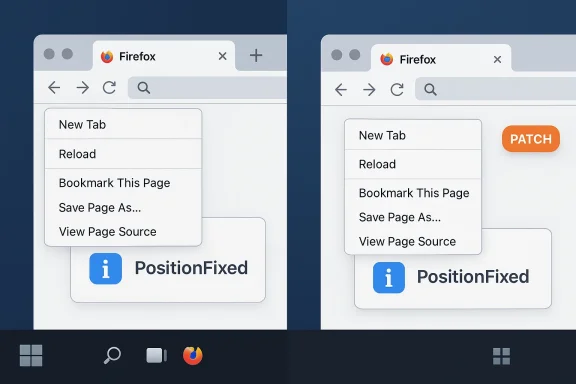
Rather than a single catastrophic failure, the 147 cycle produced a cluster of regressions that affected UI popups, menus and certain behaviors on specific platforms (Windows and several Linux desktop environments being most visible in user reports). Users reported context menus appearing in the wrong place, nested menu items failing to display, and — in a small number of cases — inability to interact with tabs when the window was maximized on certain displays. These problems were disruptive: context menus and popups are core to day‑to‑day browsing workflows, and misbehavior there is immediately painful. Community threads, bug reports, and developer responses confirmed the regressions were introduced by recent changes and needed targeted fixes.Root causes (high level)
From the developer threads and Bugzilla entries the pattern is clear: a set of window/compositor and menu‑positioning changes interacted poorly with platform window managers and fractional scaling on some desktops. The symptoms ranged from misplaced popup coordinates (popups appearing at the window’s top‑left) to nested submenus failing to render. In some cases the issue was tied to platform-specific codepaths (for example, Wayland/Wayland compositors, GNOME Mutter fractional scaling, or Windows-specific window metrics when a browser window is maximized). Those subtle differences across OS windowing stacks made the problem appear intermittent and hard to reproduce for some users.Why the community noticed so quickly
Firefox has a large, vocal user base and active telemetry. Issues that prevent basic interactions — right‑click menus, nested menus, drag and drop — are immediately visible in forum posts, Reddit threads, and bug reports. Mozilla’s engineering teams generally monitor those signals and try to triage regressions quickly; in this case the bug reports coalesced into fix candidates that could be uplifted into a near‑term dot release. Community signal that a fix was required and underway was visible in public bug threads and forum replies.What Firefox 147.0.3 fixes — the practical list
The 147.0.3 release is focused and pragmatic: it is not a feature release but a maintenance update aimed at restoring expected browser UI behavior across platforms. The most important user‑visible items addressed in this dot release are:- Popup and context‑menu placement fixes — patches to ensure context menus and developer tools popups render at the correct on‑screen coordinates instead of appearing at the top‑left or off‑screen in certain desktop configurations.
- Nested menus and submenu rendering — fixes that restore correct display and navigation of nested menus in menu bars and context menus, especially for users on Linux Wayland and certain GNOME/Plasma configurations.
- Windows-specific UI regressions — adjustments that repair interactions when Firefox is maximized (for example, cases where the topmost pixel row prevented tab selection), and other Windows UI oddities that cropped up after the major release. The initial 147 release had already fixed some of those issues, and 147.0.3 further tightens Windows behavior.
- Other small quality‑of‑life fixes — assorted small fixes for drag‑and‑drop, keyboard navigation, and accessibility edge cases that together improve day‑to‑day stability.
How Mozilla handled the incident — speed, scope and communication
Mozilla’s approach here follows a familiar pattern for modern open‑source browser maintenance:- Ship the major release (147), monitor telemetry and community feedback.
- When compatibility regressions appear, act quickly: issue a small reversion or temporary disablement for the offending experimental feature (as happened earlier in the 147 cycle).
- Triage high‑impact regressions and security issues; produce targeted point releases (147.0.1, 147.0.2) for security fixes and compatibility workarounds, then follow with targeted dot releases (147.0.3) to address remaining user‑facing regressions.
Strengths of the approach:
- Fast reaction time: fixes were developed and shipped within weeks of the major release.
- Transparent triage: bug reports and resolution status are public, allowing enterprise admins and power users to track progress.
- Targeted fixes: dot releases avoid unnecessary feature churn while getting fixes to users promptly.
- The rapid cadence can create short windows where certain users (especially those on niche window managers or with extensive third‑party integrations) experience breakage.
- Enterprises that freeze updates or rely on the Release channel may need to plan uplifted patching cycles more actively than usual.
Technical analysis: what likely went wrong under the hood
The popup/misplacement regressions are symptomatic of coordinate and surface synchronization problems between Firefox’s UI layer and underlying platform windowing systems. The class of root causes includes:- Coordinate translation mismatch: when the browser draws a popup it computes a pixel position in the window coordinate space. If the mapping between Firefox’s window coordinates and the OS compositor’s coordinate system is miscomputed (for instance due to fractional scaling or multi-monitor setups), the computed popup placement can be wrong by large offsets. This results in a popup being drawn in the top‑left corner or off‑screen.
- Compositor/IPC timing: changes to how surfaces are registered with the compositor, or how the windowing layer defers painting of transient layers, can expose race conditions where a popup’s geometry is calculated before the final surface size is known.
- Platform-specific window metrics: Windows and Wayland/Wayland compositors expose window metrics differently (e.g., DPI scaling, virtual desktop offsets). Code that assumed a particular behavior across platforms can be brittle when a new windowing optimization lands.
- Interaction with third‑party hooks: antivirus or endpoint integrations that inject hooks or modify handle semantics can alter the lifecycle of window or input events. This is more commonly implicated in startup crashes, but is also relevant when UI code relies on precise event timings.
Risks and caveats
While 147.0.3 seeks to resolve the immediate UI breakages, there are practical caveats for users and administrators:- Rollout timing: dot releases are distributed broadly via Mozilla’s update channels, but not every user will receive the update at exactly the same moment — enterprise update policies, local caching/packaging, or blocked update servers can delay the fix.
- Third‑party interactions: issues caused or exacerbated by injected DLLs or antivirus hooks may persist until vendor integrations are updated. In other words, some crashes and UI misbehavior have roots in the interaction between Firefox and endpoint products; those require coordination with security vendors as well as browser patches. (releases.mozilla.org)
- Unverified reports: the landscape of community reporting includes a mix of reproducible bug reports and user‑specific configuration issues. Where a community post cannot be reproduced in a clean profile and up‑to‑date build, exercise care before concluding the problem is universal. This is why Mozilla uses telemetry and targeted checks in addition to community triage.
- Security vs. usability tradeoffs: some changes that affected compatibility were initially toggled to preserve security or privacy guarantees. Any subsequent re‑enablement must balance the risk that a previously mitigated security change could reintroduce attack surface.
Practical guidance for Windows users and IT admins
If you or your organization encountered UI breakage after upgrading to Firefox 147.x, follow these steps:- Update to 147.0.3
- For typical users, open Firefox → Help → About Firefox to trigger an immediate update check. The 147.0.3 update is a point release; applying it will often resolve the popup/menu problems.
- If updating is not possible immediately, try a temporary workaround:
- Restart the browser and test in a fresh profile. Many UI regressions are profile‑independent, but a temporary test in a clean profile can help isolate the issue.
- Disable third‑party shell integrations temporarily (for example, extensions that manipulate UI) to see if the behavior persists.
- For enterprise endpoints:
- Test 147.0.3 in a controlled staging environment before broad rollout. Verify critical workflows that involve context menus, drag‑and‑drop, and multi‑monitor setups.
- If you run endpoint protection appliances that inject DLLs or hook I/O, consult vendor guidance: some vendors document compatibility steps or advise toggles to mitigate crashes until browser patches are available. (releases.mozilla.org)
- If problems persist after updating:
- Collect a reproducible test case, steps to reproduce, your OS and compositor/graphics environment, and file a detailed bug report. Bugzilla entries that include screenshots, system logs, and reproducible steps are the fastest route to a targeted fix.
For power users: how to inspect whether the fix applied
- Confirm your installed version in Help → About Firefox; the window will report 147.0.3 and trigger updates if needed. (releases.mozilla.org)
- Reproduce a previously observed failing scenario (right‑click in the same place, open nested menus, maximize to the same monitor configuration).
- If a problem still occurs, run Firefox in Safe Mode (Help → Restart with Add‑ons Disabled) to determine whether an extension or userChrome customization is interacting with the issue.
- When reporting, attach the exact build string and platform details (Windows 10/11, DPI scaling, multi‑monitor configuration, GPU driver if graphics issues appear).
What this episode teaches us about modern browser maintenance
- Shipping major releases rapidly yields large, visible benefits (new platform features, security fixes), but also increases the probability of regressions that only appear on specific platform configurations.
- Public bug trackers and community telemetry remain essential: they accelerate detection, diagnosis, and prioritization of fixes.
- Dot releases (147.0.3 in this case) are a practical way to deliver surgical fixes without delaying the entire release pipeline.
- Enterprises must consider both feature cadence and the risk of short‑term regressions when designing update policies. Testing on representative endpoints, and coordinating with security vendors, reduces unexpected disruption.
Final verdict and recommendations
Firefox 147.0.3 is a focused, corrective release that addresses the most painful UI regressions affecting context menus, nested menus, and a set of Windows and Linux‑specific behaviors. For most users the update will immediately restore normal menu behavior and remove the need for cumbersome workarounds. The release artifacts confirm 147.0.3 is an official build and its public bug threads confirm the fixes target the observed problems. (releases.mozilla.org)If you manage Windows endpoints, treat 147.0.3 as a recommended update: test it in staging, then apply it broadly. If you are a home or power user who experienced the broken UI in earlier 147 builds, update now and verify your workflows. And if you continue to see popup anomalies after updating, gather reproducible steps and report them — a clear bug report is the fastest route to any remaining fixes landing in subsequent micro‑releases.
The 147.0.3 release is not a sweeping new feature release — it is a pragmatic repair job. That, by itself, is an encouraging sign: Mozilla is listening to real‑world usage signals and shipping narrowly scoped fixes to keep the browser usable and reliable across the wide variety of Windows and Linux desktop environments it supports.
Conclusion: update to Firefox 147.0.3 to reclaim normal UI behavior; for organizations, validate in staging and coordinate with endpoint vendors where necessary to ensure both security and interoperability remain intact. (releases.mozilla.org)
Source: Neowin https://www.neowin.net/amp/firefox-14703-is-out-with-fixes-for-broken-ui-on-windows-and-more/
