Firefox’s latest desktop update leans into a rare — and deliberate — user-first stance on artificial intelligence while polishing the browser’s accessibility, backup, and drag‑and‑drop workflows, plus closing out legacy Windows support with a final security nod to older systems.
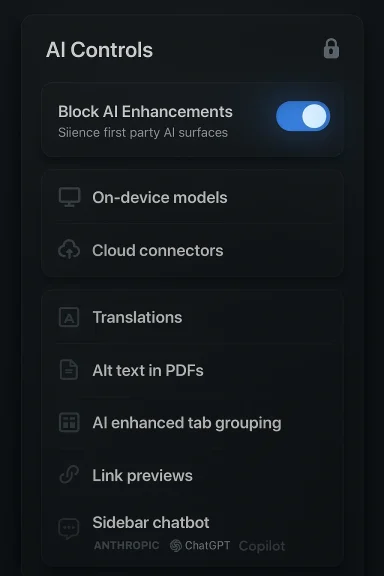
Mozilla has positioned Firefox 148 as a measured response to the two-headed browser reality of 2026: a surge of AI-powered conveniences and a user base that remains deeply concerned about privacy, control, and predictable behavior. The headline change is a dedicated AI Controls section in desktop Settings that provides a master “kill switch” — a single toggle to block all generative-AI features — alongside granular controls for individual AI experiences. Mozilla says the feature is shipping with Firefox 148 and slated to roll out to stable-channel users on Feb. 24, 2026.
Beyond the AI controls, this release bundles a string of practical improvements that matter to real-world browsing: improved accessibility for mathematical content inside PDFs, refinements to the Backup feature (including tighter behavior with “clear on close” settings), translation language expansions, fixes for language-pack regressions, and an important drag‑and‑drop bug fix on Windows that restores expected behavior when moving downloaded images into Adobe Illustrator.
The release also intersects with broader product lifecycle news: Mozilla is ending updates for legacy Windows releases via the mainline channel, continuing only a short-term ESR safety net through the end of February 2026 for systems still on Windows 7/8/8.1.
Key facts to act on now:
This release is not about flashy new AI features; it’s about returning agency to users while continuing to offer AI as an option. That balance — enabling choice without surprise — is the real product story here. The devil, as always, will be in the implementation: whether the kill switch and the telemetry decoupling truly hold up under new feature rollouts, and whether integrations with third‑party AI providers are surfaced clearly enough for nontechnical users.
For organizations and users alike, the two immediate operational items are clear. First, verify and apply Firefox 148 in your test channels and confirm policy and backup behaviors. Second, if you’re on Windows 7/8/8.1, treat the end of ESR 115 security maintenance at the end of February 2026 as a hard deadline for migration or containment.
Firefox 148 is less a leap than a course correction — and in a year where “AI everywhere” is often sold as inevitable, a course correction that restores control and focuses on accessibility is one users can actually rely on.
Source: Neowin Firefox 148.0 arrives with AI kill switch, drag-and-drop fixes, and more
 Background / Overview
Mozilla has positioned Firefox 148 as a measured response to the two-headed browser reality of 2026: a surge of AI-powered conveniences and a user base that remains deeply concerned about privacy, control, and predictable behavior. The headline change is a dedicated AI Controls section in desktop Settings that provides a master “kill switch” — a single toggle to block all generative-AI features — alongside granular controls for individual AI experiences. Mozilla says the feature is shipping with Firefox 148 and slated to roll out to stable-channel users on Feb. 24, 2026.Beyond the AI controls, this release bundles a string of practical improvements that matter to real-world browsing: improved accessibility for mathematical content inside PDFs, refinements to the Backup feature (including tighter behavior with “clear on close” settings), translation language expansions, fixes for language-pack regressions, and an important drag‑and‑drop bug fix on Windows that restores expected behavior when moving downloaded images into Adobe Illustrator.
The release also intersects with broader product lifecycle news: Mozilla is ending updates for legacy Windows releases via the mainline channel, continuing only a short-term ESR safety net through the end of February 2026 for systems still on Windows 7/8/8.1.
What’s new in Firefox 148 — feature highlights
AI Controls: one place to silence (or tweak) AI
- Firefox 148 adds an AI Controls section to desktop Settings that centralizes management of AI-enabled features.
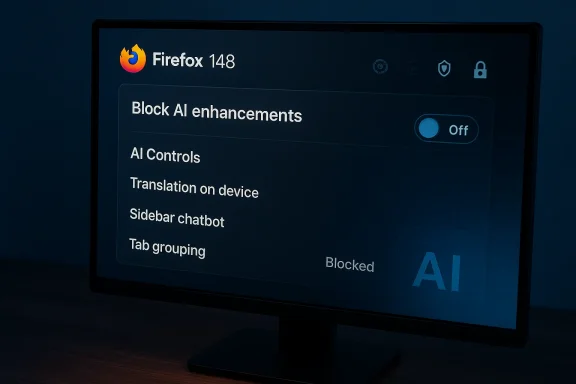
- A single, prominent toggle — Block AI enhancements — disables all current and future generative-AI features in the browser. When activated, Mozilla says the toggle will also stop prompts and reminders that would otherwise attempt to nudge users toward AI features.
- Users who want a mixed approach can instead keep the master toggle off and control individual features. At launch, Mozilla lists the following AI-capable features as controllable:
- page translations (browser-provided translations),
- AI-generated alt text for images in PDFs,
- AI-enhanced tab grouping suggestions,
- link-preview summaries,
- the sidebar AI chatbot (which can connect to third‑party assistants such as ChatGPT, Anthropic Claude, Microsoft Copilot, Google Gemini, and others).
- Settings persist across updates, so a choice to block AI today will remain in place after future browser upgrades.
Accessibility: better math in PDFs
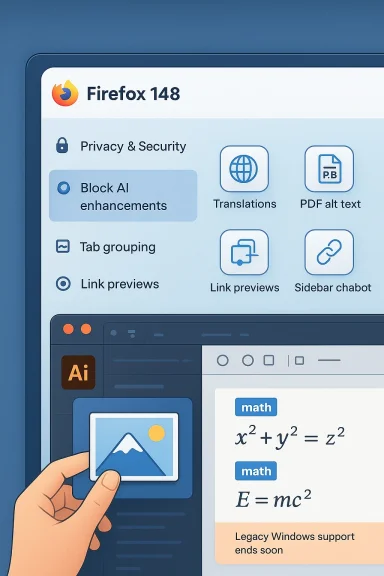
- PDF.js — the in‑browser PDF engine Firefox uses — has received targeted accessibility work to support “tagged math” inside PDFs. That lets screen readers expose mathematical formulas in a structured way, improving usability for blind and low‑vision users who rely on assistive technology.
- This is not an interface tweak only; it’s a content‑level improvement that makes complex scientific and educational PDFs significantly more navigable when using screen readers.
Remote settings and telemetry: decoupling and choice
- Firefox Settings now separates the “remote improvements” opt‑in from telemetry and experimentation settings. In plain terms: you can choose to receive remote browser changes (config updates distributed by Mozilla) without having to agree to send telemetry or participate in experimental studies.
- This change makes receiving crucial remote fixes and configuration updates compatible with stronger privacy stances.
Backup refinements for Windows users
- Firefox Backup continues to be refined: backups are now better integrated with the “Clear history when Firefox closes” capability on Windows.
- If you enable automatic clearing of certain data on exit, Firefox Backup will now exclude those items from backups — aligning backup contents with user privacy choices.
- The update includes availability tweaks that expand Backup behavior and UX for Windows 10 and Windows 11 scenarios.
Translation languages and New Tab polish
- New translation pairs were added, including translations into and from Traditional Chinese and into Vietnamese, broadening Firefox’s on-device and browser-provided translation reach.
- New Tab wallpapers now appear on container new tabs as well as on the default new tab, keeping the visual experience consistent across contextual tab containers.
Fixes you’ll notice
- Resolved an issue where language packs could become disabled after a major update, preventing unexpected language fallbacks.
- On Windows, dragging a downloaded image directly into Adobe Illustrator now correctly inserts the image file instead of linking or inserting a URL. This fixes a common designer workflow breakage.
- Various other stability, security, and localization fixes round out the patchset.
How to use the new AI controls (practical steps)
- Open Firefox desktop (after it updates to 148.x).
- Go to Settings.
- Find the new AI Controls section.
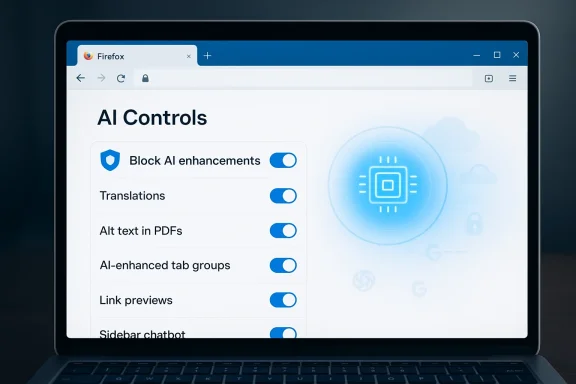
- To shut off all generative AI features, enable Block AI enhancements.
- To fine-tune, disable the master toggle and then toggle individual features (Translations, PDF alt text, Tab grouping suggestions, Link previews, Sidebar chatbot).
- Restart Firefox if prompted; your selections persist across updates.
Critical analysis — strengths, limitations, and risks
Strengths: clear, discoverable choice; accessibility and privacy wins
- The centralized AI control is the clearest user-facing expression we’ve seen from a major browser that “AI is optional.” That’s both a UX victory and a competitive differentiator. Instead of hiding toggles across disparate menus, Firefox gives users a single locus of control.
- Decoupling remote improvements from telemetry requirements demonstrates pragmatic engineering: organizations and privacy advocates can accept remote fixes without conceding broad telemetry.
- Accessibility work — especially tagged math in PDFs — is the kind of low‑glamour engineering that has outsized benefit for disabled users and institutions dealing with technical documentation.
- Backup behavior that respects “clear on close” aligns data preservation with privacy expectations and reduces privacy-restore friction.
Limitations and unanswered questions
- Data flow for AI features remains a practical concern. Sidebar chatbots that “let you use your chosen chatbot” inherently rely on third‑party services. Even if the browser provides a kill switch, users enabling chatbots will need clarity on what text leaves their device, how long it’s stored by third parties, and whether any query context is logged by Mozilla or the chosen provider. Mozilla’s blog frames AI features as optional, but operational privacy depends on each provider’s terms.
- The master toggle is powerful, but future-proofing matters: Mozilla says the toggle will block “current and future” generative AI features. That claim depends on engineering rigor and careful defaulting — a future feature that integrates AI at a low level risks being easier to ship than to filter out. The long‑term effectiveness of the kill switch deserves follow-up audits.
- Release timing and rollout pace are always variables with Firefox. A press summary may say “rolling out now,” but rollout can be staged by channel and geography. Enterprises should treat the date shown in public posts as a best‑effort target and verify availability before wide deployment.
Security and enterprise considerations
- The improved decoupling of telemetry and remote updates is a win for enterprise configuration management: security‑critical remote updates become compatible with minimal telemetry footprints.
- Windows legacy EOL timing (see below) is crucial for enterprise patch planning. Organizations still running Windows 7/8/8.1 must finalize migration or compensating controls now — the ESR safety net reaches its limit at the end of February 2026.
- Chrome and Edge long ago stopped mainstream support for older Windows versions; Mozilla’s ESR 115 was the last mainstream backstop. With that window closing, enterprises must treat unsupported OS browser deployments as critical vulnerabilities.
The Windows 7/8/8.1 story — final security updates and what to do
Mozilla has been one of the last browser vendors to offer a sustained pathway for older Windows customers via the Firefox 115 ESR stream. That special path provided critical security backports for legacy systems even after the main release track moved on.Key facts to act on now:
- Firefox 115 is the final mainline build that runs on Windows 7, 8, and 8.1.
- Mozilla will provide security updates for the ESR 115 branch only through the end of February 2026. After that point, binaries running on those legacy systems will no longer receive official security fixes.
- If your environment still runs Windows 7/8/8.1, prepare to:
- Upgrade clients to Windows 10 or 11 where possible.
- Migrate affected users onto a supported OS before the ESR maintenance window closes.
- If upgrades are impossible, isolate systems, harden endpoints, and restrict risky browsing tasks to managed, segregated devices.
- Consider moving to a modern Linux distribution on older hardware if Windows 10/11 is not feasible.
Privacy, AI and real user risks — a closer look
- Opt-in vs opt-out: Mozilla’s approach is explicitly opt‑in for AI features and opt‑out by default for the master toggle. That’s good from a privacy posture, but user education matters. Many users click through default prompts; clear, plain-language notifications around what enabling a chatbot or translation entails (what is sent to a provider, how long it’s stored) are essential.
- Third‑party providers: allowing integrations with services like ChatGPT or Gemini introduces combinations of legal and technical risk. Organizations concerned about data exfiltration should disable the sidebar chatbot and block external connections at the network or policy layer unless they have an approved, secure provider.
- Telemetry decoupling: the new separation is a pragmatic privacy win, but it relies on correct implementation and observability. Security teams should verify that opting into remote settings truly doesn’t open additional telemetry channels.
- Backups and privacy: backups that respect “clear on close” are less likely to capture private session data, but restoring from a backup can reintroduce data that a user intentionally purged earlier — recovery workflows must be transparent. The restore UI should clearly surface what will and will not be restored, especially around cookies, logins, and local storage.
For power users and admins — upgrade guidance and checklist
- Personal users:
- Expect Firefox 148 to roll out in stages. Check “About Firefox” to trigger updates or wait for automatic distribution.
- If you don’t want AI features, turn on Block AI enhancements immediately after updating.
- If you rely on AI features, review which providers you connect to and read their privacy terms.
- IT administrators:
- Test Firefox 148 in a controlled environment before wide deployment; check group policies and preference names for AI toggles.
- Review firewall rules and allow‑list decisions for sidebar chatbot integrations.
- Plan migrations off legacy Windows — treat end of ESR 115 support as a hard migration deadline.
- Validate backup/restore behavior in your standard image and migration workflows — ensure “clear on close” policies are enforced post-restore if that is required by policy.
- Web developers:
- Test your sites for compatibility with potential changes to translation and link-preview behavior.
- If you provide content that includes complex math (MathML, LaTeX), test accessibility with screen readers against Firefox’s updated PDF support.
Final verdict — pragmatic progress with guarded optimism
Firefox 148 is an iteration that checks the boxes many users and administrators have been asking for: clear control over AI, measurable accessibility improvements, and pragmatic privacy-forward engineering that respects nuanced consent (remote updates without telemetry).This release is not about flashy new AI features; it’s about returning agency to users while continuing to offer AI as an option. That balance — enabling choice without surprise — is the real product story here. The devil, as always, will be in the implementation: whether the kill switch and the telemetry decoupling truly hold up under new feature rollouts, and whether integrations with third‑party AI providers are surfaced clearly enough for nontechnical users.
For organizations and users alike, the two immediate operational items are clear. First, verify and apply Firefox 148 in your test channels and confirm policy and backup behaviors. Second, if you’re on Windows 7/8/8.1, treat the end of ESR 115 security maintenance at the end of February 2026 as a hard deadline for migration or containment.
Firefox 148 is less a leap than a course correction — and in a year where “AI everywhere” is often sold as inevitable, a course correction that restores control and focuses on accessibility is one users can actually rely on.
Source: Neowin Firefox 148.0 arrives with AI kill switch, drag-and-drop fixes, and more

 references#ai). From there you can flip the master toggle and experiment with per-feature options.