

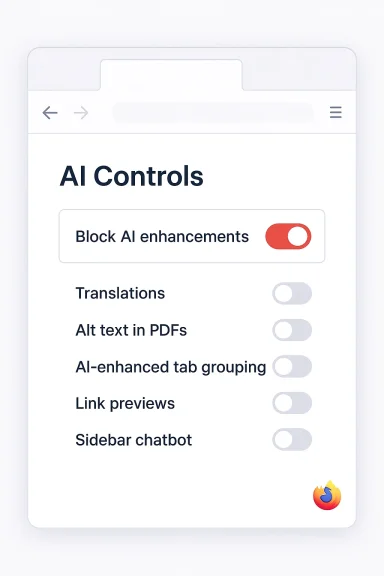
Mozilla will let you flip a single switch and remove generative AI from your browsing experience: starting with Firefox 148, due to roll out on February 24, 2026, a new “AI controls” section puts a master “Block AI enhancements” toggle alongside per-feature switches so users can either opt into individual AI tools or turn every AI-powered capability off in one move. (blog.mozilla.org)
Background
Mozilla’s announcement is straightforward: after months of experimenting with generative-AI features in Firefox, the company is adding a centralized controls panel so people who want a traditional, non‑AI browsing experience can have it without hunting through menus or reinstalling older versions. The new controls arrive in Firefox 148 on Feb. 24, 2026, and are available for early testing in Firefox Nightly. (blog.mozilla.org)This move is positioned as an extension of Mozilla’s long-running privacy‑first ethos: build tools for people who want AI, but do not force AI on people who don’t. The blog post announcing the change explicitly frames it as choice-driven: “AI is changing the web, and people want very different things from it.” (blog.mozilla.org)
What exactly is being added?
One-stop AI controls
At a glance, the new AI controls provide:- A global “Block AI enhancements” toggle that disables all current and future generative-AI features in Firefox.
- Individual switches for the primary AI capabilities Mozilla has been adding, including translations, PDF alt‑text generation, AI‑enhanced tab grouping, link previews, and a sidebar chatbot integration that can connect to external models. (blog.mozilla.org)
Features covered at launch
The first set of AI features listed in the controls includes:- Translations — AI-assisted page translation to browse in your preferred language.
- Alt text in PDFs — automatic generation of descriptive text for images embedded in PDF pages.
- AI‑enhanced tab grouping — suggestions for grouping related tabs and providing human‑readable names.
- Link previews — short summaries or highlights to preview content before opening a page.
- Sidebar chatbot — an integrated sidebar that can connect to third‑party chatbots (examples Mozilla lists include Anthropic Claude, ChatGPT, Microsoft Copilot, Google Gemini, and Le Chat Mistral). (blog.mozilla.org)
Why this matters: the strengths
1) Real, discoverable choice — not hidden toggles
By centralizing AI settings into a single panel in desktop Settings, Mozilla removes ambiguity. Users no longer need to hunt for scattered feature flags; everything is in one place under the browser settings. That single-pane approach is far friendlier to non‑technical users and makes “no‑AI” a realistic default for those who want it. (blog.mozilla.org)2) Future-proof opt‑out
Mozilla explicitly designed the master toggle to cover “current and future generative AI features,” which addresses a recurring problem: vendors add new AI functionality and unintentionally enable it for users who previously opted out. Mozilla’s model aims to make opt‑out sticky. That’s a meaningful engineering and user‑experience commitment. (blog.mozilla.org)3) Granular flexibility for mixed use
Not everyone wants to turn off AI entirely. The per‑feature switches let users make tradeoffs — keep translations and accessibility features enabled while disabling sidebar chat, for example. This nuance makes the control panel useful across a broad user base. (blog.mozilla.org)4) Aligns with real privacy concerns
AI features often involve sending page content, prompts, or metadata to external AI providers. Given multiple recent studies and investigative reports showing how AI chatbot interactions can be used for model training or, worse, harvested by third parties, giving users a simple opt‑out is a reasonable privacy mitigation. The design recognizes those real privacy risks.Critical analysis: the technical and security caveats
Mozilla’s new toggle is an important step, but it is not a silver bullet. Below are the main caveats and unresolved issues that users, admins, and security teams should be aware of.Scope: built‑in features vs. extensions
Mozilla’s announcement lists built‑in features that the toggle will govern. The blog post does not explicitly say whether the master toggle will block AI features implemented by third‑party extensions or how it interacts with extension permission models. Many real‑world privacy failures involving AI have come from extensions that intercept or exfiltrate AI chats and page content — incidents where the browser’s built‑in settings don’t protect users. Until Mozilla clarifies the interaction with extensions, assume the controls primarily target Firefox’s own AI features, not arbitrary extension behavior. (blog.mozilla.org)Local vs. cloud inference: not all AI is the same
Some AI features may do inference locally in the browser (e.g., a small model running on-device), while others rely on cloud calls to Anthropic, OpenAI, Google, or Microsoft. Early reporting on Firefox’s tab‑grouping rollout noted that the tab-grouping inference ran locally in the browser; however, Mozilla does not guarantee that all generative features will always be local. That distinction matters because a global toggle that merely hides the UI will be less protective if background network calls to external models continue in some features. Users and admins should demand explicit documentation of which features perform remote inference and when network calls occur.Synchronization and enterprise policy
Mozilla’s blog confirms that preferences “stay in place across updates,” but it does not say whether those preferences sync across devices via Firefox Sync, or whether enterprise admins can centrally enforce the global toggle using policies. Early coverage speculates about the likely location of the controls in Settings → Privacy & Security → AI Controls, but centralized enterprise management and policy templates remain unconfirmed. Enterprises that need to ensure AI is disabled across fleets should wait for Mozilla policy guidance or use existing Group Policy / configuration management tools until official controls for admins are published. (blog.mozilla.org)Interaction with other privacy protections
Firefox already has a rich set of privacy controls (Enhanced Tracking Protection, cookie settings, and site permissions). The new AI controls add another axis to this ecosystem. The interplay among tracking protections, content‑blocking, and AI features will require careful testing: aggressive blocking can break site features; leaving AI off might still allow other privacy‑sensitive signals to flow to third parties. Mozilla should publish a clear interoperability matrix so users can anticipate the functional impact of disabling AI features.The human factor: prompts, discoverability, and nudges
Mozilla intends the master toggle to suppress prompts and reminders, which reduces coercive nudging. Nevertheless, UI design matters: how obviously will the toggle be presented to new users, and will the onboarding experience respect an existing “no‑AI” choice? There’s often a tension between product discovery (show me what’s new) and non‑coercive privacy (don’t bother me). Mozilla’s claim that they will “not show pop‑ups or reminders” is reassuring, but it will be tested by real rollout behavior and telemetry. (blog.mozilla.org)How this compares to other browsers
- Google Chrome: Google has deep integration between Chrome and Gemini; Chrome’s AI features are tightly woven into the UI, and while users can disable specific signals and features, there is not (as of Mozilla’s announcement) a single catch‑all “kill switch” equivalent to Firefox’s global toggle. Tech writers contrast Mozilla’s approach as more explicit about user choice.
- Microsoft Edge: Edge exposes Copilot functionality and an experimental “Copilot Mode” that can deeply integrate AI into browsing and workflows. Edge offers toggles to hide Copilot UI elements, but full removal often requires digging into settings or enterprise policies; historically some users reported difficulty fully eliminating Copilot from the interface. That fragmented experience is precisely what Mozilla’s single‑control approach seeks to avoid.
The privacy threat landscape that motivates this
Recent academic and investigative work shows why a simple, authoritative opt‑out matters:- Researchers have highlighted how chat interactions may be used for model training unless users explicitly opt out, and documentation from many AI providers is inconsistent or opaque. That means a casual interaction might feed into long‑term model improvements or analytics without clear notice.
- Investigations have found browser extensions and add‑ons that purport to “protect privacy” while actually intercepting and harvesting AI chats for monetization — a vector that a browser’s built‑in toggle cannot easily address. Those real incidents underscore why users should be cautious even after flipping built‑in AI features off.
- Corporate environments are already seeing data leakage via employee use of generative AI (copying sensitive documents into model prompts), which raises the stakes beyond individual privacy: data-loss prevention and compliance teams must treat AI interactions as a potential exfiltration channel. A global browser toggle is a useful policy tool, but won’t solve unmanaged third‑party extensions or cloud‑based endpoints by itself.
Developer and extension ecosystem implications
Mozilla’s decision to make AI features opt‑in and controllable should change the calculus for extension developers and integrators.- Extension authors who build AI-powered tools must be explicit about network calls, data handling, and training policies because users will expect transparency now that browsers emphasize choice.
- Enterprise software vendors may need to certify whether their browser extensions honor Firefox’s global AI toggle or whether additional controls are necessary in corporate deployments.
- Security teams should treat AI-enabled features and extensions as a new attack surface: code review, permission audits, and telemetry for unexpected background requests will be essential.
What’s still unanswered (and what to watch for)
- Extensions scope — Does the master toggle block AI features implemented inside third‑party extensions, or only Mozilla’s built‑ins? Mozilla’s public post is silent on this specific interaction. Expect clarification in release notes or extension documentation. (blog.mozilla.org)
- Sync behavior — Will the AI preferences sync via Firefox Sync? Mozilla says settings persist across updates, but it does not explicitly confirm cross‑device synchronization. Enterprises and multi‑device users should watch for follow‑up documentation. (blog.mozilla.org)
- Policy controls — Will IT admins have Group Policy or enterprise management controls to enforce the global toggle centrally for fleets? This is a critical requirement for regulated organizations.
- Technical transparency — Which features perform inference locally and which call cloud APIs? This is material to both privacy and performance; Mozilla should publish a definitive mapping.
- Telemetry and nudging — Will Mozilla collect telemetry about opt‑outs and feature usage, and if so, how will it be retained and disclosed? Even privacy‑first vendors must be explicit about telemetry related to AI feature usage. (blog.mozilla.org)
Practical guidance for users and IT teams
- If you prefer a no‑AI browsing experience: plan to use Firefox 148 and flip the master Block AI enhancements toggle in Settings once it arrives. You can also test the feature in Firefox Nightly now. (blog.mozilla.org)
- If you’re an administrator: don’t assume the new toggle is an enterprise policy control. Until Mozilla publishes enterprise guidance, continue using established configuration management tools to enforce browser settings and audit installed extensions.
- Audit extensions: regardless of the master toggle, review installed extensions for AI-related permissions and recent updates. Investigations have repeatedly shown that extensions can be a source of AI data leakage. Remove or sandbox extensions that request broad access or that you don’t actively use.
- Treat AI chat content like sensitive data: do not paste confidential company information, credentials, or secrets into chatbots unless you fully trust the provider and understand their data‑use policies. Encourage staff training on safe AI usage.
Final verdict: a necessary but partial fix
Mozilla’s addition of a global AI kill switch in Firefox 148 is an important and welcome product move: it provides clear, discoverable choice and sets a higher bar for user control than many competitors currently offer. For consumers who dread being nudged into AI experiences or for privacy‑conscious professionals, the master toggle and per‑feature switches are a meaningful improvement. (blog.mozilla.org)That said, the toggle is not a cure‑all. Its effectiveness depends on implementation details that Mozilla has not fully documented publicly: how the control interacts with third‑party extensions, which features call remote models, and what enterprise controls will be available are still open questions. The most privacy‑conscious users and organizations will need to combine this new browser control with extension audits, network monitoring, and clear policies about where AI is allowable for work‑related tasks.
Mozilla has taken a principled stance: offer AI options but make them optional and obvious. The rest now falls to careful engineering, transparent documentation, and continued pressure from users and security teams to ensure that an apparent “kill switch” does not become merely cosmetic. If Mozilla follows through with clear technical disclosures and enterprise management tools, this could set a useful precedent across the browser ecosystem for how to add AI without taking away user control. (blog.mozilla.org)
What to watch next
- Firefox 148 release notes and the first stable builds on Feb. 24, 2026 — verify the final UI, exact Settings path, and release‑note clarifications. (blog.mozilla.org)
- Mozilla documentation on extension behavior and enterprise policy templates — required for admins to adopt the feature safely.
- Independent tests and audits showing whether network calls stop when the global toggle is enabled — critical proof that the opt‑out is comprehensive.
Source: Technobaboy Mozilla will soon add a global AI kill switch on Firefox - Technobaboy
