

FL Studio Mobile arrived on the Microsoft Store as a Universal Windows Platform app for Windows 10, Windows 8.1, Windows 10 Mobile, and Windows Phone 8.1, bringing Image-Line’s compact music-production environment to Microsoft’s phone, tablet, and desktop app ecosystem. The release mattered because it gave Windows users a real cross-platform creative tool at a moment when Microsoft was still selling UWP as the bridge between pocket devices and PCs. It also exposed the central tension of the Windows Store era: a technically ambitious platform could attract serious apps, but the surrounding consumer hardware story was already beginning to fray.
The easiest way to underrate FL Studio Mobile on Windows is to treat it as just another port. It was not Photoshop, Office, or a prestige console game, so it did not arrive with the kind of market-moving fanfare Microsoft often needed. But for musicians, beatmakers, hobbyists, and students, the arrival of a recognizable digital audio workstation in the Windows Store was a signal that UWP could host something more demanding than weather widgets and news readers.
FL Studio Mobile was designed for complete projects rather than sketches alone. It offered synthesizers, samplers, drum kits, step sequencing, MIDI controller support, audio recording, piano-roll editing, mixing, effects, and export to WAV or MP3. That feature set put it in a different category from novelty music apps: it was a mobile DAW with enough range to start and finish a song.
That distinction matters because creative apps tend to reveal a platform’s strengths and weaknesses quickly. A note-taking app can tolerate rough edges. A music-production app must care about latency, file access, screen scaling, touch input, export workflows, and device compatibility. If UWP could support a credible mobile music studio, Microsoft could point to something tangible behind the promise of one app family across many device classes.
The Windows version also arrived after FL Studio Mobile had already established itself on Android and iOS. That made the Microsoft Store release less an experiment and more a catch-up move. Windows was not inventing the category here; it was trying to prove that its app model could remain part of the category at all.
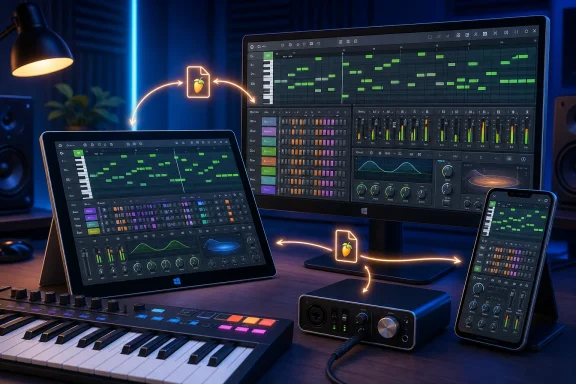
FL Studio Mobile fit that pitch almost perfectly. A music app is naturally portable, but it also benefits from desktop continuity. A user might start a beat on a phone, refine it on a tablet, and finish the arrangement on a larger Windows machine. That is exactly the kind of cross-device behavior Microsoft wanted developers and customers to imagine.
The problem was not the concept. The problem was the calendar. By the time serious UWP apps were appearing, Windows phones were already losing the app-store gravity war. Android and iOS had user bases, developer momentum, accessory ecosystems, and cultural relevance. Windows had a technically coherent platform story, but a shrinking mobile audience to receive it.
That made every credible UWP release feel faintly bittersweet. Microsoft could still win individual arguments about architecture, tooling, and device flexibility. It was losing the larger argument about where mobile users actually lived.
The inclusion of MIDI controller support was particularly important. Touchscreen music apps can be useful, but musicians often want physical keys, pads, knobs, and sliders. Supporting external control made the Windows version more plausible for people who wanted to use a small tablet or convertible as part of a real setup.
The app’s screen layout was also central to its Windows story. UWP’s great challenge was not simply making code run across form factors, but making interfaces feel intentional across wildly different screen sizes. A piano roll, mixer, step sequencer, keyboard, and browser all have to compete for space. A music app that adapts well becomes an argument for responsive app design; one that does not becomes a cramped demo of why “one app everywhere” is harder than it sounds.
FL Studio Mobile also leaned into project movement. The ability to share project data across Android, iOS, and Windows installations, and to open projects in the FL Studio plugin environment, made the app part of a broader workflow rather than a sealed-off mobile island. That was the right model for creative software: mobility at the edges, depth when the project returns to the studio.
At the time, that breadth looked like a strength. A developer could reach legacy Windows tablets, new Windows 10 PCs, Windows phones, and perhaps future device types without creating wholly separate products. Users could imagine buying once and staying inside the Microsoft ecosystem.
Today, the same list reads like a time capsule. Windows Phone 8.1 is gone as a living consumer platform. Windows 10 Mobile is gone too. Windows 8.1 has exited normal relevance for most mainstream users. What remains is Windows on PCs, where UWP survived but never became the singular future Microsoft once advertised.
That does not make the FL Studio Mobile release a failure. It makes it a useful marker. The app demonstrated that Microsoft’s Store could host serious cross-platform creative software, but the surrounding platform strategy could not convert those wins into a durable mobile comeback.
That is the difference between vendor strategy and developer strategy. Microsoft wanted UWP to make Windows central. Image-Line wanted FL Studio Mobile to make projects portable. Those goals overlapped, but they were not identical.
The cross-platform sharing feature is a good example. For Microsoft, a Windows Store app that syncs across devices helped the “one Windows” narrative. For Image-Line, syncing across Android, iOS, and Windows was more important because users do not build their lives around one vendor’s dream. They own phones, tablets, laptops, desktops, controllers, and cloud accounts from different ecosystems.
That pragmatic posture is why FL Studio Mobile aged better than many Windows Store stories from the same period. The Windows release was useful, but it was not the whole bet. If Microsoft’s phone ambitions faded, the app still had a reason to exist on Windows PCs and in the broader FL Studio workflow.
That makes the FL Studio Mobile release more technically meaningful than many Store launches. It forced the Windows version to contend with real-time audio expectations on consumer hardware. The announcement itself acknowledged the practical caveat: input and output latency depend on the device.
That caveat is honest and important. Windows hardware spans everything from underpowered tablets to high-end workstations. UWP gave developers a common app framework, but it could not erase differences in audio drivers, CPU performance, storage speed, or peripheral behavior. For musicians, “runs on Windows” has never been enough; the question is whether it performs well enough to play, record, and mix without interrupting the creative act.
Still, the existence of the app broadened what Windows Store users could expect. It suggested that Store-distributed software did not have to be passive, consumption-oriented, or locked into casual use. It could be creative, interactive, and technically demanding.
On a Windows tablet or two-in-one, however, FL Studio Mobile made obvious sense. A Surface-style device could provide touch input, a larger screen, USB peripherals, better speakers or interfaces, and a more comfortable export workflow. The app’s “mobile” identity did not require a phone; it required a lightweight, touch-friendly production environment.
That is where the Windows version still fits the broader DAW market. Full FL Studio on the desktop is deep, complex, and mature. FL Studio Mobile is more immediate. The two do not need to compete directly. One can be the sketchpad, the other the studio.
Microsoft’s mistake was often to talk as if UWP would make all device categories equally important. In practice, successful Windows Store apps often found their strongest footing on PCs. FL Studio Mobile followed that pattern: the same package could support many screens, but the most durable Windows audience remained the one sitting in front of a desktop-class machine.
But app stores do not magically create demand. Discovery has always been the hard part, especially for paid creative tools that sit between casual entertainment and professional software. A serious user may search directly for FL Studio. A curious beginner may never encounter it unless the Store, press coverage, or community recommendations surface it at the right moment.
That was one of Microsoft’s enduring problems. The Store was strategically important, but it rarely became the first place Windows users went looking for powerful software. Decades of Win32 habits trained users to download from developer websites, Steam, GitHub, enterprise portals, or vendor licensing dashboards. UWP apps had to fight not only rival platforms, but Windows’ own history.
FL Studio Mobile benefited from brand recognition. Many smaller developers did not. For every recognizable name that made the Store look viable, there were countless apps that struggled to be found, trusted, or monetized.
That workflow reflected how modern creators actually work. A beat might begin on a phone during a commute, get expanded on a tablet, and later be mixed on a desktop. The app’s job is not to keep every step inside one device. Its job is to keep creative momentum intact as the user moves.
That is where FL Studio Mobile aligned with the best version of Microsoft’s UWP vision. The future was not one Windows phone replacing every device. The future was software that could keep state, projects, and identity moving across device boundaries.
The irony is that Microsoft’s broader ecosystem did not need Windows phones to make that idea true. Cross-device workflows became normal through cloud sync, account systems, browser apps, cross-platform subscriptions, and native apps on Android and iOS. Microsoft eventually embraced that world through Office, OneDrive, Teams, Edge, and its Android integrations. FL Studio Mobile was already living in that more practical universe.
That distinction matters because Windows users are unusually likely to compare a Store app with a traditional desktop application. On iOS, a mobile-first DAW can be judged within a mobile-first software culture. On Windows, it sits next to the full FL Studio installer, Ableton Live, Cubase, Reaper, Pro Tools, and a huge ecosystem of VST plugins.
FL Studio Mobile therefore had to occupy a careful middle ground. It could be powerful enough to finish tracks, but simple enough to remain usable on touch screens. It could integrate with the larger FL Studio world, but it could not pretend to replace every desktop workflow. Its success depended on being clear about that role.
That is not a weakness. It is the product’s logic. The best mobile creative tools do not win by becoming smaller replicas of desktop software; they win by removing friction from the first stages of creation.
This was one of those examples. It gave Windows users a recognizable creative tool and gave Microsoft a talking point in a category that mattered culturally. Music production has always had a special place in personal computing because it turns the machine into an instrument, not just a terminal.
The app also fit the democratizing arc of music software. Expensive studios gave way to home studios; home studios gave way to laptops; laptops gave way to phones and tablets as sketchpads and production tools. FL Studio Mobile on Windows meant Microsoft users were not excluded from that shift.
But symbolism cuts both ways. The very excitement around a single app’s arrival showed how thin the Windows mobile app story had become. On iOS or Android, FL Studio Mobile was part of a crowded field. On Windows phones, it was news because credible creative apps were scarce enough to notice.
That evolution makes the FL Studio Mobile release easier to understand. It was part of a moment when Microsoft believed a unified app platform could solve multiple strategic problems at once. It could modernize Windows development, rescue mobile, secure distribution, improve app quality, and compete with Apple and Google’s stores.
Some of those goals were reasonable. Some were overburdened. No app model, however elegant, could compensate for weak phone sales, late developer incentives, and a consumer market already trained around two mobile ecosystems.
Still, UWP’s influence remains visible. Windows apps today are more likely to consider scaling, sandboxing, Store delivery, touch, background tasks, and cross-device identity than they were before Microsoft pushed the platform. The revolution did not arrive as advertised, but pieces of it became part of the Windows substrate.
A musician does not care whether a project file proves a platform strategy. They care whether the snare lands correctly, whether the synth patch opens, whether the export works, and whether inspiration survives the trip from one device to another. FL Studio Mobile’s Windows release mattered because it reduced the number of moments where Windows users had to leave their chosen device behind.
For sysadmins and IT pros, the lesson is slightly different. Store-packaged creative tools hinted at a world where software deployment, updating, and licensing could be cleaner even for non-office workloads. Education labs, shared devices, and managed Windows tablets all stood to benefit from apps that were easier to install and contain.
That story was always more grounded than the dream of a Lumia-led mobile renaissance. Windows remained strong where it had always been strong: flexible hardware, deep peripheral support, and a massive base of users who wanted to do real work. FL Studio Mobile’s best Windows future was attached to that foundation.
 FL Studio Mobile Was More Than Another Store Badge
The easiest way to underrate FL Studio Mobile on Windows is to treat it as just another port. It was not Photoshop, Office, or a prestige console game, so it did not arrive with the kind of market-moving fanfare Microsoft often needed. But for musicians, beatmakers, hobbyists, and students, the arrival of a recognizable digital audio workstation in the Windows Store was a signal that UWP could host something more demanding than weather widgets and news readers.FL Studio Mobile was designed for complete projects rather than sketches alone. It offered synthesizers, samplers, drum kits, step sequencing, MIDI controller support, audio recording, piano-roll editing, mixing, effects, and export to WAV or MP3. That feature set put it in a different category from novelty music apps: it was a mobile DAW with enough range to start and finish a song.
That distinction matters because creative apps tend to reveal a platform’s strengths and weaknesses quickly. A note-taking app can tolerate rough edges. A music-production app must care about latency, file access, screen scaling, touch input, export workflows, and device compatibility. If UWP could support a credible mobile music studio, Microsoft could point to something tangible behind the promise of one app family across many device classes.
The Windows version also arrived after FL Studio Mobile had already established itself on Android and iOS. That made the Microsoft Store release less an experiment and more a catch-up move. Windows was not inventing the category here; it was trying to prove that its app model could remain part of the category at all.
UWP Gave Microsoft the Right Pitch at the Wrong Time
The Universal Windows Platform was built around an elegant promise: write a modern Windows app once, adapt the interface across screens, and reach desktops, tablets, phones, and other Windows devices through the Store. For developers, that meant a cleaner distribution model and a theoretically broader audience. For Microsoft, it meant a way to make Windows Phone look less isolated from the larger Windows business.FL Studio Mobile fit that pitch almost perfectly. A music app is naturally portable, but it also benefits from desktop continuity. A user might start a beat on a phone, refine it on a tablet, and finish the arrangement on a larger Windows machine. That is exactly the kind of cross-device behavior Microsoft wanted developers and customers to imagine.
The problem was not the concept. The problem was the calendar. By the time serious UWP apps were appearing, Windows phones were already losing the app-store gravity war. Android and iOS had user bases, developer momentum, accessory ecosystems, and cultural relevance. Windows had a technically coherent platform story, but a shrinking mobile audience to receive it.
That made every credible UWP release feel faintly bittersweet. Microsoft could still win individual arguments about architecture, tooling, and device flexibility. It was losing the larger argument about where mobile users actually lived.
A Music App Showed the Store Could Handle Real Work
FL Studio Mobile’s feature list reads like a direct challenge to the idea that Store apps were necessarily lightweight. The app included a high-quality audio engine, per-track mixer controls, configurable instruments, loop and sample browsing, audio recording with monitoring, and a suite of effects including compression, EQ, reverb, delay, filters, phaser, flanger, limiter, and distortion. That is not a toy box; that is a compact production environment.The inclusion of MIDI controller support was particularly important. Touchscreen music apps can be useful, but musicians often want physical keys, pads, knobs, and sliders. Supporting external control made the Windows version more plausible for people who wanted to use a small tablet or convertible as part of a real setup.
The app’s screen layout was also central to its Windows story. UWP’s great challenge was not simply making code run across form factors, but making interfaces feel intentional across wildly different screen sizes. A piano roll, mixer, step sequencer, keyboard, and browser all have to compete for space. A music app that adapts well becomes an argument for responsive app design; one that does not becomes a cramped demo of why “one app everywhere” is harder than it sounds.
FL Studio Mobile also leaned into project movement. The ability to share project data across Android, iOS, and Windows installations, and to open projects in the FL Studio plugin environment, made the app part of a broader workflow rather than a sealed-off mobile island. That was the right model for creative software: mobility at the edges, depth when the project returns to the studio.
The Windows Phone Footnote Is Now the Whole Story
The supported-platform list is the most revealing part of the announcement in hindsight. Windows 10, Windows 8.1, Windows 10 Mobile, and Windows Phone 8.1 together describe Microsoft’s transitional era better than any keynote slide could. The company was trying to bring old and new Windows worlds into one Store-shaped funnel.At the time, that breadth looked like a strength. A developer could reach legacy Windows tablets, new Windows 10 PCs, Windows phones, and perhaps future device types without creating wholly separate products. Users could imagine buying once and staying inside the Microsoft ecosystem.
Today, the same list reads like a time capsule. Windows Phone 8.1 is gone as a living consumer platform. Windows 10 Mobile is gone too. Windows 8.1 has exited normal relevance for most mainstream users. What remains is Windows on PCs, where UWP survived but never became the singular future Microsoft once advertised.
That does not make the FL Studio Mobile release a failure. It makes it a useful marker. The app demonstrated that Microsoft’s Store could host serious cross-platform creative software, but the surrounding platform strategy could not convert those wins into a durable mobile comeback.
Image-Line Chose Portability Over Platform Purity
Image-Line’s approach was pragmatic. FL Studio Mobile did not exist to validate Microsoft’s developer strategy; it existed to put a music-production tool wherever users might plausibly want to make music. Android, iOS, macOS, Windows, and the FL Studio plugin ecosystem all became pieces of the same creative pipeline.That is the difference between vendor strategy and developer strategy. Microsoft wanted UWP to make Windows central. Image-Line wanted FL Studio Mobile to make projects portable. Those goals overlapped, but they were not identical.
The cross-platform sharing feature is a good example. For Microsoft, a Windows Store app that syncs across devices helped the “one Windows” narrative. For Image-Line, syncing across Android, iOS, and Windows was more important because users do not build their lives around one vendor’s dream. They own phones, tablets, laptops, desktops, controllers, and cloud accounts from different ecosystems.
That pragmatic posture is why FL Studio Mobile aged better than many Windows Store stories from the same period. The Windows release was useful, but it was not the whole bet. If Microsoft’s phone ambitions faded, the app still had a reason to exist on Windows PCs and in the broader FL Studio workflow.
The Mobile DAW Was a Test of Latency, Not Just Loyalty
Music software is unforgiving in ways general productivity software is not. If input latency is poor, the app feels broken. If audio monitoring is unreliable, recording becomes frustrating. If export is clumsy, the project is trapped. If file access is confusing, the user loses confidence.That makes the FL Studio Mobile release more technically meaningful than many Store launches. It forced the Windows version to contend with real-time audio expectations on consumer hardware. The announcement itself acknowledged the practical caveat: input and output latency depend on the device.
That caveat is honest and important. Windows hardware spans everything from underpowered tablets to high-end workstations. UWP gave developers a common app framework, but it could not erase differences in audio drivers, CPU performance, storage speed, or peripheral behavior. For musicians, “runs on Windows” has never been enough; the question is whether it performs well enough to play, record, and mix without interrupting the creative act.
Still, the existence of the app broadened what Windows Store users could expect. It suggested that Store-distributed software did not have to be passive, consumption-oriented, or locked into casual use. It could be creative, interactive, and technically demanding.
Windows 10 PCs Were the Real Prize All Along
The original announcement naturally emphasized phone and mobile support, because that was where UWP’s promise sounded most dramatic. But the long-term value of FL Studio Mobile on Windows was always more likely to come from PCs, tablets, and convertibles than from Lumia handsets. Microsoft’s phone business never had enough oxygen to make the mobile side of the story last.On a Windows tablet or two-in-one, however, FL Studio Mobile made obvious sense. A Surface-style device could provide touch input, a larger screen, USB peripherals, better speakers or interfaces, and a more comfortable export workflow. The app’s “mobile” identity did not require a phone; it required a lightweight, touch-friendly production environment.
That is where the Windows version still fits the broader DAW market. Full FL Studio on the desktop is deep, complex, and mature. FL Studio Mobile is more immediate. The two do not need to compete directly. One can be the sketchpad, the other the studio.
Microsoft’s mistake was often to talk as if UWP would make all device categories equally important. In practice, successful Windows Store apps often found their strongest footing on PCs. FL Studio Mobile followed that pattern: the same package could support many screens, but the most durable Windows audience remained the one sitting in front of a desktop-class machine.
The Store Solved Distribution but Not Discovery
The Microsoft Store made installation cleaner, updates simpler, and purchases more familiar to users coming from phones and tablets. For an app like FL Studio Mobile, that mattered. Musicians who might not want to navigate traditional installer downloads could buy, install, and update through the same storefront used for other Windows apps.But app stores do not magically create demand. Discovery has always been the hard part, especially for paid creative tools that sit between casual entertainment and professional software. A serious user may search directly for FL Studio. A curious beginner may never encounter it unless the Store, press coverage, or community recommendations surface it at the right moment.
That was one of Microsoft’s enduring problems. The Store was strategically important, but it rarely became the first place Windows users went looking for powerful software. Decades of Win32 habits trained users to download from developer websites, Steam, GitHub, enterprise portals, or vendor licensing dashboards. UWP apps had to fight not only rival platforms, but Windows’ own history.
FL Studio Mobile benefited from brand recognition. Many smaller developers did not. For every recognizable name that made the Store look viable, there were countless apps that struggled to be found, trusted, or monetized.
The Cross-Platform Workflow Was the Real Innovation
The most interesting part of FL Studio Mobile on Windows was not that it copied Android and iOS features. It was that it participated in a workflow that could cross those ecosystems. Projects could move between mobile instances and the FL Studio plugin environment, letting ideas begin on one device and mature elsewhere.That workflow reflected how modern creators actually work. A beat might begin on a phone during a commute, get expanded on a tablet, and later be mixed on a desktop. The app’s job is not to keep every step inside one device. Its job is to keep creative momentum intact as the user moves.
That is where FL Studio Mobile aligned with the best version of Microsoft’s UWP vision. The future was not one Windows phone replacing every device. The future was software that could keep state, projects, and identity moving across device boundaries.
The irony is that Microsoft’s broader ecosystem did not need Windows phones to make that idea true. Cross-device workflows became normal through cloud sync, account systems, browser apps, cross-platform subscriptions, and native apps on Android and iOS. Microsoft eventually embraced that world through Office, OneDrive, Teams, Edge, and its Android integrations. FL Studio Mobile was already living in that more practical universe.
The App Also Exposed the Limits of “Full-Functional”
The announcement described FL Studio Mobile as full-functional, and in the mobile DAW context that was fair: users could record, edit, mix, arrange, and render complete projects. But “full-functional” is always relative in creative software. A mobile DAW is not the same thing as a desktop DAW with years of plugins, routing options, automation depth, hardware support, and studio conventions behind it.That distinction matters because Windows users are unusually likely to compare a Store app with a traditional desktop application. On iOS, a mobile-first DAW can be judged within a mobile-first software culture. On Windows, it sits next to the full FL Studio installer, Ableton Live, Cubase, Reaper, Pro Tools, and a huge ecosystem of VST plugins.
FL Studio Mobile therefore had to occupy a careful middle ground. It could be powerful enough to finish tracks, but simple enough to remain usable on touch screens. It could integrate with the larger FL Studio world, but it could not pretend to replace every desktop workflow. Its success depended on being clear about that role.
That is not a weakness. It is the product’s logic. The best mobile creative tools do not win by becoming smaller replicas of desktop software; they win by removing friction from the first stages of creation.
For Windows Enthusiasts, This Was a Small Win With Big Symbolism
For Windows fans, the arrival of FL Studio Mobile carried emotional weight beyond its practical use. The Microsoft Store needed signs of life. Windows phones needed apps that were not merely obligation ports. UWP needed examples that could survive contact with real users.This was one of those examples. It gave Windows users a recognizable creative tool and gave Microsoft a talking point in a category that mattered culturally. Music production has always had a special place in personal computing because it turns the machine into an instrument, not just a terminal.
The app also fit the democratizing arc of music software. Expensive studios gave way to home studios; home studios gave way to laptops; laptops gave way to phones and tablets as sketchpads and production tools. FL Studio Mobile on Windows meant Microsoft users were not excluded from that shift.
But symbolism cuts both ways. The very excitement around a single app’s arrival showed how thin the Windows mobile app story had become. On iOS or Android, FL Studio Mobile was part of a crowded field. On Windows phones, it was news because credible creative apps were scarce enough to notice.
The UWP Bet Survived, but Not in the Form Microsoft Sold
UWP did not disappear, but it did not become the universal replacement for Windows software. Instead, Windows evolved into a more pluralistic platform: Win32 remained dominant, the Microsoft Store opened to broader app types, progressive web apps gained ground, Windows Subsystem for Linux reshaped developer workflows, and Microsoft’s own app strategy became less doctrinaire.That evolution makes the FL Studio Mobile release easier to understand. It was part of a moment when Microsoft believed a unified app platform could solve multiple strategic problems at once. It could modernize Windows development, rescue mobile, secure distribution, improve app quality, and compete with Apple and Google’s stores.
Some of those goals were reasonable. Some were overburdened. No app model, however elegant, could compensate for weak phone sales, late developer incentives, and a consumer market already trained around two mobile ecosystems.
Still, UWP’s influence remains visible. Windows apps today are more likely to consider scaling, sandboxing, Store delivery, touch, background tasks, and cross-device identity than they were before Microsoft pushed the platform. The revolution did not arrive as advertised, but pieces of it became part of the Windows substrate.
Creators Needed Continuity More Than Another Ecosystem War
The best way to judge FL Studio Mobile on Windows is not by asking whether it saved UWP. It obviously did not. The better question is whether it gave creators another useful place to work, and on that measure the answer is yes.A musician does not care whether a project file proves a platform strategy. They care whether the snare lands correctly, whether the synth patch opens, whether the export works, and whether inspiration survives the trip from one device to another. FL Studio Mobile’s Windows release mattered because it reduced the number of moments where Windows users had to leave their chosen device behind.
For sysadmins and IT pros, the lesson is slightly different. Store-packaged creative tools hinted at a world where software deployment, updating, and licensing could be cleaner even for non-office workloads. Education labs, shared devices, and managed Windows tablets all stood to benefit from apps that were easier to install and contain.
That story was always more grounded than the dream of a Lumia-led mobile renaissance. Windows remained strong where it had always been strong: flexible hardware, deep peripheral support, and a massive base of users who wanted to do real work. FL Studio Mobile’s best Windows future was attached to that foundation.
The Beat Dropped on Windows, but the Platform Kept Changing
The concrete lessons from FL Studio Mobile’s Windows arrival are less about nostalgia than about how software ecosystems actually survive. A technically capable app can validate a platform, but it cannot single-handedly fix distribution habits, hardware decline, or developer economics.- FL Studio Mobile’s Windows release gave Microsoft Store users a real music-production app rather than a thin companion utility.
- The app’s UWP packaging supported Microsoft’s cross-device argument, but Windows phones were already losing the broader market battle.
- The strongest long-term Windows use case was likely PCs, tablets, and convertibles, not handsets.
- Image-Line’s cross-platform project workflow mattered more to creators than allegiance to any single app-store ecosystem.
- The release showed that Store apps could support demanding creative work, even if the Store itself struggled to become Windows users’ default software destination.
- The episode remains a useful reminder that platform architecture only matters when it meets users where their devices, files, and habits already are.
References
- Primary source: nokiapoweruser.com
Published: 2026-06-20T05:20:11.714546
FL Studio Mobile now available for Windows as a UWP
FL Studio Mobile now available on Windows. Supports Windows 10, Win8.1, W10M, WP8.1 as well. Record, sequence, edit, mix and render complete songs nokiapoweruser.com
- Related coverage: image-line.com
- Related coverage: ww2.image-line.com
FL Studio Mobile – Music Production App for iOS & Android
Create, edit, and mix music anywhere with FL Studio Mobile. 8 instruments, 1000+ sounds and 30+ effects.ww2.image-line.com - Related coverage: windowscentral.com
Windows Phone Store shuts down today, Windows 10 Mobile support extended to January | Windows Central
Today is the last day that you can download apps from the Windows Phone Store. The operating system has been unsupported for over a year, but now the Windows Phone Store is set to shut down.www.windowscentral.com - Official source: blogs.windows.com
Important dates regarding apps with Windows Phone 8.x and earlier and Windows 8/8.1 packages submitted to Microsoft Store
Update June 18, 2020: Microsoft has stopped accepting Windows Phone 8.x XAP packages. You can no longer publish new Windows Phone XAP packages for new or existing apps. You can continue to update existing Windows Phone apps with UWP packages for use on Windows 10 devices, remove XAP packages...blogs.windows.com - Related coverage: app-direct-www-cloudfront.s3.amazonaws.com
Introducing Windows 10 for IT Professionals Technical Overview
PDF documentapp-direct-www-cloudfront.s3.amazonaws.com
