

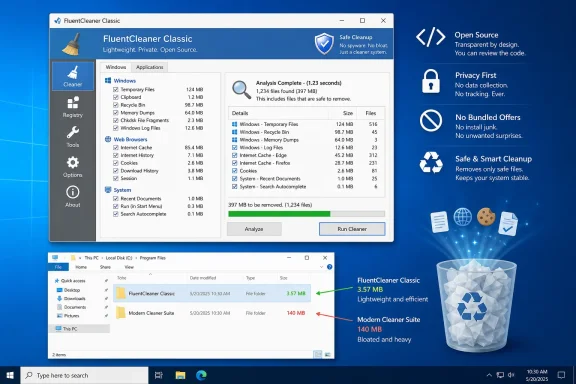
FluentCleaner Classic has arrived as a tiny, free, open-source Windows cleanup utility that deliberately recreates the familiar look and workflow of old-school CCleaner while avoiding the installers, bundled offers, telemetry concerns, and feature sprawl that damaged trust in the category. At only about 3.57 MB unpacked, the new Windows Forms edition is dramatically smaller than the roughly 140 MB modern FluentCleaner package, yet it reportedly uses the same core scanning engine and community-maintained cleaning databases. The result is more than a nostalgic interface experiment: it is a timely test of whether Windows users still prefer compact, transparent desktop utilities over visually polished applications carrying heavyweight runtime dependencies.
FluentCleaner Classic 1.0.0 was released as a companion to the existing FluentCleaner application, not as its immediate replacement. The original edition uses WinUI 3 to present a modern Windows 11-style interface, while Classic returns to Windows Forms and the visual vocabulary of utility software from the Windows XP and Windows 7 eras.
That distinction matters because the two editions represent competing ideas about what a modern Windows application should be. One prioritizes native-looking contemporary design, localization, advanced tools, and integration with newer development frameworks; the other prioritizes speed, compatibility, portability, and minimal overhead.
The resemblance is intentional rather than accidental. FluentCleaner’s developer describes Classic as a throwback to the utility experience many users remember, but with an open-source codebase and without the commercial layers that accumulated around its inspiration.
That shared architecture separates presentation from function. FluentCleaner can therefore maintain two user interfaces without duplicating the most sensitive code responsible for interpreting rules, finding files, calculating removable data, and performing cleanup operations.
Its early appeal came partly from restraint. The application was small, fast, familiar, and easy to run from a USB drive, making it a common component of technicians’ portable repair toolkits.
CCleaner translated that complexity into a checkbox-driven interface. Users did not need to know where an application stored thumbnails, logs, caches, crash reports, or recently used file lists; the utility supplied a named rule and estimated how much data it could remove.
CCleaner itself went through ownership changes, expanding functionality, installer controversies, and a serious 2017 supply-chain compromise involving specific releases. Microsoft Defender later classified certain bundled CCleaner installers as potentially unwanted applications because they offered additional software that was not required for the cleaner’s core operation.
CCleaner eventually reached the Microsoft Store in 2022, but the long-running tension helped define the modern debate. Microsoft objected to unwanted bundling and does not support registry cleaners, while users continued to seek a convenient way to remove application-specific clutter that Windows’ own tools might not identify.
According to the developer, roughly 14 percent of incoming feedback involved people who could not start the modern application or clearly struggled to run it. Some failures may have involved runtime availability, older Windows builds, security restrictions, extraction issues, or incomplete dependencies rather than the cleaning engine itself.
A cleaner does not inherently require a sophisticated rendering framework. Its essential interface tasks are to display categories, enumerate matching files, show sizes, present warnings, and let the user select what should be removed.
Windows Forms also benefits from decades of deployment knowledge. Enterprises, technicians, and experienced Windows users understand how such applications behave, where their configuration files live, and how to diagnose them when something goes wrong.
The shared core’s .NET Standard 2.0 target also gives the developer a practical abstraction layer. Cleanup logic can remain separate from either WinUI 3 or Windows Forms, limiting the risk that interface work changes the behavior of file detection and deletion.
This architecture does not guarantee identical behavior in every situation. Interface-specific settings, permissions, process handling, update mechanisms, and error presentation can still affect the result, but the shared core is a strong foundation for keeping the two editions aligned.
Modern Windows applications often include dependencies so they can run consistently without requiring the user to install the correct framework separately. That improves predictability, but it also makes relatively simple utilities appear disproportionately large.
The contradiction is particularly noticeable for cleanup software. Users may reasonably question why an application designed to eliminate disposable files needs to ship with hundreds of supporting files and a three-digit-megabyte footprint.
Classic answers that criticism by making the interface layer exceptionally small. Its compact package is easier to inspect, copy, archive, and carry between computers.
The meaningful advantage is not size alone but size combined with source availability, understandable behavior, cautious defaults, and a clear separation between scanning and deletion. FluentCleaner Classic must prove those qualities over time as users test it on more configurations.
The standard FluentCleaner release advertises support for thousands of entries. That breadth can extend cleanup far beyond Windows’ native temporary-file categories, especially on systems where many third-party desktop applications have been installed and removed over several years.
This model offers several advantages:
That warning deserves emphasis because “junk” is contextual. A cache might be disposable for one user but important for offline access, rapid project loading, saved authentication, diagnostic work, or recovery after a crash.
FluentCleaner users should inspect optional or advanced rules rather than enabling every category simply because the application found it. The largest cleanup number is not necessarily the best cleanup plan.
The safest way to approach any cleaner is to treat analysis and deletion as separate decisions. A scan indicates that files match a rule; it does not establish that deleting every matched item is desirable.
Users should close browsers before cleaning and review whether a rule targets only conventional caches or also privacy-related records. Clearing a cache generally causes the browser to download resources again, while clearing cookies can sign the user out of websites and disrupt trusted-device sessions.
The consequences become more serious on shared workstations, kiosks, testing environments, and systems used for digital investigations. In those cases, browser traces may be operational records rather than clutter.
Third-party applications are similarly inconsistent. Video editors, game launchers, development tools, chat clients, and creative suites may store gigabytes of regenerable cache data, but rebuilding those caches can take time and consume network bandwidth.
A good cleaner must communicate these trade-offs. “Can be recreated” does not mean “cost-free to remove.”
The design also communicates the project’s philosophy. FluentCleaner Classic is not trying to become a general Windows control center, subscription dashboard, driver updater, security suite, or performance optimizer.
For technicians working across many computers, predictability is more valuable than novelty. Familiar controls make it easier to verify selections quickly and reduce the cognitive overhead of learning another application-specific design language.
Classic’s appearance may therefore be one of its functional strengths. The interface visually prioritizes tasks rather than branding.
The resemblance could create false confidence among people who remember a particular CCleaner workflow. They may click through based on muscle memory without reviewing FluentCleaner’s descriptions or understanding which definitions are active.
Clear warnings and detailed result views are essential. A familiar shell should help users navigate, not encourage them to bypass verification.
The modern edition remains the better option for users who value Windows 11 styling, broader language support, integrated advanced tools, and newer workflow features. Classic is aimed at people who prioritize compatibility, immediate startup, a tiny portable package, and a conventional interface.
Microsoft’s position on registry cleaners remains especially clear: it does not support their use and cannot guarantee that problems caused by such utilities can be resolved. Registry databases contain settings and references, but unused entries rarely produce the dramatic slowdowns advertised by low-quality optimization software.
This is an important break from the classic PC-optimization formula. FluentCleaner focuses on data that can occupy disk space or retain activity traces rather than promising performance gains from deleting arbitrary registry entries.
That choice narrows the product’s claims and reduces one of the cleaner category’s most serious risks. It also makes the software easier to evaluate: users can measure reclaimed storage, inspect targeted files, and decide whether privacy-related records should remain.
These options reduce the need for a third-party cleaner on lightly used systems. A typical consumer PC with ample free space, current applications, and Storage Sense enabled may gain little from an additional maintenance utility.
FluentCleaner’s strongest case is therefore not that Windows cannot clean itself. It is that community databases can recognize a wider range of third-party application caches and leftovers than Microsoft is likely to maintain centrally.
That simplicity is attractive in an era when utilities often request accounts, display subscriptions, install services, monitor the system continuously, or send persistent notifications.
Cleaning can also help before creating a system image, exporting a virtual machine, or migrating a user profile. Removing regenerable data reduces transfer size and can shorten backup operations.
Users should nevertheless start with Windows’ own storage interface. Native cleanup tools understand protected Windows servicing data and are generally the safer first option for operating-system components.
Cleanup software should therefore be viewed as local data management, not as a complete privacy solution. Claims that a single scan can make online activity untraceable are misleading.
FluentCleaner’s transparency-oriented design may help users understand this distinction, but the effectiveness of privacy cleanup still depends on which definitions they enable and where applications synchronize their data.
The lack of installation also simplifies temporary use during repair sessions. Technicians can scan a machine, export or record relevant findings, perform an approved cleanup, and remove the tool afterward.
Administrators should pin approved application and database versions rather than allowing uncontrolled updates. They should also establish global exclusions for business data and test every ruleset against representative systems.
Automated cleanup must be especially conservative. Silent execution turns a mistaken checkbox into a repeatable fleet-wide deletion policy.
Its strongest opportunity is not replacing every maintenance suite. It is rebuilding confidence in a category that became synonymous with advertisements and dubious optimization promises.
Localization is another significant opportunity. The WinUI 3 edition already supports multiple languages, and bringing that infrastructure to Classic would broaden its audience without compromising the application’s compact design.
The project could also distinguish itself through unusually clear risk labels. Rules could be classified as low-risk caches, privacy-sensitive history, troubleshooting data, session state, or aggressive cleanup, helping users make informed choices instead of chasing the largest possible reclaimed-space figure.
FluentCleaner Classic’s first release should therefore be treated as new software, regardless of the maturity of its shared engine.
The safest initial workflow is to scan only, review the largest categories, exclude anything unclear, close affected applications, and clean a small selection. The machine should then be restarted and normal applications tested before broader rules are enabled.
Power users should read custom definitions directly. If a rule targets a wildcard across a broad directory, its consequences must be understood before execution.
The developer now faces the same product-design pressure that transformed earlier cleaners into sprawling maintenance suites. The challenge will be adding necessary safeguards and accessibility improvements without recreating the bloat Classic was designed to avoid.
Other additions deserve more skepticism. A cleaner does not need to become an antivirus, registry optimizer, driver updater, application store, or general-purpose Windows tweaking platform.
Maintaining a strict boundary between FluentCleaner and related tools could protect the project’s credibility. Optional components should remain genuinely optional and independently packaged.
The community will also need to watch how quickly database mistakes are identified and corrected. A mature cleaner is defined not only by how many rules it supports but by how safely it handles exclusions, locked files, symbolic links, reparse points, permission failures, and interrupted operations.
The answer is not to abandon WinUI 3. The modern FluentCleaner edition offers capabilities that would be difficult or time-consuming to reproduce in Windows Forms, and its interface aligns better with current Windows conventions.
The more useful lesson is that framework choice should follow the application’s job and audience. A compact maintenance utility and a media-rich consumer application do not have the same requirements.
FluentCleaner Classic is compelling because it treats efficiency as a product feature rather than an afterthought. Its tiny footprint, traditional Windows Forms interface, shared cleaning core, open-source development model, and rejection of registry-cleaning mythology give it a stronger foundation than many utilities trading on nostalgia. Yet cleanup software earns trust slowly: the quality of its rules, safeguards, updates, and error handling matters far more than its familiar appearance. If the project preserves its narrow purpose while strengthening verification, previews, localization, and database governance, FluentCleaner Classic could become not merely a CCleaner lookalike, but a credible example of how focused Windows utilities should be built in 2026.
 Overview
FluentCleaner Classic 1.0.0 was released as a companion to the existing FluentCleaner application, not as its immediate replacement. The original edition uses WinUI 3 to present a modern Windows 11-style interface, while Classic returns to Windows Forms and the visual vocabulary of utility software from the Windows XP and Windows 7 eras.That distinction matters because the two editions represent competing ideas about what a modern Windows application should be. One prioritizes native-looking contemporary design, localization, advanced tools, and integration with newer development frameworks; the other prioritizes speed, compatibility, portability, and minimal overhead.
A deliberate return to old-school utility design
FluentCleaner Classic is unmistakably inspired by early CCleaner releases. Its sidebar, category organization, controls, and general information density recall the period when CCleaner was a narrowly focused program for deleting temporary files and browser traces.The resemblance is intentional rather than accidental. FluentCleaner’s developer describes Classic as a throwback to the utility experience many users remember, but with an open-source codebase and without the commercial layers that accumulated around its inspiration.
Two interfaces, one cleaning core
The most important technical detail is that Classic does not introduce an unrelated or reduced cleaning engine. The project’s developer says the WinUI 3 and Windows Forms editions shareFluentCleaner.Core, built against .NET Standard 2.0, allowing scanning and cleaning improvements to flow into both products.That shared architecture separates presentation from function. FluentCleaner can therefore maintain two user interfaces without duplicating the most sensitive code responsible for interpreting rules, finding files, calculating removable data, and performing cleanup operations.
Background
CCleaner became one of the best-known Windows utilities after its original release in 2004. At a time when Windows accumulated temporary files, browser caches, installer remnants, log files, and application history in locations that ordinary users rarely understood, it offered a simple answer: scan the machine, review the result, and reclaim space.Its early appeal came partly from restraint. The application was small, fast, familiar, and easy to run from a USB drive, making it a common component of technicians’ portable repair toolkits.
Why CCleaner became so influential
Windows has always included some form of built-in storage cleanup, but third-party applications traditionally offered broader coverage. They could recognize files created by browsers, media tools, office suites, download managers, messaging applications, and dozens of other programs.CCleaner translated that complexity into a checkbox-driven interface. Users did not need to know where an application stored thumbnails, logs, caches, crash reports, or recently used file lists; the utility supplied a named rule and estimated how much data it could remove.
How the cleaner category lost trust
Over time, PC cleaning software developed a less flattering reputation. The category became associated with aggressive advertising, questionable performance claims, registry-cleaning warnings, bundled applications, recurring upgrade prompts, and “health” scores designed to make routine system conditions appear urgent.CCleaner itself went through ownership changes, expanding functionality, installer controversies, and a serious 2017 supply-chain compromise involving specific releases. Microsoft Defender later classified certain bundled CCleaner installers as potentially unwanted applications because they offered additional software that was not required for the cleaner’s core operation.
CCleaner eventually reached the Microsoft Store in 2022, but the long-running tension helped define the modern debate. Microsoft objected to unwanted bundling and does not support registry cleaners, while users continued to seek a convenient way to remove application-specific clutter that Windows’ own tools might not identify.
The Classic Edition’s Technical Foundation
FluentCleaner Classic is built with Windows Forms on .NET Framework 4.8, while its shared cleaning core targets .NET Standard 2.0. This is a conservative technology choice by 2026 standards, but it directly addresses a practical problem reported by users of the WinUI 3 edition.According to the developer, roughly 14 percent of incoming feedback involved people who could not start the modern application or clearly struggled to run it. Some failures may have involved runtime availability, older Windows builds, security restrictions, extraction issues, or incomplete dependencies rather than the cleaning engine itself.
Why Windows Forms remains useful
Windows Forms lacks the polished typography, animations, adaptive controls, and fluent materials associated with modern Windows 11 applications. It nevertheless remains effective for conventional desktop tools built around lists, trees, checkboxes, progress bars, menus, and buttons.A cleaner does not inherently require a sophisticated rendering framework. Its essential interface tasks are to display categories, enumerate matching files, show sizes, present warnings, and let the user select what should be removed.
Windows Forms also benefits from decades of deployment knowledge. Enterprises, technicians, and experienced Windows users understand how such applications behave, where their configuration files live, and how to diagnose them when something goes wrong.
The role of .NET Framework 4.8
Using .NET Framework 4.8 reduces the need to distribute a large private runtime alongside the program on supported Windows installations where the framework is already present. That is central to Classic’s small footprint and broad compatibility strategy.The shared core’s .NET Standard 2.0 target also gives the developer a practical abstraction layer. Cleanup logic can remain separate from either WinUI 3 or Windows Forms, limiting the risk that interface work changes the behavior of file detection and deletion.
This architecture does not guarantee identical behavior in every situation. Interface-specific settings, permissions, process handling, update mechanisms, and error presentation can still affect the result, but the shared core is a strong foundation for keeping the two editions aligned.
A 3.57 MB Answer to Application Bloat
The headline comparison is striking: FluentCleaner Classic occupies approximately 3.57 MB across 20 files, compared with roughly 140 MB and 243 files for the self-contained modern edition described in its release notes. The difference comes largely from the frameworks and runtimes packaged around the application rather than a 40-fold increase in actual cleaning logic.Modern Windows applications often include dependencies so they can run consistently without requiring the user to install the correct framework separately. That improves predictability, but it also makes relatively simple utilities appear disproportionately large.
Why package size still matters
A 140 MB application is not a serious storage burden on a multi-terabyte desktop, but raw disk capacity is only part of the issue. Package size influences download time, deployment bandwidth, extraction speed, update overhead, antivirus scanning, backup size, and the number of components that can potentially fail.The contradiction is particularly noticeable for cleanup software. Users may reasonably question why an application designed to eliminate disposable files needs to ship with hundreds of supporting files and a three-digit-megabyte footprint.
Classic answers that criticism by making the interface layer exceptionally small. Its compact package is easier to inspect, copy, archive, and carry between computers.
Small does not automatically mean safe
Minimalism should not be confused with security. A one-megabyte executable can delete the wrong directory just as effectively as a 200-megabyte application, and compact software may omit safeguards, logging, rollback options, or accessibility features.The meaningful advantage is not size alone but size combined with source availability, understandable behavior, cautious defaults, and a clear separation between scanning and deletion. FluentCleaner Classic must prove those qualities over time as users test it on more configurations.
How FluentCleaner Finds Removable Data
FluentCleaner relies on the Winapp2.ini ecosystem, a long-running community project that describes where Windows applications place disposable data. Rather than hard-coding every supported program directly into the interface, the cleaner parses declarative rules containing paths, file patterns, registry-based detection conditions, and category information.The standard FluentCleaner release advertises support for thousands of entries. That breadth can extend cleanup far beyond Windows’ native temporary-file categories, especially on systems where many third-party desktop applications have been installed and removed over several years.
Understanding Winapp2.ini rules
A typical rule identifies an application, establishes whether it exists on the machine, and lists file-system locations that may contain removable data. Environment variables can help the same definition work across systems with different user names, architectures, and installation paths.This model offers several advantages:
- Cleaning definitions can be updated independently of the application interface.
- Community contributors can add support for software without rebuilding the entire cleaner.
- Users can inspect text-based rules to understand which locations are being targeted.
- Compatible cleaners can share improvements instead of maintaining isolated databases.
- Custom databases can support specialized or internally developed applications.
Winapp3.ini requires greater caution
Winapp3.ini extends the concept with entries intended for power users. Its own project documentation warns that these definitions can be aggressive or dangerous to the file system and should not be used casually.That warning deserves emphasis because “junk” is contextual. A cache might be disposable for one user but important for offline access, rapid project loading, saved authentication, diagnostic work, or recovery after a crash.
FluentCleaner users should inspect optional or advanced rules rather than enabling every category simply because the application found it. The largest cleanup number is not necessarily the best cleanup plan.
What FluentCleaner Classic Can Clean
The utility is designed to scan Windows and supported applications for temporary files, logs, browser caches, thumbnail data, update remnants, history records, and other material considered unnecessary under its active definitions. Its practical coverage depends on the database version, installed software, enabled categories, and the user’s exclusions.The safest way to approach any cleaner is to treat analysis and deletion as separate decisions. A scan indicates that files match a rule; it does not establish that deleting every matched item is desirable.
Browser data needs careful review
Browser cleanup can reclaim substantial space, particularly from heavily used Chromium-based browsers. It can also remove cookies, session information, cached media, form history, site storage, download traces, and other data that affects convenience or offline behavior.Users should close browsers before cleaning and review whether a rule targets only conventional caches or also privacy-related records. Clearing a cache generally causes the browser to download resources again, while clearing cookies can sign the user out of websites and disrupt trusted-device sessions.
The consequences become more serious on shared workstations, kiosks, testing environments, and systems used for digital investigations. In those cases, browser traces may be operational records rather than clutter.
Windows and application leftovers
Windows creates temporary installation files, error reports, update logs, thumbnail caches, memory dumps, and delivery-related data for legitimate reasons. Some items become unnecessary after an update or successful installation, while others remain valuable when troubleshooting instability.Third-party applications are similarly inconsistent. Video editors, game launchers, development tools, chat clients, and creative suites may store gigabytes of regenerable cache data, but rebuilding those caches can take time and consume network bandwidth.
A good cleaner must communicate these trade-offs. “Can be recreated” does not mean “cost-free to remove.”
The CCleaner Resemblance Is More Than Cosmetic
FluentCleaner Classic’s visual similarity to early CCleaner makes the program immediately understandable to a large audience. That familiarity reduces training time and appeals to users who believe classic desktop utility design reached an effective balance before modern navigation panes, oversized spacing, web-based components, and account-driven features became common.The design also communicates the project’s philosophy. FluentCleaner Classic is not trying to become a general Windows control center, subscription dashboard, driver updater, security suite, or performance optimizer.
Familiarity can improve usability
Dense desktop interfaces are often criticized as dated, yet they can be highly efficient. A traditional utility can display more categories at once, reduce navigation depth, and expose the state of multiple options without requiring animated transitions or separate pages.For technicians working across many computers, predictability is more valuable than novelty. Familiar controls make it easier to verify selections quickly and reduce the cognitive overhead of learning another application-specific design language.
Classic’s appearance may therefore be one of its functional strengths. The interface visually prioritizes tasks rather than branding.
Nostalgia can also hide differences
Users should not assume that FluentCleaner Classic behaves exactly like an old CCleaner release merely because it looks similar. The database, parser, exclusion system, supported Windows versions, permissions, and cleanup engine are different.The resemblance could create false confidence among people who remember a particular CCleaner workflow. They may click through based on muscle memory without reviewing FluentCleaner’s descriptions or understanding which definitions are active.
Clear warnings and detailed result views are essential. A familiar shell should help users navigate, not encourage them to bypass verification.
Classic and Modern FluentCleaner Compared
The two FluentCleaner editions are best understood as parallel front ends with overlapping capabilities rather than fully interchangeable packages. Classic is a fresh port, and its developer has explicitly acknowledged that it does not yet offer complete feature parity.The modern edition remains the better option for users who value Windows 11 styling, broader language support, integrated advanced tools, and newer workflow features. Classic is aimed at people who prioritize compatibility, immediate startup, a tiny portable package, and a conventional interface.
Features currently missing from Classic
At its initial release, FluentCleaner Classic lacks several capabilities available in the WinUI 3 edition:- Classic does not yet include the modern theme picker for light, dark, and system-controlled appearance.
- Its interface is currently English-only rather than using the modern edition’s expanding localization system.
- Settings export and import have not yet been ported.
- The settings interface does not provide the same portable-mode indicator.
- Winappx database support for bloatware and AppX-related tasks is not yet available.
- The interactive terminal page is absent.
- Rule Lab, which supports dry-run testing of custom definitions, has not yet been added.
- AI-assisted custom cleaner generation remains exclusive to the modern interface, although Classic supports manual custom-rule workflows.
Choosing the right edition
Users can make the choice through a simple sequence:- Choose Classic when minimal size, older-system compatibility, and a traditional interface are the main priorities.
- Choose the modern edition when localization, theme integration, Rule Lab, terminal access, and broader auxiliary features matter.
- Test both editions with analysis-only scans before deploying either one widely.
- Retain the same database version and exclusions when comparing results.
- Avoid running both cleaners against the same categories in immediate succession, because the first pass will distort the second application’s results.
Microsoft’s Complicated Relationship With PC Cleaners
It would be simplistic to say Microsoft opposed CCleaner because it disliked third-party competition. The historical dispute involved multiple issues, including bundled software, potentially unwanted application classifications, unsupported registry cleaning, and the broader risk of external tools modifying Windows in ways Microsoft could not guarantee.Microsoft’s position on registry cleaners remains especially clear: it does not support their use and cannot guarantee that problems caused by such utilities can be resolved. Registry databases contain settings and references, but unused entries rarely produce the dramatic slowdowns advertised by low-quality optimization software.
FluentCleaner rejects registry-cleaning claims
FluentCleaner’s developer has taken an unusually direct position against registry cleaners, describing them as ineffective rather than treating registry cleanup as a premium feature. The modern FluentCleaner project has even used the presence of a nonfunctional registry tab to make that point.This is an important break from the classic PC-optimization formula. FluentCleaner focuses on data that can occupy disk space or retain activity traces rather than promising performance gains from deleting arbitrary registry entries.
That choice narrows the product’s claims and reduces one of the cleaner category’s most serious risks. It also makes the software easier to evaluate: users can measure reclaimed storage, inspect targeted files, and decide whether privacy-related records should remain.
Windows now includes stronger cleanup tools
Windows 11 provides Storage Sense, temporary-file management, cleanup recommendations, application removal controls, and cloud-aware storage features. Microsoft also offers PC Manager in supported markets, bringing several maintenance functions into a Microsoft-branded interface.These options reduce the need for a third-party cleaner on lightly used systems. A typical consumer PC with ample free space, current applications, and Storage Sense enabled may gain little from an additional maintenance utility.
FluentCleaner’s strongest case is therefore not that Windows cannot clean itself. It is that community databases can recognize a wider range of third-party application caches and leftovers than Microsoft is likely to maintain centrally.
Consumer Impact
For home users, FluentCleaner Classic offers an accessible way to inspect where temporary data has accumulated. Its portable design means it can be downloaded, extracted, run, and removed without adding another permanently installed background application.That simplicity is attractive in an era when utilities often request accounts, display subscriptions, install services, monitor the system continuously, or send persistent notifications.
Useful on storage-constrained PCs
The application may be particularly valuable on inexpensive laptops, older desktops, virtual machines, and handheld Windows devices with limited internal storage. On a 64 GB or 128 GB system drive, several gigabytes of browser, update, application, and thumbnail caches can materially affect usability.Cleaning can also help before creating a system image, exporting a virtual machine, or migrating a user profile. Removing regenerable data reduces transfer size and can shorten backup operations.
Users should nevertheless start with Windows’ own storage interface. Native cleanup tools understand protected Windows servicing data and are generally the safer first option for operating-system components.
Privacy is not the same as anonymity
Deleting browser histories, recent-item lists, logs, and caches can reduce locally visible activity traces. It does not erase records stored by websites, cloud services, internet providers, employers, network equipment, synchronization platforms, or backup systems.Cleanup software should therefore be viewed as local data management, not as a complete privacy solution. Claims that a single scan can make online activity untraceable are misleading.
FluentCleaner’s transparency-oriented design may help users understand this distinction, but the effectiveness of privacy cleanup still depends on which definitions they enable and where applications synchronize their data.
Enterprise and Technician Impact
Classic’s small, portable architecture could appeal to support technicians, lab operators, and administrators responsible for older or restricted Windows environments. A self-contained folder with a conventional executable is easier to move through an approved toolkit than a large application package with multiple modern dependencies.The lack of installation also simplifies temporary use during repair sessions. Technicians can scan a machine, export or record relevant findings, perform an approved cleanup, and remove the tool afterward.
Deployment advantages
A lightweight utility can reduce operational friction in several ways:- It consumes little deployment bandwidth across remote offices or metered links.
- It can fit into rescue media and portable diagnostic collections.
- Its traditional interface is familiar to experienced support staff.
- Its open-source licensing can permit internal review and controlled modification.
- Its shared rule format supports custom definitions for line-of-business applications.
Change control remains essential
A community rule that is reasonable for a home PC may be inappropriate on a managed endpoint. Log files, crash dumps, browser data, and application caches may be needed for incident response, compliance, support, or forensic retention.Administrators should pin approved application and database versions rather than allowing uncontrolled updates. They should also establish global exclusions for business data and test every ruleset against representative systems.
Automated cleanup must be especially conservative. Silent execution turns a mistaken checkbox into a repeatable fleet-wide deletion policy.
Strengths and Opportunities
FluentCleaner Classic enters the market with a coherent philosophy that many Windows utilities have abandoned: perform a narrow task, remain portable, avoid inflated claims, and let users inspect what the software intends to remove.Its strongest opportunity is not replacing every maintenance suite. It is rebuilding confidence in a category that became synonymous with advertisements and dubious optimization promises.
Key advantages
- The 3.57 MB unpacked footprint makes Classic unusually easy to download, archive, inspect, and deploy.
- Windows Forms and .NET Framework 4.8 improve compatibility with systems that struggle with the modern FluentCleaner package.
- The shared core should allow engine fixes to reach both editions without maintaining two unrelated implementations.
- Winapp2.ini compatibility gives the utility broad, community-maintained application coverage.
- Open-source development enables independent code inspection and public issue reporting.
- The project rejects unsupported registry-cleaning performance claims.
- Portable operation avoids a persistent service, traditional installation, and unnecessary background activity.
- The familiar interface can reduce training requirements for long-time Windows users and technicians.
Opportunities for future releases
Classic could become especially compelling if it adds a robust preview system, signed releases, database signature verification, exportable scan reports, reliable backup and restore options, and enterprise-friendly command-line controls.Localization is another significant opportunity. The WinUI 3 edition already supports multiple languages, and bringing that infrastructure to Classic would broaden its audience without compromising the application’s compact design.
The project could also distinguish itself through unusually clear risk labels. Rules could be classified as low-risk caches, privacy-sensitive history, troubleshooting data, session state, or aggressive cleanup, helping users make informed choices instead of chasing the largest possible reclaimed-space figure.
Risks and Concerns
Every cleaner operates near valuable user data, even when it intends to remove only disposable files. The central risk is not malicious behavior but an incorrect assumption about what is safe to delete.FluentCleaner Classic’s first release should therefore be treated as new software, regardless of the maturity of its shared engine.
Important cautions
- Classic has not yet been audited across every Windows version and edge case claimed by its broad compatibility strategy.
- A shared engine does not guarantee complete behavioral parity when the interfaces expose different settings and safeguards.
- Community databases can contain outdated, conflicting, or overly aggressive definitions.
- Winapp3.ini rules are intended for knowledgeable users and can be dangerous when enabled indiscriminately.
- Deleting caches may increase launch times, network usage, and application rebuild activity.
- Removing cookies or session data can sign users out and disrupt trusted-device authentication.
- Deleting logs and crash dumps can make later troubleshooting or forensic analysis more difficult.
- An open-source label does not prove that a downloaded binary matches the published source code.
- Automatic database updates introduce a separate trust path that deserves the same scrutiny as application updates.
- The CCleaner-like interface may encourage experienced users to rely on habit rather than reviewing FluentCleaner’s actual rules.
Sensible safeguards
Users should create a restore point or current backup before the first cleanup, although System Restore should not be treated as a complete backup of personal files. Important application data should be backed up separately.The safest initial workflow is to scan only, review the largest categories, exclude anything unclear, close affected applications, and clean a small selection. The machine should then be restarted and normal applications tested before broader rules are enabled.
Power users should read custom definitions directly. If a rule targets a wildcard across a broad directory, its consequences must be understood before execution.
What to Watch Next
FluentCleaner Classic’s long-term success will depend less on its initial download size than on whether the project can maintain discipline. Small utilities often grow as users request scheduling, automation, cloud integration, software updating, driver management, AI assistance, and other adjacent features.The developer now faces the same product-design pressure that transformed earlier cleaners into sprawling maintenance suites. The challenge will be adding necessary safeguards and accessibility improvements without recreating the bloat Classic was designed to avoid.
Feature parity without feature creep
Several missing capabilities would clearly improve Classic, including localization, settings backup, dry-run testing, better portable-mode visibility, and more advanced rule inspection. Those are directly related to safe cleaning and configuration management.Other additions deserve more skepticism. A cleaner does not need to become an antivirus, registry optimizer, driver updater, application store, or general-purpose Windows tweaking platform.
Maintaining a strict boundary between FluentCleaner and related tools could protect the project’s credibility. Optional components should remain genuinely optional and independently packaged.
Security and release engineering
Future releases should make binary authenticity easy to verify. Consistent code signing, published checksums, reproducible builds, protected update channels, and transparent database versioning would reduce uncertainty for consumers and administrators.The community will also need to watch how quickly database mistakes are identified and corrected. A mature cleaner is defined not only by how many rules it supports but by how safely it handles exclusions, locked files, symbolic links, reparse points, permission failures, and interrupted operations.
The broader Windows development lesson
FluentCleaner Classic highlights an uncomfortable truth about modern desktop development: newer frameworks can improve appearance and developer capabilities while making distribution more complicated. A utility may gain fluent styling but lose users because the package is large, a runtime is missing, or the application refuses to launch on a restricted machine.The answer is not to abandon WinUI 3. The modern FluentCleaner edition offers capabilities that would be difficult or time-consuming to reproduce in Windows Forms, and its interface aligns better with current Windows conventions.
The more useful lesson is that framework choice should follow the application’s job and audience. A compact maintenance utility and a media-rich consumer application do not have the same requirements.
FluentCleaner Classic is compelling because it treats efficiency as a product feature rather than an afterthought. Its tiny footprint, traditional Windows Forms interface, shared cleaning core, open-source development model, and rejection of registry-cleaning mythology give it a stronger foundation than many utilities trading on nostalgia. Yet cleanup software earns trust slowly: the quality of its rules, safeguards, updates, and error handling matters far more than its familiar appearance. If the project preserves its narrow purpose while strengthening verification, previews, localization, and database governance, FluentCleaner Classic could become not merely a CCleaner lookalike, but a credible example of how focused Windows utilities should be built in 2026.
References
- Primary source: Neowin
Published: 2026-07-21T15:16:01+00:00
This new free light Windows 11 cleaning app looks just like one Microsoft really hated | Neowin
There is a new lightweight third-party Windows 11 tool that very much resembles another popular app that Microsoft absolutely despised. www.neowin.net
- Official source: support.microsoft.com
Windows activity history and your privacy | Microsoft Support
Find out how Microsoft uses activity history data to provide personalized cross-device experiences and to help improve its products and services.support.microsoft.com - Related coverage: canaltech.com.br
CCleaner agora está disponível para download na Microsoft Store do Windows 11 - Canaltech
O limpador de arquivos CCleaner chegou à Microsoft Store recentemente, flagrou o site Softpedia neste domingo (9). O software utilitário lançado em 2004 pela Picanaltech.com.br - Related coverage: windowscentral.com
Why Windows 11 users are switching to Fluent Cleaner, the sleek CCleaner alternative that actually feels native | Windows Central
Fluent Cleaner feels like the PC maintenance utility Windows users have been missing for years.www.windowscentral.com