

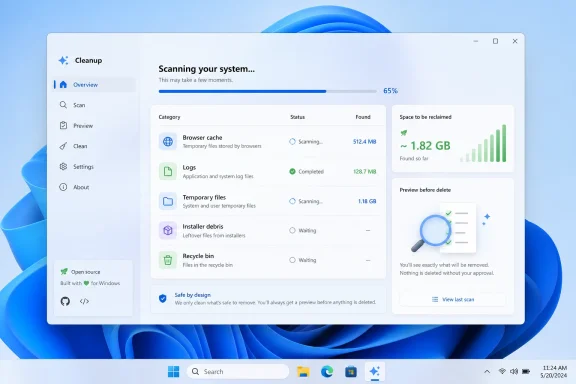
FluentCleaner, a new open-source Windows 11 cleanup utility from the developer behind FlyOOBE, arrived on GitHub in April 2026 as a WinUI 3 app that uses the community-maintained winapp2.ini ruleset to find caches, logs, temporary files, and other deletable system debris. Its pitch is not that it will magically make a tired PC young again. Its pitch is more modest and, for that reason, more interesting: the Windows cleaner may be coming back as a transparent maintenance tool rather than a scareware funnel.
PC cleaners have spent the better part of two decades earning their bad reputation. They promised one-click rejuvenation, displayed alarming red numbers, bundled “registry repair” with dubious performance claims, and often turned routine maintenance into a paid anxiety product. For many technically literate Windows users, “optimizer” became a word to avoid.
FluentCleaner enters that minefield with a pointedly different posture. It is modern-looking, free, open-source, built in C# with WinUI 3, and openly inspired by the era when CCleaner was a small, useful utility rather than a category cautionary tale. That nostalgia is doing a lot of work here, but it is not only marketing. The project’s design suggests a return to a more sober version of system cleaning: show the user what can be removed, rely on inspectable rules, and avoid promising miracles.
That matters because Windows 11 has not eliminated the need for disk hygiene. Microsoft’s own tools can remove temporary files, manage Storage Sense, and free up update space, but they tend to be broad and conservative. FluentCleaner’s bet is that enthusiasts and administrators still want finer-grained control, especially on low-capacity machines, test systems, gaming rigs stuffed with launchers, or aging laptops whose C: drives live permanently in the red.
The danger, of course, is that “more control” is also how people delete things they later wanted. FluentCleaner is not a magic button. It is a sharper broom.
FluentCleaner is powered by winapp2.ini, a long-running, community-maintained collection of cleaning definitions for Windows applications and system components. Instead of guessing wildly across a drive, these definitions describe specific folders, files, registry keys, and application leftovers associated with particular programs. That gives FluentCleaner a vocabulary: browser caches, application logs, memory dumps, recent-file traces, thumbnail stores, temporary installer debris, and other predictable clutter.
This is the smart part of the project. Building a cleaner from scratch is not primarily a UI problem; it is a knowledge problem. A useful cleaner needs to know where hundreds or thousands of applications leave disposable files, and it needs that knowledge to be maintained as applications change. By leaning on winapp2.ini, FluentCleaner inherits years of community labor rather than pretending a lone developer can rediscover the whole Windows software ecosystem.
It also gives the app a kind of transparency that commercial optimizers often lack. The rules are inspectable. They are not merely “health issues” hidden behind a glossy dashboard. That does not make every deletion risk-free, but it does make the system easier to reason about.
The result is closer to a package manager’s metadata than to the old optimizer mystique. FluentCleaner is a parser, a scanner, and a front end for known cleanup routines. The value is not that it has secret knowledge. The value is that the knowledge is legible.
FluentCleaner is not the first open-source attempt to reclaim that ground. BleachBit has long served users who want transparent cleaning without the commercial optimizer circus. Microsoft’s own Storage Sense reduced the need for many third-party tools. Power users can script cleanups with PowerShell, DISM, and scheduled tasks. The niche is not empty.
But FluentCleaner’s timing is good because Windows 11 has created a strange contradiction. The operating system looks increasingly modern, but many of the tools enthusiasts use to manage it still look and feel like relics. A native WinUI 3 cleaner is not automatically better than an older Win32 utility, but presentation matters when the target audience includes users who have learned to distrust anything that looks like it escaped from a 2009 download portal.
The WinUI 3 interface is therefore more than decoration. It is a trust signal, or at least an attempt at one. FluentCleaner says: this is not a fake antivirus clone, not a registry panic machine, not a “free scan, paid fix” installer. It belongs visually to the Windows 11 era.
That is also why the app’s restraint is important. A cleaner that promises “big FPS boosts” immediately sounds like trouble. FluentCleaner’s more credible claim is that cleaning helps in specific circumstances: when disk space is tight, when corrupted cache data breaks an app, when backups are bloated by disposable files, when privacy traces matter, or when Windows Update needs breathing room.
For most mainstream users, that should be enough. If the goal is to remove old update files, empty the recycle bin, clear temporary files, and keep Windows from choking on a tiny SSD, the built-in tools are safer and better supported. They are also less likely to surprise a help desk.
FluentCleaner exists because “safe and supported” is not the same as “flexible.” Microsoft’s tools are necessarily cautious and generalized. They do not try to catalog every application’s cache behavior. They are not designed to expose thousands of community cleaning rules. They are built for the median user and the managed enterprise baseline, not the enthusiast who wants to see exactly why an Electron app, game launcher, browser profile, or development environment has accumulated several gigabytes of residue.
That distinction is important. FluentCleaner is not competing with Storage Sense as the thing every Windows 11 user should enable. It is competing with the class of third-party cleaners people reach for after Storage Sense has done its modest pass and the drive is still cramped.
The most honest version of the app’s value proposition is this: Windows can clean Windows; FluentCleaner tries to clean the Windows ecosystem.
On a 128 GB laptop, a cheap mini PC, a classroom machine, a Windows handheld, or a Copilot+ PC with a surprisingly crowded system partition, the equation changes. Low disk space can interfere with updates, reduce performance, and turn ordinary maintenance into a constant triage exercise. The closer a Windows installation gets to the edge, the more every gigabyte matters.
That is where FluentCleaner’s granular approach becomes useful. A few hundred megabytes of browser cache is not exciting on a desktop. On a device with 6 GB free before Patch Tuesday, it can be the difference between an update installing normally and a user staring at a storage warning. The less generous the hardware, the more valuable careful cleanup becomes.
This is also why the current PC market context matters. Windows 11 continues to push users toward newer hardware, but plenty of people are stretching older systems, repurposing Windows 10-era laptops, or buying inexpensive machines with modest storage. Meanwhile, applications keep growing, browsers cache aggressively, and modern development, gaming, and media workflows can scatter temporary data everywhere.
FluentCleaner is not going to solve under-provisioned hardware. But it may make under-provisioned hardware less annoying.
FluentCleaner’s reliance on winapp2.ini means registry keys may appear in cleaning definitions where specific applications store disposable traces or recent-file histories. That is different from a generic “registry cleaner” claiming to scan for thousands of abstract errors. Still, the warning remains: deletion is deletion.
The responsible way to use a tool like this is selective. Scan first. Read categories. Avoid anything you do not understand. Treat browser sessions, saved form data, app caches, development tool directories, and recently used lists as data with consequences, not anonymous junk. Back up important files before aggressive cleaning, especially if using custom databases.
The app’s own model encourages that more careful posture because it is not pitched as a one-click miracle. That restraint should be preserved as the project evolves. The fastest way for FluentCleaner to lose credibility would be to add vague health scores, performance grades, “AI optimization,” or anything resembling the anxiety dashboards that poisoned the cleaner category in the first place.
The registry ghost never fully leaves the room. FluentCleaner’s job is to keep it from taking over the product.
But open source does not magically make a cleaner safe. A transparent tool can still delete the wrong thing if a rule is wrong, a path expands unexpectedly, a user selects an aggressive entry, or an application changes its storage behavior. Community-maintained databases are powerful precisely because they move faster than vendor-controlled lists; that same speed requires review and caution.
The maintenance burden is also real. FluentCleaner’s early momentum is encouraging, with releases arriving quickly and features such as multi-database support and ARM64 compatibility appearing in the project’s short public life. But cleanup utilities age poorly if they are abandoned. Stale rules are not merely less useful; they can become misleading.
That makes governance as important as code. Who reviews rule changes? How are risky definitions flagged? How does the app communicate destructive actions? Are defaults conservative? Can users easily preview what will be removed? Does the tool keep logs detailed enough to troubleshoot after the fact? These are not cosmetic questions. They determine whether FluentCleaner becomes a trusted maintenance utility or another power tool that only experts should touch.
The best cleaner is not the one that deletes the most. It is the one that makes deletion understandable.
A modern interface lowers the intimidation factor. Categories, scan results, and cleanup selections are easier to parse when the app behaves like it belongs on the current desktop. That matters for users who are technical enough to want control but not necessarily interested in reading raw INI files or writing scripts.
At the same time, WinUI 3 is not a magic wand. The Windows App SDK ecosystem has its own rough edges, and modern Windows UI frameworks have not always delivered the performance or consistency developers hoped for. A pretty cleaner that lags during scans, hides details, or breaks accessibility expectations would be worse than an ugly one that does the job.
FluentCleaner’s claim, then, is twofold: it wants to be modern without becoming bloated, and powerful without becoming hostile. That is a difficult balance. Windows enthusiasts have seen plenty of apps start as clean little tools and gradually accumulate features, toggles, telemetry, bundled recommendations, and “helpful” automation. The project’s minimalist rhetoric is promising, but the future test will be whether it can say no.
A cleaner should not become an operating system inside the operating system.
Cleaning and debloating are related but not identical. Cleaning removes disposable data. Debloating removes, disables, or alters installed components, apps, services, scheduled tasks, and default experiences. The former is mostly maintenance; the latter is system modification. Blending them can be useful, but it can also confuse users about the severity of an action.
FluentCleaner already points toward extensions and additional helper features, including post-install cleaning and debloating-adjacent capabilities. That could make it more valuable as a Windows maintenance hub. It could also drag the app toward the sprawling tweaker category, where every checkbox is a potential support ticket.
The Windows tweaker world has always been a mixture of genuine relief and accumulated folklore. Some tweaks remove annoyances. Some reverse Microsoft defaults that many users dislike. Some are placebo. Some break future updates. A good utility distinguishes between these categories rather than presenting them all as equal opportunities for optimization.
If FluentCleaner remains disciplined, its connection to debloating tools can be a strength. If it becomes a grab bag of every Windows complaint in executable form, it will inherit all the distrust that comes with that territory.
That does not mean IT pros should ignore it. Tools like FluentCleaner can be useful in labs, repair benches, small businesses, non-domain environments, and one-off troubleshooting sessions. They can reveal where storage is going. They can help clean stubborn app residues. They can provide a faster path than manually spelunking through AppData for every bloated profile.
But for managed fleets, the better pattern is to learn from the tool rather than blindly deploy it. If a particular cache or log source is causing repeated storage issues, administrators can create targeted scripts, policies, remediation packages, or Intune actions with known behavior. FluentCleaner can serve as a discovery aid; enterprise maintenance should still be codified through controlled channels.
There is also a compliance angle. Cleaning recent-file lists, browser traces, logs, and application caches may have privacy benefits for individuals, but organizations may need to preserve certain logs or user data for auditing, security, or legal reasons. A personal privacy win can be an enterprise retention problem.
That is why FluentCleaner’s natural first audience is not the Fortune 500 desktop team. It is the enthusiast, the repair technician, the homelab admin, the small-office troubleshooter, and the Windows user who understands that “delete” is a verb with consequences.
Still, Microsoft’s caution leaves room for tools like this. Windows 11 is full of maintenance surfaces, but they are fragmented. Storage Sense lives in Settings. Disk Cleanup still lingers. App reset and repair options live elsewhere. Browser cleanup happens inside browsers. Store caches, update leftovers, crash dumps, temp folders, and application-specific residues all have their own logic. Users who want a single, inspectable map of disposable data rarely get one from Microsoft.
FluentCleaner’s appeal comes from joining those dots. It says the operating system’s cleanup story is necessary but incomplete. It does not replace the supported baseline; it fills the enthusiast gap above it.
That gap has widened as Windows itself has become more service-like. Feature updates, Store apps, WebView components, game services, cloud sync clients, AI features, and vendor utilities all leave traces. The old mental model of “Windows plus installed programs” has become “Windows plus a constantly updating pile of frameworks, caches, packages, and services.” Maintenance tools that understand that sprawl will continue to have an audience.
The trick is to acknowledge the sprawl without exploiting it.
A good cleaner should be boring. It should scan, explain, preview, delete, log, and get out of the way. It should not gamify system anxiety. It should not imply that every cache is a disease. It should not push users toward risky tweaks under the banner of optimization. It should not treat “more removed” as inherently better.
There is a long-term product challenge here. Donation-funded open source projects need attention. Attention rewards screenshots, big numbers, new features, and dramatic claims. The cleaner category, meanwhile, has a gravitational pull toward “health checks,” “boosts,” and “optimization suites” because those are easier to sell than honest disk hygiene.
FluentCleaner’s best future is to resist that pull. It should become more precise, not more theatrical. Better rule explanations, safer defaults, clearer previews, improved logs, risk tiers, restore guidance, and strong handling of custom databases would do more for trust than any performance slogan.
In other words, the app should mature like a tool, not expand like a platform.
Source: Neowin This Windows 11 app promises free, modern, and efficient system cleaning for your PC
 The Cleaner Returns Wearing a Windows 11 Suit
PC cleaners have spent the better part of two decades earning their bad reputation. They promised one-click rejuvenation, displayed alarming red numbers, bundled “registry repair” with dubious performance claims, and often turned routine maintenance into a paid anxiety product. For many technically literate Windows users, “optimizer” became a word to avoid.FluentCleaner enters that minefield with a pointedly different posture. It is modern-looking, free, open-source, built in C# with WinUI 3, and openly inspired by the era when CCleaner was a small, useful utility rather than a category cautionary tale. That nostalgia is doing a lot of work here, but it is not only marketing. The project’s design suggests a return to a more sober version of system cleaning: show the user what can be removed, rely on inspectable rules, and avoid promising miracles.
That matters because Windows 11 has not eliminated the need for disk hygiene. Microsoft’s own tools can remove temporary files, manage Storage Sense, and free up update space, but they tend to be broad and conservative. FluentCleaner’s bet is that enthusiasts and administrators still want finer-grained control, especially on low-capacity machines, test systems, gaming rigs stuffed with launchers, or aging laptops whose C: drives live permanently in the red.
The danger, of course, is that “more control” is also how people delete things they later wanted. FluentCleaner is not a magic button. It is a sharper broom.
Winapp2.ini Is the Real Product
The most important thing about FluentCleaner is not the app window. It is the database underneath it.FluentCleaner is powered by winapp2.ini, a long-running, community-maintained collection of cleaning definitions for Windows applications and system components. Instead of guessing wildly across a drive, these definitions describe specific folders, files, registry keys, and application leftovers associated with particular programs. That gives FluentCleaner a vocabulary: browser caches, application logs, memory dumps, recent-file traces, thumbnail stores, temporary installer debris, and other predictable clutter.
This is the smart part of the project. Building a cleaner from scratch is not primarily a UI problem; it is a knowledge problem. A useful cleaner needs to know where hundreds or thousands of applications leave disposable files, and it needs that knowledge to be maintained as applications change. By leaning on winapp2.ini, FluentCleaner inherits years of community labor rather than pretending a lone developer can rediscover the whole Windows software ecosystem.
It also gives the app a kind of transparency that commercial optimizers often lack. The rules are inspectable. They are not merely “health issues” hidden behind a glossy dashboard. That does not make every deletion risk-free, but it does make the system easier to reason about.
The result is closer to a package manager’s metadata than to the old optimizer mystique. FluentCleaner is a parser, a scanner, and a front end for known cleanup routines. The value is not that it has secret knowledge. The value is that the knowledge is legible.
The Anti-CCleaner Argument Is Really an Anti-Dark-Pattern Argument
The developer’s positioning is blunt: this is the idea of CCleaner rebuilt without the baggage. That framing will resonate with a certain kind of Windows user because CCleaner occupies an unusual place in PC culture. It was once the default recommendation for cleaning temp files and browser junk. Then, over time, the category around it became entangled with upsells, telemetry concerns, driver-update pitches, registry-cleaning folklore, and the general rot that comes when utility software becomes a monetization surface.FluentCleaner is not the first open-source attempt to reclaim that ground. BleachBit has long served users who want transparent cleaning without the commercial optimizer circus. Microsoft’s own Storage Sense reduced the need for many third-party tools. Power users can script cleanups with PowerShell, DISM, and scheduled tasks. The niche is not empty.
But FluentCleaner’s timing is good because Windows 11 has created a strange contradiction. The operating system looks increasingly modern, but many of the tools enthusiasts use to manage it still look and feel like relics. A native WinUI 3 cleaner is not automatically better than an older Win32 utility, but presentation matters when the target audience includes users who have learned to distrust anything that looks like it escaped from a 2009 download portal.
The WinUI 3 interface is therefore more than decoration. It is a trust signal, or at least an attempt at one. FluentCleaner says: this is not a fake antivirus clone, not a registry panic machine, not a “free scan, paid fix” installer. It belongs visually to the Windows 11 era.
That is also why the app’s restraint is important. A cleaner that promises “big FPS boosts” immediately sounds like trouble. FluentCleaner’s more credible claim is that cleaning helps in specific circumstances: when disk space is tight, when corrupted cache data breaks an app, when backups are bloated by disposable files, when privacy traces matter, or when Windows Update needs breathing room.
Windows Already Has a Cleaner, but Not This Cleaner
The obvious objection is that Windows already includes cleanup tools. Storage Sense can automatically remove temporary files and manage some storage pressure. The Settings app offers cleanup recommendations. Disk Cleanup, though increasingly antique in feel, still exists. Windows Update can trigger its own cleanup behavior. On managed devices, administrators can configure storage policies rather than asking users to run random GitHub utilities.For most mainstream users, that should be enough. If the goal is to remove old update files, empty the recycle bin, clear temporary files, and keep Windows from choking on a tiny SSD, the built-in tools are safer and better supported. They are also less likely to surprise a help desk.
FluentCleaner exists because “safe and supported” is not the same as “flexible.” Microsoft’s tools are necessarily cautious and generalized. They do not try to catalog every application’s cache behavior. They are not designed to expose thousands of community cleaning rules. They are built for the median user and the managed enterprise baseline, not the enthusiast who wants to see exactly why an Electron app, game launcher, browser profile, or development environment has accumulated several gigabytes of residue.
That distinction is important. FluentCleaner is not competing with Storage Sense as the thing every Windows 11 user should enable. It is competing with the class of third-party cleaners people reach for after Storage Sense has done its modest pass and the drive is still cramped.
The most honest version of the app’s value proposition is this: Windows can clean Windows; FluentCleaner tries to clean the Windows ecosystem.
The Low-End PC Is Where This Starts to Make Sense
On a workstation with a 2 TB NVMe drive, 64 GB of RAM, and healthy maintenance habits, system cleaning is mostly psychological comfort. It may reclaim some space. It may remove some traces. It may make a user feel tidier. It probably will not transform performance.On a 128 GB laptop, a cheap mini PC, a classroom machine, a Windows handheld, or a Copilot+ PC with a surprisingly crowded system partition, the equation changes. Low disk space can interfere with updates, reduce performance, and turn ordinary maintenance into a constant triage exercise. The closer a Windows installation gets to the edge, the more every gigabyte matters.
That is where FluentCleaner’s granular approach becomes useful. A few hundred megabytes of browser cache is not exciting on a desktop. On a device with 6 GB free before Patch Tuesday, it can be the difference between an update installing normally and a user staring at a storage warning. The less generous the hardware, the more valuable careful cleanup becomes.
This is also why the current PC market context matters. Windows 11 continues to push users toward newer hardware, but plenty of people are stretching older systems, repurposing Windows 10-era laptops, or buying inexpensive machines with modest storage. Meanwhile, applications keep growing, browsers cache aggressively, and modern development, gaming, and media workflows can scatter temporary data everywhere.
FluentCleaner is not going to solve under-provisioned hardware. But it may make under-provisioned hardware less annoying.
The Registry Ghost Still Haunts Every Cleaner
Any discussion of PC cleaners eventually runs into the registry. For years, registry cleaning was sold as a performance cure, and for years it was one of the most suspect parts of the optimizer industry. The basic problem is that the Windows registry can contain stale entries without those entries meaningfully slowing a system down. Removing the wrong entry, however, can break applications or Windows behaviors in ways that are tedious to diagnose.FluentCleaner’s reliance on winapp2.ini means registry keys may appear in cleaning definitions where specific applications store disposable traces or recent-file histories. That is different from a generic “registry cleaner” claiming to scan for thousands of abstract errors. Still, the warning remains: deletion is deletion.
The responsible way to use a tool like this is selective. Scan first. Read categories. Avoid anything you do not understand. Treat browser sessions, saved form data, app caches, development tool directories, and recently used lists as data with consequences, not anonymous junk. Back up important files before aggressive cleaning, especially if using custom databases.
The app’s own model encourages that more careful posture because it is not pitched as a one-click miracle. That restraint should be preserved as the project evolves. The fastest way for FluentCleaner to lose credibility would be to add vague health scores, performance grades, “AI optimization,” or anything resembling the anxiety dashboards that poisoned the cleaner category in the first place.
The registry ghost never fully leaves the room. FluentCleaner’s job is to keep it from taking over the product.
Open Source Helps, but It Does Not Absolve Risk
Open source is a major advantage for a system utility. Users can inspect the code. Security-minded administrators can examine what the executable is intended to do. Bugs can be reported publicly. The rulesets can be audited. The app is not a black box asking for trust while rummaging through system directories.But open source does not magically make a cleaner safe. A transparent tool can still delete the wrong thing if a rule is wrong, a path expands unexpectedly, a user selects an aggressive entry, or an application changes its storage behavior. Community-maintained databases are powerful precisely because they move faster than vendor-controlled lists; that same speed requires review and caution.
The maintenance burden is also real. FluentCleaner’s early momentum is encouraging, with releases arriving quickly and features such as multi-database support and ARM64 compatibility appearing in the project’s short public life. But cleanup utilities age poorly if they are abandoned. Stale rules are not merely less useful; they can become misleading.
That makes governance as important as code. Who reviews rule changes? How are risky definitions flagged? How does the app communicate destructive actions? Are defaults conservative? Can users easily preview what will be removed? Does the tool keep logs detailed enough to troubleshoot after the fact? These are not cosmetic questions. They determine whether FluentCleaner becomes a trusted maintenance utility or another power tool that only experts should touch.
The best cleaner is not the one that deletes the most. It is the one that makes deletion understandable.
The WinUI 3 Choice Is Symbolic and Practical
There is something faintly funny about a cleanup utility making a point of being a “real” Windows 11 app. Cleaning temporary files is not glamorous. Caches do not care whether the buttons use Mica. Yet FluentCleaner’s WinUI 3 foundation is central to its identity because Windows utilities have long suffered from an aesthetic trust gap.A modern interface lowers the intimidation factor. Categories, scan results, and cleanup selections are easier to parse when the app behaves like it belongs on the current desktop. That matters for users who are technical enough to want control but not necessarily interested in reading raw INI files or writing scripts.
At the same time, WinUI 3 is not a magic wand. The Windows App SDK ecosystem has its own rough edges, and modern Windows UI frameworks have not always delivered the performance or consistency developers hoped for. A pretty cleaner that lags during scans, hides details, or breaks accessibility expectations would be worse than an ugly one that does the job.
FluentCleaner’s claim, then, is twofold: it wants to be modern without becoming bloated, and powerful without becoming hostile. That is a difficult balance. Windows enthusiasts have seen plenty of apps start as clean little tools and gradually accumulate features, toggles, telemetry, bundled recommendations, and “helpful” automation. The project’s minimalist rhetoric is promising, but the future test will be whether it can say no.
A cleaner should not become an operating system inside the operating system.
Debloating Is the Temptation Waiting Next Door
FluentCleaner’s lineage matters because its developer is also associated with FlyOOBE, a tool aimed at smoothing, customizing, and debloating the Windows 11 setup experience. That background gives FluentCleaner credibility among users already interested in reducing Windows friction. It also raises the question of scope.Cleaning and debloating are related but not identical. Cleaning removes disposable data. Debloating removes, disables, or alters installed components, apps, services, scheduled tasks, and default experiences. The former is mostly maintenance; the latter is system modification. Blending them can be useful, but it can also confuse users about the severity of an action.
FluentCleaner already points toward extensions and additional helper features, including post-install cleaning and debloating-adjacent capabilities. That could make it more valuable as a Windows maintenance hub. It could also drag the app toward the sprawling tweaker category, where every checkbox is a potential support ticket.
The Windows tweaker world has always been a mixture of genuine relief and accumulated folklore. Some tweaks remove annoyances. Some reverse Microsoft defaults that many users dislike. Some are placebo. Some break future updates. A good utility distinguishes between these categories rather than presenting them all as equal opportunities for optimization.
If FluentCleaner remains disciplined, its connection to debloating tools can be a strength. If it becomes a grab bag of every Windows complaint in executable form, it will inherit all the distrust that comes with that territory.
Enterprise IT Will Mostly Admire It From a Distance
For sysadmins, FluentCleaner is interesting but not immediately deployable in the way an enthusiast might hope. Enterprise Windows maintenance is governed by repeatability, supportability, logging, rollback, policy, and vendor accountability. A GitHub cleaner powered by community rules is not something most organizations will casually push across a fleet.That does not mean IT pros should ignore it. Tools like FluentCleaner can be useful in labs, repair benches, small businesses, non-domain environments, and one-off troubleshooting sessions. They can reveal where storage is going. They can help clean stubborn app residues. They can provide a faster path than manually spelunking through AppData for every bloated profile.
But for managed fleets, the better pattern is to learn from the tool rather than blindly deploy it. If a particular cache or log source is causing repeated storage issues, administrators can create targeted scripts, policies, remediation packages, or Intune actions with known behavior. FluentCleaner can serve as a discovery aid; enterprise maintenance should still be codified through controlled channels.
There is also a compliance angle. Cleaning recent-file lists, browser traces, logs, and application caches may have privacy benefits for individuals, but organizations may need to preserve certain logs or user data for auditing, security, or legal reasons. A personal privacy win can be an enterprise retention problem.
That is why FluentCleaner’s natural first audience is not the Fortune 500 desktop team. It is the enthusiast, the repair technician, the homelab admin, the small-office troubleshooter, and the Windows user who understands that “delete” is a verb with consequences.
Microsoft Created the Space by Being Conservative
It would be easy to frame FluentCleaner as a rebuke to Microsoft, but that is too simple. Microsoft is right to keep built-in cleanup conservative. Windows has to serve everyone from gamers to hospitals, from school laptops to industrial control machines, from people who never open Settings to administrators who manage thousands of endpoints. A built-in cleaner that aggressively targets third-party app traces would generate endless complaints.Still, Microsoft’s caution leaves room for tools like this. Windows 11 is full of maintenance surfaces, but they are fragmented. Storage Sense lives in Settings. Disk Cleanup still lingers. App reset and repair options live elsewhere. Browser cleanup happens inside browsers. Store caches, update leftovers, crash dumps, temp folders, and application-specific residues all have their own logic. Users who want a single, inspectable map of disposable data rarely get one from Microsoft.
FluentCleaner’s appeal comes from joining those dots. It says the operating system’s cleanup story is necessary but incomplete. It does not replace the supported baseline; it fills the enthusiast gap above it.
That gap has widened as Windows itself has become more service-like. Feature updates, Store apps, WebView components, game services, cloud sync clients, AI features, and vendor utilities all leave traces. The old mental model of “Windows plus installed programs” has become “Windows plus a constantly updating pile of frameworks, caches, packages, and services.” Maintenance tools that understand that sprawl will continue to have an audience.
The trick is to acknowledge the sprawl without exploiting it.
The Real Test Is Whether FluentCleaner Stays Boring
The most encouraging thing about FluentCleaner is also the least flashy: it appears to understand that cleaning is maintenance, not transformation. That is the line separating a useful utility from snake oil.A good cleaner should be boring. It should scan, explain, preview, delete, log, and get out of the way. It should not gamify system anxiety. It should not imply that every cache is a disease. It should not push users toward risky tweaks under the banner of optimization. It should not treat “more removed” as inherently better.
There is a long-term product challenge here. Donation-funded open source projects need attention. Attention rewards screenshots, big numbers, new features, and dramatic claims. The cleaner category, meanwhile, has a gravitational pull toward “health checks,” “boosts,” and “optimization suites” because those are easier to sell than honest disk hygiene.
FluentCleaner’s best future is to resist that pull. It should become more precise, not more theatrical. Better rule explanations, safer defaults, clearer previews, improved logs, risk tiers, restore guidance, and strong handling of custom databases would do more for trust than any performance slogan.
In other words, the app should mature like a tool, not expand like a platform.
The Useful Broom Has Sharp Bristles
The concrete lesson for Windows users is not that everyone should rush to install another cleaner. It is that the category still has a legitimate use when it is stripped of panic marketing and treated as a controlled maintenance task.- FluentCleaner is best understood as a modern front end for community cleanup rules, not as a universal Windows performance booster.
- The app is most useful on systems where storage pressure is real, such as low-capacity laptops, repair machines, test installs, and PCs with years of accumulated application debris.
- Built-in Windows tools remain the safer first stop for mainstream users, especially Storage Sense and cleanup recommendations.
- The winapp2.ini model gives FluentCleaner useful transparency, but it also means users should read categories carefully before deleting data.
- Open source improves trust and auditability, but it does not remove the need for backups, previews, and conservative defaults.
- FluentCleaner’s long-term credibility depends on avoiding the dark patterns that made the PC cleaner category toxic in the first place.
Source: Neowin This Windows 11 app promises free, modern, and efficient system cleaning for your PC
