

FluentFlyout’s newest release finally delivers two headline features many Windows 11 power users have been waiting for: native ARM64 builds and multi‑monitor / per‑display flyout placement, alongside a collection of polish fixes and taskbar widget improvements that make the app feel more production‑ready on modern hardware. This update narrows the gap between third‑party polish and built‑in system UX, while underlining both the opportunity and the care required when adopting community‑built system utilities on ARM‑based Copilot+ and Snapdragon X machines.
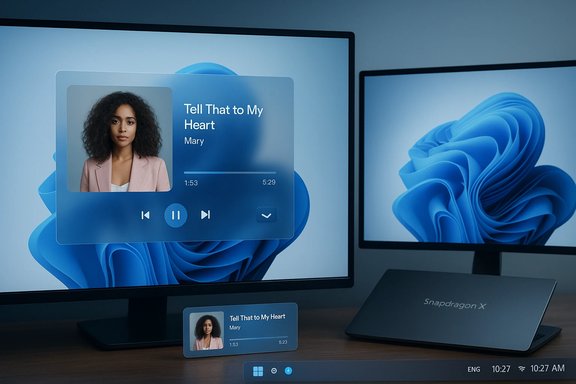
FluentFlyout is an open‑source utility that replaces and extends Windows 11’s default media and status flyouts with an experience that matches Windows’ Fluent design language. It provides a richer media flyout with album art, a seek bar (when supported by the media app), an “Up Next” view, lock‑key indicators, and a taskbar widget that surfaces media info inline on the taskbar. The project is distributed both via GitHub releases and as a Microsoft Store package; the Store edition offers the convenience of auto‑updates and an optional one‑time payment to support development, while GitHub remains the free, full‑featured source for advanced installers and MSIX bundles.
Third‑party developers have long stepped in where Microsoft’s shell choices left usability gaps, and FluentFlyout has become one of the most visible examples: small, focused, and tightly scoped—but highly polished. The latest release builds on that reputation by addressing platform diversity (ARM64) and multi‑display ergonomics, two practical blockers for broader adoption on newer laptops and desk setups.
Why this matters in practice:
Community influence also drives feature choices (taskbar alignment, custom padding, and per‑monitor switching are classic examples of power‑user requests becoming standard features). This rapid iteration is a key advantage of independent projects compared with larger vendor release cycles.
However, the broader platform still depends on OEM drivers, Microsoft’s emulation improvements, and developer willingness to release ARM64 artifacts. Native binaries are a major step forward, but they are one piece of a larger compatibility puzzle.
For everyday users, the simplest path is to check the Microsoft Store for an ARM64‑capable FluentFlyout package; power users and administrators will find the GitHub MSIX bundle useful but should plan for certificate management and testing across representative hardware. The update is a meaningful milestone for Windows on Arm and a practical demonstration of how open‑source communities continue to shape and fill gaps in the modern Windows desktop experience.
Source: Windows Report https://windowsreport.com/popular-w...adds-arm64-support-and-multi-monitor-flyouts/
 Background
FluentFlyout is an open‑source utility that replaces and extends Windows 11’s default media and status flyouts with an experience that matches Windows’ Fluent design language. It provides a richer media flyout with album art, a seek bar (when supported by the media app), an “Up Next” view, lock‑key indicators, and a taskbar widget that surfaces media info inline on the taskbar. The project is distributed both via GitHub releases and as a Microsoft Store package; the Store edition offers the convenience of auto‑updates and an optional one‑time payment to support development, while GitHub remains the free, full‑featured source for advanced installers and MSIX bundles.Third‑party developers have long stepped in where Microsoft’s shell choices left usability gaps, and FluentFlyout has become one of the most visible examples: small, focused, and tightly scoped—but highly polished. The latest release builds on that reputation by addressing platform diversity (ARM64) and multi‑display ergonomics, two practical blockers for broader adoption on newer laptops and desk setups.
What’s New: The Update Breakdown
Native ARM64 support — the headline change
The most consequential technical change is explicit ARM64 configuration and builds. The developer now provides ARM64 artifacts so FluentFlyout runs natively on ARM64 Windows devices—this includes recent Qualcomm Snapdragon X family / Copilot+ PCs—rather than relying on x86/x64 emulation. Native binaries remove emulation overhead, reduce startup time, and typically consume less power while improving compatibility with platform APIs. The changelog calls out ARM64 support directly.Why this matters in practice:
- Faster startup and lower CPU overhead compared with emulated processes.
- Potential battery life improvement on thin‑and‑light ARM laptops.
- Fewer emulation‑related edge cases and better integration with platform features.
Multi‑monitor flyouts and display switching
New display‑aware controls allow users to select which monitor the flyouts and taskbar widget appear on. This matters for multi‑monitor setups where the taskbar or user focus changes between displays; being able to route the flyout to the active or preferred display reduces visual distance and context switching. The release notes list a “Switch Monitors” or monitor‑selection capability as part of the update.Taskbar widget improvements and UI polish
Several smaller but important improvements landed in the same release:- Taskbar widget alignment and custom padding (left/center/right and per‑taskbar adjustments).
- Cover‑art tooltips and other micro‑UX refinements.
- Performance fixes to reduce lag when media keys are pressed rapidly.
- Visual fixes (lock flyout glitches, acrylic/mica opacity adjustments) and localization updates.
Why Native ARM64 Builds Matter (Technical Analysis)
ARM64 native binaries are no longer an academic checkbox; they affect end‑user experience and enterprise deployment.- Performance: Emulation imposes CPU cycles and translation overhead. Native ARM64 code eliminates those costs, often yielding snappier interactions—important for an app that responds to real‑time keypresses (play/pause, skip).
- Power efficiency: On battery‑constrained laptops, even small reductions in background CPU usage add up over a workday; running native code is frequently more efficient.
- Compatibility and reliability: Emulation can introduce timing and API mismatches that surface as subtle bugs; native builds reduce the surface area for such problems.
Installation and Distribution: Store vs GitHub
FluentFlyout is distributed two ways; users should choose based on risk tolerance and maintenance preferences.- Microsoft Store (recommended for most users)
- Pros: Automatic updates, streamlined installation flow, and the Store should deliver the appropriate architecture package for the device (including ARM64 when available).
- Cons: Some regions or OEM Store variants may behave differently; the Store edition includes an optional paid convenience unlock for developers.
- GitHub MSIX / MSIXBUNDLE (for power users)
- Pros: Free and fully featured, direct access to release notes and artifacts, and transparent source code.
- Cons: Manual steps—installing certificates and trusting the package—are required for non‑Store artifacts and can be confusing for non‑technical users.
- Check the Microsoft Store for FluentFlyout and install it; the Store build is the simplest path to an ARM64 package.
- If the Store doesn't present an ARM64 package, download the ARM64‑labelled MSIXBUNDLE from the project’s GitHub Releases page and follow the README for installing the self‑signed certificate and package.
- Verify the running process architecture in Task Manager (enable the appropriate Platform/Architecture column) to confirm the app is running as ARM64, not an emulated x64 process.
Compatibility, Limits, and Known Caveats
FluentFlyout integrates with Windows’ System Media Transport Controls (SMTC). This architecture brings both compatibility and limits:- SMTC dependency: The rich features (seek bar, Up Next, position metadata) depend on source apps exposing metadata via SMTC. Some web‑hosted players and legacy apps may not provide full metadata, meaning some features won’t be available in those edge cases. This is an application limitation, not a shortcoming of FluentFlyout.
- Driver and OEM quirks: ARM-based Windows PCs sometimes include OEM‑specific drivers and display peculiarities. Visual placement or taskbar widget alignment can be impacted by driver behavior or non‑standard taskbar configurations; the developer has added custom padding and alignment controls to mitigate these variations, but some edge cases may persist.
- Manual installation friction: GitHub MSIX installs often require users to install certificates and trust the package. This step is normal for unsigned or self‑signed distributions, but it raises the bar for non‑technical users and creates potential for mistakes if users obtain packages from incorrect sources. Best practice: always download releases from the official repository and follow documented steps.
- Distribution inconsistency: Whether ARM64 packages appear automatically via the Microsoft Store can vary by region and OEM Store mirrors. The Store’s packaging and distribution mechanisms are sometimes region‑sensitive, so availability may be inconsistent immediately after release. This is an open question the community is watching.
Security and Privacy Considerations
FluentFlyout’s open‑source status provides critical transparency and reduces certain trust barriers, but open source is not an automatic security guarantee.- Transparency is a strength: Source availability enables independent review, and the project’s active changelog and GitHub Issues feed show ongoing maintenance and community oversight. This level of visibility helps identify and remediate suspicious code or unsafe behavior.
- Practical risks remain:
- Distribution integrity: Non‑Store installs require trusting a certificate. Users must ensure they download official releases and verify package signatures where provided.
- Privilege and hooking: The app hooks into system media controls and UI events; while this is expected for its functionality, hooking code has a larger attack surface than a sandboxed utility. Active maintenance and community review reduce risk, but administrators should evaluate deployments, especially in managed environments.
- Privacy footprint: FluentFlyout reads media metadata exposed by apps (title, artist, cover art). There’s no public indication of telemetry exfiltration, but privacy‑sensitive users should audit the repository and release artifacts to be certain. Open source enables such audits; the responsible route is to confirm there’s no opt‑out telemetry or hidden background reporting in your installed build.
Enterprise & IT Deployment Guidance
For IT professionals planning to allow or standardize FluentFlyout across fleets, consider the following checklist:- Validate architecture needs: If you have a fleet of ARM64 Copilot+ or Snapdragon X devices, prefer the Store ARM64 package or verify the GitHub ARM64 MSIXBUNDLE for each device model.
- Test across representative hardware: Check for taskbar alignment, monitor placement, and SMTC behavior with your common media apps and browser versions. OEM driver differences can create subtle UI placement issues.
- Certificate & signing policy: If using GitHub packages, establish a secure workflow for signing and distributing MSIX bundles internally; avoid asking end users to install certificates manually.
- Risk assessment: Evaluate the risk profile for hooking system UI in your environment—particularly on machines used for sensitive tasks—and consider whether to restrict installation to managed users.
- Support plan: Prepare rollback steps (store reinstall or previous MSIX) and guidance for reporting issues to the GitHub Issues page with logs. Community‑driven projects rely on issue reports to find and fix bugs quickly.
Hands‑On: Confirming ARM64 and Troubleshooting (Step‑by‑Step)
- Install via Microsoft Store when possible. The Store should deliver the right architecture package automatically.
- If manually installing, open Task Manager → right‑click a column header → enable the “Platform” or “Architecture” column (Windows version dependent). Confirm the FluentFlyout process shows ARM64 and not x64 emulation.
- If flyouts don’t show:
- Check that the app is permitted to show overlays.
- Ensure media keys aren’t intercepted by another app.
- Try the taskbar widget padding/alignment options to mitigate odd placements on customized taskbars.
- If experiencing crashes after update: roll back to the prior release and report the issue to GitHub with logs. The developer’s cadence suggests a responsive fix cycle, but reproducible reports accelerate patches.
Developer, Community, and Funding Dynamics
FluentFlyout’s model—free, open‑source core releases with a Microsoft Store convenience purchase—has become a pragmatic approach for solo and small‑team maintainers. It preserves open source accessibility while offering a modest sustainability path for continued work. The addition of ARM64 targets shows developer responsiveness to platform shifts and community requests, which is a strong signal for long‑term maintenance and feature growth.Community influence also drives feature choices (taskbar alignment, custom padding, and per‑monitor switching are classic examples of power‑user requests becoming standard features). This rapid iteration is a key advantage of independent projects compared with larger vendor release cycles.
Critical Analysis: Strengths, Risks, and Unanswered Questions
Strengths
- Immediate user benefit: Native ARM64 support and multi‑monitor placement are tangible quality‑of‑life improvements for power users and owners of ARM laptops.
- Polished UX: The combination of Fluent styling, Mica/Acrylic options, and taskbar integration gives a native feel many users prefer to the default Quick Settings overlay.
- Open source and active maintenance: Transparent development, public changelogs, and a steady release cadence increase trustworthiness and allow community audits.
Risks and caveats
- Distribution variability: Store rollouts can be inconsistent across regions and OEM store variants; not all users may immediately see ARM64 packages in the Store. This complicates mass rollout plans.
- Installation friction for non‑Store users: Manual certificate installation for MSIX bundles can confuse and create security mistakes if users download from unofficial places.
- Platform edge cases: OEM drivers, unusual taskbar customizations, or non‑standard media apps that don’t expose SMTC metadata could blunt the promised experience for some users.
Unanswered questions and verification points
- Will the Microsoft Store push ARM64 artifacts uniformly across regions and OEM partner stores, or will there be delayed/mirrored rollouts? This remains to be seen and may vary by Store packaging policies.
- Real‑world stability across the full range of Snapdragon X implementations is not yet exhaustively validated; anecdotal reports vary and broader telemetry would help confirm cross‑device reliability. Treat early reports as promising but not definitive.
What This Means for Windows on Arm
FluentFlyout’s ARM64 packaging is a signal: independent developers are increasingly treating Windows on Arm as a first‑class platform rather than an afterthought. As more mainstream utilities produce native ARM64 builds, the software ecosystem on Snapdragon X and Copilot+ devices grows more compelling for everyday productivity users.However, the broader platform still depends on OEM drivers, Microsoft’s emulation improvements, and developer willingness to release ARM64 artifacts. Native binaries are a major step forward, but they are one piece of a larger compatibility puzzle.
Conclusion
The FluentFlyout update that adds native ARM64 support and multi‑monitor flyout control is a concrete, practical improvement for Windows 11 users—especially those on Copilot+ and Snapdragon X ARM64 hardware. It reduces reliance on emulation, improves responsiveness for media controls, and tightens the overall user experience through taskbar widget polish and multiple visual fixes. The release exemplifies how nimble, community‑driven projects can deliver focused UX features faster than large vendors, while also highlighting the tradeoffs of manual distribution, device heterogeneity, and the need for careful installation practices in managed environments.For everyday users, the simplest path is to check the Microsoft Store for an ARM64‑capable FluentFlyout package; power users and administrators will find the GitHub MSIX bundle useful but should plan for certificate management and testing across representative hardware. The update is a meaningful milestone for Windows on Arm and a practical demonstration of how open‑source communities continue to shape and fill gaps in the modern Windows desktop experience.
Source: Windows Report https://windowsreport.com/popular-w...adds-arm64-support-and-multi-monitor-flyouts/
