

FlyOOBE 2.0 arrives as a tidy, opinionated answer to a single complaint: Windows is becoming a platform that chooses for you, and some users want the choice back.
FlyOOBE began life as a compact, community‑driven workaround to Windows 11’s setup gating: a way to get modern Windows running on older machines. Over time the project — by the developer known as builtbybel and formerly associated with Flyby11 and ThisIsWin11 — shifted from a pure bypass utility into a full Out‑Of‑Box Experience (OOBE) configurator and debloat toolkit. The 2.0 wave represents a consolidation of that history: the original bypass engine, a modular OOBE customiser, and new UI and extension infrastructure have been folded into a single release that’s explicitly positioned as user-first control over day‑one Windows behavior. That repositioning is politically charged. FlyOOBE doesn’t just automate setup; it opts out of Microsoft’s default nudges — Copilot prompts, Bing integrations, app provisioning, forced cloud account workflows — and offers those options to users explicitly during OOBE. For privacy‑minded consumers, refurbishers, and technicians the appeal is obvious: fewer surprises, repeatable profiles, and the ability to ship machines that don’t expose AI surfaces by default. Igor’sLAB’s recent coverage captures the tone: FlyOOBE 2.0 is framed as a “digital self‑defense” tool against aggressive AI integration.
Community projects push the industry on both fronts. They demonstrate demand for modular installs and privacy defaults. They also create trade‑offs — unsupported installs mean unsupported updates, and the community then becomes responsible for long‑term maintenance. FlyOOBE’s existence, adoption and the subsequent copycat/mirror incident underline the complex balance between vendor control, user agency and supply‑chain safety.
For enterprises, regulated industries, and primary workstations the right answer remains vendor‑sanctioned upgrade and management paths. FlyOOBE is an excellent tactical tool, not a strategic platform replacement.
If you choose to use FlyOOBE:
Source: igor´sLAB Flyoobe 2.0: Digital self-defense against Microsoft’s AI overreach | igor´sLAB
 Background / Overview
FlyOOBE began life as a compact, community‑driven workaround to Windows 11’s setup gating: a way to get modern Windows running on older machines. Over time the project — by the developer known as builtbybel and formerly associated with Flyby11 and ThisIsWin11 — shifted from a pure bypass utility into a full Out‑Of‑Box Experience (OOBE) configurator and debloat toolkit. The 2.0 wave represents a consolidation of that history: the original bypass engine, a modular OOBE customiser, and new UI and extension infrastructure have been folded into a single release that’s explicitly positioned as user-first control over day‑one Windows behavior. That repositioning is politically charged. FlyOOBE doesn’t just automate setup; it opts out of Microsoft’s default nudges — Copilot prompts, Bing integrations, app provisioning, forced cloud account workflows — and offers those options to users explicitly during OOBE. For privacy‑minded consumers, refurbishers, and technicians the appeal is obvious: fewer surprises, repeatable profiles, and the ability to ship machines that don’t expose AI surfaces by default. Igor’sLAB’s recent coverage captures the tone: FlyOOBE 2.0 is framed as a “digital self‑defense” tool against aggressive AI integration. What’s new in FlyOOBE 2.0
UI overhaul and extension engine
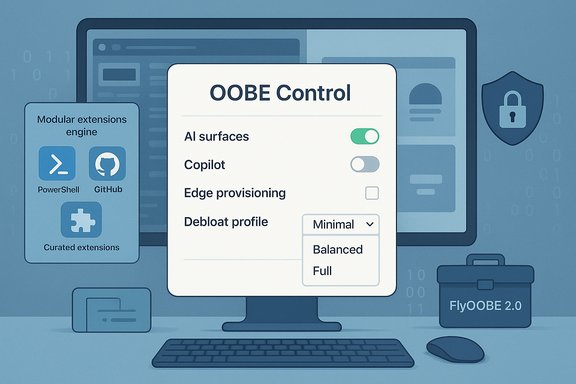
Version 2.0 debuts a redesigned interface focused on clarity and speed. The UI reduces menu complexity, adds stack‑based back navigation, and moves extension management into categorized dropdowns so users can find and execute extensions without UI freezes. As part of the 2.0 preview cadence the developer describes asynchronous search/load operations and a generalized extensions engine that supports community PowerShell modules and curated presets. These are practical, user‑experience changes that move FlyOOBE beyond an ad‑hoc script runner into a repeatable toolkit for imaging and refurbishment.OOBE control and AI discovery
FlyOOBE’s signature capability — OOBE‑level discovery and disablement of AI surfaces like Copilot — is now a first‑class page in the wizard. The tool scans the chosen ISO or in‑progress setup for AI touchpoints (taskbar Copilot button, Copilot provisioning in Edge, Recall prompts, and related Appx packages) and gives the operator the option to disable, defer, or remove those items before the first login. Technically this is an orchestration of package unprovisioning, registry edits and policy toggles rather than kernel‑level removal; it reduces the visible AI surface and automates steps advanced users have long applied manually.Profiles, ViVeTool integration and practical utilities
FlyOOBE 2.0 ships with four ready‑made cleanup profiles (Minimal, Balanced, Full plus a technician profile), built‑in ViVeTool support to toggle hidden features, and improved driver backup/export utilities. The new engine supports GitHub‑loadable profiles, enabling reproducible workflows for refurbishers and small IT teams. The bundling of these features is what turns FlyOOBE into a “Swiss army knife” for boot‑time provisioning rather than a single‑purpose bypass.How it works — the technical reality
It’s critical to separate what FlyOOBE changes from what it cannot change.- What FlyOOBE does:
- Automates setup routing and LabConfig‑style registry flags to skip certain preflight checks (TPM, Secure Boot) or steer Setup into different code paths (historically the Server variant), enabling installation flows that the stock consumer installer would block.
- Runs scripted OOBE hooks and PowerShell extensions during first boot to remove Appx provisioning, change account defaults, set privacy toggles, and apply debloat profiles.
- Provides discovery logic to enumerate AI surfaces and disable or remove UI elements associated with Copilot and related features.
- What FlyOOBE cannot do:
- It cannot magically add missing CPU instructions or permanently rewrite Microsoft’s update logic. If a CPU lacks fundamental instructions required by a Windows build (for example, the POPCNT requirement introduced in Windows 11 24H2), the system may not boot even if setup completes.
- It does not provide a tamper‑proof removal of AI binaries embedded in OS components; removals are largely configuration and package‑level and can be reintroduced by future cumulative updates. Treat FlyOOBE’s actions as hardening and surface removal, not permanent eradication.
Verified facts and dates
- FlyOOBE 2.0 preview builds are published on the project’s GitHub releases; the 2.0 Preview tags appeared in mid‑November 2025. The project’s release notes describe a preview‑first rollout and a prominent “preview” caveat that features are work‑in‑progress.
- Igor’sLAB published a feature piece summarizing FlyOOBE 2.0, its aims and practical steps for users, and explicitly called out the repository advice to download from the official Releases page.
- Windows 10 reached end of support on October 14, 2025; Microsoft’s lifecycle pages and support documentation confirm the date and the related upgrade guidance. This timing created real urgency for many Windows 10 users and is a contextual driver behind heightened interest in tools that allow Windows 11 installs on older hardware.
- The POPCNT CPU instruction requirement introduced around Windows 11 24H2 is documented by multiple independent tech outlets and community analysis; it is a genuine blocker for some older CPUs and cannot be bypassed by setup routing. That makes the claim that “some hardware checks cannot be bypassed” factual and operationally relevant.
Security posture, supply‑chain risk and real‑world cautions
FlyOOBE does elevated, setup‑time work: it downloads ISOs, mounts images, runs scripts with administrative privileges and alters provisioning. Those actions make distribution and supply‑chain integrity the most consequential risk.- Official releases vs mirrors: The project maintainer has repeatedly warned users not to download from unofficial mirrors; community coverage (and a recent impersonation campaign) shows that a fake site offering FlyOOBE builds has appeared and may host tampered packages. Downloading unsigned or mirror‑distributed binaries that run as admin during setup is a high‑impact risk. Always use the official GitHub Releases and validate checksums when provided.
- AV heuristics and delivery friction: Because FlyOOBE modifies setup flows and orchestrates patches, some antivirus engines and browser download protections flag it as suspicious or classify it as a PUA/patcher. That can interrupt an install and leave a device in a half‑done state if not handled correctly. The community recommends verifying signatures, using release assets rather than nightly builds for production, and preferring offline or test‑lab execution if you are uncertain.
- Elevated scripts and extension vetting: The extension store and PowerShell hooks are powerful — they can install drivers, change policies and provision apps during OOBE. That power is also a vector: unreviewed community extensions could introduce persistence or unwanted telemetry. Best practice: review extension code, prefer curated community presets with transparent source, and avoid unknown third‑party extensions on production devices.
Use cases where FlyOOBE makes sense
- Refurbishers and small‑shop technicians who need repeatable, auditable day‑one images that don’t ship with Copilot, Edge provisioning baggage, or OEM app clutter. FlyOOBE’s profiles and GitHub‑loadable presets are designed for that scenario.
- Hobbyists and power users who want to extend the useful life of older hardware and prefer minimal, privacy‑lean installs. When used in a controlled environment with backups, FlyOOBE can reduce time spent on post‑install cleanup.
- Lab and test environments that value flexibility over vendor support. FlyOOBE’s nightly/dev channel is explicitly intended for early access to features and is best kept out of production.
When not to use it
- Enterprise production fleets and regulated systems: unsupported installs are out of policy for most organizations. FlyOOBE installs are unsupported by Microsoft and can break update servicing—enterprise devices should follow vendor‑sanctioned upgrade and management paths.
- Primary machines with critical data and strict compliance requirements: the supply‑chain and AV flagging risks make FlyOOBE inappropriate for systems that cannot tolerate the risk of a broken update chain or a tampered binary.
- Devices that lack CPU fundamentals such as POPCNT: no installer trick will add required instructions; if the CPU misses POPCNT (or comparable instruction sets), Windows 11 24H2 may not boot even after installation. In those cases, hardware replacement or staying on a supported OS with an ESU plan is the safer route.
Practical, concise checklist before you run FlyOOBE
- Back up your full disk image and export recovery keys (BitLocker, TPM) before you begin. A file backup alone is insufficient; you need a full image to revert quickly.
- Test the workflow in a VM or on a sacrificial machine. Confirm hardware compatibility (POPCNT and other instruction flags) before committing to a production run.
- Download only from the official GitHub Releases or the developer’s official site, and verify checksums or signatures if provided. Avoid unofficial mirrors — the project owner has explicitly warned against them.
- Use conservative debloat presets when you first test. Apply “Minimal” or “Balanced” profiles and manually review candidate removals for critical features (Windows Hello, virtualization support, network drivers).
- Document the exact FlyOOBE profile and extension set you used so you can reapply it after future cumulative updates if needed. Maintain a post‑update checklist that audits whether disabled AI surfaces remain disabled.
Strengths and limitations — an assessment
Strengths
- Repeatability: Profiles and an extensions engine let refurbishers and techs create auditable, repeatable images that save hours vs manual cleanup.
- Day‑one control: FlyOOBE surfaces first‑boot choices and prevents many of Microsoft’s default nudges from being applied silently. That’s a significant UX win for privacy advocates.
- Open‑source, fast iteration: Public releases and transparent changelogs make FlyOOBE easier to follow and audit compared with opaque, closed installers.
Limitations and risks
- Not permanent removal: AI disablement is largely surface‑level and may be reversed by future updates; maintenance and vigilance are required.
- Update fragility: Unsupported installs may be excluded from future feature updates or require manual intervention to remain patched. This is a long‑term maintenance burden.
- Supply‑chain exposure: Mirrored or tampered downloads pose an outsized risk because FlyOOBE runs at elevated privilege during a sensitive time. The project’s own security alert reinforces this concern.
The politics of tooling: control vs convenience
Tools like FlyOOBE are a blunt instrument — and that bluntness is intentional. They restore user control in an environment where vendor defaults are increasingly automatic and AI‑enabled. That has real benefits: less bloat, fewer tracking surfaces, longer hardware life for older machines. But it also amplifies a structural question: should OS vendors ship opinionated, auto‑enabled services by default, or should they provide an opt‑out at first run that is truly enforced and supported?Community projects push the industry on both fronts. They demonstrate demand for modular installs and privacy defaults. They also create trade‑offs — unsupported installs mean unsupported updates, and the community then becomes responsible for long‑term maintenance. FlyOOBE’s existence, adoption and the subsequent copycat/mirror incident underline the complex balance between vendor control, user agency and supply‑chain safety.
Final recommendation
FlyOOBE 2.0 is a mature, pragmatic toolkit for specific audiences: refurbishers, technicians, hobbyists and privacy‑minded users who are prepared to accept the operational burden of unsupported installs. Use it in controlled environments, prioritize official release assets, verify integrity, and keep recovery images at hand.For enterprises, regulated industries, and primary workstations the right answer remains vendor‑sanctioned upgrade and management paths. FlyOOBE is an excellent tactical tool, not a strategic platform replacement.
If you choose to use FlyOOBE:
- Start conservative, test, and document everything.
- Prefer stable releases, not nightlies.
- Validate binary provenance and avoid unofficial mirrors at all costs.
- Expect to re‑apply some customizations after major Windows updates.
Source: igor´sLAB Flyoobe 2.0: Digital self-defense against Microsoft’s AI overreach | igor´sLAB
