

Foldable phones in 2026 distinguish themselves less by the hinge itself than by software behaviors that let apps, cameras, multitasking views, and cover screens change shape as the device opens and closes. That is the useful answer hiding inside BGR’s July 5 roundup of nine foldable-only features: the category is finally becoming a software category, not just a hardware stunt. The best foldables are no longer trying to win by proving that glass can bend. They are trying to make the slab phone feel architecturally finished.
That matters because foldables have spent years being judged by the wrong yardstick. Early reviews obsessed over creases, durability, thickness, and price, all of which were fair concerns. But the deeper question was always whether Android, Samsung’s One UI, Google’s Pixel software, Motorola’s Razr interface, and third-party apps could treat a changing screen as an advantage rather than a compatibility hazard.
BGR’s list is useful because it focuses on the small behaviors that separate a foldable from a phone with a party trick. App continuity, cover-screen controls, tabletop camera modes, dual-screen previews, split-screen layouts, and drag-and-drop workflows are not glamorous in isolation. Together, they describe a future where the phone is no longer a single rectangle but a device with postures.
The defining foldable feature is not that the display folds. It is that the operating system understands what folding means.
On a normal phone, the screen is a stable assumption. Apps know their dimensions, the user knows where the controls live, and the system rarely has to reinterpret the physical state of the device. On a foldable, the hardware keeps renegotiating the interface: closed, half-open, fully open, tented, propped on a table, or used as a miniature laptop.
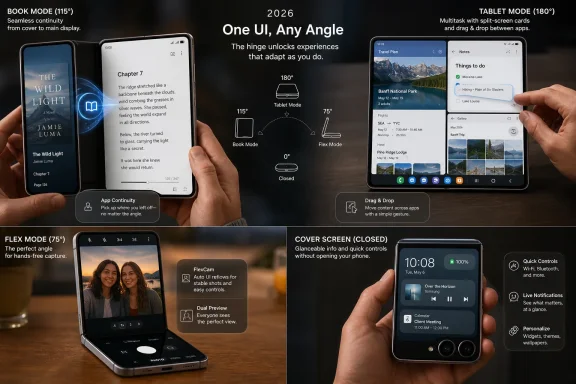
That is why app continuity is the real foundation. As BGR notes, book-style foldables such as Samsung’s Galaxy Z Fold line and Google’s Pixel Fold family can move an app from a smaller cover screen to the larger inner display when the user opens the device. Samsung’s own support material describes the same basic behavior for the Galaxy Z Fold series: apps running on the cover screen can continue when the device is unfolded.
The more interesting problem is the reverse trip. Folding a book-style device often resembles locking it, because closing a screen has traditionally meant ending the session. Samsung handles that with a per-app setting called “Continue apps on cover screen,” while Google added a more situational swipe-up behavior on Pixel Fold devices, a change widely reported by Android Central and Android Authority when it appeared in Android 15 development builds.
That distinction is not cosmetic. Samsung’s approach says, “Tell me which apps should survive the fold.” Google’s approach says, “Decide in the moment.” One is a settings-panel solution; the other is a gesture-language solution. Both reveal how much of the foldable experience now lives in the gray area between hardware state and user intent.
Motorola pushed hardest against that model. Its recent Razr software lets users run more apps on the external display, and Motorola’s support documentation describes transition options that allow an app to move from the internal display to the external one after the phone is closed. BGR’s walkthrough points to the same idea: the Razr can be configured for manual or automatic transitions, depending on whether the user wants control or convenience.
Samsung’s Galaxy Z Flip line has historically been more conservative. Samsung has offered widgets and a curated set of cover-screen apps, and enthusiasts often use Good Lock modules to stretch the experience further. But BGR’s criticism is fair: compared with Motorola’s clamshells, Samsung’s Flip software has often treated the cover screen as a controlled accessory rather than a fully trusted workspace.
This is one of the more consequential differences in foldable design philosophy. A clamshell phone is sold partly on the promise that it can make the phone smaller and less distracting. But once the outside screen becomes large enough to run maps, messages, timers, music, ride-hailing, and authentication apps, it stops being a detox feature and becomes a second mode of computing.
That makes the cover screen a battleground. The vendor that gets it right can make a closed phone feel intentionally compact. The vendor that gets it wrong makes a closed phone feel artificially restricted.
BGR nods to this with a caveat: unfolding an app into a larger display works “assuming glitches don’t cause the app to crash.” That line is more important than it looks. Foldables expose every shortcut an app developer has taken around resizing, state management, and adaptive layouts.
Android has made progress here. Google has spent years encouraging developers to support large screens, resizable windows, activity embedding, and adaptive layouts. Microsoft, Samsung, Lenovo, OnePlus, Oppo, and others have also had obvious incentives to make Android behave better on tablets and foldables. But the app ecosystem still trails the hardware in places.
The problem is not merely that some apps look ugly on the inner display. It is that foldables ask apps to preserve continuity across a physical transformation. A weather app can survive a resize easily. A camera app, a banking app, a live navigation session, a video call, or a game may be more brittle.
That is why foldable software cannot be judged only by the best demo. It has to be judged by the fiftieth app the user opens, the one that was never optimized for a hinge. The platform wins only when foldability becomes boring for developers and predictable for users.
On a book-style foldable, the inner screen can support two or three apps in a way that feels closer to a small tablet than a stretched phone. Samsung has long leaned into this with Multi Window, taskbars, app pairs, floating windows, and drag-and-drop support. Google’s Pixel Fold line brought a more restrained version of the same idea, with split-screen support and a taskbar built around Android’s large-screen push.
This is where foldables feel most honest. Nobody needs a folding phone to read a message or browse a webpage. But the case becomes stronger when a user can keep a video call open while checking notes, drag a photo into a message, compare two documents, or keep a password manager beside a login screen.
The practical value is especially obvious for IT pros and administrators. A foldable is not a replacement for a laptop, but it can reduce the number of times someone has to reach for one. Remote desktop, SSH clients, ticketing systems, authenticator apps, Teams, Outlook, documentation, and browser dashboards all benefit from a larger canvas and faster app switching.
That does not make foldables enterprise defaults. They are still expensive, mechanically more complex, and harder to standardize than mainstream slabs. But the productivity argument is no longer fantasy. It is becoming a question of whether the software stack and device-management policies can justify the premium.
Samsung calls this general idea Flex Mode, and similar concepts appear across foldable lines. Bend the device halfway, place it on a flat surface, and the phone can hold itself upright for photos, videos, calls, time-lapses, or hands-free viewing. The bottom half becomes a base; the top half becomes a screen and camera mount.
This sounds minor until you use it. A slab phone needs a stand, a case, a wall, a cup, a stack of books, or the familiar ritual of balancing expensive glass against a household object. A foldable can sit on a table and frame a shot by design.
Clamshells have an additional advantage: the main rear cameras can become selfie cameras when paired with the external display. That gives users better sensors for self-portraits, vlogging, and video calls than the inner front-facing camera usually provides. BGR highlights this category of foldable-only camera behavior because it is one of the few features ordinary buyers understand immediately.
There is a quiet accessibility story here too. Hands-free framing helps users who cannot easily hold a phone for long periods, parents trying to photograph children, creators recording themselves, and workers documenting a process while keeping both hands available. The foldable camera is not just better because the phone bends. It is better because the device can occupy space differently.
With a slab phone, the screen faces one way. If the user shows something to another person, both people crowd around the same rectangle. A foldable can show one interface to the user and another to the subject, the customer, the person across the table, or the person being photographed.
Google has leaned into this with Pixel Fold and Pixel 9 Pro Fold camera features such as dual-screen preview and Made You Look, the latter designed to attract a child’s attention on the outer display while the photographer uses the inner screen. Samsung has offered comparable cover-screen preview tools on Galaxy Z Fold and Z Flip devices. These are niche features, but niche does not mean trivial.
The interpreter use case is even more telling. A foldable can display translated speech on both sides of the device, making the phone less like a private screen and more like a shared object. That is a genuinely different interaction model from a slab phone, where one person usually controls and reads the device while the other waits.
This is where foldables may eventually matter most: not in making one user more productive, but in making the phone less solitary. The modern smartphone is intensely personal, which is one reason it is powerful and another reason it can be socially awkward. A device with two usable faces can mediate interactions rather than merely interrupt them.
That is why BGR’s list lands at an important moment for the category. Foldables are no longer rare curiosities, but they are not yet mainstream defaults. Samsung, Google, Motorola, OnePlus, Honor, Oppo, Vivo, and Xiaomi have all pushed the form factor in different markets, while Apple remains the absent gravitational force whose eventual entry would likely reset public expectations.
The premium remains real. Foldables are typically more expensive than comparable slab phones, and buyers still have to accept tradeoffs in thickness, weight, battery allocation, repair complexity, dust resistance, case design, and long-term durability anxiety. Even when the hardware is excellent, the ownership experience carries a mental surcharge.
Software-exclusive features are how vendors justify that surcharge. A bigger inner display is easy to understand, but not always enough. A phone that becomes a camera stand, a translation panel, a two-app workstation, a better selfie rig, a compact outer-screen communicator, and a pocket tablet starts to sound less like a novelty and more like a category.
The danger is fragmentation. Samsung’s Fold does one thing, Samsung’s Flip does another, Pixel handles a transition differently, Motorola exposes more cover-screen controls, and OnePlus has its own multitasking vocabulary. Enthusiasts may enjoy that variety. Developers and enterprise buyers often do not.
Windows users have watched this happen with convertible laptops, detachable tablets, pen computing, touch-first interfaces, ultrawides, multi-monitor workflows, and the long, uneven march from Windows 8’s tablet ambitions to the more pragmatic posture of Windows 11. The lesson is always the same. A new form factor succeeds when the operating system stops treating it as an exception.
Foldables are Android’s version of that fight. The OS has to manage windows, postures, input methods, aspect ratios, taskbars, app state, and continuity. Apps have to respond without breaking. Users need settings that are powerful enough for enthusiasts but simple enough for everyone else.
Microsoft has its own bruises here. The Surface Duo tried to make dual-screen Android productivity feel natural, but it arrived with compromises that overwhelmed the concept. The Duo was not a foldable in the modern flexible-display sense, yet it anticipated many of the same questions: how should apps span displays, how should multitasking feel, and when does a second screen help rather than confuse?
Today’s foldables have better hardware and a healthier Android large-screen ecosystem than the Duo had. But they are still wrestling with the same design challenge. A device that changes shape must not make the user feel like the software is improvising.
A normal phone already requires decisions around enrollment, patching, app control, authentication, data loss prevention, and replacement cycles. A foldable adds questions about cover-screen data exposure, app behavior across displays, kiosk modes, durability under field conditions, and whether approved apps behave properly in resized or split-screen states.
There are also privacy concerns hiding in plain sight. A cover screen can be convenient, but it can also surface information in more public contexts. Dual-screen translation and preview modes may be useful, but organizations will want to understand what data is displayed where, what is logged, and how third-party apps behave across postures.
The upside is that foldables could reduce friction in specific workflows. A technician could keep documentation open beside a work order. A manager could review a spreadsheet without carrying a tablet. A healthcare worker could use the device hands-free during a procedure. A traveler could handle email and document review more comfortably from a single pocketable device.
The realistic enterprise future is not mass foldable deployment. It is targeted deployment where the form factor solves a measurable workflow problem. That is how most specialized hardware earns its place.
If a user lives mostly in browser tabs, messaging apps, email, maps, camera, YouTube, Kindle, Office, Teams, Slack, and social apps, a foldable may feel increasingly polished. Those are the apps most likely to benefit from larger screens, continuity, or vendor-specific optimization. If a user depends on niche enterprise tools, older apps, games with rigid layouts, or poorly maintained utilities, the experience may be less elegant.
This is not unique to foldables. Every new device class exposes weak software assumptions. High-DPI Windows laptops did it. Ultrawide monitors did it. Dark mode did it. Touchscreens did it. Apple Silicon did it. The difference is that foldables expose those assumptions every time the user physically changes the device.
That makes app continuity both a feature and a stress test. When it works, the phone feels alive to context. When it fails, the hinge becomes a reminder that the ecosystem is not fully ready.
The most important progress will not come from one flashy feature. It will come from boring improvements: better Android APIs, stricter developer guidance, more adaptive UI frameworks, more reliable state handling, and fewer vendor-specific workarounds. Foldables will be mature when users stop thinking about whether an app will survive the fold.
That matters because foldables have spent years being judged by the wrong yardstick. Early reviews obsessed over creases, durability, thickness, and price, all of which were fair concerns. But the deeper question was always whether Android, Samsung’s One UI, Google’s Pixel software, Motorola’s Razr interface, and third-party apps could treat a changing screen as an advantage rather than a compatibility hazard.
BGR’s list is useful because it focuses on the small behaviors that separate a foldable from a phone with a party trick. App continuity, cover-screen controls, tabletop camera modes, dual-screen previews, split-screen layouts, and drag-and-drop workflows are not glamorous in isolation. Together, they describe a future where the phone is no longer a single rectangle but a device with postures.
 The Hinge Is Becoming a Software Contract
The defining foldable feature is not that the display folds. It is that the operating system understands what folding means.On a normal phone, the screen is a stable assumption. Apps know their dimensions, the user knows where the controls live, and the system rarely has to reinterpret the physical state of the device. On a foldable, the hardware keeps renegotiating the interface: closed, half-open, fully open, tented, propped on a table, or used as a miniature laptop.
That is why app continuity is the real foundation. As BGR notes, book-style foldables such as Samsung’s Galaxy Z Fold line and Google’s Pixel Fold family can move an app from a smaller cover screen to the larger inner display when the user opens the device. Samsung’s own support material describes the same basic behavior for the Galaxy Z Fold series: apps running on the cover screen can continue when the device is unfolded.
The more interesting problem is the reverse trip. Folding a book-style device often resembles locking it, because closing a screen has traditionally meant ending the session. Samsung handles that with a per-app setting called “Continue apps on cover screen,” while Google added a more situational swipe-up behavior on Pixel Fold devices, a change widely reported by Android Central and Android Authority when it appeared in Android 15 development builds.
That distinction is not cosmetic. Samsung’s approach says, “Tell me which apps should survive the fold.” Google’s approach says, “Decide in the moment.” One is a settings-panel solution; the other is a gesture-language solution. Both reveal how much of the foldable experience now lives in the gray area between hardware state and user intent.
The Cover Screen Has Escaped Notification Duty
The first clamshell foldables treated the outside display like a smartwatch welded to a phone. It could show the time, weather, notifications, music controls, and maybe a selfie preview. That made sense when external screens were tiny, but it also limited the category’s appeal: closing the phone meant the device became less capable.Motorola pushed hardest against that model. Its recent Razr software lets users run more apps on the external display, and Motorola’s support documentation describes transition options that allow an app to move from the internal display to the external one after the phone is closed. BGR’s walkthrough points to the same idea: the Razr can be configured for manual or automatic transitions, depending on whether the user wants control or convenience.
Samsung’s Galaxy Z Flip line has historically been more conservative. Samsung has offered widgets and a curated set of cover-screen apps, and enthusiasts often use Good Lock modules to stretch the experience further. But BGR’s criticism is fair: compared with Motorola’s clamshells, Samsung’s Flip software has often treated the cover screen as a controlled accessory rather than a fully trusted workspace.
This is one of the more consequential differences in foldable design philosophy. A clamshell phone is sold partly on the promise that it can make the phone smaller and less distracting. But once the outside screen becomes large enough to run maps, messages, timers, music, ride-hailing, and authentication apps, it stops being a detox feature and becomes a second mode of computing.
That makes the cover screen a battleground. The vendor that gets it right can make a closed phone feel intentionally compact. The vendor that gets it wrong makes a closed phone feel artificially restricted.
App Continuity Is Still More Fragile Than the Marketing Suggests
The phrase “seamless transition” appears constantly in foldable marketing, but real foldable use is rarely seamless in the absolute sense. Apps reload. Video players lose state. Layouts snap awkwardly. Games may not know what to do with a sudden aspect-ratio change. Banking and streaming apps sometimes behave as if the user has changed devices.BGR nods to this with a caveat: unfolding an app into a larger display works “assuming glitches don’t cause the app to crash.” That line is more important than it looks. Foldables expose every shortcut an app developer has taken around resizing, state management, and adaptive layouts.
Android has made progress here. Google has spent years encouraging developers to support large screens, resizable windows, activity embedding, and adaptive layouts. Microsoft, Samsung, Lenovo, OnePlus, Oppo, and others have also had obvious incentives to make Android behave better on tablets and foldables. But the app ecosystem still trails the hardware in places.
The problem is not merely that some apps look ugly on the inner display. It is that foldables ask apps to preserve continuity across a physical transformation. A weather app can survive a resize easily. A camera app, a banking app, a live navigation session, a video call, or a game may be more brittle.
That is why foldable software cannot be judged only by the best demo. It has to be judged by the fiftieth app the user opens, the one that was never optimized for a hinge. The platform wins only when foldability becomes boring for developers and predictable for users.
Multitasking Finally Has a Phone-Sized Reason to Exist
Split-screen multitasking has existed on Android for years, but on a conventional phone it has always felt like eating dinner on an airplane tray. Technically possible, often useful in emergencies, rarely pleasant. Foldables change that because they turn multitasking from a checkbox into a plausible daily behavior.On a book-style foldable, the inner screen can support two or three apps in a way that feels closer to a small tablet than a stretched phone. Samsung has long leaned into this with Multi Window, taskbars, app pairs, floating windows, and drag-and-drop support. Google’s Pixel Fold line brought a more restrained version of the same idea, with split-screen support and a taskbar built around Android’s large-screen push.
This is where foldables feel most honest. Nobody needs a folding phone to read a message or browse a webpage. But the case becomes stronger when a user can keep a video call open while checking notes, drag a photo into a message, compare two documents, or keep a password manager beside a login screen.
The practical value is especially obvious for IT pros and administrators. A foldable is not a replacement for a laptop, but it can reduce the number of times someone has to reach for one. Remote desktop, SSH clients, ticketing systems, authenticator apps, Teams, Outlook, documentation, and browser dashboards all benefit from a larger canvas and faster app switching.
That does not make foldables enterprise defaults. They are still expensive, mechanically more complex, and harder to standardize than mainstream slabs. But the productivity argument is no longer fantasy. It is becoming a question of whether the software stack and device-management policies can justify the premium.
The Camera Is Better When the Phone Can Stand Up
Foldables also change photography in a way that has little to do with megapixels. A hinged phone can act as its own tripod.Samsung calls this general idea Flex Mode, and similar concepts appear across foldable lines. Bend the device halfway, place it on a flat surface, and the phone can hold itself upright for photos, videos, calls, time-lapses, or hands-free viewing. The bottom half becomes a base; the top half becomes a screen and camera mount.
This sounds minor until you use it. A slab phone needs a stand, a case, a wall, a cup, a stack of books, or the familiar ritual of balancing expensive glass against a household object. A foldable can sit on a table and frame a shot by design.
Clamshells have an additional advantage: the main rear cameras can become selfie cameras when paired with the external display. That gives users better sensors for self-portraits, vlogging, and video calls than the inner front-facing camera usually provides. BGR highlights this category of foldable-only camera behavior because it is one of the few features ordinary buyers understand immediately.
There is a quiet accessibility story here too. Hands-free framing helps users who cannot easily hold a phone for long periods, parents trying to photograph children, creators recording themselves, and workers documenting a process while keeping both hands available. The foldable camera is not just better because the phone bends. It is better because the device can occupy space differently.
Dual-Screen Tricks Are More Than Party Demos
The strangest foldable features are also the ones that best explain the category’s potential. Dual-screen previews, interpreter modes, rear-camera selfies, and mirrored displays can look gimmicky in a store demo. But they point toward a larger truth: a foldable has two audiences.With a slab phone, the screen faces one way. If the user shows something to another person, both people crowd around the same rectangle. A foldable can show one interface to the user and another to the subject, the customer, the person across the table, or the person being photographed.
Google has leaned into this with Pixel Fold and Pixel 9 Pro Fold camera features such as dual-screen preview and Made You Look, the latter designed to attract a child’s attention on the outer display while the photographer uses the inner screen. Samsung has offered comparable cover-screen preview tools on Galaxy Z Fold and Z Flip devices. These are niche features, but niche does not mean trivial.
The interpreter use case is even more telling. A foldable can display translated speech on both sides of the device, making the phone less like a private screen and more like a shared object. That is a genuinely different interaction model from a slab phone, where one person usually controls and reads the device while the other waits.
This is where foldables may eventually matter most: not in making one user more productive, but in making the phone less solitary. The modern smartphone is intensely personal, which is one reason it is powerful and another reason it can be socially awkward. A device with two usable faces can mediate interactions rather than merely interrupt them.
The Foldable Premium Now Has to Buy Behavior, Not Novelty
The hard part for manufacturers is that novelty depreciates quickly. The first time a user opens a foldable, it feels futuristic. The hundredth time, it either feels useful or it feels like an expensive compromise.That is why BGR’s list lands at an important moment for the category. Foldables are no longer rare curiosities, but they are not yet mainstream defaults. Samsung, Google, Motorola, OnePlus, Honor, Oppo, Vivo, and Xiaomi have all pushed the form factor in different markets, while Apple remains the absent gravitational force whose eventual entry would likely reset public expectations.
The premium remains real. Foldables are typically more expensive than comparable slab phones, and buyers still have to accept tradeoffs in thickness, weight, battery allocation, repair complexity, dust resistance, case design, and long-term durability anxiety. Even when the hardware is excellent, the ownership experience carries a mental surcharge.
Software-exclusive features are how vendors justify that surcharge. A bigger inner display is easy to understand, but not always enough. A phone that becomes a camera stand, a translation panel, a two-app workstation, a better selfie rig, a compact outer-screen communicator, and a pocket tablet starts to sound less like a novelty and more like a category.
The danger is fragmentation. Samsung’s Fold does one thing, Samsung’s Flip does another, Pixel handles a transition differently, Motorola exposes more cover-screen controls, and OnePlus has its own multitasking vocabulary. Enthusiasts may enjoy that variety. Developers and enterprise buyers often do not.
Windows Users Should Recognize This Movie
There is a reason foldables resonate with WindowsForum readers even though the devices mostly run Android. The underlying story is familiar: hardware creates a new possibility, but software determines whether the possibility becomes a platform.Windows users have watched this happen with convertible laptops, detachable tablets, pen computing, touch-first interfaces, ultrawides, multi-monitor workflows, and the long, uneven march from Windows 8’s tablet ambitions to the more pragmatic posture of Windows 11. The lesson is always the same. A new form factor succeeds when the operating system stops treating it as an exception.
Foldables are Android’s version of that fight. The OS has to manage windows, postures, input methods, aspect ratios, taskbars, app state, and continuity. Apps have to respond without breaking. Users need settings that are powerful enough for enthusiasts but simple enough for everyone else.
Microsoft has its own bruises here. The Surface Duo tried to make dual-screen Android productivity feel natural, but it arrived with compromises that overwhelmed the concept. The Duo was not a foldable in the modern flexible-display sense, yet it anticipated many of the same questions: how should apps span displays, how should multitasking feel, and when does a second screen help rather than confuse?
Today’s foldables have better hardware and a healthier Android large-screen ecosystem than the Duo had. But they are still wrestling with the same design challenge. A device that changes shape must not make the user feel like the software is improvising.
Enterprise IT Will Like the Use Cases and Dislike the Variables
For corporate fleets, foldables are both tempting and annoying. The tempting part is obvious: a field technician, executive, healthcare worker, sales lead, or administrator can carry a device that handles more complex work than a conventional phone. The annoying part is that foldables introduce more variables into procurement, support, app testing, repair planning, and policy enforcement.A normal phone already requires decisions around enrollment, patching, app control, authentication, data loss prevention, and replacement cycles. A foldable adds questions about cover-screen data exposure, app behavior across displays, kiosk modes, durability under field conditions, and whether approved apps behave properly in resized or split-screen states.
There are also privacy concerns hiding in plain sight. A cover screen can be convenient, but it can also surface information in more public contexts. Dual-screen translation and preview modes may be useful, but organizations will want to understand what data is displayed where, what is logged, and how third-party apps behave across postures.
The upside is that foldables could reduce friction in specific workflows. A technician could keep documentation open beside a work order. A manager could review a spreadsheet without carrying a tablet. A healthcare worker could use the device hands-free during a procedure. A traveler could handle email and document review more comfortably from a single pocketable device.
The realistic enterprise future is not mass foldable deployment. It is targeted deployment where the form factor solves a measurable workflow problem. That is how most specialized hardware earns its place.
The App Ecosystem Is the Real Durability Test
Reviewers often ask whether a foldable hinge will survive years of opening and closing. Buyers should also ask whether their app habits will.If a user lives mostly in browser tabs, messaging apps, email, maps, camera, YouTube, Kindle, Office, Teams, Slack, and social apps, a foldable may feel increasingly polished. Those are the apps most likely to benefit from larger screens, continuity, or vendor-specific optimization. If a user depends on niche enterprise tools, older apps, games with rigid layouts, or poorly maintained utilities, the experience may be less elegant.
This is not unique to foldables. Every new device class exposes weak software assumptions. High-DPI Windows laptops did it. Ultrawide monitors did it. Dark mode did it. Touchscreens did it. Apple Silicon did it. The difference is that foldables expose those assumptions every time the user physically changes the device.
That makes app continuity both a feature and a stress test. When it works, the phone feels alive to context. When it fails, the hinge becomes a reminder that the ecosystem is not fully ready.
The most important progress will not come from one flashy feature. It will come from boring improvements: better Android APIs, stricter developer guidance, more adaptive UI frameworks, more reliable state handling, and fewer vendor-specific workarounds. Foldables will be mature when users stop thinking about whether an app will survive the fold.
The Nine Tricks Point to One Larger Shift
BGR’s roundup is framed as a list of features exclusive to foldable phones, but the larger story is that foldables are becoming the test bed for adaptive personal computing. The individual tricks matter because they show where the phone is escaping the slab model.- App continuity is the core foldable promise, because it lets the same task survive a change in screen size.
- Cover-screen apps are turning clamshells from compact phones into two-mode devices with different levels of attention.
- Split-screen and taskbar workflows finally make Android multitasking feel natural on a phone-sized product.
- Flex-style camera modes exploit the hinge in ways that no software update can fully replicate on a slab phone.
- Dual-screen previews and interpreter modes make the phone useful to people on both sides of the device.
- The remaining weakness is consistency, because too many features still depend on the brand, model, app, and setting a user happens to choose.
References
- Primary source: bgr.com
Published: Sun, 05 Jul 2026 14:02:00 GMT
Loading…
www.bgr.com - Related coverage: tomsguide.com
Samsung Galaxy Z Fold 8 may skip this major Galaxy S26 Ultra upgrade — and its foldable screen is to blame | Tom's Guide
A new leak claims Samsung won't bring the Privacy Display to its upcoming foldable lineup.www.tomsguide.com - Related coverage: phonearena.com
Loading…
www.phonearena.com - Related coverage: androidcentral.com
Loading…
www.androidcentral.com - Related coverage: techradar.com
Loading…
www.techradar.com - Related coverage: t3.com
Loading…
www.t3.com