

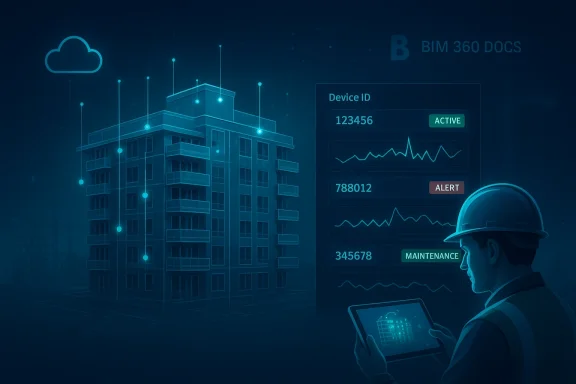
Autodesk’s demonstration of using Forge and BIM 360 Docs as the front end for an IoT-powered digital twin is a practical blueprint for bringing design models, field-collected inventories, and live sensor telemetry into a single, actionable operations layer—and it already shows where real operational value and real risk live in modern AEC workflows.
Background / Overview
Autodesk’s approach maps three distinct layers into a working digital twin: the design and as-built model (hosted in BIM 360 Docs and surfaced via Forge), the field inventory and construction-to-ops data (tracks and checklists created in BIM 360 Build/Field), and the telemetry/control plane (device telemetry handled by Microsoft Azure IoT Hub and device management offered through Azure’s IoT tooling). Together, those pieces let an owner-operator map physical equipment to model geometry, visualize health or status in 3D, and trigger condition-based or predictive maintenance workflows.This article breaks that blueprint down into a practical roadmap: what the integration actually looks like, what to verify before you build, how to secure devices and lifecycle processes, how to operationalize analytics (including predictive maintenance), and the commercial and technical trade-offs you should expect.
Why this matters: AEC’s digital transformation opportunity
The AEC industry has long been fragmented; project teams keep silos of model, document, and operational data, and handovers to operations are often lossy. Turning BIM into an operational digital twin—where geometry, metadata, and live telemetry combine—reduces manual lookups, cuts reactive maintenance, and gives owners measurable lifecycle savings. Autodesk’s concept leverages existing product footprints (BIM 360 + Forge) and large-scale cloud primitives (Azure IoT) to make the digital twin feasible without reinventing the stack.Microsoft’s IoT primitives—IoT Hub for secure device telemetry ingestion, Stream Analytics and IoT Edge for near‑real‑time processing, and Azure Machine Learning for model training—are already established building blocks that pair naturally with a BIM-hosted visualization layer. Multiple independent documents in the archive confirm that Azure IoT Hub is the standard entry point for secure device telemetry and for routing messages into downstream analytics services.
Core architecture: How Forge + BIM 360 Docs + Azure IoT fit together
Three-layer architecture (model, management, telemetry)
- Design & documentation: Authoring tools (Revit, Inventor, InfraWorks) create the engineering model; BIM 360 Docs hosts the resulting federated models and documents. Forge APIs and the Forge Viewer embed that geometry and property set into custom web apps for visualization and interaction.
- Field inventory & handover: BIM 360 Build/Field checklists capture on-site equipment IDs, installation metadata, and commissioning records. These datasets form the canonical mapping between which physical object corresponds to which model element.
- Telemetry & intelligence: Devices and sensors in the building report to Azure IoT Hub (secure ingestion). Downstream, stream processing, storage, and ML services (e.g., Azure Stream Analytics, Azure Machine Learning or IoT Central’s rule engine) analyze telemetry, detect anomalies, and predict failures.
The integration glue
- Canonical identifier: The single most important practical detail is a reliable, human- and machine-readable identifier that ties a BIM object to a physical device (e.g., the parameter string described in the Autodesk example). This identifier must exist both as a BIM parameter and as a device tag in IoT Hub/IoT Central.
- Viewer overlay: The Forge Viewer displays models and lets a web app place UI markers (dots) at equipment coordinates. Clicking a dot fetches telemetry for the mapped device and displays current status, time series charts, and maintenance history.
- Direction of truth: BIM remains the design/tracking system of record for geometry and fixed asset metadata; Azure IoT is the system of record for telemetry and device lifecycle. The web app orchestrates both views into a single UI.
Step-by-step implementation roadmap
- Prepare the BIM for operations
- Standardize equipment naming conventions and parameterization in authoring tools (Revit, etc.).
- Export and confirm that those parameters appear consistently in BIM 360 Docs model derivatives so they can be queried via Forge Viewer.
- Capture reliable field inventory data
- Use BIM 360 Build/Field checklists to create a definitive inventory during commissioning.
- Ensure each asset entry includes the canonical identifier that will be used by the device (barcode/QR/UID).
- Provision devices and register them to Azure IoT Hub
- Enroll devices to IoT Hub using per-device credentials (preferably hardware-backed keys / TPM where available) and group them into logical device twins. Azure IoT Hub is built for this ingestion pattern.
- Map model coordinates to device endpoints
- Use Forge Viewer APIs to calculate 3D coordinates of equipment and overlay interactive markers bound to device IDs.
- Provide UI affordances in the viewer for status, historical charts, and maintenance actions.
- Stream, enrich, and analyze
- Route IoT Hub telemetry into a processing pipeline (Azure Stream Analytics or IoT Edge modules for near‑edge decisions).
- Store telemetry and enriched time-series for ML training; use Azure Machine Learning or IoT Central rules for predictive triggers.
- Close the operational loop
- When analytics or rules trigger alerts, automatically create a BIM 360 Build issue or a maintenance ticket in the CAFM/CMMS in use.
- Track issue lifecycle in BIM 360 Build so future handovers remain auditable and traceable.
Security and device lifecycle: technical verification and practical controls
Security isn’t optional for IoT in buildings; insecure devices give attackers footholds into enterprise networks. The Autodesk design explicitly lists minimum cryptographic and connectivity requirements—AES-128 (or better), SHA-2, TLS 1.2/DTLS 1.2 support, per-device keys, and updatable firmware. That checklist reflects best practice and aligns with device provisioning guidance found in Azure and Windows IoT documentation.Key controls to implement:
- Strong device identity: Use per-device credentials and hardware-backed storage (TPM) where available; document the provisioning playbook. Azure device provisioning and TPM-backed enrollment are mature, supported options.
- Encrypted telemetry: Enforce TLS 1.2+ or DTLS for datagram paths; avoid plaintext protocols.
- Firmware and key rotation: Build secure OTA (over-the-air) update paths and a key rotation schedule for compromised-device response.
- Network segmentation: Place IoT devices on segregated networks and use a Web Security Service or gateway layer to unify policy and monitor threats as recommended in enterprise web security architectures.
- Least privilege and logging: Grant minimal cloud permissions to devices and pipeline components; maintain detailed telemetry and audit logs for post-incident forensics.
Predictive maintenance: how to get from telemetry to actionable predictions
Predictive maintenance depends on three ingredients: relevant telemetry, labeled historical events (failures, maintenance records), and a retraining loop.- Select telemetry with signal: Temperature, vibration, run-hours, pressure trends, power consumption, and error codes are typical inputs. Prioritize sensors that directly correlate with failure modes for the asset class you care about.
- Create labeled events: Use BIM 360 Build issues or CMMS records to mark “ground truth” failures and repair actions. These labels are essential for supervised ML approaches.
- Build a layered analytics pipeline:
- Edge rules for immediate actions (threshold triggers).
- Stream processing (Azure Stream Analytics / IoT Edge) for aggregation and anomaly detection.
- Periodic batch retraining with Azure Machine Learning to improve model precision and reduce false positives. Microsoft’s IoT primitives (IoT Hub → Stream Analytics → ML) are designed for orchestration of these stages.
Practical trade-offs, costs, and vendor lock-in risks
- Speed vs. portability: Using Azure IoT Central and Azure Machine Learning accelerates implementation because these managed services remove heavy dev work. The trade-off is platform dependence; extractable data contracts and documented migration playbooks are essential to avoid long-term vendor lock-in. Several independent analyses flag vendor lock-in as a common risk in enterprise IoT stacks.
- Data gravity and exit costs: As predictive models and analytics improve, data accumulates and moving it out becomes more expensive. Decide early on export formats and API requirements for your organization.
- CapEx vs. OpEx: Managed IoT services trade capital investment in infrastructure for operating costs that scale with telemetry volume and model complexity. Budget telemetry cadence and retention accordingly.
- Organizational change: The most underestimated cost is process re-engineering—teaming up facilities, IT, and data science teams to maintain a living twin takes governance and resourcing.
Field realities: BIM 360 Build vs. Field and the human factor
Autodesk’s field guidance is practical: use BIM 360 Build/Field to collect equipment metadata at install/commissioning and preserve the canonical mapping to devices. The current product maturity matters: some teams prefer continuing to use BIM 360 Field workflows until Build’s equipment features fully mirror Field’s capabilities. Whichever you choose, the human step—consistent and disciplined field data capture—makes or breaks downstream automation.Operational recommendation:
- Make equipment tagging a mandatory commissioning checkpoint.
- Use QR/barcode scanning tied to device UID to reduce transcription errors.
- Train installers with a short, standardized checklist that enforces canonical naming and metadata capture.
Implementation checklist (quick-read)
- Standardize naming: Ensure model parameters and device IDs match.
- Secure provisioning: TPM-backed keys or equivalent for devices.
- Ingestion pipeline: Register devices in Azure IoT Hub; route telemetry to Stream Analytics or IoT Edge.
- Viewer mapping: Use Forge Viewer to place interactive markers bound to device telemetry.
- Automation: Configure IoT Central or an equivalent engine to create BIM 360 Build issues on actionable alerts.
- Audit & export: Define data export and retention policies to avoid lock-in.
Strengths: Why the Forge + Azure pattern is compelling
- Uses proven primitives: Forge + BIM 360 handles model visualization and asset metadata; Azure IoT Hub handles device identity and telemetry. Combining mature building blocks shortens time to value.
- Tight operator workflows: Connecting alerts to BIM issues closes the loop for facility teams and preserves institutional memory in the model.
- Scalable analytics: Azure’s edge and cloud analytics provide both low-latency reaction and long-term learning capability.
- Incremental adoption: Teams can start small—instrument one system or floor—and expand once benefits are visible.
Risks and limitations (be explicit)
- Security misconfiguration: Poor provisioning, lack of key rotation, or unpatched firmware will expose the facility network. The device lifecycle must be a first-class deliverable.
- Data quality: Predictive models are only as good as labeled failure histories; many owners lack disciplined historical maintenance records at the start.
- Organizational inertia: Facilities, construction, and IT must realign around a single source of truth; that requires governance and change management.
- Platform coupling: Heavy use of managed Azure services and Forge APIs streamlines implementation but increases dependence on vendor ecosystems. Demand clear export APIs and migration support.
Real-world patterns and verification from independent traces
Multiple archives and implementation notes corroborate the architecture described here: Azure IoT Hub as ingestion and device identity backbone, IoT Edge/Stream Analytics for near-real-time processing, and a visualization layer that overlays telemetry onto engineering models. Independent materials in the corpus echo the need for TPM-backed provisioning and careful lifecycle management for devices, reinforcing the security-first posture recommended above.Recommendations for pilots and proof-of-value projects
- Start with a single asset class that has clear telemetry-to-failure signal (e.g., HVAC fan bearings, chilled water pumps).
- Instrument a pilot site with conservative telemetry cadence and short retention (to keep costs small).
- Run parallel manual validation for 90 days—compare model alerts to technician findings to measure precision/recall.
- Publish a short migration and export policy before scaling so stakeholders can make informed platform choices.
Conclusion
Autodesk’s Forge + BIM 360 Docs as an IoT hub model is a practical, implementable path to the digital twin for buildings—one that leverages both BIM-hosted geometry and cloud-native telemetry/analytics. The integration requires disciplined field data capture, secure device provisioning, and an analytics pipeline capable of both immediate edge decisions and cloud-based learning. When these pieces are done well, owners get a living model that shortens response times, reduces reactive maintenance, and turns design data into operational intelligence. When done poorly, the common failure modes are security gaps, poor telemetry quality, and vendor lock-in.For teams starting this journey, the single most actionable advice is to treat device identity and commissioning metadata as first-class deliverables. Get the identifiers right at handover, secure your devices properly, and build the simplest closed loop that delivers a measurable operational win. From there, the rest scales—forge by verified forge.
Source: Autodesk https://www.autodesk.com/autodesk-university/de/article/Forge-BIM-360-Docs-IoT-Hub/?linkId=64452631
