

The first time I snapped the bottom cover onto a bare Framework Laptop 12 and watched the system spring to life with a freshly flashed Linux live USB, I felt something I hadn't expected from a mass-market laptop: the confident certainty that I could take this machine apart, rebuild it, and change where it would sit in my workflow — not because I had to, but because I wanted to. That sense of ownership is the core news here: Framework's new 12-inch convertible is a legitimately affordable, repairable, and Linux-friendly take on the ultraportable — a device that changes the purchase calculus for anyone tired of sealed, throwaway notebooks.
Framework built its reputation on the idea that laptops should be modular, serviceable, and sustainable. The Laptop 12 brings that philosophy to a smaller, convertible form factor with a deliberate focus on accessibility and cost. Framework sells a DIY edition that ships without RAM, SSD, charger, or OS — the bare chassis and assembly kit — with a headline starting price of $549 for the DIY SKU and prebuilt configurations available for buyers who prefer a ready-to-run machine. Those core price and availability figures are confirmed by Framework's own pre-order announcement and independent press coverage. This isn't a power-user workstation. Framework chose energy-efficient 13th‑Gen Intel U‑series processors (Core i3‑1315U as the base, with an i5‑1334U option), a single user-accessible SODIMM slot supporting up to 48 GB DDR5, and an M.2‑2230 NVMe slot supporting up to 2 TB of storage. The display is a 12.2‑inch 1920×1200 touchscreen on a 360° hinge — a true 2‑in‑1 convertible — and the battery is a modest 50 Wh pack that, in real-world use, can stretch to a full day under light workloads if you pay attention to power settings. Those specs are consistent across Framework's product page and multiple independent reports. What changes the conversation is the packaging of those specs inside a device you can open and alter without warranty-voiding acrobatics. Every modular element — RAM, storage, keyboard, battery, and the now‑familiar swappable Expansion Card I/O — is intended to be user-serviceable, and Framework publishes step-by-step install guides and short how‑to videos for almost every component and major Linux distribution. That documentation removes a lot of the "unknown" that has historically scared mainstream users away from DIY hardware and from trying Linux on new consumer laptops.
A practical 30–90 minute path to a working laptop looks like this:
Memory and storage choices are deliberately constrained for simplicity and upgradeability:
Practical tips for a low-friction Linux install:
However, repairability is not a free lunch. You must be willing to invest a little time and to source parts for upgrades or repairs. Warranty terms also matter; buyers should confirm Framework’s current warranty and parts policies for their region before making a purchase decision.
The real story isn't the 13th‑Gen i3 or the exact battery runtime; it’s that a mainstream vendor is making it easy and affordable to own hardware as an open, maintainable platform. That changes long-term costs, reduces environmental impact, and gives users the option to learn and experiment with their machines without feeling like they’re performing a warranty‑voiding surgery. If those outcomes matter to you, the Laptop 12 is a rare and welcome entry in the modern laptop market.
In the end, the Laptop 12 stole my heart for the same reason it will appeal to many readers: it treats the buyer like an adult. You choose what goes in it, how long it should last, and which operating system will run your life. That degree of control is increasingly rare — and increasingly valuable.
Source: ZDNET How this DIY Windows laptop stole my heart from more expensive models (and it works with Linux)
 Background / Overview
Framework built its reputation on the idea that laptops should be modular, serviceable, and sustainable. The Laptop 12 brings that philosophy to a smaller, convertible form factor with a deliberate focus on accessibility and cost. Framework sells a DIY edition that ships without RAM, SSD, charger, or OS — the bare chassis and assembly kit — with a headline starting price of $549 for the DIY SKU and prebuilt configurations available for buyers who prefer a ready-to-run machine. Those core price and availability figures are confirmed by Framework's own pre-order announcement and independent press coverage. This isn't a power-user workstation. Framework chose energy-efficient 13th‑Gen Intel U‑series processors (Core i3‑1315U as the base, with an i5‑1334U option), a single user-accessible SODIMM slot supporting up to 48 GB DDR5, and an M.2‑2230 NVMe slot supporting up to 2 TB of storage. The display is a 12.2‑inch 1920×1200 touchscreen on a 360° hinge — a true 2‑in‑1 convertible — and the battery is a modest 50 Wh pack that, in real-world use, can stretch to a full day under light workloads if you pay attention to power settings. Those specs are consistent across Framework's product page and multiple independent reports. What changes the conversation is the packaging of those specs inside a device you can open and alter without warranty-voiding acrobatics. Every modular element — RAM, storage, keyboard, battery, and the now‑familiar swappable Expansion Card I/O — is intended to be user-serviceable, and Framework publishes step-by-step install guides and short how‑to videos for almost every component and major Linux distribution. That documentation removes a lot of the "unknown" that has historically scared mainstream users away from DIY hardware and from trying Linux on new consumer laptops. Design and build: modest, practical, and repair-first
Framework's design language for the Laptop 12 favors function over flash. The chassis combines polymer panels with a smaller metal subframe, and the 12.2-inch footprint feels distinctly portable — a device built to be carried and used in tablet mode without the fragility that comes with all-glass shells. Framework claims the device meets MIL‑STD‑810 durability standards, which signals a baseline of drop and stress testing, though that claim should be read as a test-profile compliance rather than a guarantee that it’s indestructible; some early owner reports raised specific durability issues that Framework addressed with replacements and tooling corrections. In other words, the laptop is robust for a budget convertible, but it’s still not an indestructible field unit. A few design notes worth flagging:- The display is surrounded by thicker bezels than some premium ultraportables. That keeps cost down and makes the assembly simpler, but it affects perceived premium-ness.
- Colorways (bubblegum, lavender, sage, etc. are available on DIY SKUs, while prebuilt units are limited to black — a small but meaningful choice for buyers who want personality.
- The Expansion Card system (removable port modules that plug into readymade slots on the chassis) continues to be Framework’s signature differentiator; it’s practical for classroom, travel, and mixed-device environments where port needs change.
The DIY assembly experience — approachable, deliberate, and educational
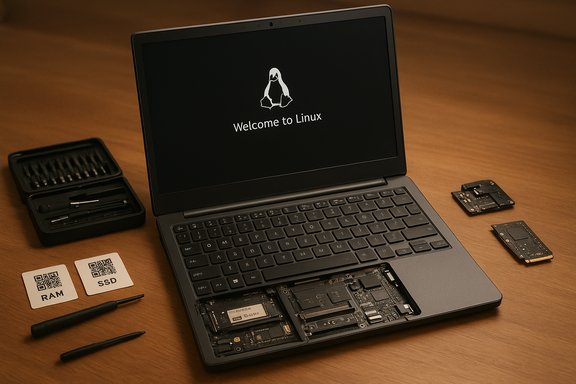
Framework intentionally ships a DIY kit that is approachable even for non‑experts. The kit includes a compact screwdriver and pre-labeled parts, and every removable component inside the chassis has a QR code that links to a how‑to video or written guide. Reviewers and early buyers consistently report that the assembly experience is straightforward: if you can install a stick of RAM and tighten a single M.2 screw, you can assemble the Laptop 12.A practical 30–90 minute path to a working laptop looks like this:
- Fit a compatible DDR5 SODIMM (remember: single slot, up to 48 GB) and install an M.2‑2230 NVMe drive.
- Insert the Expansion Cards you want for first boot; an Ethernet card is a smart choice when installing an OS to avoid initial Wi‑Fi driver headaches.
- Make a verified bootable USB with your distro of choice, boot a live session, confirm touchscreen and stylus behavior, then install.
Hardware and performance: competent for everyday work, not a power play
Framework engineered the Laptop 12 around practical performance, not headline-bait numbers. The Core i3‑1315U and i5‑1334U are low‑power 13th‑Gen Intel U‑series processors optimized for battery life and general responsiveness. Real‑world performance across reviews matches expectations: snappy for web browsing, office suites, video calls, and light media tasks; limited for heavy multi‑core workloads such as lengthy video encodes, large VM farms, or professional-grade rendering. If you prioritize single‑thread snappiness in common apps, the machine behaves well; if you need sustained throughput for content creation, you should be looking at Framework's larger Laptop 13/16 models or a different class of machine entirely.Memory and storage choices are deliberately constrained for simplicity and upgradeability:
- Single user‑accessible SODIMM supporting up to 48 GB DDR5‑5200/5600. The single-slot design sacrifices dual-channel memory bandwidth but enables a high-capacity upgrade path while keeping BOM cost lower.
- Single M.2‑2230 NVMe slot supporting up to 2 TB; bring‑your‑own SSD can dramatically cut the initial DIY purchase price.
Display, battery and I/O: balanced tradeoffs
The Laptop 12’s 12.2‑inch, 1920×1200 touchscreen is a functional, color‑accurate enough panel for everyday content consumption and document work, and it supports both MPP and USI styluses for pen input. However, reviewers note that color vibrancy and reflectivity are not class-leading, and the thicker bezels telegraph the device’s budget positioning. If you need color-critical work right out of the lid, plan to use an external monitor. Battery life is similarly modest but reasonable. Framework uses a 50 Wh battery with USB‑C charging; independent tests show a range from roughly 7–10 hours depending on workload and screen brightness. Light, focused use with careful power management gets you closer to the upper end of that range; mixed browsing and video calls will push it toward the lower bound. Treat any single number as conditional — your mileage will vary. On the I/O front, Framework’s Expansion Card system remains distinctive:- Four Expansion Card slots positioned around the chassis so you can distribute ports as you like.
- Cards available for USB‑C (with power and DisplayPort alt‑mode), USB‑A, HDMI, Ethernet, and SD.
- This modular port approach eliminates the need for dongles for many users and keeps damaged ports from being a throwaway fault.
Linux friendliness: vendor support changes the risk calculus
Where Framework really moves the needle is on Linux. Unlike most mainstream laptop vendors who treat Linux support as an afterthought, Framework publishes distribution‑specific installation guides — covering Linux Mint, Ubuntu, NixOS, Arch, and others — and documents firmware update steps and Secure Boot handling. That vendor-authored documentation materially reduces the typical friction of installing Linux on new consumer hardware. Multiple hands‑on reports corroborate that a prepared user can get to a working Linux install quickly, especially if they use Ethernet for the initial network step.Practical tips for a low-friction Linux install:
- Choose a distro and pre-download the ISO; verify the SHA‑256 checksum.
- Flash a bootable USB with Rufus, balenaEtcher, or Ventoy.
- Install an Ethernet Expansion Card for first boot if you want to avoid early Wi‑Fi driver troubleshooting.
- Use the live environment to confirm touchscreen, pen, and camera functionality before committing to disk.
Repairability, sustainability, and total cost of ownership
Framework markets repairability as a first-class feature, and the Laptop 12 is built with replaceable batteries, keyboards, ports, and other serviceable modules. The argument is simple and increasingly persuasive: buying a modular laptop that can be serviced over years reduces e‑waste and, over time, lowers the total cost of ownership relative to sealed, disposable notebooks. Framework pairs parts catalogs with video how‑tos and QR‑linked guides so non‑technical buyers can perform simple repairs without professional service. That ecosystem — hardware designed for disassembly plus documentation — is what makes the device more than a novelty.However, repairability is not a free lunch. You must be willing to invest a little time and to source parts for upgrades or repairs. Warranty terms also matter; buyers should confirm Framework’s current warranty and parts policies for their region before making a purchase decision.
Risks, caveats and things to check before you buy
Framework’s Laptop 12 is a compelling proposition, but it's not perfect. Here are the most important tradeoffs and practical cautions:- Modest raw performance: U‑series processors and a single RAM slot limit multi‑core sustained throughput. For heavy video work, complex VMs, or long batch renders, look at higher-TDP machines.
- Display quality: The panel is functional but not premium; high reflectivity and muted color keep it from being a creator’s primary screen. Consider an external monitor for color work.
- Durability nuance: While Framework claims MIL‑STD‑810 test compliance, real-world reports of bottom cover cracking and screen fragility appeared early; Framework has responded with replacements and minor tooling updates, but buyers who need military-grade ruggedness should not assume the Laptop 12 is purpose-built for extreme environments.
- Regional pricing and tariffs: The $549 DIY price is accurate as a headline number in many markets, but tariffs, shipping, and taxes have affected availability and final cost in certain regions — notably the U.S. at launch — so double‑check the total landed cost for your country. Recent tariff discussions caused temporary pre-order pauses and availability adjustments.
- Single-slot memory tradeoffs: A single SODIMM removes dual‑channel bandwidth unless you choose a specific high-frequency module that compensates, making the initial RAM choice impactful on real-world performance.
Who should buy the Framework Laptop 12 — and who should not
Buy it if:- You want a laptop you can upgrade and repair without shipping to the manufacturer.
- You’re curious about Linux or want an officially supported route to a Linux laptop.
- You value sustainability and want to minimize e‑waste by keeping a machine running for years.
- You rely on Windows‑only creative or enterprise apps with no Linux equivalents, or you need maximum single‑thread performance for professional workloads.
- You need a color‑accurate, high‑brightness display for photo/video grading out of the laptop lid.
- You prefer a purely turnkey, no‑assembly experience and don't want to select RAM/SSD or deal with initial OS installs. The prebuilt option exists, but it lacks the DIY colorways and some of the personalization choices.
Practical buying checklist
- Confirm the final price for your country (tariffs/duties can change the math).
- Decide whether the DIY path (buy chassis + parts) or prebuilt is better for you. DIY gets colorways and lower headline prices; prebuilt gives convenience.
- If DIY: buy a compatible DDR5 SODIMM, purchase a 2230 NVMe drive, and make or buy a USB‑C charger.
- If you plan to run Linux, pick your distro, download the ISO, verify checksums, and consider adding an Ethernet Expansion Card for a smoother first boot.
Verdict: why this laptop matters beyond the pixels
The Framework Laptop 12 isn’t a headline CPU or display champion. What it is is a pragmatic piece of consumer computing design that reframes the relationship between buyer and device. For a starting price that undercuts many repairable alternatives and for a build model that makes Linux a supported, documented choice, Framework has created a compelling gateway for people who want more than a sealed slab of future e‑waste.The real story isn't the 13th‑Gen i3 or the exact battery runtime; it’s that a mainstream vendor is making it easy and affordable to own hardware as an open, maintainable platform. That changes long-term costs, reduces environmental impact, and gives users the option to learn and experiment with their machines without feeling like they’re performing a warranty‑voiding surgery. If those outcomes matter to you, the Laptop 12 is a rare and welcome entry in the modern laptop market.
In the end, the Laptop 12 stole my heart for the same reason it will appeal to many readers: it treats the buyer like an adult. You choose what goes in it, how long it should last, and which operating system will run your life. That degree of control is increasingly rare — and increasingly valuable.
Source: ZDNET How this DIY Windows laptop stole my heart from more expensive models (and it works with Linux)
