

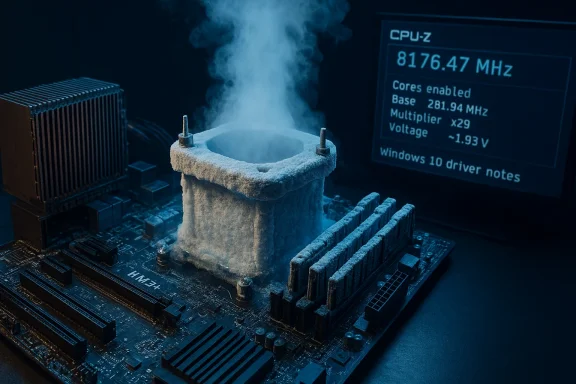
The AMD FX‑8350’s headline-grabbing overclock runs and a torrent of “driver download” listings have resurfaced together in search results and repackaged articles — a perfect storm of nostalgia, clickbait, and genuine technical nuance. On one hand, extreme overclockers drove Vishera silicon past 8 GHz years ago under liquid‑nitrogen conditions; on the other, people looking for “AMD FX‑8350 drivers Windows 10” face fragmented support guidance, legacy package traps, and risky third‑party downloads. This article separates the record‑setting achievements from practical reality, verifies the numbers and sources, and gives clear, actionable guidance for anyone still running an FX‑series AM3+ system on Windows 10.
Background / Overview
The AMD FX‑8350 (Vishera) was released in late 2012 as an AM3+ desktop part with a 4.0 GHz stock turbo on an advertised 4.0 GHz base/boost envelope (3.8 GHz base, 4.0 GHz Turbo depending on model and binning). Enthusiasts quickly pushed the chip far beyond stock frequencies using extreme cooling; multiple overclocking teams posted validated CPU‑Z / HWBOT results showing frequencies in the high 8 GHz range when cooled with liquid nitrogen (LN2) and supplied with very high voltages.Simultaneously, the question “Where do I get legitimate AMD FX‑8350 drivers for Windows 10?” is still common. Driver responsibilities for AM3+ era boards are split: AMD provided chipset references in earlier driver sets, but many AM3+ hardware drivers — SATA, audio, LAN, and some USB controllers — came through motherboard vendors. By the late 2010s AMD’s driver engineering focus shifted toward AM4/AM5 (Ryzen) platforms; modern AMD chipset pages and community guides emphasize using vendor support pages for AM3+ boards.
This combination of high‑profile overclock headlines and repackaged driver “shop” listings (sometimes with marketing language) confuses users. The following sections verify the major claims, analyze the risks, and provide a practical step‑by‑step for drivers and stability.
The overclock headlines: what actually happened
The claim: “FX‑8350 overclocked to 8.176 GHz with 8 cores enabled”
This claim is factual and verifiable: multiple independent overclocking reports documented FX‑8350 runs above 8.1 GHz with all eight cores enabled, using LN2 and extreme voltages. TechPowerUp covered a verified run showing 8,176.47 MHz with all 8 cores active (achieved by Korean overclocker NAMEGT), reporting a base clock around 281.94 MHz and multiplier ×29 with ~1.932 V applied — LN2 cooling and specialized test rigs were used.Other reputable outlets captured similar records and incremental improvements: MSI, ASUS ROG pages, and independent review sites documented FX‑8350 world records in late 2012 and early 2013, with pro‑overclockers using ROG Crosshair V Formula‑Z or MSI 990FX platforms to reach 8.3 GHz, 8.67 GHz, and even reports near 8.79 GHz under extreme conditions. These were validated with CPU‑Z/HWBOT screenshots and are part of the historical overclocking record.
What the numbers mean (technical verification)
- These high‑frequency runs were performed under extreme cooling — typically LN2 — which is not representative of air or closed‑loop liquid (AIO) cooling behavior.
- Voltages reported for those runs ranged near or above 1.9–2.1 V, far higher than safe everyday operating voltages for normal use; such voltages are only tolerable for seconds to minutes in LN2 bench sessions.
- Overclock validations were ordinarily recorded with CPU‑Z and submitted to HWBOT or shown on vendor validation pages; those validation IDs are available in the original coverage and linked screenshots.
Practical takeaway
Extreme overclock figures (8+ GHz) are historic demonstrations of headroom and binning — useful as engineering curiosities and marketing wins for motherboard vendors — but they are not practical for daily systems. Expect no usable or stable desktop workload at those voltages or temperatures; they are benchmark runs, not durability tests.AMD FX‑8350 and Windows 10 drivers: the reality
What “drivers” covers for an AM3+ FX system
When a user asks for “AMD FX‑8350 drivers Windows 10,” they commonly conflate different driver classes:- Chipset drivers (southbridge/PCI controller, power management helpers)
- Onboard peripherals (Ethernet, audio, SATA/RAID controllers) often supplied by motherboard OEMs (ASUS, Gigabyte, MSI, ASRock) rather than AMD for AM3+ boards
- Graphics drivers for discrete GPUs (Radeon/NVIDIA) — not the CPU
- Device‑specific ACPI/ASD/AS4 drivers that appear on some branded OEM systems
Windows 10 lifecycle context
Windows 10 reached its end of regular support on October 14, 2025. After that date Microsoft stopped issuing routine security and feature updates for Windows 10; OEM and driver vendors naturally prioritized Windows 11 and newer chipset baselines, which affects driver packaging and test coverage. This shift explains why older AM3+ driver packages and legacy Catalyst archives sometimes require advanced manual installation and why vendor updates are less frequent.Common problems users encounter
- Installer refuses to run or reports “This device is not supported” because the INF doesn’t list the board’s VID/PID.
- Windows Update or Microsoft Catalog replaces a manual install with its own signed driver.
- Legacy Catalyst packages lack signing compatible with newer WDDM/Windows 10 kernels; installers ask to disable signature enforcement.
- Repackaged driver collections on third‑party sites are unsigned or altered; community threads repeat warnings about these sources.
Verifying driver claims and third‑party content: caution advised
Born2Invest and repackaged driver listings
The user provided a Born2Invest link; repackaged listings and e‑commerce style “driver shop” pages sometimes surface in searches for legacy drivers. Independent community investigations show these repackaged items often prioritize convenience and monetization over provenance: they may omit INF mapping, cryptographic checksums, and compatibility notes that are essential for safe driver installs. In community archives, Born2Invest‑type posts have been flagged as marketing style repackaging rather than authoritative technical guidance. Treat those listings with skepticism and verify binaries against vendor/OEM or AMD official archives first.How we validated the overclock and the driver reality
- The 8.176 GHz FX‑8350 run was confirmed via at least two independent mainstream outlets that documented CPU‑Z and HWBOT validation traces; ASUS/ROG and TechPowerUp/LegitReviews coverage corroborate the extreme records.
- AMD’s public chipset and driver pages show a clear focus on Ryzen/AM4/AM5 drivers in the modern era; archived packages and vendor pages are the credible sources for legacy AM3+ drivers, confirmed on AMD’s site and in community recommendations.
- Microsoft’s lifecycle notice confirms Windows 10 end of support date, which impacts long‑term driver maintenance and is essential context for anyone deciding whether to keep or upgrade an FX‑based Windows 10 system.
Practical, safe guidance for FX‑8350 owners on Windows 10
If you’re still running an AM3+/FX‑8350 system, follow this prioritized checklist. It balances stability, safety, and the reality that vendor attention for older platforms is limited.Immediate safety and verification steps
- Inventory hardware: Record motherboard model and revision (printed on PCB or UEFI splash), BIOS version, discrete GPU model, and audio/Ethernet controller IDs (Device Manager → Properties → Details → Hardware Ids). This information is essential for vendor searches and INF verification.
- Create a full system backup: Use a disk‑image tool (Macrium Reflect, Acronis, or similar) before changing drivers. Driver changes can render a system unbootable.
- Prefer Windows Update first: If Windows Update offers a Microsoft‑signed driver for display or chipset components, test that first — it is usually the lowest‑risk option.
If Windows Update is insufficient
- Download drivers from the motherboard vendor (ASUS/Gigabyte/MSI/ASRock): This is the recommended route for AM3+ systems because vendors supply tuned INFs and utilities. Look up the exact model and board revision before installing.
- If you must use archived AMD packages, do it carefully: extract the package, verify the Display.Driver.inf contains your hardware ID before installing via “Have Disk” → point to the extracted INF. Do not* edit INF files and attempt to install unsigned drivers on a production machine.
- Avoid unverified “driver packs” and one‑click updater tools: These often lack integrity checks and have a history of bundling modified code. Community posts warn against repackaged installers from untrusted sources.
Cleanup and troubleshooting
- If previous driver installs are messy: Boot to Safe Mode and run Display Driver Uninstaller (DDU) to remove residual AMD/NVIDIA driver traces before attempting a clean install. DDU logs can help diagnose partial installs.
- If Windows keeps reverting: Pause Windows Update temporarily while validating a manually installed driver. Re‑enable it after confirming the system is stable.
- If an installer requests to disable signature enforcement: Use this only on a disposable test machine. Disabling driver signing on a production, internet‑connected machine increases security risk.
If you need advanced features (Catalyst control center, legacy GPU features)
- Older Radeon HD‑class cards (HD 2000–HD 7000 families) are often not formally certified for modern Windows 10 WDDM versions. Windows will fall back to Microsoft Basic Display Adapter in many cases. If you rely on legacy Catalyst features, accept that you are in a maintenance‑only, advanced‑user scenario that requires backups, DDU cycles, and careful INF checks.
- For truly stubborn legacy setups, the “Have Disk” method using an extracted Catalyst INF after DDU cleanup is the documented community approach — but it’s inherently riskier and may lack feature parity. Only proceed if you have an image backup and are comfortable with test restorations.
Upgrade considerations: when to move on
The combination of aging hardware and the end of Windows 10 support creates a natural fork in choices:- Stick and secure: If your FX‑8350 rig meets your current needs (office, light media), you can continue using Windows 10 — but be aware that security updates stopped on October 14, 2025. Consider network isolation, a good third‑party antivirus, and creating periodic full disk images.
- Upgrade the OS: Many AM3+ motherboards lack Windows 11 compatibility; even if they technically run Windows 11, driver and firmware support will be minimal. For continued vendor support and security updates, migrating to a newer platform (AM4/AM5 or Intel equivalent) is the practical path.
- Extended Security Updates (ESU): For some users who cannot move immediately, Microsoft offered ESU options to extend support for a defined period; however, ESU logistics and account requirements are specific and may not be suitable for all consumers.
Risks and red flags to watch for
- Unsigned or repackaged installers: These are the most common path to system instability or worse. Prefer vendor or AMD official archives, and validate checksums where provided. Community archives strongly caution against untrusted repackaging.
- Editing INFs to add hardware IDs: This is possible but requires re‑signing the driver for modern Windows kernels. Doing INF edits without re‑signing exposes you to driver signature enforcement and security risks.
- Disabling signature enforcement permanently: Never leave a production machine with signature enforcement off. Use test mode only on disposable machines.
- Assuming overclock records imply everyday performance: Extreme overclock records are bench artifacts using LN2 and extreme voltages — they do not translate to safe, everyday configuration guidance. Treat such claims as performance curiosities, not tutorials.
Recommended step‑by‑step for a safe driver update on FX‑8350 + Windows 10
- Inventory and backup (create a full disk image).
- Check Windows Update for Microsoft‑signed driver updates; install and test.
- If a specific device requires a vendor driver, download the exact motherboard model’s driver package (match board revision).
- If installing a legacy AMD package: extract installer, check INF lists for your hardware ID before running.
- If display drivers act flaky, boot Safe Mode → run DDU to clean previous drivers → reinstall chosen package.
- Pause Windows Update during validation to prevent automatic replacement; resume afterwards if stable.
- If you encounter “unsupported” errors, stop and consult vendor forums — do not install a driver from an anonymous third‑party site without checksums.
Critical analysis and final verdict
The headlines that pair “AMD FX‑8350 overclocked to 8.176 GHz” with driver shopping guides capture two very different truths simultaneously: the FX‑8350 is capable of extraordinary frequencies in bench conditions, and the FX platform is now a legacy era where driver provenance and vendor responsibility matter more than ever.Notable strengths:
- The overclock records are legitimate and well‑documented by multiple independent outlets and validation systems. They illustrate silicon headroom, vendor motherboard robustness for LN2 benching, and the vibrant overclock community around 2012–2013.
- For driver needs, vendor pages and Microsoft’s update catalog still provide the safest routes for stable daily operation. The community workflows for DDU and manual INF verification are well‑trodden and effective for those who know the risks.
- Repackaged, e‑commerce style driver listings (like the types of posts repurposed on Born2Invest) often omit crucial compatibility and signing information; following them blindly risks instability or worse. Always cross‑check against OEM/AMD archives.
- Windows 10’s support lifecycle ended on October 14, 2025; continuing on an unsupported platform increases exposure to unpatched vulnerabilities and driver incompatibilities over time. This is arguably the most important single fact for FX‑8350 owners to weigh.
Conclusion: a pragmatic path forward
If you cherish your FX‑8350 system for legacy software, retro gaming, or as a second machine, treat the platform as a maintained legacy installation: use vendor drivers when possible, validate archives carefully, and keep robust backups. Celebrate the overclocking history as an engineering achievement, but do not confuse extreme bench records with practical, safe tuning.For everyone else, consider the long‑term costs: Windows 10 is past its mainstream support window, and driver maintenance for AM3+ will continue to be user‑led rather than vendor‑led. Upgrading to a newer platform will deliver better security, broader driver coverage, and less friction — and if you’re motivated by performance rather than nostalgia, modern Ryzen platforms make that move both sensible and relatively inexpensive.
If you want a concise checklist or a tailored driver‑update plan for your exact motherboard model and GPU, I can prepare a step‑by‑step guide that lists the precise INF checks and the safest download sources — matching your board’s revision and the FX‑8350’s configuration.
Source: Born2Invest https://born2invest.com/?b=style-231895012/
