

Samsung’s new Galaxy Book5 Edge drops into the thin-and-light laptop market with a striking focus on on-device AI: a 15.6-inch chassis powered by Qualcomm’s Snapdragon X (X1-26-100) silicon, a dedicated Copilot AI key, and a collection of Copilot+ style features built to run locally on a 45‑TOPS Hexagon NPU.
Samsung is positioning the Galaxy Book5 Edge as another step in the industry’s shift toward Copilot+ Windows PCs — machines that combine Windows 11 software hooks with on-device neural acceleration so latency‑sensitive AI features can run locally instead of always hitting the cloud. Samsung’s product page explicitly markets the Edge as a Copilot‑aware device with a Hexagon NPU rated at 45 TOPS, and it list features such as Recall, Cocreator in Paint, Live Captions, and Windows Studio Effects. That push isn’t happening in isolation. Microsoft and OEM partners have defined a rough technical bar for the first wave of Copilot+ features — devices with NPUs capable of roughly 40+ TOPS are the ones most likely to deliver the full, low‑latency Copilot experience on the device. Independent industry coverage and OEM materials repeatedly reference this threshold as the practical dividing line for which features will run locally.
For typical office, web and media use — where many apps are natively Arm64 or run well under emulation — the Book5 Edge will feel snappy and efficient. For heavier workloads that expect discrete GPU performance or require legacy x86 driver stacks, an Intel/AMD alternative may be safer.
Key competitive points:
For readers tracking availability: Samsung lists the Galaxy Book5 Edge 5G (NP755XRA‑KA1UK, 16 GB / 512 GB) at £949 on its UK product page; independent outlets note the initial retail footprint appears focused on the UK with region‑specific SKU rollout likely to follow. Confirm local SKUs, warranty terms and software update timing before purchase to ensure the specific Copilot features you want are supported on your model.
Source: Technetbook Samsung Galaxy Book5 Edge Laptop Announced with Snapdragon X AI Processor and Copilot Key
 Background / Overview
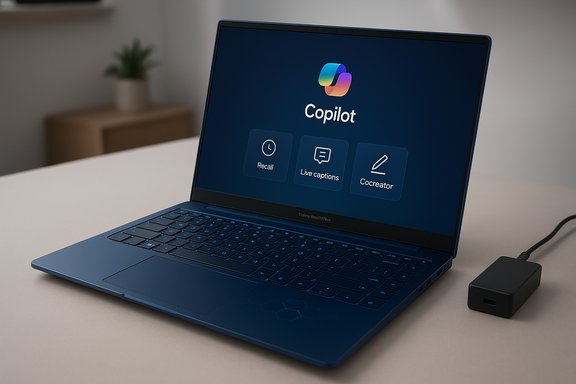
Samsung is positioning the Galaxy Book5 Edge as another step in the industry’s shift toward Copilot+ Windows PCs — machines that combine Windows 11 software hooks with on-device neural acceleration so latency‑sensitive AI features can run locally instead of always hitting the cloud. Samsung’s product page explicitly markets the Edge as a Copilot‑aware device with a Hexagon NPU rated at 45 TOPS, and it list features such as Recall, Cocreator in Paint, Live Captions, and Windows Studio Effects. That push isn’t happening in isolation. Microsoft and OEM partners have defined a rough technical bar for the first wave of Copilot+ features — devices with NPUs capable of roughly 40+ TOPS are the ones most likely to deliver the full, low‑latency Copilot experience on the device. Independent industry coverage and OEM materials repeatedly reference this threshold as the practical dividing line for which features will run locally.What Samsungannounced — the headline spec sheet
- Processor: Snapdragon® X processor (X1-26-100), 8 cores, up to 3.0 GHz.
- NPU: Hexagon NPU rated at 45 TOPS (qualifies the device for many Copilot+ features).
- Memory and storage: 16 GB LPDDR5X (on‑board) and 512 GB eUFS storage in the UK retail SKU.
- Display: 15.6" FHD IPS (1920×1080) with anti‑glare coating.
- Battery and charging: 61.2 Wh typical capacity; Samsung claims up to 27 hours of local video playback and ~43% charge in 30 minutes with the included 65 W adapter (lab conditions).
- Connectivity: Wi‑Fi 7 (802.11be), Bluetooth v5.4, 5G Sub‑6, and a SIM/MicroSD slot depending on SKU. Ports include 2× USB4.0, HDMI 2.1, USB 3.2 Type‑A, and a 3.5 mm combo jack.
- Dimensions & weight: 356.6 × 229.8 × 15.5 mm, 1.66 kg (3.66 lbs). Color: Sapphire Blue.
- Price (UK): £949 for the Galaxy Book5 Edge 5G (model NP755XRA‑KA1UK, 16 GB / 512 GB). Availability at announcement is primarily UK‑focused. Independent outlets have picked up the same list price.
Hardware deep dive: Snapdragon X and the 45 TOPS claim
Snapdragon X (X1‑26‑100) — what it is and what it promises
The Galaxy Book5 Edge ships with the Snapdragon X family SoC labeled X1‑26‑100, an 8‑core Qualcomm design used as a lower‑binned Snapdragon X option beneath the X Plus and X Elite tiers. Samsung’s spec sheet lists an NPU capable of 45 TOPS, which places the device within the practical range Microsoft and reviewers use to designate Copilot+ capable hardware. From a functional perspective, the Hexagon NPU’s role is to accelerate inference for on‑device models — speech recognition, local translations, low‑latency image processing for Copilot Vision, live captioning and Recall indexing. That’s the rationale behind marketing claims that the Book5 Edge can perform many AI tasks without always sending data to the cloud.Memory, storage and graphics
Samsung ships the Edge with 16 GB LPDDR5X soldered on the board and 512 GB eUFS storage in the UK SKU. The GPU is Qualcomm’s Adreno integrated block; it’s fit for UI acceleration, media playback and light GPU tasks but not a replacement for discrete graphics in demanding video editing or gaming. Samsung’s configuration mirrors what we’ve seen across other Snapdragon X‑class devices: strong system power efficiency, soldered RAM and fixed memory configurations that favor battery life and thin chassis goals over modular expandability.Copilot integration and the dedicated AI key
The Copilot key — real convenience or marketing flourish?
Samsung adds a dedicated AI key on the keyboard that launches Microsoft Copilot and quick AI features. On paper this is a genuine productivity convenience: a one‑press pathway to recall files, ask Copilot questions or invoke Vision features without hunting through menus. Samsung’s pages and product imagery make the key a marquee differentiator. In practice, the value of a dedicated AI key depends on OS integration and how often users adopt Copilot workflows. The Copilot key will be most useful to people who embrace conversational, visual or voice interactions as part of their daily workflow — otherwise it’s a convenience rather than a must‑have. Early Copilot+ device rollouts show that the UI and timing will likely improve under Windows updates, but adoption hinges on software polish and user habits.Key built‑in AI features Samsung highlights
- Recall — a local snapshot‑indexing feature that lets you search your PC’s recent activity (documents, images, browser pages) via visual thumbnails. Samsung’s page notes Recall will be available via post‑launch Windows Update in some regions.
- Cocreator (Paint integration) — turn rough sketches into more finished art with AI prompts directly inside Paint. This echoes Microsoft’s push to add generative and editing helpers inside built‑in apps.
- Live Captions — real‑time captioning and translation for meetings and videos. The feature’s responsiveness will benefit heavily from the on‑device NPU.
- Windows Studio Effects — eye contact correction, auto‑framing, lighting tweaks and background tools for video calls. These effects are already shipping on other Copilot+ PCs and are GPU/NPU accelerated.
Display, build and ports — a practical mid‑range design
The Book5 Edge trades premium AMOLED for a practical 15.6‑inch FHD IPS panel with anti‑glare coating — a sensible choice for a machine marketed at mobility and battery life. The chassis is slim at 15.5 mm and offers an array of ports that many ultraportables skip: two USB4 ports, HDMI 2.1 (4K @ 60 Hz support), a USB 3.2 Type‑A, SIM/MicroSD slot and a 3.5 mm combo jack. That combination makes the Edge a versatile travel laptop without dongle reliance. Weight at 1.66 kg is competitive for a 15.6‑inch device, though NotebookCheck’s hands‑on commentary flagged a small weight increase versus prior generation Edge models and questioned whether the tradeoff is always worth it for the Snapdragon X configuration. Independent reviewers commonly note that 15.6‑inch laptops at ~1.6‑1.7 kg sit in the “portable but not featherlight” segment.Battery life: lab claims vs. realistic expectations
Samsung advertises up to 27 hours of local video playback on a full charge and ~43% charge in 30 minutes using the included 65 W adapter. Those figures come from Samsung’s internal lab tests and are clear marketing claims; the company also includes the typical caveats that real‑world performance varies by settings, network connectivity and usage patterns. Independent testers and reviewers have a consistent caution: marketing-stated video playback runtimes are measured under tightly controlled conditions (e.g., local video playback, fixed brightness, airplane mode). Typical productivity, web browsing and video‑conferencing workloads will significantly reduce runtime. NotebookCheck and similar outlets advise tempering expectations for multi‑tasking or continuous cloud workloads (which also engage radios and more background processes). If battery runtime is a top priority, expect practical day‑long results but not the full 27‑hour claim except in highly optimized playback scenarios.Software compatibility, emulation and practical performance notes
Running Windows 11 on Arm‑based chips (like Snapdragon X) gives a strong battery and on‑device AI benefits, but there remain compatibility considerations. Emulation (x86‑64/x86 apps running under Windows on Arm translation) has improved substantially, but some legacy software, device drivers and specialist apps can still show performance or compatibility issues. Early adopters of Snapdragon‑based Copilot+ PCs should verify mission‑critical applications (development toolchains, proprietary enterprise apps, virtualization workflows) before switching.For typical office, web and media use — where many apps are natively Arm64 or run well under emulation — the Book5 Edge will feel snappy and efficient. For heavier workloads that expect discrete GPU performance or require legacy x86 driver stacks, an Intel/AMD alternative may be safer.
Privacy, security and enterprise considerations
Samsung bundles enterprise‑grade security features such as Samsung Knox plus TPM and a fingerprint reader. That covers the baseline security posture many buyers expect. However, the new wave of on‑device AI features introduces additional privacy considerations that merit attention.- Recall stores visual snapshots and indexes of local activity to enable fast retrieval. While local indexing reduces cloud exposure, it also creates a local cache of screenshots and metadata that could be sensitive. Samsung and Microsoft include privacy controls, but enterprise administrators and privacy‑sensitive users should review and disable Recall indexing where necessary.
- On devices managed by IT, staged rollouts and feature availability may be gated; organizations should coordinate firmware and Windows Update policies to control when and how Copilot features are enabled. File‑indexing and vision features can change the attack surface and data retention profile, so conservative enablement is prudent in regulated environments.
Positioning and market context
Samsung’s Galaxy Book5 Edge sits between ultra‑premium Copilot+ laptops (OLED/AMOLED Book5 Pro models, higher‑binned Snapdragon X Elite / Intel Core Ultra SKUs) and more mainstream ultrabooks. Its design choices emphasize portability, on‑device AI and broad connectivity rather than extreme display fidelity or discrete GPU performance.Key competitive points:
- It undercuts many premium models on price while offering a Copilot‑capable NPU and a robust port array.
- It’s not aimed at heavy GPU creatives or GPU‑accelerated AI workflows that need discrete accelerators; those users will still prefer workstations or Intel/AMD + discrete GPU laptops.
- Professionals and students who want long battery life, always‑on connectivity (5G) and a Copilot‑enabled workflow.
- Travelers and hybrid workers who value ports and a 15.6‑inch screen without lugging a heavy machine.
- Buyers inside the Samsung ecosystem who will use Connected Camera, Phone Link and Quick Share features extensively.
Strengths, weaknesses and risks
Strengths
- On‑device AI capability (45 TOPS NPU) gives the Edge a practical edge for Copilot features like Recall, Live Captions and Cocreator.
- Solid connectivity & ports including USB4 and HDMI 2.1 set it apart from many ultraportables.
- Integrated 5G Sub‑6 and Wi‑Fi 7 readiness aim the laptop at always‑connected users.
- Reasonable price point (UK: £949) for a Copilot‑capable 15.6‑inch device makes it relatively accessible compared with higher‑end Copilot+ PCs.
Weaknesses / potential downsides
- ARM app compatibility caveats: some legacy x86 software and drivers may not work optimally under emulation. Business users must test mission‑critical apps.
- Display is FHD IPS (not AMOLED) — fine for productivity, but less compelling for creators who want higher color gamut or HDR.
- Battery claims are lab‑based and real‑world results will vary — expect significantly less than 27 hours for mixed workloads.
Risks to note
- Privacy and data exposure: features that capture screen content or index personal activity (Recall) broaden the privacy surface; organizations should control rollout and settings.
- Fragmented feature availability: staged Windows updates and regional SKU differences mean not all buyers receive the full Copilot feature set immediately. Samsung states some features arrive post‑launch.
Practical buying guidance — who should consider the Galaxy Book5 Edge
- Users who want a Copilot‑capable laptop with on‑device AI for local Recall, live captions and similar features and who prioritize battery life and connectivity.
- Buyers who value port selection and 5G in a 15.6‑inch laptop without paying for an OLED panel.
- Samsung ecosystem customers who will use Phone Link, Connected Camera and Quick Share extensively.
- You rely heavily on legacy x86 specialist software without confident emulation support.
- You need discrete GPU performance for rendering or large model training.
- You demand the absolute best color/contrast for professional photo/video work (Book5 Pro and other AMOLED machines are better suited).
Final verdict — measured enthusiasm
The Galaxy Book5 Edge is a smart and pragmatic entry in Samsung’s Copilot+ roadmap: it pairs a capable Snapdragon X silicon with a 45‑TOPS NPU, a sensible port array, and a price that undercuts many premium AI‑first machines. For mainstream productivity users and frequent travelers who want fast, local AI features and always‑connected convenience, it’s a compelling proposition. That said, prospective buyers must be realistic about two things: first, the difference between lab battery numbers and real‑world usage; and second, the lingering compatibility edge cases for Windows on Arm. Enterprises and privacy‑sensitive users should audit Recall and Copilot settings before enabling them broadly. If those caveats are acceptable and the use case aligns with Samsung’s strengths — on‑device AI assistance, portability and connectivity — the Book5 Edge represents a practical, forward‑looking buy in the first wave of Copilot+ PCs.For readers tracking availability: Samsung lists the Galaxy Book5 Edge 5G (NP755XRA‑KA1UK, 16 GB / 512 GB) at £949 on its UK product page; independent outlets note the initial retail footprint appears focused on the UK with region‑specific SKU rollout likely to follow. Confirm local SKUs, warranty terms and software update timing before purchase to ensure the specific Copilot features you want are supported on your model.
Source: Technetbook Samsung Galaxy Book5 Edge Laptop Announced with Snapdragon X AI Processor and Copilot Key
