

Samsung’s Galaxy Wearable app is reportedly getting a major redesign in July 2026, with leaked screenshots showing a cleaner One UI-style home screen, larger Galaxy Watch previews, Gemini wrist activation, AI-generated watch tiles, and hooks for Samsung’s next wave of health features. The leak, first surfaced by SammyGuru and amplified by Android Central, 9to5Google, Android Authority, and SamMobile, is not just another cosmetic refresh. It suggests Samsung is preparing its watch software for a more ambitious role: less accessory control panel, more AI-and-health command center. That shift could make Galaxy Watch feel more coherent — or more intrusive — depending on how much control Samsung leaves in the user’s hands.
For years, the Galaxy Wearable app has felt like what it technically is: a companion utility. You opened it to change a watch face, rearrange tiles, tweak notifications, or pair earbuds. It worked, but it rarely felt like the polished front door to a product ecosystem that Samsung insists is increasingly personal, intelligent, and health-aware.
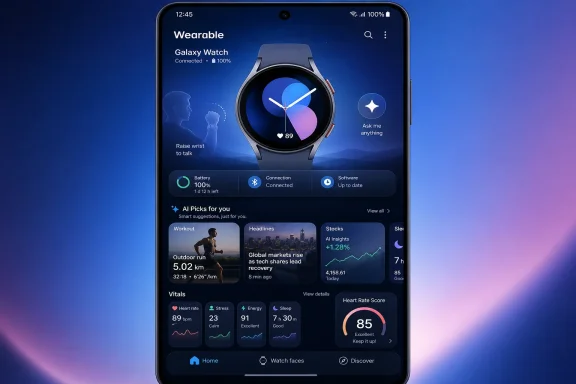
The leaked redesign changes that posture. According to SammyGuru’s early look, the app’s Home tab gives the connected Galaxy Watch a much larger visual presence, with the device render dominating the screen and secondary controls collapsed into cleaner containers. Android Central described the result as closer to Samsung’s current One UI aesthetic, and that is the important part: this is not merely a new coat of paint, but an attempt to make the wearable feel native to the same design language as Galaxy phones.
That matters because smartwatches are sold emotionally but managed administratively. Samsung’s marketing shows sleep, running, coaching, and lifestyle; the app often exposes toggles, menus, permissions, and firmware baggage. A better Galaxy Wearable app narrows that gap by making the watch feel less like a peripheral and more like a visible, living part of the phone experience.
The timing is also telling. Samsung has already previewed new Galaxy Watch health features through its own Newsroom, while the rumor cycle is now circling One UI 9 Watch and the next Galaxy Watch hardware. A refreshed companion app arriving around that wave would be less surprising than Samsung leaving the existing experience untouched.
SammyGuru reportedly found references to a gesture that would let users raise their wrist to talk to Gemini, rather than long-pressing the side button. 9to5Google framed the feature as a “Raise to Talk” style shortcut, echoing a direction Google has already explored on Pixel Watch. If implemented well, it could make voice interaction on a watch feel much less awkward.
That is a big if. Raising your wrist is already the most common gesture people use to check the time, glance at a notification, or see workout stats. If Samsung maps that same motion to an AI assistant without careful gating, it risks turning a convenience feature into a privacy and usability problem.
Android Central’s own take was appropriately skeptical: people raise their wrist constantly, and many of those moments are not invitations for a microphone to become active. Samsung can solve this with settings, wake-word logic, context detection, or a deliberate secondary cue. But the distinction matters because ambient AI on the wrist is much more intimate than ambient AI on a phone.
Phones sit on tables, in pockets, and on chargers. Watches sit on bodies. A wrist-based assistant knows when you are moving, sleeping, exercising, stressed, idle, and possibly unwell. The more Samsung turns Galaxy Watch into an AI surface, the more important it becomes that activation feels intentional rather than merely convenient.
A watch is also a sensible place for short, transactional AI. Setting reminders, checking weather, asking quick questions, starting workouts, controlling smart home devices, and replying to messages are all plausible wrist-first use cases. Nobody wants to compose a long document on a watch, but plenty of people want a five-second answer without digging out a phone.
The danger is that vendors keep trying to make voice assistants feel magical before they are reliably useful. A wrist-raise shortcut could be brilliant if it understands context and fails quietly. It could be maddening if it wakes at the wrong time, misses the intended command, or creates yet another setting users disable after a week.
This is where Samsung’s app redesign becomes more than decoration. The companion app is where users will likely discover, enable, disable, and tune these behaviors. If Samsung buries AI controls under vague branding, it will invite backlash. If it presents them clearly — with obvious toggles and plain-language privacy cues — the feature has a better chance of becoming part of daily use.
That model works for enthusiasts. It is less effective for everyone else.
AI-generated tiles are Samsung’s attempt to reduce that friction. Instead of making the user assemble the perfect dashboard, the watch might infer what belongs there. A commuter gets weather and transit-style prompts; a runner gets training and recovery context; a sports fan gets scores; a finance watcher gets market movement; a traveler gets time zones and elevation or location-aware data.
This is the same broad logic behind many modern assistant surfaces: not an all-knowing chatbot, but a dynamic dashboard that tries to reduce the number of taps between intent and information. On a watch, that may be the better use of AI anyway. Generative conversation is flashy, but glanceable relevance is where wearables can quietly improve.
The risk is predictability. A tile that changes too often becomes something users stop trusting. A tile that guesses wrong becomes clutter. A tile that reveals sensitive interests at the wrong time becomes embarrassing. Samsung’s challenge is not generating a tile; it is making the tile feel like yours without making the watch feel like it is freelancing.
Vitals is the most obvious example. Samsung says it analyzes five overnight bio-signals: heart rate, heart rate variability, respiratory rate, skin temperature, and blood oxygen. The goal is to compare those readings against a user’s resting baseline and flag meaningful changes.
That is the same competitive terrain Apple, Google Fitbit, Garmin, Whoop, and Oura have been fighting over for years. The hardware sensor race is no longer enough. Everyone can show heart rate; the differentiator is whether the platform can tell users what their numbers mean without pretending to be a doctor.
Heart Rate Score fits that pattern. Rather than simply displaying heart-rate data, Samsung is positioning it as a broader wellness indicator influenced by sleep, stress, activity, and body composition. That is classic platform logic: the more data streams Samsung can combine, the more valuable the watch becomes, and the harder it is for a user to leave.
For WindowsForum readers, the parallel is familiar. This is telemetry plus interface design plus ecosystem lock-in. The consumer version is friendlier and health-branded, but the underlying strategy is the same: collect signals, interpret them, surface recommendations, and make the platform feel indispensable.
Galaxy Watch now has to reconcile Wear OS, One UI Watch, Samsung Health, Google Gemini, Galaxy AI, regional health approvals, device compatibility, watch-specific sensors, phone-side app updates, and cloud-driven personalization. The user sees a tile. The administrator in all of us sees a stack.
This is why Samsung’s execution matters. A redesigned Home tab is welcome, but it cannot become a glossy layer over confusing feature availability. If Vitals works on one watch but not another, if Heart Rate Score requires One UI 9 Watch, if some health functions vary by country, and if AI features depend on Gemini availability or account settings, the companion app must explain that clearly.
Samsung has a habit of shipping powerful features with fragmented messaging. Galaxy phones are full of capabilities many users never discover because they are scattered across Settings, Samsung apps, Google services, Labs menus, and regional variants. The Wearable app redesign is a chance to avoid repeating that mistake on the wrist.
It is also a chance to make support easier. For enthusiasts and IT pros supporting family devices or fleets of ruggedized phones and wearables, clarity matters. A good app should show what the connected watch supports, what software version it is running, what features are pending, and what requires a new device. A beautiful render of a watch is nice; a trustworthy compatibility story is better.
Consistency has real value. Users should not feel like they are jumping between unrelated eras of Samsung software when moving from phone settings to watch controls. A unified design also helps Samsung compete with Apple, whose ecosystem advantage has always been less about any single app and more about the impression that every device belongs to the same operating philosophy.
But Samsung’s version of consistency is more complicated because it is layered on Android, Wear OS, Google services, Samsung services, carrier builds, and regional regulations. One UI is not a single operating system so much as a brand wrapper across many moving parts. The redesigned Wearable app is therefore doing symbolic work: it tells users Samsung is in control, even when the stack underneath is shared.
That symbolism is valuable, but it creates expectations. If the app looks like a polished One UI hub, users will expect the experience behind it to be equally integrated. If tapping into AI tiles or health scores throws them into inconsistent screens, missing features, or unclear requirements, the redesign will feel cosmetic.
This is where Apple remains the benchmark. Not because Apple always has the best health metrics or the most open AI strategy, but because the Watch app, Health app, Fitness app, and device setup generally feel like parts of one authored experience. Samsung is trying to close that gap while still living in the Android ecosystem’s messier, more flexible world.
Outdoor users are a different audience from casual smartwatch buyers. They care about battery, GPS reliability, screen visibility, button behavior, water resistance, sensor accuracy, and whether a feature works when conditions are bad. A prettier companion app will not convince that audience by itself.
But better software organization can help. Trail running, depth tracking, elevation, workout tiles, health recovery, and AI summaries all become more useful when they are presented as a coherent training and activity system. If Samsung wants the Ultra line to be taken seriously by runners, hikers, swimmers, and divers, the app must support the watch as equipment, not just as jewelry.
There is also a trust issue. Outdoor and health features have less tolerance for gimmickry than notification features. If an AI-generated tile misjudges a news preference, the cost is annoyance. If health or activity software misrepresents recovery, exertion, elevation, or environmental exposure, the consequences can be more serious.
Samsung does not need to turn Galaxy Watch into a Garmin overnight. It does need to decide how much of the Ultra identity is marketing and how much is operational discipline. The leaked app hints at ambition; the next hardware cycle will show how much substance is behind it.
Samsung is careful, at least in its public language, to frame features such as Vitals and Heart Rate Score as wellness insights rather than medical diagnosis. That distinction matters. A watch can nudge a user to rest, notice trends, or seek professional advice; it should not pretend to replace clinical equipment.
Still, users do not always perceive those boundaries clearly. A score feels like a verdict. A warning feels like an alarm. A trend line feels like evidence. The more Samsung compresses complex physiology into digestible cards, the more responsibility it has to communicate uncertainty.
This is not a Samsung-only issue. Apple, Fitbit, Garmin, Whoop, and Oura all face the same tension. The wearable industry’s great promise is that everyday health patterns can be made visible. Its great danger is that visibility can become overconfidence.
For Galaxy Watch owners, the practical advice remains boring but necessary: treat new wellness metrics as prompts, not diagnoses. Look for patterns over time. Pay attention when multiple signals change together. And if something feels medically significant, involve a clinician rather than arguing with a wrist computer.
A watch is a particularly important gateway because it combines input, output, identity, and biometric sensing. It can hear a command, show a glanceable response, authenticate proximity, monitor the body, and feed context back into a phone. That is why a simple “raise wrist to talk” feature deserves scrutiny.
Samsung’s ecosystem advantage is that it can connect watches, phones, earbuds, rings, tablets, and eventually XR or glasses products under the Galaxy brand. Google supplies much of the AI and operating-system substrate. The partnership gives Samsung reach, but it also forces the company to differentiate through design, hardware integration, and health features.
The leaked Galaxy Wearable app is therefore part of a larger contest over the next interface layer. If AI moves beyond chat boxes, it needs surfaces where it can appear at the right moment. Samsung wants the wrist to be one of those surfaces.
The question is whether users want that too. Many people bought smartwatches for notifications, fitness, and convenience, not for another assistant waiting to be invoked. Samsung’s job is to make AI feel optional, useful, and subordinate to the user — not like a new landlord for the smallest screen they own.
The worst interpretation is that Samsung is adding AI varnish to familiar smartwatch problems. Battery life still matters. Sensor accuracy still matters. Feature availability still fragments by model and region. Voice assistants still misfire. Health dashboards still risk confusing engagement with insight.
The truth will likely land between those poles. Samsung is too experienced to ship a totally reckless wrist-raise Gemini feature without controls, and the company’s health push is too central to be dismissed as a gimmick. But leaks are snapshots of intent, not proof of execution.
What Samsung needs now is discipline. The redesigned Wearable app should make setup easier, feature discovery clearer, privacy controls more visible, and health interpretation more sober. If it does that, the design refresh will deserve more than the usual “looks cleaner” praise.
 Samsung Is Finally Treating the Watch App Like the Front Door
For years, the Galaxy Wearable app has felt like what it technically is: a companion utility. You opened it to change a watch face, rearrange tiles, tweak notifications, or pair earbuds. It worked, but it rarely felt like the polished front door to a product ecosystem that Samsung insists is increasingly personal, intelligent, and health-aware.The leaked redesign changes that posture. According to SammyGuru’s early look, the app’s Home tab gives the connected Galaxy Watch a much larger visual presence, with the device render dominating the screen and secondary controls collapsed into cleaner containers. Android Central described the result as closer to Samsung’s current One UI aesthetic, and that is the important part: this is not merely a new coat of paint, but an attempt to make the wearable feel native to the same design language as Galaxy phones.
That matters because smartwatches are sold emotionally but managed administratively. Samsung’s marketing shows sleep, running, coaching, and lifestyle; the app often exposes toggles, menus, permissions, and firmware baggage. A better Galaxy Wearable app narrows that gap by making the watch feel less like a peripheral and more like a visible, living part of the phone experience.
The timing is also telling. Samsung has already previewed new Galaxy Watch health features through its own Newsroom, while the rumor cycle is now circling One UI 9 Watch and the next Galaxy Watch hardware. A refreshed companion app arriving around that wave would be less surprising than Samsung leaving the existing experience untouched.
The Leak Is About Design, But the Real Story Is Control
The screenshots are the obvious hook because software redesigns are easy to judge at a glance. Bigger watch render, cleaner sections, fewer scattered controls: this is the kind of change that reads well in screenshots and social posts. But the more consequential part of the leak is what the app appears to enable.SammyGuru reportedly found references to a gesture that would let users raise their wrist to talk to Gemini, rather than long-pressing the side button. 9to5Google framed the feature as a “Raise to Talk” style shortcut, echoing a direction Google has already explored on Pixel Watch. If implemented well, it could make voice interaction on a watch feel much less awkward.
That is a big if. Raising your wrist is already the most common gesture people use to check the time, glance at a notification, or see workout stats. If Samsung maps that same motion to an AI assistant without careful gating, it risks turning a convenience feature into a privacy and usability problem.
Android Central’s own take was appropriately skeptical: people raise their wrist constantly, and many of those moments are not invitations for a microphone to become active. Samsung can solve this with settings, wake-word logic, context detection, or a deliberate secondary cue. But the distinction matters because ambient AI on the wrist is much more intimate than ambient AI on a phone.
Phones sit on tables, in pockets, and on chargers. Watches sit on bodies. A wrist-based assistant knows when you are moving, sleeping, exercising, stressed, idle, and possibly unwell. The more Samsung turns Galaxy Watch into an AI surface, the more important it becomes that activation feels intentional rather than merely convenient.
Gemini on the Wrist Makes Sense — Until It Doesn’t
Samsung’s embrace of Gemini is not happening in isolation. Galaxy AI already blends Samsung features with Google’s AI stack, and Wear OS gives Google a natural path onto Samsung’s watch hardware. In that sense, Gemini on Galaxy Watch is strategic housekeeping: if AI is becoming central to Android, Samsung does not want its most visible wearable to feel disconnected from that story.A watch is also a sensible place for short, transactional AI. Setting reminders, checking weather, asking quick questions, starting workouts, controlling smart home devices, and replying to messages are all plausible wrist-first use cases. Nobody wants to compose a long document on a watch, but plenty of people want a five-second answer without digging out a phone.
The danger is that vendors keep trying to make voice assistants feel magical before they are reliably useful. A wrist-raise shortcut could be brilliant if it understands context and fails quietly. It could be maddening if it wakes at the wrong time, misses the intended command, or creates yet another setting users disable after a week.
This is where Samsung’s app redesign becomes more than decoration. The companion app is where users will likely discover, enable, disable, and tune these behaviors. If Samsung buries AI controls under vague branding, it will invite backlash. If it presents them clearly — with obvious toggles and plain-language privacy cues — the feature has a better chance of becoming part of daily use.
AI Tiles Are Samsung’s Attempt to Fix the Watch Face Problem
The leak also points to Galaxy AI-generated custom tiles based on user interests, with examples reportedly including sports, headlines, stocks, and other glanceable information. That sounds small until you consider how smartwatch customization usually works. Users are expected to manually choose complications, arrange tiles, pick watch faces, and decide what information deserves precious screen space.That model works for enthusiasts. It is less effective for everyone else.
AI-generated tiles are Samsung’s attempt to reduce that friction. Instead of making the user assemble the perfect dashboard, the watch might infer what belongs there. A commuter gets weather and transit-style prompts; a runner gets training and recovery context; a sports fan gets scores; a finance watcher gets market movement; a traveler gets time zones and elevation or location-aware data.
This is the same broad logic behind many modern assistant surfaces: not an all-knowing chatbot, but a dynamic dashboard that tries to reduce the number of taps between intent and information. On a watch, that may be the better use of AI anyway. Generative conversation is flashy, but glanceable relevance is where wearables can quietly improve.
The risk is predictability. A tile that changes too often becomes something users stop trusting. A tile that guesses wrong becomes clutter. A tile that reveals sensitive interests at the wrong time becomes embarrassing. Samsung’s challenge is not generating a tile; it is making the tile feel like yours without making the watch feel like it is freelancing.
Health Is the Strategic Center, Not the Side Feature
Samsung’s own announcements make clear where the company wants Galaxy Watch to matter most: health. In June, Samsung previewed new Galaxy Watch health features coming through Samsung Health and the next watch software cycle, including Vitals, Heart Rate Score, Daily Cardio Load, Fitness Index, and Hearing Health. Those features are designed to move Samsung from raw metrics toward interpretation.Vitals is the most obvious example. Samsung says it analyzes five overnight bio-signals: heart rate, heart rate variability, respiratory rate, skin temperature, and blood oxygen. The goal is to compare those readings against a user’s resting baseline and flag meaningful changes.
That is the same competitive terrain Apple, Google Fitbit, Garmin, Whoop, and Oura have been fighting over for years. The hardware sensor race is no longer enough. Everyone can show heart rate; the differentiator is whether the platform can tell users what their numbers mean without pretending to be a doctor.
Heart Rate Score fits that pattern. Rather than simply displaying heart-rate data, Samsung is positioning it as a broader wellness indicator influenced by sleep, stress, activity, and body composition. That is classic platform logic: the more data streams Samsung can combine, the more valuable the watch becomes, and the harder it is for a user to leave.
For WindowsForum readers, the parallel is familiar. This is telemetry plus interface design plus ecosystem lock-in. The consumer version is friendlier and health-branded, but the underlying strategy is the same: collect signals, interpret them, surface recommendations, and make the platform feel indispensable.
A Cleaner App Could Hide a More Complicated Platform
The irony of the leaked redesign is that Samsung appears to be simplifying the interface while expanding the underlying complexity. That is often what mature platforms do. The surface gets cleaner precisely because the machine underneath is becoming harder to explain.Galaxy Watch now has to reconcile Wear OS, One UI Watch, Samsung Health, Google Gemini, Galaxy AI, regional health approvals, device compatibility, watch-specific sensors, phone-side app updates, and cloud-driven personalization. The user sees a tile. The administrator in all of us sees a stack.
This is why Samsung’s execution matters. A redesigned Home tab is welcome, but it cannot become a glossy layer over confusing feature availability. If Vitals works on one watch but not another, if Heart Rate Score requires One UI 9 Watch, if some health functions vary by country, and if AI features depend on Gemini availability or account settings, the companion app must explain that clearly.
Samsung has a habit of shipping powerful features with fragmented messaging. Galaxy phones are full of capabilities many users never discover because they are scattered across Settings, Samsung apps, Google services, Labs menus, and regional variants. The Wearable app redesign is a chance to avoid repeating that mistake on the wrist.
It is also a chance to make support easier. For enthusiasts and IT pros supporting family devices or fleets of ruggedized phones and wearables, clarity matters. A good app should show what the connected watch supports, what software version it is running, what features are pending, and what requires a new device. A beautiful render of a watch is nice; a trustworthy compatibility story is better.
Samsung’s One UI Ambition Is Consistency by Accretion
Samsung’s larger software direction has been clear for several years: make everything look and behave more like One UI. Phones, tablets, watches, earbuds, TVs, and even appliance interfaces increasingly share visual cues, rounded cards, simplified hierarchy, and larger touch targets. The leaked Galaxy Wearable design fits that trend.Consistency has real value. Users should not feel like they are jumping between unrelated eras of Samsung software when moving from phone settings to watch controls. A unified design also helps Samsung compete with Apple, whose ecosystem advantage has always been less about any single app and more about the impression that every device belongs to the same operating philosophy.
But Samsung’s version of consistency is more complicated because it is layered on Android, Wear OS, Google services, Samsung services, carrier builds, and regional regulations. One UI is not a single operating system so much as a brand wrapper across many moving parts. The redesigned Wearable app is therefore doing symbolic work: it tells users Samsung is in control, even when the stack underneath is shared.
That symbolism is valuable, but it creates expectations. If the app looks like a polished One UI hub, users will expect the experience behind it to be equally integrated. If tapping into AI tiles or health scores throws them into inconsistent screens, missing features, or unclear requirements, the redesign will feel cosmetic.
This is where Apple remains the benchmark. Not because Apple always has the best health metrics or the most open AI strategy, but because the Watch app, Health app, Fitness app, and device setup generally feel like parts of one authored experience. Samsung is trying to close that gap while still living in the Android ecosystem’s messier, more flexible world.
The Galaxy Watch Ultra Angle Reveals Samsung’s Other Audience
The leak reportedly includes references relevant to outdoor and rugged users, including real-time elevation information for Trail Run and companion controls for the Depth app. That points to Samsung’s continuing attempt to make the Galaxy Watch Ultra line more than a fashionably chunky Apple Watch Ultra response.Outdoor users are a different audience from casual smartwatch buyers. They care about battery, GPS reliability, screen visibility, button behavior, water resistance, sensor accuracy, and whether a feature works when conditions are bad. A prettier companion app will not convince that audience by itself.
But better software organization can help. Trail running, depth tracking, elevation, workout tiles, health recovery, and AI summaries all become more useful when they are presented as a coherent training and activity system. If Samsung wants the Ultra line to be taken seriously by runners, hikers, swimmers, and divers, the app must support the watch as equipment, not just as jewelry.
There is also a trust issue. Outdoor and health features have less tolerance for gimmickry than notification features. If an AI-generated tile misjudges a news preference, the cost is annoyance. If health or activity software misrepresents recovery, exertion, elevation, or environmental exposure, the consequences can be more serious.
Samsung does not need to turn Galaxy Watch into a Garmin overnight. It does need to decide how much of the Ultra identity is marketing and how much is operational discipline. The leaked app hints at ambition; the next hardware cycle will show how much substance is behind it.
The Health Features Raise the Familiar Accuracy Problem
Every smartwatch maker wants to move from measurement to advice. That transition is lucrative because advice creates recurring engagement. It is also risky because advice sounds authoritative even when it is built on imperfect consumer sensors and probabilistic models.Samsung is careful, at least in its public language, to frame features such as Vitals and Heart Rate Score as wellness insights rather than medical diagnosis. That distinction matters. A watch can nudge a user to rest, notice trends, or seek professional advice; it should not pretend to replace clinical equipment.
Still, users do not always perceive those boundaries clearly. A score feels like a verdict. A warning feels like an alarm. A trend line feels like evidence. The more Samsung compresses complex physiology into digestible cards, the more responsibility it has to communicate uncertainty.
This is not a Samsung-only issue. Apple, Fitbit, Garmin, Whoop, and Oura all face the same tension. The wearable industry’s great promise is that everyday health patterns can be made visible. Its great danger is that visibility can become overconfidence.
For Galaxy Watch owners, the practical advice remains boring but necessary: treat new wellness metrics as prompts, not diagnoses. Look for patterns over time. Pay attention when multiple signals change together. And if something feels medically significant, involve a clinician rather than arguing with a wrist computer.
The App Redesign Arrives as Wearables Become AI Gateways
The broader industry context is that wearables are being repositioned as AI gateways. Phones remain the main computing device, but watches, rings, earbuds, and glasses are becoming the sensors and interaction points around it. Samsung’s recent leak cycle around watches and smart glasses makes that direction hard to miss.A watch is a particularly important gateway because it combines input, output, identity, and biometric sensing. It can hear a command, show a glanceable response, authenticate proximity, monitor the body, and feed context back into a phone. That is why a simple “raise wrist to talk” feature deserves scrutiny.
Samsung’s ecosystem advantage is that it can connect watches, phones, earbuds, rings, tablets, and eventually XR or glasses products under the Galaxy brand. Google supplies much of the AI and operating-system substrate. The partnership gives Samsung reach, but it also forces the company to differentiate through design, hardware integration, and health features.
The leaked Galaxy Wearable app is therefore part of a larger contest over the next interface layer. If AI moves beyond chat boxes, it needs surfaces where it can appear at the right moment. Samsung wants the wrist to be one of those surfaces.
The question is whether users want that too. Many people bought smartwatches for notifications, fitness, and convenience, not for another assistant waiting to be invoked. Samsung’s job is to make AI feel optional, useful, and subordinate to the user — not like a new landlord for the smallest screen they own.
The Best Version of This Future Is Boringly Competent
The most promising interpretation of the leak is not that Samsung is about to reinvent the smartwatch. It is that Samsung is doing necessary housekeeping before asking Galaxy Watch to carry more responsibility. A cleaner app, better health explanations, smarter tiles, and faster assistant access could all make the watch more useful.The worst interpretation is that Samsung is adding AI varnish to familiar smartwatch problems. Battery life still matters. Sensor accuracy still matters. Feature availability still fragments by model and region. Voice assistants still misfire. Health dashboards still risk confusing engagement with insight.
The truth will likely land between those poles. Samsung is too experienced to ship a totally reckless wrist-raise Gemini feature without controls, and the company’s health push is too central to be dismissed as a gimmick. But leaks are snapshots of intent, not proof of execution.
What Samsung needs now is discipline. The redesigned Wearable app should make setup easier, feature discovery clearer, privacy controls more visible, and health interpretation more sober. If it does that, the design refresh will deserve more than the usual “looks cleaner” praise.
The Galaxy Watch App Leak Points to a More Demanding Samsung Ecosystem
The immediate lesson from the leak is that Samsung is aligning the Galaxy Wearable app with the next phase of Galaxy Watch, not merely refreshing an old utility. The practical consequences are concrete, even before Samsung confirms every feature publicly.- Samsung appears to be preparing a One UI-style Galaxy Wearable redesign that gives the connected watch a more prominent, visual home inside the app.
- The reported Gemini wrist-raise shortcut could make voice AI faster, but it needs clear controls because raising a wrist is already a common non-AI gesture.
- Galaxy AI-generated tiles could reduce smartwatch setup friction if Samsung makes them predictable, editable, and transparent.
- Samsung’s new health features show the company moving from raw metrics toward interpreted wellness scores, which raises both usefulness and accuracy concerns.
- The Galaxy Watch Ultra-related references suggest Samsung still wants credibility with outdoor and rugged users, where software reliability matters more than visual polish.
- The app’s biggest job may be explaining compatibility, privacy, and feature availability as Samsung’s wearable stack becomes more complex.
References
- Primary source: Android Central
Published: Mon, 06 Jul 2026 16:58:50 GMT
Samsung's Wearables app leaks with an all-new look to get ready for new watches | Android Central
Can't have a new line of watches without a refreshed app.www.androidcentral.com - Related coverage: tomsguide.com
Major leak reveals Samsung Galaxy Glasses controls, pairing modes and how they might work with smart watches and rings | Tom's Guide
Samsung's Galaxy Glasses aren't supposed to launch until the fall but this may be our best look at them yet.www.tomsguide.com - Related coverage: techradar.com
Samsung is pulling the plug on its Vascular Load tracking tool in the US just a year after it launched — but don’t worry, the company is offering an alternative | TechRadar
Samsung's experiment comes to a closewww.techradar.com - Related coverage: sammobile.com
Samsung's Galaxy Wearable app could soon get a massive design update - SamMobile
With the arrival of the Galaxy Watch 9 and the Galaxy Watch Ultra 2, Samsung will bring a massive design update for the Galaxy Wearable app. - SamMobilewww.sammobile.com - Related coverage: techtimes.com
Galaxy Watch 9 App Leak: AI Tiles, Gemini Wrist-Raise, and New Health Tools Revealed
Galaxy Watch 9 features leaked via Samsung’s Wearable app: AI-generated custom Tiles, Raise-to-Talk Gemini activation, plus Daily Cardio Load, Vitals, and Sound Exposure health tools. The Snapdragonwww.techtimes.com - Related coverage: sammyfans.com
Galaxy Watch 9 AI Health features and One UI 9 watch faces revealed in a massive leak
Samsung Wearable app leak has just revealed a plethora of new Galaxy AI and Health features for the Galaxy Watch 9 and Watch Ultra 2, along with a set of fresh watch faces included in the One UI 9 Watch wearable software. Galaxy AI and Health Features in Watch 9, Ultra 2 A leaked version […]www.sammyfans.com
- Related coverage: news.samsung.com
Samsung Introduces Next-Gen Galaxy Watch Features for AI-Powered Everyday Health Companion – Samsung Global Newsroom
New update transforms the user experience from passive tracking to proactive guidance with a suite of personalized, intuitive daily insightsnews.samsung.com
- Related coverage: sammyguru.com
Galaxy Watch 9 and Watch Ultra 2 Leak With New Watch Faces - SammyGuru
Galaxy Watch 9 and Watch Ultra 2 Have Leaked in new renders discovered inside the Galaxy Wearable app. Get the latest ahead of Unpacked.sammyguru.com - Official source: 9to5google.com
Samsung adds Pixel Watch features in leaked Galaxy Watch app
A new leak has revealed Samsung’s revamped Galaxy Wearable app for Galaxy Watch. SammyGuru obtained an early version of the...9to5google.com - Related coverage: samsung.gadgethacks.com

Samsung Wearable App Redesign: What the Galaxy Watch 9 Leaks Reveal << Samsung :: Gadget Hacks
Samsung Wearable App Redesign: What the Galaxy Watch 9 Leaks Reveal Leaked renders published two weeks ago show more than a Samsung Health facelift. Buried...
samsung.gadgethacks.com
- Related coverage: phonearena.com
Samsung refreshes the Galaxy Wearable app with key UI tweaks - PhoneArena
If you're a Samsung phone owner with a smartwatch or smart ring, you're likely familiar with the Galaxy Wearable app. Well, if it looks a bit different lately, you're not imagining it – Samsung has given the app a fresh new look in several key areas.www.phonearena.com - Related coverage: androidauthority.com
After Samsung Health, the Wearable app could be getting its biggest redesign yet
A fresh leak reveals Samsung may be overhauling the Galaxy wearable app with a new design, AI-generated tiles, Gemini and health upgrades.www.androidauthority.com - Related coverage: cdn.manualsarea.com
- Related coverage: image-us.samsung.com