

Game of Tobi has released a free
The practical caveats matter up front. Textures are off by default because enabling them hurts performance. The same ROM can also run on the original Game Boy, but there it runs at half speed and in black and white. If you want to try it on original Nintendo hardware, you need a flash cart and the usual homebrew setup. If you only want to see the idea in motion, an emulator is the simpler path.
That framing protects the project from the wrong expectation. This is not a replacement for Minecraft on modern platforms, and it is not a complete clone with survival, mobs, inventory, or progression. It is a focused technical experiment that asks a narrower question: how much of Minecraft’s core grammar can survive when squeezed into a handheld from 1998?
The project works because it preserves the right verbs. A Minecraft demake could have been a flat mining game, a top-down builder, or a static visual tribute and still looked familiar in screenshots. Game of Tobi aimed at the more difficult version: a first-person, navigable 3D space where blocks are not just scenery but objects the player can change.
That distinction matters. Minecraft is recognizable not only because of cubes, grass, stone, and lava-colored danger. It is recognizable because the player stands inside a world and alters it. Walking, breaking, and placing are the minimum grammar of the experience. The Game Boy Color demo keeps that grammar even while stripping away most of the modern game around it.
The omissions are significant. There is no health system, no inventory management, and no mobs. Those are not small missing features; they are the line between a survival sandbox and a proof-of-concept construction demo. But the remaining pieces are still enough to make the idea legible. The player can enter a world, move through a blocky 3D space, remove blocks, place blocks, choose from a small set of worlds, and visit a Nether-style area.
That is why the demo is more than a novelty skin. A few block textures or colors would be easy to imitate. The harder achievement is interactive recognition. The viewer understands what the world is supposed to be because the player can do Minecraft-like things inside it, not merely look at a Minecraft-like image.
The roughness is part of the evidence. If textures have to be disabled by default for performance, that tells you the demo is making real tradeoffs rather than hiding behind a still image. If the control scheme feels awkward, that tells you the project is colliding with the physical limits of the Game Boy Color’s buttons. The demo is impressive because its compromises are visible, not because they disappear.
That mismatch is what makes the project interesting. Minecraft expects space, manipulation, and a feeling of open-ended possibility. The Game Boy Color expects discipline, reduction, and careful use of every available resource. Put those together and the result becomes a study in what must be discarded before the core remains.
The demo’s missing systems are therefore not just shortcomings. They are also design evidence. Before Minecraft becomes survival, crafting, combat, farming, automation, or exploration, it begins with the act of standing inside a mutable block world. Game of Tobi’s build identifies that as the essential center and builds outward only far enough to make the idea recognizable.
The Nether-style dimension is especially telling. A second dimension is not necessary for a minimal renderer test. Walking, breaking, and placing would already prove the main concept. Including a Nether-style area suggests a broader goal: not just drawing a 3D block corridor, but preserving a hint of Minecraft’s sense that the world contains another place beyond the first one.
The result is not a sprawling procedural survival game. It is a contained showcase. The player is invited into a small set of test spaces where the engine can demonstrate movement, interaction, world selection, and dimensional contrast without pretending to recreate the full commercial experience.
The texture tradeoff makes that boundary even clearer. Textures are central to Minecraft’s visual personality, but in this demo they are off by default because performance matters more than surface detail. That is a classic demake choice: the feature that makes a game look more like itself may be the same feature that prevents it from moving well enough to feel like itself.
On the original Game Boy, the compromise becomes even sharper. The ROM can run there too, but at half speed and in black and white. That mode is less a recommended way to play than an additional technical flex. It shows the idea can be coerced onto even more limited hardware, but only with tradeoffs that make the Game Boy Color the more sensible target.
The table is the point in miniature. If your goal is to play Minecraft normally, use a modern version. If your goal is to see how much of Minecraft’s idea can be compressed into a 1998 handheld, the Game Boy Color demo is the interesting one.
Original hardware is the more authentic route, but it is not plug-and-play. To run the demo on a real Game Boy Color, you need a compatible flash cart and the usual process for loading homebrew ROMs. That adds cost, setup time, and troubleshooting. It also preserves the physical reality of the project: the small screen, the limited buttons, the original performance constraints, and the friction of using old handheld hardware for a job it was never meant to do.
The original Game Boy option exists, but it should be treated as a curiosity rather than the best experience. Running the same ROM at half speed and in black and white is impressive as a compatibility stunt, but the Game Boy Color is the intended showcase.
A practical expectation checklist looks like this:
In a modern 3D game, movement and camera control are usually separated across two analog sticks, a mouse and keyboard, or a touchscreen interface that simulates multiple inputs. Minecraft depends on that separation. Players move, look, mine, place, jump, and react in a continuous rhythm.
On Game Boy Color, those jobs must be compressed into far fewer inputs. That means controls have to become modal: one button changes what the D-pad does, or one input scheme has to serve multiple purposes. This is a reasonable solution to the hardware problem, but it necessarily adds friction.
That friction defines the ceiling on playability. A game can render a 3D world and still feel difficult to inhabit if the controls cannot keep up with the spatial model. In this case, the awkwardness is not a sign that the project failed to understand Minecraft. It is evidence that the Game Boy Color was never meant to provide the control vocabulary that Minecraft expects.
There is no shame in that. The Game Boy Color’s button layout was appropriate for its own era and software library. The mismatch appears only because the demo asks it to stand in for a later style of 3D interaction. The control compromises are therefore part of the historical experiment.
For emulator users, the issue may be easier to tolerate. Keyboard mapping, controller profiles, and emulator-specific input settings can soften some of the discomfort. But on original hardware, the limitations become physical. The player has to deal with the actual buttons, the actual screen, and the actual feel of moving through a 3D block world using a handheld designed for a different kind of play.
That is why original hardware is both the most romantic and the most demanding way to experience the demo. It delivers the full strangeness of the achievement, but it also delivers the full awkwardness.
It is better understood as a Minecraft-like 3D homebrew project. It preserves a handful of essential interactions and images, then discards almost everything that would push the Game Boy Color beyond a workable proof of concept. That does not make the project less interesting. It makes it more honest.
The more useful question is not “Is this a good version of Minecraft?” It is “What did the demo decide Minecraft must keep in order to remain recognizable?” The answer appears to be first-person navigation, editable blocks, world selection, and a Nether-style destination. Everything else is secondary for this particular experiment.
That reduction is a design argument. It says Minecraft’s identity is not reducible to its full modern feature list. At minimum, Minecraft is a relationship between a player and a mutable block world. The demo is interesting because it preserves that relationship while stripping away most of the systems that normally surround it.
That also explains why textures can be sacrificed. A more detailed surface may make the game look more familiar in a screenshot, but movement and interaction are more important to the core illusion. A textured slideshow would not be a better Minecraft-like experience than a simpler world that moves and responds.
This is where the project belongs closer to the tradition of demos, homebrew experiments, and engine prototypes than to the world of normal consumer ports. The audience is not judging whether it competes with an official release. The audience is judging whether it makes a hostile target machine do something surprising and recognizable.
By that standard, the demo succeeds. It does not ship Minecraft on Game Boy Color. It demonstrates that a Game Boy Color can host a crude but legible version of Minecraft’s central spatial idea.
In full Minecraft, the Nether is tied to danger, travel, resources, navigation, and atmosphere. This Game Boy Color demo cannot reproduce that full meaning without mobs, health, inventory, or survival pressure. But it can preserve the idea of crossing into a distinct environment, and that idea carries a lot of recognition by itself.
That is how demakes often work. They do not reproduce complexity. They reproduce memory. A successful demake gives the player enough cues for the mind to fill in what the machine cannot provide. The Nether-style area is one of those cues. It carries more symbolic weight than another ordinary test world would.
The same is true of block breaking and placing. Without a full inventory system, resource logic has to be simplified. But the essential act remains: the player changes the environment. A Minecraft-like world where blocks cannot be altered would feel like a diorama. A rough first-person world where blocks can be broken and placed immediately becomes closer to Minecraft’s grammar.
That hierarchy explains the project’s tradeoffs. Movement and interaction outrank decoration. Recognition outranks completeness. A second dimension outranks a longer feature checklist because it signals that the world has structure beyond the starting area.
Every technical demo like this makes an argument about what matters. Here, the argument is clear: in a Game Boy Color Minecraft-like demo, the illusion of editable 3D space matters more than combat, survival, texture detail, or modern comfort. You can disagree with that hierarchy, but the project is coherent because it follows it.
That is the comparison in one sentence. Anything more risks overstating the connection. Doom and Minecraft create different technical and design problems. Doom is about movement through hostile spaces with a fixed game identity built around shooting, enemies, and levels. Minecraft is about a mutable world whose meaning depends heavily on the player’s ability to rearrange it.
That difference is why this Game Boy Color project is not satisfied by a static blocky view. A screenshot can suggest Minecraft, but interaction is what makes the illusion persuasive. The player has to be able to move, break, and place before the project crosses from visual gag into meaningful demake territory.
The demo’s value is therefore not that it joins a checklist of unlikely machines running famous games. Its value is that it shows how a modern sandbox can be reduced to a few essential actions and still remain legible on a much older device.
On a modern platform, a Minecraft-like project can afford to carry many systems at once: rendering, input, inventory, enemies, sound, crafting, terrain, saving, multiplayer, and more. On Game Boy Color, every addition competes with the basic miracle of making a 3D editable space move at all. The machine forces prioritization.
That prioritization is visible in the final shape of the demo. There are worlds, but not a full survival structure. There is a Nether-style destination, but not the full set of systems that would make it behave like Minecraft’s Nether. There is block interaction, but not the larger inventory and progression loop. There are textures, but they are off by default because performance has to come first.
Those choices are not random. They point to a disciplined understanding of what the project is trying to prove. The renderer and interaction model are the main event. Everything else exists only if it supports that event without overwhelming the hardware.
The result also shows why old hardware remains useful to developers and tinkerers. Severe limits make design decisions visible. On a modern PC, it is easy to hide waste under abundant resources. On a Game Boy Color, there is nowhere to hide. If a feature is too expensive, the player will feel it immediately.
That makes projects like this valuable even when they are not polished games. They teach by compression. They show what happens when a familiar design is reduced to its load-bearing elements. They make the relationship between hardware, interface, and game identity easier to see.
The romantic version is good for a headline. The practical version is better for anyone who wants to try it, evaluate it, or understand why it matters.
A player arriving with the wrong expectation will bounce off the missing features immediately. There are no mobs to fight, no health to manage, and no full inventory loop. The controls are constrained. The visuals are compromised. The texture setting exists under a performance shadow. Original hardware requires extra equipment. Original Game Boy compatibility is more curiosity than recommendation.
A player arriving with the right expectation will see something else: a tiny technical argument made in software. The demo says that Minecraft’s most important idea can be reduced to a walkable, editable block world and still be understood. It says that the Game Boy Color, under the right conditions and with the right compromises, can be pushed into a role that looks absurd on paper.
That is the correct standard. This is not a consumer review. It is a proof-of-concept evaluation. The question is not whether the Game Boy Color is secretly a good Minecraft machine. It is not. The question is whether the demo makes a convincing case that the Game Boy Color can host a recognizable slice of Minecraft’s identity. It does.
Projects like this usually live between old hardware and modern development environments. A developer may write code, organize assets, test builds, capture footage, manage files, use emulators, and prepare ROMs on a contemporary PC before anything ever appears on original hardware. For many users, the first hands-on experience will also happen on a Windows PC through an emulator rather than on a physical Game Boy Color.
That makes the project relevant as part of a broader tinkering ecosystem. Retro hardware experiments are rarely isolated from modern desktops. They depend on file management, debugging workflows, emulator accuracy, controller mapping, flash-cart utilities, video tools, and community documentation. The final image may be a Game Boy Color screen, but the path to that screen often runs through a PC.
There is also a practical lesson here for anyone who works around systems, compatibility, or software preservation. Old platforms do not stay alive only because people store them on shelves. They stay alive because people keep building for them, testing assumptions, documenting limits, and making new work that forces old tools to remain usable.
A Game Boy Color Minecraft-like demo may look like a novelty, but it sits inside that larger pattern. It encourages people to install emulators, learn about ROM formats, understand flash carts, compare hardware behavior with emulator behavior, and think about how software changes when the target machine is brutally constrained.
That is a useful Windows angle because it turns the story from “look at this weird handheld stunt” into “look at the modern desktop ecosystem that makes old-hardware experimentation accessible.” The PC is not the star of the demo, but it is often the workshop around it.
There is no requirement that Game of Tobi answer all of those questions. A proof of concept can be complete as a proof of concept. The mistake would be assuming that every impressive homebrew demo owes the public a full game. Sometimes the value is in showing a path clearly enough that others can study it, copy it, criticize it, or surpass it.
The project is already useful because it gives people something testable rather than only something watchable. A downloadable
The right conclusion is therefore modest but strong. This is not Minecraft for Game Boy Color in the full commercial sense. It is a free homebrew demo that gets a Minecraft-like 3D editable block world running on Game Boy Color, with walking, block breaking, block placing, world selection, and a Nether-style dimension. It runs on original Game Boy too, but at half speed and in black and white. Textures are off by default for performance. Original hardware requires a flash cart and setup. Emulation is the easier way to try it.
Those facts are enough. The achievement does not need to be inflated into a complete port, a community movement, or a revolution in retro gaming. It is impressive because it is specific: a 1998 handheld doing just enough of a modern sandbox’s core trick to make the impossible look briefly playable.
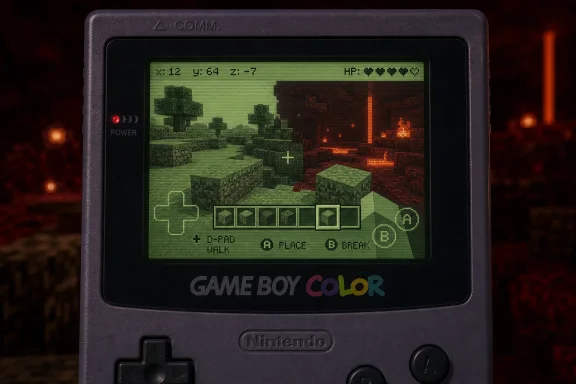
.gbc homebrew demo that gets a Minecraft-like 3D block world running on the 1998 Game Boy Color. It is not a full Minecraft port, and it should not be treated as one. The concrete takeaway is simpler and more interesting: the demo runs as a Game Boy Color ROM, lets the player walk around, break blocks, place blocks, select from a couple of worlds, and visit a Nether-style dimension on hardware that was never designed for a first-person editable 3D sandbox.The practical caveats matter up front. Textures are off by default because enabling them hurts performance. The same ROM can also run on the original Game Boy, but there it runs at half speed and in black and white. If you want to try it on original Nintendo hardware, you need a flash cart and the usual homebrew setup. If you only want to see the idea in motion, an emulator is the simpler path.
That framing protects the project from the wrong expectation. This is not a replacement for Minecraft on modern platforms, and it is not a complete clone with survival, mobs, inventory, or progression. It is a focused technical experiment that asks a narrower question: how much of Minecraft’s core grammar can survive when squeezed into a handheld from 1998?
 The Trick Is Not Making Minecraft Smaller, but Keeping It Legible
The project works because it preserves the right verbs. A Minecraft demake could have been a flat mining game, a top-down builder, or a static visual tribute and still looked familiar in screenshots. Game of Tobi aimed at the more difficult version: a first-person, navigable 3D space where blocks are not just scenery but objects the player can change.That distinction matters. Minecraft is recognizable not only because of cubes, grass, stone, and lava-colored danger. It is recognizable because the player stands inside a world and alters it. Walking, breaking, and placing are the minimum grammar of the experience. The Game Boy Color demo keeps that grammar even while stripping away most of the modern game around it.
The omissions are significant. There is no health system, no inventory management, and no mobs. Those are not small missing features; they are the line between a survival sandbox and a proof-of-concept construction demo. But the remaining pieces are still enough to make the idea legible. The player can enter a world, move through a blocky 3D space, remove blocks, place blocks, choose from a small set of worlds, and visit a Nether-style area.
That is why the demo is more than a novelty skin. A few block textures or colors would be easy to imitate. The harder achievement is interactive recognition. The viewer understands what the world is supposed to be because the player can do Minecraft-like things inside it, not merely look at a Minecraft-like image.
The roughness is part of the evidence. If textures have to be disabled by default for performance, that tells you the demo is making real tradeoffs rather than hiding behind a still image. If the control scheme feels awkward, that tells you the project is colliding with the physical limits of the Game Boy Color’s buttons. The demo is impressive because its compromises are visible, not because they disappear.
A 1998 Handheld Is the Wrong Machine in Exactly the Right Way
The Game Boy Color is not merely “old.” It belongs to a handheld design tradition built around sprites, scrolling backgrounds, tight memory budgets, small screens, and a limited button layout. It was excellent at compact role-playing games, puzzle games, platformers, action games, and readable 2D worlds. It was not built to render a first-person block world that appears to recede into space while the player edits it.That mismatch is what makes the project interesting. Minecraft expects space, manipulation, and a feeling of open-ended possibility. The Game Boy Color expects discipline, reduction, and careful use of every available resource. Put those together and the result becomes a study in what must be discarded before the core remains.
The demo’s missing systems are therefore not just shortcomings. They are also design evidence. Before Minecraft becomes survival, crafting, combat, farming, automation, or exploration, it begins with the act of standing inside a mutable block world. Game of Tobi’s build identifies that as the essential center and builds outward only far enough to make the idea recognizable.
The Nether-style dimension is especially telling. A second dimension is not necessary for a minimal renderer test. Walking, breaking, and placing would already prove the main concept. Including a Nether-style area suggests a broader goal: not just drawing a 3D block corridor, but preserving a hint of Minecraft’s sense that the world contains another place beyond the first one.
The result is not a sprawling procedural survival game. It is a contained showcase. The player is invited into a small set of test spaces where the engine can demonstrate movement, interaction, world selection, and dimensional contrast without pretending to recreate the full commercial experience.
The texture tradeoff makes that boundary even clearer. Textures are central to Minecraft’s visual personality, but in this demo they are off by default because performance matters more than surface detail. That is a classic demake choice: the feature that makes a game look more like itself may be the same feature that prevents it from moving well enough to feel like itself.
On the original Game Boy, the compromise becomes even sharper. The ROM can run there too, but at half speed and in black and white. That mode is less a recommended way to play than an additional technical flex. It shows the idea can be coerced onto even more limited hardware, but only with tradeoffs that make the Game Boy Color the more sensible target.
| Platform or target | What runs | Visual/performance tradeoff | Core interactions | Practical meaning |
|---|---|---|---|---|
| Game Boy Color | Free .gbc Minecraft-like homebrew demo | Textures off by default because enabling them hurts performance | Walk around, break blocks, place blocks, choose from a couple of worlds, visit a Nether-style dimension | Main proof of concept |
| Original Game Boy | Same ROM | Half speed and black and white | Reduced version of the same basic experience | More technical flex than ideal play mode |
| Modern Minecraft platforms | Official Minecraft versions | Far more complete and practical | Full modern Minecraft experience depending on platform/version | Better choice if the goal is simply to play Minecraft |
How to Try It
The simplest way to try the demo is through an emulator that can run Game Boy Color.gbc files. That route avoids the hardware setup and makes it easier to test the project quickly. It also gives players more flexibility around controls, depending on the emulator and input device being used.Original hardware is the more authentic route, but it is not plug-and-play. To run the demo on a real Game Boy Color, you need a compatible flash cart and the usual process for loading homebrew ROMs. That adds cost, setup time, and troubleshooting. It also preserves the physical reality of the project: the small screen, the limited buttons, the original performance constraints, and the friction of using old handheld hardware for a job it was never meant to do.
The original Game Boy option exists, but it should be treated as a curiosity rather than the best experience. Running the same ROM at half speed and in black and white is impressive as a compatibility stunt, but the Game Boy Color is the intended showcase.
A practical expectation checklist looks like this:
- Use an emulator if you want the fastest and easiest way to see the demo.
- Use a real Game Boy Color if you specifically want the original-hardware experience.
- Expect textures to be off by default for performance reasons.
- Expect awkward controls compared with modern 3D games.
- Do not expect survival mode, mobs, health, inventory, crafting depth, or a full Minecraft loop.
- Treat the demo as experimental homebrew, not as a normal commercial port.
The Controls Are Where the Fantasy Meets the Plastic
The hardest limitation for many players may not be the graphics. It may be the controls. The Game Boy Color has a D-pad, A, B, Start, and Select. That is a fine layout for the games the system was designed to host, but it is a poor match for a first-person 3D game that wants movement, camera control, block breaking, block placing, and world interaction.In a modern 3D game, movement and camera control are usually separated across two analog sticks, a mouse and keyboard, or a touchscreen interface that simulates multiple inputs. Minecraft depends on that separation. Players move, look, mine, place, jump, and react in a continuous rhythm.
On Game Boy Color, those jobs must be compressed into far fewer inputs. That means controls have to become modal: one button changes what the D-pad does, or one input scheme has to serve multiple purposes. This is a reasonable solution to the hardware problem, but it necessarily adds friction.
That friction defines the ceiling on playability. A game can render a 3D world and still feel difficult to inhabit if the controls cannot keep up with the spatial model. In this case, the awkwardness is not a sign that the project failed to understand Minecraft. It is evidence that the Game Boy Color was never meant to provide the control vocabulary that Minecraft expects.
There is no shame in that. The Game Boy Color’s button layout was appropriate for its own era and software library. The mismatch appears only because the demo asks it to stand in for a later style of 3D interaction. The control compromises are therefore part of the historical experiment.
For emulator users, the issue may be easier to tolerate. Keyboard mapping, controller profiles, and emulator-specific input settings can soften some of the discomfort. But on original hardware, the limitations become physical. The player has to deal with the actual buttons, the actual screen, and the actual feel of moving through a 3D block world using a handheld designed for a different kind of play.
That is why original hardware is both the most romantic and the most demanding way to experience the demo. It delivers the full strangeness of the achievement, but it also delivers the full awkwardness.
This Is Not a Port in the Way Players Usually Mean It
Calling this “Minecraft on Game Boy Color” is irresistible shorthand, but it can mislead if taken literally. A full port would imply a much broader recreation of Minecraft’s systems: survival, health, inventory, mobs, progression, crafting depth, resource management, and a world model much closer to the real game. Game of Tobi’s demo does not claim that territory.It is better understood as a Minecraft-like 3D homebrew project. It preserves a handful of essential interactions and images, then discards almost everything that would push the Game Boy Color beyond a workable proof of concept. That does not make the project less interesting. It makes it more honest.
The more useful question is not “Is this a good version of Minecraft?” It is “What did the demo decide Minecraft must keep in order to remain recognizable?” The answer appears to be first-person navigation, editable blocks, world selection, and a Nether-style destination. Everything else is secondary for this particular experiment.
That reduction is a design argument. It says Minecraft’s identity is not reducible to its full modern feature list. At minimum, Minecraft is a relationship between a player and a mutable block world. The demo is interesting because it preserves that relationship while stripping away most of the systems that normally surround it.
That also explains why textures can be sacrificed. A more detailed surface may make the game look more familiar in a screenshot, but movement and interaction are more important to the core illusion. A textured slideshow would not be a better Minecraft-like experience than a simpler world that moves and responds.
This is where the project belongs closer to the tradition of demos, homebrew experiments, and engine prototypes than to the world of normal consumer ports. The audience is not judging whether it competes with an official release. The audience is judging whether it makes a hostile target machine do something surprising and recognizable.
By that standard, the demo succeeds. It does not ship Minecraft on Game Boy Color. It demonstrates that a Game Boy Color can host a crude but legible version of Minecraft’s central spatial idea.
Why the Nether-Style Dimension Matters More Than the Frame Rate
The Nether-style dimension may seem like a flourish, but it is one of the smartest inclusions in the demo. A single block world proves the renderer and interaction model. A second, distinct destination suggests a larger imaginative structure. It tells the player that the project is not only about drawing blocky space; it is also trying to preserve the feeling that Minecraft contains another place beyond the first one.In full Minecraft, the Nether is tied to danger, travel, resources, navigation, and atmosphere. This Game Boy Color demo cannot reproduce that full meaning without mobs, health, inventory, or survival pressure. But it can preserve the idea of crossing into a distinct environment, and that idea carries a lot of recognition by itself.
That is how demakes often work. They do not reproduce complexity. They reproduce memory. A successful demake gives the player enough cues for the mind to fill in what the machine cannot provide. The Nether-style area is one of those cues. It carries more symbolic weight than another ordinary test world would.
The same is true of block breaking and placing. Without a full inventory system, resource logic has to be simplified. But the essential act remains: the player changes the environment. A Minecraft-like world where blocks cannot be altered would feel like a diorama. A rough first-person world where blocks can be broken and placed immediately becomes closer to Minecraft’s grammar.
That hierarchy explains the project’s tradeoffs. Movement and interaction outrank decoration. Recognition outranks completeness. A second dimension outranks a longer feature checklist because it signals that the world has structure beyond the starting area.
Every technical demo like this makes an argument about what matters. Here, the argument is clear: in a Game Boy Color Minecraft-like demo, the illusion of editable 3D space matters more than combat, survival, texture detail, or modern comfort. You can disagree with that hierarchy, but the project is coherent because it follows it.
The Doom Comparison, Kept in Proportion
Doom became the classic “can it run on this?” benchmark because it is famous, portable, and instantly recognizable; this demo applies a similar stunt logic to Minecraft, but with a harder emphasis on preserving sandbox verbs rather than merely displaying a recognizable scene.That is the comparison in one sentence. Anything more risks overstating the connection. Doom and Minecraft create different technical and design problems. Doom is about movement through hostile spaces with a fixed game identity built around shooting, enemies, and levels. Minecraft is about a mutable world whose meaning depends heavily on the player’s ability to rearrange it.
That difference is why this Game Boy Color project is not satisfied by a static blocky view. A screenshot can suggest Minecraft, but interaction is what makes the illusion persuasive. The player has to be able to move, break, and place before the project crosses from visual gag into meaningful demake territory.
The demo’s value is therefore not that it joins a checklist of unlikely machines running famous games. Its value is that it shows how a modern sandbox can be reduced to a few essential actions and still remain legible on a much older device.
What the Demo Teaches About Constraints
The project is a reminder that technical constraints are not only obstacles. They are editorial forces. They decide what survives.On a modern platform, a Minecraft-like project can afford to carry many systems at once: rendering, input, inventory, enemies, sound, crafting, terrain, saving, multiplayer, and more. On Game Boy Color, every addition competes with the basic miracle of making a 3D editable space move at all. The machine forces prioritization.
That prioritization is visible in the final shape of the demo. There are worlds, but not a full survival structure. There is a Nether-style destination, but not the full set of systems that would make it behave like Minecraft’s Nether. There is block interaction, but not the larger inventory and progression loop. There are textures, but they are off by default because performance has to come first.
Those choices are not random. They point to a disciplined understanding of what the project is trying to prove. The renderer and interaction model are the main event. Everything else exists only if it supports that event without overwhelming the hardware.
The result also shows why old hardware remains useful to developers and tinkerers. Severe limits make design decisions visible. On a modern PC, it is easy to hide waste under abundant resources. On a Game Boy Color, there is nowhere to hide. If a feature is too expensive, the player will feel it immediately.
That makes projects like this valuable even when they are not polished games. They teach by compression. They show what happens when a familiar design is reduced to its load-bearing elements. They make the relationship between hardware, interface, and game identity easier to see.
The Practical Way to Understand It Is Not the Romantic Way
The romantic version of the story is obvious: someone got Minecraft running on a Game Boy Color. The practical version is more precise and more useful: someone built a free.gbc homebrew demo that recreates a small, Minecraft-like, first-person editable block world with major omissions and major hardware-driven compromises.The romantic version is good for a headline. The practical version is better for anyone who wants to try it, evaluate it, or understand why it matters.
A player arriving with the wrong expectation will bounce off the missing features immediately. There are no mobs to fight, no health to manage, and no full inventory loop. The controls are constrained. The visuals are compromised. The texture setting exists under a performance shadow. Original hardware requires extra equipment. Original Game Boy compatibility is more curiosity than recommendation.
A player arriving with the right expectation will see something else: a tiny technical argument made in software. The demo says that Minecraft’s most important idea can be reduced to a walkable, editable block world and still be understood. It says that the Game Boy Color, under the right conditions and with the right compromises, can be pushed into a role that looks absurd on paper.
That is the correct standard. This is not a consumer review. It is a proof-of-concept evaluation. The question is not whether the Game Boy Color is secretly a good Minecraft machine. It is not. The question is whether the demo makes a convincing case that the Game Boy Color can host a recognizable slice of Minecraft’s identity. It does.
The Windows Angle Is the Toolchain, Not the Handheld
For WindowsForum readers, the useful connection is not that the Game Boy Color itself has anything to do with Windows. It does not. The connection is the modern toolchain around retro homebrew.Projects like this usually live between old hardware and modern development environments. A developer may write code, organize assets, test builds, capture footage, manage files, use emulators, and prepare ROMs on a contemporary PC before anything ever appears on original hardware. For many users, the first hands-on experience will also happen on a Windows PC through an emulator rather than on a physical Game Boy Color.
That makes the project relevant as part of a broader tinkering ecosystem. Retro hardware experiments are rarely isolated from modern desktops. They depend on file management, debugging workflows, emulator accuracy, controller mapping, flash-cart utilities, video tools, and community documentation. The final image may be a Game Boy Color screen, but the path to that screen often runs through a PC.
There is also a practical lesson here for anyone who works around systems, compatibility, or software preservation. Old platforms do not stay alive only because people store them on shelves. They stay alive because people keep building for them, testing assumptions, documenting limits, and making new work that forces old tools to remain usable.
A Game Boy Color Minecraft-like demo may look like a novelty, but it sits inside that larger pattern. It encourages people to install emulators, learn about ROM formats, understand flash carts, compare hardware behavior with emulator behavior, and think about how software changes when the target machine is brutally constrained.
That is a useful Windows angle because it turns the story from “look at this weird handheld stunt” into “look at the modern desktop ecosystem that makes old-hardware experimentation accessible.” The PC is not the star of the demo, but it is often the workshop around it.
What Comes Next
The most interesting future questions are concrete. Can the controls become less awkward without losing essential functions? Can textures become more usable without crushing performance? Can the world interaction expand while staying within the Game Boy Color’s limits? Can the Nether-style area become more than a symbolic destination? Can the demo become easier to run for curious players who do not already understand homebrew workflows?There is no requirement that Game of Tobi answer all of those questions. A proof of concept can be complete as a proof of concept. The mistake would be assuming that every impressive homebrew demo owes the public a full game. Sometimes the value is in showing a path clearly enough that others can study it, copy it, criticize it, or surpass it.
The project is already useful because it gives people something testable rather than only something watchable. A downloadable
.gbc file changes the conversation. It lets players feel the performance tradeoffs, input compromises, and hardware assumptions directly. That is healthier than treating the demo as a magic trick that exists only in video form.The right conclusion is therefore modest but strong. This is not Minecraft for Game Boy Color in the full commercial sense. It is a free homebrew demo that gets a Minecraft-like 3D editable block world running on Game Boy Color, with walking, block breaking, block placing, world selection, and a Nether-style dimension. It runs on original Game Boy too, but at half speed and in black and white. Textures are off by default for performance. Original hardware requires a flash cart and setup. Emulation is the easier way to try it.
Those facts are enough. The achievement does not need to be inflated into a complete port, a community movement, or a revolution in retro gaming. It is impressive because it is specific: a 1998 handheld doing just enough of a modern sandbox’s core trick to make the impossible look briefly playable.
References
- Primary source: games.gg
Published: 2026-07-09T15:30:24.202502
Minecraft Is Now Running on a Game Boy Color | GAMES.GG
YouTuber Game of Tobi built a 3D Minecraft port for the original Game Boy Color, complete with block breaking, placing, and a working Nether dimension.games.gg - Related coverage: planetminecraft.com
Interactive 3D Gameboy Color Minecraft Map
Please give this project a diamond favorite. It would really help out since I worked so hard. Thanks! Pressing B Spawns a Wolf Pressing A Spawns a Sheepwww.planetminecraft.com
- Related coverage: pimyretro.org
Game Boy Color | Pimp my retro handheld
One could think that the Game Boy Color short life span makes the plateform forgettable. In reality, this console received a lot of good games being ports or exwww.pimyretro.org - Related coverage: techtimes.com
'Pokemon Red' Is Being Programmed In 'Minecraft,' Complete With Working Game Boy
This is the most ambitious ‘Minecraft’ creation we’ve seen to date. Nearly everything has been made in Minecraft at this point. From massive recreations of entire cities to working calculators, itwww.techtimes.com - Related coverage: retroisle.com
- Related coverage: nintendo.com
Minecraft for Nintendo Switch - Nintendo Official Site
Build, explore, and survive in Minecraft for Nintendo Switch. Create endless worlds, craft tools, and play solo or with friends.www.nintendo.com
- Related coverage: minecraft.net
What is Minecraft? Discover the World of Minecraft | Minecraft
Learn more about Minecraft, an action-adventure sandbox game. Discover the world of Minecraft, explore game features, and see what platforms you can play Minecraft on.www.minecraft.net - Related coverage: help.minecraft.net
en-us
help.minecraft.net
- Related coverage: news.xbox.com
- Related coverage: xbox.com
Minecraft: Play with Game Pass | XBOX
Now connect with players across Windows and XBOX. Play now with Game Pass.www.xbox.com - Related coverage: techradar.com
What system is Minecraft for? | TechRadar
Minecraft can be played on many different devices and we're here to talk about each of them.www.techradar.com - Related coverage: gamesradar.com
10 Best Game Boy Color Games of All Time | GamesRadar+
The 10 best Game Boy Color games ever made if you want to relive the glory days, from Pokemon to Donkey Kong.www.gamesradar.com - Related coverage: time.com
Minecraft Nintendo Switch Review: The Best Version Available
Minecraft for Nintendo Switch is the best version of the game, and another great reason to get Nintendo's new console.time.com - Related coverage: windowscentral.com
Minecraft blast mobile game announced in King partnership | Windows Central
Block-matching meets the Overworld!www.windowscentral.com - Related coverage: nintendowire.com
Developer has made real-time 3D graphics possible on the Game Boy Color – Nintendo Wire
A very clever individual has proven that the Game Boy Color, a 27 year-old, 8-bit portable system, is capable of running a real-time, interactive 3D shader.nintendowire.com
- Related coverage: gamespot.com
Dev Gets 3D Visuals Working On Game Boy Color - GameSpot
The Game Boy Color may not have been built for 3D images, but apparently it's not impossible.www.gamespot.com - Related coverage: nintendoforums.com
Game Boy - Gameboy classics reimagined as 3D games in their original graphics! | Nintendo Forums
This is my first time posting on this forum, so hello to everybody! For those of you who don't know me i'm Bitplex, the creator of the Retro Reimaginings...www.nintendoforums.com - Related coverage: otontechnology.com
Game of Tobi Has Twilight Princess Running on a Nintendo 3DS
Game of Tobi's unofficial Twilight Princess 3DS port is partially playable, with bugs and no release date, on the decompilation that finished in late 2025.otontechnology.com - Related coverage: korben.info
GBCYouTube - YouTube live on a Game Boy Color - Korben
A tinkerer by the name of Throaty Mumbo decided to take on the Game Boy Color (released in 1998, which doesn't make any of us younger) and get YouTube ...korben.info
- Related coverage: blenderartists.org
Gameboy Color - Finished Projects - Blender Artists Community
Just finished this 3D Game Boy Color model! Still experimenting and improving, but I’m happy with my blender journey so far. I also link a little animation of this project [https://www.youtube.com/watch?v=_AKM90bSAJU] …blenderartists.org
- Related coverage: 8bithero.net