

Tech All Rounder’s July 8, 2026 guide names Gamma, Canva, Microsoft Copilot for PowerPoint, Beautiful.ai, Plus AI, Prezi AI, and SlideSpeak as seven AI presentation tools worth trying for students, business users, and pitch-deck makers today. The list is useful less because it crowns a winner than because it exposes the real fault line in AI slides: fast web-native creation versus editable PowerPoint reality. For Windows users and IT teams, that distinction matters more than star ratings. The question is no longer whether AI can generate slides; it is whether the resulting deck survives the meeting, the brand review, and the file handoff.
Presentations are one of the strangest artifacts in modern work. They are treated as high-value communication, yet most of the labor goes into low-value formatting: nudging boxes, hunting for icons, resizing charts, reworking a title that wrapped awkwardly, and discovering at the last minute that a template behaves differently on another machine.
That is why AI presentation tools have found a receptive audience. They do not need to be brilliant to be useful. If a service can turn a rough outline into a coherent first draft in five minutes, it has already displaced a painful chunk of human drudgery.
Tech All Rounder’s guide frames the appeal in practical terms: these tools handle structure, layout, and design so users can spend more time on the message. That is the right starting point. The mistake many buyers make is assuming the tool that produces the prettiest first draft is also the tool that will produce the safest final deck.
For WindowsForum readers, the more important question is operational. Does the tool create a real PowerPoint file? Does it work with Microsoft 365 storage and permissions? Can a colleague edit the charts? Can the organization enforce branding? Can sensitive source material be uploaded at all?
Gamma’s official help materials describe exports to PDF, PNG, and PowerPoint, and the company positions its product as a way to generate polished presentations quickly from prompts, outlines, or uploaded content. The key word is generate. Gamma is excellent at giving users momentum.
That matters because the blank slide is often the enemy. A student needs a defensible structure. A founder needs a pitch narrative. A product manager needs a roadmap deck that does not look like it was assembled from a decade of recycled templates. Gamma lowers the activation energy.
But Gamma also illustrates the hidden cost of leaving the PowerPoint-native world. A web-native deck can look better than a conventional PPTX because it is not constrained by the same editing model. The trouble begins when someone says the three dreaded words: “Send the PowerPoint.”
At that moment, the AI slide tool is no longer being judged by visual charm. It is being judged by object fidelity, font handling, image placement, master slides, and whether the exported file can be edited by a stakeholder who will never log into the original service.
Tech All Rounder’s guide correctly places Canva near the top for users who want more design control, a large template library, and flexible exports. That makes it especially attractive for marketers, small businesses, social media teams, educators, and anyone whose deck is part of a broader design workflow.
Canva’s Magic Design features are useful because they sit alongside templates, stock assets, brand kits, and export options. In practice, that means the AI is not carrying the entire job. It gives the user a starting point, and the editor gives the user a way to make it presentable.
That is also Canva’s limitation. If the goal is to produce a deeply structured business deck from a source document, Canva may feel more like a creative assistant than a document reasoning engine. Users still need to tune the hierarchy, rewrite copy, and ensure the result says something meaningful.
For many people, that is fine. A presentation is rarely finished by AI anyway. Canva’s strength is that the human cleanup stage is less painful than it is in more rigid tools.
Microsoft’s own support material says Copilot in PowerPoint can create a new presentation from a prompt or by referencing a file, depending on subscription and organizational settings. Microsoft has also described improvements that allow users to reference documents such as Word files, PDFs, and text files in the presentation creation flow. For Microsoft 365 shops, that is the whole pitch.
The benefit is not only convenience. It is governance. Corporate content often lives in OneDrive, SharePoint, Teams, and Microsoft 365 groups. If AI slide generation can happen within that environment, IT has a better chance of applying existing identity, compliance, retention, and access controls.
That is why Copilot may be the best answer for a company even when it is not the most dazzling answer for an individual. A web-based AI deck builder might produce prettier slides, but a CISO may prefer the tool that does not require employees to upload strategy documents to yet another SaaS service.
The downside is that Copilot inherits the expectations users already have for PowerPoint. If it produces generic slides, awkward stock imagery, or a structure that misunderstands the source material, users will not compare it with a blank page. They will compare it with the polished decks their team already knows how to build manually.
That may sound boring compared with prompt-to-deck magic, but it is strategically important. In many organizations, the presentation editor is not optional. Sales teams have approved templates. Consultants have reusable slide libraries. Executives have assistants who edit directly in PowerPoint. Legal and brand teams expect familiar files.
A tool that generates slides inside the existing editor avoids the most common failure mode of AI deck generation: beautiful output trapped in an alien format. The less translation required, the fewer things can break.
This is also why Plus AI is likely to appeal to heavy presentation makers rather than casual users. A student may prefer Gamma’s immediacy. A marketer may prefer Canva’s visual playground. A consultant who lives in PowerPoint wants the AI to respect the house style, not reinvent it.
The broader lesson is that the best AI workflow is often not a separate AI app. It is an AI layer over the software people already use under deadline pressure.
Tech All Rounder gives Beautiful.ai credit for brand consistency while warning that generated text can feel generic or too wordy. That is a fair criticism. Beautiful.ai’s strength is not necessarily original thought; it is structured design discipline.
The company’s own positioning emphasizes brand controls, shared templates, themes, and consistency across teams. For agencies, sales organizations, and companies with strict visual guidelines, that can be more valuable than raw generative flair.
The danger is that brand consistency can become a cosmetic substitute for editorial judgment. A perfectly on-brand deck can still be bloated, vague, or strategically confused. AI tools are especially prone to producing plausible business language that feels polished until someone asks what decision the slide is supposed to support.
Still, Beautiful.ai addresses a real workplace problem. Most organizations do not suffer from a shortage of slide-making tools. They suffer from a surplus of off-brand decks made by people who are not designers.
Tech All Rounder recommends Prezi AI for public speakers and educators who want a more dynamic presentation style, while noting the learning curve. That distinction matters. Prezi is not just another deck generator; it changes the rhythm of a presentation.
For a keynote, classroom explanation, or visual story, that can be powerful. A non-linear structure can help show relationships, revisit earlier concepts, and keep an audience oriented around a bigger map rather than a slide count.
But Prezi’s strength can also be its risk. In corporate settings, novelty is not always welcome. Some audiences want the deck afterward. Some procurement teams want the PPTX. Some executives want to jump directly to slide 17. Motion-based storytelling is not always compatible with meeting-room pragmatism.
Prezi AI is therefore best understood as a presentation tool for performances, not merely documents. If the deck is meant to be delivered live by someone who understands the format, it can shine. If it is meant to circulate as an editable business artifact, PowerPoint gravity eventually pulls it back to earth.
That is not as flashy as “make me a startup pitch deck about drone-powered smoothies.” But in real work, many presentations begin as reports, PDFs, Word documents, meeting notes, or research summaries. The hard part is not inventing content. It is compressing existing content into a slide structure.
This is where AI can provide genuine leverage. A good document-to-deck workflow can identify sections, reduce paragraphs to slide-level claims, create speaker-friendly sequencing, and preserve enough editability for a human to finish the job.
For Windows users, native PowerPoint export is not a minor feature. It is the difference between a presentation that can enter the normal review process and a presentation that becomes a screenshot collection.
SlideSpeak also points toward the future of this market. The winners may not be the tools that generate the most attractive generic decks. They may be the tools that convert real business material into real business files with the least cleanup.
PowerPoint remains the standard not because everyone loves it, but because it is infrastructure. It is supported in conference rooms, classrooms, boardrooms, Teams calls, email chains, SharePoint libraries, and executive workflows. The PPTX file is not just a format; it is a social contract.
That is why the export question should be near the top of any evaluation. Can text be edited as text? Are charts real charts or flattened images? Are layouts preserved? Do fonts substitute correctly? Does the file behave on another machine? Can the deck survive being merged into a larger presentation?
AI presentation startups often talk as though PowerPoint is the past. Yet many of them still advertise PowerPoint export because customers demand it. That tension tells us everything.
The future may be web-native, but the present is still file-native. Until that changes, AI presentation tools must meet users where their meetings actually happen.
A pitch deck may contain financial projections. A sales presentation may contain customer names. A product roadmap may contain unreleased features. A board update may contain headcount plans, acquisition targets, or security incidents. Feeding that material into an AI tool is not a casual act.
For individual users, the risk is often ignored because the convenience is immediate. For IT departments, it raises familiar questions: where is the data stored, how is it processed, whether it is used for model training, who can access it, and what contractual protections exist.
This is where Microsoft’s ecosystem advantage becomes meaningful. Copilot is not automatically the best creative tool, but it is easier for enterprises to evaluate within existing Microsoft 365 compliance frameworks. That does not eliminate risk, but it makes the conversation legible to procurement and security teams.
Smaller AI presentation tools can still be appropriate, especially for public material, classroom work, marketing drafts, or non-sensitive content. But organizations should not let employees discover the policy boundary one upload at a time.
Some decks are delivered once and forgotten. Some are shared as links. Some are exported to PDF. Some are revised by five colleagues. Some become templates for future work. Some are archived in regulated environments. Some are torn apart and reused for the next quarterly meeting.
A tool that is perfect for one afterlife may be wrong for another. Gamma is compelling for fast web-native storytelling. Canva is strong when design control matters. Copilot fits Microsoft 365 shops. Plus AI respects existing slide workflows. Beautiful.ai enforces consistency. Prezi creates a different kind of live performance. SlideSpeak converts source documents into editable PowerPoint output.
That is why “best AI presentation tool” is the wrong singular question. The better question is whether the deck needs to be beautiful, editable, compliant, collaborative, brand-safe, or simply finished before tomorrow morning.
AI changes the first draft. It does not repeal the constraints around the final file.
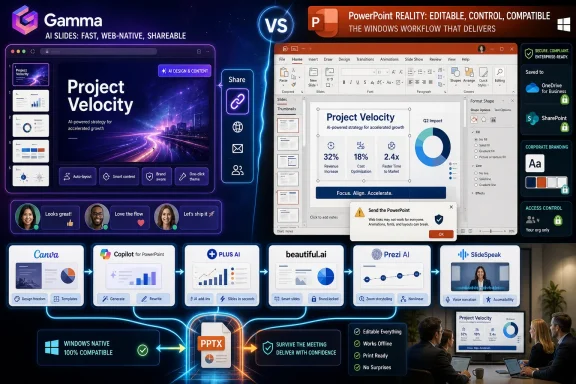 AI Has Finally Reached the Most Boring Part of Office Work
Presentations are one of the strangest artifacts in modern work. They are treated as high-value communication, yet most of the labor goes into low-value formatting: nudging boxes, hunting for icons, resizing charts, reworking a title that wrapped awkwardly, and discovering at the last minute that a template behaves differently on another machine.That is why AI presentation tools have found a receptive audience. They do not need to be brilliant to be useful. If a service can turn a rough outline into a coherent first draft in five minutes, it has already displaced a painful chunk of human drudgery.
Tech All Rounder’s guide frames the appeal in practical terms: these tools handle structure, layout, and design so users can spend more time on the message. That is the right starting point. The mistake many buyers make is assuming the tool that produces the prettiest first draft is also the tool that will produce the safest final deck.
For WindowsForum readers, the more important question is operational. Does the tool create a real PowerPoint file? Does it work with Microsoft 365 storage and permissions? Can a colleague edit the charts? Can the organization enforce branding? Can sensitive source material be uploaded at all?
Gamma Shows Why the Web Is Winning the First Draft
Gamma is the obvious star of the current AI presentation boom because it behaves less like PowerPoint with an AI button and more like a web publishing system that happens to make decks. Tech All Rounder praises it for speed, modern layouts, and web-link sharing, while noting that PowerPoint export may still require cleanup. That tradeoff defines the category.Gamma’s official help materials describe exports to PDF, PNG, and PowerPoint, and the company positions its product as a way to generate polished presentations quickly from prompts, outlines, or uploaded content. The key word is generate. Gamma is excellent at giving users momentum.
That matters because the blank slide is often the enemy. A student needs a defensible structure. A founder needs a pitch narrative. A product manager needs a roadmap deck that does not look like it was assembled from a decade of recycled templates. Gamma lowers the activation energy.
But Gamma also illustrates the hidden cost of leaving the PowerPoint-native world. A web-native deck can look better than a conventional PPTX because it is not constrained by the same editing model. The trouble begins when someone says the three dreaded words: “Send the PowerPoint.”
At that moment, the AI slide tool is no longer being judged by visual charm. It is being judged by object fidelity, font handling, image placement, master slides, and whether the exported file can be edited by a stakeholder who will never log into the original service.
Canva Remains the Safe Bet for People Who Think Visually
Canva’s advantage is not that it is the most advanced AI presentation generator. It is that millions of users already understand what Canva is for. It is a design workspace first, and AI is an accelerant inside a familiar visual-editing environment.Tech All Rounder’s guide correctly places Canva near the top for users who want more design control, a large template library, and flexible exports. That makes it especially attractive for marketers, small businesses, social media teams, educators, and anyone whose deck is part of a broader design workflow.
Canva’s Magic Design features are useful because they sit alongside templates, stock assets, brand kits, and export options. In practice, that means the AI is not carrying the entire job. It gives the user a starting point, and the editor gives the user a way to make it presentable.
That is also Canva’s limitation. If the goal is to produce a deeply structured business deck from a source document, Canva may feel more like a creative assistant than a document reasoning engine. Users still need to tune the hierarchy, rewrite copy, and ensure the result says something meaningful.
For many people, that is fine. A presentation is rarely finished by AI anyway. Canva’s strength is that the human cleanup stage is less painful than it is in more rigid tools.
Microsoft Copilot Is the Enterprise Default, Not Necessarily the Creative Default
Microsoft Copilot for PowerPoint occupies a different category from Gamma and Canva. It is not merely an AI presentation tool; it is an AI feature inside the dominant office suite. That gives it a distribution advantage no startup can match.Microsoft’s own support material says Copilot in PowerPoint can create a new presentation from a prompt or by referencing a file, depending on subscription and organizational settings. Microsoft has also described improvements that allow users to reference documents such as Word files, PDFs, and text files in the presentation creation flow. For Microsoft 365 shops, that is the whole pitch.
The benefit is not only convenience. It is governance. Corporate content often lives in OneDrive, SharePoint, Teams, and Microsoft 365 groups. If AI slide generation can happen within that environment, IT has a better chance of applying existing identity, compliance, retention, and access controls.
That is why Copilot may be the best answer for a company even when it is not the most dazzling answer for an individual. A web-based AI deck builder might produce prettier slides, but a CISO may prefer the tool that does not require employees to upload strategy documents to yet another SaaS service.
The downside is that Copilot inherits the expectations users already have for PowerPoint. If it produces generic slides, awkward stock imagery, or a structure that misunderstands the source material, users will not compare it with a blank page. They will compare it with the polished decks their team already knows how to build manually.
Plus AI Understands That the File Format Is the Workflow
Plus AI’s pitch is unusually practical: it works inside Google Slides and PowerPoint rather than asking users to migrate to a new presentation universe. Tech All Rounder highlights that advantage, and Plus AI’s own materials emphasize native PowerPoint and Google Slides workflows.That may sound boring compared with prompt-to-deck magic, but it is strategically important. In many organizations, the presentation editor is not optional. Sales teams have approved templates. Consultants have reusable slide libraries. Executives have assistants who edit directly in PowerPoint. Legal and brand teams expect familiar files.
A tool that generates slides inside the existing editor avoids the most common failure mode of AI deck generation: beautiful output trapped in an alien format. The less translation required, the fewer things can break.
This is also why Plus AI is likely to appeal to heavy presentation makers rather than casual users. A student may prefer Gamma’s immediacy. A marketer may prefer Canva’s visual playground. A consultant who lives in PowerPoint wants the AI to respect the house style, not reinvent it.
The broader lesson is that the best AI workflow is often not a separate AI app. It is an AI layer over the software people already use under deadline pressure.
Beautiful.ai Makes the Brand Police Look Reasonable
Beautiful.ai has always been built around the idea that most people should not be trusted with slide layout. That sounds insulting until you sit through a quarterly business review assembled by twelve departments with twelve interpretations of the same template.Tech All Rounder gives Beautiful.ai credit for brand consistency while warning that generated text can feel generic or too wordy. That is a fair criticism. Beautiful.ai’s strength is not necessarily original thought; it is structured design discipline.
The company’s own positioning emphasizes brand controls, shared templates, themes, and consistency across teams. For agencies, sales organizations, and companies with strict visual guidelines, that can be more valuable than raw generative flair.
The danger is that brand consistency can become a cosmetic substitute for editorial judgment. A perfectly on-brand deck can still be bloated, vague, or strategically confused. AI tools are especially prone to producing plausible business language that feels polished until someone asks what decision the slide is supposed to support.
Still, Beautiful.ai addresses a real workplace problem. Most organizations do not suffer from a shortage of slide-making tools. They suffer from a surplus of off-brand decks made by people who are not designers.
Prezi AI Keeps Betting Against the Linear Slide
Prezi has always been the presentation tool for people who think PowerPoint is too flat. Its zooming, non-linear canvas made it distinctive long before generative AI arrived. Prezi AI now applies prompt-based creation and file-to-presentation workflows to that older idea.Tech All Rounder recommends Prezi AI for public speakers and educators who want a more dynamic presentation style, while noting the learning curve. That distinction matters. Prezi is not just another deck generator; it changes the rhythm of a presentation.
For a keynote, classroom explanation, or visual story, that can be powerful. A non-linear structure can help show relationships, revisit earlier concepts, and keep an audience oriented around a bigger map rather than a slide count.
But Prezi’s strength can also be its risk. In corporate settings, novelty is not always welcome. Some audiences want the deck afterward. Some procurement teams want the PPTX. Some executives want to jump directly to slide 17. Motion-based storytelling is not always compatible with meeting-room pragmatism.
Prezi AI is therefore best understood as a presentation tool for performances, not merely documents. If the deck is meant to be delivered live by someone who understands the format, it can shine. If it is meant to circulate as an editable business artifact, PowerPoint gravity eventually pulls it back to earth.
SlideSpeak Is Aimed at the Least Glamorous but Most Valuable Job
SlideSpeak’s appeal is narrow and important: turning existing documents into editable PowerPoint presentations. Tech All Rounder calls out its clean PowerPoint exports and document-to-deck workflow, and SlideSpeak’s own materials emphasize native PPTX output.That is not as flashy as “make me a startup pitch deck about drone-powered smoothies.” But in real work, many presentations begin as reports, PDFs, Word documents, meeting notes, or research summaries. The hard part is not inventing content. It is compressing existing content into a slide structure.
This is where AI can provide genuine leverage. A good document-to-deck workflow can identify sections, reduce paragraphs to slide-level claims, create speaker-friendly sequencing, and preserve enough editability for a human to finish the job.
For Windows users, native PowerPoint export is not a minor feature. It is the difference between a presentation that can enter the normal review process and a presentation that becomes a screenshot collection.
SlideSpeak also points toward the future of this market. The winners may not be the tools that generate the most attractive generic decks. They may be the tools that convert real business material into real business files with the least cleanup.
The Export Button Is Where the Hype Goes to Die
Every AI presentation tool looks better in a product demo than it does during a file handoff. Demos show generation. Workflows expose translation.PowerPoint remains the standard not because everyone loves it, but because it is infrastructure. It is supported in conference rooms, classrooms, boardrooms, Teams calls, email chains, SharePoint libraries, and executive workflows. The PPTX file is not just a format; it is a social contract.
That is why the export question should be near the top of any evaluation. Can text be edited as text? Are charts real charts or flattened images? Are layouts preserved? Do fonts substitute correctly? Does the file behave on another machine? Can the deck survive being merged into a larger presentation?
AI presentation startups often talk as though PowerPoint is the past. Yet many of them still advertise PowerPoint export because customers demand it. That tension tells us everything.
The future may be web-native, but the present is still file-native. Until that changes, AI presentation tools must meet users where their meetings actually happen.
The Privacy Problem Is Bigger Than the Prompt Box
The overlooked issue in AI presentation tools is not whether they can make a decent title slide. It is what users upload to make that title slide possible.A pitch deck may contain financial projections. A sales presentation may contain customer names. A product roadmap may contain unreleased features. A board update may contain headcount plans, acquisition targets, or security incidents. Feeding that material into an AI tool is not a casual act.
For individual users, the risk is often ignored because the convenience is immediate. For IT departments, it raises familiar questions: where is the data stored, how is it processed, whether it is used for model training, who can access it, and what contractual protections exist.
This is where Microsoft’s ecosystem advantage becomes meaningful. Copilot is not automatically the best creative tool, but it is easier for enterprises to evaluate within existing Microsoft 365 compliance frameworks. That does not eliminate risk, but it makes the conversation legible to procurement and security teams.
Smaller AI presentation tools can still be appropriate, especially for public material, classroom work, marketing drafts, or non-sensitive content. But organizations should not let employees discover the policy boundary one upload at a time.
The Best Tool Depends on the Deck’s Afterlife
Most AI presentation reviews focus on creation. That is understandable because creation is exciting. But a deck’s real life begins after generation.Some decks are delivered once and forgotten. Some are shared as links. Some are exported to PDF. Some are revised by five colleagues. Some become templates for future work. Some are archived in regulated environments. Some are torn apart and reused for the next quarterly meeting.
A tool that is perfect for one afterlife may be wrong for another. Gamma is compelling for fast web-native storytelling. Canva is strong when design control matters. Copilot fits Microsoft 365 shops. Plus AI respects existing slide workflows. Beautiful.ai enforces consistency. Prezi creates a different kind of live performance. SlideSpeak converts source documents into editable PowerPoint output.
That is why “best AI presentation tool” is the wrong singular question. The better question is whether the deck needs to be beautiful, editable, compliant, collaborative, brand-safe, or simply finished before tomorrow morning.
AI changes the first draft. It does not repeal the constraints around the final file.
The Deck You Need Should Pick the Tool You Use
The practical lesson from Tech All Rounder’s roundup is that AI presentation tools have matured enough to be useful, but not enough to be interchangeable. Before choosing one, users should decide where the deck will live, who will edit it, and how much control the final PowerPoint file needs.- Gamma is the strongest first stop when speed and modern web-style presentation matter more than perfect PowerPoint fidelity.
- Canva is the better fit for users who want visual control, templates, and design assets around the AI-generated draft.
- Microsoft Copilot for PowerPoint is the default enterprise choice when Microsoft 365 integration, permissions, and familiar workflows matter most.
- Plus AI deserves attention from consultants, sales teams, and analysts who need AI inside PowerPoint or Google Slides rather than beside them.
- Beautiful.ai is most useful when brand consistency is the problem, not when original content quality is the main challenge.
- SlideSpeak is the tool to watch when the job is turning reports, PDFs, and documents into editable PowerPoint decks.
References
- Primary source: Tech all rounder
Published: 2026-07-08T01:50:08.232233
7 Best AI Presentation Tools Worth Trying Today
Create professional slides in minutes with the best AI presentation tools. See our expert picks and comparisons.techallrounder.com - Related coverage: guide.plusai.com
- Official source: powerpoint.cloud.microsoft
Copilot in PowerPoint を使用した AI プレゼンテーション メーカー | Microsoft PowerPoint
Copilot in PowerPoint を使用して、素晴らしいプレゼンテーションを作成しましょう。トピックのアイデアを共有するだけで、洗練されたレイアウトとカスタム画像を備えたスライド コンテンツが生成されます。powerpoint.cloud.microsoft - Official source: cdn-dynmedia-1.microsoft.com
</rdf:Alt> </dc:title> <dc:creator> <rdf:Seq> <rdf:li>Ryan Fowles
PDF documentcdn-dynmedia-1.microsoft.com