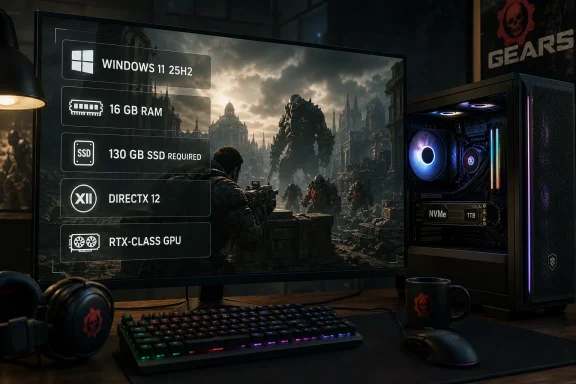
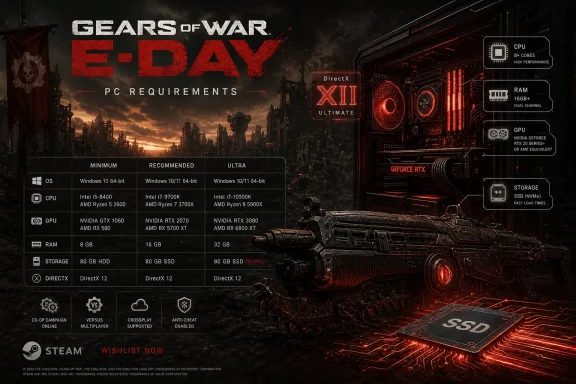
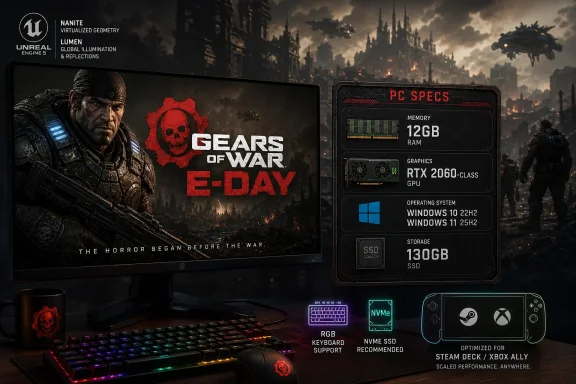
On June 8, 2026, The Coalition published PC requirements for Gears of War: E-Day showing a 12GB RAM minimum, an RTX 2060-class GPU floor, Windows 10 22H2 support, and a 130GB SSD requirement ahead of the game’s October 6 launch on Xbox Series X|S and Windows PC. That is the sort of spec sheet that lands with a thud precisely because it does not look like a crisis. After years of PC players being trained to expect Unreal Engine 5 showcases to arrive wearing 32GB memory recommendations and GPU anxiety as a badge of honor, E-Day is making a more interesting argument: the future of blockbuster rendering may depend less on raw intimidation than on disciplined engineering. The catch is that a spec sheet is still a promise written in shorthand, not proof.
The minimum requirement that jumps off the page is not the GPU, but the memory line. A 12GB RAM floor for a flagship Unreal Engine 5 shooter in 2026 is almost quaint. It says that The Coalition is at least attempting to keep the game within reach of machines that were not built last Christmas.
The GPU line tells a similar story. The minimum tier includes Nvidia’s RTX 2060, AMD’s Radeon RX 6600, Intel’s Arc A580, and newer low-end equivalents such as the RTX 5050 and Radeon RX 9060. The recommended tier moves to cards like the RTX 3060 Ti, RX 6700 XT, Intel Arc B580, and newer RTX 5060/RX 9060 XT-class hardware.
That is not bargain-bin territory, and nobody should pretend a 130GB SSD requirement is lightweight. But compared with the fear that every UE5 tentpole would demand a contemporary high-end graphics card merely to function, this is a notably moderate entry point. The RTX 2060 is a 2019 GPU, and while it introduced consumer ray-tracing hardware, it is now several architectural generations behind the curve.
The unanswered part is also the most important part. The Coalition has not yet attached these specs to target resolutions, frame rates, or graphics presets. A minimum spec could mean 1080p at low settings, 30fps, upscaling enabled, and ray tracing disabled. A recommended spec could mean 1080p high, 1440p medium, or something else entirely. Until those details arrive, the numbers are encouraging but incomplete.
Still, the shape of the requirement list matters. It suggests The Coalition is not treating PC as an afterthought and is not using “next-gen” as an excuse to abandon a broad installed base. For Windows players, that alone is news.
The studio’s public UE5 demos, Alpha Point in 2021 and The Cavern in 2022, were not merely marketing exercises. They were early declarations that Microsoft had a studio willing to wrestle directly with Nanite, Lumen, high-density environments, and the question that haunts every engine demo: can this run as a shipping game?
That question has followed UE5 since its first jaw-dropping presentations. Demo footage made the engine look like a generational leap, but many PC releases built on UE5 have also carried the baggage of shader compilation stutter, traversal hitching, inconsistent frame pacing, and CPU bottlenecks that no amount of GPU horsepower fully masks. Players learned to read “Unreal Engine 5” not only as a promise of better lighting and denser worlds, but as a warning label.
The Coalition’s advantage is institutional memory. Gears 5 was not a UE5 game, but it was a carefully engineered PC release with broad graphics options, strong scalability, and a reputation for respecting the platform. That history gives the E-Day spec sheet more credibility than it would have coming from a studio with a messier PC record.
This is why the modest RAM and GPU requirements are more than trivia. They are The Coalition telling PC players that its UE5 ambitions have been constrained by shipping realities. In an era when too many blockbuster PC ports seem to discover optimization after launch, E-Day is at least beginning the conversation before players start editing config files.
That is why the E-Day requirements hit a nerve. PC players are not irrationally afraid of high specs; they are tired of spec sheets that fail to predict the actual experience. A game can list reasonable minimums and still stutter when entering a new area, hitch during shader compilation, or collapse under CPU pressure in scenes that the GPU ought to handle.
The Coalition’s feature list reads like it understands that distinction. Borderless, exclusive, and windowed display modes are not glamorous, but PC players notice when they are missing. Uncapped frame rates matter because high-refresh monitors are now common across enthusiast and midrange setups. Ultrawide support for both gameplay and menus is the kind of detail that signals a studio has tested beyond the living-room television.
The promise of keyboard-and-mouse and controller remapping also matters more than it sounds. PC accessibility and comfort often live in those menus. A technically advanced game that locks players into awkward bindings still feels like a console port with a settings screen bolted on.
The ray-tracing language is where expectations need discipline. Hardware ray-traced lighting, reflections, and shadows sound expensive, and they will almost certainly be expensive at high presets. The presence of an RTX 2060 in the minimum list should not be read as “turn everything on.” It should be read as “the game has a path down to older RT-capable hardware,” which is a different and more defensible claim.
For WindowsForum readers, this is the part worth watching closely. Windows 10 support remains important because many gaming PCs, especially self-built desktops, still run it either out of preference, inertia, or hardware constraints. Requiring Windows 11 outright would narrow the audience and intensify the usual debate about upgrade pressure.
But the recommended line points the other way. Windows 11 is where Microsoft wants its gaming stack, driver model assumptions, security posture, and Xbox app ecosystem to consolidate. If E-Day performs materially better on Windows 11, that will become part of the broader, slow-moving argument for upgrading even among users who have resisted the platform.
The specific Windows 10 build reference also suggests a tighter compatibility floor than a casual “Windows 10” label. It implies the studio is targeting a known servicing baseline, not the sprawling historical range of Windows 10 installations. That is sensible for support, but it also means players on stale systems should not expect sympathy if launch week goes badly.
This is the modern Windows gaming bargain. Microsoft wants PC to feel open and flexible, but big releases increasingly depend on recent OS builds, updated drivers, SSDs, and platform services. E-Day may not demand bleeding-edge hardware, but it is not inviting neglected systems to the party.
The SSD requirement itself is unsurprising. Modern asset streaming, high-resolution textures, denser environments, and reduced loading screens all depend on predictable storage performance. Hard-drive support is increasingly incompatible with the way major games are built, especially when developers are targeting current consoles and PC simultaneously.
The more interesting issue is how storage intersects with patching. A 130GB install can become more painful if updates require large temporary space, shader caches grow aggressively, or multiplayer content expands after launch. The day-one size is only the opening bid.
For enterprise-adjacent readers managing shared machines, labs, or household PCs with multiple users, this is also a reminder that gaming workloads now resemble workstation workloads in storage behavior. Fast NVMe drives are not just a luxury for benchmark charts. They are becoming part of the minimum viable experience.
The good news is that SSD prices have normalized enough that this requirement is no longer the barrier it would have been a decade ago. The bad news is that “just install it on an SSD” assumes users have planned their storage layout with 2026 game sizes in mind. Many have not.
Steam Deck support in particular will be a credibility test. Valve’s handheld has made PC gaming more console-like, but it has also exposed how many Windows-first games struggle with shader behavior, launchers, anti-cheat, and interface scaling. To say a game is optimized for handheld play is to make a claim about more than frame rate.
The Xbox Ally mention is equally strategic. Microsoft has been trying to make Windows more credible on handheld gaming PCs, a category that has often succeeded despite Windows rather than because of it. If E-Day becomes a showcase title for Xbox-branded handheld hardware, it will have to demonstrate that the Xbox PC ecosystem can provide something closer to a console experience without giving up PC flexibility.
This is where the 12GB RAM minimum becomes more interesting. Handheld PCs often share memory between CPU and GPU, making raw RAM capacity and bandwidth practical constraints. If The Coalition has genuinely designed scalable content paths for handheld devices, the benefit may spill over to older desktops and laptops.
But handheld optimization is also the claim most likely to be misunderstood. “Optimized” does not necessarily mean native-resolution, high-settings, 60fps play. It may mean careful presets, dynamic resolution, upscaling, tuned input defaults, readable UI, and stable frame pacing at more modest targets. For many players, that would still be a win.
Good scalability is not simply a matter of adding low, medium, high, and ultra labels. It requires art direction, lighting fallbacks, texture budgets, CPU threading, shader management, and careful profiling across a wide range of hardware. A well-scaled game can look coherent at modest settings; a poorly scaled one looks like a collection of missing features.
The Coalition has the right pedigree for this. Its past PC work showed a willingness to expose meaningful settings and tune across hardware classes. If E-Day follows that tradition, the RTX 2060 minimum may be less important than the ladder between minimum and ultra.
Ray tracing complicates that ladder. Reflections, shadows, and global lighting effects can transform a scene, but they can also create a gulf between the “intended” image and the performance-friendly image. The best PC versions handle this gracefully, offering screen-space or baked alternatives that preserve the art direction even when RT is disabled.
That is the real test for E-Day. Not whether it looks stunning on a flagship GPU at 4K, because it almost certainly will. The test is whether it still feels like Gears on a midrange machine, a handheld, or a four-year-old gaming laptop whose owner has no intention of upgrading before October.
The Windows PC version sits at the center of that strategy. Microsoft needs its first-party PC releases to be technically credible because Game Pass for PC, Xbox app distribution, Play Anywhere entitlements, cloud saves, and Steam availability all depend on users believing that Xbox on PC is not the lesser version. A bad PC launch would not just hurt E-Day. It would damage the broader argument that Xbox is now a platform rather than a box.
The absence of PlayStation 5 from the current platform list is also notable, especially after Microsoft’s broader push to bring selected first-party franchises to rival consoles. Gears remains one of the names most closely associated with Xbox’s identity, and E-Day appears to be treated accordingly. That may change later, but the October launch is being framed around Xbox hardware and PC.
For Windows users, that creates an odd but favorable dynamic. PC is no longer a secondary stop after console. It is one of the primary launch platforms through which Microsoft can claim reach, flexibility, and continuity. The spec sheet’s restraint fits that positioning: a PC release that only flatters $3,000 desktops would undermine the whole pitch.
This is why The Coalition’s engineering choices matter beyond enthusiast benchmarking. A performant, scalable E-Day would give Microsoft a flagship example of its “play anywhere” rhetoric actually working. A rough launch would provide fresh ammunition to everyone who sees Xbox’s PC strategy as an attractive storefront wrapped around inconsistent execution.
But recommended specs have become slippery. In one publisher’s language, “recommended” means 1080p at 60fps on high settings. In another’s, it means 1440p at medium settings with upscaling. Sometimes it means “the configuration we tested that seemed fine,” which is less useful than it sounds.
The CPU choices are worth noting. The Ryzen 5 5600 and Core i5-11600K are capable six-core chips, but neither represents the modern high-end. That suggests The Coalition is not expecting the game to require extreme CPU throughput under normal conditions. If true, that would be welcome, because CPU-limited stutter has been one of the more frustrating aspects of recent PC releases.
The 16GB RAM recommendation is also important. For several years, PC builders have debated whether 32GB should be considered the new normal. For multitasking and heavy creator workloads, the answer is often yes. For gaming, E-Day appears to be saying 16GB remains a reasonable target, at least for the recommended experience.
Again, the caveat is the missing performance target. Without it, users cannot know whether 16GB is comfortable or merely acceptable. The difference matters when a game is running alongside Discord, browser tabs, capture software, overlays, RGB utilities, and the other barnacles of a modern Windows gaming session.
That is why The Coalition’s reputation is doing so much work here. The studio’s history buys it patience that many publishers no longer receive. Players are more willing to believe a moderate requirement list when it comes from a team known for treating PC settings as a first-class interface rather than a compliance requirement.
Even so, trust will not be settled by a table. It will be settled by pre-release technical breakdowns, hands-on previews, driver readiness, shader compilation behavior, day-one patch notes, and Digital Foundry-style testing across midrange and low-end systems. PC credibility is earned in frame-time graphs, not press releases.
The beta access tied to pre-orders may provide some clues, depending on what modes and platforms are included. Multiplayer tests often reveal network and gameplay balance issues more than full campaign performance, but they can still expose shader stutter, input latency, crash patterns, and CPU scaling problems. If The Coalition is confident, broad PC testing before launch would be the best possible reassurance.
There is also a communications opportunity here. The studio should publish clear target tables before release: 1080p, 1440p, 4K, expected frame rates, preset levels, upscaling assumptions, ray-tracing tiers, and VRAM expectations. The listed specs are a good start. The next move should be precision.
Microsoft’s multiplatform strategy has created a strange new world for legacy Xbox franchises. Some games can roam. Others remain symbols. Gears is a symbol, and E-Day is especially symbolic because it returns to the franchise’s origin point rather than extending the post-Gears 5 timeline.
That origin-story framing is not accidental. Marcus Fenix and Dominic Santiago are not just characters; they are part of Xbox’s old emotional architecture. Rebuilding their bond in a modern engine is a way of telling lapsed fans that this is not a side project or service-game experiment. It is a mainline attempt to reassert what Gears is.
PC complicates that nostalgia in productive ways. The original Gears of War was a console-defining Xbox 360 moment, but the audience for E-Day will include ultrawide monitor users, handheld players, Steam buyers, Game Pass subscribers, and Windows tinkerers who expect far more control over the experience. The franchise may be returning to its fictional beginning, but the platform context is entirely modern.
That is the tension The Coalition has to resolve. E-Day must feel like a muscular, authored, cinematic Xbox blockbuster while behaving like a flexible PC game. The spec sheet says the studio understands that. The launch will show whether it can deliver.
The more likely upgrades are targeted ones. Users still gaming from hard drives need to move on. Users with 8GB RAM are outside the minimum and should not expect miracles. Users with older non-RT GPUs may find themselves excluded even if raw raster performance looks adequate on paper.
VRAM may become the hidden pressure point. The RTX 2060’s 6GB frame buffer is workable only if texture settings and streaming are carefully tuned. The recommended cards generally provide more breathing room, but 2026 games increasingly punish cards that looked fine when purchased. The published table does not spell out VRAM targets, and it should.
The encouraging part is that the listed CPUs and GPUs do not imply a brute-force port. They imply a game designed to scale across multiple performance classes. That does not guarantee launch quality, but it lowers the temperature of the conversation.
PC gaming is expensive enough without every major release becoming a referendum on whether last generation’s hardware is obsolete. E-Day appears to be pushing back against that fatalism. If it succeeds, it will be a rare modern blockbuster that sells technical ambition without turning system requirements into a threat.
 The Most Surprising Thing About E-Day’s PC Specs Is Their Restraint
The minimum requirement that jumps off the page is not the GPU, but the memory line. A 12GB RAM floor for a flagship Unreal Engine 5 shooter in 2026 is almost quaint. It says that The Coalition is at least attempting to keep the game within reach of machines that were not built last Christmas.The GPU line tells a similar story. The minimum tier includes Nvidia’s RTX 2060, AMD’s Radeon RX 6600, Intel’s Arc A580, and newer low-end equivalents such as the RTX 5050 and Radeon RX 9060. The recommended tier moves to cards like the RTX 3060 Ti, RX 6700 XT, Intel Arc B580, and newer RTX 5060/RX 9060 XT-class hardware.
That is not bargain-bin territory, and nobody should pretend a 130GB SSD requirement is lightweight. But compared with the fear that every UE5 tentpole would demand a contemporary high-end graphics card merely to function, this is a notably moderate entry point. The RTX 2060 is a 2019 GPU, and while it introduced consumer ray-tracing hardware, it is now several architectural generations behind the curve.
The unanswered part is also the most important part. The Coalition has not yet attached these specs to target resolutions, frame rates, or graphics presets. A minimum spec could mean 1080p at low settings, 30fps, upscaling enabled, and ray tracing disabled. A recommended spec could mean 1080p high, 1440p medium, or something else entirely. Until those details arrive, the numbers are encouraging but incomplete.
Still, the shape of the requirement list matters. It suggests The Coalition is not treating PC as an afterthought and is not using “next-gen” as an excuse to abandon a broad installed base. For Windows players, that alone is news.
The Coalition Has Spent Years Auditioning for This Moment
The Coalition is not just another studio shipping a large Unreal game. It has become one of Microsoft’s in-house specialists for Epic’s engine, both through its own Gears work and through technical assistance to other Xbox teams. That matters because Unreal Engine 5’s reputation on PC has been shaped as much by uneven implementation as by the engine’s capabilities.The studio’s public UE5 demos, Alpha Point in 2021 and The Cavern in 2022, were not merely marketing exercises. They were early declarations that Microsoft had a studio willing to wrestle directly with Nanite, Lumen, high-density environments, and the question that haunts every engine demo: can this run as a shipping game?
That question has followed UE5 since its first jaw-dropping presentations. Demo footage made the engine look like a generational leap, but many PC releases built on UE5 have also carried the baggage of shader compilation stutter, traversal hitching, inconsistent frame pacing, and CPU bottlenecks that no amount of GPU horsepower fully masks. Players learned to read “Unreal Engine 5” not only as a promise of better lighting and denser worlds, but as a warning label.
The Coalition’s advantage is institutional memory. Gears 5 was not a UE5 game, but it was a carefully engineered PC release with broad graphics options, strong scalability, and a reputation for respecting the platform. That history gives the E-Day spec sheet more credibility than it would have coming from a studio with a messier PC record.
This is why the modest RAM and GPU requirements are more than trivia. They are The Coalition telling PC players that its UE5 ambitions have been constrained by shipping realities. In an era when too many blockbuster PC ports seem to discover optimization after launch, E-Day is at least beginning the conversation before players start editing config files.
Unreal Engine 5’s Image Problem Was Never Just About Visuals
The industry wanted UE5 to become the great equalizer: an engine that let studios build filmic lighting, dense geometry, and huge environments without reinventing the technical stack each time. Instead, its early years on PC have produced a more complicated story. The engine can deliver spectacular images, but players have often paid for those images with uneven performance.That is why the E-Day requirements hit a nerve. PC players are not irrationally afraid of high specs; they are tired of spec sheets that fail to predict the actual experience. A game can list reasonable minimums and still stutter when entering a new area, hitch during shader compilation, or collapse under CPU pressure in scenes that the GPU ought to handle.
The Coalition’s feature list reads like it understands that distinction. Borderless, exclusive, and windowed display modes are not glamorous, but PC players notice when they are missing. Uncapped frame rates matter because high-refresh monitors are now common across enthusiast and midrange setups. Ultrawide support for both gameplay and menus is the kind of detail that signals a studio has tested beyond the living-room television.
The promise of keyboard-and-mouse and controller remapping also matters more than it sounds. PC accessibility and comfort often live in those menus. A technically advanced game that locks players into awkward bindings still feels like a console port with a settings screen bolted on.
The ray-tracing language is where expectations need discipline. Hardware ray-traced lighting, reflections, and shadows sound expensive, and they will almost certainly be expensive at high presets. The presence of an RTX 2060 in the minimum list should not be read as “turn everything on.” It should be read as “the game has a path down to older RT-capable hardware,” which is a different and more defensible claim.
Windows 10 Support Is a Practical Concession, Windows 11 Is the Direction of Travel
The operating system split is one of the more revealing parts of the spec sheet. Minimum support includes Windows 10 64-bit 22H2, while recommended support moves to Windows 11 25H2 or newer. That is Microsoft acknowledging the reality of the PC gaming market while gently nudging users toward the current platform.For WindowsForum readers, this is the part worth watching closely. Windows 10 support remains important because many gaming PCs, especially self-built desktops, still run it either out of preference, inertia, or hardware constraints. Requiring Windows 11 outright would narrow the audience and intensify the usual debate about upgrade pressure.
But the recommended line points the other way. Windows 11 is where Microsoft wants its gaming stack, driver model assumptions, security posture, and Xbox app ecosystem to consolidate. If E-Day performs materially better on Windows 11, that will become part of the broader, slow-moving argument for upgrading even among users who have resisted the platform.
The specific Windows 10 build reference also suggests a tighter compatibility floor than a casual “Windows 10” label. It implies the studio is targeting a known servicing baseline, not the sprawling historical range of Windows 10 installations. That is sensible for support, but it also means players on stale systems should not expect sympathy if launch week goes badly.
This is the modern Windows gaming bargain. Microsoft wants PC to feel open and flexible, but big releases increasingly depend on recent OS builds, updated drivers, SSDs, and platform services. E-Day may not demand bleeding-edge hardware, but it is not inviting neglected systems to the party.
The 130GB SSD Requirement Is the Least Shocking Red Flag
If there is one number that still feels heavy, it is storage. A 130GB SSD requirement is large, even by modern blockbuster standards, and it effectively ends any pretense that this is a lightweight install. Players with 512GB boot drives will feel that number immediately.The SSD requirement itself is unsurprising. Modern asset streaming, high-resolution textures, denser environments, and reduced loading screens all depend on predictable storage performance. Hard-drive support is increasingly incompatible with the way major games are built, especially when developers are targeting current consoles and PC simultaneously.
The more interesting issue is how storage intersects with patching. A 130GB install can become more painful if updates require large temporary space, shader caches grow aggressively, or multiplayer content expands after launch. The day-one size is only the opening bid.
For enterprise-adjacent readers managing shared machines, labs, or household PCs with multiple users, this is also a reminder that gaming workloads now resemble workstation workloads in storage behavior. Fast NVMe drives are not just a luxury for benchmark charts. They are becoming part of the minimum viable experience.
The good news is that SSD prices have normalized enough that this requirement is no longer the barrier it would have been a decade ago. The bad news is that “just install it on an SSD” assumes users have planned their storage layout with 2026 game sizes in mind. Many have not.
Handheld Optimization Is the Quietly Audacious Claim
The feature list’s most intriguing promise may be full optimization for handheld play on Steam Deck, Xbox Ally, and Xbox Ally X. That is a bigger statement than it first appears. A game that looks built to showcase Unreal Engine 5 and hardware ray tracing is also promising to scale down to devices constrained by thermals, power budgets, and integrated graphics.Steam Deck support in particular will be a credibility test. Valve’s handheld has made PC gaming more console-like, but it has also exposed how many Windows-first games struggle with shader behavior, launchers, anti-cheat, and interface scaling. To say a game is optimized for handheld play is to make a claim about more than frame rate.
The Xbox Ally mention is equally strategic. Microsoft has been trying to make Windows more credible on handheld gaming PCs, a category that has often succeeded despite Windows rather than because of it. If E-Day becomes a showcase title for Xbox-branded handheld hardware, it will have to demonstrate that the Xbox PC ecosystem can provide something closer to a console experience without giving up PC flexibility.
This is where the 12GB RAM minimum becomes more interesting. Handheld PCs often share memory between CPU and GPU, making raw RAM capacity and bandwidth practical constraints. If The Coalition has genuinely designed scalable content paths for handheld devices, the benefit may spill over to older desktops and laptops.
But handheld optimization is also the claim most likely to be misunderstood. “Optimized” does not necessarily mean native-resolution, high-settings, 60fps play. It may mean careful presets, dynamic resolution, upscaling, tuned input defaults, readable UI, and stable frame pacing at more modest targets. For many players, that would still be a win.
Ray Tracing Will Be the Marketing Feature, Scalability Will Be the Real Feature
The showcase language around 4K Ultra HD, HDR10, and hardware ray tracing is built for trailers and store pages. It gives the game a premium sheen and reassures console buyers that this is a current-generation flagship. For PC players, however, the most important feature may be the ability to turn expensive effects down without the game falling apart visually.Good scalability is not simply a matter of adding low, medium, high, and ultra labels. It requires art direction, lighting fallbacks, texture budgets, CPU threading, shader management, and careful profiling across a wide range of hardware. A well-scaled game can look coherent at modest settings; a poorly scaled one looks like a collection of missing features.
The Coalition has the right pedigree for this. Its past PC work showed a willingness to expose meaningful settings and tune across hardware classes. If E-Day follows that tradition, the RTX 2060 minimum may be less important than the ladder between minimum and ultra.
Ray tracing complicates that ladder. Reflections, shadows, and global lighting effects can transform a scene, but they can also create a gulf between the “intended” image and the performance-friendly image. The best PC versions handle this gracefully, offering screen-space or baked alternatives that preserve the art direction even when RT is disabled.
That is the real test for E-Day. Not whether it looks stunning on a flagship GPU at 4K, because it almost certainly will. The test is whether it still feels like Gears on a midrange machine, a handheld, or a four-year-old gaming laptop whose owner has no intention of upgrading before October.
The Spec Sheet Also Reveals Microsoft’s Platform Strategy
Gears of War: E-Day is not merely a game launch. It is a platform statement from Microsoft at a time when Xbox’s identity is more complicated than ever. The game is coming to Xbox Series X|S, Windows PC, cloud, Game Pass, Xbox Play Anywhere, and Steam. That is not a console-exclusive strategy in the old sense; it is an ecosystem strategy.The Windows PC version sits at the center of that strategy. Microsoft needs its first-party PC releases to be technically credible because Game Pass for PC, Xbox app distribution, Play Anywhere entitlements, cloud saves, and Steam availability all depend on users believing that Xbox on PC is not the lesser version. A bad PC launch would not just hurt E-Day. It would damage the broader argument that Xbox is now a platform rather than a box.
The absence of PlayStation 5 from the current platform list is also notable, especially after Microsoft’s broader push to bring selected first-party franchises to rival consoles. Gears remains one of the names most closely associated with Xbox’s identity, and E-Day appears to be treated accordingly. That may change later, but the October launch is being framed around Xbox hardware and PC.
For Windows users, that creates an odd but favorable dynamic. PC is no longer a secondary stop after console. It is one of the primary launch platforms through which Microsoft can claim reach, flexibility, and continuity. The spec sheet’s restraint fits that positioning: a PC release that only flatters $3,000 desktops would undermine the whole pitch.
This is why The Coalition’s engineering choices matter beyond enthusiast benchmarking. A performant, scalable E-Day would give Microsoft a flagship example of its “play anywhere” rhetoric actually working. A rough launch would provide fresh ammunition to everyone who sees Xbox’s PC strategy as an attractive storefront wrapped around inconsistent execution.
The Recommended Spec Is Sensible, but the Missing Targets Matter
The recommended configuration is not especially frightening: Ryzen 5 5600 or Core i5-11600K, 16GB RAM, and an RTX 3060 Ti/RX 6700 XT-class GPU. That is a solid midrange gaming PC rather than an exotic one. Many WindowsForum readers either own something close to it or know exactly which component they would need to upgrade.But recommended specs have become slippery. In one publisher’s language, “recommended” means 1080p at 60fps on high settings. In another’s, it means 1440p at medium settings with upscaling. Sometimes it means “the configuration we tested that seemed fine,” which is less useful than it sounds.
The CPU choices are worth noting. The Ryzen 5 5600 and Core i5-11600K are capable six-core chips, but neither represents the modern high-end. That suggests The Coalition is not expecting the game to require extreme CPU throughput under normal conditions. If true, that would be welcome, because CPU-limited stutter has been one of the more frustrating aspects of recent PC releases.
The 16GB RAM recommendation is also important. For several years, PC builders have debated whether 32GB should be considered the new normal. For multitasking and heavy creator workloads, the answer is often yes. For gaming, E-Day appears to be saying 16GB remains a reasonable target, at least for the recommended experience.
Again, the caveat is the missing performance target. Without it, users cannot know whether 16GB is comfortable or merely acceptable. The difference matters when a game is running alongside Discord, browser tabs, capture software, overlays, RGB utilities, and the other barnacles of a modern Windows gaming session.
PC Players Have Learned Not to Trust the Trailer
The skepticism around E-Day did not emerge from nowhere. PC players have spent the last few years watching technically ambitious games arrive with gorgeous footage and troubled frame pacing. The problem is not that players hate advanced rendering; it is that they have become involuntary QA analysts for shader compilation and asset streaming.That is why The Coalition’s reputation is doing so much work here. The studio’s history buys it patience that many publishers no longer receive. Players are more willing to believe a moderate requirement list when it comes from a team known for treating PC settings as a first-class interface rather than a compliance requirement.
Even so, trust will not be settled by a table. It will be settled by pre-release technical breakdowns, hands-on previews, driver readiness, shader compilation behavior, day-one patch notes, and Digital Foundry-style testing across midrange and low-end systems. PC credibility is earned in frame-time graphs, not press releases.
The beta access tied to pre-orders may provide some clues, depending on what modes and platforms are included. Multiplayer tests often reveal network and gameplay balance issues more than full campaign performance, but they can still expose shader stutter, input latency, crash patterns, and CPU scaling problems. If The Coalition is confident, broad PC testing before launch would be the best possible reassurance.
There is also a communications opportunity here. The studio should publish clear target tables before release: 1080p, 1440p, 4K, expected frame rates, preset levels, upscaling assumptions, ray-tracing tiers, and VRAM expectations. The listed specs are a good start. The next move should be precision.
The PlayStation Shadow Shows How Much Xbox Still Needs PC
The Wccftech report notes evidence suggesting that PlayStation 5 may have been considered and then skipped, though the current official platform messaging is clear: Xbox Series X|S and PC are the launch homes. That makes the PC version even more important. If E-Day is not going everywhere, it has to make the places it is going feel definitive.Microsoft’s multiplatform strategy has created a strange new world for legacy Xbox franchises. Some games can roam. Others remain symbols. Gears is a symbol, and E-Day is especially symbolic because it returns to the franchise’s origin point rather than extending the post-Gears 5 timeline.
That origin-story framing is not accidental. Marcus Fenix and Dominic Santiago are not just characters; they are part of Xbox’s old emotional architecture. Rebuilding their bond in a modern engine is a way of telling lapsed fans that this is not a side project or service-game experiment. It is a mainline attempt to reassert what Gears is.
PC complicates that nostalgia in productive ways. The original Gears of War was a console-defining Xbox 360 moment, but the audience for E-Day will include ultrawide monitor users, handheld players, Steam buyers, Game Pass subscribers, and Windows tinkerers who expect far more control over the experience. The franchise may be returning to its fictional beginning, but the platform context is entirely modern.
That is the tension The Coalition has to resolve. E-Day must feel like a muscular, authored, cinematic Xbox blockbuster while behaving like a flexible PC game. The spec sheet says the studio understands that. The launch will show whether it can deliver.
The Real Upgrade Path Is Smaller Than Players Feared
For many PC players, the practical question is simple: do I need a new machine? Based on the published requirements, the answer for a large chunk of the audience is probably no. A system with 16GB RAM, a decent six-core CPU, an SSD, and an RTX 3060 Ti/RX 6700 XT-class GPU should be in the intended lane for the recommended experience.The more likely upgrades are targeted ones. Users still gaming from hard drives need to move on. Users with 8GB RAM are outside the minimum and should not expect miracles. Users with older non-RT GPUs may find themselves excluded even if raw raster performance looks adequate on paper.
VRAM may become the hidden pressure point. The RTX 2060’s 6GB frame buffer is workable only if texture settings and streaming are carefully tuned. The recommended cards generally provide more breathing room, but 2026 games increasingly punish cards that looked fine when purchased. The published table does not spell out VRAM targets, and it should.
The encouraging part is that the listed CPUs and GPUs do not imply a brute-force port. They imply a game designed to scale across multiple performance classes. That does not guarantee launch quality, but it lowers the temperature of the conversation.
PC gaming is expensive enough without every major release becoming a referendum on whether last generation’s hardware is obsolete. E-Day appears to be pushing back against that fatalism. If it succeeds, it will be a rare modern blockbuster that sells technical ambition without turning system requirements into a threat.
E-Day’s Spec Sheet Is a Promise The Coalition Can Still Break
The published requirements give PC players reasons to be optimistic: a surprisingly low RAM floor, an older RTX-capable minimum GPU, a mainstream recommended tier, Windows 10 support, and a broad feature list that includes ultrawide, remapping, uncapped frame rates, HDR, ray tracing, and handheld optimization.- The minimum spec is more forgiving than many players expected, but it still assumes a modern SSD and a GPU with contemporary feature support.
- The recommended spec points to a mainstream gaming PC rather than a luxury build, though The Coalition still needs to define the exact resolution, frame-rate, and preset targets.
- Windows 10 22H2 support keeps the door open for holdouts, while Windows 11 25H2 in the recommended column signals where Microsoft wants PC gaming to live.
- The handheld optimization claim may become one of the most important tests of the game’s scalability, especially on Steam Deck and Xbox-branded portable hardware.
- Hardware ray tracing will make the trailers sparkle, but frame pacing, shader management, and scalable settings will decide whether the PC version earns trust.
- The 130GB SSD requirement is the least surprising burden and the most immediate practical planning issue for many players.
References
- Primary source: Wccftech
Published: 2026-06-14T10:20:07.913886
Gears of War: E-Day Demands just 12GB RAM and an RTX 2060, Defying PC Players' Worst Fears
Gears of War: E-Day’s PC requirements are lighter than many feared, with just 12GB RAM and an RTX 2060 listed for the minimum specs.wccftech.com
- Related coverage: windowscentral.com
Gears of War: E-Day Direct showcases everything to be excited for with the upcoming Xbox exclusive | Windows Central
Gears of War: E-Day shines and is quickly becoming the front-runner series on Xbox.www.windowscentral.com - Related coverage: news.xbox.com
Discover the Gears of War: E-Day Collector’s Edition - XBOX Wire
The Gears of War: E-Day Collector’s Edition is available to pre-order now, including the Premium Edition of the game alongside a curated set of physical items. Find out more inside.news.xbox.com - Related coverage: gameinformer.com
Gears Of War: E-Day Launches As A Console Exclusive On Xbox Series X/S And PC This October
Surive Emergence Day.gameinformer.com - Related coverage: store.steampowered.com
Gears of War: E-Day alvast kopen op Steam
Beleef de brute horror van Emergence Day in het oorsprongsverhaal van een van de meest geprezen third-person shooter-franchises.store.steampowered.com
- Related coverage: xbox.com
Gears of War: E-Day – Available 10/6/2026 on XBOX and with Game Pass | XBOX
Pre-order now. Available October 6, 2026 on XBOX Series X|S, XBOX on PC, and with Game Pass. Experience the horror of Emergence Day.www.xbox.com
- Related coverage: gamespot.com
Gears Of War E-Day Looks Mobility-Focused, And Don't Worry, There's A Chainsaw - GameSpot
Here's when you can play the next big Gears of War game.www.gamespot.com